keyless entry CADILLAC ESCALADE 2017 4.G User Guide
[x] Cancel search | Manufacturer: CADILLAC, Model Year: 2017, Model line: ESCALADE, Model: CADILLAC ESCALADE 2017 4.GPages: 354, PDF Size: 3.9 MB
Page 47 of 354
Cadillac Escalade Owner Manual (GMNA-Localizing-MidEast-10293077) -
2017 - crc - 8/24/16
46 KEYS, DOORS, AND WINDOWS
Folding Mirrors
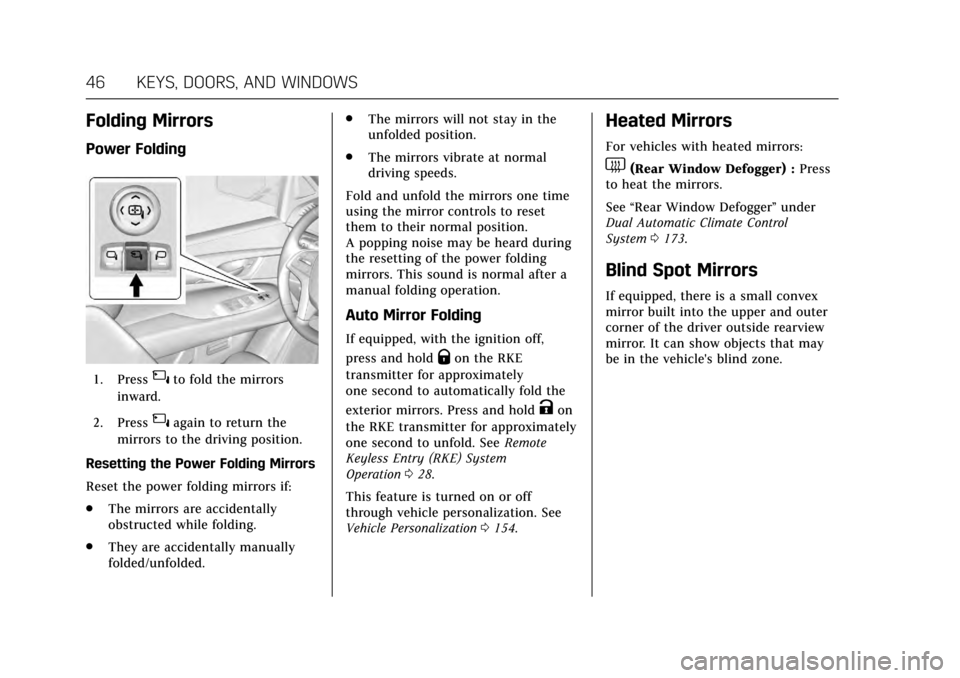
Power Folding
1. Press{to fold the mirrors
inward.
2. Press
{again to return the
mirrors to the driving position.
Resetting the Power Folding Mirrors
Reset the power folding mirrors if:
. The mirrors are accidentally
obstructed while folding.
. They are accidentally manually
folded/unfolded. .
The mirrors will not stay in the
unfolded position.
. The mirrors vibrate at normal
driving speeds.
Fold and unfold the mirrors one time
using the mirror controls to reset
them to their normal position.
A popping noise may be heard during
the resetting of the power folding
mirrors. This sound is normal after a
manual folding operation.
Auto Mirror Folding
If equipped, with the ignition off,
press and hold
Qon the RKE
transmitter for approximately
one second to automatically fold the
exterior mirrors. Press and hold
Kon
the RKE transmitter for approximately
one second to unfold. See Remote
Keyless Entry (RKE) System
Operation 028.
This feature is turned on or off
through vehicle personalization. See
Vehicle Personalization 0154.
Heated Mirrors
For vehicles with heated mirrors:
1(Rear Window Defogger) : Press
to heat the mirrors.
See “Rear Window Defogger” under
Dual Automatic Climate Control
System 0173.
Blind Spot Mirrors
If equipped, there is a small convex
mirror built into the upper and outer
corner of the driver outside rearview
mirror. It can show objects that may
be in the vehicle's blind zone.
Page 145 of 354
Cadillac Escalade Owner Manual (GMNA-Localizing-MidEast-10293077) -
2017 - crc - 8/24/16
144 INSTRUMENTS AND CONTROLS
Vehicle Messages
Messages displayed on the DIC
indicate the status of the vehicle or
some action that may be needed to
correct a condition. Multiple messages
may display one after the other.
The messages that do not require
immediate action can be
acknowledged and cleared by pressing
SEL. The messages that require
immediate action cannot be cleared
until that action is performed. All
messages should be taken seriously
and clearing the messages does not
correct the problem.
The following are some of the vehicle
messages that may be displayed
depending on the vehicle content.
Battery Voltage and
Charging Messages
BATTERY SAVER ACTIVE
This message displays when the
vehicle has detected that the battery
voltage is dropping beyond a
reasonable point. The battery saver
system starts reducing features of thevehicle that may be noticed. At the
point that features are disabled, this
message displays. Turn off
unnecessary accessories to allow the
battery to recharge.
LOW BATTERY
This message is displayed when the
battery voltage is low. See
Battery
0271.
SERVICE BATTERY CHARGING
SYSTEM
This message is displayed when there
is a fault in the battery charging
system. Take the vehicle to your
dealer for service.
TRANSPORT MODE ON
This message is displayed when the
vehicle is in transport mode. Some
features can be disabled while in this
mode, including Remote Keyless
Entry (RKE), remote start, and the
vehicle alarm system. Take the vehicle
to your dealer for service to turn
transport mode off.
Brake System Messages
BRAKE FLUID LOW
This message is displayed when the
brake fluid level is low. See Brake
Fluid 0269.
BRAKES OVERHEATED
This message is displayed when the
brakes are becoming overheated. This
may be seen when driving on hills.
Shift to a lower gear.
STEP ON BRAKE TO RELEASE
PARK BRAKE
This message is displayed if you
attempt to release the Electric Parking
Brake without the brake pedal applied.
See Electric Parking Brake 0213.
RELEASE PARKING BRAKE
This message is displayed if the
Electric Parking Brake is on while the
vehicle is in motion. See Electric
Parking Brake 0213.
SERVICE BRAKE ASSIST
This message may be displayed when
there is a problem with the brake
boost assist system. The brake boost
Page 148 of 354
Cadillac Escalade Owner Manual (GMNA-Localizing-MidEast-10293077) -
2017 - crc - 8/24/16
INSTRUMENTS AND CONTROLS 147
OIL PRESSURE LOW—STOP
ENGINE
This message displays if low oil
pressure levels occur. Stop the vehicle
as soon as safely possible and do not
operate it until the cause of the low
oil pressure has been corrected. Check
the oil as soon as possible and have
the vehicle serviced by your dealer.
Engine Power Messages
ENGINE POWER IS REDUCED
This message displays when the
vehicle's engine power is reduced.
Reduced engine power can affect the
vehicle's ability to accelerate. If this
message is on, but there is no
reduction in performance, proceed to
your destination. The performance
may be reduced the next time the
vehicle is driven. The vehicle may be
driven at a reduced speed while this
message is on, but maximum
acceleration and speed may be
reduced. Anytime this message stays
on, or displays repeatedly, the vehicle
should be taken to your dealer for
service as soon as possible.
Fuel System Messages
FUEL LEVEL LOW
This message displays when the
vehicle is low on fuel. Refuel as soon
as possible.
Key and Lock Messages
NO REMOTE KEY WAS DETECTED
PLACE KEY IN TRANSMITTER
POCKET THEN START YOUR
VEHICLE
This message displays when trying to
start the vehicle if an RKE transmitter
is not detected. The transmitter
battery may be weak. See “Starting the
Vehicle with a Low Transmitter
Battery” underRemote Keyless Entry
(RKE) System Operation 028.
NO REMOTE DETECTED
This message displays when the
transmitter battery may be weak. See
“Starting the Vehicle with a Low
Transmitter Battery” underRemote
Keyless Entry (RKE) System
Operation 028.
NO REMOTE DETECTED PRESS
BRAKE TO RESTART
This message displays when
attempting to turn off the vehicle and
the RKE transmitter is no longer
detected. Restarting is allowed
without the RKE transmitter for
five minutes. Press the brake pedal
and ENGINE START/STOP to restart
the vehicle.
NUMBER OF KEYS PROGRAMMED
This message displays when
programming new keys to the vehicle.
REMOTE LEFT IN VEHICLE
This message displays when leaving
the vehicle with the RKE transmitter
still inside.
REPLACE BATTERY IN
REMOTE KEY
This message displays when the
battery in the RKE transmitter needs
to be replaced.
Page 158 of 354
Cadillac Escalade Owner Manual (GMNA-Localizing-MidEast-10293077) -
2017 - crc - 8/24/16
INSTRUMENTS AND CONTROLS 157
Chime Volume
This allows the selection of the chime
volume level.
Press + or−to adjust the volume.
Reverse Tilt Mirror
When on, the driver and/or passenger
mirrors will tilt downward when the
vehicle is shifted to R (Reverse) to
improve visibility of the ground near
the rear wheels.
Select Off, On - Driver and Passenger,
On - Driver, or On - Passenger.
Auto Mirror Folding
When on, the outside rearview mirrors
will automatically fold or unfold when
the Remote Keyless Entry (RKE)
transmitter
QorKbutton is pressed
and held.
Select Off or On.
Auto Wipe in Reverse Gear
When on, the rear wiper will
automatically activate when the
vehicle is shifted to R (Reverse).
Select Off or On. Lighting
Select and the following may display:
.
Vehicle Locator Lights
. Exit Lighting
. Auto High Beam
Vehicle Locator Lights
This feature will flash the exterior
lamps when
Kon the Remote Keyless
Entry (RKE) transmitter is pressed to
locate the vehicle.
Select Off or On.
Exit Lighting
This allows the selection of how long
the exterior lamps stay on when
leaving the vehicle when it is dark
outside.
Select Off, 30 Seconds, 60 Seconds,
or 120 Seconds.
Auto High Beam
This allows the feature to be turned
on or off. See “IntelliBeam System ”in
Exterior Lamp Controls 0164. Select On or Off. On some vehicles
select Off, Normal Sensitivity, or Low
Sensitivity.
Power Door Locks
Select and the following may display:
.
Unlocked Door Anti-Lockout
. Auto Door Lock
. Delayed Door Lock
Unlocked Door Anti-Lockout
When on, this feature will keep the
driver door from locking when the
vehicle is off, the driver door is open,
and locking is requested. All the doors
will lock and only the driver door will
unlock. See Lockout Protection 037.
If Off is selected, the Delayed Door
Lock menu will be available.
Select On or Off.
Auto Door Lock
When this feature is turned on, all
doors will automatically lock when the
vehicle is shifted out of P (Park). The
doors will automatically unlock when
the vehicle is shifted into P (Park).
Select Off or On.
Page 159 of 354

Cadillac Escalade Owner Manual (GMNA-Localizing-MidEast-10293077) -
2017 - crc - 8/24/16
158 INSTRUMENTS AND CONTROLS
Delayed Door Lock
When on, this feature will delay the
locking of the doors. To override the
delay, press the power door lock
switch on the door.
Select Off or On.
Remote Lock, Unlock, Start
Select and the following may display:
.Remote Unlock Light Feedback
. Remote Lock Feedback
. Remote Door Unlock
. Relock Remotely Unlocked Doors
. Remote Start Auto Cool Seats
. Remote Start Auto Heat Seats
. Remote Window Operation
. Passive Door Unlock
. Passive Door Lock
. Remote Left in Vehicle Alert
Remote Unlock Light Feedback
When on, the exterior lamps will flash
when unlocking the vehicle with the
RKE transmitter.
Select Off or Flash Lights. Remote Lock Feedback
This allows selection of what type of
feedback is given when locking the
vehicle with the RKE transmitter.
Select Off, Lights and Horn, Lights
Only, or Horn Only.
Remote Door Unlock
This allows selection of which doors
will unlock when pressing
Kon the
RKE transmitter.
Select All Doors or Driver Door.
Relock Remotely Unlocked Doors
This feature will re-lock all doors and
re-arm the vehicle alarm if a door is
not opened or the vehicle is not
started within a set time of unlocking
the vehicle and disarming the alarm
system with the RKE transmitter. See
“Auto Door Relock” inRemote Keyless
Entry (RKE) System Operation 028.
Select Off or On.
Remote Start Auto Cool Seats
If equipped and turned on, this
feature will turn the cooled seats on
when using remote start on
warm days. Select Off or On.
Remote Start Auto Heat Seats
If equipped and turned on, this
feature will turn the heated seats on
when using remote start on cold days.
Select Off or On.
Remote Window Operation
This allows the window to be opened
when pressingKon the RKE
transmitter. See Remote Keyless Entry
(RKE) System Operation 028.
Select Off or On.
Passive Door Unlock
This allows the selection of what
doors will unlock when using the
button on the driver door to unlock
the vehicle.
Select All Doors or Driver Door Only.
Passive Door Lock
This feature can be turned on or off,
or can be used to select feedback
when using the button on the driver
door to lock the vehicle. See Remote
Keyless Entry (RKE) System
Operation 028.
Page 171 of 354
Cadillac Escalade Owner Manual (GMNA-Localizing-MidEast-10293077) -
2017 - crc - 8/24/16
170 LIGHTING
Reading Lamps
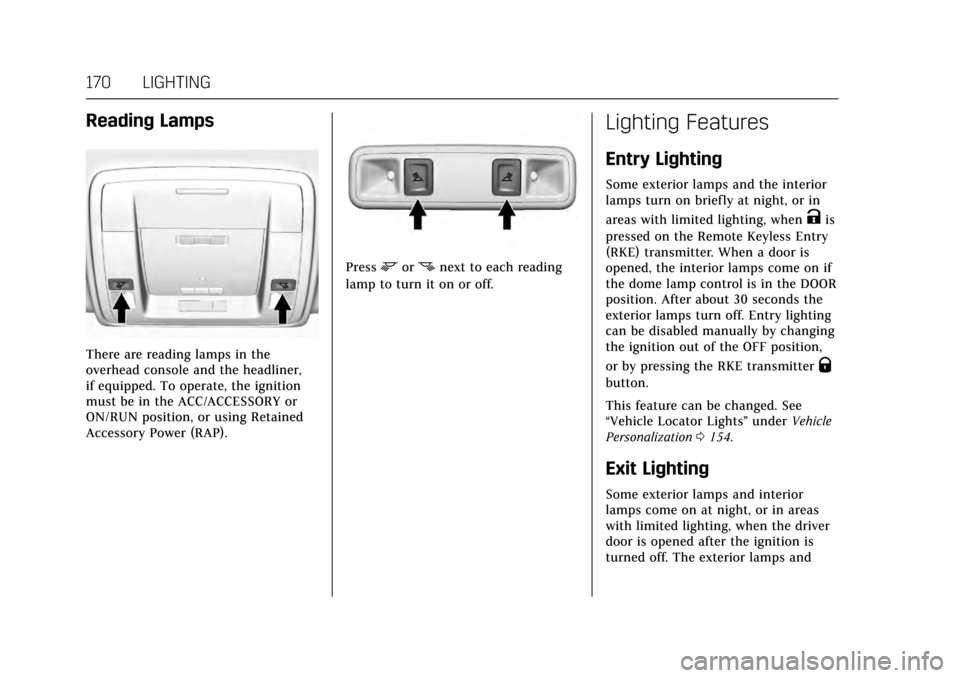
There are reading lamps in the
overhead console and the headliner,
if equipped. To operate, the ignition
must be in the ACC/ACCESSORY or
ON/RUN position, or using Retained
Accessory Power (RAP).
Pressmornnext to each reading
lamp to turn it on or off.
Lighting Features
Entry Lighting
Some exterior lamps and the interior
lamps turn on briefly at night, or in
areas with limited lighting, when
Kis
pressed on the Remote Keyless Entry
(RKE) transmitter. When a door is
opened, the interior lamps come on if
the dome lamp control is in the DOOR
position. After about 30 seconds the
exterior lamps turn off. Entry lighting
can be disabled manually by changing
the ignition out of the OFF position,
or by pressing the RKE transmitter
Q
button.
This feature can be changed. See
“Vehicle Locator Lights” underVehicle
Personalization 0154.
Exit Lighting
Some exterior lamps and interior
lamps come on at night, or in areas
with limited lighting, when the driver
door is opened after the ignition is
turned off. The exterior lamps and
Page 198 of 354
Cadillac Escalade Owner Manual (GMNA-Localizing-MidEast-10293077) -
2017 - crc - 8/24/16
DRIVING AND OPERATING 197
Caution (Continued)
breaking-in guideline every
time you get new brake
linings.
. Do not tow a trailer during
break-in. See Trailer Towing
0 247 for the trailer towing
capabilities of the vehicle and
more information.
Following break-in, engine speed
and load can be gradually
increased.
Adjustable Throttle and
Brake Pedal
If equipped, the position of the
throttle and brake pedals can be
changed.
The pedals can only be adjusted when
the vehicle is in P (Park).
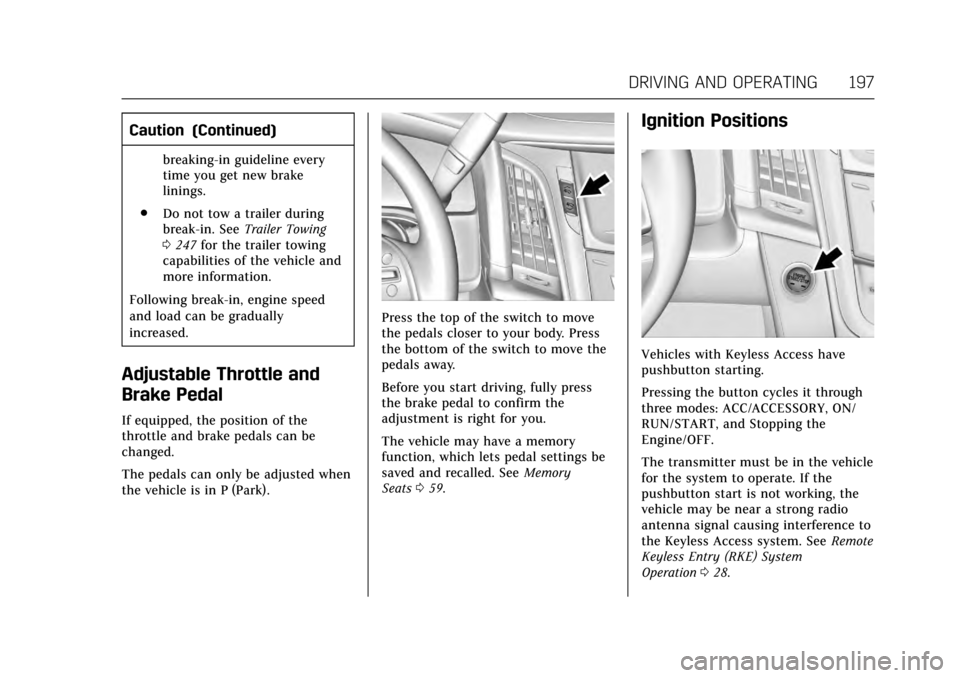
Press the top of the switch to move
the pedals closer to your body. Press
the bottom of the switch to move the
pedals away.
Before you start driving, fully press
the brake pedal to confirm the
adjustment is right for you.
The vehicle may have a memory
function, which lets pedal settings be
saved and recalled. See Memory
Seats 059.
Ignition Positions
Vehicles with Keyless Access have
pushbutton starting.
Pressing the button cycles it through
three modes: ACC/ACCESSORY, ON/
RUN/START, and Stopping the
Engine/OFF.
The transmitter must be in the vehicle
for the system to operate. If the
pushbutton start is not working, the
vehicle may be near a strong radio
antenna signal causing interference to
the Keyless Access system. See Remote
Keyless Entry (RKE) System
Operation 028.
Page 203 of 354
Cadillac Escalade Owner Manual (GMNA-Localizing-MidEast-10293077) -
2017 - crc - 8/24/16
202 DRIVING AND OPERATING
If the vehicle has an uncharged
battery or a battery with low voltage,
try charging or jump starting the
battery. SeeJump Starting 0312.
To shift out of P (Park): 1. Apply the brake pedal.
2. Move the shift lever to the desired position.
If you still are unable to shift out of
P (Park):
1. Ease the pressure on the shift lever.
2. While holding down the brake pedal, push the shift lever all the
way into P (Park).
3. Move the shift lever to the desired position.
If you are still having a problem
shifting, then have the vehicle
serviced soon.Parking over Things
That Burn
{Warning
Things that can burn could touch
hot exhaust parts under the vehicle
and ignite. Do not park over papers,
leaves, dry grass, or other things
that can burn.
Active Fuel Management®
This system allows the engine to
operate on either all or half of its
cylinders, depending on the driving
conditions.
When less power is required, such as
cruising at a constant vehicle speed,
the system will operate in the half
cylinder mode, allowing the vehicle to
achieve better fuel economy. When
greater power demands are required,
such as accelerating from a stop,
passing, or merging onto a freeway,
the system will maintain full-cylinder
operation.
Extended Parking
It is better not to park with the
vehicle running. If the vehicle is left
while running, follow the proper steps
to be sure the vehicle will not move
and there is adequate ventilation. See
Shifting Into Park 0200 and Engine
Exhaust 0203.
If the vehicle is left in P (Park) while
running and the Remote Keyless
Entry (RKE) transmitter is outside the
vehicle, the vehicle will turn off after
one hour.
If the vehicle is left in P (Park) while
running and the RKE transmitter is
inside, the vehicle will run for two
hours. At the end of the second hour,
the vehicle will turn off.
The timer will reset if the vehicle is
taken out of P (Park) while it is
running.
Page 349 of 354

Cadillac Escalade Owner Manual (GMNA-Localizing-MidEast-10293077) -
2017 - crc - 8/24/16
348 INDEX
H
Hazard Warning Flashers . . . . . . . . . . 168
Head Restraints . . . . . . . . . . . . . . . . . . . . . . 55
Head-up Display . . . . . . . . . . . . . . . . . . . . 141
HeadlampsAiming . . . . . . . . . . . . . . . . . . . . . . . . . . . . . 276
Automatic . . . . . . . . . . . . . . . . . . . . . . . . . 167
Bulb Replacement . . . . . . . . . . . . . . . . 276
Daytime RunningLamps (DRL) . . . . . . . . . . . . . . . . . . . . 166
Flash-to-Pass . . . . . . . . . . . . . . . . . . . . . . 166
High-Beam On Light . . . . . . . . . . . . . . 137
High/Low Beam Changer . . . . . . . . . 166
Lamps On Reminder . . . . . . . . . . . . . . 137
Heated Rear Seats . . . . . . . . . . . . . . . . . . . . . . . . . . . 63
Steering Wheel . . . . . . . . . . . . . . . . . . . . 115
Heated and Cooled Front Seats . . . . . 62
Heated Mirrors . . . . . . . . . . . . . . . . . . . . . . . 46
Heating . . . . . . . . . . . . . . . . . . . . . . . . .173, 177
High-Beam On Light . . . . . . . . . . . . . . . . 137
High-Speed Operation . . . . . . . . . . . . . . 292
Hill and Mountain Roads . . . . . . . . . . 190
Hill Start Assist (HSA) . . . . . . . . . . . . . 215
Hood . . . . . . . . . . . . . . . . . . . . . . . . . . . . . . . . . 256
Horn . . . . . . . . . . . . . . . . . . . . . . . . . . . . . . . . . 115
How to Wear Safety Belts Properly . . . . . . . . . . . . . . . . . . . . . . . . . . . . . 71 HVAC . . . . . . . . . . . . . . . . . . . . . . . . . . .173, 177I
Ignition Positions . . . . . . . . . . . . . . . . . . . 197
Indicator
Vehicle Ahead . . . . . . . . . . . . . . . . . . . . . 134
Infants and Young Children,
Restraints . . . . . . . . . . . . . . . . . . . . . . . . . . . 91
Infotainment . . . . . . . . . . . . . . . . . . . . . . . . 172
Infotainment System . . . . . . . . . . . . . . . 343
Instrument Cluster . . . . . . . . . . . . . . . . . 124
Instrument Panel Storage Area . . . . . . . . . . . . . . . . . . . . . . 109
Interior Rearview Mirrors . . . . . . . . . . . 48
Introduction . . . . . . . . . . . . . . . . . . . . . . . . . . . . 2
J
Jump Starting . . . . . . . . . . . . . . . . . . . . . . . 312
K
Key and Lock Messages . . . . . . . . . . . . 147
Keyless Entry Remote (RKE) System . . . . . . . . . . . . . . 28
Keys . . . . . . . . . . . . . . . . . . . . . . . . . . . . . . . . . . 27
L
Lamps Cornering . . . . . . . . . . . . . . . . . . . . . . . . . . 169
Daytime Running (DRL) . . . . . . . . . . 166
Dome . . . . . . . . . . . . . . . . . . . . . . . . . . . . . . 169
Exterior Controls . . . . . . . . . . . . . . . . . . 164 Lamps (cont'd)
Exterior Lamps Off Reminder . . . . 166
License Plate . . . . . . . . . . . . . . . . . . . . . . 277
Malfunction Indicator . . . . . . . . . . . . 130
Messages . . . . . . . . . . . . . . . . . . . . . . . . . . 148
On Reminder . . . . . . . . . . . . . . . . . . . . . . 137
Reading . . . . . . . . . . . . . . . . . . . . . . . . . . . . 170
Lane Change Alert (LCA) . . . . . . . . . . . 238
Lane Departure Warning (LDW) . . . . . . . . . . . . . . . . . . . 240
Lane Keep Assist (LKA) . . . . . . . . . . . . 240
Lane Keep Assist Light . . . . . . . . . . . . . 134
Lap-Shoulder Belt . . . . . . . . . . . . . . . . . . . . 72
LATCH System Replacing Parts after a Crash . . . . 103
LATCH, Lower Anchors and Tethers for Children . . . . . . . . . . . . . . . 96
LED Lighting . . . . . . . . . . . . . . . . . . . . . . . . 276
Level Control
Automatic . . . . . . . . . . . . . . . . . . . . . . . . . 219
Liftgate . . . . . . . . . . . . . . . . . . . . . . . . . . . . . . . 37
Lighter, Cigarette . . . . . . . . . . . . . . . . . . . 122
Lighting Entry . . . . . . . . . . . . . . . . . . . . . . . . . . . . . . 170
Exit . . . . . . . . . . . . . . . . . . . . . . . . . . . . . . . . 170
Illumination Control . . . . . . . . . . . . . . 169
LED . . . . . . . . . . . . . . . . . . . . . . . . . . . . . . . . 276
Page 352 of 354

Cadillac Escalade Owner Manual (GMNA-Localizing-MidEast-10293077) -
2017 - crc - 8/24/16
INDEX 351
RecordsMaintenance . . . . . . . . . . . . . . . . . . . . . . 338
Recreational Vehicle Towing . . . . . . . 316
Remote Keyless Entry (RKE) System . . . . . . . . . . . . . . . . . . . . . . . . . . . . . . 28
Remote Vehicle Start . . . . . . . . . . . . . . . . 33
Replacement Glass . . . . . . . . . . . . . . . . . . . . . . . . . . . . . . . 275
Replacement Bulbs . . . . . . . . . . . . . . . . . 277
Replacement Parts Airbags . . . . . . . . . . . . . . . . . . . . . . . . . . . . . . 89
Maintenance . . . . . . . . . . . . . . . . . . . . . . 337
Replacing Airbag System . . . . . . . . . . . . 89
Replacing LATCH System Parts after a Crash . . . . . . . . . . . . . . . . . . . . . . . 103
Replacing Safety Belt System
Parts after a Crash . . . . . . . . . . . . . . . . . 77
Restraints Where to Put . . . . . . . . . . . . . . . . . . . . . . . . 95
Retained Accessory Power (RAP) . . . . . . . . . . . . . . . . . . . . . . . 200
Reverse Tilt Mirrors . . . . . . . . . . . . . . . . . 47
Ride Control Systems Magnetic . . . . . . . . . . . . . . . . . . . . . . . . . . 219
Messages . . . . . . . . . . . . . . . . . . . . . . . . . . 150
Roads Driving, Wet . . . . . . . . . . . . . . . . . . . . . . . 189 Roof
Sunroof . . . . . . . . . . . . . . . . . . . . . . . . . . . . . . 52
Roof Rack System . . . . . . . . . . . . . . . . . . 112
Rotation, Tires . . . . . . . . . . . . . . . . . . . . . . 297
Routing, Engine Drive Belt . . . . . . . . . 341
Running the Vehicle While Parked . . . . . . . . . . . . . . . . . . . . . . . . . . . . . 203
S
Safety Belts . . . . . . . . . . . . . . . . . . . . . . . . . . . 70
Care . . . . . . . . . . . . . . . . . . . . . . . . . . . . . . . . . . 77
How to Wear Safety BeltsProperly . . . . . . . . . . . . . . . . . . . . . . . . . . . . 71
Lap-Shoulder Belt . . . . . . . . . . . . . . . . . . . 72
Messages . . . . . . . . . . . . . . . . . . . . . . . . . . 151
Reminders . . . . . . . . . . . . . . . . . . . . . . . . . 128
Replacing after a Crash . . . . . . . . . . . . . 77
Use During Pregnancy . . . . . . . . . . . . . . 76
Safety Kit . . . . . . . . . . . . . . . . . . . . . . . . . . . . 112
Safety Locks . . . . . . . . . . . . . . . . . . . . . . . . . . 37
Safety System Check . . . . . . . . . . . . . . . . 77
Seats Head Restraints . . . . . . . . . . . . . . . . . . . . . 55
Heated, Rear . . . . . . . . . . . . . . . . . . . . . . . . 63
Lumbar Adjustment, Front . . . . . . . . . 57
Memory . . . . . . . . . . . . . . . . . . . . . . . . . . . . . 59
Power Adjustment, Front . . . . . . . . . . 56
Reclining Seatbacks . . . . . . . . . . . . . . . . 59
Second Row . . . . . . . . . . . . . . . . . . . . . . . . . 63 Seats (cont'd)
Third Row Seat . . . . . . . . . . . . . . . . . . . . . 68
Second Row Seats . . . . . . . . . . . . . . . . . . . 63
Securing Child Restraints . . . . .104, 106
Security Light . . . . . . . . . . . . . . . . . . . . . . . . . . . . . . . 137
Messages . . . . . . . . . . . . . . . . . . . . . . . . . . 151
Vehicle . . . . . . . . . . . . . . . . . . . . . . . . . . . . . . . 43
Vehicle Alarm . . . . . . . . . . . . . . . . . . . . . . . 43
Service Accessories andModifications . . . . . . . . . . . . . . . . . . . . 255
Doing Your Own Work . . . . . . . . . . . 256
Engine Soon Light . . . . . . . . . . . . . . . . 130
Maintenance Records . . . . . . . . . . . . 338
Maintenance, General Information . . . . . . . . . . . . . . . . . . . . . . 328
Parts Identification Label . . . . . . . . 339
Vehicle Messages . . . . . . . . . . . . . . . . . 151
Service Electric Parking Brake Light . . . . . . . . . . . . . . . . . . . . . . . . . . . . . . . 133
Services Special Application . . . . . . . . . . . . . . . 334
Servicing the Airbag . . . . . . . . . . . . . . . . . 88
Shift Lock Control Function Check, Automatic
Transmission . . . . . . . . . . . . . . . . . . . . . . 274