display CADILLAC ESCALADE 2017 4.G Repair Manual
[x] Cancel search | Manufacturer: CADILLAC, Model Year: 2017, Model line: ESCALADE, Model: CADILLAC ESCALADE 2017 4.GPages: 354, PDF Size: 3.9 MB
Page 176 of 354
Cadillac Escalade Owner Manual (GMNA-Localizing-MidEast-10293077) -
2017 - crc - 8/24/16
CLIMATE CONTROLS 175
SYNC (Synchronized
Temperature) :Press SYNC on the
touch screen to link all climate zone
settings to the driver settings. Adjust
the driver side temperature control to
change the linked temperature. When
the passenger settings are adjusted,
the SYNC button is displayed when
the temperatures are unlinked.
Rear (If Equipped) : Press this button
on the front climate control touch
screen to open the rear climate
control screen. The rear climate
control settings can now be adjusted
from the front passenger area.
Manual Operation
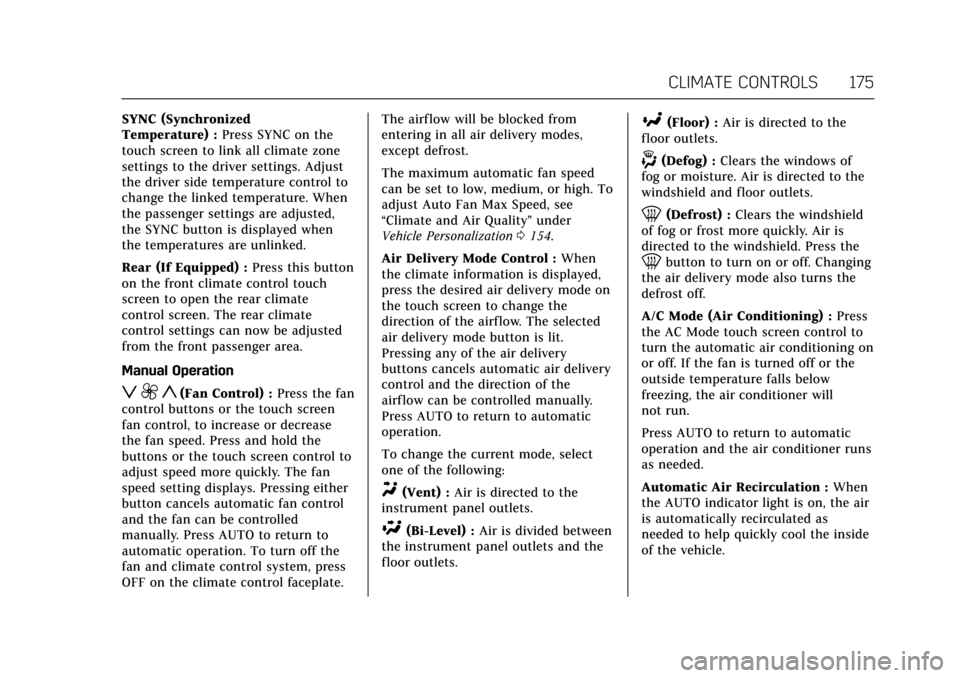
z 9 y(Fan Control) : Press the fan
control buttons or the touch screen
fan control, to increase or decrease
the fan speed. Press and hold the
buttons or the touch screen control to
adjust speed more quickly. The fan
speed setting displays. Pressing either
button cancels automatic fan control
and the fan can be controlled
manually. Press AUTO to return to
automatic operation. To turn off the
fan and climate control system, press
OFF on the climate control faceplate. The airf low will be blocked from
entering in all air delivery modes,
except defrost.
The maximum automatic fan speed
can be set to low, medium, or high. To
adjust Auto Fan Max Speed, see
“Climate and Air Quality”
under
Vehicle Personalization 0154.
Air Delivery Mode Control : When
the climate information is displayed,
press the desired air delivery mode on
the touch screen to change the
direction of the airflow. The selected
air delivery mode button is lit.
Pressing any of the air delivery
buttons cancels automatic air delivery
control and the direction of the
airf low can be controlled manually.
Press AUTO to return to automatic
operation.
To change the current mode, select
one of the following:
Y(Vent) : Air is directed to the
instrument panel outlets.
\(Bi-Level) : Air is divided between
the instrument panel outlets and the
floor outlets.
[(Floor) : Air is directed to the
floor outlets.
-(Defog) : Clears the windows of
fog or moisture. Air is directed to the
windshield and floor outlets.
0(Defrost) : Clears the windshield
of fog or frost more quickly. Air is
directed to the windshield. Press the
0button to turn on or off. Changing
the air delivery mode also turns the
defrost off.
A/C Mode (Air Conditioning) : Press
the AC Mode touch screen control to
turn the automatic air conditioning on
or off. If the fan is turned off or the
outside temperature falls below
freezing, the air conditioner will
not run.
Press AUTO to return to automatic
operation and the air conditioner runs
as needed.
Automatic Air Recirculation : When
the AUTO indicator light is on, the air
is automatically recirculated as
needed to help quickly cool the inside
of the vehicle.
Page 178 of 354
Cadillac Escalade Owner Manual (GMNA-Localizing-MidEast-10293077) -
2017 - crc - 8/24/16
CLIMATE CONTROLS 177
There are also auto heated and cooled
seats, for more information seeHeated
and Cooled Front Seats 062.
Remote Start Climate Control
Operation : The climate control
system may run when the vehicle is
started remotely. The system uses the
driver’s previous settings to heat or
cool the inside of the vehicle. The rear
defog may come on during remote
start based on cold ambient
conditions. The rear defog indicator
light does not come on during a
remote start. If equipped with heated
or cooled seats, they may come on
during a remote start. See Remote
Vehicle Start 033 and Heated and
Cooled Front Seats 062.Sensor
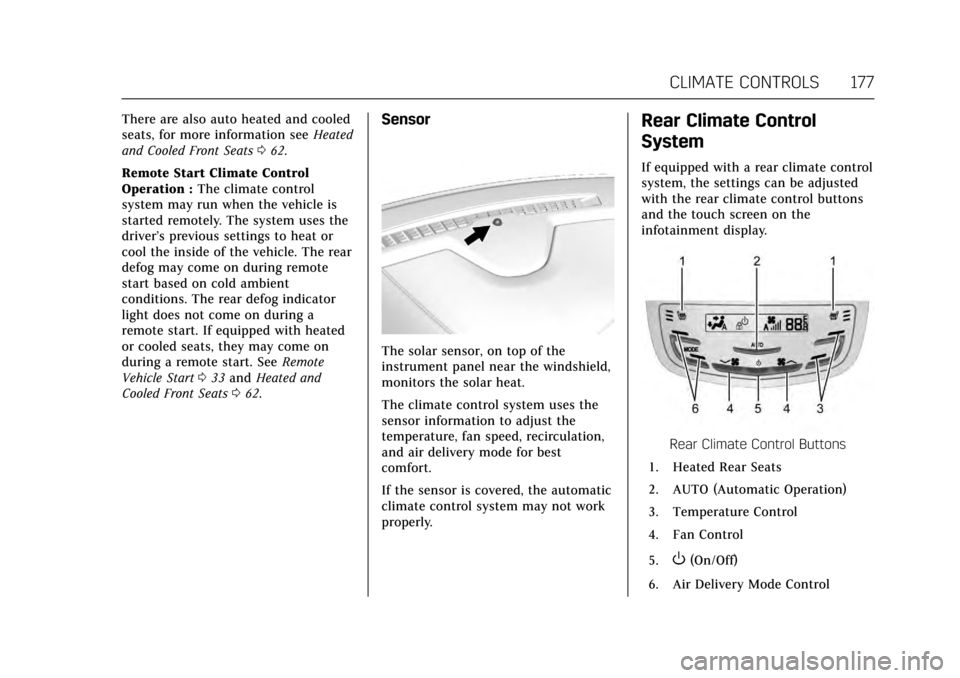
The solar sensor, on top of the
instrument panel near the windshield,
monitors the solar heat.
The climate control system uses the
sensor information to adjust the
temperature, fan speed, recirculation,
and air delivery mode for best
comfort.
If the sensor is covered, the automatic
climate control system may not work
properly.
Rear Climate Control
System
If equipped with a rear climate control
system, the settings can be adjusted
with the rear climate control buttons
and the touch screen on the
infotainment display.
Rear Climate Control Buttons
1. Heated Rear Seats
2. AUTO (Automatic Operation)
3. Temperature Control
4. Fan Control
5.
O(On/Off)
6. Air Delivery Mode Control
Page 179 of 354
Cadillac Escalade Owner Manual (GMNA-Localizing-MidEast-10293077) -
2017 - crc - 8/24/16
178 CLIMATE CONTROLS
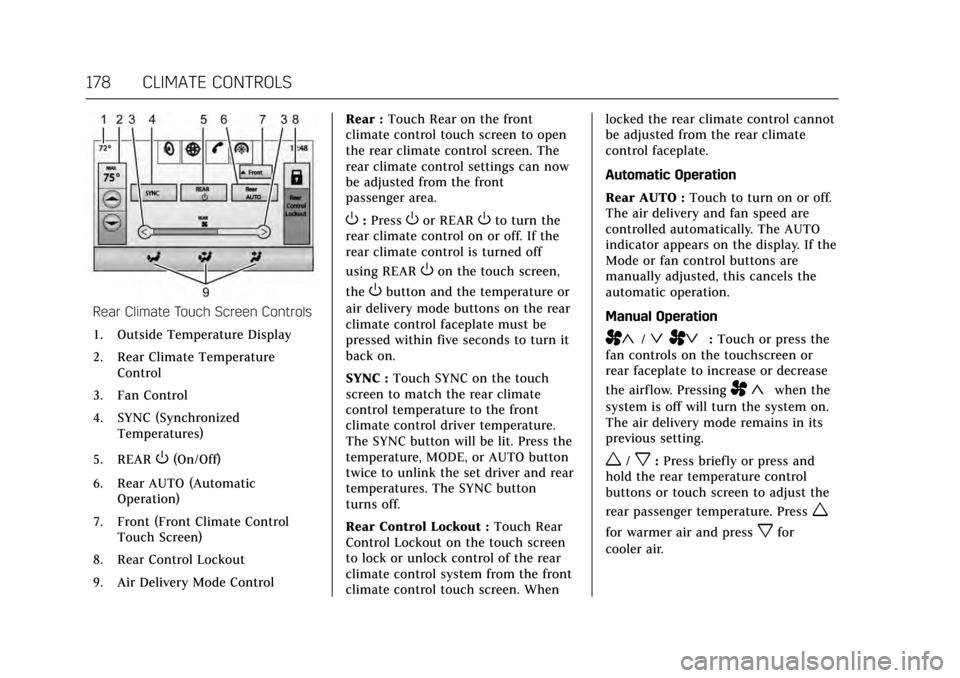
Rear Climate Touch Screen Controls1. Outside Temperature Display
2. Rear Climate Temperature Control
3. Fan Control
4. SYNC (Synchronized Temperatures)
5. REAR
O(On/Off)
6. Rear AUTO (Automatic Operation)
7. Front (Front Climate Control Touch Screen)
8. Rear Control Lockout
9. Air Delivery Mode Control Rear :
Touch Rear on the front
climate control touch screen to open
the rear climate control screen. The
rear climate control settings can now
be adjusted from the front
passenger area.
O: PressOor REAROto turn the
rear climate control on or off. If the
rear climate control is turned off
using REAR
Oon the touch screen,
the
Obutton and the temperature or
air delivery mode buttons on the rear
climate control faceplate must be
pressed within five seconds to turn it
back on.
SYNC : Touch SYNC on the touch
screen to match the rear climate
control temperature to the front
climate control driver temperature.
The SYNC button will be lit. Press the
temperature, MODE, or AUTO button
twice to unlink the set driver and rear
temperatures. The SYNC button
turns off.
Rear Control Lockout : Touch Rear
Control Lockout on the touch screen
to lock or unlock control of the rear
climate control system from the front
climate control touch screen. When locked the rear climate control cannot
be adjusted from the rear climate
control faceplate.
Automatic Operation
Rear AUTO :
Touch to turn on or off.
The air delivery and fan speed are
controlled automatically. The AUTO
indicator appears on the display. If the
Mode or fan control buttons are
manually adjusted, this cancels the
automatic operation.
Manual Operation
A«/ªAª: Touch or press the
fan controls on the touchscreen or
rear faceplate to increase or decrease
the airf low. Pressing
A «when the
system is off will turn the system on.
The air delivery mode remains in its
previous setting.
w/x: Press briefly or press and
hold the rear temperature control
buttons or touch screen to adjust the
rear passenger temperature. Press
w
for warmer air and pressxfor
cooler air.
Page 199 of 354
Cadillac Escalade Owner Manual (GMNA-Localizing-MidEast-10293077) -
2017 - crc - 8/24/16
198 DRIVING AND OPERATING
To shift out of P (Park), the vehicle
must be in ACC/ACCESSORY or ON/
RUN and the brake pedal must be
applied.
Stopping the Engine/LOCK/OFF (No
Indicator Lights) :When the vehicle
is stopped, press the ENGINE START/
STOP button once to turn the
engine off.
If the vehicle is in P (Park), the
ignition will turn off, and Retained
Accessory Power (RAP) will remain
active. See Retained Accessory Power
(RAP) 0200.
If the vehicle is not in P (Park), the
ignition will return to ACC/
ACCESSORY and display the message
SHIFT TO PARK in the Driver
Information Center (DIC). See
Transmission Messages 0152. When
the vehicle is shifted into P (Park), the
ignition system will switch to OFF.
Do not turn the engine off when the
vehicle is moving. This will cause a
loss of power assist in the brake and
steering systems and disable the
airbags. The vehicle may have an electric
steering column lock. The lock is
activated when the vehicle is switched
to OFF and either front door is
opened. A sound may be heard as the
lock actuates or releases. The steering
column lock may not release with the
wheels turned off center. If this
happens, the vehicle may not start.
Move the steering wheel from left to
right while attempting to start the
vehicle. If this does not work, the
vehicle needs service.
If the vehicle must be shut off in an
emergency:
1. Brake using a firm and steady pressure. Do not pump the
brakes repeatedly. This may
deplete power assist, requiring
increased brake pedal force.
2. Shift the vehicle to N (Neutral). This can be done while the
vehicle is moving. After shifting
to N (Neutral), firmly apply the
brakes and steer the vehicle to a
safe location.
3. Come to a complete stop, shift to P (Park), and turn the ignition to
OFF. On vehicles with an automatic transmission, the shift
lever must be in P (Park) to turn
the ignition switch to the OFF
position.
4. Set the parking brake. See Parking Brake 0213.
{Warning
Turning off the vehicle while
moving may cause loss of power
assist in the brake and steering
systems and disable the airbags.
While driving, only shut the vehicle
off in an emergency.
If the vehicle cannot be pulled over,
and must be shut off while driving,
press and hold the ENGINE START/
STOP button for longer than
two seconds, or press twice in
five seconds.
ACC/ACCESSORY (Amber Indicator
Light) : This mode allows some
electrical accessories to be used when
the engine is off.
Page 200 of 354
Cadillac Escalade Owner Manual (GMNA-Localizing-MidEast-10293077) -
2017 - crc - 8/24/16
DRIVING AND OPERATING 199
With the ignition off, pressing the
button one time without the brake
pedal applied will place the ignition
system in ACC/ACCESSORY.
The ignition will switch from ACC/
ACCESSORY to OFF after five minutes
to prevent battery rundown.
ON/RUN/START (Green Indicator
Light) :This mode is for driving and
starting. With the ignition off, and the
brake pedal applied, pressing the
button once will place the ignition
system in ON/RUN/START. Once
engine cranking begins, release the
button. Engine cranking will continue
until the engine starts. See Starting the
Engine 0199. The ignition will then
remain in ON/RUN.
Service Only Mode
This power mode is available for
service and diagnostics, and to verify
the proper operation of the
malfunction indicator lamp as may be
required for emission inspection
purposes. With the vehicle off, and the
brake pedal not applied, pressing and
holding the button for more than
five seconds will place the vehicle in
Service Only Mode. The instruments and audio systems will operate as they
do in ON/RUN, but the vehicle will
not be able to be driven. The engine
will not start in Service Only Mode.
Press the button again to turn the
vehicle off.
Starting the Engine
Move the shift lever to P (Park) or
N (Neutral). The engine will not start
in any other position. To restart the
engine when the vehicle is already
moving, use N (Neutral) only.
Caution
Do not try to shift to P (Park) if the
vehicle is moving. If you do, you
could damage the transmission.
Shift to P (Park) only when the
vehicle is stopped.
Caution
If you add electrical parts or
accessories, you could change the
way the engine operates. Any
resulting damage would not be
covered by the vehicle warranty. See
Add-On Electrical Equipment
0252.
Starting Procedure
1. With the Keyless Access system,
the RKE transmitter must be in
the vehicle. Press ENGINE
START/STOP with the brake
pedal applied. When the engine
begins cranking, let go of the
button.
The idle speed will go down as
the engine gets warm. Do not
race the engine immediately
after starting it.
If the RKE transmitter is not in
the vehicle, if there is
interference, or if the RKE
battery is low, the Driver
Information Center (DIC) will
display a message. See Key and
Lock Messages 0147.
Page 205 of 354
Cadillac Escalade Owner Manual (GMNA-Localizing-MidEast-10293077) -
2017 - crc - 8/24/16
204 DRIVING AND OPERATING
Automatic Transmission
If equipped, there is an electronic shift
lever position indicator within the
instrument cluster. This display comes
on when the ignition is turned to the
ON/RUN position.
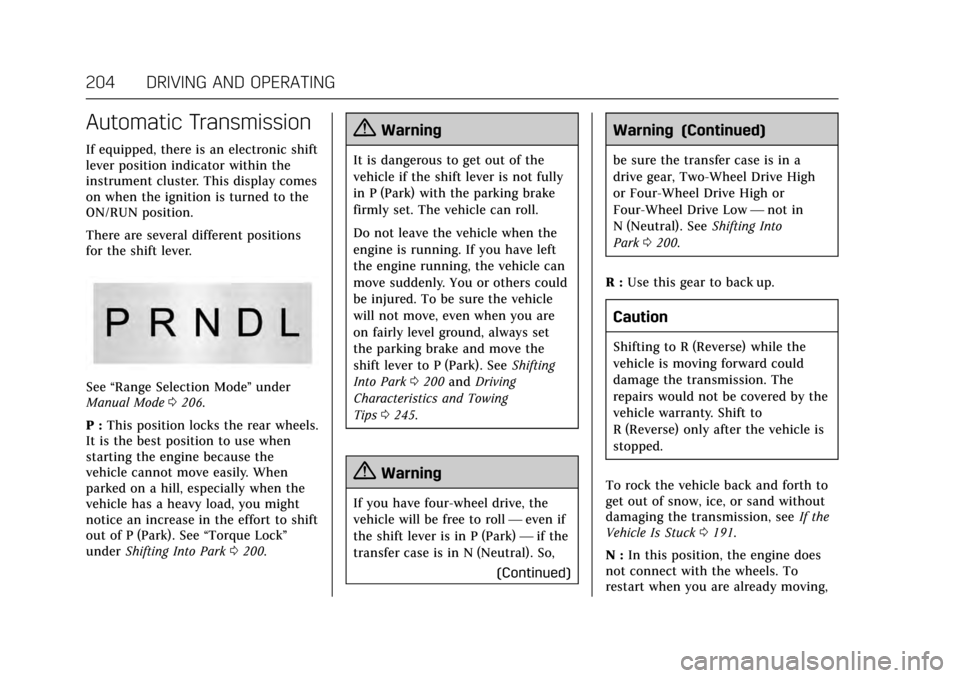
There are several different positions
for the shift lever.
See“Range Selection Mode ”under
Manual Mode 0206.
P : This position locks the rear wheels.
It is the best position to use when
starting the engine because the
vehicle cannot move easily. When
parked on a hill, especially when the
vehicle has a heavy load, you might
notice an increase in the effort to shift
out of P (Park). See “Torque Lock”
under Shifting Into Park 0200.
{Warning
It is dangerous to get out of the
vehicle if the shift lever is not fully
in P (Park) with the parking brake
firmly set. The vehicle can roll.
Do not leave the vehicle when the
engine is running. If you have left
the engine running, the vehicle can
move suddenly. You or others could
be injured. To be sure the vehicle
will not move, even when you are
on fairly level ground, always set
the parking brake and move the
shift lever to P (Park). See Shifting
Into Park 0200 and Driving
Characteristics and Towing
Tips 0245.
{Warning
If you have four-wheel drive, the
vehicle will be free to roll —even if
the shift lever is in P (Park) —if the
transfer case is in N (Neutral). So,
(Continued)
Warning (Continued)
be sure the transfer case is in a
drive gear, Two-Wheel Drive High
or Four-Wheel Drive High or
Four-Wheel Drive Low—not in
N (Neutral). See Shifting Into
Park 0200.
R : Use this gear to back up.
Caution
Shifting to R (Reverse) while the
vehicle is moving forward could
damage the transmission. The
repairs would not be covered by the
vehicle warranty. Shift to
R (Reverse) only after the vehicle is
stopped.
To rock the vehicle back and forth to
get out of snow, ice, or sand without
damaging the transmission, see If the
Vehicle Is Stuck 0191.
N : In this position, the engine does
not connect with the wheels. To
restart when you are already moving,
Page 207 of 354
Cadillac Escalade Owner Manual (GMNA-Localizing-MidEast-10293077) -
2017 - crc - 8/24/16
206 DRIVING AND OPERATING
When temperatures are very cold, the
transmission's gear shifting could be
delayed providing more stable shifts
until the engine warms up. Shifts
could be more noticeable with a cold
transmission. This difference in
shifting is normal.
L :This position allows selection of a
range of gears appropriate for current
driving conditions. If equipped, see
“Range Selection Mode ”under Manual
Mode 0206.
Caution
Spinning the tires or holding the
vehicle in one place on a hill using
only the accelerator pedal may
damage the transmission. The
repair will not be covered by the
vehicle warranty. If you are stuck,
do not spin the tires. When
stopping on a hill, use the brakes to
hold the vehicle in place.
Normal Mode Grade Braking
This mode is enabled when the
vehicle is started, but is not enabled
in Range Selection Mode. It assists in maintaining desired vehicle speeds
when driving on downhill grades by
using the engine and transmission to
slow the vehicle. The first time the
system engages for each ignition
cycle, a DIC message will be displayed.
See
Transmission Messages 0152.
To disable or enable Normal Mode
Grade Braking within the current
ignition cycle, press and hold the
Tow/Haul button for five seconds.
When the button is released, the
requested mode change is made.
A DIC message displays. See
Transmission Messages 0152.
For other forms of grade braking, see
Tow/Haul Mode 0208 and Cruise
Control 0220.
Kickdown Mode
The accelerator pedal provides an
additional downshift after pressing
through the kickdown feature.
It requires extra pedal pressure near
the end of its travel to engage.
Manual Mode
Range Selection Mode
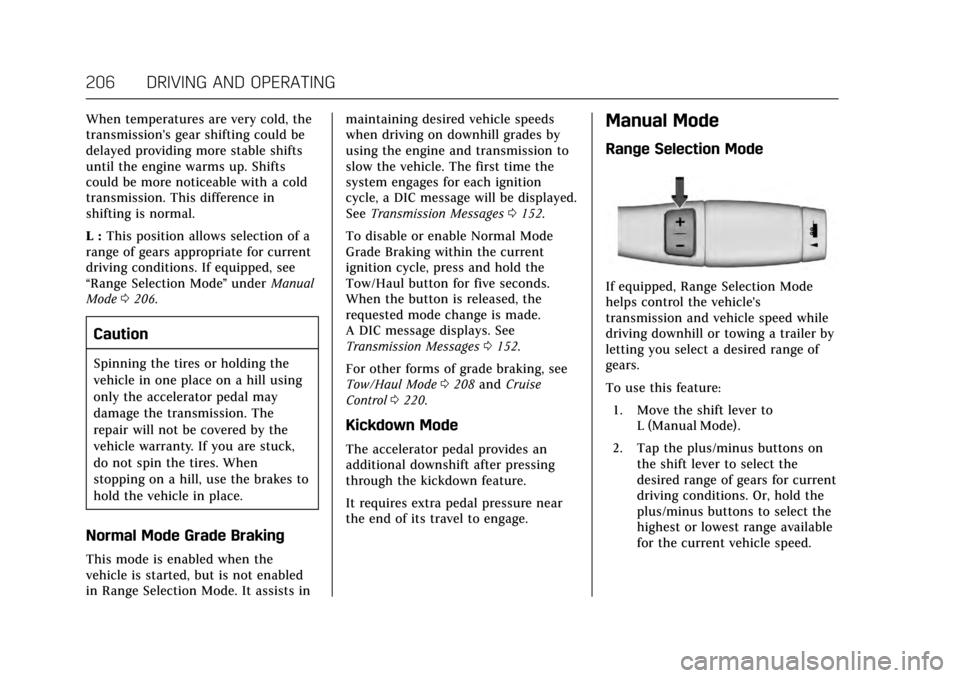
If equipped, Range Selection Mode
helps control the vehicle's
transmission and vehicle speed while
driving downhill or towing a trailer by
letting you select a desired range of
gears.
To use this feature:
1. Move the shift lever to L (Manual Mode).
2. Tap the plus/minus buttons on the shift lever to select the
desired range of gears for current
driving conditions. Or, hold the
plus/minus buttons to select the
highest or lowest range available
for the current vehicle speed.
Page 208 of 354
Cadillac Escalade Owner Manual (GMNA-Localizing-MidEast-10293077) -
2017 - crc - 8/24/16
DRIVING AND OPERATING 207
When the shift lever is moved from
D (Drive) to L (Manual Mode), a
number displays next to the L,
indicating the current transmission
range.
This number is the highest gear that
the transmission will command while
operating in L (Manual Mode). All
gears below that number are available.
As driving conditions change, the
transmission can automatically shift
to lower gears. For example, when
5 (Fifth) is selected, 1 (First) through
5 (Fifth) gears are automatically
shifted by the transmission, but
6 (Sixth) cannot be used until the
plus/minus button on the shift lever is
used to change to the range.
In vehicles with gasoline engines,
when the shift lever is moved from
D (Drive) to L (Manual Mode), a
downshift may occur. The gear that
the transmission is operating in when
the shift lever is moved from D (Drive)
to L (Manual Mode) determines if a
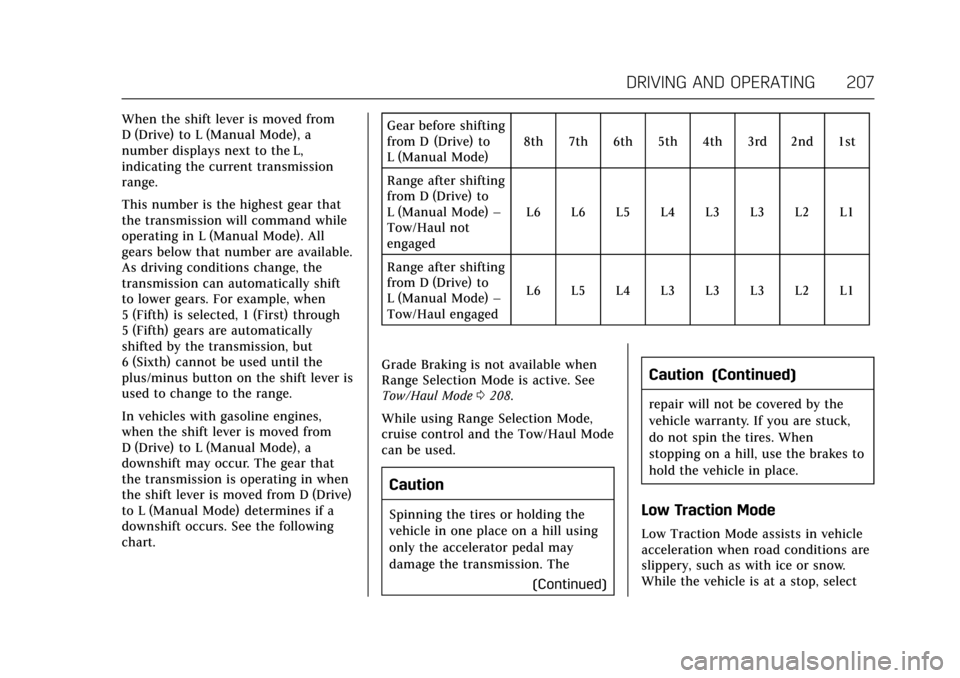
downshift occurs. See the following
chart.Gear before shifting
from D (Drive) to
L (Manual Mode)
8th 7th 6th 5th 4th 3rd 2nd 1st
Range after shifting
from D (Drive) to
L (Manual Mode) –
Tow/Haul not
engaged L6 L6 L5 L4 L3 L3 L2 L1
Range after shifting
from D (Drive) to
L (Manual Mode) –
Tow/Haul engaged L6 L5 L4 L3 L3 L3 L2 L1
Grade Braking is not available when
Range Selection Mode is active. See
Tow/Haul Mode 0208.
While using Range Selection Mode,
cruise control and the Tow/Haul Mode
can be used.
Caution
Spinning the tires or holding the
vehicle in one place on a hill using
only the accelerator pedal may
damage the transmission. The (Continued)
Caution (Continued)
repair will not be covered by the
vehicle warranty. If you are stuck,
do not spin the tires. When
stopping on a hill, use the brakes to
hold the vehicle in place.
Low Traction Mode
Low Traction Mode assists in vehicle
acceleration when road conditions are
slippery, such as with ice or snow.
While the vehicle is at a stop, select
Page 209 of 354
Cadillac Escalade Owner Manual (GMNA-Localizing-MidEast-10293077) -
2017 - crc - 8/24/16
208 DRIVING AND OPERATING
L2 using Range Selection Mode. This
will limit torque to the wheels and
help to prevent the tires from
spinning.
Tow/Haul Mode
The Tow/Haul Mode adjusts the
transmission shift pattern to reduce
shift cycling. This provides increased
performance, vehicle control, and
enhanced transmission and engine
cooling when driving down steep hills
or mountain grades, towing,
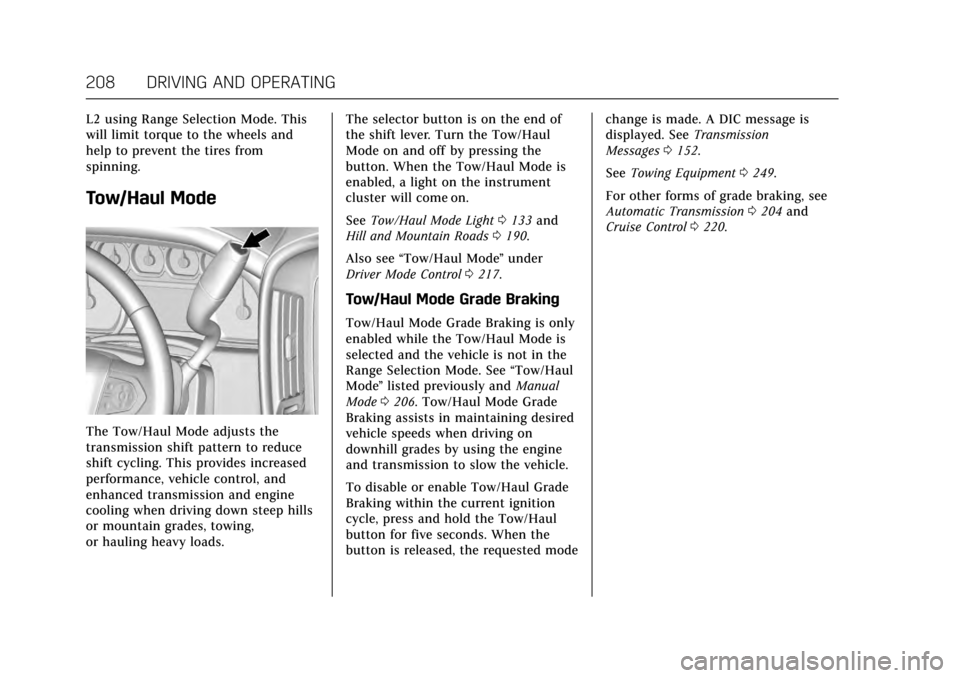
or hauling heavy loads.The selector button is on the end of
the shift lever. Turn the Tow/Haul
Mode on and off by pressing the
button. When the Tow/Haul Mode is
enabled, a light on the instrument
cluster will come on.
See
Tow/Haul Mode Light 0133 and
Hill and Mountain Roads 0190.
Also see “Tow/Haul Mode ”under
Driver Mode Control 0217.
Tow/Haul Mode Grade Braking
Tow/Haul Mode Grade Braking is only
enabled while the Tow/Haul Mode is
selected and the vehicle is not in the
Range Selection Mode. See “Tow/Haul
Mode ”listed previously and Manual
Mode 0206. Tow/Haul Mode Grade
Braking assists in maintaining desired
vehicle speeds when driving on
downhill grades by using the engine
and transmission to slow the vehicle.
To disable or enable Tow/Haul Grade
Braking within the current ignition
cycle, press and hold the Tow/Haul
button for five seconds. When the
button is released, the requested mode change is made. A DIC message is
displayed. See
Transmission
Messages 0152.
See Towing Equipment 0249.
For other forms of grade braking, see
Automatic Transmission 0204 and
Cruise Control 0220.
Page 212 of 354
Cadillac Escalade Owner Manual (GMNA-Localizing-MidEast-10293077) -
2017 - crc - 8/24/16
DRIVING AND OPERATING 211
2. Turn the knob to 4n. Wait for
the 4
nindicator light to stop
flashing before shifting the
transmission into gear.
Caution
Shifting the transmission into gear
before the requested mode indicator
light has stopped flashing could
damage the transfer case.
If the transmission is in gear and/or
moving more than 5 km/h (3 mph), the
4
nindicator light will flash for
30 seconds and not complete the shift.
After 30 seconds the transfer case will
shift to 4
m. Turn the knob to 4mto
display the indicator. With the vehicle
moving less than 5 km/h (3 mph), and
the transmission in N (Neutral),
attempt the shift again.
Shifting Out of 4
n
To shift:
1. The vehicle must be stopped or moving less than 5 km/h (3 mph)
with the transmission in N (Neutral) and the ignition in
ON/RUN. It is best for the
vehicle to be moving
1.6 to 3.2 km/h (1 to 2 mph).
2. Turn the knob to 4
m, AUTO,
or 2
m. Wait for the 4m, AUTO,
or 2
mindicator light to stop
flashing before shifting the
transmission into gear.
Caution
Shifting the transmission into gear
before the requested mode indicator
light has stopped flashing could
damage the transfer case.
If the transmission is in gear and/or
moving more than 5 km/h (3 mph), the
4
m, AUTO, or 2mindicator light will
flash for 30 seconds but will not
complete the shift. With the vehicle
moving less than 5 km/h (3 mph), and
the transmission in N (Neutral),
attempt the shift again. Shifting Into N (Neutral)
To shift into N (Neutral):
1. Park the vehicle on a level surface.
2. Set the parking brake and press and hold the brake pedal. See
Parking Brake 0213.
3. Start the vehicle or turn the ignition to ON/RUN.
4. Shift the transmission to N (Neutral).
5. Shift the transfer case to 2
m.
6. Turn the transfer case knob clockwise to N (Neutral) until it
stops and hold it there until the
N (Neutral) light starts blinking.
This will take at least 10 seconds.
Then slowly release the knob to
the 4
nposition. The N (Neutral)
light will come on when the
transfer case shift to N (Neutral)
is complete.
7. With the engine running, verify that the transfer case is in
N (Neutral) by shifting the
transmission to R (Reverse), then
shift the transmission to