ECO mode CADILLAC ESCALADE 2018 User Guide
[x] Cancel search | Manufacturer: CADILLAC, Model Year: 2018, Model line: ESCALADE, Model: CADILLAC ESCALADE 2018Pages: 399, PDF Size: 6.23 MB
Page 133 of 399
Cadillac Escalade Owner Manual (GMNA-Localizing-U.S./Canada/Mexico-
11349344) - 2018 - crc - 11/7/17
132 INSTRUMENTS AND CONTROLS
Phone
While the Phone application page is
displayed, press SEL to enter the
Phone menu. In the Phone menu,
if there is no active phone call, view
recent calls, select from favorites,
or scroll through contacts. If there is
an active call, mute the phone or
switch to handset operation.
Cluster Options Menu
To enter the cluster Options menu:1. Use the five-way control on the right side of the steering wheel
to find the Options page in one
of the interactive display zones
on the cluster.
2. Press SEL on the center of the five-way control to enter the
Options menu.
Units : Press SEL while Units is
highlighted to enter the Unit menu.
Choose US or metric units by pressing
SEL while the desired item is
highlighted. A checkmark will be
displayed next to the selected item. Info Pages :
Press SEL while Info
Pages is highlighted to select the
items to be displayed in the DIC info
displays. See Driver Information Center
(DIC) 0145.
Fav Button Options : Press SEL while
Fav Button Options is highlighted to
select between FAV Primary and SEEK
Primary. This selection allows for
configuration of the
CandB
steering wheel controls. When FAV
Primary is selected, pressing
Cand
Bwill go to the next or previous
favorite and pressing and holding
C
andBwill seek. When SEEK Primary
is selected, pressing
CandBwill
seek and pressing and holding
Cand
Bwill go to the next or previous
favorite.
Display Layout : Press SEL while
Display Layout is highlighted to
change the configuration of the
cluster. See “Reconfigurable
Instrument Cluster” earlier in this
section. Head-up Display (HUD) Rotation :
This feature allows for adjusting the
angle of the HUD image. Press SEL on
the steering wheel controls while
Head-up Display Rotation is
highlighted to enter Adjust Mode.
Press
yorzto adjust the angle of
the HUD display. Press
SorTto
highlight OK, then press SEL to save
the setting. Cancel can also be
selected to cancel the setting. The
vehicle must be in P (Park).
Open Source Software : Press SEL
while Open Source Software is
highlighted to display open source
software information.
Speedometer
The speedometer shows the vehicle's
speed in either kilometers per hour
(km/h) or miles per hour (mph).
Odometer
The odometer shows how far the
vehicle has been driven, in either
kilometers or miles.
Page 138 of 399
Cadillac Escalade Owner Manual (GMNA-Localizing-U.S./Canada/Mexico-
11349344) - 2018 - crc - 11/7/17
INSTRUMENTS AND CONTROLS 137
Malfunction Indicator Lamp
(Check Engine Light)
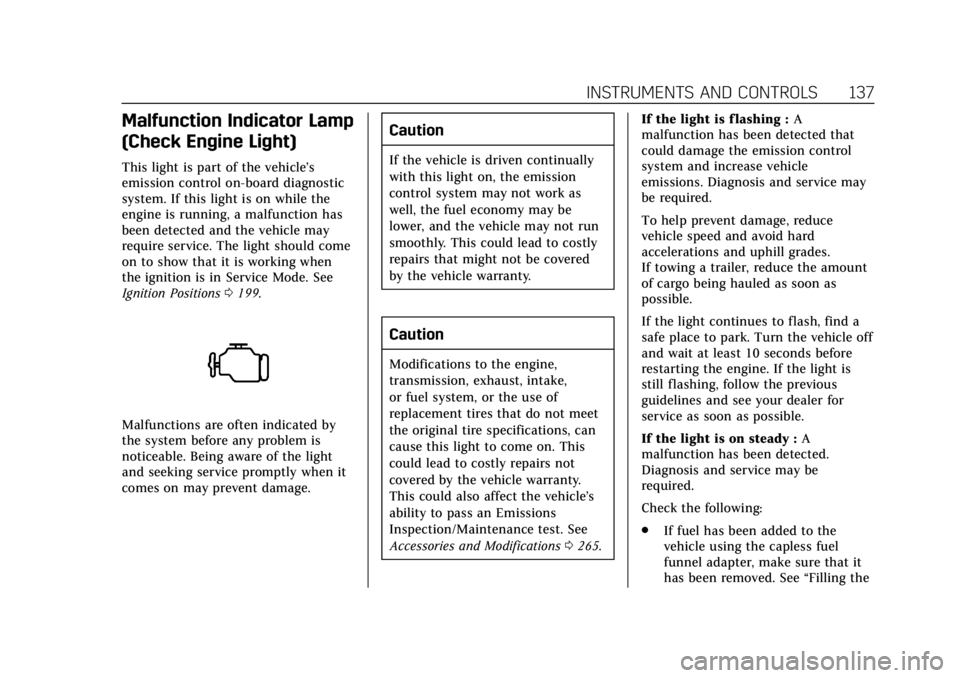
This light is part of the vehicle’s
emission control on-board diagnostic
system. If this light is on while the
engine is running, a malfunction has
been detected and the vehicle may
require service. The light should come
on to show that it is working when
the ignition is in Service Mode. See
Ignition Positions0199.
Malfunctions are often indicated by
the system before any problem is
noticeable. Being aware of the light
and seeking service promptly when it
comes on may prevent damage.
Caution
If the vehicle is driven continually
with this light on, the emission
control system may not work as
well, the fuel economy may be
lower, and the vehicle may not run
smoothly. This could lead to costly
repairs that might not be covered
by the vehicle warranty.
Caution
Modifications to the engine,
transmission, exhaust, intake,
or fuel system, or the use of
replacement tires that do not meet
the original tire specifications, can
cause this light to come on. This
could lead to costly repairs not
covered by the vehicle warranty.
This could also affect the vehicle’s
ability to pass an Emissions
Inspection/Maintenance test. See
Accessories and Modifications 0265. If the light is f lashing :
A
malfunction has been detected that
could damage the emission control
system and increase vehicle
emissions. Diagnosis and service may
be required.
To help prevent damage, reduce
vehicle speed and avoid hard
accelerations and uphill grades.
If towing a trailer, reduce the amount
of cargo being hauled as soon as
possible.
If the light continues to flash, find a
safe place to park. Turn the vehicle off
and wait at least 10 seconds before
restarting the engine. If the light is
still flashing, follow the previous
guidelines and see your dealer for
service as soon as possible.
If the light is on steady : A
malfunction has been detected.
Diagnosis and service may be
required.
Check the following:
. If fuel has been added to the
vehicle using the capless fuel
funnel adapter, make sure that it
has been removed. See “Filling the
Page 147 of 399
Cadillac Escalade Owner Manual (GMNA-Localizing-U.S./Canada/Mexico-
11349344) - 2018 - crc - 11/7/17
146 INSTRUMENTS AND CONTROLS
Trip 1 or Trip 2 and Average Fuel
Economy :The Trip display shows the
current distance traveled, in either
kilometers (km) or miles (mi), since
the trip odometer was last reset. The
trip odometer can be reset by pressing
and holding SEL while this display is
active.
The Average Fuel Economy display
shows the approximate average liters
per 100 kilometers (L/100 km) or
miles per gallon (mpg). This number
is calculated based on the number of
L/100 km (mpg) recorded since the
last time this menu item was reset.
This number reflects only the
approximate average fuel economy
that the vehicle has right now, and
will change as driving conditions
change. The Average Fuel Economy
can be reset along with the trip
odometer by pressing and holding SEL
while this display is active.
Also shows if the Active Fuel
Management is active and in
V4 mode, or inactive and in V8 mode.
See Active Fuel Management 0205. Fuel Range :
Shows the approximate
distance the vehicle can be driven
without refueling. LOW will be
displayed when the vehicle is low on
fuel. The fuel range estimate is based
on an average of the vehicle's fuel
economy over recent driving history
and the amount of fuel remaining in
the fuel tank.
Instantaneous Fuel Economy : Shows
the current fuel economy in either
liters per 100 kilometers (L/100 km) or
miles per gallon (mpg). This number
reflects only the approximate fuel
economy that the vehicle has right
now and changes frequently as driving
conditions change.
Average Speed : Shows the average
speed of the vehicle in kilometers per
hour (km/h) or miles per hour (mph).
This average is calculated based on
the various vehicle speeds recorded
since the last reset of this value. The
average speed can be reset by pressing
and holding SEL while this display is
active.
Timer : This display can be used as a
timer. To start the timer, press SEL
while this display is active. The display will show the amount of time
that has passed since the timer was
last reset. To stop the timer, press SEL
briefly while this display is active and
the timer is running. To reset the
timer to zero, press and hold SEL
while this display is active.
Turn Arrow :
Shows the next
maneuver when using route guidance.
Estimated Time to Arrival : Shows
the estimated time until arrival at
your destination.
Distance to Destination : Shows the
distance to the destination when
using route guidance.
Speed Limit : Shows the current
speed limit. The information for this
page comes from a roadway database.
Speed Warning : Allows the driver to
set a speed that they do not want to
exceed. To set the Speed Warning,
press SEL when Speed Warning is
displayed. Press
yorzto adjust the
value. This feature can be turned off
by pressing and holding SEL while
viewing this page. If the selected
Page 154 of 399
Cadillac Escalade Owner Manual (GMNA-Localizing-U.S./Canada/Mexico-
11349344) - 2018 - crc - 11/7/17
INSTRUMENTS AND CONTROLS 153
Rear Seat Reminder
This allows for a chime and a message
when the rear door has been opened
before or during operation of the
vehicle.
Select Off or On.
Language
Select Language, then select from the
available language(s).
The selected language will display on
the system, and voice recognition will
reflect the selected language.
Video Voice-Over
When activated, the RSI will read
aloud menu titles, menu listings,
pop-ups, alerts, and file titles from
audio and video media.
Select Off or On.
Valet Mode
This will lock the infotainment system
and steering wheel controls. It may
also limit access to vehicle storage
locations, if equipped.To enable valet mode:
1. Enter a four-digit code on the keypad.
2. Select Enter to go to the confirmation screen.
3. Re-enter the four-digit code.
Touch LOCK or UNLOCK to lock or
unlock the system. Touch Back to go
back to the previous menu.
Teen Driver
See “Teen Driver” under“Settings ”in
the infotainment manual.
Radio
Select to display the Radio menu and
the following may display:
. Manage Favorites
. Number of Favorites Shown
. Audible Touch Feedback
. Bose AudioPilot
. Auto Volume
. Maximum Startup Volume
. Audio Cue Volume Manage Favorites
This allows favorites to be edited. See
“Manage Favorites
”in “Settings” under
“Radio ”in the infotainment manual.
Number of Favorites Shown
Touch to set the number of favorites
to display.
Select the desired number or select
Auto and the infotainment system will
automatically adjust the number of
favorites shown.
Audible Touch Feedback
This allows Audible Touch Feedback
to be turned on or off.
Select Off or On.
Bose AudioPilot
This allows Bose AudioPilot to be
turned on or off.
Select Off or On.
Auto Volume
This feature adjusts the volume based
on vehicle speed and ambient noise.
Select Off, Low, Medium-Low,
Medium, Medium-High, or High.
Page 160 of 399
Cadillac Escalade Owner Manual (GMNA-Localizing-U.S./Canada/Mexico-
11349344) - 2018 - crc - 11/7/17
INSTRUMENTS AND CONTROLS 159
Voice
Select and the following may display:
.Confidence Threshold
. Prompt Length
. Audio Feedback Speed
. Display “What Can I Say?” Tips
Confidence Threshold
This feature allows the adjustment of
the sensitivity of the speech
recognition system.
Select Confirm More or Confirm Less.
Prompt Length
This feature adjusts the voice prompt
length.
Select Short or Long.
Audio Feedback Speed
This feature adjusts the audio
feedback speed.
Select Slow, Medium, or Fast.
Display “What Can I Say?” Tips
This feature gives voice
command tips. Select Off or On.Display
Select and the following may display:
.
Mode
. Proximity Sensing
. Calibrate Touchscreen
. Turn Display Off
Mode
Select to change the display of the
infotainment system.
Select Auto, Day, or Night.
Proximity Sensing
This allows the feature to be turned
on or off.
Select Off, On, or On-Map Only.
Calibrate Touchscreen
Select to calibrate the touchscreen,
then follow the prompts. Turn Display Off
Select to turn the display off. Touch
anywhere on the infotainment display
area or press any controls on the radio
center stack to turn the display on.
Rear Camera
Select and the following may display:
.
Guidance Lines
. Rear Park Assist Symbols
Guidance Lines
Select to turn Off or On. See
Assistance Systems for Parking or
Backing 0233.
Rear Park Assist Symbols
Select to turn Off or On. See
Assistance Systems for Parking or
Backing 0233.
Return to Factory Settings
Select and the following may display:
.
Restore Vehicle Settings
. Clear All Private Data
. Restore Radio Settings
Page 162 of 399
Cadillac Escalade Owner Manual (GMNA-Localizing-U.S./Canada/Mexico-
11349344) - 2018 - crc - 11/7/17
INSTRUMENTS AND CONTROLS 161
instructions refer to a garage door
opener, but can be used for other
devices.
Do not use the Universal Remote
system with any garage door opener
that does not have the stop and
reverse feature. This includes any
garage door opener model
manufactured before April 1, 1982.
Read the instructions completely
before programming the Universal
Remote system. It may help to have
another person assist with the
programming process.
Keep the original hand-held
transmitter for use in other vehicles
as well as for future programming.
Erase the programming when vehicle
ownership is terminated. See“Erasing
Universal Remote System Buttons”
later in this section.
To program a garage door opener,
park outside directly in line with and
facing the garage door opener receiver.
Clear all people and objects near the
garage door. Make sure the hand-held transmitter
has a new battery for quick and
accurate transmission of the
radio-frequency signal.
Programming the Universal
Remote System
For questions or programming help,
see www.homelink.com/gm or call
1-800-355-3515.
Programming involves time-sensitive
actions, and may time out causing the
procedure to be repeated.
To program up to three devices:
1. Hold the end of the hand-held transmitter about 3 to 8 cm (1 to
3 in) away from the Universal
Remote system buttons with the
indicator light in view. The
hand-held transmitter was
supplied by the manufacturer of
the garage door opener receiver.
2. At the same time, press and hold both the hand-held transmitter
button and one of the three
Universal Remote system
buttons to be used to operate the
garage door. Do not release either button until the indicator light
goes from a slow to a rapid
flashing light. Then release both
buttons.
Some garage door openers may
require substitution of Step 2
with the procedure under
“Radio
Signals for Canada and Some
Gate Operators” later in this
section.
3. Press and hold the newly programmed Universal Remote
system button for five seconds
while watching the indicator
light and garage door activation.
.If the indicator light stays on
continuously or the garage
door moves when the button
is pressed, then programming
is complete. There is no need
to complete Steps 4–6.
. If the indicator light does not
come on or the garage door
does not move, a second
button press may be
required. For a second time,
press and hold the newly
programmed button for
Page 169 of 399
Cadillac Escalade Owner Manual (GMNA-Localizing-U.S./Canada/Mexico-
11349344) - 2018 - crc - 11/7/17
168 LIGHTING
the headlamps, parking lamps, and
other exterior lamps come on. The
transition time for the lamps coming
on varies based on wiper speed. When
the wipers are not operating, these
lamps turn off. Move the exterior
lamp control to
Por;to disable
this feature.
Hazard Warning Flashers
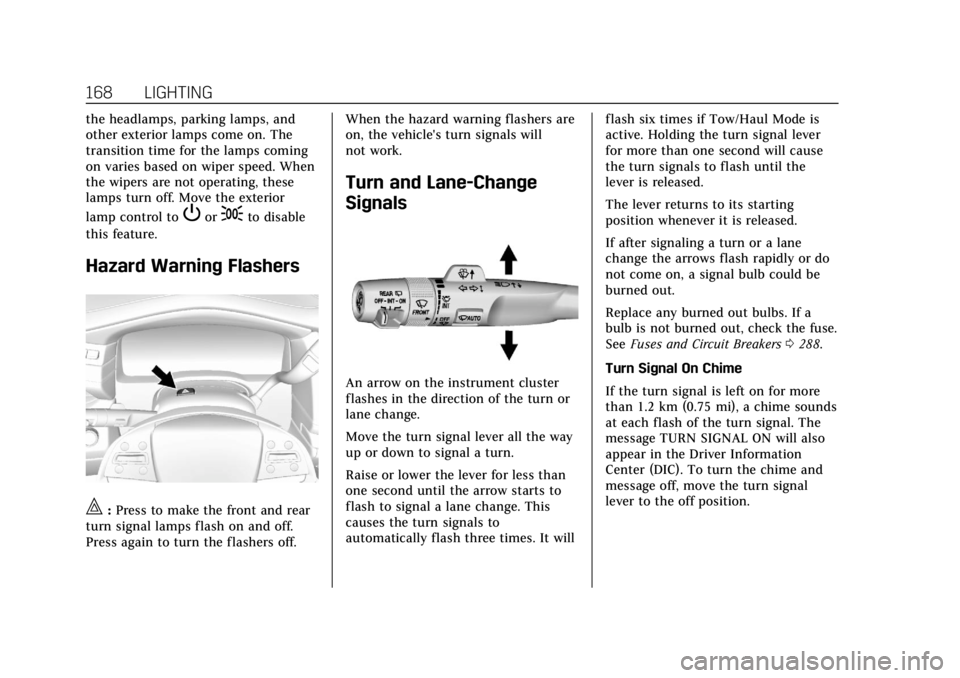
|: Press to make the front and rear
turn signal lamps flash on and off.
Press again to turn the flashers off. When the hazard warning flashers are
on, the vehicle's turn signals will
not work.
Turn and Lane-Change
Signals
An arrow on the instrument cluster
flashes in the direction of the turn or
lane change.
Move the turn signal lever all the way
up or down to signal a turn.
Raise or lower the lever for less than
one second until the arrow starts to
flash to signal a lane change. This
causes the turn signals to
automatically flash three times. It will
flash six times if Tow/Haul Mode is
active. Holding the turn signal lever
for more than one second will cause
the turn signals to flash until the
lever is released.
The lever returns to its starting
position whenever it is released.
If after signaling a turn or a lane
change the arrows flash rapidly or do
not come on, a signal bulb could be
burned out.
Replace any burned out bulbs. If a
bulb is not burned out, check the fuse.
See
Fuses and Circuit Breakers 0288.
Turn Signal On Chime
If the turn signal is left on for more
than 1.2 km (0.75 mi), a chime sounds
at each flash of the turn signal. The
message TURN SIGNAL ON will also
appear in the Driver Information
Center (DIC). To turn the chime and
message off, move the turn signal
lever to the off position.
Page 179 of 399
Cadillac Escalade Owner Manual (GMNA-Localizing-U.S./Canada/Mexico-
11349344) - 2018 - crc - 11/7/17
178 CLIMATE CONTROLS
Rear Climate Control
System
If equipped, the rear climate control
system is on the rear of the center
console. The settings can be adjusted
with the rear climate controls and the
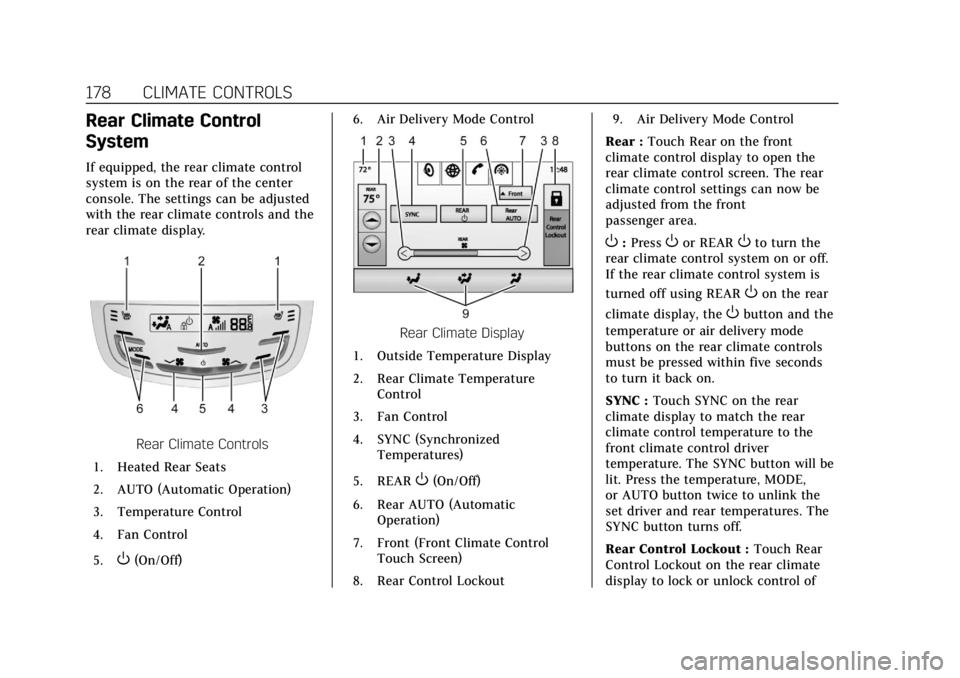
rear climate display.
Rear Climate Controls
1. Heated Rear Seats
2. AUTO (Automatic Operation)
3. Temperature Control
4. Fan Control
5.
O(On/Off) 6. Air Delivery Mode Control
Rear Climate Display
1. Outside Temperature Display
2. Rear Climate Temperature Control
3. Fan Control
4. SYNC (Synchronized Temperatures)
5. REAR
O(On/Off)
6. Rear AUTO (Automatic Operation)
7. Front (Front Climate Control Touch Screen)
8. Rear Control Lockout 9. Air Delivery Mode Control
Rear : Touch Rear on the front
climate control display to open the
rear climate control screen. The rear
climate control settings can now be
adjusted from the front
passenger area.
O: PressOor REAROto turn the
rear climate control system on or off.
If the rear climate control system is
turned off using REAR
Oon the rear
climate display, the
Obutton and the
temperature or air delivery mode
buttons on the rear climate controls
must be pressed within five seconds
to turn it back on.
SYNC : Touch SYNC on the rear
climate display to match the rear
climate control temperature to the
front climate control driver
temperature. The SYNC button will be
lit. Press the temperature, MODE,
or AUTO button twice to unlink the
set driver and rear temperatures. The
SYNC button turns off.
Rear Control Lockout : Touch Rear
Control Lockout on the rear climate
display to lock or unlock control of
Page 183 of 399
Cadillac Escalade Owner Manual (GMNA-Localizing-U.S./Canada/Mexico-
11349344) - 2018 - crc - 11/7/17
182 DRIVING AND OPERATING
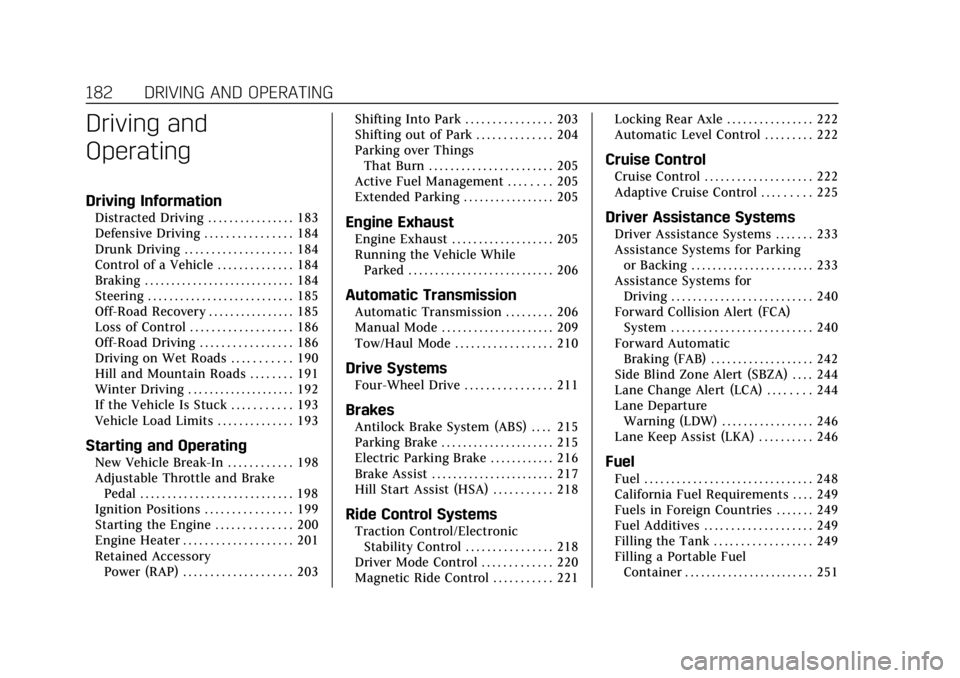
Driving and
Operating
Driving Information
Distracted Driving . . . . . . . . . . . . . . . . 183
Defensive Driving . . . . . . . . . . . . . . . . 184
Drunk Driving . . . . . . . . . . . . . . . . . . . . 184
Control of a Vehicle . . . . . . . . . . . . . . 184
Braking . . . . . . . . . . . . . . . . . . . . . . . . . . . . 184
Steering . . . . . . . . . . . . . . . . . . . . . . . . . . . 185
Off-Road Recovery . . . . . . . . . . . . . . . . 185
Loss of Control . . . . . . . . . . . . . . . . . . . 186
Off-Road Driving . . . . . . . . . . . . . . . . . 186
Driving on Wet Roads . . . . . . . . . . . 190
Hill and Mountain Roads . . . . . . . . 191
Winter Driving . . . . . . . . . . . . . . . . . . . . 192
If the Vehicle Is Stuck . . . . . . . . . . . 193
Vehicle Load Limits . . . . . . . . . . . . . . 193
Starting and Operating
New Vehicle Break-In . . . . . . . . . . . . 198
Adjustable Throttle and BrakePedal . . . . . . . . . . . . . . . . . . . . . . . . . . . . 198
Ignition Positions . . . . . . . . . . . . . . . . 199
Starting the Engine . . . . . . . . . . . . . . 200
Engine Heater . . . . . . . . . . . . . . . . . . . . 201
Retained Accessory Power (RAP) . . . . . . . . . . . . . . . . . . . . 203 Shifting Into Park . . . . . . . . . . . . . . . . 203
Shifting out of Park . . . . . . . . . . . . . . 204
Parking over Things
That Burn . . . . . . . . . . . . . . . . . . . . . . . 205
Active Fuel Management . . . . . . . . 205
Extended Parking . . . . . . . . . . . . . . . . . 205
Engine Exhaust
Engine Exhaust . . . . . . . . . . . . . . . . . . . 205
Running the Vehicle While
Parked . . . . . . . . . . . . . . . . . . . . . . . . . . . 206
Automatic Transmission
Automatic Transmission . . . . . . . . . 206
Manual Mode . . . . . . . . . . . . . . . . . . . . . 209
Tow/Haul Mode . . . . . . . . . . . . . . . . . . 210
Drive Systems
Four-Wheel Drive . . . . . . . . . . . . . . . . 211
Brakes
Antilock Brake System (ABS) . . . . 215
Parking Brake . . . . . . . . . . . . . . . . . . . . . 215
Electric Parking Brake . . . . . . . . . . . . 216
Brake Assist . . . . . . . . . . . . . . . . . . . . . . . 217
Hill Start Assist (HSA) . . . . . . . . . . . 218
Ride Control Systems
Traction Control/ElectronicStability Control . . . . . . . . . . . . . . . . 218
Driver Mode Control . . . . . . . . . . . . . 220
Magnetic Ride Control . . . . . . . . . . . 221 Locking Rear Axle . . . . . . . . . . . . . . . . 222
Automatic Level Control . . . . . . . . . 222
Cruise Control
Cruise Control . . . . . . . . . . . . . . . . . . . . 222
Adaptive Cruise Control . . . . . . . . . 225
Driver Assistance Systems
Driver Assistance Systems . . . . . . . 233
Assistance Systems for Parking
or Backing . . . . . . . . . . . . . . . . . . . . . . . 233
Assistance Systems for Driving . . . . . . . . . . . . . . . . . . . . . . . . . . 240
Forward Collision Alert (FCA) System . . . . . . . . . . . . . . . . . . . . . . . . . . 240
Forward Automatic Braking (FAB) . . . . . . . . . . . . . . . . . . . 242
Side Blind Zone Alert (SBZA) . . . . 244
Lane Change Alert (LCA) . . . . . . . . 244
Lane Departure Warning (LDW) . . . . . . . . . . . . . . . . . 246
Lane Keep Assist (LKA) . . . . . . . . . . 246
Fuel
Fuel . . . . . . . . . . . . . . . . . . . . . . . . . . . . . . . 248
California Fuel Requirements . . . . 249
Fuels in Foreign Countries . . . . . . . 249
Fuel Additives . . . . . . . . . . . . . . . . . . . . 249
Filling the Tank . . . . . . . . . . . . . . . . . . 249
Filling a Portable Fuel Container . . . . . . . . . . . . . . . . . . . . . . . . 251
Page 201 of 399

Cadillac Escalade Owner Manual (GMNA-Localizing-U.S./Canada/Mexico-
11349344) - 2018 - crc - 11/7/17
200 DRIVING AND OPERATING
{Warning
Turning off the vehicle while
moving may cause loss of power
assist in the brake and steering
systems and disable the airbags.
While driving, only shut the vehicle
off in an emergency.
If the vehicle cannot be pulled over,
and must be shut off while driving,
press and hold ENGINE START/STOP
for longer than two seconds, or press
twice in five seconds.
ACC/ACCESSORY (Amber Indicator
Light) : This mode allows some
electrical accessories to be used when
the engine is off.
With the ignition off, pressing the
button one time without the brake
pedal applied will place the ignition
system in ACC/ACCESSORY.
The ignition will switch from ACC/
ACCESSORY to off after five minutes
to prevent battery rundown. ON/RUN/START (Green Indicator
Light) :
This mode is for driving and
starting. With the ignition off, and the
brake pedal applied, pressing the
button once will turn the ignition on.
Once engine cranking begins, release
the button. Engine cranking will
continue until the engine starts. See
Starting the Engine 0200. The ignition
will then remain on.
Service Mode
This power mode is available for
service and diagnostics, and to verify
the proper operation of the
malfunction indicator lamp as may be
required for emission inspection
purposes. With the vehicle off, and the
brake pedal not applied, pressing and
holding the button for more than
five seconds will place the vehicle in
Service Mode. The instruments and
audio systems will operate as they do
when the ignition is on, but the
vehicle will not be able to be driven.
The engine will not start in Service
Mode. Press the button again to turn
the ignition off.
Starting the Engine
Move the shift lever to P (Park) or
N (Neutral). The engine will not start
in any other position. To restart the
engine when the vehicle is already
moving, use N (Neutral) only.
Caution
Do not try to shift to P (Park) if the
vehicle is moving. If you do, you
could damage the transmission.
Shift to P (Park) only when the
vehicle is stopped.
Caution
If you add electrical parts or
accessories, you could change the
way the engine operates. Any
resulting damage would not be
covered by the vehicle warranty. See
Add-On Electrical Equipment 0262.