center console CADILLAC ESCALADE 2018 User Guide
[x] Cancel search | Manufacturer: CADILLAC, Model Year: 2018, Model line: ESCALADE, Model: CADILLAC ESCALADE 2018Pages: 399, PDF Size: 6.23 MB
Page 119 of 399
Cadillac Escalade Owner Manual (GMNA-Localizing-U.S./Canada/Mexico-
11349344) - 2018 - crc - 11/7/17
118 STORAGE
Center Console Storage
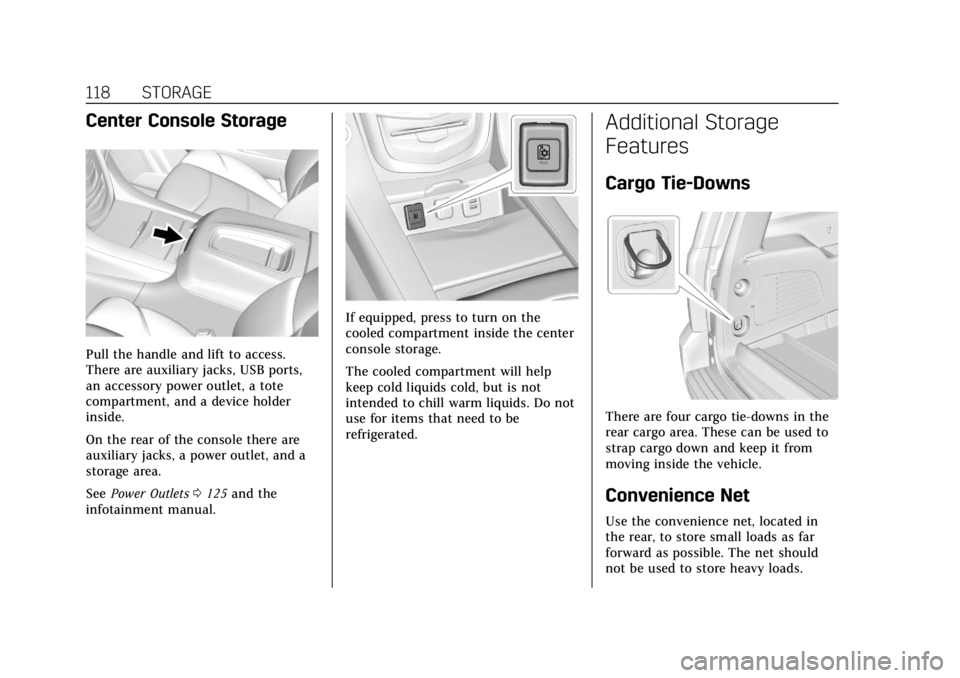
Pull the handle and lift to access.
There are auxiliary jacks, USB ports,
an accessory power outlet, a tote
compartment, and a device holder
inside.
On the rear of the console there are
auxiliary jacks, a power outlet, and a
storage area.
SeePower Outlets 0125 and the
infotainment manual.
If equipped, press to turn on the
cooled compartment inside the center
console storage.
The cooled compartment will help
keep cold liquids cold, but is not
intended to chill warm liquids. Do not
use for items that need to be
refrigerated.
Additional Storage
Features
Cargo Tie-Downs
There are four cargo tie-downs in the
rear cargo area. These can be used to
strap cargo down and keep it from
moving inside the vehicle.
Convenience Net
Use the convenience net, located in
the rear, to store small loads as far
forward as possible. The net should
not be used to store heavy loads.
Page 126 of 399
Cadillac Escalade Owner Manual (GMNA-Localizing-U.S./Canada/Mexico-
11349344) - 2018 - crc - 11/7/17
INSTRUMENTS AND CONTROLS 125
1. From the Home Page, touchSETTINGS, then touch Time
and Date.
2. Touch Set Date, then touch + or −to increase or decrease month,
day, or year.
3. Touch
[Back to go back to the
previous menu.
Auto Set
When on, the time and date will
automatically update.
To set auto set: 1. From the Home Page, touch SETTINGS, then touch Time
and Date.
2. Touch Set Time or Set Date.
3. Touch Auto Set, then select On-Cell Network or Off-Manual
to manually set the time
and date.
4. Touch
[Back to go back to the
previous menu.
If auto set is on, the time displayed on
the clock may not update immediately
when driving into a new time zone. In some regions, auto set may require
an active OnStar service plan,
if available.
Clock Display
When on, the digital clock will display
on the infotainment screen.
To set the clock display:
1. From the Home Page, touch SETTINGS, then touch Time
and Date.
2. Touch Clock Display, then select Off or On.
3. Touch
[Back to go back to the
previous menu.
Power Outlets
Power Outlets 12-Volt Direct Current
Accessory power outlets can be used
to plug in electrical equipment, such
as a cell phone or MP3 player.
The vehicle has five accessory power
outlets:
. One near the cupholders on the
center console
. One inside the center console .
One on the rear of the center
console
. One in the third row seat on the
driver side
. One in the rear cargo area on the
passenger side
Lift the cover to access and replace
when not in use.
The accessory power outlets are
powered as follows:
. The power outlet near the
cupholders on the center console
is powered in Retained Accessory
Power (RAP) mode. This outlet can
be configured to operate using
RAP or battery power. If the power
outlet is used while in the battery
power mode, this could cause
interference between the RKE
transmitter and the vehicle, and
the vehicle may not start. See
Ignition Positions 0199.
. The power outlets inside the
center console and on the rear of
the center console are powered
when the vehicle is started or the
ignition is in ACC/ACCESSORY,
Page 127 of 399
Cadillac Escalade Owner Manual (GMNA-Localizing-U.S./Canada/Mexico-
11349344) - 2018 - crc - 11/7/17
126 INSTRUMENTS AND CONTROLS
or until the driver door is opened
within 10 minutes of turning off
the vehicle. SeeRetained Accessory
Power (RAP) 0203.
. The power outlets in the third row
seat and in the rear cargo area are
powered at all times.
{Warning
Power is always supplied to the
outlets. Do not leave electrical
equipment plugged in when the
vehicle is not in use because the
vehicle could catch fire and cause
injury or death.
Caution
Leaving electrical equipment
plugged in for an extended period
of time while the vehicle is off will
drain the battery. Always unplug
electrical equipment when not in
use and do not plug in equipment
that exceeds the maximum 15 amp
rating. Certain power accessory plugs may
not be compatible with the accessory
power outlet and could overload
vehicle or adapter fuses. If a problem
is experienced, see your dealer.
When adding electrical equipment, be
sure to follow the proper installation
instructions included with the
equipment. See
Add-On Electrical
Equipment 0262.
Caution
Hanging heavy equipment from the
power outlet can cause damage not
covered by the vehicle warranty.
The power outlets are designed for
accessory power plugs only, such as
cell phone charge cords.
Power Outlet 110/120 Volt
Alternating Current
This power outlet can be used to plug
in electrical equipment that uses a
maximum limit of 150 watts.
The 110/120 volt power outlet is on
the rear of the center console. An indicator light on the outlet turns
on to show it is in use. The light
comes on when the vehicle is started,
equipment requiring less than 150
watts is plugged into the outlet, and
no system fault is detected.
The indicator light does not come on
when the ignition is off or if the
equipment is not fully seated into the
outlet.
If equipment is connected using more
than 150 watts or a system fault is
detected, a protection circuit shuts off
the power supply and the indicator
light turns off. To reset the circuit,
unplug the item and plug it back in or
turn the ignition off and then back to
on. The power restarts when
equipment using 150 watts or less is
plugged into the outlet and a system
fault is not detected.
The power outlet is not designed for
the following, and may not work
properly if they are plugged in:
.
Equipment with high initial peak
wattage, such as
compressor-driven refrigerators
and electric power tools
Page 128 of 399
Cadillac Escalade Owner Manual (GMNA-Localizing-U.S./Canada/Mexico-
11349344) - 2018 - crc - 11/7/17
INSTRUMENTS AND CONTROLS 127
.Other equipment requiring an
extremely stable power supply,
such as microcomputer-controlled
electric blankets and touch sensor
lamps
. Medical equipment.
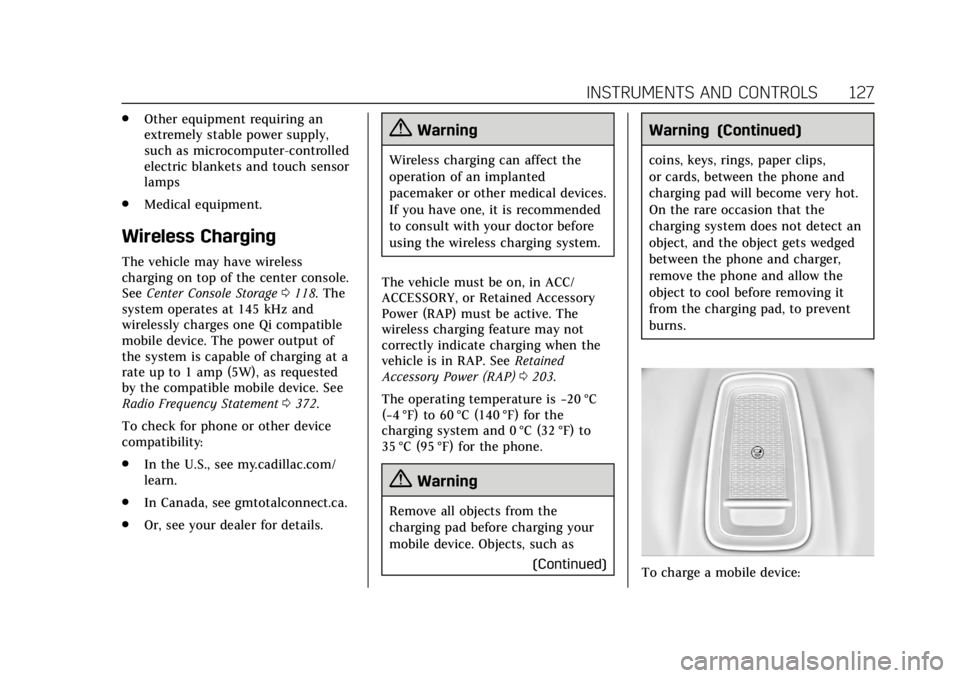
Wireless Charging
The vehicle may have wireless
charging on top of the center console.
See Center Console Storage 0118. The
system operates at 145 kHz and
wirelessly charges one Qi compatible
mobile device. The power output of
the system is capable of charging at a
rate up to 1 amp (5W), as requested
by the compatible mobile device. See
Radio Frequency Statement 0372.
To check for phone or other device
compatibility:
. In the U.S., see my.cadillac.com/
learn.
. In Canada, see gmtotalconnect.ca.
. Or, see your dealer for details.
{Warning
Wireless charging can affect the
operation of an implanted
pacemaker or other medical devices.
If you have one, it is recommended
to consult with your doctor before
using the wireless charging system.
The vehicle must be on, in ACC/
ACCESSORY, or Retained Accessory
Power (RAP) must be active. The
wireless charging feature may not
correctly indicate charging when the
vehicle is in RAP. See Retained
Accessory Power (RAP) 0203.
The operating temperature is −20 °C
(−4 °F) to 60 °C (140 °F) for the
charging system and 0 °C (32 °F) to
35 °C (95 °F) for the phone.
{Warning
Remove all objects from the
charging pad before charging your
mobile device. Objects, such as
(Continued)
Warning (Continued)
coins, keys, rings, paper clips,
or cards, between the phone and
charging pad will become very hot.
On the rare occasion that the
charging system does not detect an
object, and the object gets wedged
between the phone and charger,
remove the phone and allow the
object to cool before removing it
from the charging pad, to prevent
burns.
To charge a mobile device:
Page 130 of 399
Cadillac Escalade Owner Manual (GMNA-Localizing-U.S./Canada/Mexico-
11349344) - 2018 - crc - 11/7/17
INSTRUMENTS AND CONTROLS 129
AND ON ANY THEORY OF LIABILITY,
WHETHER IN CONTRACT, STRICT
LIABILITY, OR TORT (INCLUDING
NEGLIGENCE OR OTHERWISE)
ARISING IN ANY WAY OUT OF THE
USE OF THIS SOFTWARE, EVEN IF
ADVISED OF THE POSSIBILITY OF
SUCH DAMAGE.
Cigarette Lighter
If equipped with a cigarette lighter, it
is in the center console near the
cupholders. Press on the access door
to open it and use the lighter.
To use the cigarette lighter, push it in,
and let go. When it is ready, it will
pop back out by itself.
Caution
Holding a cigarette lighter in while
it is heating does not let the lighter
back away from the heating
element when it is hot. Damage
from overheating can occur to the
lighter or heating element, or a fuse(Continued)
Caution (Continued)
could be blown. Do not hold a
cigarette lighter in while it is
heating.
Ashtrays
If equipped, the ashtray is in the
center console cupholder.
Caution
If papers, pins, or other flammable
items are put in the ashtray, hot
cigarettes or other smoking
materials could ignite them and
possibly damage the vehicle. Never
put flammable items in the ashtray.
To remove the ashtray, pull it from
the cupholder. Push it back down to
be sure it is secure.
Warning Lights, Gauges,
and Indicators
Warning lights and gauges can signal
that something is wrong before it
becomes serious enough to cause an
expensive repair or replacement.
Paying attention to the warning lights
and gauges could prevent injury.
Some warning lights come on briefly
when the engine is started to indicate
they are working. When one of the
warning lights comes on and stays on
while driving, or when one of the
gauges shows there may be a problem,
check the section that explains what
to do. Waiting to do repairs can be
costly and even dangerous.
Page 136 of 399
Cadillac Escalade Owner Manual (GMNA-Localizing-U.S./Canada/Mexico-
11349344) - 2018 - crc - 11/7/17
INSTRUMENTS AND CONTROLS 135
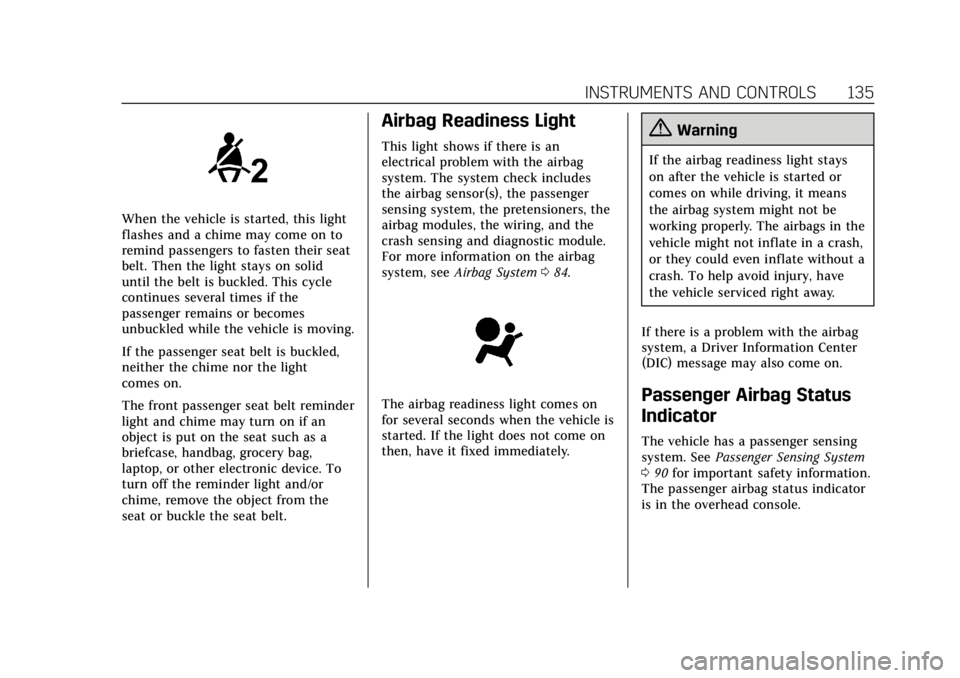
When the vehicle is started, this light
flashes and a chime may come on to
remind passengers to fasten their seat
belt. Then the light stays on solid
until the belt is buckled. This cycle
continues several times if the
passenger remains or becomes
unbuckled while the vehicle is moving.
If the passenger seat belt is buckled,
neither the chime nor the light
comes on.
The front passenger seat belt reminder
light and chime may turn on if an
object is put on the seat such as a
briefcase, handbag, grocery bag,
laptop, or other electronic device. To
turn off the reminder light and/or
chime, remove the object from the
seat or buckle the seat belt.
Airbag Readiness Light
This light shows if there is an
electrical problem with the airbag
system. The system check includes
the airbag sensor(s), the passenger
sensing system, the pretensioners, the
airbag modules, the wiring, and the
crash sensing and diagnostic module.
For more information on the airbag
system, seeAirbag System 084.
The airbag readiness light comes on
for several seconds when the vehicle is
started. If the light does not come on
then, have it fixed immediately.
{Warning
If the airbag readiness light stays
on after the vehicle is started or
comes on while driving, it means
the airbag system might not be
working properly. The airbags in the
vehicle might not inflate in a crash,
or they could even inflate without a
crash. To help avoid injury, have
the vehicle serviced right away.
If there is a problem with the airbag
system, a Driver Information Center
(DIC) message may also come on.
Passenger Airbag Status
Indicator
The vehicle has a passenger sensing
system. See Passenger Sensing System
0 90 for important safety information.
The passenger airbag status indicator
is in the overhead console.
Page 179 of 399
Cadillac Escalade Owner Manual (GMNA-Localizing-U.S./Canada/Mexico-
11349344) - 2018 - crc - 11/7/17
178 CLIMATE CONTROLS
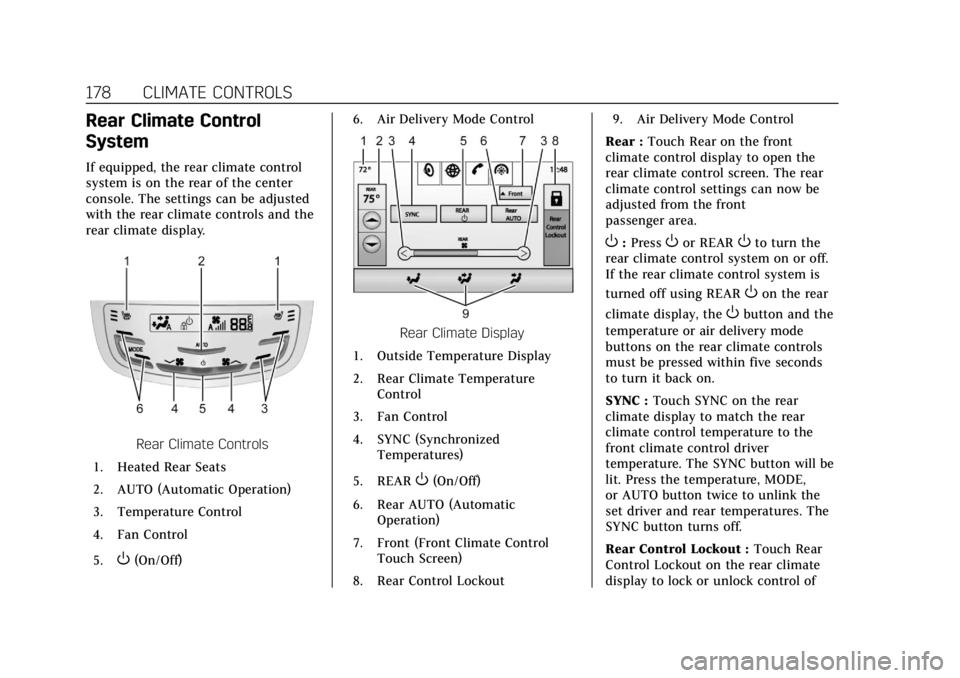
Rear Climate Control
System
If equipped, the rear climate control
system is on the rear of the center
console. The settings can be adjusted
with the rear climate controls and the
rear climate display.
Rear Climate Controls
1. Heated Rear Seats
2. AUTO (Automatic Operation)
3. Temperature Control
4. Fan Control
5.
O(On/Off) 6. Air Delivery Mode Control
Rear Climate Display
1. Outside Temperature Display
2. Rear Climate Temperature Control
3. Fan Control
4. SYNC (Synchronized Temperatures)
5. REAR
O(On/Off)
6. Rear AUTO (Automatic Operation)
7. Front (Front Climate Control Touch Screen)
8. Rear Control Lockout 9. Air Delivery Mode Control
Rear : Touch Rear on the front
climate control display to open the
rear climate control screen. The rear
climate control settings can now be
adjusted from the front
passenger area.
O: PressOor REAROto turn the
rear climate control system on or off.
If the rear climate control system is
turned off using REAR
Oon the rear
climate display, the
Obutton and the
temperature or air delivery mode
buttons on the rear climate controls
must be pressed within five seconds
to turn it back on.
SYNC : Touch SYNC on the rear
climate display to match the rear
climate control temperature to the
front climate control driver
temperature. The SYNC button will be
lit. Press the temperature, MODE,
or AUTO button twice to unlink the
set driver and rear temperatures. The
SYNC button turns off.
Rear Control Lockout : Touch Rear
Control Lockout on the rear climate
display to lock or unlock control of
Page 180 of 399
Cadillac Escalade Owner Manual (GMNA-Localizing-U.S./Canada/Mexico-
11349344) - 2018 - crc - 11/7/17
CLIMATE CONTROLS 179
the rear climate control system from
the front climate control display.
When locked the rear climate control
system cannot be adjusted from the
rear climate controls on the rear of
the center console.
Automatic Operation
Rear AUTO :Touch to turn on or off.
The air delivery and fan speed are
controlled automatically. The AUTO
indicator appears on the display on
the rear of the center console. If the
Mode or fan control buttons are
manually adjusted, this cancels the
automatic operation.
Manual Operation
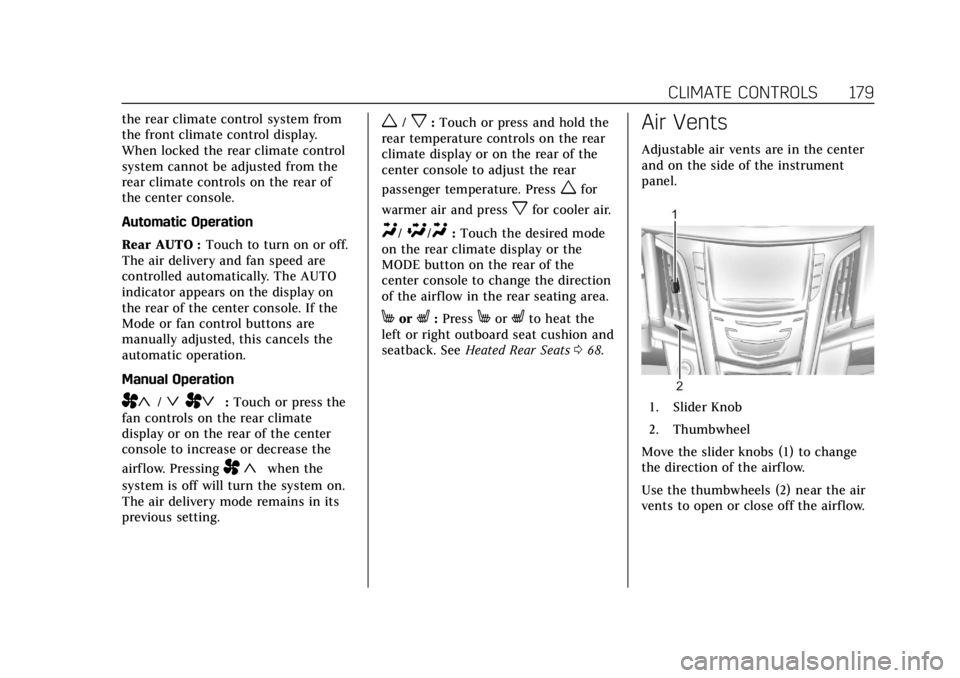
A«/ªAª: Touch or press the
fan controls on the rear climate
display or on the rear of the center
console to increase or decrease the
airf low. Pressing
A «when the
system is off will turn the system on.
The air delivery mode remains in its
previous setting.
w/x: Touch or press and hold the
rear temperature controls on the rear
climate display or on the rear of the
center console to adjust the rear
passenger temperature. Press
wfor
warmer air and press
xfor cooler air.
Y/\/Y: Touch the desired mode
on the rear climate display or the
MODE button on the rear of the
center console to change the direction
of the airflow in the rear seating area.
MorL: PressMorLto heat the
left or right outboard seat cushion and
seatback. See Heated Rear Seats 068.
Air Vents
Adjustable air vents are in the center
and on the side of the instrument
panel.
1. Slider Knob
2. Thumbwheel
Move the slider knobs (1) to change
the direction of the airf low.
Use the thumbwheels (2) near the air
vents to open or close off the airflow.
Page 221 of 399
Cadillac Escalade Owner Manual (GMNA-Localizing-U.S./Canada/Mexico-
11349344) - 2018 - crc - 11/7/17
220 DRIVING AND OPERATING
The vehicle has a Trailer Sway Control
(TSC) feature and a Hill Start Assist
(HSA) feature.
SeeTrailer Sway Control (TSC) 0260 or
Hill Start Assist (HSA) 0218.
Adding accessories can affect the
vehicle performance. See Accessories
and Modifications 0265.
Driver Mode Control
Driver Mode Control attempts to add
a sportier feel, provide a more
comfortable ride, or assist in different
weather conditions or terrain. This
system simultaneously changes the
software settings of various
sub-systems. Depending on the option
package, available features, and mode
selected, the suspension, steering, and
powertrain will change settings to
achieve the desired mode
characteristics. If the vehicle is
equipped with Magnetic Ride Control,
selecting the various Driver Modes
adjusts the ride of the vehicle to
enhance the ride performance for the
road conditions and the
selected mode. The Driver Mode Control has four
modes: Tour, Sport, Snow/Ice, and
Tow/Haul.
Press the Tow/Haul button to activate
and deactivate the Tow/Haul Mode.
Press the MODE switch on the center
console to select Tour, Sport, or Snow/
Ice. Pressing the switch will display a
graphic of all available ride modes and
change to the next mode. The Tour
and Sport Modes will feel similar on a
smooth road. Select a new setting
whenever driving conditions change.
Tour Mode
Use for normal city and highway
driving to provide a smooth, soft ride.
When selected, there will be no
indication in the DIC.
Sport Mode
Use where road conditions or personal
preference demand a more controlled
response.
The steering will change to provide
more precise control. The Magnetic
Ride Control will change to provide
better cornering performance.When selected, the Sport Mode
indicator will display in the DIC.
Snow/Ice Mode
Use when more traction is needed
during slippery conditions.
The vehicle will upshift normally
when the vehicle is moving. The
acceleration will adjust to help provide
a smoother launch.
When selected, the Snow/Ice Mode
indicator will display in the DIC.
Tow/Haul Mode
Tow/Haul is a feature that assists
when pulling a heavy trailer or a large
or heavy load. See
Tow/Haul Mode
0 210.
Tow/Haul is designed to be most
effective when the vehicle and trailer
combined weight is at least 75 percent
of the vehicle’s Gross Combined
Weight Rating (GCWR). See “Weight
of the Trailer” underTrailer Towing
0 255.
Page 389 of 399

Cadillac Escalade Owner Manual (GMNA-Localizing-U.S./Canada/Mexico-
11349344) - 2018 - crc - 11/7/17
388 INDEX
AutomaticDoor Locks . . . . . . . . . . . . . . . . . . . . . . . . . . 39
Forward Braking . . . . . . . . . . . . . . . . . . 242
Headlamp System . . . . . . . . . . . . . . . . 167
Level Control . . . . . . . . . . . . . . . . . . . . . . 222
Transmission . . . . . . . . . . . . . . . . . . . . . . 206
Transmission Fluid . . . . . . . . . . . . . . . 271
Automatic Transmission Manual Mode . . . . . . . . . . . . . . . . . . . . . 209
Shift Lock Control FunctionCheck . . . . . . . . . . . . . . . . . . . . . . . . . . . . 283
Axle, Front . . . . . . . . . . . . . . . . . . . . . . . . . . 282
Axle, Rear . . . . . . . . . . . . . . . . . . . . . . . . . . . 282
B
Battery Exterior Lighting Battery
Saver . . . . . . . . . . . . . . . . . . . . . . . . . . . . . 171
Load Management . . . . . . . . . . . . . . . . 171
Power Protection . . . . . . . . . . . . . . . . . . 171
Battery - North America . . . . . .280, 329
Blade Replacement, Wiper . . . . . . . . . 284
Brake
Parking, Electric . . . . . . . . . . . . . . . . . . 216
Pedal and Adjustable Throttle . . . 198
System Warning Light . . . . . . . . . . . . 138
Brakes . . . . . . . . . . . . . . . . . . . . . . . . . . . . . . . 278 Antilock . . . . . . . . . . . . . . . . . . . . . . . . . . . 215 Brakes (cont'd)
Assist . . . . . . . . . . . . . . . . . . . . . . . . . . . . . . 217
Fluid . . . . . . . . . . . . . . . . . . . . . . . . . . . . . . . 279
Parking . . . . . . . . . . . . . . . . . . . . . . . . . . . . 215
Braking . . . . . . . . . . . . . . . . . . . . . . . . . . . . . . 184 Automatic Forward . . . . . . . . . . . . . . . 242
Break-In, New Vehicle . . . . . . . . . . . . . . 198
Bulb Replacement Headlamp Aiming . . . . . . . . . . . . . . . . 287
Headlamps . . . . . . . . . . . . . . . . . . . . . . . . 287
License Plate Lamps . . . . . . . . . . . . . . 287
Buying New Tires . . . . . . . . . . . . . . . . . . . 314
C
Cadillac Premium Care Maintenance . . . . . . . . . . . . . . . . . . . . . . 347
Calibration . . . . . . . . . . . . . . . . . . . . . . . . . . 124
California Fuel Requirements . . . . . . . . . . . . . . . . 249
Perchlorate Materials
Requirements . . . . . . . . . . . . . . . . . . . 265
California Proposition 65 Warning . . . . . . . . . . . . .264, 280, 329, Back Cover
Canadian Vehicle Owners . . . . . . . . . . . . . 2
Capacities and Specifications . . . . . . 359
Carbon Monoxide Engine Exhaust . . . . . . . . . . . . . . . . . . . 205 Carbon Monoxide (cont'd)
Liftgate . . . . . . . . . . . . . . . . . . . . . . . . . . . . . . 41
Winter Driving . . . . . . . . . . . . . . . . . . . . 192
Cargo
Tie-Downs . . . . . . . . . . . . . . . . . . . . . . . . . 118
Caution, Danger, and Warning . . . . . . . . 3
Center Console Storage . . . . . . . . . . . . . 118
Chains, Tire . . . . . . . . . . . . . . . . . . . . . . . . . 318
Charging Wireless . . . . . . . . . . . . . . . . . . . . . . . . . . . 127
Charging System Light . . . . . . . . . . . . . 136
Check Engine Light (MalfunctionIndicator) . . . . . . . . . . . . . . . . . . . . . . . . 137
Child Restraints Infants and Young Children . . . . . . . . 98
Lower Anchors and Tethersfor Children . . . . . . . . . . . . . . . . . . . . . . 103
Older Children . . . . . . . . . . . . . . . . . . . . . . 96
Securing . . . . . . . . . . . . . . . . . . . . . . 111, 113
Systems . . . . . . . . . . . . . . . . . . . . . . . . . . . 100
Child-View Mirror . . . . . . . . . . . . . . . . . . . . 53
Cigarette Lighter . . . . . . . . . . . . . . . . . . . . 129
Circuit Breakers . . . . . . . . . . . . . . . . . . . . . 288
Cleaning Exterior Care . . . . . . . . . . . . . . . . . . . . . . 337
Interior Care . . . . . . . . . . . . . . . . . . . . . . 341