wheel CADILLAC ESCALADE 2020 Owner's Guide
[x] Cancel search | Manufacturer: CADILLAC, Model Year: 2020, Model line: ESCALADE, Model: CADILLAC ESCALADE 2020Pages: 392, PDF Size: 6.39 MB
Page 138 of 392
Cadillac Escalade Owner Manual (GMNA-Localizing-U.S./Canada/Mexico-
13566588) - 2020 - CRC - 4/24/19
INSTRUMENTS AND CONTROLS 137
.Video Voice-Over
. Valet Mode
. Teen Driver
. Radio
. Vehicle
. Bluetooth
. Apple CarPlay
. Android Auto
. Voice
. Display
. Rear Camera
. Return to Factory Settings
. Software Information
. Wi-Fi
Detailed information for each menu
follows.
Time and Date
Manually set the time and date. See
Clock 0109.
Rear Seat Reminder
This allows for a chime and a message
when the rear door has been opened
before or during operation of the
vehicle.
Select Off or On.
Language
Select Language, then select from the
available language(s).
The selected language will display on
the system, and voice recognition will
reflect the selected language.
Video Voice-Over
When activated, the Rear Seat
Infotainment (RSI) system will read
aloud menu titles, menu listings,
pop-ups, alerts, and file titles from
audio and video media.
Select Off or On.
Valet Mode
This will lock the infotainment system
and steering wheel controls. It may
also limit access to vehicle storage
locations, if equipped. To enable valet mode:
1. Enter a four-digit code on the keypad.
2. Select Enter to go to the confirmation screen.
3. Re-enter the four-digit code.
Touch Lock or Unlock to lock or
unlock the system. Touch Back to go
back to the previous menu.
Teen Driver
See “Teen Driver” under“Settings ”in
the infotainment manual.
Radio
Select to display the Radio menu and
the following may display:
. Manage Favorites
. Number of Favorites Shown
. Audible Touch Feedback
. Bose AudioPilot
. Auto Volume
. Maximum Startup Volume
Page 141 of 392

Cadillac Escalade Owner Manual (GMNA-Localizing-U.S./Canada/Mexico-
13566588) - 2020 - CRC - 4/24/19
140 INSTRUMENTS AND CONTROLS
Auto Power Assist Steps
This allows the feature to be turned
on or off. SeePower Assist Steps 028.
Select Off, On, or Extended.
Auto Memory Recall
This feature automatically recalls the
current driver’s previously stored 1 or
2 button positions when the ignition
is changed from off to on or ACC/
ACCESSORY. See Memory Seats045.
Select On or Off.
Easy Exit Options
This feature automatically recalls the
previously stored exit button position
when exiting the vehicle. See Memory
Seats 045.
Select Off or On.
Chime Volume
This allows the selection of the chime
volume level.
Touch + or −to adjust the volume. Hands Free Liftgate Control
The liftgate may be operated with a
kicking motion under the rear bumper.
See
Liftgate 020.
Select Off, On-Open and Close,
or On-Open Only.
Reverse Tilt Mirror
When on, the driver and/or passenger
mirrors will tilt downward when the
vehicle is shifted to R (Reverse) to
improve visibility of the ground near
the rear wheels. See Reverse Tilt
Mirrors 033.
Select Off, On - Driver and Passenger,
On - Driver, or On - Passenger.
Auto Mirror Folding
When on, the outside mirrors will
automatically fold or unfold when the
Remote Keyless Entry (RKE)
transmitter
QorKbutton is pressed
and held. See Folding Mirrors 033.
Select Off or On. Auto Wipe in Reverse Gear
When on and the front wiper is on,
the rear wiper will automatically
activate when the vehicle is shifted to
R (Reverse).
Select Off or On.
Lighting
Select the Lighting menu and the
following may display:
.
Vehicle Locator Lights
. Exit Lighting
Vehicle Locator Lights
This feature will flash the exterior
lamps and allows some of the exterior
lamps and most of the interior lamps
to turn on briefly when
Kon the
Remote Keyless Entry (RKE)
transmitter is pressed to locate the
vehicle.
Select On or Off.
Page 149 of 392
Cadillac Escalade Owner Manual (GMNA-Localizing-U.S./Canada/Mexico-
13566588) - 2020 - CRC - 4/24/19
148 LIGHTING
Lighting
Exterior Lighting
Exterior Lamp Controls . . . . . . . . . . 148
Exterior Lamps Off Reminder . . . 150
Headlamp High/Low-BeamChanger . . . . . . . . . . . . . . . . . . . . . . . . . . 150
Flash-to-Pass . . . . . . . . . . . . . . . . . . . . . 150
Daytime Running Lamps (DRL) . . . . . . . . . . . . . . . . . . . . 150
Automatic Headlamp System . . . 151
Hazard Warning Flashers . . . . . . . . 152
Turn and Lane-Change Signals . . . . . . . . . . . . . . . . . . . . . . . . . . . 152
Cornering Lamps . . . . . . . . . . . . . . . . . 153
Interior Lighting
Instrument Panel Illumination Control . . . . . . . . . . . . . . . . . . . . . . . . . . 153
Dome Lamps . . . . . . . . . . . . . . . . . . . . . 153
Reading Lamps . . . . . . . . . . . . . . . . . . . 154
Lighting Features
Entry Lighting . . . . . . . . . . . . . . . . . . . . 154
Exit Lighting . . . . . . . . . . . . . . . . . . . . . . 154
Battery Load Management . . . . . . 155
Battery Power Protection . . . . . . . . 155
Exterior Lighting Battery Saver . . . . . . . . . . . . . . . . . . . . . . . . . . . . . 155
Exterior Lighting
Exterior Lamp Controls
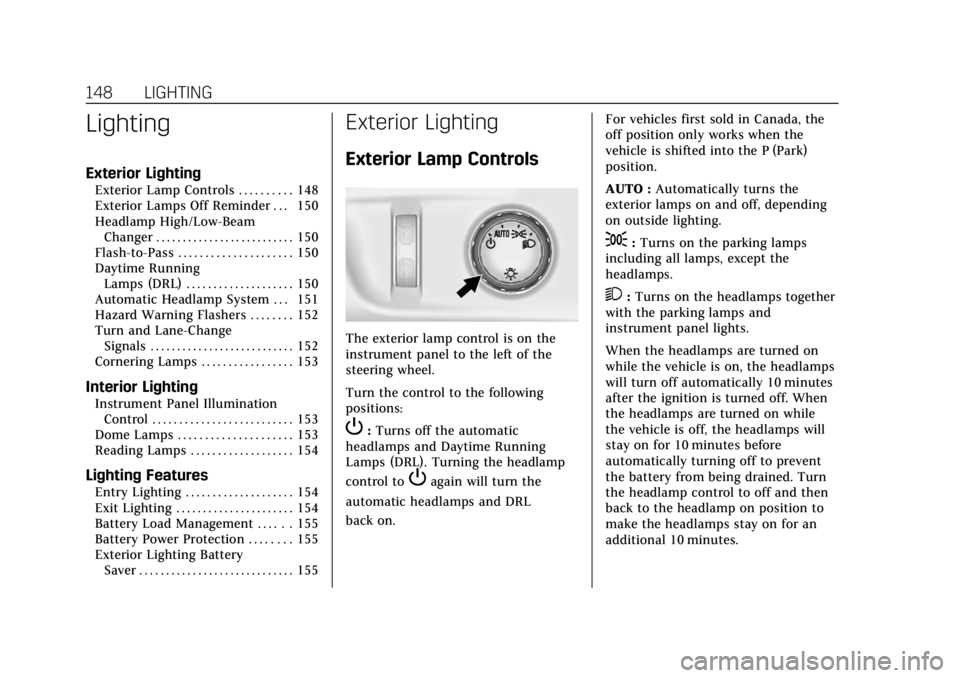
The exterior lamp control is on the
instrument panel to the left of the
steering wheel.
Turn the control to the following
positions:
P:Turns off the automatic
headlamps and Daytime Running
Lamps (DRL). Turning the headlamp
control to
Pagain will turn the
automatic headlamps and DRL
back on. For vehicles first sold in Canada, the
off position only works when the
vehicle is shifted into the P (Park)
position.
AUTO :
Automatically turns the
exterior lamps on and off, depending
on outside lighting.
;: Turns on the parking lamps
including all lamps, except the
headlamps.
2: Turns on the headlamps together
with the parking lamps and
instrument panel lights.
When the headlamps are turned on
while the vehicle is on, the headlamps
will turn off automatically 10 minutes
after the ignition is turned off. When
the headlamps are turned on while
the vehicle is off, the headlamps will
stay on for 10 minutes before
automatically turning off to prevent
the battery from being drained. Turn
the headlamp control to off and then
back to the headlamp on position to
make the headlamps stay on for an
additional 10 minutes.
Page 154 of 392

Cadillac Escalade Owner Manual (GMNA-Localizing-U.S./Canada/Mexico-
13566588) - 2020 - CRC - 4/24/19
LIGHTING 153
Cornering Lamps
If equipped with cornering lamps, they
automatically come on when all of the
following occur:
.The low-beam headlamps are on.
. The turn signals are activated or
the steering wheel is at a turning
angle.
. The vehicle speed is below 40 Km/
h or (25 mph).
Interior Lighting
Instrument Panel
Illumination Control
This feature controls the brightness of
the instrument panel lights and is
next to the exterior lamp control.
D:Move the thumbwheel up or
down to brighten or dim the lights.
The brightness of the displays
automatically adjusts based on
outdoor lighting. The instrument
panel illumination control will set the
lowest level to which the displays will
be automatically adjusted.
Dome Lamps
There are dome lamps in the overhead
console and the headliner, if equipped.
To change the dome lamp settings,
press the following:
OFF : Turns the lamps off, even when
a door is open.
DOOR : The lamps come on
automatically when a door is opened.
ON : Turns all dome lamps on.
Page 164 of 392

Cadillac Escalade Owner Manual (GMNA-Localizing-U.S./Canada/Mexico-
13566588) - 2020 - CRC - 4/24/19
CLIMATE CONTROLS 163
Rear Control Lockout :Touch Rear
Control Lockout on the rear climate
display to lock or unlock control of
the rear climate control system from
the front climate control display.
When locked the rear climate control
system cannot be adjusted from the
rear climate controls on the rear of
the center console.
Automatic Operation
Rear AUTO : Touch to turn on or off.
The air delivery and fan speed are
controlled automatically. The AUTO
indicator appears on the display on
the rear of the center console. If the
Mode or fan control buttons are
manually adjusted, this cancels the
automatic operation.
Manual Operation
A«/ªAª: Touch or press the
fan controls on the rear climate
display or on the rear of the center
console to increase or decrease the
airf low. Pressing
A «when the
system is off will turn the system on.
The air delivery mode remains in its
previous setting.
w/x: Touch or press and hold the
rear temperature controls on the rear
climate display or on the rear of the
center console to adjust the rear
passenger temperature. Press
wfor
warmer air and press
xfor cooler air.
Y/\/Y: Touch the desired mode
on the rear climate display or the
MODE button on the rear of the
center console to change the direction
of the airflow in the rear seating area.
MorL: PressMorLto heat the
left or right outboard seat cushion.
See Heated Rear Seats 050.
Air Vents
Adjustable air vents are in the center
and on the side of the instrument
panel.
1. Slider Knob
2. Thumbwheel
Move the slider knobs (1) to change
the direction of the airf low.
Use the thumbwheels (2) near the air
vents to open or close off the airflow.
Page 167 of 392
Cadillac Escalade Owner Manual (GMNA-Localizing-U.S./Canada/Mexico-
13566588) - 2020 - CRC - 4/24/19
166 DRIVING AND OPERATING
Driving and
Operating
Driving Information
Driving for Better FuelEconomy . . . . . . . . . . . . . . . . . . . . . . . . 167
Distracted Driving . . . . . . . . . . . . . . . . 167
Defensive Driving . . . . . . . . . . . . . . . . 168
Drunk Driving . . . . . . . . . . . . . . . . . . . . 168
Control of a Vehicle . . . . . . . . . . . . . . 168
Braking . . . . . . . . . . . . . . . . . . . . . . . . . . . . 169
Steering . . . . . . . . . . . . . . . . . . . . . . . . . . . 169
Off-Road Recovery . . . . . . . . . . . . . . . . 170
Loss of Control . . . . . . . . . . . . . . . . . . . 170
Off-Road Driving . . . . . . . . . . . . . . . . . 171
Driving on Wet Roads . . . . . . . . . . . 175
Hill and Mountain Roads . . . . . . . . 176
Winter Driving . . . . . . . . . . . . . . . . . . . . 177
If the Vehicle Is Stuck . . . . . . . . . . . 178
Vehicle Load Limits . . . . . . . . . . . . . . 178
Starting and Operating
New Vehicle Break-In . . . . . . . . . . . . 183
Adjustable Throttle and Brake Pedal . . . . . . . . . . . . . . . . . . . . . . . . . . . . 183
Ignition Positions . . . . . . . . . . . . . . . . 184
Starting the Engine . . . . . . . . . . . . . . 185
Engine Heater . . . . . . . . . . . . . . . . . . . . 186 Retained Accessory
Power (RAP) . . . . . . . . . . . . . . . . . . . . 188
Shifting Into Park . . . . . . . . . . . . . . . . 188
Shifting out of Park . . . . . . . . . . . . . . 189
Parking over Things That Burn . . . . . . . . . . . . . . . . . . . . . . . 190
Active Fuel Management . . . . . . . . 190
Extended Parking . . . . . . . . . . . . . . . . . 190
Engine Exhaust
Engine Exhaust . . . . . . . . . . . . . . . . . . . 190
Running the Vehicle While Parked . . . . . . . . . . . . . . . . . . . . . . . . . . . 191
Automatic Transmission
Automatic Transmission . . . . . . . . . 191
Manual Mode . . . . . . . . . . . . . . . . . . . . . 194
Tow/Haul Mode . . . . . . . . . . . . . . . . . . 195
Drive Systems
Four-Wheel Drive . . . . . . . . . . . . . . . . 196
Brakes
Antilock Brake System (ABS) . . . . 200
Parking Brake . . . . . . . . . . . . . . . . . . . . . 200
Electric Parking Brake . . . . . . . . . . . . 201
Brake Assist . . . . . . . . . . . . . . . . . . . . . . . 202
Hill Start Assist (HSA) . . . . . . . . . . . 202
Ride Control Systems
Traction Control/ElectronicStability Control . . . . . . . . . . . . . . . . 203 Driver Mode Control . . . . . . . . . . . . . 205
Magnetic Ride Control . . . . . . . . . . . 206
Locking Rear Axle . . . . . . . . . . . . . . . . 206
Automatic Level Control . . . . . . . . . 207
Cruise Control
Cruise Control . . . . . . . . . . . . . . . . . . . . 207
Adaptive Cruise Control . . . . . . . . . 210
Driver Assistance Systems
Driver Assistance Systems . . . . . . . 218
Assistance Systems for Parking
or Backing . . . . . . . . . . . . . . . . . . . . . . . 219
Assistance Systems for Driving . . . . . . . . . . . . . . . . . . . . . . . . . . 225
Forward Collision Alert (FCA) System . . . . . . . . . . . . . . . . . . . . . . . . . . 226
Automatic Emergency Braking (AEB) . . . . . . . . . . . . . . . . . . . 228
Side Blind Zone Alert (SBZA) . . . . 230
Lane Change Alert (LCA) . . . . . . . . 230
Lane Keep Assist (LKA) . . . . . . . . . . 232
Fuel
Top Tier Fuel . . . . . . . . . . . . . . . . . . . . . 234
Recommended Fuel . . . . . . . . . . . . . . 234
Prohibited Fuels . . . . . . . . . . . . . . . . . . 234
Fuels in Foreign Countries . . . . . . . 235
Fuel Additives . . . . . . . . . . . . . . . . . . . . 235
Filling the Tank . . . . . . . . . . . . . . . . . . 235
Page 168 of 392
Cadillac Escalade Owner Manual (GMNA-Localizing-U.S./Canada/Mexico-
13566588) - 2020 - CRC - 4/24/19
DRIVING AND OPERATING 167
Filling a Portable FuelContainer . . . . . . . . . . . . . . . . . . . . . . . . 237
Trailer Towing
General Towing Information . . . . 237
Driving Characteristics andTowing Tips . . . . . . . . . . . . . . . . . . . . . 237
Trailer Towing . . . . . . . . . . . . . . . . . . . . 242
Towing Equipment . . . . . . . . . . . . . . . 247
Trailer Sway Control (TSC) . . . . . . 251
Conversions and Add-Ons
Add-On Electrical Equipment . . . 253
Driving Information
Driving for Better Fuel
Economy
Driving habits can affect fuel mileage.
Here are some driving tips to get the
best fuel economy possible:
. Set the climate controls to the
desired temperature after the
engine is started, or turn them off
when not required.
. Avoid fast starts and accelerate
smoothly.
. Brake gradually and avoid abrupt
stops.
. Avoid idling the engine for long
periods of time.
. When road and weather
conditions are appropriate, use
cruise control.
. Always follow posted speed limits
or drive more slowly when
conditions require.
. Keep vehicle tires properly
inflated. .
Combine several trips into a
single trip.
. Replace the vehicle's tires with the
same TPC Spec number molded
into the tire's sidewall near
the size.
. Follow recommended scheduled
maintenance.
Distracted Driving
Distraction comes in many forms and
can take your focus from the task of
driving. Exercise good judgment and
do not let other activities divert your
attention away from the road. Many
local governments have enacted laws
regarding driver distraction. Become
familiar with the local laws in
your area.
To avoid distracted driving, keep your
eyes on the road, keep your hands on
the steering wheel, and focus your
attention on driving.
.Do not use a phone in demanding
driving situations. Use a
hands-free method to place or
receive necessary phone calls.
Page 171 of 392
Cadillac Escalade Owner Manual (GMNA-Localizing-U.S./Canada/Mexico-
13566588) - 2020 - CRC - 4/24/19
170 DRIVING AND OPERATING
If the steering wheel is turned until it
reaches the end of its travel, and is
held in that position for an extended
period of time, power steering assist
may be reduced.
Normal use of the power steering
assist should return when the system
cools down.
See your dealer if there is a problem.
Curve Tips
.Take curves at a reasonable speed.
. Reduce speed before entering a
curve.
. Maintain a reasonable steady
speed through the curve.
. Wait until the vehicle is out of the
curve before accelerating gently
into the straightaway.
Steering in Emergencies
.There are some situations when
steering around a problem may be
more effective than braking. .
Holding both sides of the steering
wheel allows you to turn
180 degrees without removing
a hand.
. Antilock Brake System (ABS)
allows steering while braking.
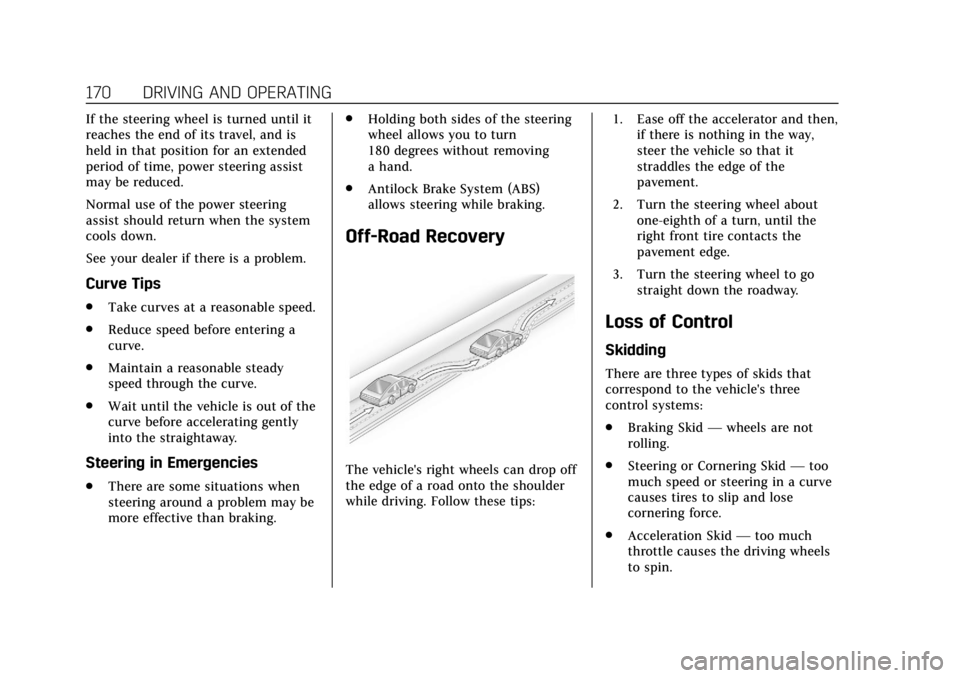
Off-Road Recovery
The vehicle's right wheels can drop off
the edge of a road onto the shoulder
while driving. Follow these tips: 1. Ease off the accelerator and then,
if there is nothing in the way,
steer the vehicle so that it
straddles the edge of the
pavement.
2. Turn the steering wheel about one-eighth of a turn, until the
right front tire contacts the
pavement edge.
3. Turn the steering wheel to go straight down the roadway.
Loss of Control
Skidding
There are three types of skids that
correspond to the vehicle's three
control systems:
.Braking Skid —wheels are not
rolling.
. Steering or Cornering Skid —too
much speed or steering in a curve
causes tires to slip and lose
cornering force.
. Acceleration Skid —too much
throttle causes the driving wheels
to spin.
Page 172 of 392
Cadillac Escalade Owner Manual (GMNA-Localizing-U.S./Canada/Mexico-
13566588) - 2020 - CRC - 4/24/19
DRIVING AND OPERATING 171
Defensive drivers avoid most skids by
taking reasonable care suited to
existing conditions, and by not
overdriving those conditions. But
skids are always possible.
If the vehicle starts to slide, follow
these suggestions:
.Ease your foot off the accelerator
pedal and steer the way you want
the vehicle to go. The vehicle may
straighten out. Be ready for a
second skid if it occurs.
. Slow down and adjust your driving
according to weather conditions.
Stopping distance can be longer
and vehicle control can be affected
when traction is reduced by water,
snow, ice, gravel, or other material
on the road. Learn to recognize
warning clues —such as enough
water, ice, or packed snow on the
road to make a mirrored surface
— and slow down when you have
any doubt.
. Try to avoid sudden steering,
acceleration, or braking, including
reducing vehicle speed by shifting to a lower gear. Any sudden
changes could cause the tires to
slide.
Remember: Antilock brakes help avoid
only the braking skid.
Off-Road Driving
Four-wheel-drive vehicles can be used
for off-road driving. Vehicles without
four-wheel drive and vehicles not
equipped with All Terrain (AT) or
On-Off Road (OOR) tires must not be
driven off-road except on a level, solid
surface. For contact information about
the original equipment tires, see the
warranty manual.
One of the best ways for successful
off-road driving is to control the
speed.
{Warning
When driving off-road, bouncing
and quick changes in direction can
easily throw you out of position.
This could cause you to lose control
and crash. You and your passengers
should always wear seat belts.
Before Driving Off-Road
. Have all necessary maintenance
and service work completed.
. Fuel the vehicle, fill fluid levels,
and check inflation pressure in all
tires, including the spare,
if equipped.
. Read all the information about
four-wheel-drive vehicles in this
manual.
. Know the local laws that apply to
off-road driving.
To gain more ground clearance if
needed, it may be necessary to remove
the front fascia lower air dam,
if equipped. However, driving without
the air dam reduces fuel economy.
Caution
Operating the vehicle for extended
periods without the front fascia
lower air dam installed can cause
improper airf low to the engine.
Reattach the front fascia air dam
after off-road driving.
Page 173 of 392

Cadillac Escalade Owner Manual (GMNA-Localizing-U.S./Canada/Mexico-
13566588) - 2020 - CRC - 4/24/19
172 DRIVING AND OPERATING
Loading the Vehicle for Off-Road
Driving
{Warning
.Unsecured cargo on the load
floor can be tossed about
when driving over rough
terrain. You or your
passengers can be struck by
flying objects. Secure the
cargo properly.
. Keep cargo in the cargo area
as far forward and as low as
possible. The heaviest things
should be on the floor,
forward of the rear axle.
. Heavy loads on the roof raise
the vehicle's center of gravity,
making it more likely to roll
over. You can be seriously or
fatally injured if the vehicle
rolls over. Put heavy loads
inside the cargo area, not on
the roof. For more information about
loading the vehicle, see
Vehicle Load
Limits 0178 and
Tires 0291.Environmental Concerns
.
Always use established trails,
roads, and areas that have been
set aside for public off-road
recreational driving and obey all
posted regulations.
. Do not damage shrubs, flowers,
trees, or grasses or disturb wildlife.
. Do not park over things that burn.
See Parking over Things That Burn
0 190.
Driving on Hills
Driving safely on hills requires good
judgment and an understanding of
what the vehicle can and cannot do.
{Warning
Many hills are simply too steep for
any vehicle. Driving up hills can
cause the vehicle to stall. Driving
(Continued)
Warning (Continued)
down hills can cause loss of control.
Driving across hills can cause a
rollover. You could be injured or
killed. Do not drive on steep hills.
Before driving on a hill, assess the
steepness, traction, and obstructions.
If the terrain ahead cannot be seen,
get out of the vehicle and walk the hill
before driving further.
When driving on hills:
. Use a low gear and keep a firm
grip on the steering wheel.
. Maintain a slow speed.
. When possible, drive straight up
or down the hill.
. Slow down when approaching the
top of the hill.
. Use headlamps even during the
day to make the vehicle more
visible.