center console CADILLAC ESCALADE 2021 User Guide
[x] Cancel search | Manufacturer: CADILLAC, Model Year: 2021, Model line: ESCALADE, Model: CADILLAC ESCALADE 2021Pages: 492, PDF Size: 7.92 MB
Page 110 of 492

Cadillac Escalade Owner Manual (GMNA-Localizing-U.S./Canada/Mexico-
13690472) - 2021 - CRC - 8/10/21
INSTRUMENTS AND CONTROLS 109
Standard Floor Console
Cooling Floor Console
Lift the cover to access and replace
when not in use. The accessory power outlets are
powered as follows:
.The power outlets are powered
when the vehicle is started or the
ignition is in ACC/ACCESSORY,
or until the driver door is opened
within 10 minutes of turning off the
vehicle. See
Retained Accessory
Power (RAP) 0248.
Caution
Leaving electrical equipment
plugged in for an extended period
of time while the vehicle is off will
drain the battery. Always unplug
electrical equipment when not in
use and do not plug in equipment
that exceeds the maximum 15 amp
rating.
Certain power accessory plugs may
not be compatible with the accessory
power outlet and could overload
vehicle or adapter fuses. If a problem
is experienced, see your dealer. When adding electrical equipment, be
sure to follow the proper installation
instructions included with the
equipment. See
Add-On Electrical
Equipment 0360.
Caution
Hanging heavy equipment from the
power outlet can cause damage not
covered by the vehicle warranty.
The power outlets are designed for
accessory power plugs only, such as
cell phone charge cords.
Power Outlet 110/120 Volt
Alternating Current
If equipped, the vehicle has two
alternating current power outlets.
.Rear storage area
.Back of the center console
Page 122 of 492

Cadillac Escalade Owner Manual (GMNA-Localizing-U.S./Canada/Mexico-
13690472) - 2021 - CRC - 8/10/21
INSTRUMENTS AND CONTROLS 121
sensing and diagnostic module. For
more information on the airbag
system, seeAirbag System 065.
The airbag readiness light comes on
for several seconds when the vehicle is
started. If the light does not come on
then, have it fixed immediately.
{Warning
If the airbag readiness light stays
on after the vehicle is started or
comes on while driving, it means
the airbag system might not be
working properly. The airbags in the
vehicle might not inflate in a crash,
or they could even inflate without a
crash. To help avoid injury, have
the vehicle serviced right away.
If there is a problem with the airbag
system, a Driver Information Center
(DIC) message may also come on.
Passenger Airbag Status
Indicator
The vehicle has a passenger sensing
system. See Passenger Sensing System
0 71 for important safety information.
The overhead console has a passenger
airbag status indicator.
United States and Canada
When the vehicle is started, the
passenger airbag status indicator will
light ON and OFF, and the symbols for
on and off, for several seconds as a
system check. Then, after several more
seconds, the status indicator will light
either ON or OFF, and the symbol for
on or off, to let you know the status of
the front outboard passenger frontal
airbag. If the word ON, and the on symbol,
are lit on the passenger airbag status
indicator, it means that the front
outboard passenger frontal airbag is
allowed to inflate.
If the word OFF, and the off symbol,
are lit on the passenger airbag status
indicator, it means that the passenger
sensing system has turned off the
front outboard passenger frontal
airbag.
If, after several seconds, both status
indicator lights remain on, if there are
no lights at all, or if the airbag
readiness light is on, there may be a
problem with the lights or the
passenger sensing system. See your
dealer for service right away.
{Warning
If the airbag readiness light ever
comes on and stays on, it means
that something may be wrong with
the airbag system. To help avoid
injury to yourself or others, have
(Continued)
Page 159 of 492
Cadillac Escalade Owner Manual (GMNA-Localizing-U.S./Canada/Mexico-
13690472) - 2021 - CRC - 8/10/21
158 INFOTAINMENT SYSTEM
Introduction
Read the following pages to become
familiar with the features.
{Warning
Taking your eyes off the road for
too long or too often while using
any infotainment feature can cause
a crash. You or others could be
injured or killed. Do not give
extended attention to infotainment
tasks while driving. Limit your
glances at the vehicle displays and
focus your attention on driving. Use
voice commands whenever possible.
The infotainment system has built-in
features intended to help avoid
distraction by disabling some features
when driving. These features may gray
out when they are unavailable. Many
infotainment features are also
available through the instrument
cluster and steering wheel controls. Before driving:
.Become familiar with the operation,
center stack controls, steering wheel
controls, and infotainment display.
.Set up the audio by presetting
favorite stations, setting the tone,
and adjusting the speakers.
.Set up phone numbers in advance
so they can be called easily by
pressing a single control or by using
a single voice command.
See Distracted Driving 0230.
Overview
Infotainment System
The infotainment system is controlled
by using the infotainment display,
controls on the center console,
steering wheel controls, and voice
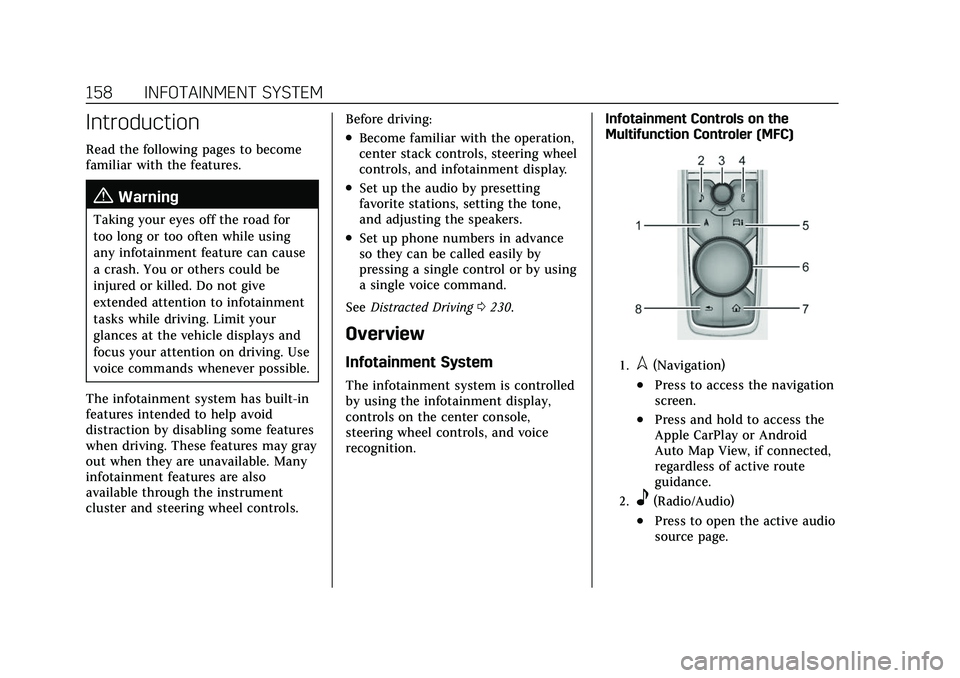
recognition. Infotainment Controls on the
Multifunction Controler (MFC)
1.l(Navigation)
.Press to access the navigation
screen.
.Press and hold to access the
Apple CarPlay or Android
Auto Map View, if connected,
regardless of active route
guidance.
2.e(Radio/Audio)
.Press to open the active audio
source page.
Page 170 of 492
Cadillac Escalade Owner Manual (GMNA-Localizing-U.S./Canada/Mexico-
13690472) - 2021 - CRC - 8/10/21
INFOTAINMENT SYSTEM 169
reception. If the vehicle has a sunroof,
and it is open, reception can also be
affected.
Audio Players
Avoiding Untrusted Media
Devices
When using media devices such as SD
cards, USB devices, and mobile
devices, consider the source.
Untrusted media devices could
contain files that affect system
operation or performance. Avoid use if
the content or origin cannot be
trusted.
USB Port
Audio stored on a USB device may be
listened to.
The vehicle may be equipped with two
USB ports in the center console under
the armrest and another two on the
center stack. These ports are for data
and charging. There may also be two
USB ports at the rear of the centerconsole and a USB port on each side
of the third row seats for
charging only.
Caution
To avoid vehicle damage, unplug all
accessories and disconnect all
accessory cables from the vehicle
when not in use. Accessory cables
left plugged into the vehicle,
unconnected to a device, could be
damaged or cause an electrical
short if the unconnected end comes
in contact with liquids or another
power source such as the accessory
power outlet.
Playing from a USB
A USB mass storage device can be
connected to the USB port.
Audio extensions supported by the
USB may include:
.MP3
.AAC
.OGG
.3GPGracenote
When plugging in a USB device,
Gracenote service builds voice tags for
music. Voice tags allow artists, albums
with hard to pronounce names, and
nicknames to be used to play music
through voice recognition, if equipped.
While indexing, infotainment features
may be available.
My Media Library
MyMedia is only available when more
than one indexed device is connected.
It allows access to content from all
indexed media sources. MyMedia will
show as an available source in the
Source page.
USB MP3 Player and USB Devices
The USB MP3 players and USB devices
connected must comply with the USB
Mass Storage Class specification
(USB MSC).
To play a USB device:
1. Connect the USB.
2. Touch Audio from the Home Page.
3. Touch the More option and then touch the USB device.
Page 179 of 492
Cadillac Escalade Owner Manual (GMNA-Localizing-U.S./Canada/Mexico-
13690472) - 2021 - CRC - 8/10/21
178 INFOTAINMENT SYSTEM
.porj(Play or Pause): Touchpto
play or touch
jto pause depending
on the current selection.
.Listen: Touch Listen to hear the
audio source on the vehicle
speakers.
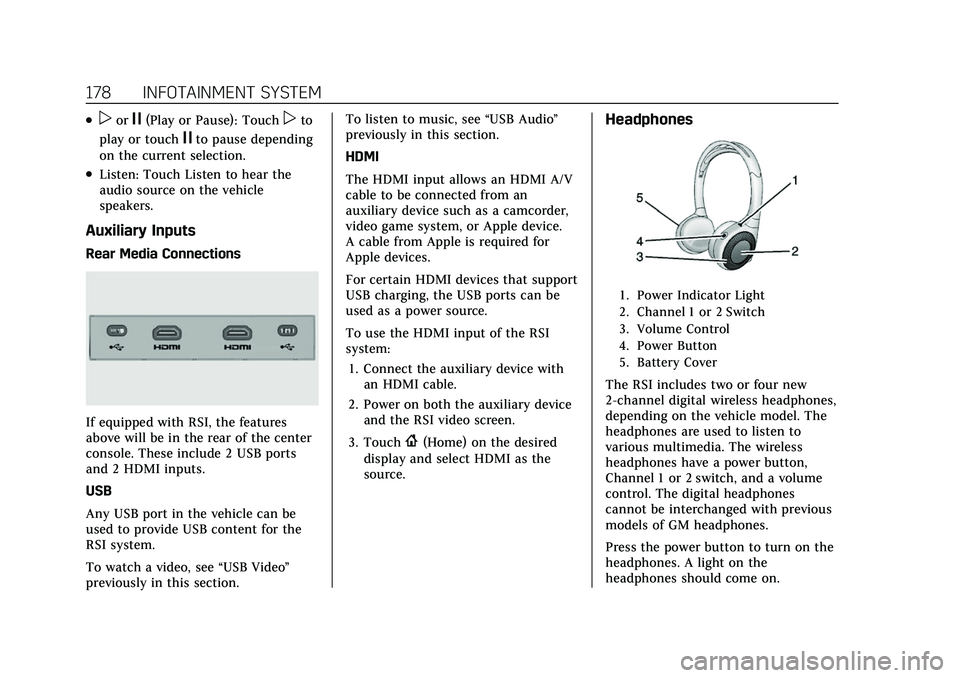
Auxiliary Inputs
Rear Media Connections
If equipped with RSI, the features
above will be in the rear of the center
console. These include 2 USB ports
and 2 HDMI inputs.
USB
Any USB port in the vehicle can be
used to provide USB content for the
RSI system.
To watch a video, see “USB Video”
previously in this section. To listen to music, see
“USB Audio”
previously in this section.
HDMI
The HDMI input allows an HDMI A/V
cable to be connected from an
auxiliary device such as a camcorder,
video game system, or Apple device.
A cable from Apple is required for
Apple devices.
For certain HDMI devices that support
USB charging, the USB ports can be
used as a power source.
To use the HDMI input of the RSI
system:
1. Connect the auxiliary device with an HDMI cable.
2. Power on both the auxiliary device and the RSI video screen.
3. Touch
{(Home) on the desired
display and select HDMI as the
source.
Headphones
1. Power Indicator Light
2. Channel 1 or 2 Switch
3. Volume Control
4. Power Button
5. Battery Cover
The RSI includes two or four new
2-channel digital wireless headphones,
depending on the vehicle model. The
headphones are used to listen to
various multimedia. The wireless
headphones have a power button,
Channel 1 or 2 switch, and a volume
control. The digital headphones
cannot be interchanged with previous
models of GM headphones.
Press the power button to turn on the
headphones. A light on the
headphones should come on.
Page 225 of 492
Cadillac Escalade Owner Manual (GMNA-Localizing-U.S./Canada/Mexico-
13690472) - 2021 - CRC - 8/10/21
224 CLIMATE CONTROLS
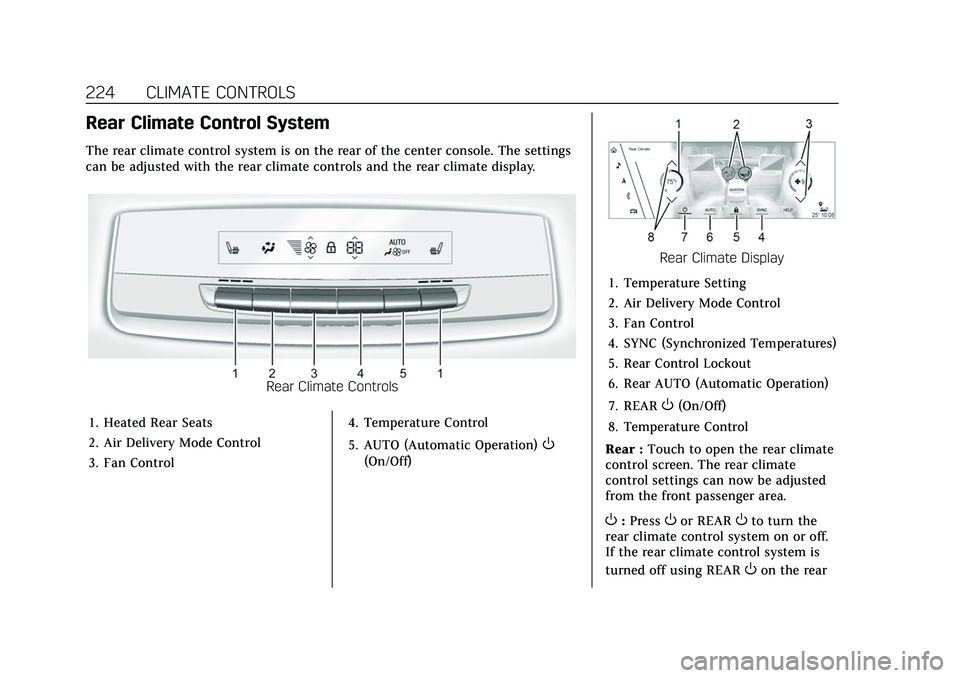
Rear Climate Control System
The rear climate control system is on the rear of the center console. The settings
can be adjusted with the rear climate controls and the rear climate display.
Rear Climate Controls
1. Heated Rear Seats
2. Air Delivery Mode Control
3. Fan Control 4. Temperature Control
5. AUTO (Automatic Operation)
O
(On/Off)
Rear Climate Display
1. Temperature Setting
2. Air Delivery Mode Control
3. Fan Control
4. SYNC (Synchronized Temperatures)
5. Rear Control Lockout
6. Rear AUTO (Automatic Operation)
7. REAR
O(On/Off)
8. Temperature Control
Rear : Touch to open the rear climate
control screen. The rear climate
control settings can now be adjusted
from the front passenger area.
O: PressOor REAROto turn the
rear climate control system on or off.
If the rear climate control system is
turned off using REAR
Oon the rear
Page 226 of 492
Cadillac Escalade Owner Manual (GMNA-Localizing-U.S./Canada/Mexico-
13690472) - 2021 - CRC - 8/10/21
CLIMATE CONTROLS 225
climate display, theObutton and the
temperature or air delivery mode
buttons on the rear climate controls
must be pressed within five seconds
to turn it back on.
SYNC : Touch SYNC on the rear
climate display to match the rear
climate control temperature to the
front climate control driver
temperature. The SYNC button will be
lit. Press the temperature, MODE,
or AUTO button to unlink the set
driver and rear temperatures. The
SYNC button turns off.
Rear Control Lockout : Touch Rear
Control Lockout on the rear climate
display to lock or unlock control of
the rear climate control system from
the front climate control display.
When locked the rear climate control
system cannot be adjusted from the
rear climate controls on the rear of
the center console.
Automatic Operation
Rear AUTO : Touch to turn on or off.
The air delivery and fan speed are
controlled automatically. The AUTO
indicator appears on the display on the rear of the center console. If the
Mode or fan control buttons are
manually adjusted, this cancels the
automatic operation.
Manual Operation
A«/ªAª:
Touch or press the
fan controls on the rear climate
display or on the rear of the center
console to increase or decrease the
airf low. Pressing
A «when the
system is off will turn the system on.
The air delivery mode remains in its
previous setting.
«/ª: Touch or press and hold the
rear temperature controls on the rear
climate display or on the rear of the
center console to adjust the rear
passenger temperature. Press
«for
warmer air and press
ªfor cooler air.
Y/\/Y: Touch the desired mode
on the rear climate display or the
MODE button on the rear of the
center console to change the direction
of the airflow in the rear seating area.
MorL: PressMorLto heat the left
or right outboard seat cushion. See
Heated Rear Seats 050.
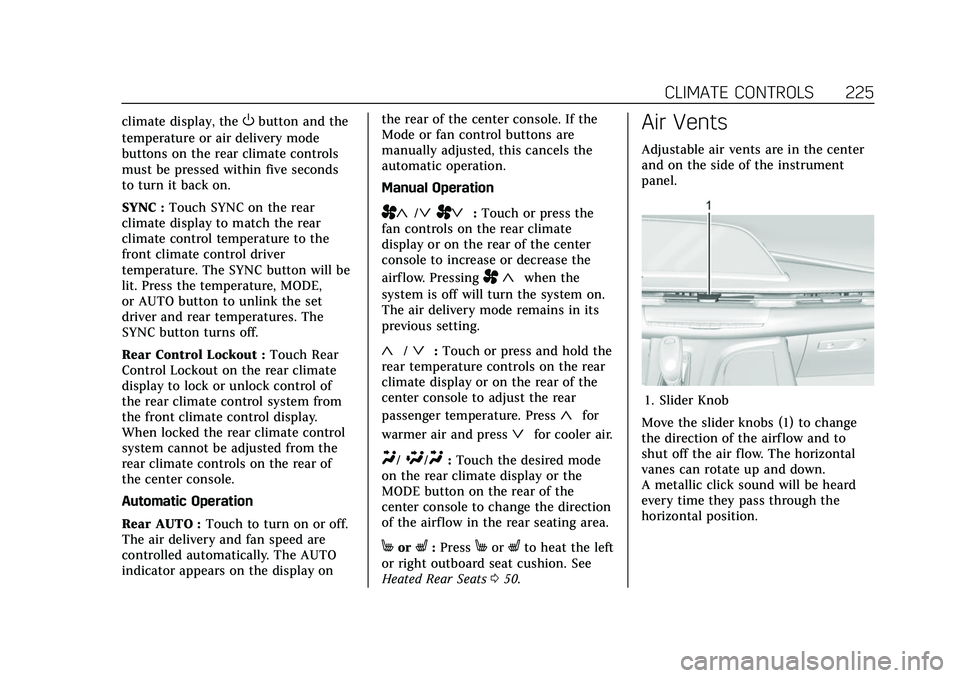
Air Vents
Adjustable air vents are in the center
and on the side of the instrument
panel.
1. Slider Knob
Move the slider knobs (1) to change
the direction of the airf low and to
shut off the air flow. The horizontal
vanes can rotate up and down.
A metallic click sound will be heard
every time they pass through the
horizontal position.
Page 326 of 492

Cadillac Escalade Owner Manual (GMNA-Localizing-U.S./Canada/Mexico-
13690472) - 2021 - CRC - 8/10/21
DRIVING AND OPERATING 325
{Warning
The LKA system does not
continuously steer the vehicle.
It may not keep the vehicle in the
lane or give a Lane Departure
Warning (LDW) alert, even if a lane
marking is detected.
The LKA and LDW systems
may not:
.Provide an alert or enough
steering assist to avoid a lane
departure or crash.
.Detect lane markings under poor
weather or visibility conditions.
This can occur if the windshield
or headlamps are blocked by dirt,
snow, or ice; if they are not in
proper condition; or if the sun
shines directly into the camera.
.Detect road edges.
.Detect lanes on winding or hilly
roads.
If LKA only detects lane markings
on one side of the road, it will only
assist or provide an LDW alert (Continued)
Warning (Continued)
when approaching the lane on the
side where it has detected a lane
marking. Even with LKA and LDW,
you must steer the vehicle. Always
keep your attention on the road and
maintain proper vehicle position
within the lane, or vehicle damage,
injury, or death could occur. Always
keep the windshield, headlamps,
and camera sensors clean and in
good repair. Do not use LKA in bad
weather conditions or on roads with
unclear lane markings, such as
construction zones.
{Warning
Using LKA while towing a trailer or
on slippery roads could cause loss
of control of the vehicle and a
crash. Turn the system off.
How the System Works
LKA uses a camera sensor installed on
the windshield ahead of the rearview
mirror to detect lane markings. It may provide brief steering assist if it
detects an unintended lane departure.
It may further provide an audible alert
or the driver seat may pulse indicating
that a lane marking has been crossed.
To turn LKA on and off, press
Aon
the center console. If equipped, the
indicator light on the button comes
on when LKA is on and turns off
when LKA is disabled.
When on,
Ais white, if equipped,
indicating that the system is not
ready to assist.
Ais green if LKA is
ready to assist. LKA may assist by
gently turning the steering wheel if
the vehicle approaches a detected
lane marking.
Ais amber when
assisting. It may also provide a Lane
Departure Warning (LDW) alert by
flashing
Aamber if the vehicle
crosses a detected lane marking.
Additionally, there may be three
beeps, or the driver seat may pulse
three times, on the right or left,
depending on the lane departure
direction.
Page 481 of 492
Cadillac Escalade Owner Manual (GMNA-Localizing-U.S./Canada/Mexico-
13690472) - 2021 - CRC - 8/10/21
480 INDEX
Appearance CareExterior . . . . . . . . . . . . . . . . . . . . . . . . . . . . 432
Interior . . . . . . . . . . . . . . . . . . . . . . . . . . . . 437
Apple CarPlay and Android Auto . . . . . . . . . . . . . . . . . . . . . . 202
Armrest Storage . . . . . . . . . . . . . . . . . . . . . . 98
Assistance Systems for Driving . . . . 313
Assistance Systems for Parking and Backing . . . . . . . . . . . . . . . . . . . . . . . 299
Audio Bluetooth . . . . . . . . . . . . . . . . . . . . . . . . . . 171
Auto Stop Stop/Start System . . . . . . . . . . . . . . . . 247
Automatic Dimming Mirrors . . . . . . . . . . . . . . . . . . 33
Door Locks . . . . . . . . . . . . . . . . . . . . . . . . . 19
Emergency Braking (AEB) . . . . . . . . 315
Headlamp System . . . . . . . . . . . . . . . . 152
Transmission . . . . . . . . . . . . . . . . . . . . . . 251
Transmission Fluid . . . . . . . . . . . . . . . 370
Vehicle Hold Light . . . . . . . . . . . . . . . . 125
Automatic Transmission Manual Mode . . . . . . . . . . . . . . . . . . . . . 255
Automatic Vehicle Hold (AVH) . . . . 263
Avoiding Untrusted Media Devices . . . . . . . . . . . . . . . . . . . . . . . . . . . . . 169
Axle, Front . . . . . . . . . . . . . . . . . . . . . . . . . . 381
Axle, Rear . . . . . . . . . . . . . . . . . . . . . . . . . . . 381B
Battery Exterior Lighting BatterySaver . . . . . . . . . . . . . . . . . . . . . . . . . . . . . 156
Load Management . . . . . . . . . . . . . . . . 155
Power Protection . . . . . . . . . . . . . . . . . . 156
Battery - North America . . . . . .380, 425
Blade Replacement, Wiper . . . . . . . . . 382
Bluetooth Overview . . . . . . . . . . . . . . . . . . . . 196, 197
Bluetooth Audio . . . . . . . . . . . . . . . . . . . . 171
Brake Electric Boost . . . . . . . . . . . . . . . . . . . . . 261
Parking, Electric . . . . . . . . . . . . . . . . . . 261
System Warning Light . . . . . . . . . . . . 124
Brake Pad Life System . . . . . . . . . . . . . . 378
Brakes . . . . . . . . . . . . . . . . . . . . . . . . . . . . . . . 377 Antilock . . . . . . . . . . . . . . . . . . . . . . . . . . . 261
Assist . . . . . . . . . . . . . . . . . . . . . . . . . . . . . . 263
Fluid . . . . . . . . . . . . . . . . . . . . . . . . . . . . . . . 379
Pad Life System . . . . . . . . . . . . . . . . . . . 378
Braking . . . . . . . . . . . . . . . . . . . . . . . . . . . . . . 231 Automatic Emergency (AEB) . . . . . 315
Braking System
Front Pedestrian (FPB) . . . . . . . . . . . 317
Break-In, New Vehicle . . . . . . . . . . . . . . 244
Bulb Replacement Headlamp Aiming . . . . . . . . . . . . . . . . 384 Bulb Replacement (cont'd)
Headlamps . . . . . . . . . . . . . . . . . . . . . . . . 384
Buying New Tires . . . . . . . . . . . . . . . . . . . 408
C
Calibration . . . . . . . . . . . . . . . . . . . . . . . . . . 108
California Perchlorate Materials
Requirements . . . . . . . . . . . . . . . . . . . 363
California Proposition 65 Warning . . . . . . . . . . . . .363, 380, 425, Back Cover
Canadian Vehicle Owners . . . . . . . . . . . . . 1
Capacities and Specifications . . . . . . 455
Carbon Monoxide Engine Exhaust . . . . . . . . . . . . . . . . . . . 250
Liftgate . . . . . . . . . . . . . . . . . . . . . . . . . . . . . 20
Winter Driving . . . . . . . . . . . . . . . . . . . . 239
Cargo Tie-Downs . . . . . . . . . . . . . . . . . . . . . . . . . 100
Caution, Danger, and Warning . . . . . . . . 2
Center Console Storage . . . . . . . . . . . . . . 99
Chains, Tire . . . . . . . . . . . . . . . . . . . . . . . . . 412
Charging Wireless . . . . . . . . . . . . . . . . . . . . . . . . . . . 111
Charging System Light . . . . . . . . . . . . . 122
Page 489 of 492
Cadillac Escalade Owner Manual (GMNA-Localizing-U.S./Canada/Mexico-
13690472) - 2021 - CRC - 8/10/21
488 INDEX
S
Safety Defects ReportingCanadian Government . . . . . . . . . . . . 468
General Motors . . . . . . . . . . . . . . . . . . . 468
U.S. Government . . . . . . . . . . . . . . . . . . 468
Safety Locks . . . . . . . . . . . . . . . . . . . . . . . . . . 19
Safety System Check . . . . . . . . . . . . . . . . 64
Satellite Radio . . . . . . . . . . . . . . . . . . . . . . 166
Scheduling Appointments . . . . . . . . . . 463
Seat Belts . . . . . . . . . . . . . . . . . . . . . . . . . . . . . 58 Care . . . . . . . . . . . . . . . . . . . . . . . . . . . . . . . . . 65
Extender . . . . . . . . . . . . . . . . . . . . . . . . . . . . 64
How to Wear Seat BeltsProperly . . . . . . . . . . . . . . . . . . . . . . . . . . . 59
Lap-Shoulder Belt . . . . . . . . . . . . . . . . . . 61
Reminders . . . . . . . . . . . . . . . . . . . . . . . . . 119
Replacing after a Crash . . . . . . . . . . . . 65
Use During Pregnancy . . . . . . . . . . . . . 64
Seats
Head Restraints . . . . . . . . . . . . . . . . . . . . 41
Heated and Ventilated Front . . . . . . 48
Heated, Rear . . . . . . . . . . . . . . . . . . . . . . . 50
Lumbar Adjustment, Front . . . . . . . . 44
Memory . . . . . . . . . . . . . . . . . . . . . . . . . . . . 45
Power Adjustment, Front . . . . . . . . . 43
Rear . . . . . . . . . . . . . . . . . . . . . . . . . . . . . . . . . 50
Reclining Seatbacks . . . . . . . . . . . . . . . 45
Second Row . . . . . . . . . . . . . . . . . . . . . . . . 51 Seats (cont'd)
Third Row Seat . . . . . . . . . . . . . . . . . . . . 55
Second Row Seats . . . . . . . . . . . . . . . . . . . 51
Securing Child Restraints . . . . . . . 91, 94
Security Light . . . . . . . . . . . . . . . . . . . . . . . . . . . . . . . 130
OnStar . . . . . . . . . . . . . . . . . . . . . . . . . . . . . 472
Vehicle . . . . . . . . . . . . . . . . . . . . . . . . . . . . . . 28
Vehicle Alarm . . . . . . . . . . . . . . . . . . . . . . 28
Service . . . . . . . . . . . . . . . . . . . . . . . . . . . . . . . 227 Accessories andModifications . . . . . . . . . . . . . . . . . . . . 364
Doing Your Own Work . . . . . . . . . . . 364
Maintenance Records . . . . . . . . . . . . 453
Maintenance, General Information . . . . . . . . . . . . . . . . . . . . . . 441
Parts Identification . . . . . . . . . . . . . . . 454
Scheduling Appointments . . . . . . . . 463
Service Electric Parking Brake Light . . . . . . . . . . . . . . . . . . . . . . . . . . . . . . . 125
Services
Special Application . . . . . . . . . . . . . . . 448
Servicing System . . . . . . . . . . . . . . . . . . . . 190
Servicing the Airbag . . . . . . . . . . . . . . . . . 75
Settings . . . . . . . . . . . . . . . . . . . . . . . . . . . . . . 203
Shifting Into Park . . . . . . . . . . . . . . . . . . . . . . . . . . 248
Out of Park . . . . . . . . . . . . . . . . . . . . . . . . 249 Side Blind Zone Alert (SBZA) . . . . . . 321
Signals, Turn and Lane-Change . . . . 153
Software Updates . . . . . . . . . . . . . . . . . . . 163
Special Application Services . . . . . . . 448
Specifications and Capacities . . . . . . 455
Speedometer . . . . . . . . . . . . . . . . . . . . . . . . 115
StabiliTrak
OFF Light . . . . . . . . . . . . . . . . . . . . . . . . . . 127
Start Assist, Hill . . . . . . . . . . . . . . . . . . . . 263
Start Vehicle, Remote . . . . . . . . . . . . . . . 14
Starting the Engine . . . . . . . . . . . . . . . . . 246
Steering . . . . . . . . . . . . . . . . . . . . . . . . . . . . . . 232 Heated Wheel . . . . . . . . . . . . . . . . . . . . . 104
Wheel Adjustment . . . . . . . . . . . . . . . . 104
Wheel Controls . . . . . . . . . . . . . . . . . . . 104
Steering Column Lock . . . . . . . . . . . . . . . 30
Steering Wheel Controls . . . . . . . . . . . 160
Steps
Power Assist . . . . . . . . . . . . . . . . . . . . . . . 28
Stop/Start System . . . . . . . . . . . . . . . . . . 247
Storage Rear . . . . . . . . . . . . . . . . . . . . . . . . . . . . . . . . . 98
Storage Areas Armrest . . . . . . . . . . . . . . . . . . . . . . . . . . . . . 98
Center Console . . . . . . . . . . . . . . . . . . . . . 99
Convenience Net . . . . . . . . . . . . . . . . . . 101
Glove Box . . . . . . . . . . . . . . . . . . . . . . . . . . 97
Roof Rack System . . . . . . . . . . . . . . . . 101