change wheel CADILLAC ESCALADE 2021 User Guide
[x] Cancel search | Manufacturer: CADILLAC, Model Year: 2021, Model line: ESCALADE, Model: CADILLAC ESCALADE 2021Pages: 492, PDF Size: 7.92 MB
Page 155 of 492

Cadillac Escalade Owner Manual (GMNA-Localizing-U.S./Canada/Mexico-
13690472) - 2021 - CRC - 8/10/21
154 LIGHTING
Interior Lighting
Instrument Panel
Illumination Control
This feature adjusts the brightness of
all illuminated controls.
D:Move the thumbwheel up or
down to set the lowest level of
automatic brightness control.
The thumbwheel is functional at
night, or when the headlamps or
parking lamps are ON.
The brightness of the displays
automatically adjusts based on
outdoor lighting. The instrument
panel illumination control will set the
lowest level to which the displays will
be automatically adjusted.
Interior Lamps
Interior Ambient Lighting
If equipped, this feature allows the
color of the interior lighting in the
vehicle to be chosen.
To access, press
{on the
infotainment controls, then touch
AMBIENT LIGHTING to display the
settings screen.
Touch to select from the following:
OFF : Turns the feature off.
ON : Turns the feature on. Ambient
lighting provides the ability to
customize the color and intensity of
the interior accent lighting. Chose the
color on the display screen to make
change to interior lighting color.
DEMO MODE : When the shift lever
is in P (Park), touch to turn the
feature on in colors chosen by the
vehicle. When the shift lever is not in
P (Park) , the interior color will default
to the last active color selected.
LINK TO DRIVE MODE : The light
color is matched to the color being
used for the drive mode.
Dome Lamps
There are dome lamps in the overhead
console and the headliner.
To change the dome lamp settings,
press the following:
Press and hold any of the overhead
console lens to turn all dome lamps
on. Press and hold any of the
overhead consoles lens again to turn
all dome lamps off.
Press OFF
jto turn off the dome
lamps when any door is opened,
Kon
the remote key is pressed, or when the
ignition is switched off. An indicator
light on the button will turn on when
Page 172 of 492
Cadillac Escalade Owner Manual (GMNA-Localizing-U.S./Canada/Mexico-
13690472) - 2021 - CRC - 8/10/21
INFOTAINMENT SYSTEM 171
Composers:1. Touch to view the composers on the USB.
2. Touch a Composer to view a list of albums by that composer.
3. Touch an album or All Songs to view a list of songs.
4. Touch a song from the list to begin playback.
Folders: 1. Touch to view the directories on the USB.
2. Touch a folder to view a list of all files.
3. Touch a file from the list to begin playback.
Podcasts : Touch to view the podcasts
on the connected Apple device and
get a list of podcast episodes.
Audiobooks:
1. Touch to view the audiobooks stored on the Apple device.
2. Touch an audiobook to get a list of chapters.
3. Touch the chapter from the list to begin playback. File System and Naming
File systems supported by the USB
may include:
.FAT32
.NTFS
.HFS+
The songs, artists, albums, and genres
are taken from the file’s song
information and are only displayed if
present. The radio displays the file
name as the track name if the song
information is not available.
Supported Apple Devices
To view supported devices, see
my.cadillac.com/learn.
Media Playback and Mute
USB playback will be paused if the
system is muted. If the steering wheel
mute control is pressed again,
playback will resume.
If the source is changed while in
mute, playback resumes and audio
will unmute.
Bluetooth Audio
Music may be played from a paired
Bluetooth device. See Bluetooth
(Pairing and Using a Phone) 0197 or
Bluetooth (Overview) 0196 for help
pairing a device.
Volume and song selection may be
controlled by using the infotainment
controls or the mobile device.
If Bluetooth is selected and no volume
is present, check the volume setting
on both your mobile device and the
infotainment system.
Music can be launched by touching
Bluetooth from the recent sources list
on the left of the display or by
touching the More option and then
touching the Bluetooth device.
To play music via Bluetooth:
1. Power on the device, and pair to connect the device.
2. Once paired, touch Audio from the Home Page, then touch Bluetooth
from the recent sources list on the
left of the display.
Page 183 of 492

Cadillac Escalade Owner Manual (GMNA-Localizing-U.S./Canada/Mexico-
13690472) - 2021 - CRC - 8/10/21
182 INFOTAINMENT SYSTEM
Map Colors
.Day (Light)
.Night (Dark)
.Auto–Touch to automatically
change modes based on lighting
conditions.
3D Landmark (Default is On) :
Touch On or Off. When turned on, the
system will display all 3D Landmarks
on the map depending on the zoom
level.
3D Buildings (Default is Off ) : Touch
On or Off. When turned on, the
system will display all of the possible
3D building shapes on the map
depending on the zoom level.
Show Terrain in 3D (Default is
Off ) : If equipped, touch On or Off.
When turned on, the system will
display terrain information on the
map in 3D view.
Auto-Zoom (Default is On) : Touch
On or Off. When turned on, the
system will automatically adjust the
zoom level when the vehicle is
approaching a turn. After the turn is
completed, the system automatically
brings the zoom back to the originally set level. If the vehicle is approaching
a turn with the next turn occurring
shortly after, the Auto-Zoom will
remain on until both turns are
completed.
Preferred Route
To access, touch Settings, then More
Settings, and then Preferred Route.
Choose from two different route
options: Fastest or Eco-Friendly.
.Fastest would be the route with the
shortest drive time.
.Eco-Friendly would be the most
fuel-efficient route.
Avoid on Route
To access, touch Settings, and then
Avoid on Route.
Choose any of the road features to
avoid while on route:
.Highways
.Unpaved Roads
.Ferries
.Carpool Lanes
.Toll Roads
.Tunnels
.Country Borders Navigation Voice Control
Touch to access the voice control
setting display.
.Navigation Volume
–To adjust the
volume level, use the sliding bar on
the Navigation screen. If the voice
guidance prompt is being heard,
volume can also be adjusted using
the knob on the center stack or the
volume switch on the steering
wheel.
.Directional Navigation Prompts –
Allows prompts to play on the left
or right side of the vehicle
depending on the direction of the
upcoming turn. This can be turned
on or off.
.Navigation Voice Prompt Level
during a Call. Options available are:
‐ Full Prompt (Selected by default)
‐ Tone Only
‐ None
Traffic Preferences (If Equipped)
While in Map View, select Settings,
then More Settings, and then Traffic
Preferences. When Show Traffic on
Map is turned on, the feature provides
Page 202 of 492
Cadillac Escalade Owner Manual (GMNA-Localizing-U.S./Canada/Mexico-
13690472) - 2021 - CRC - 8/10/21
INFOTAINMENT SYSTEM 201
1. Touch the Phone icon on theHome Page.
2. Touch Keypad and enter partial phone numbers or contact names
using the digits on the keypad to
search.
Results will show on the right side
of the display. Touch one to place
a call.
Accepting or Declining a Call
When an incoming call is received, the
infotainment system mutes and a ring
tone is heard in the vehicle.
Accepting a Call
Use the steering wheel scroll wheel to
select
#, otherwise press6on steering
wheel controls.
Declining a Call
Use steering wheel scroll wheel to
select
K.
Call Waiting
Call waiting must be supported on the
Bluetooth cell phone and enabled by
the wireless service carrier to work. Accepting a Call
Press
6on steering wheel controls to
answer.
Declining a Call
Use steering wheel scroll wheel to
select
Kto decline.
Switching Between Calls (Call
Waiting Calls Only)
To switch between calls, touch Phone
on the Home Page to display Call
View. While in Call View, touch the
call information of the call on hold to
change calls.
Three-Way Calling
Three-way calling must be supported
on the Bluetooth cell phone and
enabled by the wireless service carrier
to work.
To start a three-way call while in a
current call: 1. In the Call View, touch Add Call to add another call.
2. Initiate the second call by selecting from Recents, Contacts, or Keypad. 3. When the second call is active,
touch the merge icon to conference
the three-way call together.
Ending a Call
.Press6on the steering wheel
controls.
.Touch#on the infotainment
display, next to a call, to end only
that call.
Dual Tone Multi-Frequency
(DTMF) Tones
The in-vehicle Bluetooth system can
send numbers during a call. This is
used when calling a menu-driven
phone system. Use the Keypad to
enter the number.
Phone Settings
Touch6on the home page and then
touch Settings. The following may
display:
.Contacts
.Active Call View
.OnStar Phone TTY Mode
Page 230 of 492
Cadillac Escalade Owner Manual (GMNA-Localizing-U.S./Canada/Mexico-
13690472) - 2021 - CRC - 8/10/21
DRIVING AND OPERATING 229
Driving and
Operating
Driving Information
Driving for Better FuelEconomy . . . . . . . . . . . . . . . . . . . . . . . . 230
Distracted Driving . . . . . . . . . . . . . . . . 230
Defensive Driving . . . . . . . . . . . . . . . . 231
Impaired Driving . . . . . . . . . . . . . . . . . 231
Control of a Vehicle . . . . . . . . . . . . . . 231
Braking . . . . . . . . . . . . . . . . . . . . . . . . . . . . 231
Steering . . . . . . . . . . . . . . . . . . . . . . . . . . . 232
Off-Road Recovery . . . . . . . . . . . . . . . . 233
Loss of Control . . . . . . . . . . . . . . . . . . . 233
Off-Road Driving . . . . . . . . . . . . . . . . . 234
Driving on Wet Roads . . . . . . . . . . . 237
Hill and Mountain Roads . . . . . . . . 238
Winter Driving . . . . . . . . . . . . . . . . . . . . 239
If the Vehicle Is Stuck . . . . . . . . . . . 240
Vehicle Load Limits . . . . . . . . . . . . . . 240
Starting and Operating
New Vehicle Break-In . . . . . . . . . . . . 244
Ignition Positions . . . . . . . . . . . . . . . . 245
Starting the Engine . . . . . . . . . . . . . . 246
Stop/Start System . . . . . . . . . . . . . . . . 247
Retained Accessory Power (RAP) . . . . . . . . . . . . . . . . . . . . 248
Shifting Into Park . . . . . . . . . . . . . . . . 248 Shifting out of Park . . . . . . . . . . . . . . 249
Parking over Things
That Burn . . . . . . . . . . . . . . . . . . . . . . . 250
Dynamic Fuel Management . . . . . 250
Extended Parking . . . . . . . . . . . . . . . . . 250
Engine Exhaust
Engine Exhaust . . . . . . . . . . . . . . . . . . . 250
Running the Vehicle While Parked . . . . . . . . . . . . . . . . . . . . . . . . . . . 251
Automatic Transmission
Automatic Transmission . . . . . . . . . 251
Manual Mode . . . . . . . . . . . . . . . . . . . . . 255
Tow/Haul Mode . . . . . . . . . . . . . . . . . . 256
Drive Systems
Four-Wheel Drive . . . . . . . . . . . . . . . . 256
Brakes
Electric Brake Boost . . . . . . . . . . . . . . 261
Antilock Brake System (ABS) . . . . 261
Electric Parking Brake . . . . . . . . . . . . 261
Brake Assist . . . . . . . . . . . . . . . . . . . . . . . 263
Hill Start Assist (HSA) . . . . . . . . . . . 263
Automatic VehicleHold (AVH) . . . . . . . . . . . . . . . . . . . . . 263
Ride Control Systems
Traction Control/ElectronicStability Control . . . . . . . . . . . . . . . . 264
Driver Mode Control . . . . . . . . . . . . . 266 Magnetic Ride Control . . . . . . . . . . . 268
Locking Rear Axle . . . . . . . . . . . . . . . . 268
Four Corner Air Suspension
System . . . . . . . . . . . . . . . . . . . . . . . . . . 268
Cruise Control
Cruise Control . . . . . . . . . . . . . . . . . . . . 271
Adaptive Cruise Control(Advanced) . . . . . . . . . . . . . . . . . . . . . . 274
Super Cruise . . . . . . . . . . . . . . . . . . . . . . 283
Driver Assistance Systems
Driver Assistance Systems . . . . . . . 298
Assistance Systems for Parking or Backing . . . . . . . . . . . . . . . . . . . . . . . 299
Rear Pedestrian Alert . . . . . . . . . . . . 312
Assistance Systems for Driving . . . . . . . . . . . . . . . . . . . . . . . . . . 313
Forward Collision Alert (FCA) System . . . . . . . . . . . . . . . . . . . . . . . . . . 313
Automatic Emergency Braking (AEB) . . . . . . . . . . . . . . . . . . . 315
Front Pedestrian Braking (FPB) System . . . . . . . . . . . . . . . . . . . . . . . . . . 317
Night Vision System . . . . . . . . . . . . . 319
Side Blind Zone Alert (SBZA) . . . . 321
Lane Change Alert (LCA) . . . . . . . . 321
Lane Keep Assist (LKA) . . . . . . . . . . 324
Fuel
Top Tier Fuel . . . . . . . . . . . . . . . . . . . . . 326
Page 234 of 492
Cadillac Escalade Owner Manual (GMNA-Localizing-U.S./Canada/Mexico-
13690472) - 2021 - CRC - 8/10/21
DRIVING AND OPERATING 233
Steering in Emergencies
.There are some situations when
steering around a problem may be
more effective than braking.
.Holding both sides of the steering
wheel allows you to turn
180 degrees without removing
a hand.
.Antilock Brake System (ABS) allows
steering while braking.
Off-Road Recovery
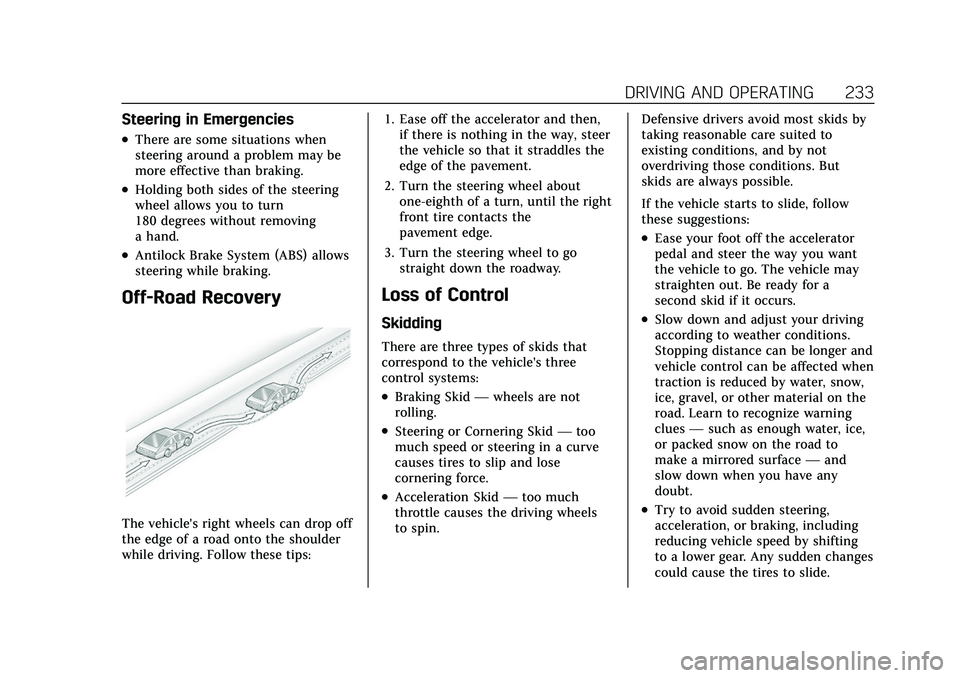
The vehicle's right wheels can drop off
the edge of a road onto the shoulder
while driving. Follow these tips:1. Ease off the accelerator and then,
if there is nothing in the way, steer
the vehicle so that it straddles the
edge of the pavement.
2. Turn the steering wheel about one-eighth of a turn, until the right
front tire contacts the
pavement edge.
3. Turn the steering wheel to go straight down the roadway.
Loss of Control
Skidding
There are three types of skids that
correspond to the vehicle's three
control systems:
.Braking Skid —wheels are not
rolling.
.Steering or Cornering Skid —too
much speed or steering in a curve
causes tires to slip and lose
cornering force.
.Acceleration Skid —too much
throttle causes the driving wheels
to spin. Defensive drivers avoid most skids by
taking reasonable care suited to
existing conditions, and by not
overdriving those conditions. But
skids are always possible.
If the vehicle starts to slide, follow
these suggestions:
.Ease your foot off the accelerator
pedal and steer the way you want
the vehicle to go. The vehicle may
straighten out. Be ready for a
second skid if it occurs.
.Slow down and adjust your driving
according to weather conditions.
Stopping distance can be longer and
vehicle control can be affected when
traction is reduced by water, snow,
ice, gravel, or other material on the
road. Learn to recognize warning
clues
—such as enough water, ice,
or packed snow on the road to
make a mirrored surface —and
slow down when you have any
doubt.
.Try to avoid sudden steering,
acceleration, or braking, including
reducing vehicle speed by shifting
to a lower gear. Any sudden changes
could cause the tires to slide.
Page 235 of 492
Cadillac Escalade Owner Manual (GMNA-Localizing-U.S./Canada/Mexico-
13690472) - 2021 - CRC - 8/10/21
234 DRIVING AND OPERATING
Remember: Antilock brakes help avoid
only the braking skid.
Off-Road Driving
Four-wheel-drive vehicles can be used
for off-road driving. Vehicles without
four-wheel drive and vehicles not
equipped with All Terrain (AT) or
On-Off Road (OOR) tires must not be
driven off-road except on a level, solid
surface. For contact information about
the original equipment tires, see the
warranty manual.
One of the best ways for successful
off-road driving is to control the
speed.
{Warning
When driving off-road, bouncing
and quick changes in direction can
easily throw you out of position.
This could cause you to lose control
and crash. You and your passengers
should always wear seat belts.
Before Driving Off-Road
.Have all necessary maintenance and
service work completed.
.Fuel the vehicle, fill fluid levels, and
check inflation pressure in all tires,
including the spare, if equipped.
.Read all the information about
four-wheel-drive vehicles in this
manual.
.Know the local laws that apply to
off-road driving.
Loading the Vehicle for Off-Road
Driving
{Warning
.Unsecured cargo on the load
floor can be tossed about when
driving over rough terrain. You or
your passengers can be struck by
flying objects. Secure the cargo
properly.
.Keep cargo in the cargo area as
far forward and as low as
possible. The heaviest things
should be on the floor, forward
of the rear axle.
.Heavy loads on the roof raise the
vehicle's center of gravity,
making it more likely to roll over.
You can be seriously or fatally(Continued)
Warning (Continued)
injured if the vehicle rolls over.
Put heavy loads inside the cargo
area, not on the roof.
For more information about loading
the vehicle, see Vehicle Load Limits
0 240 and
Tires 0393.
Environmental Concerns
.Always use established trails, roads,
and areas that have been set aside
for public off-road recreational
driving and obey all posted
regulations.
.Do not damage shrubs, flowers,
trees, or grasses or disturb wildlife.
.Do not park over things that burn.
See Parking over Things That Burn
0 250.
Driving on Hills
Driving safely on hills requires good
judgment and an understanding of
what the vehicle can and cannot do.
Page 237 of 492
Cadillac Escalade Owner Manual (GMNA-Localizing-U.S./Canada/Mexico-
13690472) - 2021 - CRC - 8/10/21
236 DRIVING AND OPERATING
2. Shift into P (Park) and then restartthe engine.
.If driving uphill when the
vehicle stalls, shift to
R (Reverse), release the parking
brake, and back straight down.
.Never try to turn the vehicle
around. If the hill is steep
enough to stall the vehicle, it is
steep enough to cause it to
roll over.
.If you cannot make it up the
hill, back straight down the hill.
.Never back down a hill in
N (Neutral) using only the
brake. The vehicle can roll
backward quickly and you could
lose control.
.If driving downhill when the
vehicle stalls, shift to a lower
gear, release the parking brake,
and drive straight down the hill.
3. If the vehicle cannot be restarted after stalling, set the parking brake,
shift into P (Park), and turn the
vehicle off.
3.1. Leave the vehicle and seek help. 3.2. Stay clear of the path the
vehicle would take if it rolled
downhill.
.Avoid turns that take the vehicle
across the incline of the hill. A hill
that can be driven straight up or
down might be too steep to drive
across. Driving across an incline
puts more weight on the downhill
wheels, which could cause a
downhill slide or a rollover.
.Surface conditions can be a
problem. Loose gravel, muddy spots,
or even wet grass can cause the
tires to slip sideways, downhill.
If the vehicle slips sideways, it can
hit something that will trip it —a
rock, a rut, etc. —and roll over.
.Hidden obstacles can make the
steepness of the incline more
severe. If a rock is driven across
with the uphill wheels, or if the
downhill wheels drop into a rut or
depression, the vehicle can tilt
even more.
.If an incline must be driven across,
and the vehicle starts to slide, turn
downhill. This should help
straighten out the vehicle and
prevent the side slipping.
{Warning
Getting out of the vehicle on the
downhill side when stopped across
an incline is dangerous. If the
vehicle rolls over, you could be
crushed or killed. Always get out on
the uphill side of the vehicle and
stay well clear of the rollover path.
Driving in Mud, Sand, Snow,
or Ice
Use a low gear when driving in mud
—the deeper the mud, the lower the
gear. Keep the vehicle moving to avoid
getting stuck.
Traction changes when driving on
sand. On loose sand, such as on
beaches or sand dunes, the tires tend
to sink into the sand. This affects
steering, accelerating, and braking.
Drive at a reduced speed and avoid
sharp turns or abrupt maneuvers.
Page 241 of 492

Cadillac Escalade Owner Manual (GMNA-Localizing-U.S./Canada/Mexico-
13690472) - 2021 - CRC - 8/10/21
240 DRIVING AND OPERATING
To save fuel, run the engine for short
periods to warm the vehicle and then
shut the engine off and partially close
the window. Moving about to keep
warm also helps.
If it takes time for help to arrive,
when running the engine, push the
accelerator pedal slightly so the
engine runs faster than the idle speed.
This keeps the battery charged to
restart the vehicle and to signal for
help with the headlamps. Do this as
little as possible, to save fuel.
If the Vehicle Is Stuck
Slowly and cautiously spin the wheels
to free the vehicle when stuck in sand,
mud, ice, or snow.
If stuck too severely for the traction
system to free the vehicle, turn the
traction system off and use the
rocking method. SeeTraction Control/
Electronic Stability Control 0264.
{Warning
If the vehicle's tires spin at high
speed, they can explode, and you or
others could be injured. The vehicle
can overheat, causing an engine
compartment fire or other damage.
Spin the wheels as little as possible
and avoid going above 56 km/h
(35 mph).
Rocking the Vehicle to Get it Out
Turn the steering wheel left and right
to clear the area around the front
wheels. Turn off any traction system.
Shift back and forth between
R (Reverse) and a low forward gear,
spinning the wheels as little as
possible. To prevent transmission
wear, wait until the wheels stop
spinning before shifting gears. Release
the accelerator pedal while shifting,
and press lightly on the accelerator
pedal when the transmission is in
gear. Slowly spinning the wheels in
the forward and reverse directions
causes a rocking motion that could
free the vehicle. If that does not get
the vehicle out after a few tries, it might need to be towed out. If the
vehicle does need to be towed out, see
Towing the Vehicle
0428.
Vehicle Load Limits
It is very important to know how
much weight the vehicle can carry.
This weight is called the vehicle
capacity weight and includes the
weight of all occupants, cargo, and
all nonfactory-installed options.
Two labels on the vehicle may
show how much weight it was
designed to carry, the Tire and
Loading Information label and the
Certification/Tire label.
{Warning
Do not load the vehicle any
heavier than the Gross Vehicle
Weight Rating (GVWR),
or either the maximum front or
rear Gross Axle Weight Rating
(GAWR). This can cause
systems to break and change
the way the vehicle handles.
(Continued)
Page 258 of 492
Cadillac Escalade Owner Manual (GMNA-Localizing-U.S./Canada/Mexico-
13690472) - 2021 - CRC - 8/10/21
DRIVING AND OPERATING 257
Driving on clean, dry pavement in 4m
or 4nmay:
.Cause a vibration to be felt in the
steering system.
.Cause tires to wear faster.
{Warning
With four-wheel drive, the vehicle
will be free to roll if the transfer
case is in N (Neutral), even when
the shift lever is in P (Park). Be sure
the transfer case is in a drive gear
—2
m, 4m, or 4n—not in
N (Neutral). See Shifting Into Park
0 248.
Caution
Extended high-speed operation in 4
nmay damage or shorten the life of
the drivetrain.
An engagement noise and bump is
normal when shifting between 4
nand
4
mor N (Neutral), with the engine
running. Shifting into 4
nwill turn Traction
Control and StabiliTrak/Electronic
Stability Control (ESC) off. See
Traction Control/Electronic Stability
Control 0264.
Automatic Transfer Case
Two-Speed Transfer Case
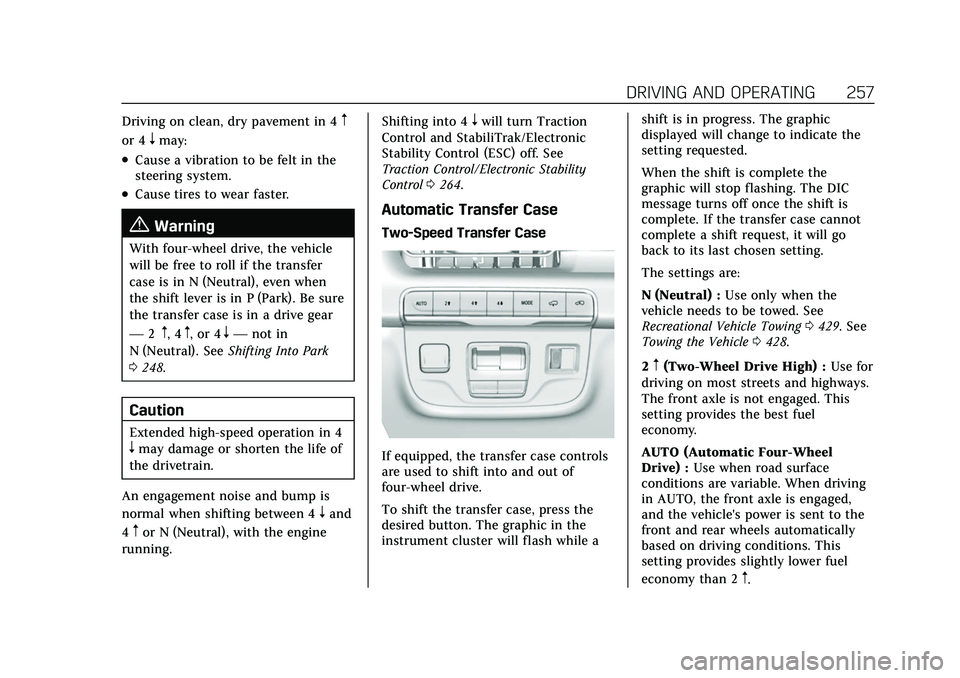
If equipped, the transfer case controls
are used to shift into and out of
four-wheel drive.
To shift the transfer case, press the
desired button. The graphic in the
instrument cluster will flash while a shift is in progress. The graphic
displayed will change to indicate the
setting requested.
When the shift is complete the
graphic will stop flashing. The DIC
message turns off once the shift is
complete. If the transfer case cannot
complete a shift request, it will go
back to its last chosen setting.
The settings are:
N (Neutral) :
Use only when the
vehicle needs to be towed. See
Recreational Vehicle Towing 0429. See
Towing the Vehicle 0428.
2
m(Two-Wheel Drive High) : Use for
driving on most streets and highways.
The front axle is not engaged. This
setting provides the best fuel
economy.
AUTO (Automatic Four-Wheel
Drive) : Use when road surface
conditions are variable. When driving
in AUTO, the front axle is engaged,
and the vehicle's power is sent to the
front and rear wheels automatically
based on driving conditions. This
setting provides slightly lower fuel
economy than 2
m.