infotainment CADILLAC ESCALADE 2022 Owners Manual
[x] Cancel search | Manufacturer: CADILLAC, Model Year: 2022, Model line: ESCALADE, Model: CADILLAC ESCALADE 2022Pages: 508, PDF Size: 9.18 MB
Page 233 of 508

Cadillac Escalade Owner Manual (GMNA-Localizing-U.S./Canada/Mexico-
15567102) - 2022 - CRC - 11/17/21
232 DRIVING AND OPERATING
.Become familiar with vehicle
features before driving, such as
programming favorite radio stations
and adjusting climate control and
seat settings. Program all trip
information into any navigation
device prior to driving.
.Wait until the vehicle is parked to
retrieve items that have fallen to
the floor.
.Stop or park the vehicle to tend to
children.
.Keep pets in an appropriate carrier
or restraint.
.Avoid stressful conversations while
driving, whether with a passenger or
on a cell phone.
{Warning
Taking your eyes off the road too
long or too often could cause a
crash resulting in injury or death.
Focus your attention on driving.
Refer to the infotainment section for
more information on using that
system and the navigation system,
if equipped, including pairing and
using a cell phone.
Defensive Driving
Defensive driving means “always
expect the unexpected.” The first step
in driving defensively is to wear the
seat belt. See Seat Belts058.
.Assume that other road users
(pedestrians, bicyclists, and other
drivers) are going to be careless and
make mistakes. Anticipate what
they may do and be ready.
.Allow enough following distance
between you and the driver in front
of you.
.Focus on the task of driving.
Impaired Driving
Death and injury associated with
impaired driving is a global tragedy.
{Warning
Drinking alcohol or taking drugs
and then driving is very dangerous.
Your reflexes, perceptions,
attentiveness, and judgment can be
affected by even a small amount of
alcohol or drugs. You can have a
(Continued)
Warning (Continued)
serious—or even fatal —collision
if you drive after drinking or taking
drugs.
Do not drive while under the
influence of alcohol or drugs,
or ride with a driver who has been
drinking or is impaired by drugs.
Find alternate transportation home;
or if you are with a group, designate
a driver who will remain sober.
Control of a Vehicle
Braking, steering, and accelerating are
important factors in helping to control
a vehicle while driving.
Braking
Braking action involves perception
time and reaction time. Deciding to
push the brake pedal is perception
time. Actually doing it is
reaction time.
Average driver reaction time is about
three-quarters of a second. In that
time, a vehicle moving at 100 km/h
Page 251 of 508
Cadillac Escalade Owner Manual (GMNA-Localizing-U.S./Canada/Mexico-
15567102) - 2022 - CRC - 11/17/21
250 DRIVING AND OPERATING
When thehindicator is illuminated,
the system is enabled.
Retained Accessory
Power (RAP)
When the ignition is turned from on
to off, the following features (if
equipped) will continue to function
for up to 10 minutes, or until the
driver door is opened. These features
will also work when the ignition is in
RUN or ACC/ACCESSORY:
.Infotainment System
.Power Windows (during RAP this
functionality will be lost when any
door is opened)
.Sunroof (during RAP this
functionality will be lost when any
door is opened)
.Auxiliary Power Outlet
.Audio System
.OnStar System
Shifting Into Park
{Warning
It can be dangerous to get out of
the vehicle if the vehicle is not in
P (Park) with the parking brake set.
The vehicle can roll. If you have left
the engine running, the vehicle can
move suddenly. You or others could
be injured. To be sure the vehicle
will not move, even when you are
on fairly level ground, use the steps
that follow. If you are pulling a
trailer, see Driving Characteristics
and Towing Tips 0336.
To shift into P (Park): 1. Hold the brake pedal down and set the Electric Parking Brake (EPB).
See Electric Parking Brake 0262.
2. Press the P (Park) switch on top of the shift lever.
3. Press ENGINE START/STOP to turn the vehicle off.
If the vehicle is shifted into P (Park)
on a hill, the EPB may apply
automatically. The driver may not be
able to release the EPB using the EPB switch. It should automatically release
when the vehicle is shifted out of
P (Park).Leaving the Vehicle with the
Engine Running
{Warning
It can be dangerous to leave the
vehicle with the engine running.
It could overheat and catch fire.
It is dangerous to get out of the
vehicle if the vehicle is not in
P (Park) with the parking brake set.
The vehicle can roll.
Do not leave the vehicle when the
engine is running. If you have left
the engine running, the vehicle can
move suddenly. You or others could
be injured. To be sure the vehicle
will not move, even when you are
on fairly level ground, always set
the parking brake and shift to
P (Park). See
Shifting Into Park 0250
. If you are towing a trailer, see
Driving Characteristics and Towing
Tips 0336.
Page 267 of 508
Cadillac Escalade Owner Manual (GMNA-Localizing-U.S./Canada/Mexico-
15567102) - 2022 - CRC - 11/17/21
266 DRIVING AND OPERATING
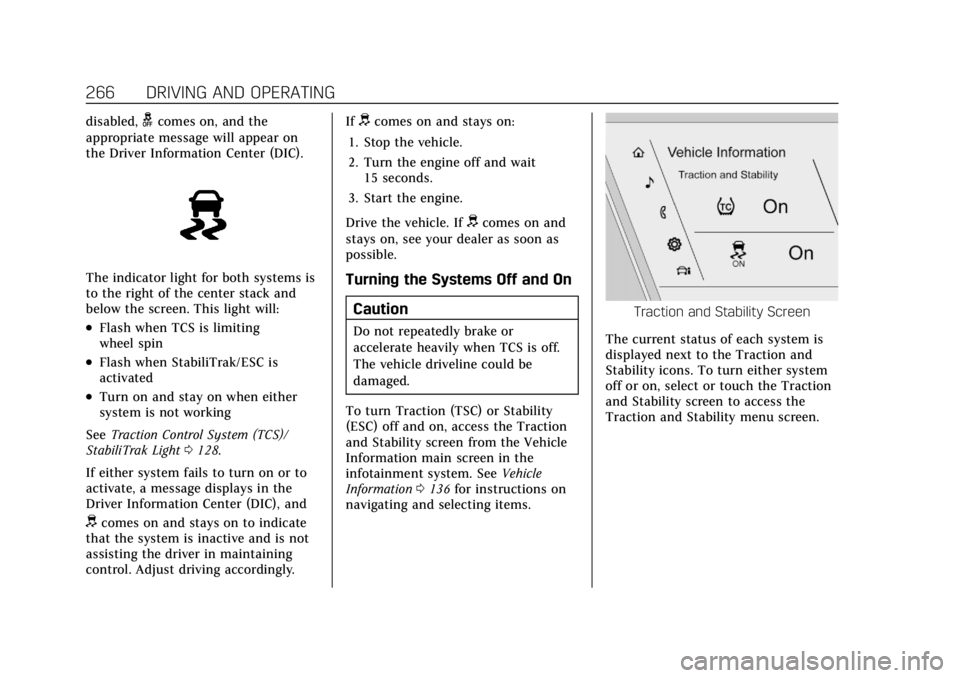
disabled,gcomes on, and the
appropriate message will appear on
the Driver Information Center (DIC).
The indicator light for both systems is
to the right of the center stack and
below the screen. This light will:
.Flash when TCS is limiting
wheel spin
.Flash when StabiliTrak/ESC is
activated
.Turn on and stay on when either
system is not working
See Traction Control System (TCS)/
StabiliTrak Light 0128.
If either system fails to turn on or to
activate, a message displays in the
Driver Information Center (DIC), and
dcomes on and stays on to indicate
that the system is inactive and is not
assisting the driver in maintaining
control. Adjust driving accordingly. If
dcomes on and stays on:
1. Stop the vehicle.
2. Turn the engine off and wait 15 seconds.
3. Start the engine.
Drive the vehicle. If
dcomes on and
stays on, see your dealer as soon as
possible.
Turning the Systems Off and On
Caution
Do not repeatedly brake or
accelerate heavily when TCS is off.
The vehicle driveline could be
damaged.
To turn Traction (TSC) or Stability
(ESC) off and on, access the Traction
and Stability screen from the Vehicle
Information main screen in the
infotainment system. See Vehicle
Information 0136 for instructions on
navigating and selecting items.
Traction and Stability Screen
The current status of each system is
displayed next to the Traction and
Stability icons. To turn either system
off or on, select or touch the Traction
and Stability screen to access the
Traction and Stability menu screen.
Page 271 of 508
Cadillac Escalade Owner Manual (GMNA-Localizing-U.S./Canada/Mexico-
15567102) - 2022 - CRC - 11/17/21
270 DRIVING AND OPERATING
The following settings may be
available depending on region, trim
level, and optional features.
Engine Sound :Engine sound settings
adjusts the volume of engine noise.
Engine sound is quieter at lower
settings and louder at higher settings.
Steering : Steering setting adjusts the
effort required to turn the steering
wheel. Steering feel is less responsive
at lower settings and more responsive
at higher settings.
Suspension : Suspension adjusts the
stiffness of the shocks and / or
springs. The ride is more comfortable
at lower settings and stiffer at higher
settings for better control.
Visualization
This feature shows handling and
performance settings on the
infotainment display when changing
drive modes.Magnetic Ride Control
This vehicle may have a semi-active
damping system called Magnetic Ride
Control. With this feature, improved
vehicle ride and handling is provided
under a variety of passenger and
loading conditions.
Locking Rear Axle
Vehicles with a locking rear axle can
give more traction on snow, mud, ice,
sand, or gravel. It works like a
standard axle most of the time, but
when traction is low, this feature will
allow the rear wheel with the most
traction to move the vehicle.
Four Corner Air Suspension
System
The Four Corner Air Suspension
feature provides full time load leveling
capability along with the benefit of
adjusting ride height for increased
convenience and capability.
{Warning
To help avoid personal injury or
death, make sure the area
underneath the vehicle and inside
the wheel wells is clear when
lowering the vehicle.
{Warning
To help avoid personal injury or
death, always select the lowest ride
height for the current driving
conditions. Higher ride heights raise
the vehicle's center of gravity,
increasing the chance of a rollover
during extreme maneuvers.
{Warning
Heavy loads on the roof rack will
make the vehicle's center of gravity
higher, increasing the possibility of
a rollover. To avoid losing control of
the vehicle, always select the
normal height setting and avoid
high speeds, sudden starts, sharp
(Continued)
Page 272 of 508
Cadillac Escalade Owner Manual (GMNA-Localizing-U.S./Canada/Mexico-
15567102) - 2022 - CRC - 11/17/21
DRIVING AND OPERATING 271
Warning (Continued)
turns, sudden braking, or abrupt
maneuvers when carrying cargo on
the roof rack.
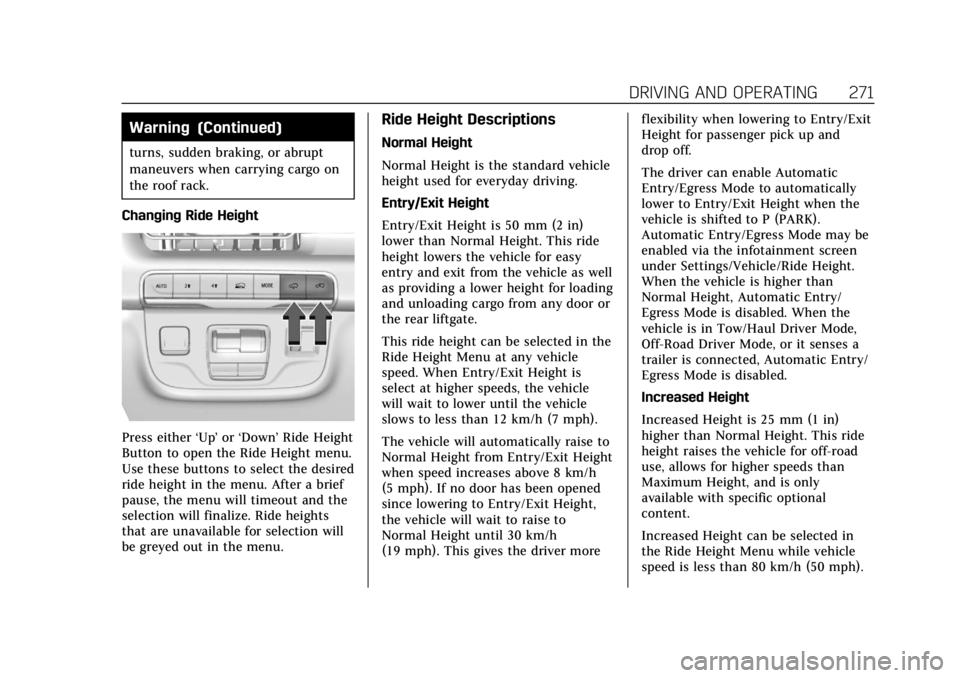
Changing Ride Height
Press either ‘Up’or‘Down’ Ride Height
Button to open the Ride Height menu.
Use these buttons to select the desired
ride height in the menu. After a brief
pause, the menu will timeout and the
selection will finalize. Ride heights
that are unavailable for selection will
be greyed out in the menu.
Ride Height Descriptions
Normal Height
Normal Height is the standard vehicle
height used for everyday driving.
Entry/Exit Height
Entry/Exit Height is 50 mm (2 in)
lower than Normal Height. This ride
height lowers the vehicle for easy
entry and exit from the vehicle as well
as providing a lower height for loading
and unloading cargo from any door or
the rear liftgate.
This ride height can be selected in the
Ride Height Menu at any vehicle
speed. When Entry/Exit Height is
select at higher speeds, the vehicle
will wait to lower until the vehicle
slows to less than 12 km/h (7 mph).
The vehicle will automatically raise to
Normal Height from Entry/Exit Height
when speed increases above 8 km/h
(5 mph). If no door has been opened
since lowering to Entry/Exit Height,
the vehicle will wait to raise to
Normal Height until 30 km/h
(19 mph). This gives the driver more flexibility when lowering to Entry/Exit
Height for passenger pick up and
drop off.
The driver can enable Automatic
Entry/Egress Mode to automatically
lower to Entry/Exit Height when the
vehicle is shifted to P (PARK).
Automatic Entry/Egress Mode may be
enabled via the infotainment screen
under Settings/Vehicle/Ride Height.
When the vehicle is higher than
Normal Height, Automatic Entry/
Egress Mode is disabled. When the
vehicle is in Tow/Haul Driver Mode,
Off-Road Driver Mode, or it senses a
trailer is connected, Automatic Entry/
Egress Mode is disabled.
Increased Height
Increased Height is 25 mm (1 in)
higher than Normal Height. This ride
height raises the vehicle for off-road
use, allows for higher speeds than
Maximum Height, and is only
available with specific optional
content.
Increased Height can be selected in
the Ride Height Menu while vehicle
speed is less than 80 km/h (50 mph).
Page 273 of 508
Cadillac Escalade Owner Manual (GMNA-Localizing-U.S./Canada/Mexico-
15567102) - 2022 - CRC - 11/17/21
272 DRIVING AND OPERATING
If vehicle speed exceeds 80 km/h
(50 mph), the vehicle will
automatically lower to Normal Height.
Off-Road Driver Mode and Terrain
Driver Mode will automatically set
Increased Height when vehicle speed
is less than 80 km/h (50 mph).
If vehicle speed exceeds 80 km/h
(50 mph), the vehicle will lower to
Normal Height. Normal Height will be
maintained until vehicle speed is
slowed to less than 16 km/h (10 mph)
and then the vehicle will
automatically raise back to Increased
Height.
The vehicle will automatically lower
from Increased Height to Normal
Height to provide improved stability if
aggressive maneuvers are detected.
Maximum Height
Maximum Height is 50 mm (2 in)
higher than Normal Height. This ride
height raises the vehicle for off-road
use and is only available with specific
optional content.
To raise the vehicle to Maximum
Height, first shift the transfer case to
4
n. Once the transfer case is in 4n
and vehicle speed is less than
48 km/hr (30 mph), select Maximum
Height in the Ride Height Menu.
If vehicle speed exceeds 48 km/h, the
vehicle will automatically lower to
Increased Height.
The vehicle will automatically lower
from Maximum Height to Normal
Height to provide improved stability if
aggressive maneuvers are detected.
Aerodynamic Height
Aerodynamic Height is 20 mm
(0.75 in) lower than Normal Height.
This ride height lowers the vehicle at
higher vehicle speeds to improve
aerodynamics.
The vehicle will lower to Aerodynamic
Height when vehicle speed exceeds
105 km/h (65 mph) for a period of
time. The vehicle will raise to Normal
Height when the vehicle slows to less
than 48 km/h (30 mph).
Aerodynamic Height is automatically
disabled when a trailer is connected to
the vehicle or Tow/Haul Driver Mode
is active.Suspension Modes
The air suspension has two special
modes, Service Mode and Alignment
Mode, located in the infotainment
screen under Settings/Vehicle/
Suspension.
Service Mode
Service Mode will disable all air
suspension operation including raising
and lowering the vehicle and
operation of the air compressor. This
mode is useful when the vehicle is
being towed on a flat bed or when any
work under the vehicle is being
performed.
Service Mode is automatically enabled
when the vehicle is put on a hoist or a
floor jack is used to raise a corner.
Service Mode automatically disables
when vehicle speed exceeds 16 km/h
(10 mph).
Alignment Mode
Alignment Mode will optimize the
vehicle height to provide the most
accurate wheel alignment. This mode
should be enabled once the vehicle is
driven onto the alignment station.
Page 305 of 508
Cadillac Escalade Owner Manual (GMNA-Localizing-U.S./Canada/Mexico-
15567102) - 2022 - CRC - 11/17/21
304 DRIVING AND OPERATING
(RCTA), and Enhanced Automatic
Parking Assist (APA) may help the
driver park or avoid objects. Always
check around the vehicle when
parking or backing.
Rear Vision Camera (RVC)
When the vehicle is shifted into
R (Reverse), the RVC displays an
image of the area behind the vehicle
in the infotainment display. The
previous screen displays when the
vehicle is shifted out of R (Reverse)
after a short delay. To return to the
previous screen sooner, press Home or
Back on the infotainment system,
shift into P (Park), or reach a vehicle
speed of approximately 12 km/h
(8 mph) while in D (Drive). The rear
vision camera is above the license
plate.
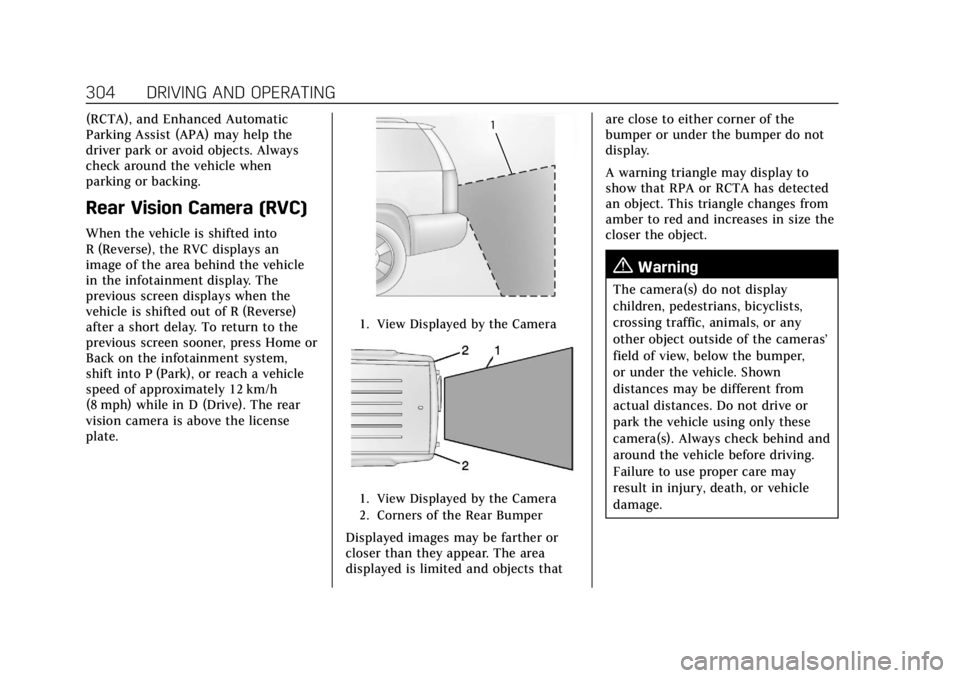
1. View Displayed by the Camera
1. View Displayed by the Camera
2. Corners of the Rear Bumper
Displayed images may be farther or
closer than they appear. The area
displayed is limited and objects thatare close to either corner of the
bumper or under the bumper do not
display.
A warning triangle may display to
show that RPA or RCTA has detected
an object. This triangle changes from
amber to red and increases in size the
closer the object.
{Warning
The camera(s) do not display
children, pedestrians, bicyclists,
crossing traffic, animals, or any
other object outside of the cameras’
field of view, below the bumper,
or under the vehicle. Shown
distances may be different from
actual distances. Do not drive or
park the vehicle using only these
camera(s). Always check behind and
around the vehicle before driving.
Failure to use proper care may
result in injury, death, or vehicle
damage.
Page 306 of 508
Cadillac Escalade Owner Manual (GMNA-Localizing-U.S./Canada/Mexico-
15567102) - 2022 - CRC - 11/17/21
DRIVING AND OPERATING 305
Surround Vision System
If equipped the Surround Vision
system can display various views
surrounding the vehicle in the
infotainment display. See below for
camera view descriptions and more
information.
{Warning
The Surround Vision cameras have
blind spots and will not display all
objects near the corners of the
vehicle. Folding outside mirrors that
are out of position may not display
surround view correctly. Always
check around the vehicle when
parking or backing.
1. Views Displayed by the SurroundVision Cameras
2. Area Not Shown
1. Views Displayed by the Surround Vision Cameras
2. Area Not Shown
{Warning
The camera(s) do not display
children, pedestrians, bicyclists,
crossing traffic, animals, or any
other object outside of the cameras’
field of view, below the bumper,
or under the vehicle. Shown
distances may be different from
actual distances. Do not drive or
park the vehicle using only these
camera(s). Always check behind and (Continued)
Warning (Continued)
around the vehicle before driving.
Failure to use proper care may
result in injury, death, or vehicle
damage.
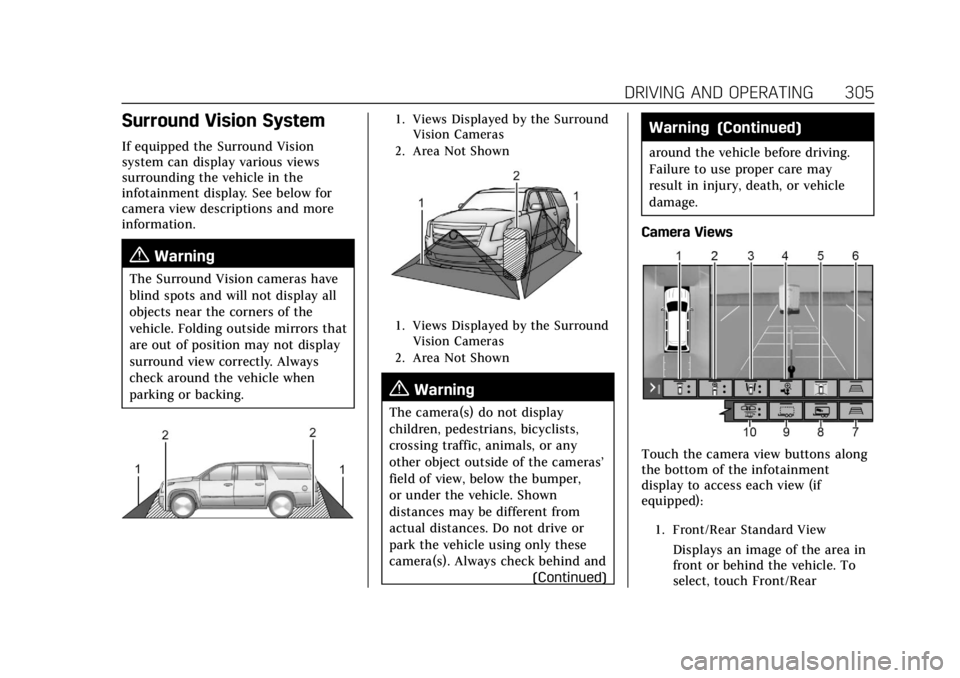
Camera Views
Touch the camera view buttons along
the bottom of the infotainment
display to access each view (if
equipped):
1. Front/Rear Standard View
Displays an image of the area in
front or behind the vehicle. To
select, touch Front/Rear
Page 307 of 508

Cadillac Escalade Owner Manual (GMNA-Localizing-U.S./Canada/Mexico-
15567102) - 2022 - CRC - 11/17/21
306 DRIVING AND OPERATING
Standard View on the
infotainment display when a
camera view is active.
When the hitch guidance is
selected, Rear Standard View will
remain visible across gear
changes, otherwise the view will
toggle between Front and Rear
Standard View based on gear
position.
If equipped, the front view
camera also displays when the
Park Assist system detects an
object within 30 cm (12 in).
To access this view when in a
forward gear above 12 km/h
(8 mph), select CAMERA on the
infotainment display and select
Rear Standard View. The view
will close after 8 seconds and
can be closed early by selecting
X, Home or Back.
2. Front/Rear Top-Down View
Displays a front or rear overhead
view of the vehicle. To view,
select Front/Rear Top-Down
View on the infotainment display
when the camera app is active.
3. Front/Rear side View
Displays a view that shows
objects next to the front or rear
sides of the vehicle. To select,
touch Front/Rear Side View on
the infotainment display when a
camera view is active. Touch the
button to toggle between front
and rear camera views. Park
Assist and RCTA overlays are not
available when Front/Rear Side
View is active.
4. Hitch View
Displays a zoomed-in view of the
hitch area to assist with aligning
the vehicle’s hitch ball with the
trailer coupler and monitoring
the trailer connection. To view,
select Hitch View on the
infotainment display when the
Camera App is active. To access
this view when in a forward gear
above 12 km/h (8 mph), select
CAMERA on the infotainment
display and select Hitch View.
The view will close after
eight seconds and can be closed
early by selecting X, Home or
Back. Shifting into P (Park) whilein this view will automatically
engage the Electric Parking
Brake (EPB).
5. Surround View
Displays an image of the area
surrounding the vehicle.
Surround View is displayed
alongside the currently selected
view when below 12 kph
(8 mph). Surround View is
disabled when above
12 kph (8 mph).
6. Camera App Guidance Lines
The Camera App supports three
possible guidance modes: No
Guidance, Vehicle Guidance and
Trailering Guidance. To change
guidance mode, select the
appropriate guidance icon.
Depending on the guidance
mode and view selected, different
guidance lines may appear.
A grayed-out icon indicates that
guidance lines are not available.
Certain views do not support
Guidance lines.
.Standard Guidance Lines are
available in Front/Rear
Standard Views, Front/Rear
Page 308 of 508

Cadillac Escalade Owner Manual (GMNA-Localizing-U.S./Canada/Mexico-
15567102) - 2022 - CRC - 11/17/21
DRIVING AND OPERATING 307
Top-Down Views and
Surround View when the
vehicle guidance mode is
selected. Standard Guidance
Lines show current and
intended vehicle path.
.Hitch Guidance Line is
available in Rear Standard
View when the Trailering
Guidance mode is selected.
Hitch Guidance displays a
single centered guidance line
on the infotainment display to
assist with aligning the
vehicle’s hitch with a trailer
coupler. Align the Hitch
Guidance Line with the trailer
coupler by continuously
steering the vehicle to keep
the guidance line centered on
the coupler when backing.
Park Assist overlays will not
display when the Hitch
Guidance Line is active.
.Rear Trailer Guidance Lines
are available in the Rear
Trailer View when the
Trailering Guidance mode is
selected and the rear trailer
camera calibration has beensuccessfully completed. Rear
Trailer Guidance Lines show
the intended path (yellow)
and the current path (blue) of
the trailer. The current path
guidance lines will converge
with the intended path
guidance lines.
7. Camera App Guidance Lines
Duplicate of item 6.
8. Interior Trailer View
Displays a view of the interior of
the trailer. The feature is
available when a trailer is
connected. The feature requires
user installation of an accessory
trailer camera on the interior of
the trailer per the accessory
trailer camera installation
instructions (see your dealer for
accessory trailer camera(s) and
information). To view, select
Interior Trailer View on the
infotainment display when the
Camera App is active. To access
this view when in a forward gear
above 12 km/h (8 mph), select
CAMERA on the infotainment
display and select Interior Trailer
View. The view will close after8 seconds and can be closed
early by selecting X, Home
or Back.
9. Transparent Trailer View
Displays a view that allows the
driver to virtually
“see through”
the trailer. The feature is
available when a compatible
trailer is connected, a valid
profile is selected and the vehicle
is not in Reverse. The feature
requires user installation of an
accessory trailer camera on the
rear exterior surface of the trailer
per the accessory trailer camera
installation instructions (see
your dealer for accessory trailer
camera(s) and information). To
view, select Transparent Trailer
View on the infotainment display
when the Camera App is active.
To access this view when in a
forward gear above 12 km/h
(8 mph), select CAMERA on the
infotainment display and select
Transparent Trailer View. The
view can be closed by selecting
X, Home or Back.