infotainment CADILLAC ESCALADE 2022 Owners Manual
[x] Cancel search | Manufacturer: CADILLAC, Model Year: 2022, Model line: ESCALADE, Model: CADILLAC ESCALADE 2022Pages: 508, PDF Size: 9.18 MB
Page 356 of 508
Cadillac Escalade Owner Manual (GMNA-Localizing-U.S./Canada/Mexico-
15567102) - 2022 - CRC - 11/17/21
DRIVING AND OPERATING 355
{Warning
Use of aftermarket electronic trailer
sway control devices could result in
reduced trailer brake performance,
loss of trailer brakes, or other
malfunctions, and result in a crash.
You or others could be seriously
injured or killed. Before using one
of these devices:
.Ask the device or trailer
manufacturer if the device has
been thoroughly tested for
compatibility with the make,
model, and year of your vehicle
and any optional equipment
installed on your vehicle.
.Before driving, check the trailer
brakes are working properly,
if equipped. Drive the vehicle
with the trailer attached on a
level road surface that is free of
traffic at about 32-40 km/h
(20-25 mph) and fully apply the
manual trailer brake apply lever.
Also, check the trailer brake
lamps and other lamps are
functioning correctly.(Continued)
Warning (Continued)
.If the trailer brakes are not
operating properly at any time,
or if a DIC message indicates
problems with the trailer
connections or trailer brakes,
carefully pull the vehicle over to
the side of the road when traffic
conditions allow.
Trailer Tires
Special Trailer (ST) tires differ from
vehicle tires. Trailer tires are designed
with stiff sidewalls to help prevent
sway and to support heavy loads.
These features can make it difficult to
determine if the trailer tire pressures
are low only based on a visual
inspection.
Always check all trailer tire pressures
before each trip when the tires are
cool. Low trailer tire pressure is a
leading cause of trailer tire blow-outs.
If the vehicle is equipped with a trailer
tire pressure monitoring system, see
the trailer tire pressure monitoring
system description and the
trailering app. Trailer tires deteriorate over time. The
trailer tire sidewall will show the week
and year the tire was manufactured.
Many trailer tire manufacturers
recommend replacing tires more than
six years old.
Overloading is another leading cause
of trailer tire blow-outs. Never load
your trailer with more weight than the
tires are designed to support. The load
rating is located on the trailer tire
sidewall.
Always know the maximum speed
rating for the trailer tires before
driving. This may be significantly
lower than the vehicle tire speed
rating. The speed rating may be on
the trailer tire sidewall. If the speed
rating is not shown, the default trailer
tire speed rating is 105 km/h (65 mph).
Trailering App
Trailer Lights App
If equipped, the Trailer Lights App is
on the Home Page of the infotainment
display.
Page 357 of 508
Cadillac Escalade Owner Manual (GMNA-Localizing-U.S./Canada/Mexico-
15567102) - 2022 - CRC - 11/17/21
356 DRIVING AND OPERATING
Touch Start to cycle the trailer lamps
on and off to determine if they are
working. The test follows this
sequence:1. The running lights turn on first and remain on throughout the
sequence.
2. The brake lights turn on for about two seconds.
3. The left turn signal light flashes three times.
4. The right turn signal light flashes three times.
5. The reverse lights turn on for about two seconds.
6. Steps 2–5 repeat for approximately one minute and 45 seconds,
or until the test deactivates.
Touch Stop to stop the test. The test
will automatically end after
one minute and 45 seconds.
The sequence also deactivates when
any of the following occur:
.The ignition is turned off.
.The transmission is shifted out of
P (Park).
.The brake pedal is pressed.
.The turn signal is activated.
.The hazard warning lights are
activated.
Trailering App
If equipped, the Trailering App is on
the Home Page of the infotainment
display.
If equipped this feature allows profiles
for connected trailers to be created to
view status, to store and track trailer
usage information, and to set up
towing assistance features.
The Trailering App Preview will
appear when the Trailering App is
opened for the first time from the
Home Page. Touch GET STARTED in
the Trailering App to go into the app.
When a trailer is electrically
connected and a trailer profile has not
been created, there will be an option
to create a profile, use a guest profile,
or select Accessory/No trailer. After
the pop-up is displayed three times,
Don’t Remind Me will display and
touching that will turn off the trailer
detection pop-up. To turn the Trailer
Detection Alert on, select ON in the
Settings tab. When a trailer is electrically
connected and after a Trailer Profile
has been created, the trailer detection
pop-up will appear with a list of all of
the custom Trailer Profiles made on
the vehicle. To load an existing Trailer
Profile, select one of the Trailer
Profiles listed, or load the Guest
Trailer Profile by selecting GUEST
TRAILER. Touching Accessory/No
trailer will select Accessory/No trailer
as the active Trailer Profile and will
dismiss the pop- up. Shifting the
vehicle from P (Park) will select Guest
Trailer as the active Trailer Profile and
will dismiss the pop-up.
Create a Trailer Profile
1. Touch Create Profile on the trailer detection pop-up or touch + Add
Trailer Profile in the Trailering App.
2. Create a name for the trailer.
3. Select the trailer type.
4. Select Save Profile.
A pop-up will indicate the setup is
complete. Touch DONE to complete
the process or touch TRAILER
FEATURE SETUP to set up the
Tow/Haul Mode reminder, Trailer Tire
Page 359 of 508

Cadillac Escalade Owner Manual (GMNA-Localizing-U.S./Canada/Mexico-
15567102) - 2022 - CRC - 11/17/21
358 DRIVING AND OPERATING
Sensor Learning Steps
To complete the sensor-to-vehicle
learn process:1. Touch Start on the Learn Sensors screen. The horn chirps twice and
the Learning Active screen appears
on the infotainment display.
2. Start with the driver side front trailer tire.
3. Activate the tool near the valve stem or adjust the air pressure of
this tire until the horn chirps and
all working vehicle and trailer
lights flash.
The process stops without saving
the sensor locations if this step
takes more than two minutes.
4. Move to the next tire and repeat Step 3 for each sensor. The horn
chirps twice when all sensors are
completed.
5. Return to the vehicle to complete the setup.
Maintenance Reminders
To set up maintenance reminders,
touch the Trailer Maintenance icon.
Select Yes to set up the maintenance reminders for the Trailer Profile.
Follow the on-screen prompts. The
maximum number of reminders is 50.
Select No to return to the previous
screen.
Towing Assistance
To set up towing assistance features,
if equipped, touch the Towing
Assistance icon.
Touch Yes to begin set up or touch No
to return to the previous screen.
1. Select the number of axles on the trailer.
2. Enter trailer dimensions
3. Follow the on-screen instructions to complete setup for available
features.
Rear Trailer Guidance Setup, If
Equipped
A rear trailer camera must be
mounted on the trailer and electrically
connected to the vehicle before rear
trailer guidance feature can be used.
See Assistance Systems for Parking or
Backing 0303. Trailer dimensions must be in range
to enable this feature.
Trailer Length: 300 cm (118.1 in)
–
1300 cm (511.8 in). Measure from
center of coupler to furthest rear point
on the trailer.
1. If trailer dimensions are out of range, this feature will be
unavailable.
2. Ensure rear trailer camera is connected.
3. Follow instructions to drive forward to complete calibration.
Trailer Length Indicator Setup
1. Follow instructions to driveforward to complete calibration.
Trailer Side Blind Zone Alert
Setup
Trailer dimensions must be in range
to enable this feature.
.Trailer Length: 300 cm (118.1 in) –
1200 cm (472.4 in). Measure from
center of coupler to furthest rear
point on the trailer.
If trailer dimensions are out of range,
this feature will be unavailable.
Page 360 of 508

Cadillac Escalade Owner Manual (GMNA-Localizing-U.S./Canada/Mexico-
15567102) - 2022 - CRC - 11/17/21
DRIVING AND OPERATING 359
Status View
The Status view shows:
.Vehicle
.Connections
.Tires
.Maintenance
.Cameras
Upon entry, the most recent items will
be shown.
Connections
1. Trailer Electrical Diagnostics
2. Light Test Start Button
Connections: OK
If a trailer connection is detected
without any faults, the view will
display NO FAULTS DETECTED.
Trailer Connections Status
When a trailer is connected, the
Trailering App System detects the
trailer connection using the Stop/Turn
Signal lighting circuits and alerts the
driver by requesting a trailer profile
setup through the Trailering App
System on the infotainment screen.
The Trailer Detection Alert setting
must be enabled for the alert to
display when a trailer is connected.
When a trailer is connected and the
ignition is off, the Trailering App
System will periodically pulse the
lighting circuits of the trailer to verify
it is still connected. The trailer lights
may periodically flash as a result of
this trailer connection detection.
These flashes may be more visible in
dark ambient light environments. The
flashing or flickering lights are a
normal condition and the Trailering
App System has built-in protections to
prevent the battery from draining. When Theft Alert is also enabled the
frequency and pattern of this flashing
will change.
If a connected trailer becomes
disconnected, a message about the
trailer disconnect will appear on the
DIC immediately (if vehicle is on) or
upon next ignition cycle (if trailer was
disconnected while vehicle is off).
Check your trailer connection if
needed.
Connection Problem
If any of the trailer connections are
lost, a message about the connection
issue will appear on the Driver
Information Center (DIC). The
infotainment display will also show
the connection issue in the
Connection Status view.
If a trailer connection is not detected,
the Trailering App will not display the
Connection Status screen.
Page 361 of 508

Cadillac Escalade Owner Manual (GMNA-Localizing-U.S./Canada/Mexico-
15567102) - 2022 - CRC - 11/17/21
360 DRIVING AND OPERATING
Connection Trailer Lighting Faults
Detected
The Trailering App System monitors
for electrical faults on the trailer
lights. A message about the lighting
issue will appear on the DIC. The
infotainment display will also show
the lighting issue in the Connection
Status view. Repair your trailer lights
if needed. A trailer lighting issue is
not covered by your GM warranty.
Diagnose View
Touch Diagnose to see more
information about the connection
problem.
This view will display the names of
the trailer connector pins, a graphic of
the trailer connector, and a graphic of
the back of the trailer.
Any connector pin that failed will be
amber color, and the location of the
corresponding connection will be
highlighted on the graphic of the back
of the trailer.
The Running Lights connection may
not detect partial outages. Activate
the light test to check all trailer
lamps. See“Light Test”following. Light Test
Touch Start Light Test to cycle the
trailer lights on and off to determine if
they are working. The test follows this
sequence:
1. The running lights turn on first and remain on throughout the
sequence.
2. The brake lights turn on for about two seconds.
3. The left turn signal light flashes three times.
4. The right turn signal light flashes three times.
5. The reverse lights turn on for about two seconds.
6. Steps 2–5 repeat for approximately one minute and 45 seconds,
or until the test deactivates.
Touch Stop to stop the test. The test
will automatically end after
one minute and 45 seconds.
The sequence also deactivates when
any of the following occur:
.The ignition is turned off.
.The transmission is shifted out of
P (Park).
.The brake pedal is pressed.
.The turn signal is activated.
.The hazard warning lights are
activated.
Tires
1. Trailer Tire Pressure/Temperature
Tire Pressure and Temperature
If the TTPMS sensor-to-vehicle learn
process was completed, the status
view will display the current tire
pressure and temperature of the
trailer tires related to the active
Trailer Profile. If a tire’s pressure is
low or high, the color of the pressure
value will be amber. If a sensor
malfunctions, the values are dashed
lines. If the screen displays “Service
Page 378 of 508

Cadillac Escalade Owner Manual (GMNA-Localizing-U.S./Canada/Mexico-
15567102) - 2022 - CRC - 11/17/21
VEHICLE CARE 377
Engine Air Filter Life
System
If equipped, this feature provides the
engine air filter’s remaining life and
best timing for a change. The timing
to change an engine air filter depends
on driving and environmental
conditions.
When to Change the Engine Air
Filter
When the Driver Information Center
(DIC) displays a message to replace
the engine air filter at the next oil
change, follow this timing.
When the DIC displays a message to
replace the engine air filter soon,
replace the engine air filter at the
earliest convenience.
The system must be reset after the
engine air filter is changed.
If the DIC displays a message to check
the engine air filter system, see your
dealer.
How to Reset the Engine Air
Filter Life System
To reset:1. Place the vehicle in P (Park).
2. Access the Air Filter Life screen from the Vehicle Information main
screen in the infotainment system.
See Vehicle Information 0136 for
instructions on navigating and
selecting items.
3. Touch Reset on the display screen.
4. Touch Yes to confirm the reset.
Engine Air Cleaner/Filter
If the vehicle has a diesel engine, see
the Duramax diesel supplement.
The engine air cleaner/filter is on the
driver side of the engine
compartment. See Engine Compartment
Overview 0372.
When to Inspect the Engine Air
Cleaner/Filter
If the vehicle is not equipped with the
engine air filter life system see
Maintenance Schedule 0455 for
intervals on inspecting and replacing
the engine air cleaner filter.
How to Inspect/Replace the
Engine Air Cleaner/Filter
Do not start the engine or have the
engine running with the engine air
cleaner/filter housing open. Before
removing the engine air cleaner/filter,
make sure that the engine air cleaner/
filter housing and nearby components
are free of dirt and debris. Do not
clean the engine air cleaner/filter or
components with water or
compressed air.
Page 400 of 508
Cadillac Escalade Owner Manual (GMNA-Localizing-U.S./Canada/Mexico-
15567102) - 2022 - CRC - 11/17/21
VEHICLE CARE 399
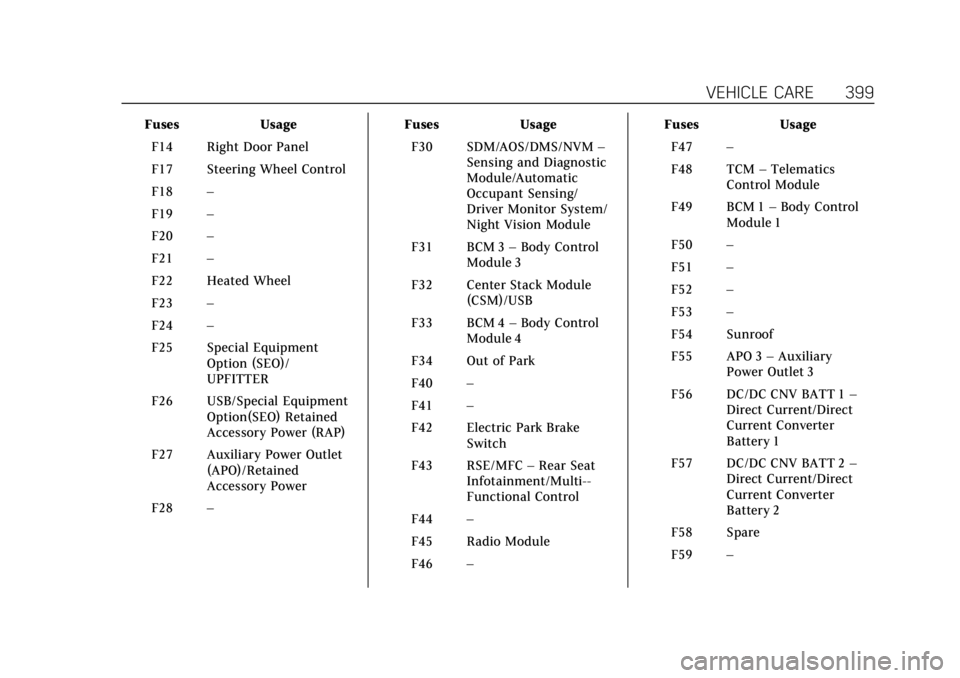
FusesUsage
F14 Right Door Panel
F17 Steering Wheel Control
F18 –
F19 –
F20 –
F21 –
F22 Heated Wheel
F23 –
F24 –
F25 Special Equipment Option (SEO)/
UPFITTER
F26 USB/Special Equipment Option(SEO) Retained
Accessory Power (RAP)
F27 Auxiliary Power Outlet (APO)/Retained
Accessory Power
F28 – Fuses
Usage
F30 SDM/AOS/DMS/NVM –
Sensing and Diagnostic
Module/Automatic
Occupant Sensing/
Driver Monitor System/
Night Vision Module
F31 BCM 3 –Body Control
Module 3
F32 Center Stack Module (CSM)/USB
F33 BCM 4 –Body Control
Module 4
F34 Out of Park
F40 –
F41 –
F42 Electric Park Brake Switch
F43 RSE/MFC –Rear Seat
Infotainment/Multi--
Functional Control
F44 –
F45 Radio Module
F46 – Fuses
Usage
F47 –
F48 TCM –Telematics
Control Module
F49 BCM 1 –Body Control
Module 1
F50 –
F51 –
F52 –
F53 –
F54 Sunroof
F55 APO 3 –Auxiliary
Power Outlet 3
F56 DC/DC CNV BATT 1 –
Direct Current/Direct
Current Converter
Battery 1
F57 DC/DC CNV BATT 2 –
Direct Current/Direct
Current Converter
Battery 2
F58 Spare
F59 –
Page 472 of 508
Cadillac Escalade Owner Manual (GMNA-Localizing-U.S./Canada/Mexico-
15567102) - 2022 - CRC - 11/17/21
CUSTOMER INFORMATION 471
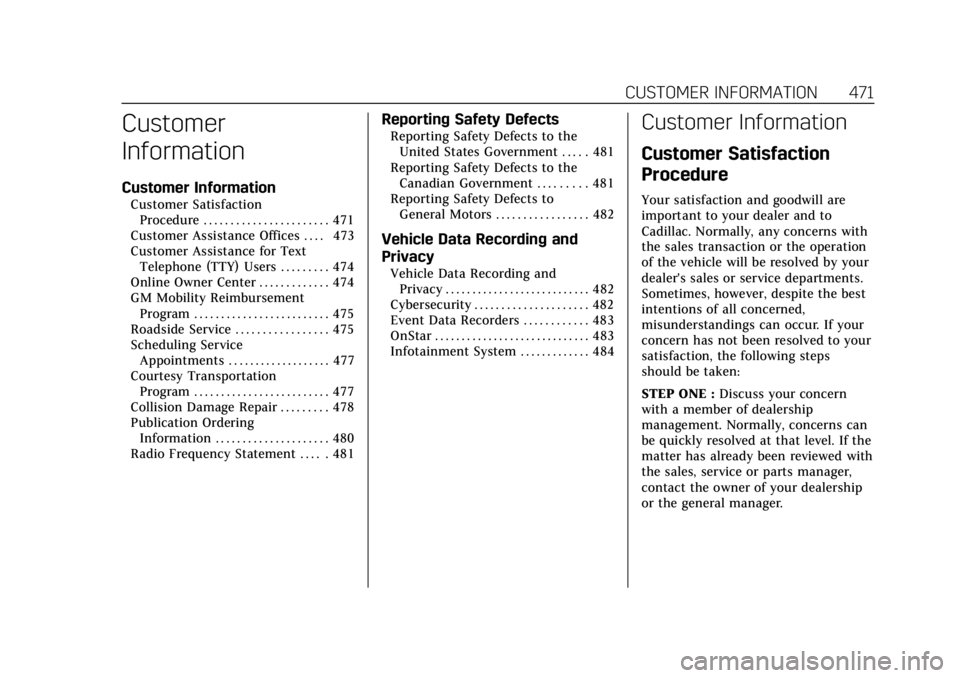
Customer
Information
Customer Information
Customer SatisfactionProcedure . . . . . . . . . . . . . . . . . . . . . . . 471
Customer Assistance Offices . . . . 473
Customer Assistance for Text Telephone (TTY) Users . . . . . . . . . 474
Online Owner Center . . . . . . . . . . . . . 474
GM Mobility Reimbursement Program . . . . . . . . . . . . . . . . . . . . . . . . . 475
Roadside Service . . . . . . . . . . . . . . . . . 475
Scheduling Service Appointments . . . . . . . . . . . . . . . . . . . 477
Courtesy Transportation Program . . . . . . . . . . . . . . . . . . . . . . . . . 477
Collision Damage Repair . . . . . . . . . 478
Publication Ordering Information . . . . . . . . . . . . . . . . . . . . . 480
Radio Frequency Statement . . . . . 481
Reporting Safety Defects
Reporting Safety Defects to the United States Government . . . . . 481
Reporting Safety Defects to the Canadian Government . . . . . . . . . 481
Reporting Safety Defects to
General Motors . . . . . . . . . . . . . . . . . 482
Vehicle Data Recording and
Privacy
Vehicle Data Recording andPrivacy . . . . . . . . . . . . . . . . . . . . . . . . . . . 482
Cybersecurity . . . . . . . . . . . . . . . . . . . . . 482
Event Data Recorders . . . . . . . . . . . . 483
OnStar . . . . . . . . . . . . . . . . . . . . . . . . . . . . . 483
Infotainment System . . . . . . . . . . . . . 484
Customer Information
Customer Satisfaction
Procedure
Your satisfaction and goodwill are
important to your dealer and to
Cadillac. Normally, any concerns with
the sales transaction or the operation
of the vehicle will be resolved by your
dealer's sales or service departments.
Sometimes, however, despite the best
intentions of all concerned,
misunderstandings can occur. If your
concern has not been resolved to your
satisfaction, the following steps
should be taken:
STEP ONE : Discuss your concern
with a member of dealership
management. Normally, concerns can
be quickly resolved at that level. If the
matter has already been reviewed with
the sales, service or parts manager,
contact the owner of your dealership
or the general manager.
Page 484 of 508
Cadillac Escalade Owner Manual (GMNA-Localizing-U.S./Canada/Mexico-
15567102) - 2022 - CRC - 11/17/21
CUSTOMER INFORMATION 483
electronic systems to unauthorized
devices or connect your vehicle to any
unknown or untrusted networks (such
as Bluetooth, WIFI or similar
technology). In the event you suspect
any security incident impacting your
data or the safe operation of your
vehicle, please stop operating your
vehicle and contact your dealer.
Event Data Recorders
This vehicle is equipped with an event
data recorder (EDR). The main
purpose of an EDR is to record, in
certain crash or near crash-like
situations, such as an air bag
deployment or hitting a road obstacle,
data that will assist in understanding
how a vehicle’s systems performed.
The EDR is designed to record data
related to vehicle dynamics and safety
systems for a short period of time,
typically 30 seconds or less. The EDR
in this vehicle is designed to record
such data as:
.How various systems in your
vehicle were operating;
.Whether or not the driver and
passenger safety belts were buckled/
fastened;
.How far (if at all) the driver was
depressing the accelerator and/or
brake pedal; and,
.How fast the vehicle was traveling.
These data can help provide a better
understanding of the circumstances in
which crashes and injuries occur.
Note
EDR data are recorded by your vehicle
only if a non-trivial crash situation
occurs; no data are recorded by the
EDR under normal driving conditions
and no personal data (e.g., name,
gender, age, and crash location) are
recorded. However, other parties, such
as law enforcement, could combine
the EDR data with the type of
personally identifying data routinely
acquired during a crash investigation.
To read data recorded by an EDR,
special equipment is required, and
access to the vehicle or the EDR is
needed. In addition to the vehicle
manufacturer, other parties, such as
law enforcement, that have the special
equipment, can read the information
if they have access to the vehicle or
the EDR. GM will not access these data or share
it with others except: with the consent
of the vehicle owner or, if the vehicle
is leased, with the consent of the
lessee; in response to an official
request by police or similar
government office; as part of GM's
defense of litigation through the
discovery process; or, as permitted by
law. Data that GM collects or receives
may also be used for GM research
needs or may be made available to
others for research purposes, where a
need is shown and the data is not tied
to a specific vehicle or vehicle owner.
OnStar
If the vehicle is equipped with OnStar
and has an active service plan,
additional data may be collected and
transmitted through the OnStar
system. This includes information
about the vehicle’s operation;
collisions involving the vehicle; the
use of the vehicle and its features,
including infotainment; and the
location and approximate GPS speed
of the vehicle. Refer to the OnStar
Terms and Conditions and Privacy
Statement on the OnStar website.
Page 485 of 508

Cadillac Escalade Owner Manual (GMNA-Localizing-U.S./Canada/Mexico-
15567102) - 2022 - CRC - 11/17/21
484 CUSTOMER INFORMATION
SeeOnStar Additional Information
0 487.
Infotainment System
If the vehicle is equipped with a
navigation system as part of the
infotainment system, use of the
system may result in the storage of
destinations, addresses, telephone
numbers, and other trip information.
See the infotainment section for
information on stored data and for
deletion instructions.