light CADILLAC ESCALADE 2022 Owners Manual
[x] Cancel search | Manufacturer: CADILLAC, Model Year: 2022, Model line: ESCALADE, Model: CADILLAC ESCALADE 2022Pages: 508, PDF Size: 9.18 MB
Page 357 of 508
Cadillac Escalade Owner Manual (GMNA-Localizing-U.S./Canada/Mexico-
15567102) - 2022 - CRC - 11/17/21
356 DRIVING AND OPERATING
Touch Start to cycle the trailer lamps
on and off to determine if they are
working. The test follows this
sequence:1. The running lights turn on first and remain on throughout the
sequence.
2. The brake lights turn on for about two seconds.
3. The left turn signal light flashes three times.
4. The right turn signal light flashes three times.
5. The reverse lights turn on for about two seconds.
6. Steps 2–5 repeat for approximately one minute and 45 seconds,
or until the test deactivates.
Touch Stop to stop the test. The test
will automatically end after
one minute and 45 seconds.
The sequence also deactivates when
any of the following occur:
.The ignition is turned off.
.The transmission is shifted out of
P (Park).
.The brake pedal is pressed.
.The turn signal is activated.
.The hazard warning lights are
activated.
Trailering App
If equipped, the Trailering App is on
the Home Page of the infotainment
display.
If equipped this feature allows profiles
for connected trailers to be created to
view status, to store and track trailer
usage information, and to set up
towing assistance features.
The Trailering App Preview will
appear when the Trailering App is
opened for the first time from the
Home Page. Touch GET STARTED in
the Trailering App to go into the app.
When a trailer is electrically
connected and a trailer profile has not
been created, there will be an option
to create a profile, use a guest profile,
or select Accessory/No trailer. After
the pop-up is displayed three times,
Don’t Remind Me will display and
touching that will turn off the trailer
detection pop-up. To turn the Trailer
Detection Alert on, select ON in the
Settings tab. When a trailer is electrically
connected and after a Trailer Profile
has been created, the trailer detection
pop-up will appear with a list of all of
the custom Trailer Profiles made on
the vehicle. To load an existing Trailer
Profile, select one of the Trailer
Profiles listed, or load the Guest
Trailer Profile by selecting GUEST
TRAILER. Touching Accessory/No
trailer will select Accessory/No trailer
as the active Trailer Profile and will
dismiss the pop- up. Shifting the
vehicle from P (Park) will select Guest
Trailer as the active Trailer Profile and
will dismiss the pop-up.
Create a Trailer Profile
1. Touch Create Profile on the trailer detection pop-up or touch + Add
Trailer Profile in the Trailering App.
2. Create a name for the trailer.
3. Select the trailer type.
4. Select Save Profile.
A pop-up will indicate the setup is
complete. Touch DONE to complete
the process or touch TRAILER
FEATURE SETUP to set up the
Tow/Haul Mode reminder, Trailer Tire
Page 358 of 508

Cadillac Escalade Owner Manual (GMNA-Localizing-U.S./Canada/Mexico-
15567102) - 2022 - CRC - 11/17/21
DRIVING AND OPERATING 357
Pressure Monitoring System,
if equipped, maintenance reminders,
or towing assistance, if equipped.
Import a Trailer Profile
A trailer profile saved to an OnStar
account can be imported to the
vehicle.1. Touch + Add Trailer Profile in the Trailering App
2. Touch Import Profile on the pop-up.
3. Select a trailer profile from the list.
4. Touch IMPORT.
A pop-up will indicate the import was
successful. Touch OK to return to the
trailer list and select the trailer profile.
The Tow/Haul Mode reminder, Brake
Gain Setting and Trailer Tire Pressure
sensor learning, if equipped, do not
import.
Trailer Feature Setup
Tow/Haul Mode Reminder
To turn the Tow/Haul Mode Reminder
setting on, touch Yes. To turn it off,
touch No. Trailer Tire Pressure Setup
If the Trailer Tire Pressure Monitoring
System (TTPMS) is detected, touch
the Tire Pressure Monitoring icon to
set up tire pressure monitoring. Touch
Yes to set up the sensors or touch No
to return to the previous screen.
The trailer tire pressure sensors can
transmit up to 7 m (23 ft) from the
hitch receiver of the vehicle.
A trailer must be electrically
connected to the vehicle before
starting the sensor-to-vehicle learn
process.
After selecting Start from the Learn
Sensors screen, use the Tool Method
or the Manual Method (described
below) to learn each tire sensor,
during which the current tire number
will be highlighted.
Each sensor has a minimum of
two minutes to learn, shown by a
timer. After a sensor is learned, a
checkmark appears next to the tire,
the vehicle horn will sound, the
vehicle’s brake lamps will flash, and
all working trailer lamps will flash.
It then moves to the next sensor.To cancel the process touch Stop.
The recommended tire pressure must
be entered for the trailer tires. This
allows the vehicle to alert when the
tire pressure is high or low.
TTPMS must learn the location of the
installed tire sensors to show correct
air pressure and temperature for each
tire. To set up, use one of the
following options or see a tire or
trailer dealer for service. The learning
process must be repeated when the
trailer tires are rotated or replaced.
See
“Editing a Trailer Profile ”later in
this section for tire pressure sensor
relearn information.
Tool Method: A TTPMS activation tool
can be purchased separately to learn
the sensor locations.
Manual Method: Without the tool, the
air pressure can be increased or
decreased in each tire for 10 seconds.
Do not exceed the maximum inflation
pressure found on the tire sidewalls.
Make sure to re-adjust tire pressure to
the recommended level when the
process is complete.
Page 359 of 508

Cadillac Escalade Owner Manual (GMNA-Localizing-U.S./Canada/Mexico-
15567102) - 2022 - CRC - 11/17/21
358 DRIVING AND OPERATING
Sensor Learning Steps
To complete the sensor-to-vehicle
learn process:1. Touch Start on the Learn Sensors screen. The horn chirps twice and
the Learning Active screen appears
on the infotainment display.
2. Start with the driver side front trailer tire.
3. Activate the tool near the valve stem or adjust the air pressure of
this tire until the horn chirps and
all working vehicle and trailer
lights flash.
The process stops without saving
the sensor locations if this step
takes more than two minutes.
4. Move to the next tire and repeat Step 3 for each sensor. The horn
chirps twice when all sensors are
completed.
5. Return to the vehicle to complete the setup.
Maintenance Reminders
To set up maintenance reminders,
touch the Trailer Maintenance icon.
Select Yes to set up the maintenance reminders for the Trailer Profile.
Follow the on-screen prompts. The
maximum number of reminders is 50.
Select No to return to the previous
screen.
Towing Assistance
To set up towing assistance features,
if equipped, touch the Towing
Assistance icon.
Touch Yes to begin set up or touch No
to return to the previous screen.
1. Select the number of axles on the trailer.
2. Enter trailer dimensions
3. Follow the on-screen instructions to complete setup for available
features.
Rear Trailer Guidance Setup, If
Equipped
A rear trailer camera must be
mounted on the trailer and electrically
connected to the vehicle before rear
trailer guidance feature can be used.
See Assistance Systems for Parking or
Backing 0303. Trailer dimensions must be in range
to enable this feature.
Trailer Length: 300 cm (118.1 in)
–
1300 cm (511.8 in). Measure from
center of coupler to furthest rear point
on the trailer.
1. If trailer dimensions are out of range, this feature will be
unavailable.
2. Ensure rear trailer camera is connected.
3. Follow instructions to drive forward to complete calibration.
Trailer Length Indicator Setup
1. Follow instructions to driveforward to complete calibration.
Trailer Side Blind Zone Alert
Setup
Trailer dimensions must be in range
to enable this feature.
.Trailer Length: 300 cm (118.1 in) –
1200 cm (472.4 in). Measure from
center of coupler to furthest rear
point on the trailer.
If trailer dimensions are out of range,
this feature will be unavailable.
Page 360 of 508

Cadillac Escalade Owner Manual (GMNA-Localizing-U.S./Canada/Mexico-
15567102) - 2022 - CRC - 11/17/21
DRIVING AND OPERATING 359
Status View
The Status view shows:
.Vehicle
.Connections
.Tires
.Maintenance
.Cameras
Upon entry, the most recent items will
be shown.
Connections
1. Trailer Electrical Diagnostics
2. Light Test Start Button
Connections: OK
If a trailer connection is detected
without any faults, the view will
display NO FAULTS DETECTED.
Trailer Connections Status
When a trailer is connected, the
Trailering App System detects the
trailer connection using the Stop/Turn
Signal lighting circuits and alerts the
driver by requesting a trailer profile
setup through the Trailering App
System on the infotainment screen.
The Trailer Detection Alert setting
must be enabled for the alert to
display when a trailer is connected.
When a trailer is connected and the
ignition is off, the Trailering App
System will periodically pulse the
lighting circuits of the trailer to verify
it is still connected. The trailer lights
may periodically flash as a result of
this trailer connection detection.
These flashes may be more visible in
dark ambient light environments. The
flashing or flickering lights are a
normal condition and the Trailering
App System has built-in protections to
prevent the battery from draining. When Theft Alert is also enabled the
frequency and pattern of this flashing
will change.
If a connected trailer becomes
disconnected, a message about the
trailer disconnect will appear on the
DIC immediately (if vehicle is on) or
upon next ignition cycle (if trailer was
disconnected while vehicle is off).
Check your trailer connection if
needed.
Connection Problem
If any of the trailer connections are
lost, a message about the connection
issue will appear on the Driver
Information Center (DIC). The
infotainment display will also show
the connection issue in the
Connection Status view.
If a trailer connection is not detected,
the Trailering App will not display the
Connection Status screen.
Page 361 of 508

Cadillac Escalade Owner Manual (GMNA-Localizing-U.S./Canada/Mexico-
15567102) - 2022 - CRC - 11/17/21
360 DRIVING AND OPERATING
Connection Trailer Lighting Faults
Detected
The Trailering App System monitors
for electrical faults on the trailer
lights. A message about the lighting
issue will appear on the DIC. The
infotainment display will also show
the lighting issue in the Connection
Status view. Repair your trailer lights
if needed. A trailer lighting issue is
not covered by your GM warranty.
Diagnose View
Touch Diagnose to see more
information about the connection
problem.
This view will display the names of
the trailer connector pins, a graphic of
the trailer connector, and a graphic of
the back of the trailer.
Any connector pin that failed will be
amber color, and the location of the
corresponding connection will be
highlighted on the graphic of the back
of the trailer.
The Running Lights connection may
not detect partial outages. Activate
the light test to check all trailer
lamps. See“Light Test”following. Light Test
Touch Start Light Test to cycle the
trailer lights on and off to determine if
they are working. The test follows this
sequence:
1. The running lights turn on first and remain on throughout the
sequence.
2. The brake lights turn on for about two seconds.
3. The left turn signal light flashes three times.
4. The right turn signal light flashes three times.
5. The reverse lights turn on for about two seconds.
6. Steps 2–5 repeat for approximately one minute and 45 seconds,
or until the test deactivates.
Touch Stop to stop the test. The test
will automatically end after
one minute and 45 seconds.
The sequence also deactivates when
any of the following occur:
.The ignition is turned off.
.The transmission is shifted out of
P (Park).
.The brake pedal is pressed.
.The turn signal is activated.
.The hazard warning lights are
activated.
Tires
1. Trailer Tire Pressure/Temperature
Tire Pressure and Temperature
If the TTPMS sensor-to-vehicle learn
process was completed, the status
view will display the current tire
pressure and temperature of the
trailer tires related to the active
Trailer Profile. If a tire’s pressure is
low or high, the color of the pressure
value will be amber. If a sensor
malfunctions, the values are dashed
lines. If the screen displays “Service
Page 368 of 508

Cadillac Escalade Owner Manual (GMNA-Localizing-U.S./Canada/Mexico-
15567102) - 2022 - CRC - 11/17/21
DRIVING AND OPERATING 367
Conversions and
Add-Ons
Add-On Electrical
Equipment
{Warning
The Data Link Connector (DLC) is
used for vehicle service and
Emission Inspection/Maintenance
testing. SeeMalfunction Indicator
Lamp (Check Engine Light) 0123.
A device connected to the DLC —
such as an aftermarket fleet or
driver-behavior tracking device —
may interfere with vehicle systems.
This could affect vehicle operation
and cause a crash. Such devices
may also access information stored
in the vehicle’s systems.
Caution
Some electrical equipment can
damage the vehicle or cause
components to not work and would
not be covered by the vehicle
warranty. Always check with your
dealer before adding electrical
equipment.
{Warning
Certain mobile radio equipment,
like amplifiers and antennas used
for two-way communication, can
interfere with some vehicle systems.
Always ensure this equipment is
supplied with proper local
grounding. Follow all of the
instructions that came with the
equipment and see your GM dealer
for additional mobile radio
installation instructions. Add-on equipment can drain the
vehicle's 12-volt battery, even if the
vehicle is not operating.
The vehicle has an airbag system.
Before attempting to add anything
electrical to the vehicle, see
Servicing
the Airbag-Equipped Vehicle 076 and
Adding Equipment to the
Airbag-Equipped Vehicle 076.
Page 369 of 508
Cadillac Escalade Owner Manual (GMNA-Localizing-U.S./Canada/Mexico-
15567102) - 2022 - CRC - 11/17/21
368 VEHICLE CARE
Vehicle Care
General Information
General Information . . . . . . . . . . . . . 369
California Perchlorate MaterialsRequirements . . . . . . . . . . . . . . . . . . . 369
Accessories and Modifications . . . . . . . . . . . . . . . . . . . 369
Vehicle Checks
Doing Your OwnService Work . . . . . . . . . . . . . . . . . . . . 370
Hood . . . . . . . . . . . . . . . . . . . . . . . . . . . . . . 371
Engine Compartment Overview . . . . . . . . . . . . . . . . . . . . . . . . . 372
Engine Oil . . . . . . . . . . . . . . . . . . . . . . . . . 373
Engine Oil Life System . . . . . . . . . . . 375
Automatic Transmission Fluid . . . . . . . . . . . . . . . . . . . . . . . . . . . . . 376
Engine Air Filter Life System . . . . 377
Engine Air Cleaner/Filter . . . . . . . . . 377
Cooling System . . . . . . . . . . . . . . . . . . . 378
Engine Overheating . . . . . . . . . . . . . . 381
Engine Fan . . . . . . . . . . . . . . . . . . . . . . . . 382
Washer Fluid . . . . . . . . . . . . . . . . . . . . . 383
Brakes . . . . . . . . . . . . . . . . . . . . . . . . . . . . . 383
Brake Pad Life System . . . . . . . . . . . 384
Brake Fluid . . . . . . . . . . . . . . . . . . . . . . . 385
Battery - North America . . . . . . . . . 386 Four-Wheel Drive . . . . . . . . . . . . . . . . 386
Front Axle . . . . . . . . . . . . . . . . . . . . . . . . 387
Rear Axle . . . . . . . . . . . . . . . . . . . . . . . . . 387
Park Brake and P (Park)
Mechanism Check . . . . . . . . . . . . . . 387
Wiper Blade Replacement . . . . . . . 388
Glass Replacement . . . . . . . . . . . . . . . 389
Windshield Replacement . . . . . . . . 389
Gas Strut(s) . . . . . . . . . . . . . . . . . . . . . . . 389Headlamp Aiming
Front Headlamp Aiming . . . . . . . . . 390
Bulb Replacement
Bulb Replacement . . . . . . . . . . . . . . . . 390
LED Lighting . . . . . . . . . . . . . . . . . . . . . 390
Electrical System
Electrical System Overload . . . . . . 390
Fuses and Circuit Breakers . . . . . . 392
Engine Compartment Fuse Block . . . . . . . . . . . . . . . . . . . . . . . . . . . . 393
Instrument Panel Fuse Block . . . . 397
Rear Compartment Fuse Block . . . . . . . . . . . . . . . . . . . . . . . . . . . . 400
Wheels and Tires
Tires . . . . . . . . . . . . . . . . . . . . . . . . . . . . . . . 402
All-Season Tires . . . . . . . . . . . . . . . . . . 403
Winter Tires . . . . . . . . . . . . . . . . . . . . . . 403 Low-Profile Tires . . . . . . . . . . . . . . . . . 403
Tire Sidewall Labeling . . . . . . . . . . . 404
Tire Designations . . . . . . . . . . . . . . . . . 405
Tire Terminology and
Definitions . . . . . . . . . . . . . . . . . . . . . . 406
Tire Pressure . . . . . . . . . . . . . . . . . . . . . . 409
Tire Pressure for High-Speed Operation . . . . . . . . . . . . . . . . . . . . . . . . 410
Tire Pressure Monitor System . . . 411
Tire Pressure Monitor Operation . . . . . . . . . . . . . . . . . . . . . . . . 412
Tire Inspection . . . . . . . . . . . . . . . . . . . 416
Tire Rotation . . . . . . . . . . . . . . . . . . . . . 417
When It Is Time for New Tires . . . . . . . . . . . . . . . . . . . . . . . . . . . . . 418
Buying New Tires . . . . . . . . . . . . . . . . 419
Different Size Tires and Wheels . . . . . . . . . . . . . . . . . . . . . . . . . . 420
Uniform Tire Quality Grading . . . 420
Wheel Alignment and Tire Balance . . . . . . . . . . . . . . . . . . . . . . . . . . 422
Wheel Replacement . . . . . . . . . . . . . . 422
Tire Chains . . . . . . . . . . . . . . . . . . . . . . . 422
If a Tire Goes Flat . . . . . . . . . . . . . . . . 423
Tire Changing . . . . . . . . . . . . . . . . . . . . . 424
Full-Size Spare Tire . . . . . . . . . . . . . . 435
Page 382 of 508
Cadillac Escalade Owner Manual (GMNA-Localizing-U.S./Canada/Mexico-
15567102) - 2022 - CRC - 11/17/21
VEHICLE CARE 381
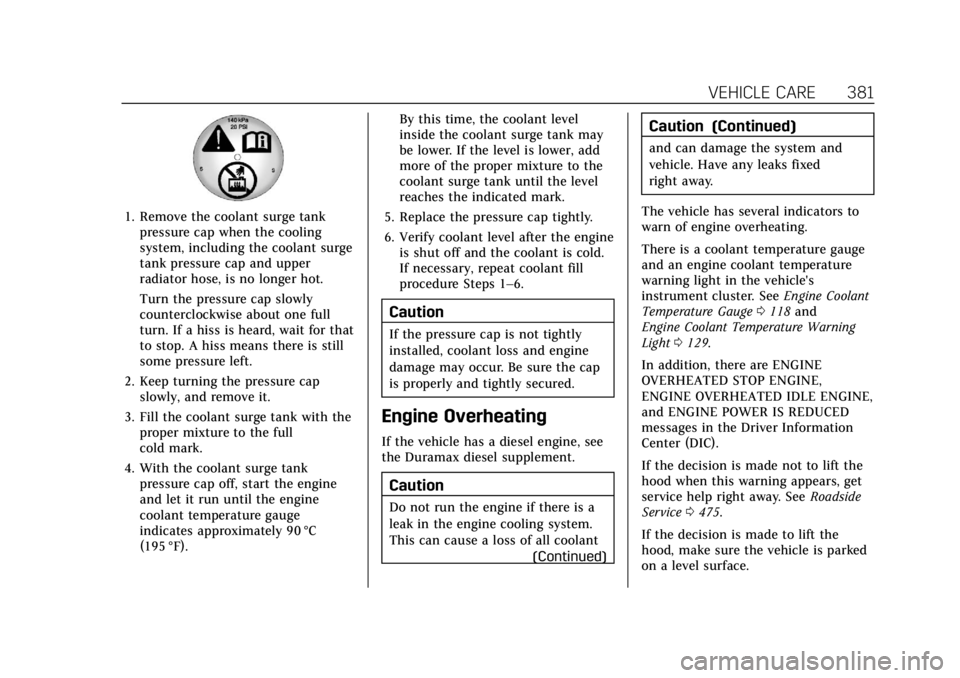
1. Remove the coolant surge tankpressure cap when the cooling
system, including the coolant surge
tank pressure cap and upper
radiator hose, is no longer hot.
Turn the pressure cap slowly
counterclockwise about one full
turn. If a hiss is heard, wait for that
to stop. A hiss means there is still
some pressure left.
2. Keep turning the pressure cap slowly, and remove it.
3. Fill the coolant surge tank with the proper mixture to the full
cold mark.
4. With the coolant surge tank pressure cap off, start the engine
and let it run until the engine
coolant temperature gauge
indicates approximately 90 °C
(195 °F). By this time, the coolant level
inside the coolant surge tank may
be lower. If the level is lower, add
more of the proper mixture to the
coolant surge tank until the level
reaches the indicated mark.
5. Replace the pressure cap tightly.
6. Verify coolant level after the engine is shut off and the coolant is cold.
If necessary, repeat coolant fill
procedure Steps 1–6.
Caution
If the pressure cap is not tightly
installed, coolant loss and engine
damage may occur. Be sure the cap
is properly and tightly secured.
Engine Overheating
If the vehicle has a diesel engine, see
the Duramax diesel supplement.
Caution
Do not run the engine if there is a
leak in the engine cooling system.
This can cause a loss of all coolant
(Continued)
Caution (Continued)
and can damage the system and
vehicle. Have any leaks fixed
right away.
The vehicle has several indicators to
warn of engine overheating.
There is a coolant temperature gauge
and an engine coolant temperature
warning light in the vehicle's
instrument cluster. See Engine Coolant
Temperature Gauge 0118 and
Engine Coolant Temperature Warning
Light 0129.
In addition, there are ENGINE
OVERHEATED STOP ENGINE,
ENGINE OVERHEATED IDLE ENGINE,
and ENGINE POWER IS REDUCED
messages in the Driver Information
Center (DIC).
If the decision is made not to lift the
hood when this warning appears, get
service help right away. See Roadside
Service 0475.
If the decision is made to lift the
hood, make sure the vehicle is parked
on a level surface.
Page 386 of 508

Cadillac Escalade Owner Manual (GMNA-Localizing-U.S./Canada/Mexico-
15567102) - 2022 - CRC - 11/17/21
VEHICLE CARE 385
4. Select YES on the confirmationmessage. Repeat for pads on the
other axle if they were also
replaced.
How to Disable the Brake Pad
Life System
The brake pad life system can be
turned off. This may be necessary if
aftermarket brake pads without wear
sensors are installed. When the
system is turned off, the front and
rear brake pad life percentages will
not display. However, the built-in wear
indicators that make a high-pitched
warning sound when the brake pads
are worn can still determine when the
pads should be replaced. See Brakes
0 383.
To turn off the brake pad life system: 1. Display Brake Pad Life on the DIC. See Driver Information Center (DIC)
0 133.
2. Select the Brake Pad Life menu.
3. Select DISABLE.
To turn the brake pad life system back
on, follow the above steps but select
ENABLE in Step 2.
Brake Fluid
The brake master cylinder reservoir is
filled with GM approved DOT 4 brake
fluid as indicated on the reservoir cap.
See Engine Compartment Overview
0 372 for the location of the reservoir.
Checking Brake Fluid
With the vehicle in P (Park) on a level
surface, the brake fluid level should be
between the minimum and maximum
marks on the brake fluid reservoir.
There are only two reasons why the
brake fluid level in the reservoir may
go down:
.Normal brake lining wear. When
new linings are installed, the fluid
level goes back up.
.A fluid leak in the brake hydraulic
system. Have the brake hydraulic
system fixed. With a leak, the
brakes will not work well. Always clean the brake fluid reservoir
cap and the area around the cap
before removing it.
Do not top off the brake fluid. Adding
fluid does not correct a leak. If fluid is
added when the linings are worn,
there will be too much fluid when
new brake linings are installed. Add or
remove fluid, as necessary, only when
work is done on the brake hydraulic
system.
{Warning
If too much brake fluid is added, it
can spill on the engine and burn,
if the engine is hot enough. You or
others could be burned, and the
vehicle could be damaged. Add
brake fluid only when work is done
on the brake hydraulic system.
When the brake fluid falls to a low
level, the brake warning light comes
on. See Brake System Warning Light
0 125.
Brake fluid absorbs water over time
which degrades the effectiveness of
the brake fluid. Replace brake fluid at
Page 391 of 508

Cadillac Escalade Owner Manual (GMNA-Localizing-U.S./Canada/Mexico-
15567102) - 2022 - CRC - 11/17/21
390 VEHICLE CARE
Hood
Trunk
Liftgate
Headlamp Aiming
Front Headlamp Aiming
Headlamp aim has been preset and
should need no further adjustment.
If the vehicle is damaged in a crash,
the headlamp aim may be affected.
If adjustment to the headlamps is
necessary, see your dealer.
Bulb Replacement
For the proper type of replacement
bulbs, or any bulb changing procedure
not listed in this section, contact your
dealer.
Caution
Do not replace incandescent bulbs
with aftermarket LED replacement
bulbs. This can cause damage to
the vehicle electrical system.
LED Lighting
This vehicle has several LED lamps.
For replacement of any LED lighting
assembly, contact your dealer.
Electrical System
Electrical System Overload
The vehicle has fuses and circuit
breakers to protect against an
electrical system overload.