light CADILLAC ESCALADE 2022 Manual Online
[x] Cancel search | Manufacturer: CADILLAC, Model Year: 2022, Model line: ESCALADE, Model: CADILLAC ESCALADE 2022Pages: 508, PDF Size: 9.18 MB
Page 247 of 508

Cadillac Escalade Owner Manual (GMNA-Localizing-U.S./Canada/Mexico-
15567102) - 2022 - CRC - 11/17/21
246 DRIVING AND OPERATING
Caution (Continued)
.Do not tow a trailer during
break-in. SeeTrailer Towing 0340
for the trailer towing capabilities
of the vehicle and more
information.
Following break-in, engine speed
and load can be gradually
increased.
On new vehicles, the various
mechanical and electrical systems
experience a “break-in”period during
the first 6 400 km (4,000 mi) of
routine driving. As the vehicle is
driven, the mechanical systems adjust
to provide optimal fuel economy and
transmission shift performance.
Electrical systems will adapt and
calibrate during the break-in period.
A one-time occurrence of clicks and
similar vehicle noises is normal during
this process.
Normal driving charges the vehicle’s
battery to achieve the best operation
of the vehicle, including fuel economy
and the Stop/Start System. See Stop/
Start System 0249.
Ignition Positions
Vehicles equipped with Keyless Access
have pushbutton starting.
The Remote Key must be in the
vehicle for the system to operate.
If the pushbutton start is not working,
the vehicle may be near a strong radio
antenna signal causing interference to
the Keyless Access system. See Remote
Keyless Entry (RKE) System Operation
0 7.
To shift out of P (Park), the ignition
must be on or in Service Mode, and
the brake pedal must be applied.
{Warning
Turning off the vehicle while
moving may cause loss of power
assist in the brake and steering
systems and disable the airbags.
While driving, only shut the vehicle
off in an emergency.
Stopping the Engine/LOCK/OFF (No
Indicator Lights) : When the vehicle
is stopped, press ENGINE START/
STOP once to turn the engine off.
If the vehicle is in P (Park), the
ignition will turn off, and Retained
Accessory Power (RAP) will remain
active. See Retained Accessory Power
(RAP) 0250.
If the vehicle is not in P (Park),
the ignition will return to
ACC/ACCESSORY and display the
message SHIFT TO PARK in the Driver
Information Center (DIC). When the
vehicle is shifted into P (Park), the
ignition system will turn off.
The vehicle may have an electric
steering column lock. The lock is
activated when the ignition is turned
off and either front door is opened.
Page 248 of 508

Cadillac Escalade Owner Manual (GMNA-Localizing-U.S./Canada/Mexico-
15567102) - 2022 - CRC - 11/17/21
DRIVING AND OPERATING 247
A sound may be heard as the lock
actuates or releases. The steering
column lock may not release with the
wheels turned off center. If this
happens, the vehicle may not start.
Move the steering wheel from left to
right while attempting to start the
vehicle. If this does not work, the
vehicle needs service.
If the vehicle must be shut off in an
emergency:1. Brake using a firm and steady pressure. Do not pump the brakes
repeatedly. This may deplete power
assist, requiring increased brake
pedal force.
2. Shift the vehicle to N (Neutral). This can be done while the vehicle
is moving. After shifting to
N (Neutral), firmly apply the brakes
and steer the vehicle to a safe
location.
3. Come to a complete stop.
4. Hold the brake pedal down and shift to P (Park). The shift lever
must be in P (Park) to turn the
ignition off. 5. Continue to hold the brake
pedal down.
6. Set the parking brake. See Electric
Parking Brake 0262.
7. Press ENGINE START/STOP once to turn the ignition off.
8. Release the brake pedal.
If the vehicle cannot be pulled over,
and must be shut off while driving,
press and hold ENGINE START/STOP
for longer than two seconds, or press
twice in five seconds.
ACC/ACCESSORY (Amber Indicator
Light) : This mode allows some
electrical accessories to be used when
the engine is off.
With the ignition off, pressing the
button one time without the brake
pedal applied will place the ignition
system in ACC/ACCESSORY.
The ignition will switch from
ACC/ACCESSORY to off after
five minutes to prevent battery
rundown. ON/RUN/START (Green Indicator
Light) :
This mode is for driving and
starting. With the ignition off, and the
brake pedal applied, pressing the
button once will turn the ignition on.
Once engine cranking begins, release
the button. Engine cranking will
continue until the engine starts. See
Starting the Engine 0248.
Service Mode
This power mode is available for
service and diagnostics, and to verify
the proper operation of the
malfunction indicator lamp as may be
required for emission inspection
purposes. With the vehicle off, and the
brake pedal not applied, pressing and
holding the button for more than
five seconds will place the vehicle in
Service Mode. The instruments and
audio systems will operate as they do
when the ignition is on, but the
vehicle will not be able to be driven.
The engine will not start in Service
Mode. Press the button again to turn
the ignition off.
Page 249 of 508

Cadillac Escalade Owner Manual (GMNA-Localizing-U.S./Canada/Mexico-
15567102) - 2022 - CRC - 11/17/21
248 DRIVING AND OPERATING
Starting the Engine
If the vehicle has a diesel engine, see
the Duramax diesel supplement.
Caution
If you add electrical parts or
accessories, you could change the
way the engine operates. Any
resulting damage would not be
covered by the vehicle warranty. See
Add-On Electrical Equipment0367.
Shift the vehicle into P (Park) or
N (Neutral). To restart the engine
when the vehicle is already moving,
use N (Neutral) only.
Caution
Do not try to shift to P (Park) if the
vehicle is moving. If you do, you
could damage the transmission.
Shift to P (Park) only when the
vehicle is stopped.
Starting Procedure
1. The remote key must be in the vehicle. Press ENGINE START/
STOP with the brake pedal applied.
When the engine begins cranking,
let go of the button.
The idle speed will go down as the
engine gets warm. Do not race the
engine immediately after starting
it. Operate the engine and
transmission gently to allow the oil
to warm up and lubricate all
moving parts.
When the low fuel warning light is
on and the FUEL LEVEL LOW
message is displayed in the Driver
Information Center (DIC), press the
ENGINE START/STOP position to
continue engine cranking.
Caution
Cranking the engine for long
periods of time, by trying to start
the engine immediately after
cranking has ended, can overheat
and damage the cranking motor,
(Continued)
Caution (Continued)
and drain the battery. Wait at least
15 seconds between each try, to let
the cranking motor cool down.
2. If the engine does not start after five to 10 seconds, especially in
very cold weather (below −18 °C or
0 °F), it could be flooded with too
much gasoline. Try pushing the
accelerator pedal all the way to the
floor and holding it there while
pressing ENGINE START/STOP for
up to a maximum of 15 seconds.
Wait at least 15 seconds between
each try, to allow the cranking
motor to cool down. When the
engine starts, let go of the button
and accelerator. If the vehicle starts
briefly but then stops again, do the
same thing. This clears the extra
gasoline from the engine. Do not
race the engine immediately after
starting it. Operate the engine and
transmission gently until the oil
warms up and lubricates all
moving parts.
Page 259 of 508
Cadillac Escalade Owner Manual (GMNA-Localizing-U.S./Canada/Mexico-
15567102) - 2022 - CRC - 11/17/21
258 DRIVING AND OPERATING
{Warning
With four-wheel drive, the vehicle
will be free to roll if the transfer
case is in N (Neutral), even when
the shift lever is in P (Park). Be
sure the transfer case is in a drive
gear—2
m, 4m, or 4n—not in
N (Neutral). See Shifting Into Park
0 250.
Caution
Extended high-speed operation in
4
nmay damage or shorten the life
of the drivetrain.
An engagement noise and bump is
normal when shifting between 4
nand
4
mor N (Neutral), with the engine
running.
Shifting into 4
nwill turn Traction
Control and StabiliTrak/Electronic
Stability Control (ESC) off. See
Traction Control/Electronic Stability
Control 0265.
Automatic Transfer Case
Two-Speed Transfer Case
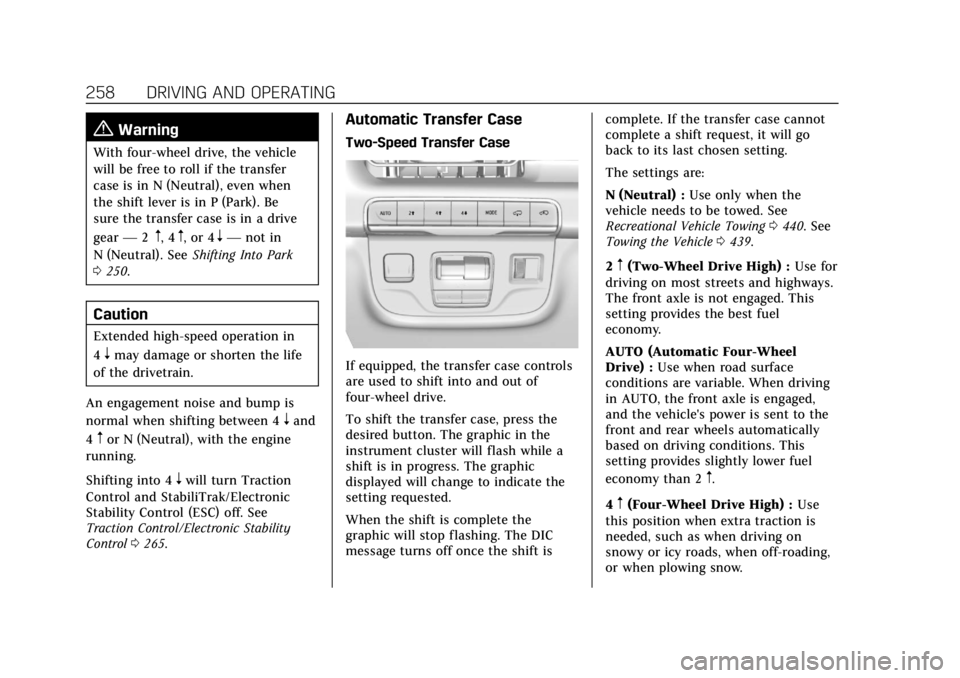
If equipped, the transfer case controls
are used to shift into and out of
four-wheel drive.
To shift the transfer case, press the
desired button. The graphic in the
instrument cluster will flash while a
shift is in progress. The graphic
displayed will change to indicate the
setting requested.
When the shift is complete the
graphic will stop flashing. The DIC
message turns off once the shift is complete. If the transfer case cannot
complete a shift request, it will go
back to its last chosen setting.
The settings are:
N (Neutral) :
Use only when the
vehicle needs to be towed. See
Recreational Vehicle Towing 0440. See
Towing the Vehicle 0439.
2
m(Two-Wheel Drive High) : Use for
driving on most streets and highways.
The front axle is not engaged. This
setting provides the best fuel
economy.
AUTO (Automatic Four-Wheel
Drive) : Use when road surface
conditions are variable. When driving
in AUTO, the front axle is engaged,
and the vehicle's power is sent to the
front and rear wheels automatically
based on driving conditions. This
setting provides slightly lower fuel
economy than 2
m.
4
m(Four-Wheel Drive High) : Use
this position when extra traction is
needed, such as when driving on
snowy or icy roads, when off-roading,
or when plowing snow.
Page 260 of 508
Cadillac Escalade Owner Manual (GMNA-Localizing-U.S./Canada/Mexico-
15567102) - 2022 - CRC - 11/17/21
DRIVING AND OPERATING 259
4n(Four-Wheel Drive Low) :This
setting engages the front axle and
delivers extra torque. Choose 4
nwhen
driving off-road in deep sand, deep
mud, or deep snow, and while
climbing or descending steep hills.
While driving in 4
n, keep vehicle
speed below 72 km/h (45 mph).
Shifting into 4
nwill turn Traction
Control and StabiliTrak/ESC off. See
Traction Control/Electronic Stability
Control 0265.
Shifts between 2
m, 4m, and AUTO
Any of these shifts can be made at
normal driving speed.
The actual 4x4 shift request is only
made after the button is released. The
4x4 graphic will remain flashing until
the shift request has completed. A DIC
message displays to indicate that the
4x4 transfer case has been requested
to shift to the new desired state.
Once the 4x4 shift has completed, the
DIC message disappears, the 4x4
graphic stops flashing, and the current
setting is indicated. When a shift to 2
mis completed
successfully while in P (Park), the
parking brake will engage. To resume
driving, shift the transmission to the
desired gear and manually release the
parking bake or press the accelerator
pedal to begin driving. See Electric
Parking Brake 0262.
If equipped, use 4
n, AUTO, or 4mto
provide additional traction when
parking on a steep grade with poor
traction such as ice, snow, mud,
or gravel.
Shifting Into 4
n
1. The ignition must be on and the vehicle must be stopped or moving
less than 5 km/h (3 mph) with the
transmission in N (Neutral). It is
best for the vehicle to be moving
1.6 to 3.2 km/h (1 to 2 mph).
2. Press 4
n. The actual 4x4 shift
request is only made after the
button is released. The 4x4 graphic
will remain flashing until the shift
request has completed. A DIC
message displays to indicate that the 4x4 transfer case has been
requested to shift to the new
desired state.
Once the 4x4 shift has completed,
the DIC message disappears, the
4x4 graphic stops flashing and the
current setting is indicated.
If vehicle speed is higher when shift
request occurs, a DIC message
displays. Reduce vehicle speed.
If the transmission is not in
N (Neutral) when shift request occurs,
a DIC message displays. The vehicle
will allow 20 seconds for the shift to
occur. After this time, a graphic in the
instrument cluster will indicate that
the transfer case is in 4
n.
Caution
Shifting the transmission into gear
before the requested mode indicator
light has stopped flashing could
damage the transfer case.
If the transmission is not shifted into
N (Neutral) or the vehicle has not
slowed to 5 km/h (3 mph) within
Page 261 of 508

Cadillac Escalade Owner Manual (GMNA-Localizing-U.S./Canada/Mexico-
15567102) - 2022 - CRC - 11/17/21
260 DRIVING AND OPERATING
20 seconds, the transfer case will
remain in its original state. This will
be indicated in the instrument cluster.
With the vehicle moving less than
5 km/h (3 mph) and the transmission
in N (Neutral), attempt the shift again.
Shifting Out of 4
n
1. The vehicle must be stopped ormoving less than 5 km/h (3 mph)
with the transmission in
N (Neutral) and the ignition on.
It is best for the vehicle to be
moving 1.6 to 3.2 km/h (1 to 2 mph).
2. Press 4
m, AUTO, or 2m. The actual
4x4 shift request is only made after
the button is released. The 4x4
graphic will remain flashing until
the shift request has completed.
A DIC message displays to indicate
the state of the request.
Once the 4x4 shift has completed,
the DIC message disappears, the
4x4 graphic stops flashing, and the
current setting is indicated.
If vehicle speed is higher when
shift request occurs, a DIC message
displays. Reduce vehicle speed. If the transmission is not in
N (Neutral) when the shift request
occurs, DIC messages will display. The
vehicle will allow 20 seconds for this
shift to occur. After this time, a
graphic in the instrument cluster will
indicate that the transfer case is in 4
n.
Caution
Shifting the transmission into gear
before the requested mode indicator
light has stopped flashing could
damage the transfer case.
If the transmission is not shifted into
N (Neutral) or the vehicle has not
slowed to 5 km/h (3 mph) within
20 seconds, the transfer case will
remain in its original state. This will
be indicated in the instrument cluster.
With the vehicle moving less than
5 km/h (3 mph), and the transmission
in N (Neutral), attempt the shift again.
Shifting Into N (Neutral)
To shift into N (Neutral): 1. Start the vehicle.
2. Shift the transmission to N (Neutral). 3. Shift the transfer case to 2
m.
4. Apply the parking brake and/or brake pedal.
5. Press 2
mfive times in 10 seconds
until the N (Neutral) symbol starts
flashing in the instrument cluster.
When the shift is complete, the
graphic stops flashing. If the
parking brake and/or brake pedal is
not applied within 20 seconds, the
transfer case will remain in the
original state.
6. If the transmission is not shifted into N (Neutral) or the vehicle has
not slowed to 5 km/h (3 mph)
within 20 seconds, the transfer case
will remain in its original state.
This will be indicated in the
instrument cluster.
Shifting Out of N (Neutral)
To shift out of N (Neutral): 1. Turn the ignition on with the engine off. See Ignition Positions
0 246.
2. Set the parking brake. See Electric
Parking Brake 0262.
Page 262 of 508
Cadillac Escalade Owner Manual (GMNA-Localizing-U.S./Canada/Mexico-
15567102) - 2022 - CRC - 11/17/21
DRIVING AND OPERATING 261
3. Shift the transmission toN (Neutral).
4. Shift the transfer case to 2
m.
Transfer case shifts out of
N (Neutral) can only be made into
2
m. When the shift to 2mis
complete, the graphic in the
instrument cluster will stop
flashing. If the transfer case cannot
complete a shift, the graphic will
return to the previously selected
setting.
Single Speed Transfer Case
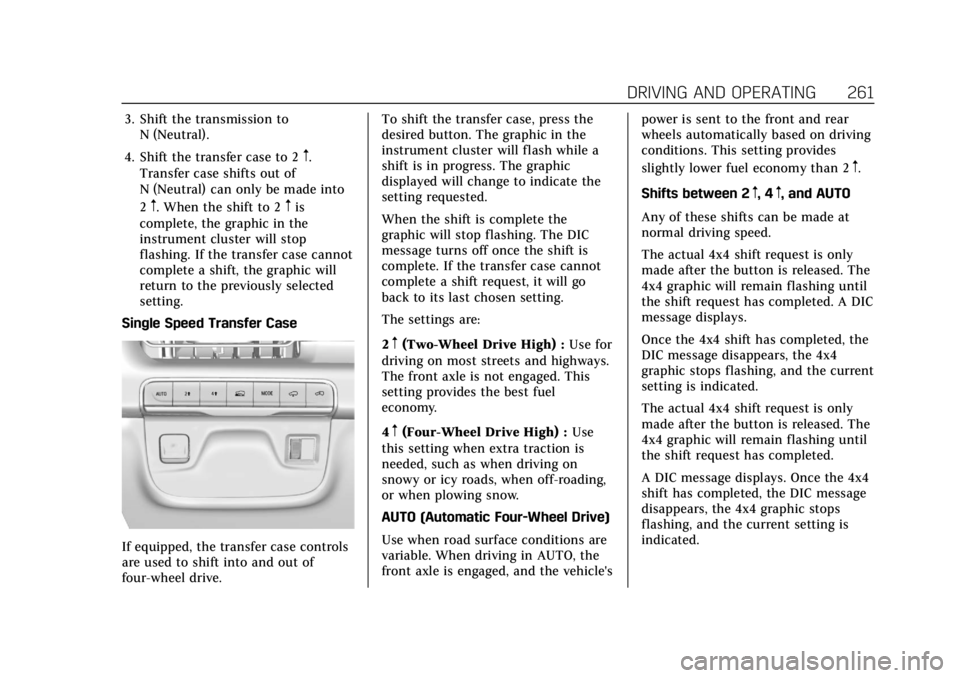
If equipped, the transfer case controls
are used to shift into and out of
four-wheel drive. To shift the transfer case, press the
desired button. The graphic in the
instrument cluster will flash while a
shift is in progress. The graphic
displayed will change to indicate the
setting requested.
When the shift is complete the
graphic will stop flashing. The DIC
message turns off once the shift is
complete. If the transfer case cannot
complete a shift request, it will go
back to its last chosen setting.
The settings are:
2
m(Two-Wheel Drive High) :
Use for
driving on most streets and highways.
The front axle is not engaged. This
setting provides the best fuel
economy.
4
m(Four-Wheel Drive High) : Use
this setting when extra traction is
needed, such as when driving on
snowy or icy roads, when off-roading,
or when plowing snow.
AUTO (Automatic Four-Wheel Drive)
Use when road surface conditions are
variable. When driving in AUTO, the
front axle is engaged, and the vehicle's power is sent to the front and rear
wheels automatically based on driving
conditions. This setting provides
slightly lower fuel economy than 2
m.
Shifts between 2
m, 4m, and AUTO
Any of these shifts can be made at
normal driving speed.
The actual 4x4 shift request is only
made after the button is released. The
4x4 graphic will remain flashing until
the shift request has completed. A DIC
message displays.
Once the 4x4 shift has completed, the
DIC message disappears, the 4x4
graphic stops flashing, and the current
setting is indicated.
The actual 4x4 shift request is only
made after the button is released. The
4x4 graphic will remain flashing until
the shift request has completed.
A DIC message displays. Once the 4x4
shift has completed, the DIC message
disappears, the 4x4 graphic stops
flashing, and the current setting is
indicated.
Page 263 of 508
Cadillac Escalade Owner Manual (GMNA-Localizing-U.S./Canada/Mexico-
15567102) - 2022 - CRC - 11/17/21
262 DRIVING AND OPERATING
Brakes
Electric Brake Boost
Vehicles equipped with electric brake
boost have hydraulic brake circuits
that are electronically controlled when
the brake pedal is applied during
normal operation. The system
performs routine tests and turns off
within a few minutes after the vehicle
is turned off. Noise may be heard
during this time. If the brake pedal is
pressed during the tests or when the
electric brake boost system is off, a
noticeable change in pedal force and
travel may be felt. This is normal.
Antilock Brake
System (ABS)
The Antilock Brake System (ABS)
helps prevent a braking skid and
maintain steering while braking hard.
If there is a problem with ABS, this
warning light stays on. SeeAntilock
Brake System (ABS) Warning Light
0 126.
ABS does not change the time needed
to get a foot on the brake pedal and
does not always decrease stopping
distance. If you get too close to the
vehicle ahead, there will not be
enough time to apply the brakes if
that vehicle suddenly slows or stops.
Always leave enough room ahead to
stop, even with ABS.
Using ABS
Do not pump the brakes. Just hold the
brake pedal down firmly. Hearing and
feeling ABS operate is normal.
Braking in Emergencies
ABS allows steering and braking at the
same time. In many emergencies,
steering can help even more than
braking.
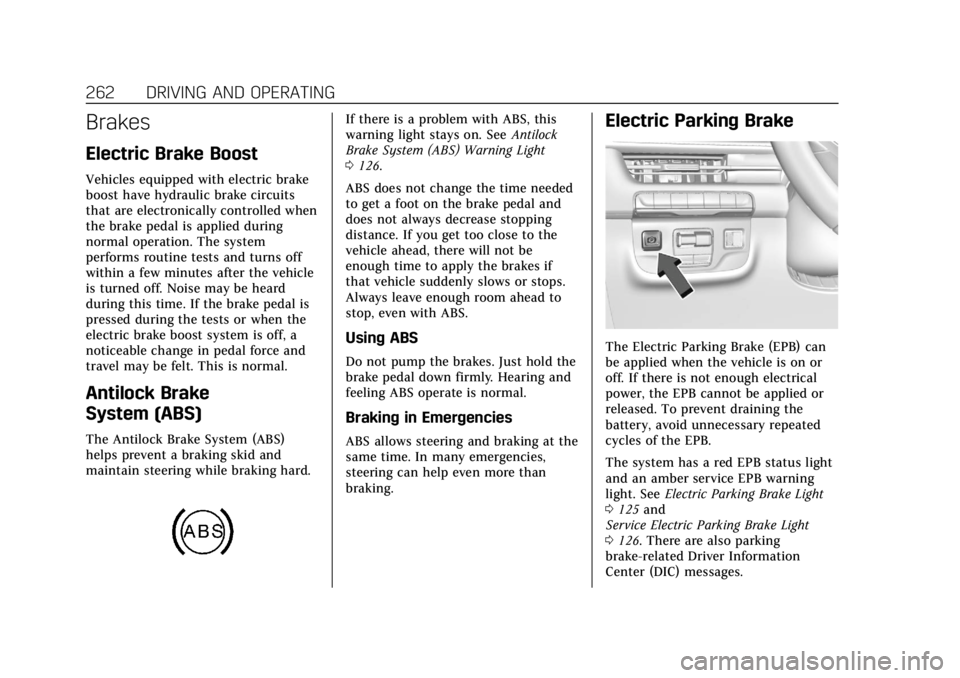
Electric Parking Brake
The Electric Parking Brake (EPB) can
be applied when the vehicle is on or
off. If there is not enough electrical
power, the EPB cannot be applied or
released. To prevent draining the
battery, avoid unnecessary repeated
cycles of the EPB.
The system has a red EPB status light
and an amber service EPB warning
light. See Electric Parking Brake Light
0 125 and
Service Electric Parking Brake Light
0 126. There are also parking
brake-related Driver Information
Center (DIC) messages.
Page 264 of 508
Cadillac Escalade Owner Manual (GMNA-Localizing-U.S./Canada/Mexico-
15567102) - 2022 - CRC - 11/17/21
DRIVING AND OPERATING 263
Before leaving the vehicle, check the
red EPB status light to ensure that the
parking brake is applied.
If a message displays on the DIC
indicating the transmission is unable
to shift soon, the service electric
parking brake is on, and the EPB light
flashes at the same time, the system
must be reset. Start the vehicle, apply
the EPB, and then release it. The
message and light should turn off. See
Electric Parking Brake Light0125 and
Service Electric Parking Brake Light
0 126.
EPB Apply
To apply the EPB:
1. Be sure the vehicle is at a complete stop.
2. Press the EPB switch.
The red EPB status light will flash and
then stay on once the EPB is fully
applied. If the red EPB status light
flashes continuously, then the EPB is
only partially applied or there is a
problem with the EPB. A DIC message
will display. Release the EPB and try
to apply it again. If the light does not
come on, or keeps flashing, have the vehicle serviced. Do not drive the
vehicle if the red EPB status light is
flashing. See your dealer.
If the amber service EPB warning light
is on, press the EPB switch. Continue
to hold the switch until the red EPB
status light remains on. If the amber
service EPB warning light is on, see
your dealer.
If the EPB is applied while the vehicle
is moving, the vehicle will decelerate
as long as the switch is pressed. If the
switch is pressed until the vehicle
comes to a stop, the EPB will remain
applied.
The vehicle may automatically apply
the EPB in some situations when the
vehicle is not moving. This is normal,
and is done to periodically check the
correct operation of the EPB system,
or as required by other safety
functions that utilize the EPB.
If the EPB fails to apply, block the rear
wheels to prevent vehicle movement.
EPB Release
To release the EPB:
1. Turn the ignition on or to ACC/ACCESSORY.
2. Apply and hold the brake pedal.
3. Press the EPB switch momentarily.
The EPB is released when the red EPB
status light is off.
If the amber service EPB warning light
is on, release the EPB by pressing and
holding the EPB switch. Continue to
hold the switch until the red EPB
status light is off. If either light stays
on after release is attempted, see your
dealer.
Caution
Driving with the parking brake on
can overheat the brake system and
cause premature wear or damage to
brake system parts. Make sure that
the parking brake is fully released
and the brake warning light is off
before driving.
If you are towing a trailer and parking
on a hill, see Driving Characteristics
and Towing Tips 0336.
Page 266 of 508
Cadillac Escalade Owner Manual (GMNA-Localizing-U.S./Canada/Mexico-
15567102) - 2022 - CRC - 11/17/21
DRIVING AND OPERATING 265
When Automatic Vehicle Hold (AVH)
is turned on and the vehicle is braked
to a stop, AVH prevents the vehicle
from moving during the transition
from brake pedal release to accelerator
pedal apply. The brakes release when
the accelerator pedal is applied. The
brakes may also release under other
conditions. Do not rely on AVH to
hold the vehicle.
If the accelerator pedal is not applied
within a few minutes, the Electric
Parking Brake will apply. The parking
brake will also apply if the driver door
is opened or the driver seat belt is
unfastened while AVH is holding the
vehicle.
AVH can be turned on by pressing
AUTO HOLD. The indicator light on
the switch will come on. The AVH
light on the instrument panel will
come on while AVH is actively holding
the vehicle. SeeAutomatic Vehicle Hold
(AVH) Light 0126.Ride Control Systems
Traction Control/Electronic
Stability Control
System Operation
The vehicle has a Traction Control
System (TCS) and StabiliTrak/
Electronic Stability Control (ESC).
These systems help limit wheel spin
and assist the driver in maintaining
control, especially on slippery road
conditions.
TCS activates if it senses any of the
drive wheels are spinning or beginning
to lose traction. When this happens,
TCS applies the brakes to the spinning
wheels and reduces engine power to
limit wheel spin.
StabiliTrak/ESC activates when the
vehicle senses a difference between
the intended path and the direction
the vehicle is actually traveling.
StabiliTrak/ESC selectively applies
braking pressure to one or more of the
vehicle wheel brakes to assist the
driver in keeping the vehicle on the
intended path. Trailer Sway Control (TSC) is also on automatically when
the vehicle is started. See
Trailer Sway
Control (TSC) 0354.
If cruise control is being used and
traction control or StabiliTrak/ESC
begins to limit wheel spin, cruise
control will disengage. Cruise control
may be turned back on when road
conditions allow.
Both systems come on automatically
when the vehicle is started and begins
to move. The systems may be heard or
felt while they are operating or while
performing diagnostic checks. This is
normal and does not mean there is a
problem with the vehicle.
It is recommended to leave both
systems on for normal driving
conditions, but it may be necessary to
turn TCS off if the vehicle gets stuck
in sand, mud, ice, or snow. See If the
Vehicle Is Stuck 0241 and “Turning
the Systems Off and On ”later in this
section.
When the transfer case (if equipped)
is in Four-Wheel Drive Low, the TCS
and StabiliTrak/ESC are automatically