light CADILLAC ESCALADE 2022 Owners Manual
[x] Cancel search | Manufacturer: CADILLAC, Model Year: 2022, Model line: ESCALADE, Model: CADILLAC ESCALADE 2022Pages: 508, PDF Size: 9.18 MB
Page 292 of 508
Cadillac Escalade Owner Manual (GMNA-Localizing-U.S./Canada/Mexico-
15567102) - 2022 - CRC - 11/17/21
DRIVING AND OPERATING 291
2. Use the turn signal lever to activatethe turn signal in the direction of
the desired lane change.
3. Return the turn signal lever to the neutral position after the lane
change. See Turn and Lane-Change
Signals 0155.
Super Cruise System may initiate a
single lane change when enabled
through Vehicle Personalization under
following conditions:
.The Super Cruise System may
initiate a lane change to the left to
pass a slower moving vehicle ahead
and a subsequent lane change to
right to return to your original lane.
.Super Cruise System may initiate a
lane change to left or right when
current lane is ending ahead.
.To cancel a Super Cruise lane
change, return the turn signal lever
to the neutral position or move the
turn signal lever.
.Super Cruise steering can be
overridden with manual steering at
any time to cancel a Super Cruise
lane change. If Super Cruise detects that traffic is
clear, Super Cruise will steer the
vehicle to perform the lane change.
A message appears on the Driver
Information Center (DIC) during the
lane change to provide more
information on the status of the lane
change.
The Super Cruise Lane Change feature
can be enabled or disabled through
the vehicle personalization menu. See
“Super Cruise Lane Change
”under
Vehicle Personalization 0140.
{Warning
Super Cruise Lane Change may not
detect a vehicle in an adjacent lane.
Always supervise the driving task
and monitor traffic conditions when
using the Super Cruise Lane Change
feature. Only request a lane change
when traffic conditions are safe for
a lane change, and always be ready
to manually steer the vehicle. See
“Steering Manually and Changing
Lanes” listed previously in this
section. Take Over Alert
{Warning
Super Cruise will not maintain the
vehicle’s speed while the steering
wheel light bar is flashing red.
If the steering wheel light bar
flashes red, immediately resume
manual steering to prevent serious
injury or death. If you do not
resume manual steering, the vehicle
will begin to slow in the same lane
and eventually come to a complete
stop on the road.
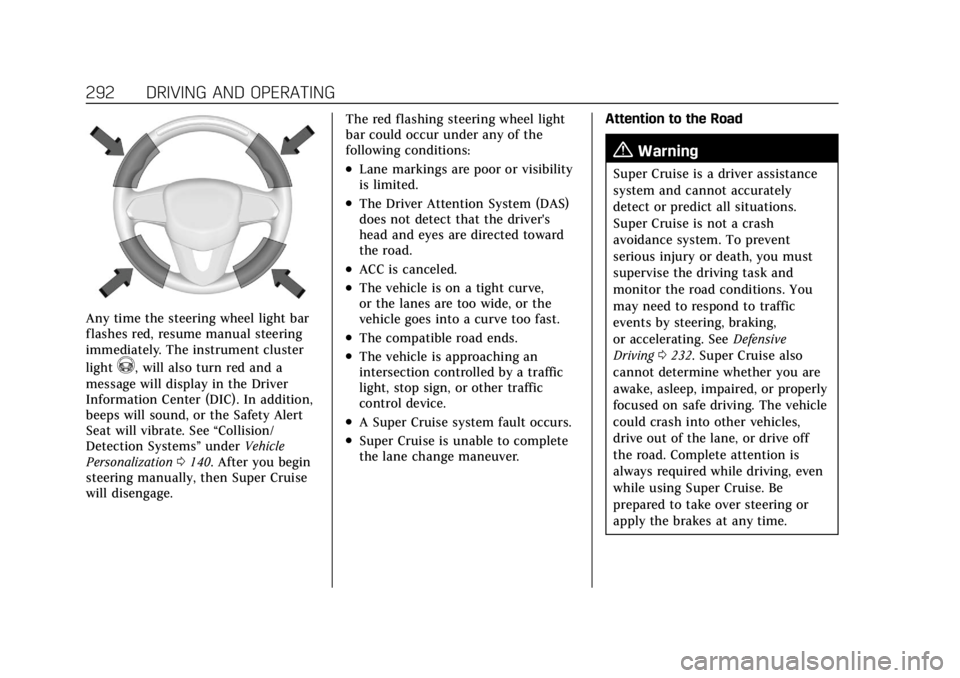
To begin steering manually, hold the
steering wheel firmly (with both
hands) using the highlighted regions
as shown in the picture below.
Page 293 of 508
Cadillac Escalade Owner Manual (GMNA-Localizing-U.S./Canada/Mexico-
15567102) - 2022 - CRC - 11/17/21
292 DRIVING AND OPERATING
Any time the steering wheel light bar
flashes red, resume manual steering
immediately. The instrument cluster
light
^, will also turn red and a
message will display in the Driver
Information Center (DIC). In addition,
beeps will sound, or the Safety Alert
Seat will vibrate. See “Collision/
Detection Systems” underVehicle
Personalization 0140. After you begin
steering manually, then Super Cruise
will disengage. The red flashing steering wheel light
bar could occur under any of the
following conditions:
.Lane markings are poor or visibility
is limited.
.The Driver Attention System (DAS)
does not detect that the driver's
head and eyes are directed toward
the road.
.ACC is canceled.
.The vehicle is on a tight curve,
or the lanes are too wide, or the
vehicle goes into a curve too fast.
.The compatible road ends.
.The vehicle is approaching an
intersection controlled by a traffic
light, stop sign, or other traffic
control device.
.A Super Cruise system fault occurs.
.Super Cruise is unable to complete
the lane change maneuver.
Attention to the Road
{Warning
Super Cruise is a driver assistance
system and cannot accurately
detect or predict all situations.
Super Cruise is not a crash
avoidance system. To prevent
serious injury or death, you must
supervise the driving task and
monitor the road conditions. You
may need to respond to traffic
events by steering, braking,
or accelerating. See
Defensive
Driving 0232. Super Cruise also
cannot determine whether you are
awake, asleep, impaired, or properly
focused on safe driving. The vehicle
could crash into other vehicles,
drive out of the lane, or drive off
the road. Complete attention is
always required while driving, even
while using Super Cruise. Be
prepared to take over steering or
apply the brakes at any time.
Page 295 of 508
Cadillac Escalade Owner Manual (GMNA-Localizing-U.S./Canada/Mexico-
15567102) - 2022 - CRC - 11/17/21
294 DRIVING AND OPERATING
First Alert
.If the steering wheel light bar flashes green, the system has detected that your head and
eyes may not be directed toward the road.
.The flashing will stop when the system detects that your head and eyes appear to be
directed toward the road.
Second Alert
.If the steering wheel light bar flashes green for too long, Super Cruise will alert the driver
to take control of steering immediately by flashing the light bar red. Also, either beeps will
sound or the Safety Alert Seat will vibrate. See “Collision/Detection Systems”underVehicle
Personalization 0140.
.Take over steering, then Super Cruise will disengage.
.To re-engage Super Cruise, press]. See “Using Super Cruise ”previously in this section.
Third Alert
.If the steering wheel light bar flashes red for too long, a voice command will tell you to
take control of the vehicle.
.Take control of the steering immediately; ACC and Super Cruise will disengage.
.A DIC message will indicate that Super Cruise is locked out. Super Cruise cannot be
re-engaged until the vehicle is turned off and back on again.
.Continued failure to take over steering will cause the vehicle to brake to a stop and OnStar
will be called. The brake lamps and hazard warning flashers will come on.
.Take control of the vehicle and continue driving.
Page 297 of 508
Cadillac Escalade Owner Manual (GMNA-Localizing-U.S./Canada/Mexico-
15567102) - 2022 - CRC - 11/17/21
296 DRIVING AND OPERATING
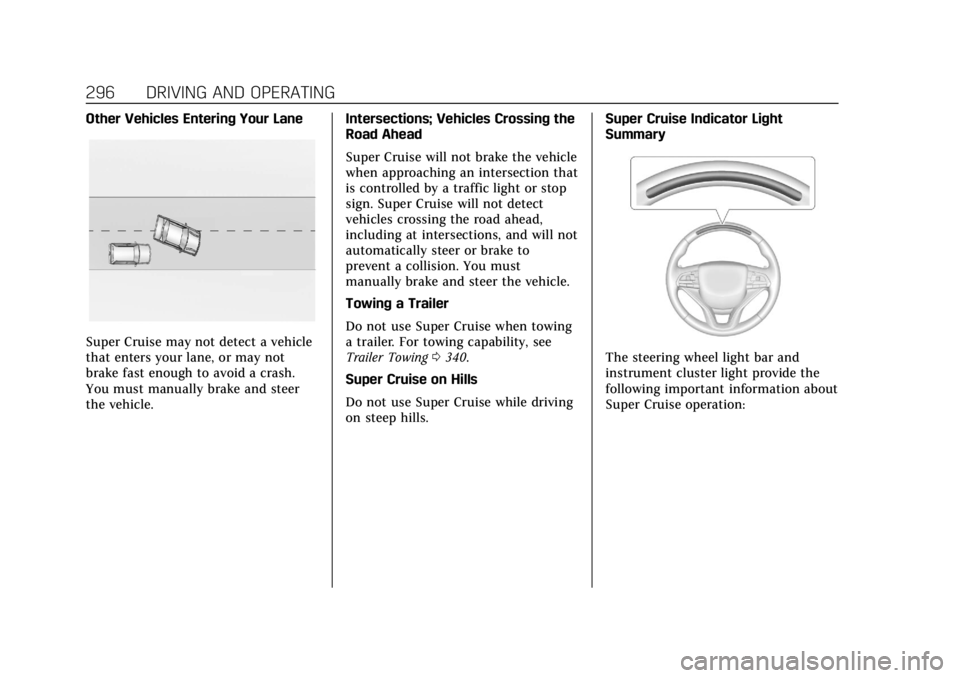
Other Vehicles Entering Your Lane
Super Cruise may not detect a vehicle
that enters your lane, or may not
brake fast enough to avoid a crash.
You must manually brake and steer
the vehicle.Intersections; Vehicles Crossing the
Road Ahead
Super Cruise will not brake the vehicle
when approaching an intersection that
is controlled by a traffic light or stop
sign. Super Cruise will not detect
vehicles crossing the road ahead,
including at intersections, and will not
automatically steer or brake to
prevent a collision. You must
manually brake and steer the vehicle.
Towing a Trailer
Do not use Super Cruise when towing
a trailer. For towing capability, see
Trailer Towing
0340.
Super Cruise on Hills
Do not use Super Cruise while driving
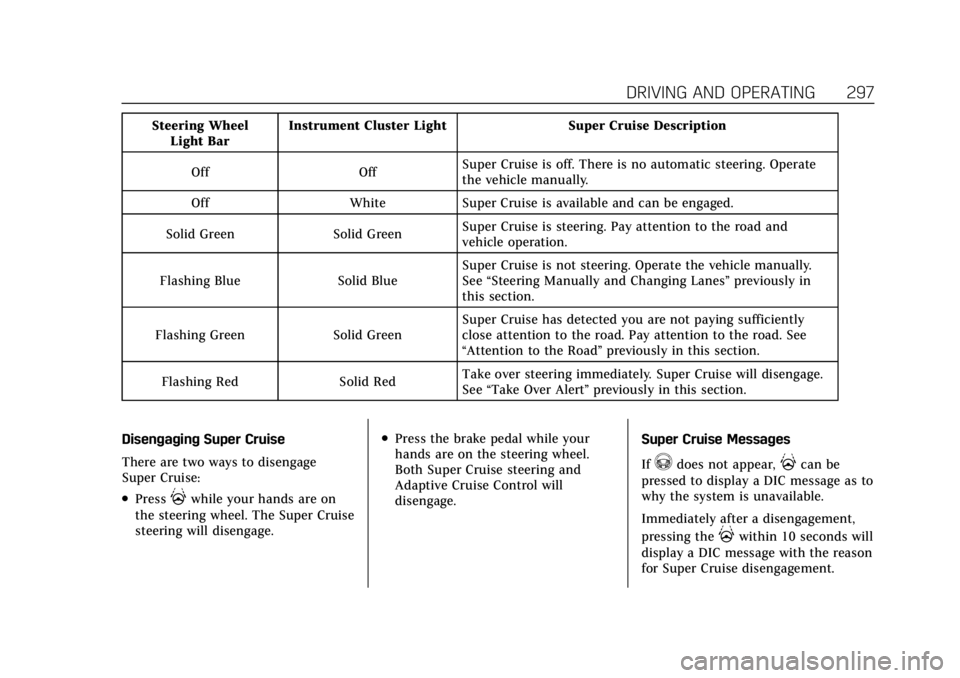
on steep hills. Super Cruise Indicator Light
SummaryThe steering wheel light bar and
instrument cluster light provide the
following important information about
Super Cruise operation:
Page 298 of 508
Cadillac Escalade Owner Manual (GMNA-Localizing-U.S./Canada/Mexico-
15567102) - 2022 - CRC - 11/17/21
DRIVING AND OPERATING 297
Steering WheelLight Bar Instrument Cluster Light Super Cruise Description
Off Off Super Cruise is off. There is no automatic steering. Operate
the vehicle manually.
Off White Super Cruise is available and can be engaged.
Solid Green Solid Green Super Cruise is steering. Pay attention to the road and
vehicle operation.
Flashing Blue Solid Blue Super Cruise is not steering. Operate the vehicle manually.
See
“Steering Manually and Changing Lanes” previously in
this section.
Flashing Green Solid Green Super Cruise has detected you are not paying sufficiently
close attention to the road. Pay attention to the road. See
“Attention to the Road”
previously in this section.
Flashing Red Solid Red Take over steering immediately. Super Cruise will disengage.
See
“Take Over Alert ”previously in this section.
Disengaging Super Cruise
There are two ways to disengage
Super Cruise:
.Press]while your hands are on
the steering wheel. The Super Cruise
steering will disengage.
.Press the brake pedal while your
hands are on the steering wheel.
Both Super Cruise steering and
Adaptive Cruise Control will
disengage. Super Cruise Messages
If
^does not appear,]can be
pressed to display a DIC message as to
why the system is unavailable.
Immediately after a disengagement,
pressing the
]within 10 seconds will
display a DIC message with the reason
for Super Cruise disengagement.
Page 300 of 508

Cadillac Escalade Owner Manual (GMNA-Localizing-U.S./Canada/Mexico-
15567102) - 2022 - CRC - 11/17/21
DRIVING AND OPERATING 299
Super Cruise Message Summary (cont'd)
Unavailable No Road Information.There is no map information available for that portion
of the road. Recent road reconstruction may turn off
Super Cruise for that section of road until new map
information is available.
.The vehicle is not on the correct type of road.
A controlled access freeway or compatible divided
highway is required for Super Cruise.
.There are lanes entering or exiting on both the left and
right side of the road.
.The vehicle is approaching an interchange or
intersection. The message will appear for 10 seconds
or less.
Unavailable Sensors Can’t Find Lane Lines
.Rain or snow is inhibiting the system’s ability to see
lane lines.
.Direct sunlight is on the front camera at dawn or dusk.
.There are missing or poor lane line markings on
the road.
.There is sun glare on the road surface.
.There is heavy rain, puddles, or road spray.
Page 312 of 508
Cadillac Escalade Owner Manual (GMNA-Localizing-U.S./Canada/Mexico-
15567102) - 2022 - CRC - 11/17/21
DRIVING AND OPERATING 311
Home or Back button on the
infotainment system or shift into
P (Park).
Available camera views:
.Rear Standard View
.Hitch View
.Bed View
.Rear Trailer View
.Interior Trailer View
.Guidance Lines
.Hitch Guidance
Troubleshooting
The Transparent Trailer calibration
may take longer than expected or not
calibrate if:
.The vehicle is driven too fast during
calibration. Speed should be
maintained below 50 km/h
(31 mph).
.The vehicle is not driven straight
during calibration. Steering should
be maintained as straight as
possible, excessive steering during
calibration may extend
calibration time.
.The calibration is attempted in low
light. Calibration should be
attempted when there is enough
light.
.The calibration is attempted during
adverse weather conditions.
Calibration during conditions such
as snow or heavy rain should be
avoided.
.The road surface is not ideal for
calibration. Calibration should be
attempted on an alternate road
surface.
.The accessory trailer cameras are
swapped at the hitch connector.
Ensure that the camera mounted to
the rear of the trailer is connected
to the rear trailer camera input.
.The accessory trailer camera is
mounted, angled or rotated outside
of the defined mounting location
(see camera installation
instructions). Distortion may be observed in the
calibrated Transparent Trailer View if:
.The accessory trailer camera is
mounted, angled or rotated outside
of the defined mounting location
(see camera installation
instructions).
The Transparent Trailer icon may
appear grayed out if:
.A compatible trailer profile is not
configured or a non-compatible
trailer profile is selected.
.The vehicle is in R (Reverse).
.The trailer is not connected.
.The accessory rear trailer camera is
not connected or connected to the
incorrect input.
The preview may not be provided or
the wrong preview may be provided if:
.The accessory cameras are not
recognized. Ensure that the
accessory camera(s) are connected
and power cycle the vehicle.
.The accessory trailer cameras are
swapped at the hitch connector.
Ensure that the accessory camera(s)
are connected to the correct input.
Page 313 of 508

Cadillac Escalade Owner Manual (GMNA-Localizing-U.S./Canada/Mexico-
15567102) - 2022 - CRC - 11/17/21
312 DRIVING AND OPERATING
.The accessory trailer camera(s) are
connected to the correct camera
input.
.The accessory trailer camera(s) are
not installed according to the
installation instructions.
A feature may be unavailable or not
activating as expected if:
.The customization is disabled.
Check the customization settings
where applicable.
.The accessory trailer cameras are
swapped at the hitch connector.
Ensure that the accessory camera(s)
are connected to the correct camera
input.
A view may switch automatically if:
.The vehicle is shifted to
another gear.
Park Assist
The vehicle may be equipped with
Rear Park Assist (RPA) or Front and
Rear Park Assist (FRPA). Under
certain conditions, the Park Assist
system can assist the driver during
backing and parking maneuvers when
the vehicle is driven at no more than 9 km/h (6 mph). An illuminated
indicator in the Park Assist button
indicates the system is ready.
Sensors located in the bumpers
measure the distance between the
vehicle and objects using sonar
technology. These sensors are
designed to detect certain objects up
to 1.8 m (6 ft) behind and 1.3 m (4 ft)
in front of your vehicle that are taller
than 25 cm (10 in).
Different environmental conditions
may affect whether and how far the
Park Assist system can detect objects.
Keep the sensors clean of mud, dirt,
snow, ice, and slush; and clean
sensors after a car wash in freezing
temperatures. Sensors that are not
clean may not detect objects or may
cause the system to alert when not
required.{Warning
The Park Assist System is no
substitute for careful and attentive
driving. The Park Assist system
does not detect children,
pedestrians, bicyclists, animals,
(Continued)
Warning (Continued)
or objects located below the
bumper or that are too close or too
far from the vehicle. It is not
available at speeds greater than
9 km/h (6 mph). To prevent injury,
death, or vehicle damage, even with
Park Assist, always check the area
around the vehicle and check all
mirrors before moving forward or
backing.
How the System Works
The vehicle may have a Park
Assist amphitheatre-like display on
the cluster with bars that represent
the estimated location of a detected
object and the vehicle’s distance from
the object. As a detected object
becomes closer, more bars light up
and change color from yellow to
amber to red. Vehicles equipped with
RPA will show the amphitheater at
the rear of the vehicle, and if
equipped, FRPA will show
the amphitheater at the front and rear.
Page 320 of 508
Cadillac Escalade Owner Manual (GMNA-Localizing-U.S./Canada/Mexico-
15567102) - 2022 - CRC - 11/17/21
DRIVING AND OPERATING 319
Rear Pedestrian Alert can be set to Off
or Alert. See“Rear Pedestrian
Detection ”in “Collision/Detection
Systems” underVehicle Personalization
0 140. If equipped, alerts can be set to
beeps or seat pulses. See “Alert Type”
in “Collision/Detection Systems” under
Vehicle Personalization 0140.
Rear Cross Traffic Alert
(RCTA) System
If equipped, Rear Cross Traffic Alert
(RCTA) displays a red warning triangle
with a left or right pointing arrow on
the infotainment display to warn of
traffic coming from the left or right.
This system detects objects coming
from up to 20 m (65 ft) from the left
or right side of the vehicle. When an
object is detected, either three beeps
sound from the left or right or three
Safety Alert Seat pulses occur on the
left or right side, depending on the
direction of the detected vehicle.
Driving With a Trailer
Use caution while backing up when
towing a trailer. The RCTA feature is
automatically disabled when a trailer
is attached to the vehicle. Turning the Features On or Off
RCTA can be turned on or off using
the infotainment system. See
“Collision/Detection Systems”
under
Vehicle Personalization 0140.
Assistance Systems for
Driving
If equipped, when driving the vehicle
in a forward gear, Forward Collision
Alert (FCA), Front Pedestrian Braking
(FPB), Lane Keep Assist (LKA), Side
Blind Zone Alert (SBZA), Night Vision
System, Lane Change Alert (LCA),
and/or Automatic Emergency Braking
(AEB) can help to avoid a crash or
reduce crash damage.
Forward Collision Alert
(FCA) System
The FCA system may help to avoid or
reduce the harm caused by front-end
crashes. When approaching a vehicle
ahead too quickly, FCA provides a red
flashing alert on the windshield and
rapidly beeps or pulses the driver seat.
FCA also lights an amber visual alert
if following another vehicle much too
closely. FCA detects vehicles within a distance
of approximately 60 m (197 ft) and
operates at speeds above 8 km/h
(5 mph). If the vehicle has Adaptive
Cruise Control (ACC), it can detect
vehicles to distances of approximately
110 m (360 ft) and operates at all
speeds. See
Adaptive Cruise Control
(Advanced) 0275.
{Warning
FCA is a warning system and does
not apply the brakes. When
approaching a slower-moving or
stopped vehicle ahead too rapidly,
or when following a vehicle too
closely, FCA may not provide a
warning with enough time to help
avoid a crash. It also may not
provide any warning at all. FCA
does not warn of pedestrians,
animals, signs, guardrails, bridges,
construction barrels, or other
objects. Be ready to take action and
apply the brakes. See Defensive
Driving 0232.
Page 327 of 508

Cadillac Escalade Owner Manual (GMNA-Localizing-U.S./Canada/Mexico-
15567102) - 2022 - CRC - 11/17/21
326 DRIVING AND OPERATING
Adjust the instrument panel
brightness to make the image no
brighter than necessary. Turn the
image off by selecting another view
on the instrument cluster. The night
vision image brightness and contrast
can be adjusted individually using the
touchscreen to the left of the
instrument cluster.
Warm objects, such as pedestrians,
animals, and other moving vehicles,
should appear whiter on the Night
Vision display. Cold objects, such as
the sky, signs, and parked vehicles,
should appear darker. Night Vision
only shows objects that are warmer or
colder than the surroundings. It does
not detect brake lamps, turn signals,
emergency flashers, traffic lights,
or sign information.
Use this system as an aid by
occasionally glancing at the image. Do
not stare at the image or use the
image under well-lit conditions.{Warning
Do not stare at the image while
driving as this might cause
important objects ahead not to be
seen. You could crash, and you or
others could be injured.
When a pedestrian or large animal is
detected, a yellow box will be drawn
around it. With the vehicle moving
when the pedestrian or animal may be
in the vehicle path, an amber box
displays around the pedestrian or
animal on the Night Vision display
and an amber pedestrian icon,
~,
or animal icon,
!, displays on the
instrument cluster. This pedestrian
icon is also shown on the Head-Up
Display (HUD). When the system
detects the vehicle is approaching a
pedestrian or large animal too quickly,
the amber pedestrian icon or animal
icon and amber box turns red, and a
red flashing icon,
~or!, displays on
the HUD with rapid beeping or
pulsing of the Safety Alert Seat,
if equipped. System pedestrian icons, beeps, and
(if equipped) Safety Alert Seat pulses
can be set to Off through vehicle
personalization by turning off the
Front Pedestrian Braking system. See
“Front Pedestrian Detection
”in
“Collision/Detection Systems” under
Vehicle Personalization 0140.
{Warning
The Night Vision system does not
automatically brake the vehicle.
It does not provide alerts unless it
detects a pedestrian or large
animal. The system may not detect
pedestrians, including children,
or animals:
.If they are less than 25 m
(82 ft) away.
.If they are not directly ahead in
the sensor coverage area, fully
visible, standing upright, or part
of a group.
.If the person or animal is moving
too quickly through the field of
view, such as a bicyclist.
(Continued)