ECO mode CADILLAC ESCALADE 2022 Owner's Manual
[x] Cancel search | Manufacturer: CADILLAC, Model Year: 2022, Model line: ESCALADE, Model: CADILLAC ESCALADE 2022Pages: 508, PDF Size: 9.18 MB
Page 247 of 508

Cadillac Escalade Owner Manual (GMNA-Localizing-U.S./Canada/Mexico-
15567102) - 2022 - CRC - 11/17/21
246 DRIVING AND OPERATING
Caution (Continued)
.Do not tow a trailer during
break-in. SeeTrailer Towing 0340
for the trailer towing capabilities
of the vehicle and more
information.
Following break-in, engine speed
and load can be gradually
increased.
On new vehicles, the various
mechanical and electrical systems
experience a “break-in”period during
the first 6 400 km (4,000 mi) of
routine driving. As the vehicle is
driven, the mechanical systems adjust
to provide optimal fuel economy and
transmission shift performance.
Electrical systems will adapt and
calibrate during the break-in period.
A one-time occurrence of clicks and
similar vehicle noises is normal during
this process.
Normal driving charges the vehicle’s
battery to achieve the best operation
of the vehicle, including fuel economy
and the Stop/Start System. See Stop/
Start System 0249.
Ignition Positions
Vehicles equipped with Keyless Access
have pushbutton starting.
The Remote Key must be in the
vehicle for the system to operate.
If the pushbutton start is not working,
the vehicle may be near a strong radio
antenna signal causing interference to
the Keyless Access system. See Remote
Keyless Entry (RKE) System Operation
0 7.
To shift out of P (Park), the ignition
must be on or in Service Mode, and
the brake pedal must be applied.
{Warning
Turning off the vehicle while
moving may cause loss of power
assist in the brake and steering
systems and disable the airbags.
While driving, only shut the vehicle
off in an emergency.
Stopping the Engine/LOCK/OFF (No
Indicator Lights) : When the vehicle
is stopped, press ENGINE START/
STOP once to turn the engine off.
If the vehicle is in P (Park), the
ignition will turn off, and Retained
Accessory Power (RAP) will remain
active. See Retained Accessory Power
(RAP) 0250.
If the vehicle is not in P (Park),
the ignition will return to
ACC/ACCESSORY and display the
message SHIFT TO PARK in the Driver
Information Center (DIC). When the
vehicle is shifted into P (Park), the
ignition system will turn off.
The vehicle may have an electric
steering column lock. The lock is
activated when the ignition is turned
off and either front door is opened.
Page 248 of 508

Cadillac Escalade Owner Manual (GMNA-Localizing-U.S./Canada/Mexico-
15567102) - 2022 - CRC - 11/17/21
DRIVING AND OPERATING 247
A sound may be heard as the lock
actuates or releases. The steering
column lock may not release with the
wheels turned off center. If this
happens, the vehicle may not start.
Move the steering wheel from left to
right while attempting to start the
vehicle. If this does not work, the
vehicle needs service.
If the vehicle must be shut off in an
emergency:1. Brake using a firm and steady pressure. Do not pump the brakes
repeatedly. This may deplete power
assist, requiring increased brake
pedal force.
2. Shift the vehicle to N (Neutral). This can be done while the vehicle
is moving. After shifting to
N (Neutral), firmly apply the brakes
and steer the vehicle to a safe
location.
3. Come to a complete stop.
4. Hold the brake pedal down and shift to P (Park). The shift lever
must be in P (Park) to turn the
ignition off. 5. Continue to hold the brake
pedal down.
6. Set the parking brake. See Electric
Parking Brake 0262.
7. Press ENGINE START/STOP once to turn the ignition off.
8. Release the brake pedal.
If the vehicle cannot be pulled over,
and must be shut off while driving,
press and hold ENGINE START/STOP
for longer than two seconds, or press
twice in five seconds.
ACC/ACCESSORY (Amber Indicator
Light) : This mode allows some
electrical accessories to be used when
the engine is off.
With the ignition off, pressing the
button one time without the brake
pedal applied will place the ignition
system in ACC/ACCESSORY.
The ignition will switch from
ACC/ACCESSORY to off after
five minutes to prevent battery
rundown. ON/RUN/START (Green Indicator
Light) :
This mode is for driving and
starting. With the ignition off, and the
brake pedal applied, pressing the
button once will turn the ignition on.
Once engine cranking begins, release
the button. Engine cranking will
continue until the engine starts. See
Starting the Engine 0248.
Service Mode
This power mode is available for
service and diagnostics, and to verify
the proper operation of the
malfunction indicator lamp as may be
required for emission inspection
purposes. With the vehicle off, and the
brake pedal not applied, pressing and
holding the button for more than
five seconds will place the vehicle in
Service Mode. The instruments and
audio systems will operate as they do
when the ignition is on, but the
vehicle will not be able to be driven.
The engine will not start in Service
Mode. Press the button again to turn
the ignition off.
Page 258 of 508
Cadillac Escalade Owner Manual (GMNA-Localizing-U.S./Canada/Mexico-
15567102) - 2022 - CRC - 11/17/21
DRIVING AND OPERATING 257
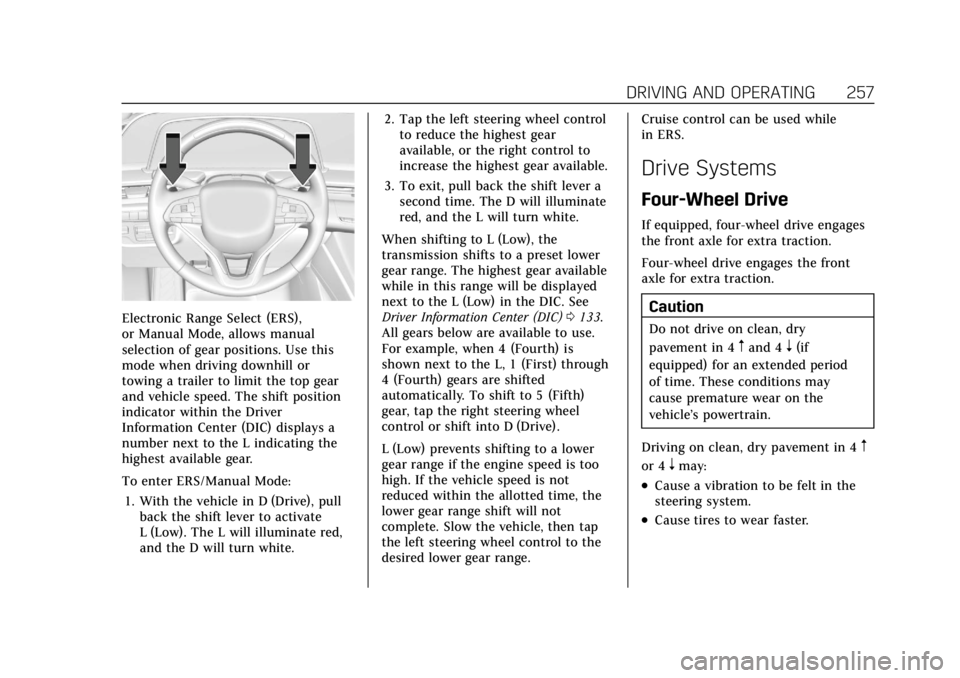
Electronic Range Select (ERS),
or Manual Mode, allows manual
selection of gear positions. Use this
mode when driving downhill or
towing a trailer to limit the top gear
and vehicle speed. The shift position
indicator within the Driver
Information Center (DIC) displays a
number next to the L indicating the
highest available gear.
To enter ERS/Manual Mode:1. With the vehicle in D (Drive), pull back the shift lever to activate
L (Low). The L will illuminate red,
and the D will turn white. 2. Tap the left steering wheel control
to reduce the highest gear
available, or the right control to
increase the highest gear available.
3. To exit, pull back the shift lever a second time. The D will illuminate
red, and the L will turn white.
When shifting to L (Low), the
transmission shifts to a preset lower
gear range. The highest gear available
while in this range will be displayed
next to the L (Low) in the DIC. See
Driver Information Center (DIC) 0133.
All gears below are available to use.
For example, when 4 (Fourth) is
shown next to the L, 1 (First) through
4 (Fourth) gears are shifted
automatically. To shift to 5 (Fifth)
gear, tap the right steering wheel
control or shift into D (Drive).
L (Low) prevents shifting to a lower
gear range if the engine speed is too
high. If the vehicle speed is not
reduced within the allotted time, the
lower gear range shift will not
complete. Slow the vehicle, then tap
the left steering wheel control to the
desired lower gear range. Cruise control can be used while
in ERS.
Drive Systems
Four-Wheel Drive
If equipped, four-wheel drive engages
the front axle for extra traction.
Four-wheel drive engages the front
axle for extra traction.
Caution
Do not drive on clean, dry
pavement in 4
mand 4n(if
equipped) for an extended period
of time. These conditions may
cause premature wear on the
vehicle’s powertrain.
Driving on clean, dry pavement in 4
m
or 4nmay:
.Cause a vibration to be felt in the
steering system.
.Cause tires to wear faster.
Page 260 of 508
Cadillac Escalade Owner Manual (GMNA-Localizing-U.S./Canada/Mexico-
15567102) - 2022 - CRC - 11/17/21
DRIVING AND OPERATING 259
4n(Four-Wheel Drive Low) :This
setting engages the front axle and
delivers extra torque. Choose 4
nwhen
driving off-road in deep sand, deep
mud, or deep snow, and while
climbing or descending steep hills.
While driving in 4
n, keep vehicle
speed below 72 km/h (45 mph).
Shifting into 4
nwill turn Traction
Control and StabiliTrak/ESC off. See
Traction Control/Electronic Stability
Control 0265.
Shifts between 2
m, 4m, and AUTO
Any of these shifts can be made at
normal driving speed.
The actual 4x4 shift request is only
made after the button is released. The
4x4 graphic will remain flashing until
the shift request has completed. A DIC
message displays to indicate that the
4x4 transfer case has been requested
to shift to the new desired state.
Once the 4x4 shift has completed, the
DIC message disappears, the 4x4
graphic stops flashing, and the current
setting is indicated. When a shift to 2
mis completed
successfully while in P (Park), the
parking brake will engage. To resume
driving, shift the transmission to the
desired gear and manually release the
parking bake or press the accelerator
pedal to begin driving. See Electric
Parking Brake 0262.
If equipped, use 4
n, AUTO, or 4mto
provide additional traction when
parking on a steep grade with poor
traction such as ice, snow, mud,
or gravel.
Shifting Into 4
n
1. The ignition must be on and the vehicle must be stopped or moving
less than 5 km/h (3 mph) with the
transmission in N (Neutral). It is
best for the vehicle to be moving
1.6 to 3.2 km/h (1 to 2 mph).
2. Press 4
n. The actual 4x4 shift
request is only made after the
button is released. The 4x4 graphic
will remain flashing until the shift
request has completed. A DIC
message displays to indicate that the 4x4 transfer case has been
requested to shift to the new
desired state.
Once the 4x4 shift has completed,
the DIC message disappears, the
4x4 graphic stops flashing and the
current setting is indicated.
If vehicle speed is higher when shift
request occurs, a DIC message
displays. Reduce vehicle speed.
If the transmission is not in
N (Neutral) when shift request occurs,
a DIC message displays. The vehicle
will allow 20 seconds for the shift to
occur. After this time, a graphic in the
instrument cluster will indicate that
the transfer case is in 4
n.
Caution
Shifting the transmission into gear
before the requested mode indicator
light has stopped flashing could
damage the transfer case.
If the transmission is not shifted into
N (Neutral) or the vehicle has not
slowed to 5 km/h (3 mph) within
Page 261 of 508

Cadillac Escalade Owner Manual (GMNA-Localizing-U.S./Canada/Mexico-
15567102) - 2022 - CRC - 11/17/21
260 DRIVING AND OPERATING
20 seconds, the transfer case will
remain in its original state. This will
be indicated in the instrument cluster.
With the vehicle moving less than
5 km/h (3 mph) and the transmission
in N (Neutral), attempt the shift again.
Shifting Out of 4
n
1. The vehicle must be stopped ormoving less than 5 km/h (3 mph)
with the transmission in
N (Neutral) and the ignition on.
It is best for the vehicle to be
moving 1.6 to 3.2 km/h (1 to 2 mph).
2. Press 4
m, AUTO, or 2m. The actual
4x4 shift request is only made after
the button is released. The 4x4
graphic will remain flashing until
the shift request has completed.
A DIC message displays to indicate
the state of the request.
Once the 4x4 shift has completed,
the DIC message disappears, the
4x4 graphic stops flashing, and the
current setting is indicated.
If vehicle speed is higher when
shift request occurs, a DIC message
displays. Reduce vehicle speed. If the transmission is not in
N (Neutral) when the shift request
occurs, DIC messages will display. The
vehicle will allow 20 seconds for this
shift to occur. After this time, a
graphic in the instrument cluster will
indicate that the transfer case is in 4
n.
Caution
Shifting the transmission into gear
before the requested mode indicator
light has stopped flashing could
damage the transfer case.
If the transmission is not shifted into
N (Neutral) or the vehicle has not
slowed to 5 km/h (3 mph) within
20 seconds, the transfer case will
remain in its original state. This will
be indicated in the instrument cluster.
With the vehicle moving less than
5 km/h (3 mph), and the transmission
in N (Neutral), attempt the shift again.
Shifting Into N (Neutral)
To shift into N (Neutral): 1. Start the vehicle.
2. Shift the transmission to N (Neutral). 3. Shift the transfer case to 2
m.
4. Apply the parking brake and/or brake pedal.
5. Press 2
mfive times in 10 seconds
until the N (Neutral) symbol starts
flashing in the instrument cluster.
When the shift is complete, the
graphic stops flashing. If the
parking brake and/or brake pedal is
not applied within 20 seconds, the
transfer case will remain in the
original state.
6. If the transmission is not shifted into N (Neutral) or the vehicle has
not slowed to 5 km/h (3 mph)
within 20 seconds, the transfer case
will remain in its original state.
This will be indicated in the
instrument cluster.
Shifting Out of N (Neutral)
To shift out of N (Neutral): 1. Turn the ignition on with the engine off. See Ignition Positions
0 246.
2. Set the parking brake. See Electric
Parking Brake 0262.
Page 269 of 508
Cadillac Escalade Owner Manual (GMNA-Localizing-U.S./Canada/Mexico-
15567102) - 2022 - CRC - 11/17/21
268 DRIVING AND OPERATING
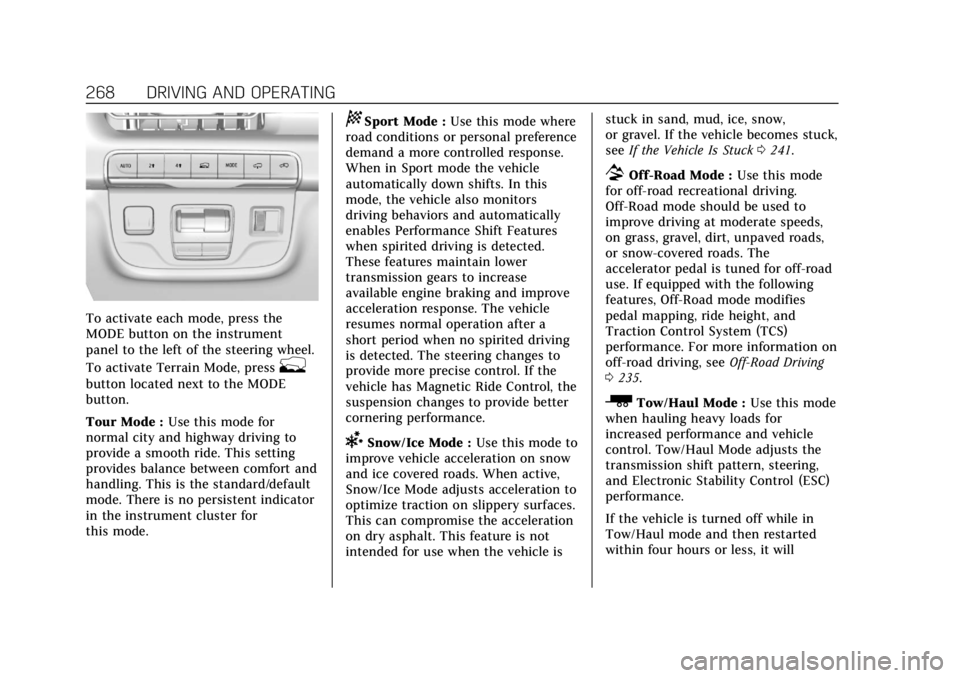
To activate each mode, press the
MODE button on the instrument
panel to the left of the steering wheel.
To activate Terrain Mode, press
g
button located next to the MODE
button.
Tour Mode :Use this mode for
normal city and highway driving to
provide a smooth ride. This setting
provides balance between comfort and
handling. This is the standard/default
mode. There is no persistent indicator
in the instrument cluster for
this mode.
8Sport Mode : Use this mode where
road conditions or personal preference
demand a more controlled response.
When in Sport mode the vehicle
automatically down shifts. In this
mode, the vehicle also monitors
driving behaviors and automatically
enables Performance Shift Features
when spirited driving is detected.
These features maintain lower
transmission gears to increase
available engine braking and improve
acceleration response. The vehicle
resumes normal operation after a
short period when no spirited driving
is detected. The steering changes to
provide more precise control. If the
vehicle has Magnetic Ride Control, the
suspension changes to provide better
cornering performance.
6Snow/Ice Mode : Use this mode to
improve vehicle acceleration on snow
and ice covered roads. When active,
Snow/Ice Mode adjusts acceleration to
optimize traction on slippery surfaces.
This can compromise the acceleration
on dry asphalt. This feature is not
intended for use when the vehicle is stuck in sand, mud, ice, snow,
or gravel. If the vehicle becomes stuck,
see
If the Vehicle Is Stuck 0241.
7Off-Road Mode : Use this mode
for off-road recreational driving.
Off-Road mode should be used to
improve driving at moderate speeds,
on grass, gravel, dirt, unpaved roads,
or snow-covered roads. The
accelerator pedal is tuned for off-road
use. If equipped with the following
features, Off-Road mode modifies
pedal mapping, ride height, and
Traction Control System (TCS)
performance. For more information on
off-road driving, see Off-Road Driving
0 235.
_Tow/Haul Mode : Use this mode
when hauling heavy loads for
increased performance and vehicle
control. Tow/Haul Mode adjusts the
transmission shift pattern, steering,
and Electronic Stability Control (ESC)
performance.
If the vehicle is turned off while in
Tow/Haul mode and then restarted
within four hours or less, it will
Page 270 of 508

Cadillac Escalade Owner Manual (GMNA-Localizing-U.S./Canada/Mexico-
15567102) - 2022 - CRC - 11/17/21
DRIVING AND OPERATING 269
remain active. Otherwise, the vehicle
will start in Tour mode. Tow/Haul
mode turns on trailer sway control.
If equipped with a diesel engine,
exhaust braking is automatically
activated when Tow/Haul mode is
selected. The system will command
down shifts to reduce vehicle speed
when the brake is applied. The normal
tow/haul shift pattern will return once
the vehicle is on a low grade or when
the accelerator pedal is pressed. While
in the Electronic Range Select (ERS)
Mode (seeManual Mode 0256), grade
braking is deactivated, allowing the
driver to select a range, and limiting
the highest gear available.
For more information on trailer
weight specifications, see Towing
Equipment 0344.
gTerrain Mode : Use this mode
when traveling on very rough roads at
very low speeds, such as a two-track
or heavily rutted road. This mode can
also be used for pulling a boat out of
the water on a trailer. When in Terrain
mode, the vehicle shifts automatically,
but will hold a lower gear longer to
maximize engine torque. This mode has a unique pedal map and
transmission shift pattern for better
control at lower speeds and over
rough terrain. This mode modifies
accelerator pedal mapping,
transmission shift pattern, ride height,
and Electronic Limited-Slip
Differential (eSLD).
When the vehicle comes to a stop on
an upward grade, automatic vehicle
hold is engaged until the driver
presses the accelerator pedal. Stop/
Start and cruise control are disabled
in Terrain mode.
Active Braking during lift throttle will
be engaged. This feature automatically
applies light braking to simulate
heavy engine braking of
four-wheel-drive low. It also applies
light braking in D (Drive) until the
vehicle is at idle speeds. In L1 and L2
light braking will typically bring the
vehicle to a stop. Active Braking
during lift throttle also reduces trailer
braking.
Terrain mode automatically exits to
Tour mode if the brake temperatures
become too hot, electronic parking
brake becomes inoperable, or the
vehicle cannot perform braking or
vehicle hold.
For more information on off-road
driving, see
Off-Road Driving 0235 and
Hill and Mountain Roads 0239.
My Mode
My mode is used to personalize
everyday driving. This mode allows
the driver to configure the vehicle
system settings to their driving
preferences. My mode will remain
active every time the vehicle is
started. To customize My mode, see
“Drive Mode Customization.”
Drive Mode Customization
The vehicle is equipped to modify the
following settings based on vehicle
content. Through the center radio
display, select Vehicle Settings>Drive
Mode Customization to customize and
personalize My mode, or turn off or
on Visualization.
My Mode
These settings will be retained over
each key cycle, and do not have to be
reset each time the vehicle is started.
Page 276 of 508
Cadillac Escalade Owner Manual (GMNA-Localizing-U.S./Canada/Mexico-
15567102) - 2022 - CRC - 11/17/21
DRIVING AND OPERATING 275
Reducing Speed While Cruise
Control is at a Set Speed
If the cruise control system is already
activated:
.Press and hold SET−down until the
desired lower speed is reached, then
release it.
.To decrease the vehicle speed in
small increments, press SET− down
briefly. For each press, the vehicle
goes about 1 km/h (1 mph) slower.
The speedometer reading can be
displayed in either English or metric
units. See Instrument Cluster 0115.
The increment value used depends on
the units displayed.
Passing Another Vehicle While
Using Cruise Control
Use the accelerator pedal to increase
the vehicle speed. When you take your
foot off the pedal, the vehicle will slow
down to the previous set cruise speed.
While pressing the accelerator pedal
or shortly following the release to
override cruise, briefly applying the
SET− control will result in cruise set
to the current vehicle speed. Using Cruise Control on Hills
How well the cruise control works on
hills depends on the vehicle speed, the
load, and the steepness of the hills.
When going up steep hills, pressing
the accelerator pedal may be
necessary to maintain vehicle speed.
When going downhill, Cruise Grade
Braking helps maintain the driver
selected speed.
Cruise Grade Braking is enabled when
the vehicle is started and cruise
control is active. It is not enabled in
Range Selection Mode. It assists in
maintaining driver selected speed
when driving on downhill grades by
using the engine and transmission to
slow the vehicle.
To disable and enable Cruise Grade
Braking for the current ignition cycle,
press and hold the Tow/Haul button
for five seconds. A Driver Information
Center (DIC) message displays.
For other forms of Grade Braking, see
Automatic Transmission
0252 and
Driver Mode Control 0267. Ending Cruise Control
There are four ways to end cruise
control:
.Step lightly on the brake pedal.
.Press*.
.Shift the transmission to
N (Neutral).
.To turn off cruise control, pressJ.
Erasing Speed Memory
The cruise control set speed is erased
from memory if
Jis pressed or if the
ignition is turned off.
Adaptive Cruise Control
(Advanced)
If equipped, Adaptive Cruise Control
(ACC) allows the cruise control set
speed and following gap to be
selected. Read this entire section
before using this system. The
following gap is the following time (or
distance) between your vehicle and a
vehicle detected directly ahead in your
path, moving in the same direction.
If no vehicle is detected in your path,
Page 278 of 508
Cadillac Escalade Owner Manual (GMNA-Localizing-U.S./Canada/Mexico-
15567102) - 2022 - CRC - 11/17/21
DRIVING AND OPERATING 277
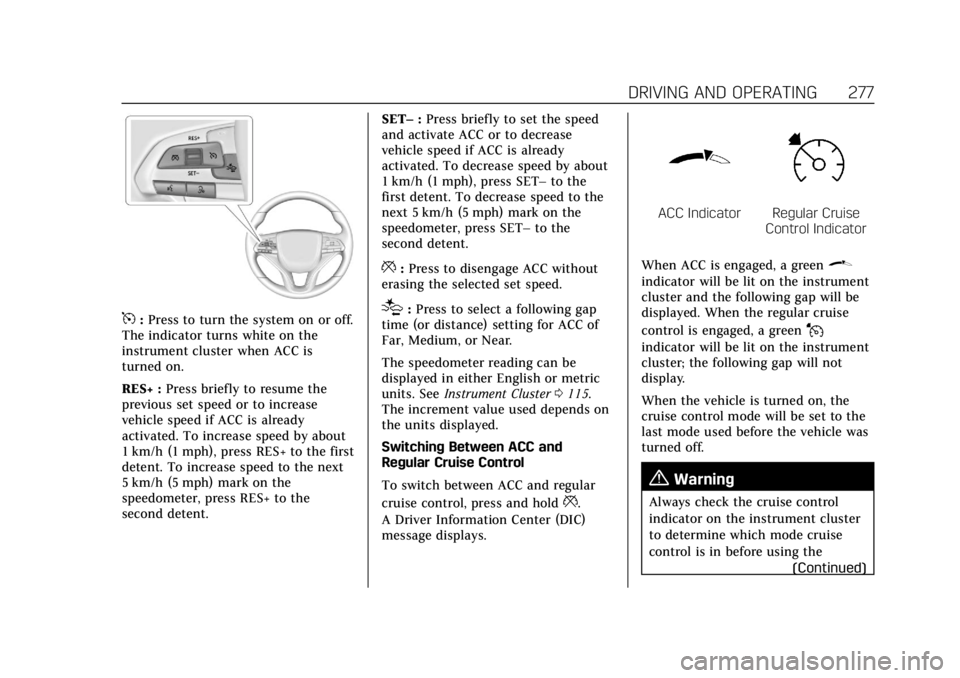
5:Press to turn the system on or off.
The indicator turns white on the
instrument cluster when ACC is
turned on.
RES+ : Press briefly to resume the
previous set speed or to increase
vehicle speed if ACC is already
activated. To increase speed by about
1 km/h (1 mph), press RES+ to the first
detent. To increase speed to the next
5 km/h (5 mph) mark on the
speedometer, press RES+ to the
second detent. SET–
:Press briefly to set the speed
and activate ACC or to decrease
vehicle speed if ACC is already
activated. To decrease speed by about
1 km/h (1 mph), press SET– to the
first detent. To decrease speed to the
next 5 km/h (5 mph) mark on the
speedometer, press SET– to the
second detent.
*: Press to disengage ACC without
erasing the selected set speed.
[: Press to select a following gap
time (or distance) setting for ACC of
Far, Medium, or Near.
The speedometer reading can be
displayed in either English or metric
units. See Instrument Cluster 0115.
The increment value used depends on
the units displayed.
Switching Between ACC and
Regular Cruise Control
To switch between ACC and regular
cruise control, press and hold
*.
A Driver Information Center (DIC)
message displays.
ACC IndicatorRegular Cruise
Control Indicator
When ACC is engaged, a green
\
indicator will be lit on the instrument
cluster and the following gap will be
displayed. When the regular cruise
control is engaged, a green
J
indicator will be lit on the instrument
cluster; the following gap will not
display.
When the vehicle is turned on, the
cruise control mode will be set to the
last mode used before the vehicle was
turned off.
{Warning
Always check the cruise control
indicator on the instrument cluster
to determine which mode cruise
control is in before using the (Continued)
Page 307 of 508

Cadillac Escalade Owner Manual (GMNA-Localizing-U.S./Canada/Mexico-
15567102) - 2022 - CRC - 11/17/21
306 DRIVING AND OPERATING
Standard View on the
infotainment display when a
camera view is active.
When the hitch guidance is
selected, Rear Standard View will
remain visible across gear
changes, otherwise the view will
toggle between Front and Rear
Standard View based on gear
position.
If equipped, the front view
camera also displays when the
Park Assist system detects an
object within 30 cm (12 in).
To access this view when in a
forward gear above 12 km/h
(8 mph), select CAMERA on the
infotainment display and select
Rear Standard View. The view
will close after 8 seconds and
can be closed early by selecting
X, Home or Back.
2. Front/Rear Top-Down View
Displays a front or rear overhead
view of the vehicle. To view,
select Front/Rear Top-Down
View on the infotainment display
when the camera app is active.
3. Front/Rear side View
Displays a view that shows
objects next to the front or rear
sides of the vehicle. To select,
touch Front/Rear Side View on
the infotainment display when a
camera view is active. Touch the
button to toggle between front
and rear camera views. Park
Assist and RCTA overlays are not
available when Front/Rear Side
View is active.
4. Hitch View
Displays a zoomed-in view of the
hitch area to assist with aligning
the vehicle’s hitch ball with the
trailer coupler and monitoring
the trailer connection. To view,
select Hitch View on the
infotainment display when the
Camera App is active. To access
this view when in a forward gear
above 12 km/h (8 mph), select
CAMERA on the infotainment
display and select Hitch View.
The view will close after
eight seconds and can be closed
early by selecting X, Home or
Back. Shifting into P (Park) whilein this view will automatically
engage the Electric Parking
Brake (EPB).
5. Surround View
Displays an image of the area
surrounding the vehicle.
Surround View is displayed
alongside the currently selected
view when below 12 kph
(8 mph). Surround View is
disabled when above
12 kph (8 mph).
6. Camera App Guidance Lines
The Camera App supports three
possible guidance modes: No
Guidance, Vehicle Guidance and
Trailering Guidance. To change
guidance mode, select the
appropriate guidance icon.
Depending on the guidance
mode and view selected, different
guidance lines may appear.
A grayed-out icon indicates that
guidance lines are not available.
Certain views do not support
Guidance lines.
.Standard Guidance Lines are
available in Front/Rear
Standard Views, Front/Rear