brake CADILLAC ESCALADE 2022 Repair Manual
[x] Cancel search | Manufacturer: CADILLAC, Model Year: 2022, Model line: ESCALADE, Model: CADILLAC ESCALADE 2022Pages: 508, PDF Size: 9.18 MB
Page 286 of 508
Cadillac Escalade Owner Manual (GMNA-Localizing-U.S./Canada/Mexico-
15567102) - 2022 - CRC - 11/17/21
DRIVING AND OPERATING 285
ACC may occasionally provide an alert
and/or braking that is considered
unnecessary. It could respond to
vehicles in different lanes, signs,
guardrails, and other stationary
objects when entering or exiting a
curve. This is normal operation. The
vehicle does not need service.
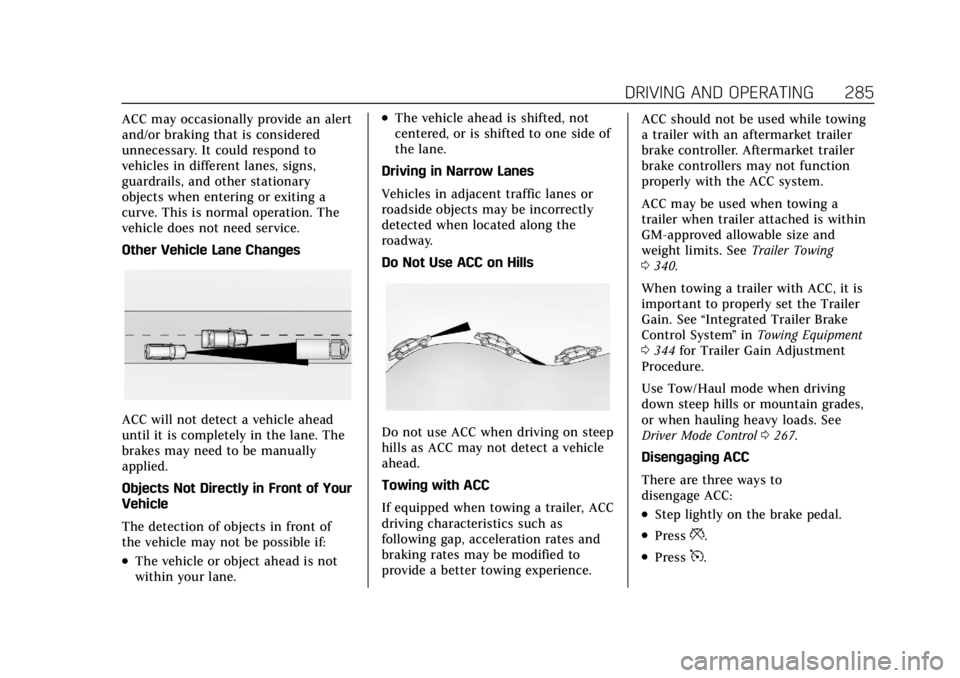
Other Vehicle Lane Changes
ACC will not detect a vehicle ahead
until it is completely in the lane. The
brakes may need to be manually
applied.
Objects Not Directly in Front of Your
Vehicle
The detection of objects in front of
the vehicle may not be possible if:
.The vehicle or object ahead is not
within your lane.
.The vehicle ahead is shifted, not
centered, or is shifted to one side of
the lane.
Driving in Narrow Lanes
Vehicles in adjacent traffic lanes or
roadside objects may be incorrectly
detected when located along the
roadway.
Do Not Use ACC on Hills
Do not use ACC when driving on steep
hills as ACC may not detect a vehicle
ahead.
Towing with ACC
If equipped when towing a trailer, ACC
driving characteristics such as
following gap, acceleration rates and
braking rates may be modified to
provide a better towing experience. ACC should not be used while towing
a trailer with an aftermarket trailer
brake controller. Aftermarket trailer
brake controllers may not function
properly with the ACC system.
ACC may be used when towing a
trailer when trailer attached is within
GM-approved allowable size and
weight limits. See
Trailer Towing
0 340.
When towing a trailer with ACC, it is
important to properly set the Trailer
Gain. See “Integrated Trailer Brake
Control System ”in Towing Equipment
0 344 for Trailer Gain Adjustment
Procedure.
Use Tow/Haul mode when driving
down steep hills or mountain grades,
or when hauling heavy loads. See
Driver Mode Control 0267.
Disengaging ACC
There are three ways to
disengage ACC:
.Step lightly on the brake pedal.
.Press*.
.Press5.
Page 291 of 508
Cadillac Escalade Owner Manual (GMNA-Localizing-U.S./Canada/Mexico-
15567102) - 2022 - CRC - 11/17/21
290 DRIVING AND OPERATING
When Super Cruise is available, the
white
^will display in the
instrument cluster.
.Press]. ACC will set the speed to
the current vehicle speed or resume
to the higher previously stored ACC
set speed.
When engaged and not steering the
vehicle, the steering wheel light bar
flashes blue, and
^will be blue. The
driver is in control of steering and
Super Cruise is not steering the
vehicle.
When the vehicle is positioned in the
center of the lane, the steering wheel
light bar and
^display will turn
green, indicating Super Cruise is
steering the vehicle.
When Super Cruise controls the
steering, traffic and other conditions
and laws permit, and it is safe to do
so, your hands can be taken off the
steering wheel.
Always pay attention to the road and
the operation of the vehicle. Always
monitor and be attentive of surrounding traffic, including vehicles
that may cross the road in front of
your vehicle.
Super Cruise steering can be
overridden with manual steering at
any time. When Super Cruise is
engaged, always be prepared to take
immediate action
—including
steering, accelerating, and braking
quickly, if necessary.
Super Cruise, when engaged, will
enable Forward Collision System to
alert and brake.
Steering Manually and Changing
Lanes
The vehicle can always be manually
steered, even with Super Cruise
engaged; for example, when manually
changing lanes.
When the steering wheel is moved
manually, the steering wheel light bar
flashes blue and
^on the
instrument cluster turns blue to
indicate Super Cruise is not steering
the vehicle. When ready to allow Super Cruise to
resume steering again, position the
vehicle in the center of the lane, hold
the steering wheel until the steering
wheel light bar turns green, and then
release the steering wheel when it is
safe to do so.
{Warning
To help prevent crashes before
making a lane change:
.Always check mirrors.
.Glance over your shoulder.
.Use the turn signals.
Super Cruise Lane Change
Super Cruise can steer to perform a
single lane change under certain
conditions when requested by the
driver or initiated by the Super Cruise
System.
To request a lane change: 1. Verify the lane next to your vehicle is clear and conditions are safe to
make a lane change.
Page 293 of 508
Cadillac Escalade Owner Manual (GMNA-Localizing-U.S./Canada/Mexico-
15567102) - 2022 - CRC - 11/17/21
292 DRIVING AND OPERATING
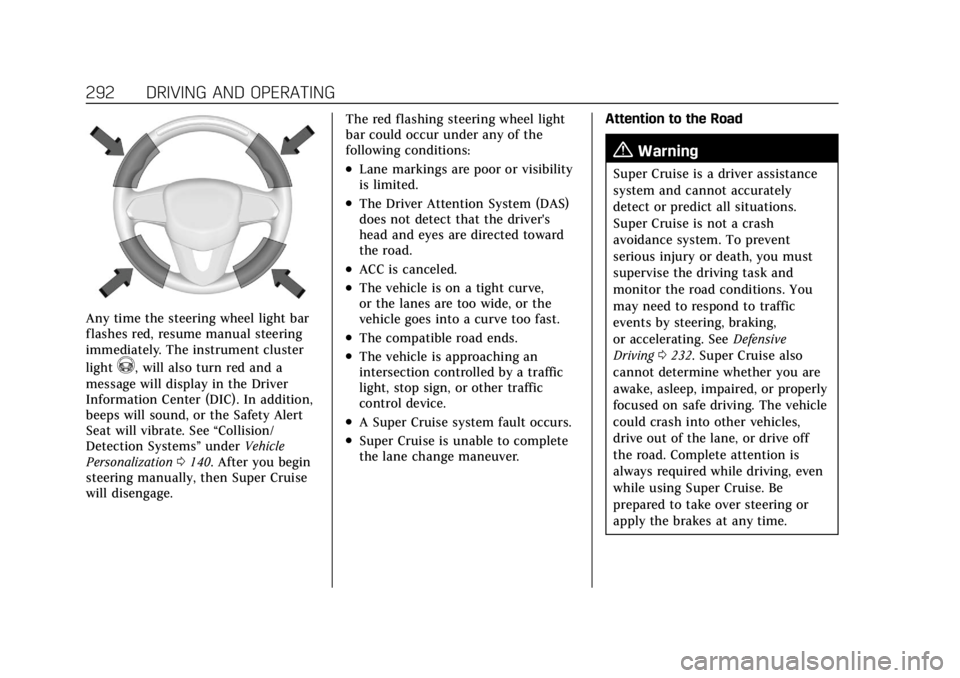
Any time the steering wheel light bar
flashes red, resume manual steering
immediately. The instrument cluster
light
^, will also turn red and a
message will display in the Driver
Information Center (DIC). In addition,
beeps will sound, or the Safety Alert
Seat will vibrate. See “Collision/
Detection Systems” underVehicle
Personalization 0140. After you begin
steering manually, then Super Cruise
will disengage. The red flashing steering wheel light
bar could occur under any of the
following conditions:
.Lane markings are poor or visibility
is limited.
.The Driver Attention System (DAS)
does not detect that the driver's
head and eyes are directed toward
the road.
.ACC is canceled.
.The vehicle is on a tight curve,
or the lanes are too wide, or the
vehicle goes into a curve too fast.
.The compatible road ends.
.The vehicle is approaching an
intersection controlled by a traffic
light, stop sign, or other traffic
control device.
.A Super Cruise system fault occurs.
.Super Cruise is unable to complete
the lane change maneuver.
Attention to the Road
{Warning
Super Cruise is a driver assistance
system and cannot accurately
detect or predict all situations.
Super Cruise is not a crash
avoidance system. To prevent
serious injury or death, you must
supervise the driving task and
monitor the road conditions. You
may need to respond to traffic
events by steering, braking,
or accelerating. See
Defensive
Driving 0232. Super Cruise also
cannot determine whether you are
awake, asleep, impaired, or properly
focused on safe driving. The vehicle
could crash into other vehicles,
drive out of the lane, or drive off
the road. Complete attention is
always required while driving, even
while using Super Cruise. Be
prepared to take over steering or
apply the brakes at any time.
Page 295 of 508
Cadillac Escalade Owner Manual (GMNA-Localizing-U.S./Canada/Mexico-
15567102) - 2022 - CRC - 11/17/21
294 DRIVING AND OPERATING
First Alert
.If the steering wheel light bar flashes green, the system has detected that your head and
eyes may not be directed toward the road.
.The flashing will stop when the system detects that your head and eyes appear to be
directed toward the road.
Second Alert
.If the steering wheel light bar flashes green for too long, Super Cruise will alert the driver
to take control of steering immediately by flashing the light bar red. Also, either beeps will
sound or the Safety Alert Seat will vibrate. See “Collision/Detection Systems”underVehicle
Personalization 0140.
.Take over steering, then Super Cruise will disengage.
.To re-engage Super Cruise, press]. See “Using Super Cruise ”previously in this section.
Third Alert
.If the steering wheel light bar flashes red for too long, a voice command will tell you to
take control of the vehicle.
.Take control of the steering immediately; ACC and Super Cruise will disengage.
.A DIC message will indicate that Super Cruise is locked out. Super Cruise cannot be
re-engaged until the vehicle is turned off and back on again.
.Continued failure to take over steering will cause the vehicle to brake to a stop and OnStar
will be called. The brake lamps and hazard warning flashers will come on.
.Take control of the vehicle and continue driving.
Page 296 of 508
Cadillac Escalade Owner Manual (GMNA-Localizing-U.S./Canada/Mexico-
15567102) - 2022 - CRC - 11/17/21
DRIVING AND OPERATING 295
Stationary or Very Slow-Moving
Objects; Cross-Traffic
{Warning
Super Cruise is not a crash
avoidance system and will not steer
or brake to avoid a crash. Super
Cruise does not steer to prevent a
crash with stopped or slow-moving
vehicles. You must supervise the
driving task and may need to steer
and brake to prevent a crash,
especially in stop-and-go traffic or
when a vehicle suddenly enters
your lane. Always pay attention
when using Super Cruise. Failure to
do so could result in a crash
involving serious injury or death.
Curves in the Road
{Warning
The vehicle could drift out of your
lane of travel. To prevent crashes,
always be ready to manually steer. (Continued)
Warning (Continued)
Super Cruise may not detect your
lane on curves in the road. Super
Cruise may not detect the markings
that show your lane. You may not
have time to react to a vehicle in
the lane next to your vehicle while
on curves in the road.
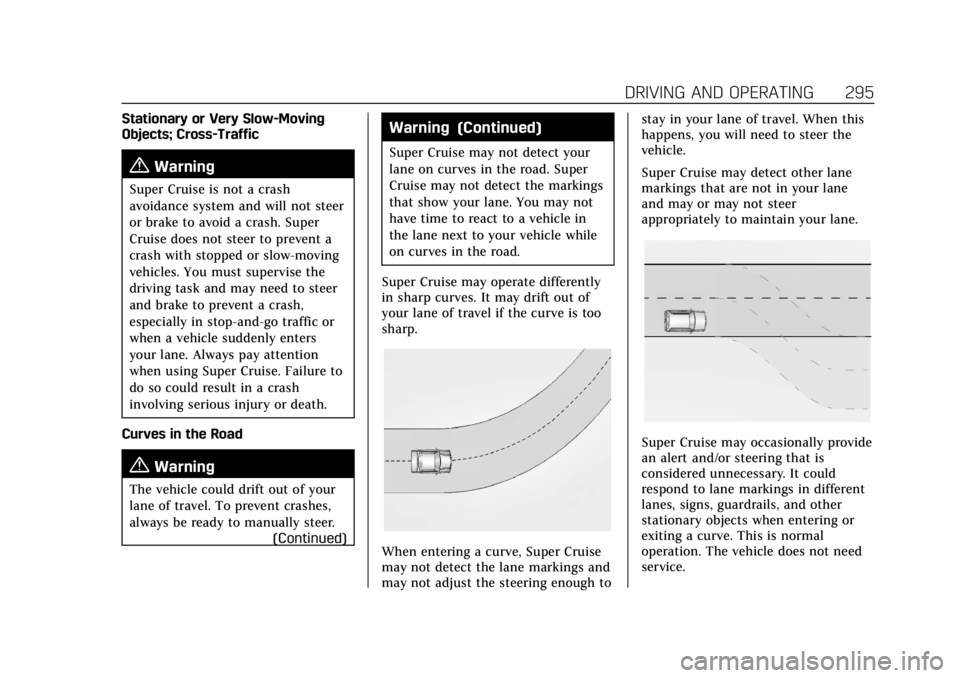
Super Cruise may operate differently
in sharp curves. It may drift out of
your lane of travel if the curve is too
sharp.
When entering a curve, Super Cruise
may not detect the lane markings and
may not adjust the steering enough to stay in your lane of travel. When this
happens, you will need to steer the
vehicle.
Super Cruise may detect other lane
markings that are not in your lane
and may or may not steer
appropriately to maintain your lane.
Super Cruise may occasionally provide
an alert and/or steering that is
considered unnecessary. It could
respond to lane markings in different
lanes, signs, guardrails, and other
stationary objects when entering or
exiting a curve. This is normal
operation. The vehicle does not need
service.
Page 297 of 508
Cadillac Escalade Owner Manual (GMNA-Localizing-U.S./Canada/Mexico-
15567102) - 2022 - CRC - 11/17/21
296 DRIVING AND OPERATING
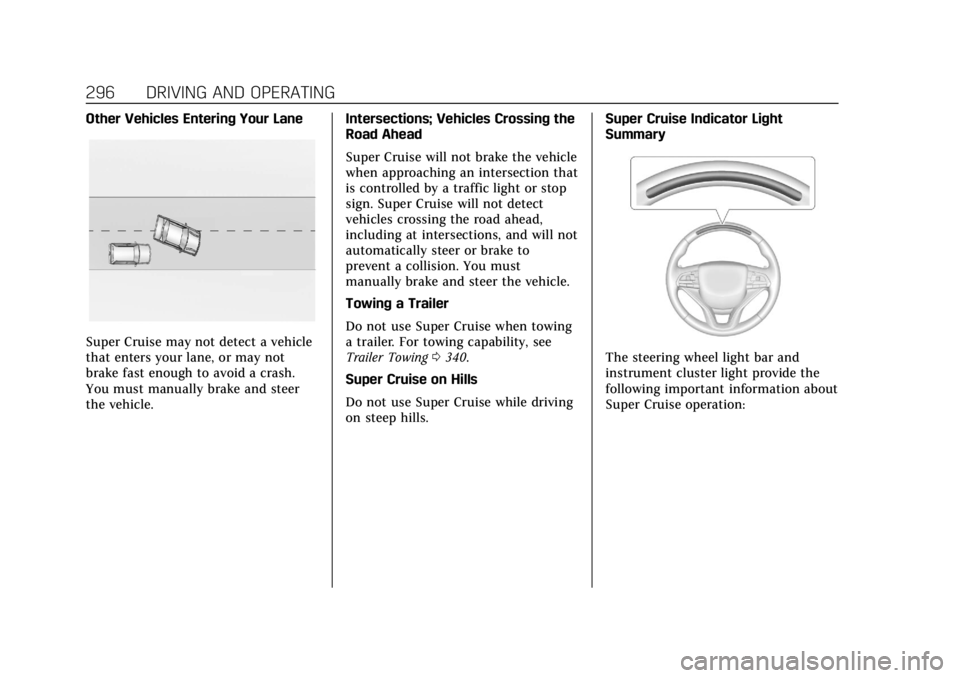
Other Vehicles Entering Your Lane
Super Cruise may not detect a vehicle
that enters your lane, or may not
brake fast enough to avoid a crash.
You must manually brake and steer
the vehicle.Intersections; Vehicles Crossing the
Road Ahead
Super Cruise will not brake the vehicle
when approaching an intersection that
is controlled by a traffic light or stop
sign. Super Cruise will not detect
vehicles crossing the road ahead,
including at intersections, and will not
automatically steer or brake to
prevent a collision. You must
manually brake and steer the vehicle.
Towing a Trailer
Do not use Super Cruise when towing
a trailer. For towing capability, see
Trailer Towing
0340.
Super Cruise on Hills
Do not use Super Cruise while driving
on steep hills. Super Cruise Indicator Light
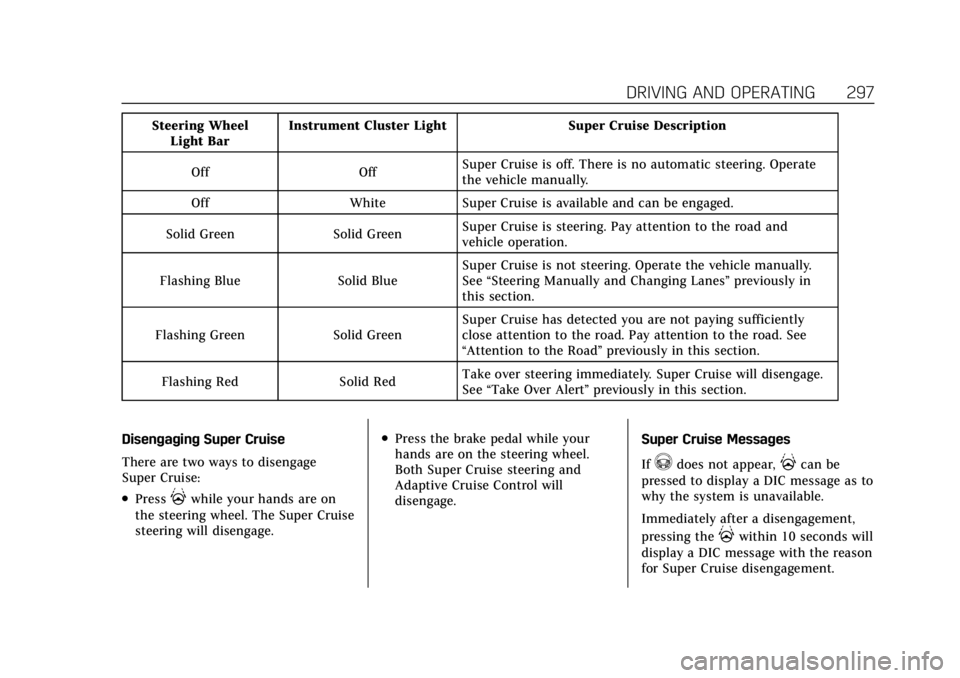
SummaryThe steering wheel light bar and
instrument cluster light provide the
following important information about
Super Cruise operation:
Page 298 of 508
Cadillac Escalade Owner Manual (GMNA-Localizing-U.S./Canada/Mexico-
15567102) - 2022 - CRC - 11/17/21
DRIVING AND OPERATING 297
Steering WheelLight Bar Instrument Cluster Light Super Cruise Description
Off Off Super Cruise is off. There is no automatic steering. Operate
the vehicle manually.
Off White Super Cruise is available and can be engaged.
Solid Green Solid Green Super Cruise is steering. Pay attention to the road and
vehicle operation.
Flashing Blue Solid Blue Super Cruise is not steering. Operate the vehicle manually.
See
“Steering Manually and Changing Lanes” previously in
this section.
Flashing Green Solid Green Super Cruise has detected you are not paying sufficiently
close attention to the road. Pay attention to the road. See
“Attention to the Road”
previously in this section.
Flashing Red Solid Red Take over steering immediately. Super Cruise will disengage.
See
“Take Over Alert ”previously in this section.
Disengaging Super Cruise
There are two ways to disengage
Super Cruise:
.Press]while your hands are on
the steering wheel. The Super Cruise
steering will disengage.
.Press the brake pedal while your
hands are on the steering wheel.
Both Super Cruise steering and
Adaptive Cruise Control will
disengage. Super Cruise Messages
If
^does not appear,]can be
pressed to display a DIC message as to
why the system is unavailable.
Immediately after a disengagement,
pressing the
]within 10 seconds will
display a DIC message with the reason
for Super Cruise disengagement.
Page 301 of 508

Cadillac Escalade Owner Manual (GMNA-Localizing-U.S./Canada/Mexico-
15567102) - 2022 - CRC - 11/17/21
300 DRIVING AND OPERATING
Super Cruise Message Summary (cont'd)
Unavailable Sensor Can’t See Face Clearly.Cups, food, hands, or other objects are obscuring the
DAS view of the driver’s face.
.The steering column is pointed too high or low for the
DAS to see the driver. Adjust the steering column or the
seat if the message occurs frequently.
.Sun is shining into the Driver Attention System (DAS)
camera.
.Dawn or dusk sun glare is on the driver’s face.
Unavailable Looking Away From Road for Too Long The DAS system detects that the driver is not looking at the road.
Unavailable Driving Too Fast The vehicle is traveling faster than 137 km/h (85 mph). The maximum Super Cruise speed in curves will vary based
on how sharp the curve is. The vehicle will automatically
decrease speed if needed.
Unavailable Driving in Exit Lane The Super Cruise system has detected that the vehicle is in an exit lane.
Unavailable GPS Signal Lost
.There is poor reception in isolated areas.
.Reception is being blocked by buildings or other large
structures.
Unavailable You Have Taken Vehicle Control
.The brake pedal is being pressed.
.The Adaptive Cruise Control has been canceled or
turned off.
Unavailable Sensor Blocked Clear snow, ice, dirt, or other contaminants from the front and rear areas of the vehicle.
Page 304 of 508

Cadillac Escalade Owner Manual (GMNA-Localizing-U.S./Canada/Mexico-
15567102) - 2022 - CRC - 11/17/21
DRIVING AND OPERATING 303
Warning (Continued)
.Work if the area surrounding the
detection sensor is damaged or
not properly repaired.
Complete attention is always
required while driving, and you
should be ready to take action and
apply the brakes and/or steer the
vehicle to avoid crashes.
Audible or Safety Alert Seat
Some driver assistance features alert
the driver of obstacles by beeping. To
change the volume of the warning
chime, see “Comfort and Convenience ”
under Vehicle Personalization 0140.
If equipped with the Safety Alert Seat,
the driver seat cushion may provide a
vibrating pulse alert instead of
beeping. To change this, see
“Collision/Detection Systems” under
Vehicle Personalization 0140.
Cleaning
Depending on vehicle options, keep
these areas of the vehicle clean to
ensure the best driver assistance
feature performance. Driver Information Center (DIC) messages
may display when the systems are
unavailable or blocked.
.Front and rear bumpers and the
area below the bumpers
.Front grille and headlamps
.Front camera lens in the front grille
or near the front emblem
.Front side and rear side panels
.Outside of the windshield in front of
the rearview mirror
.Side camera lens on the bottom of
the outside mirrors
.Rear side corner bumpers
.Rear Vision Camera above the
license plate
Radio Frequency
This vehicle may be equipped with
driver assistance systems that operate
using radio frequency. See Radio
Frequency Statement 0481.
Assistance Systems for
Parking or Backing
If equipped, the Rear Vision Camera
(RVC), Rear Park Assist (RPA), Front
and Rear Park Assist (FRPA),
Surround Vision, Reverse Automatic
Braking (RAB) and Backing Warning
System, Rear Cross Traffic Alert
Page 307 of 508

Cadillac Escalade Owner Manual (GMNA-Localizing-U.S./Canada/Mexico-
15567102) - 2022 - CRC - 11/17/21
306 DRIVING AND OPERATING
Standard View on the
infotainment display when a
camera view is active.
When the hitch guidance is
selected, Rear Standard View will
remain visible across gear
changes, otherwise the view will
toggle between Front and Rear
Standard View based on gear
position.
If equipped, the front view
camera also displays when the
Park Assist system detects an
object within 30 cm (12 in).
To access this view when in a
forward gear above 12 km/h
(8 mph), select CAMERA on the
infotainment display and select
Rear Standard View. The view
will close after 8 seconds and
can be closed early by selecting
X, Home or Back.
2. Front/Rear Top-Down View
Displays a front or rear overhead
view of the vehicle. To view,
select Front/Rear Top-Down
View on the infotainment display
when the camera app is active.
3. Front/Rear side View
Displays a view that shows
objects next to the front or rear
sides of the vehicle. To select,
touch Front/Rear Side View on
the infotainment display when a
camera view is active. Touch the
button to toggle between front
and rear camera views. Park
Assist and RCTA overlays are not
available when Front/Rear Side
View is active.
4. Hitch View
Displays a zoomed-in view of the
hitch area to assist with aligning
the vehicle’s hitch ball with the
trailer coupler and monitoring
the trailer connection. To view,
select Hitch View on the
infotainment display when the
Camera App is active. To access
this view when in a forward gear
above 12 km/h (8 mph), select
CAMERA on the infotainment
display and select Hitch View.
The view will close after
eight seconds and can be closed
early by selecting X, Home or
Back. Shifting into P (Park) whilein this view will automatically
engage the Electric Parking
Brake (EPB).
5. Surround View
Displays an image of the area
surrounding the vehicle.
Surround View is displayed
alongside the currently selected
view when below 12 kph
(8 mph). Surround View is
disabled when above
12 kph (8 mph).
6. Camera App Guidance Lines
The Camera App supports three
possible guidance modes: No
Guidance, Vehicle Guidance and
Trailering Guidance. To change
guidance mode, select the
appropriate guidance icon.
Depending on the guidance
mode and view selected, different
guidance lines may appear.
A grayed-out icon indicates that
guidance lines are not available.
Certain views do not support
Guidance lines.
.Standard Guidance Lines are
available in Front/Rear
Standard Views, Front/Rear