ECO mode CADILLAC ESCALADE ESV 2009 User Guide
[x] Cancel search | Manufacturer: CADILLAC, Model Year: 2009, Model line: ESCALADE ESV, Model: CADILLAC ESCALADE ESV 2009Pages: 602, PDF Size: 5.18 MB
Page 178 of 602

Rainsense™ II Wipers The vehicle has Rainsense™ II windshield wipers.
These wipers automatically turn on when a sensor,
mounted next to the inside rearview mirror, detects
moisture on the windshield. When active, these wipers
are able to detect moisture on the windshield and
automatically turn on the wipers.
To turn on the Rainsense™ feature, the wipers must
be set to one of the ve delay settings. Each of the
ve settings adjusts the sensitivity of the rain sensor.
Since different drivers have different setting preferences,
it is recommended that the mid-range setting, position
three, be used initially. For more wipes, select the higher
settings; for fewer wipes, select the lower settings located
closer to the off position on the multifunction lever. The rain sensor will automatically control the frequency
of the wipes from off to high speed according to the
weather conditions. The wipers can be left in a
Rainsense™ mode even when it is not raining.
When Rainsense™ II is active, the headlamps will
turn on automatically after approximately eight wipes.
The headlamps will turn off if the wiper switch is set
to a delay position, and there have been no wipes for
approximately three minutes, or if the wiper switch
is turned to the off position. If it is dark outside, the
headlamps will remain on.
Notice: Going through an automatic car wash with
the wipers on can damage them. Turn the wipers
off when going through an automatic car wash.
3-10
Page 196 of 602

Automatic Operation AUTO (Automatic): When automatic operation is
active the system will control the inside temperature,
the air delivery, and the fan speed.
Use the steps below to place the entire system in
automatic mode:
1. Press the AUTO button.
When AUTO is selected, the display will change to
show the current temperature(s) and AUTO come on
the display. The current delivery mode and fan speed
will also be displayed for approximately ve seconds.
When AUTO is selected, the air conditioning
operation and air inlet will be automatically
controlled. The air conditioning compressor will
run when the outside temperature is over about
40°F (4°C). The air inlet will normally be set
to outside air. If it is hot outside, the air inlet may
automatically switch to recirculate inside air to
help quickly cool down the vehicle. The light on
the button comes on in recirculation. 2. Set the driver’s and passenger’s temperature.
To nd your comfort setting, start with a 74°F (23°C)
temperature setting and allow about 20 minutes for
the system to regulate. Use the driver or passenger
temperature buttons to adjust the temperature setting
as necessary. If a temperature setting of 60°F (15°C)
is chosen, the system remains at the maximum
cooling setting. If a temperature setting of 90°F
(32°C) is chosen, the system remains at the
maximum heat setting. Choosing either maximum
setting will not cause the vehicle to heat or cool
any faster.
Be careful not to cover the sensor located on the top of
the instrument panel near the windshield. This sensor
regulates air temperature based on sun load and
also turns on the headlamps.
To avoid blowing cold air in cold weather, the system
will delay turning on the fan until warm air is available.
The length of delay depends on the engine coolant
temperature. Pressing the fan switch will override
this delay and change the fan to a selected speed.
3-28
Page 197 of 602

Manual Operation
y9z (Fan Control): Press the up or down arrows
to increase or decrease the fan speed
Pressing this button when the system is off will turn the
system on.
Pressing either arrow while using automatic operation
will place the fan in manual operation. The fan setting will
display and the AUTO light will turn off. The air delivery
will remain in automatic operation.
N (Air Delivery Mode Control): Press to change the
direction of the airow in the vehicle. Repeatedly press
the button until the desired mode appears on the display.
When the system is turned off, the display goes blank
after displaying the current status of the system.
H (Vent): Air is directed to the instrument panel outlets.
) (Bi-Level): Air is divided between the instrument
panel and oor outlets. Some air is directed towards
the windshield and side window outlets. Cooler air
is directed to the upper vents and warmer air to the
oor vents. 6 (Floor): Air is directed to the oor outlets, with
some to the windshield, side window outlets, and second
row oor outlets. In this mode, the system automatically
selects outside air.
- (Defog): This mode clears the windows of fog or
moisture. Air is directed to the windshield, oor outlets,
and side window vents. In this mode, the system turns
off recirculation and runs the air conditioning compressor
unless the outside temperature is close to freezing.
The recirculation mode cannot be selected while in
the defog mode.
0 (Defrost): This mode removes fog or frost from the
windshield more quickly. Air is directed to the windshield
and side window vents, with some directed to the oor
vents. In this mode, the system automatically forces
outside air into the vehicle and runs the air conditioning
compressor unless the outside temperature is close to
freezing. The recirculation mode cannot be selected while
in the defrost mode.
Do not drive the vehicle until all the windows are clear.
3-29
Page 201 of 602

Automatic Operation, If Equipped. AUTO: Press the air delivery mode button until this
setting is selected to control the inside temperature, air
delivery, and fan speed. AUTO appears in the display
when automatic operation is active.
+/ − (Increase/Decrease Temperature): Press the + or
− buttons to increase or decrease the cabin temperature.
The rear control temperature display will show the
temperature setting increasing or decreasing.
The display only indicates climate control functions
when the system is in rear independent mode.
Manual Operation
DC (Fan Control): Press these buttons on the rear
seat audio control panel to increase or decrease the
airow. Pressing the fan up button when the system is off
will turn the system on. The air delivery mode will remain
under automatic control.
+/ − (Temperature Control): Press these buttons
to adjust the temperature of the air owing into the
passenger area. Press the + button for warmer air
and press the − button for cooler air.
N (Air Delivery Mode Control): Press the mode
button to change the direction of the airow in the
vehicle. Repeatedly press the button until the desired
mode appears on the display. Multiple presses will cycle
through the delivery selections. Warning Lights, Gages, and
Indicators Warning lights and gages can signal that something
is wrong before it becomes serious enough to cause
an expensive repair or replacement. Paying attention
to the warning lights and gages could prevent injury.
Warning lights come on when there may be or is
a problem with one of the vehicle’s functions. Some
warning lights come on briey when the engine is
started to indicate they are working.
Gages can indicate when there may be or is a problem
with one of the vehicle’s functions. Often gages and
warning lights work together to indicate a problem with
the vehicle.
When one of the warning lights comes on and stays on
while driving, or when one of the gages shows there may
be a problem, check the section that explains what to do.
Follow this manual’s advice. Waiting to do repairs can be
costly and even dangerous.
3-33
Page 221 of 602

Relearn Remote Key This display allows you to match Remote Keyless
Entry (RKE) transmitters to your vehicle. To match
an RKE transmitter to your vehicle:
1. Press the vehicle information button until
PRESS
V TO RELEARN REMOTE KEY displays.
2. Press the set/reset button until REMOTE KEY
LEARNING ACTIVE is displayed.
3. Press and hold the lock and unlock buttons on
the rst transmitter at the same time for about
15 seconds.
On vehicles with memory recall seats, the rst
transmitter learned will match driver 1 and
the second will match driver 2.
A chime will sound indicating that the transmitter is
matched.
4. To match additional transmitters at this time, repeat
Step 3.
Each vehicle can have a maximum of eight
transmitters matched to it.
5. To exit the programming mode, you must cycle the
key to LOCK/OFF. Compass Zone Setting This display allows for setting the compass zone.
See DIC Compass on page 3-53 for more information.
Compass Recalibration This display allows for calibrating the compass.
See DIC Compass on page 3-53 for more information.
Blank Display This display shows no information.
DIC Compass Your vehicle may have a compass in the Driver
Information Center (DIC).
3-53
Page 225 of 602
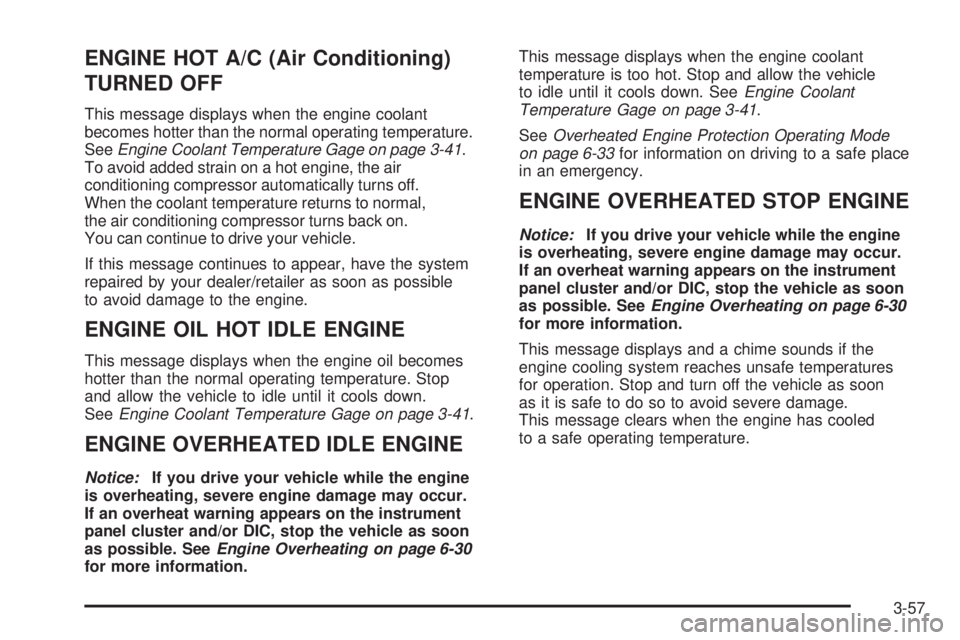
ENGINE HOT A/C (Air Conditioning)
TURNED OFF This message displays when the engine coolant
becomes hotter than the normal operating temperature.
See Engine Coolant Temperature Gage on page 3-41 .
To avoid added strain on a hot engine, the air
conditioning compressor automatically turns off.
When the coolant temperature returns to normal,
the air conditioning compressor turns back on.
You can continue to drive your vehicle.
If this message continues to appear, have the system
repaired by your dealer/retailer as soon as possible
to avoid damage to the engine.
ENGINE OIL HOT IDLE ENGINE This message displays when the engine oil becomes
hotter than the normal operating temperature. Stop
and allow the vehicle to idle until it cools down.
See Engine Coolant Temperature Gage on page 3-41 .
ENGINE OVERHEATED IDLE ENGINE Notice: If you drive your vehicle while the engine
is overheating, severe engine damage may occur.
If an overheat warning appears on the instrument
panel cluster and/or DIC, stop the vehicle as soon
as possible. See Engine Overheating on page 6-30
for more information. This message displays when the engine coolant
temperature is too hot. Stop and allow the vehicle
to idle until it cools down. See Engine Coolant
Temperature Gage on page 3-41 .
See Overheated Engine Protection Operating Mode
on page 6-33 for information on driving to a safe place
in an emergency.
ENGINE OVERHEATED STOP ENGINE Notice: If you drive your vehicle while the engine
is overheating, severe engine damage may occur.
If an overheat warning appears on the instrument
panel cluster and/or DIC, stop the vehicle as soon
as possible. See Engine Overheating on page 6-30
for more information.
This message displays and a chime sounds if the
engine cooling system reaches unsafe temperatures
for operation. Stop and turn off the vehicle as soon
as it is safe to do so to avoid severe damage.
This message clears when the engine has cooled
to a safe operating temperature.
3-57
Page 229 of 602

SERVICE BRAKES SOON This message displays if there is a problem with the
brake system. If this message appears, stop as soon as
possible and turn off the vehicle. Restart the vehicle and
check for the message on the DIC display. If the message
is still displayed or appears again when you begin driving,
the brake system needs service. See your dealer/retailer.
SERVICE LEFT HEADLAMP
ASSEMBLY On some models, this message will be displayed when
the left headlamp is out and needs to be serviced.
See LED Lighting on page 6-51 for more information.
SERVICE PARKING ASSIST This message displays if there is a problem with the
Ultrasonic Rear Parking Assist (URPA) system. Do not
use this system to help you park. See Ultrasonic
Rear Parking Assist (URPA) on page 2-42 for more
information. See your dealer/retailer for service.
SERVICE RIGHT HEADLAMP
ASSEMBLY On some models, this message will be displayed when
the right headlamp is out and needs to be serviced.
See LED Lighting on page 6-51 for more information. SERVICE SIDE BLIND ZONE ALERT
SYSTEM If your vehicle has the Side Blind Zone Alert (SBZA)
system and this message displays, both SBZA displays
will remain on indicating there is a problem with the
SBZA system. If these displays remain on after continued
driving, the system needs service. See your dealer/
retailer. See Side Blind Zone Alert (SBZA) on page 2-44
for more information.
SERVICE STABILITRAK If your vehicle has StabiliTrak ®
and this message
displays, it means there may be a problem with the
StabiliTrak system. If you see this message, try to
reset the system. Stop; turn off the engine for at least
15 seconds; then start the engine again. If this message
still comes on, it means there is a problem. You should
see your dealer/retailer for service. The vehicle is safe to
drive, however, you do not have the benet of StabiliTrak,
so reduce your speed and drive accordingly.
SERVICE SUSPENSION SYSTEM This message displays when the Road Sensing
Suspension (RSS) system is not operating properly.
Have your vehicle serviced by your dealer/retailer.
3-61
Page 263 of 602
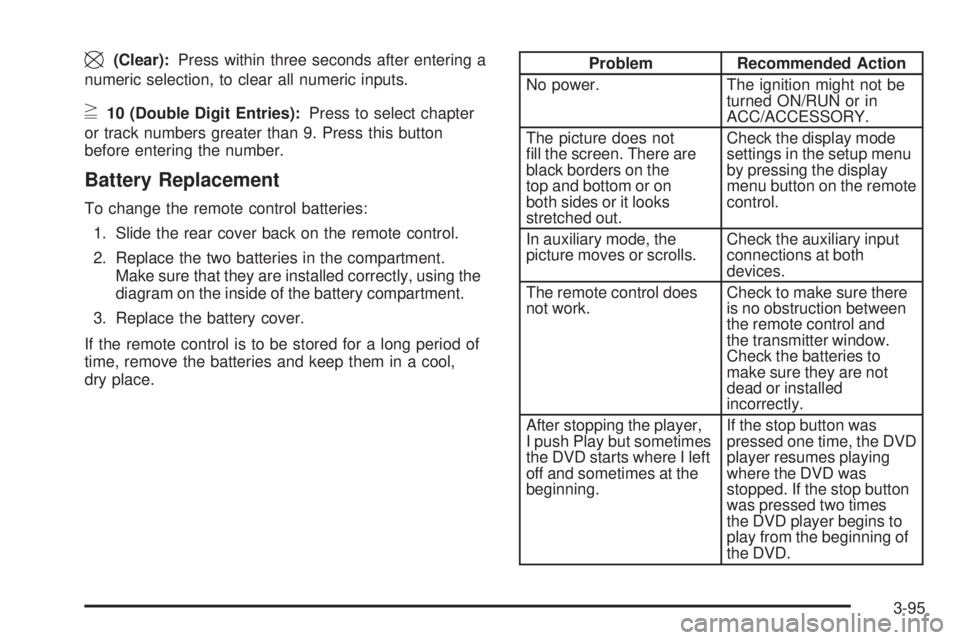
\ (Clear): Press within three seconds after entering a
numeric selection, to clear all numeric inputs.
} 10 (Double Digit Entries): Press to select chapter
or track numbers greater than 9. Press this button
before entering the number.
Battery Replacement To change the remote control batteries:
1. Slide the rear cover back on the remote control.
2. Replace the two batteries in the compartment.
Make sure that they are installed correctly, using the
diagram on the inside of the battery compartment.
3. Replace the battery cover.
If the remote control is to be stored for a long period of
time, remove the batteries and keep them in a cool,
dry place. Problem Recommended Action
No power. The ignition might not be
turned ON/RUN or in
ACC/ACCESSORY.
The picture does not
ll the screen. There are
black borders on the
top and bottom or on
both sides or it looks
stretched out. Check the display mode
settings in the setup menu
by pressing the display
menu button on the remote
control.
In auxiliary mode, the
picture moves or scrolls. Check the auxiliary input
connections at both
devices.
The remote control does
not work. Check to make sure there
is no obstruction between
the remote control and
the transmitter window.
Check the batteries to
make sure they are not
dead or installed
incorrectly.
After stopping the player,
I push Play but sometimes
the DVD starts where I left
off and sometimes at the
beginning. If the stop button was
pressed one time, the DVD
player resumes playing
where the DVD was
stopped. If the stop button
was pressed two times
the DVD player begins to
play from the beginning of
the DVD.
3-95
Page 264 of 602
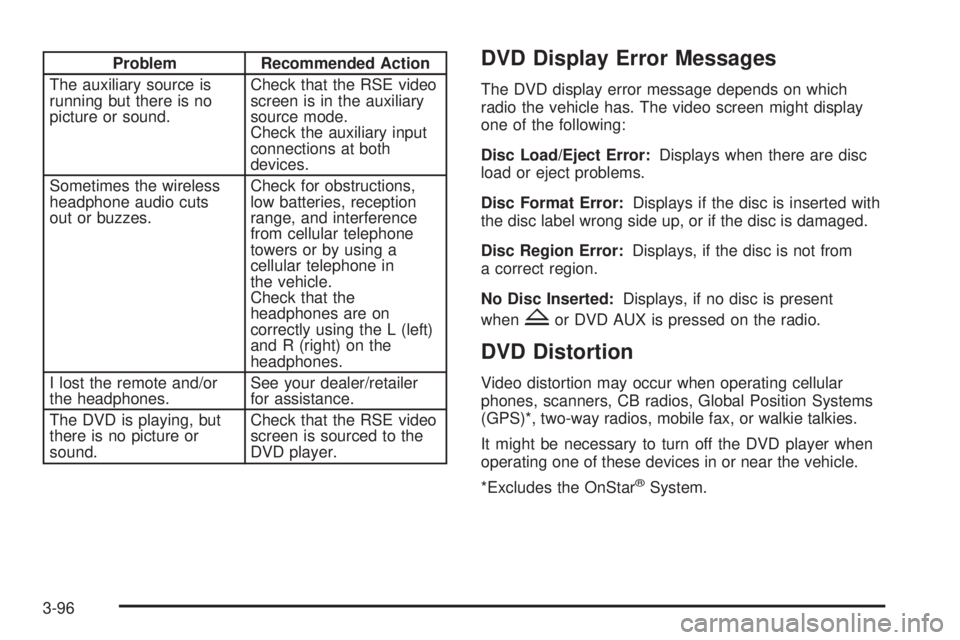
Problem Recommended Action
The auxiliary source is
running but there is no
picture or sound. Check that the RSE video
screen is in the auxiliary
source mode.
Check the auxiliary input
connections at both
devices.
Sometimes the wireless
headphone audio cuts
out or buzzes. Check for obstructions,
low batteries, reception
range, and interference
from cellular telephone
towers or by using a
cellular telephone in
the vehicle.
Check that the
headphones are on
correctly using the L (left)
and R (right) on the
headphones.
I lost the remote and/or
the headphones. See your dealer/retailer
for assistance.
The DVD is playing, but
there is no picture or
sound. Check that the RSE video
screen is sourced to the
DVD player. DVD Display Error Messages The DVD display error message depends on which
radio the vehicle has. The video screen might display
one of the following:
Disc Load/Eject Error: Displays when there are disc
load or eject problems.
Disc Format Error: Displays if the disc is inserted with
the disc label wrong side up, or if the disc is damaged.
Disc Region Error: Displays, if the disc is not from
a correct region.
No Disc Inserted: Displays, if no disc is present
when
Z or DVD AUX is pressed on the radio.
DVD Distortion Video distortion may occur when operating cellular
phones, scanners, CB radios, Global Position Systems
(GPS)*, two-way radios, mobile fax, or walkie talkies.
It might be necessary to turn off the DVD player when
operating one of these devices in or near the vehicle.
*Excludes the OnStar ®
System.
3-96
Page 272 of 602

TITLE: Press to enter the disc title mode. The title
feature is disc-specic, and may not be available on
all discs.
SUBTITLE: Press to change the subtitle language to
another available language or to turn subtitles off.
ANGLE: Press to select a different viewing angle for
discs that are recorded with different camera angles.
AUDIO: Press to select a different language for
discs that are recorded with different languages.
0-9 (Numbers): The numbers located on the lower
left side of the remote control can be used to enter
numbered menu options, channels, or track numbers.
GOTO: Press to enter the GOTO menu to choose
a desired title, chapter, track, or song inside the disc.
DISPLAY: Press to scroll through display information
on the upper left corner of the screen, such as title,
chapter/track, time elapsed, and time remaining,
or to turn off the display
PROGRAM: Press to edit a playback program
containing desired titles in the DVD or tracks in
the CD-DA.
3D: Press to change between different 3D audio modes
for DVD or CD.
The options for DVD are: Off, Rock, Pop, Live, Dance,
Techno, Classic, and Soft. The options for CD are: Off, Concert, Living room, Hall,
Bathroom Cave, Arena, and Church.
RANDOM: Press to play titles randomly.
PLAY/PAUSE
r /
j : Press to start playback of the
disc, or to pause playback.
STOP
c : Press to stop playback of a disc.
To resume disc playback, press PLAY.
To start playback from the beginning of the disc,
press STOP, STOP, then PLAY.
ZOOM: Press to either enlarge the viewed image by
2X, 3X, and 4X, or reduce the image by 1/2X, 1/3X,
and 1/4X.
PBC (Playback Control): Press to turn video CD
playback control on or off.
FR
r (Fast Reverse): Press to fast reverse the disc.
Press multiple times to choose between 2X, 4X, 8X,
16X, and 32X speeds.
FF
[ (Fast Forward): Press to fast forward the disc.
Press multiple times to choose between 2X, 4X, 8X,
16X, and 32X speeds.
3-104