radio CADILLAC ESCALADE ESV 2009 Owner's Guide
[x] Cancel search | Manufacturer: CADILLAC, Model Year: 2009, Model line: ESCALADE ESV, Model: CADILLAC ESCALADE ESV 2009Pages: 602, PDF Size: 5.18 MB
Page 296 of 602

11. Select the Go screen button. A map screen, with
the destination marked appears.
12. Select the route preference (Fastest, Shortest, or
Other). The system calculates and highlights the
route.
13. Select the Start Guidance screen button. You are
now ready to start your route.
See “Address Entry ” under Destination on page 4-25
for more information.
Entering a Point of Interest (POI) To set a destination by entering a Point of
Interest (POI), do the following:
1. If the radio is already on with a map disc inserted,
skip to Step 5.
2. Press
O to turn the system on.
3. Insert the DVD map disc. See “Installing the
Map DVD” under Maps on page 4-15 for more
information.
4. A caution may appear. Touch the OK screen button
to proceed.
5. Press the DEST hard key. 6. Press the
i Point of Interest screen button.
7. Select the state/province screen button, if needed,
to change the current state or province. A list of
all of the available states and provinces appear.
Select the state or province.
8. Enter the specic title of the POI in the POI name
space (e.g. Washington Monument).
If ve or less names are available, a list displays.
If more than ve are available, the List screen button
displays a number. This button represents the
number of available POIs. Select this button to
view the list.
9. Select the Go screen button next to the POI. A map
screen, with the destination marked appears.
10. Select the route preference (Fastest, Shortest, or
Other). The system calculates and highlights the
route.
11. Select the Start Guidance screen button. The route
is now ready to be started.
See “Point of Interest (POI)” under Destination on
page 4-25 for more information.
4-10
Page 297 of 602

Storing Preset Destinations 1. If the radio is already on with a map disc inserted,
skip to Step 5.
2. Press
O to turn the system on.
3. Insert the DVD map disc. See “Installing the
Map DVD” under Maps on page 4-15 for more
information.
4. A caution may appear. Touch the OK screen button
to proceed.
5. Press the DEST hard key.
Enter a destination. See Destination on page 4-25
for more information on how to enter a destination.
6. Press the DEST hard key, the Route screen
displays. Press the Final Destination or Stopover
screen button. The information screen displays
for that location. Press the Add to Address Book
screen button. The address book screen appears.
7. Select the Name screen button. An alpha-keyboard
displays. Enter the name. Select the Back screen
button. 8. Press and hold one of the screen buttons at the
bottom of the screen until the name appears in
the screen button on the display.
The name appears in that preset destination screen
button and is now available to select from the
Destination Entry screen. See “Using Your Stored
Preset Destinations” next in this section to select
it as a destination.
See “Adding or Changing Preset Destinations”
under Destination on page 4-25 for more information
on how to add preset destinations.
Using Your Stored Preset Destinations These destinations are available for selection while
driving.
1. If the radio is already on with a map disc inserted,
skip to Step 5.
2. Press
O to turn the system on.
3. Insert the DVD map disc. See “Installing the
Map DVD” under Maps on page 4-15 for more
information.
4-11
Page 299 of 602
Features and Controls Using the Navigation System This section presents basic information needed to
operate the navigation system.
Use the hard keys located on the navigation system
along with the available touch-sensitive screen buttons
on the navigation screen to operate the system.
See Navigation System Overview on page 4-2 for
more information.
Once the vehicle is moving, various functions are
disabled to reduce driver distractions.
Hard Keys The following hard keys are located on the navigation
system:
O /
n (Power/Volume): Press to turn the system
on and off. Turn to increase or decrease the volume
to the audio system.
Press and hold for more than two seconds to turn off
the navigation system, the Rear Seat Entertainment
(RSE), and Rear Seat Audio (RSA). If the vehicle has
not been tuned off, the RSE and the RSA can be turned
back on by pressing this knob and continues play of
the last active source. w (Tune): Turn to go to the next or previous
radio station or disc track or chapter. See Navigation
Audio System on page 4-62 , CD Player on page 4-71 ,
or DVD Player on page 4-78 for more information.
Z (DVD Map Disc Eject): Press to eject the DVD
map disc. This button is located next to the upper disc
slot. See Maps on page 4-15 for more information.
M (Load): Press to load CDs or audio/video DVDs.
See CD Player on page 4-71 or DVD Player on
page 4-78 for more information.
Z (CD/DVD Eject): Press to eject CDs or audio/video
DVDs. This button is located under the load button.
See CD Player on page 4-71 or DVD Player on
page 4-78 for more information.
M (Disc Up/Down): Press the up or down arrows to go
to the next or previous disc.
AUDIO: Press access the full Audio screen to change
AM, FM, XM™ Satellite Radio Service (if equipped),
CD/DVD, and auxiliary input. See “Audio” under
Navigation Audio System on page 4-62 for more
information.
FAV (Favorite): Press to access the preset stations.
See “Storing Radio Station Presets” under Navigation
Audio System on page 4-62 for more information.
4-13
Page 300 of 602
5 (Phone): Press to access calling through OnStar ®
.
See OnStar ®
System on page 2-52 and Bluetooth ®
on page 3-75 for more information.
e (Sound): Press to access the Sound screen to
adjust bass, midrange, treble, and Digital Signal
Processing (DSP). See “Sound Menu” under Navigation
Audio System on page 4-62 for more information.
DEST (Destination): Press to access the Destination
Entry screen to plan a destination. See Destination
on page 4-25 for more information.
CONFIG (Congure Menu): Press to adjust
features for sound, radio, navigation, and the display.
See Configure Menu on page 4-43 for more information.
NAV (Navigation): Press to view your vehicle’s current
position on the map screen. Each press of this key cycles
through Full Map and the tab that displays the current
audio source (AM, FM, CD, etc.). Full Map displays the screen in full map view. Selecting the audio tab splits the
screen between the map screen and the current audio
source screen menu. See “Audio” under Navigation
Audio System on page 4-62 for more information.
RPT (Navigation Repeat): Press to repeat the last
voice guidance prompt.
y©¨z (Seek): Press the seek arrows to seek
and scan radio stations, to seek tracks on a CD, and to
seek chapters on a DVD. See Navigation Audio System
on page 4-62 , CD Player on page 4-71 ,or DVD Player
on page 4-78 for more information.
Touch-Sensitive Screen Buttons Touch-sensitive screen buttons are located on the
screen. When a screen button has been selected,
a beep sounds. Screen buttons are highlighted when
a feature is available.
4-14
Page 323 of 602

Route Guidance Not Active If an OnStar destination is downloaded while route
guidance is not active, the navigation system displays
an OnStar Destination Download Screen and operations
will continue as outlined in the Using OnStar Destination
Download section:
Route Guidance Active If OnStar downloads a destination while route
guidance is already active, the navigation system
adds the downloaded destination as the next waypoint in
the existing route. All features such as Call and Add to
Address Book will be available for the waypoint. Refer
to the section on Waypoints for more information.
Previous Destinations Previous OnStar Destination Downloads are
saved under Previous Destinations in the navigation
system where they can be accessed or saved to the
address book. Important Notes regarding OnStar Destination
Download:
If the navigation system is turned off when the
destination download is attempted, the navigation
system will automatically turn on and display the
OnStar Destination Download Screen. The radio
will remain on after the download occurs.
If OnStar downloads a destination and the address is
not found in the mapping disc’s database and routing
by coordinates is not available, the Go and Map
buttons gray out and routing will not be available.
Press the blue OnStar button for further assistance.
The Call button grays out when there is no phone
number available for your destination and while
connected to OnStar.
4-37
Page 329 of 602
To store an address book entry as a preset destination:
1. Select the CONFIG hard key.
2. Select the Nav screen button or press the CONFIG
key until Nav is selected or touch the Nav screen
button.
3. Select the Edit/View screen button.
4. Select the address book entry to be stored as the
preset destination. Select the Name screen button
to add a name, if needed.
5. Press and hold one of the buttons at the bottom of
the screen until the name appears in that preset
destination screen button. It is now available
to select from the Destination Entry screen. Congure Menu
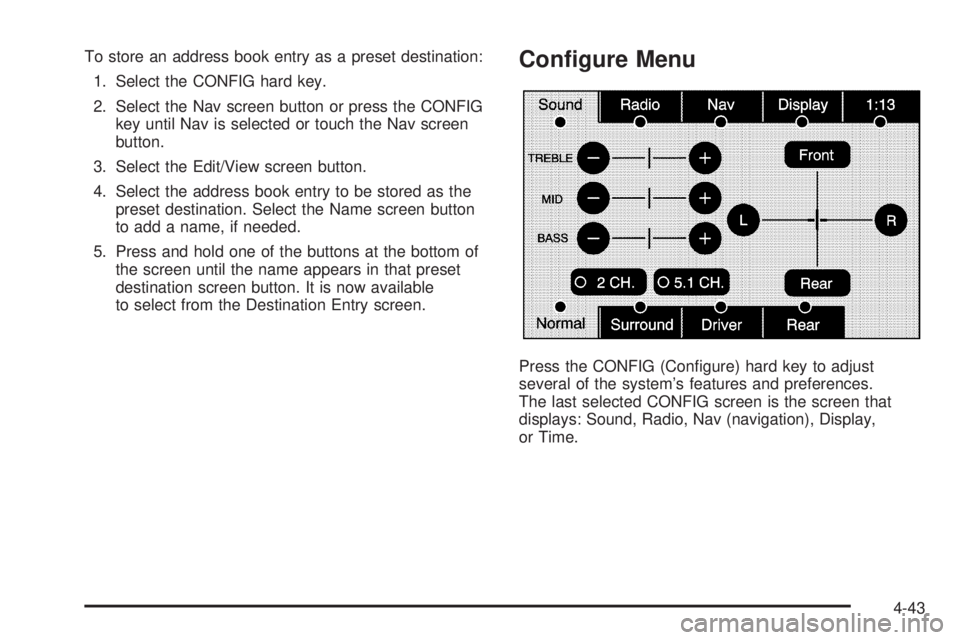
Press the CONFIG (Congure) hard key to adjust
several of the system’s features and preferences.
The last selected CONFIG screen is the screen that
displays: Sound, Radio, Nav (navigation), Display,
or Time.
4-43
Page 330 of 602

Sound Press the CONFIG key to enter the congure menu
options, then press the CONFIG key repeatedly
until Sound is selected or touch the Sound screen
button to make speaker and DSP (Digital Signal
Processing) adjustments. See “Sound Menu” under,
Navigation Audio System on page 4-62 for more
information.
Radio Press the CONFIG key to enter the congure menu
options, then press the CONFIG key repeatedly
until Radio is selected or touch the Radio screen
button to make changes for radio information displayed,
preset pages, XM™ categories, and Bose ®
AudioPilot ®
.
See “Radio Menu” under, Navigation Audio System
on page 4-62 for more information. Nav (Navigation)
Press the CONFIG key to enter the congure menu
options, then press the CONFIG key repeatedly
until Nav is selected or touch the Nav screen button.
4-44
Page 334 of 602

Off-Road Mode To turn the Off-road mode on or off, do the following:
1. Press the CONFIG hard key.
2. Press the Nav screen button.
3. Press the Off-Road mode screen button. The button
will be highlighted when the feature is on.
When the off-road mode is turned on, the navigation
system will show the path being traveled by the vehicle
when not on a marked road. This path will be a simulation
since the map database coverage will not have these
roads on the DVD. This path will be stored in the
navigation system’s memory, see “Previous Destination”
under Destination on page 4-25 for more information.
See “Off-Road Driving” in the Index of your vehicle’s
owner manual for more information about off-road
driving. Traffic Options Read the following Options descriptions to understand
how the XM NavTraffic™ operates.
XM NavTraffic™ (USA and Canada) Vehicles with the navigation system have an
XM NavTraffic™ receiver. XM NavTraffic™ is a
subscription service provided via XM™ Satellite
Radio. XM NavTraffic™ provides real-time traffic
information fully integrated to the navigation system
to display current traffic conditions for a driver’s chosen
route. XM NavTraffic™ allows drivers to make the most
informed, timesaving routing decisions.
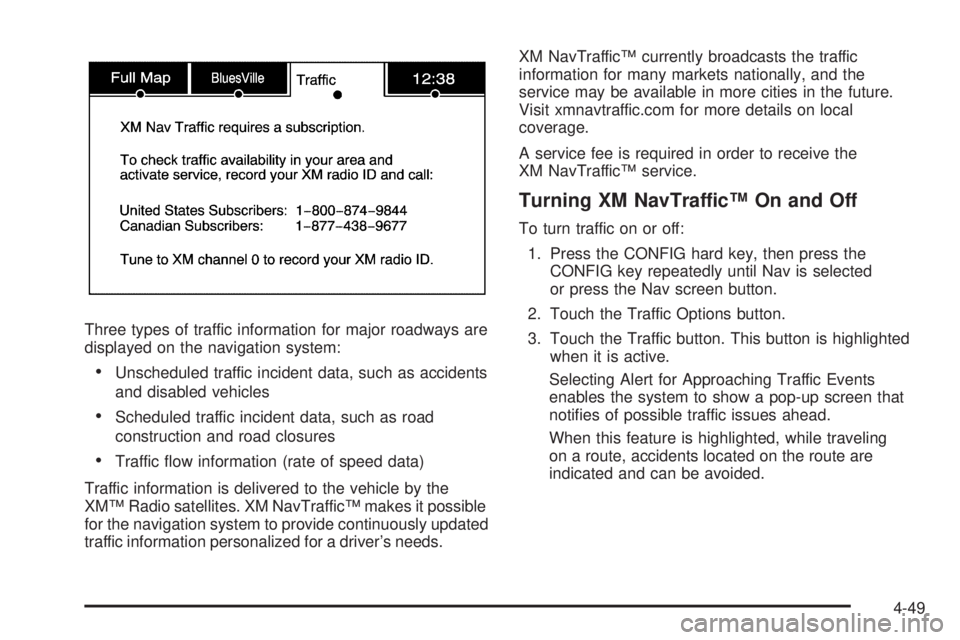
If the Traffic touch screen button is pressed or if
an attempt is made to turn on the traffic display in the
Navigation Setup Menu without a subscription, a Caution
screen displays indicating that XM traffic is not activated.
4-48
Page 335 of 602
Three types of traffic information for major roadways are
displayed on the navigation system:
Unscheduled traffic incident data, such as accidents
and disabled vehicles
Scheduled traffic incident data, such as road
construction and road closures
Traffic ow information (rate of speed data)
Traffic information is delivered to the vehicle by the
XM™ Radio satellites. XM NavTraffic™ makes it possible
for the navigation system to provide continuously updated
traffic information personalized for a driver’s needs. XM NavTraffic™ currently broadcasts the traffic
information for many markets nationally, and the
service may be available in more cities in the future.
Visit xmnavtraffic.com for more details on local
coverage.
A service fee is required in order to receive the
XM NavTraffic™ service.
Turning XM NavTraffic™ On and Off To turn traffic on or off:
1. Press the CONFIG hard key, then press the
CONFIG key repeatedly until Nav is selected
or press the Nav screen button.
2. Touch the Traffic Options button.
3. Touch the Traffic button. This button is highlighted
when it is active.
Selecting Alert for Approaching Traffic Events
enables the system to show a pop-up screen that
noties of possible traffic issues ahead.
When this feature is highlighted, while traveling
on a route, accidents located on the route are
indicated and can be avoided.
4-49
Page 348 of 602
If you have any questions about the operation of
the navigation system or the update process, contact
the GM Nav Disc Center toll-free phone number,
1-877-NAV-DISC (1-877-628-3472) or go to the center’s
website, gmnavdisc.com. If you need any updates or
a replacement disc, because the current disc is lost,
damaged, or needs to be updated, call the GM Nav
Disc Center or order a new disc online. To order a disc,
have your Vehicle Identication Number (VIN) available.
This helps the center make sure you receive the correct
and most up-to-date DVD map disc for your vehicle.
See “Vehicle Identication Number (VIN)” in the Index
of your vehicle’s owner manual for more information.
After receiving the updated disc, replace the old disc
in the navigation system. See “Installing the DVD Map
Disc” and “Ejecting the DVD Map Disc” under Maps
on page 4-15 . Dispose of the old disc to avoid confusion
about which disc is the most current.
Database Coverage Explanations Coverage area depends upon the map detail available.
Some areas have greater map detail than others. The
navigation system works only as well as the information
provided on the map disc. See Ordering Map DVDs on
page 4-61 on how to obtain updated map information. Navigation Audio System Notice: Before adding any sound equipment to
the vehicle, such as an audio system, CD player,
CB radio, mobile telephone, or two-way radio, make
sure that it can be added by checking with your
dealer/retailer. Also, check federal rules covering
mobile radio and telephone units. If sound equipment
can be added, it is very important to do it properly.
Added sound equipment can interfere with the
operation of the vehicle’s engine, radio, or other
systems, and even damage them. The vehicle’s
systems can interfere with the operation of sound
equipment that has been added.
Notice: The chime signals related to safety belts,
parking brake, and other functions of the vehicle
operate through the navigation system. If that
equipment is replaced or additional equipment is
added to the vehicle, the chimes may not work.
Make sure that replacement or additional equipment
is compatible with the vehicle before installing it.
See “Accessories and Modications” in the Index
of the vehicle’s owner manual.
4-62