ECU CADILLAC ESCALADE ESV 2010 Service Manual
[x] Cancel search | Manufacturer: CADILLAC, Model Year: 2010, Model line: ESCALADE ESV, Model: CADILLAC ESCALADE ESV 2010Pages: 620, PDF Size: 7.4 MB
Page 181 of 620
Black plate (57,1)Cadillac Escalade/Escalade ESV Owner Manual - 2010
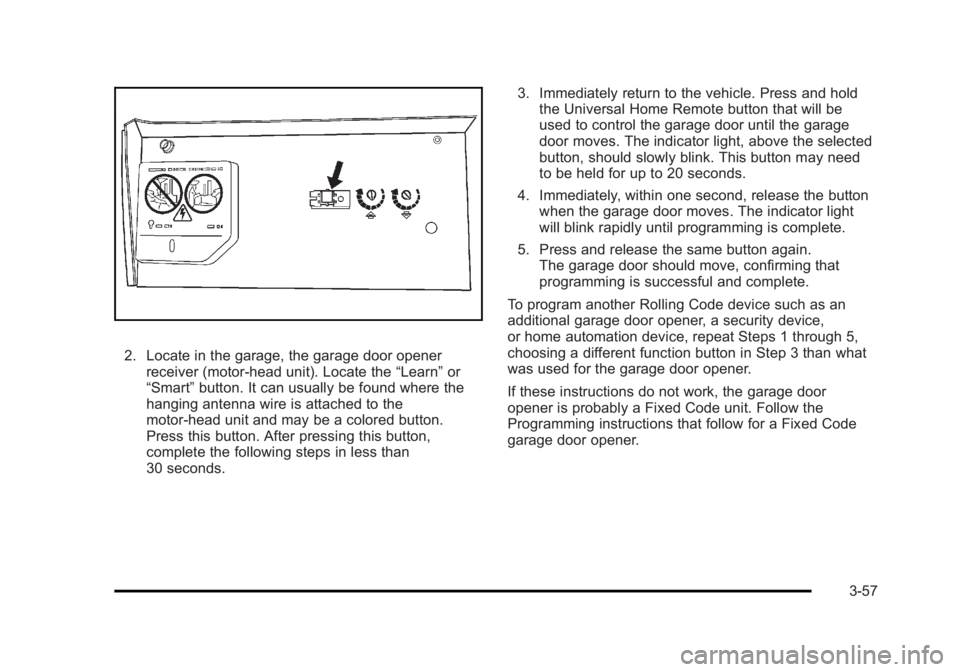
2. Locate in the garage, the garage door opener
receiver (motor-head unit). Locate the “ Learn ” or
“ Smart ” button. It can usually be found where the
hanging antenna wire is attached to the
motor-head unit and may be a colored button.
Press this button. After pressing this button,
complete the following steps in less than
30 seconds. 3. Immediately return to the vehicle. Press and hold
the Universal Home Remote button that will be
used to control the garage door until the garage
door moves. The indicator light, above the selected
button, should slowly blink. This button may need
to be held for up to 20 seconds.
4. Immediately, within one second, release the button
when the garage door moves. The indicator light
will blink rapidly until programming is complete.
5. Press and release the same button again.
The garage door should move, confirming that
programming is successful and complete.
To program another Rolling Code device such as an
additional garage door opener, a security device,
or home automation device, repeat Steps 1 through 5,
choosing a different function button in Step 3 than what
was used for the garage door opener.
If these instructions do not work, the garage door
opener is probably a Fixed Code unit. Follow the
Programming instructions that follow for a Fixed Code
garage door opener.
3-57
Page 185 of 620

Black plate (61,1)Cadillac Escalade/Escalade ESV Owner Manual - 2010
4. The indicator lights will blink slowly. Enter each
switch setting from Step 2 into your vehicle's
Universal Home Remote. You will have two and
one-half minutes to complete Step 4. Now press
one button on the Universal Home Remote for
each switch setting as follows: .
If you wrote “ Left, ” press the left button in the
vehicle. .
If you wrote “ Right, ” press the right button in
the vehicle. .
If you wrote “ Middle, ” press the middle button in
the vehicle. 5. After entering all of the switch positions, again,
firmly press and release all three buttons at the
same time. The indicator lights will turn on.
6. Press and hold the button that will be used to
control the garage door until the garage door
moves. The indicator light above the selected
button should slowly blink. This button may need to
be held for up to 55 seconds.
7. Immediately release the button when the garage
door moves. The indicator light will blink rapidly
until programming is complete.
8. Press and release the same button again.
The garage door should move, confirming that
programming is successful and complete.
To program another Fixed Code device such as an
additional garage door opener, a security device,
or home automation device, repeat Steps 1-8, choosing
a different button in Step 6 than what was used for the
garage door opener.
3-61
Page 188 of 620

Black plate (64,1)Cadillac Escalade/Escalade ESV Owner Manual - 2010
Center Console Storage A console compartment is located between the bucket
seats.
The console has both an upper and lower storage bin
accessed by lifting up on the latches located at the front
of the console lid.
The console may have an accessory power outlet
inside. See Accessory Power Outlet(s) on page 4 ‑ 19 .
The rear of the console also has a cupholder that
swings down for the rear seat passengers to use.
Assist Handles Assist handles located above the rear passenger doors
can be used when getting out of the vehicle. Pull the
handles downward to use them.
Garment Hooks There are garment hooks located on the assist handles. Roof Rack System
{ WARNING: If something is carried on top of the vehicle that is
longer or wider than the roof rack — like paneling,
plywood, or a mattress — the wind can catch it
while the vehicle is being driven. The item being
carried could be violently torn off, and this could
cause a collision, and damage the vehicle. Never
carry something longer or wider than the roof rack
on top of the vehicle unless using a GM Certified
accessory carrier.
For vehicles with a roof rack, the rack can be used to
load items. For roof racks that do not have crossrails
included, GM Certified crossrails can be purchased as
an accessory. See your dealer for additional
information.
For vehicles with crossrails, they can be moved back
and forth to help secure cargo. To adjust them,
turn the knob located at each end of the crossrail
counterclockwise until the crossrail can move freely. To
secure the crossrail, turn the knob located at each end
of the crossrail clockwise until tightened. Tie the load to
the siderails or siderail supports.
3-64
Page 189 of 620
Black plate (65,1)Cadillac Escalade/Escalade ESV Owner Manual - 2010
Notice: Loading cargo on the roof rack that weighs
more than 91 kg (200 lbs) or hangs over the rear or
sides of the vehicle may damage the vehicle. Load
cargo so that it rests evenly between the crossrails,
making sure to fasten cargo securely.
To prevent damage or loss of cargo when driving, check
to make sure crossrails and cargo are securely
fastened. Loading cargo on the roof rack will make the
vehicle ’ s center of gravity higher. Avoid high speeds,
sudden starts, sharp turns, sudden braking or abrupt
maneuvers, otherwise it may result in loss of control.
If driving for a long distance, on rough roads, or at high
speeds, occasionally stop the vehicle to make sure the
cargo remains in its place.
Do not exceed the maximum vehicle capacity when
loading the vehicle. For more information on vehicle
capacity and loading, see Loading the Vehicle
on
page 6 ‑ 32 .
To prevent damage or loss of cargo, check now and
then to make sure the luggage and cargo are still
securely fastened.
Be sure the cargo is properly loaded. .
If small heavy objects are placed on the roof, place
the load in the area over the rear wheels (behind
the rear side door on extended models). If needed,
cut a piece of 3/8 inch plywood to fit inside the
crossrails and siderails to spread the load.
If plywood is used, tie it to the siderail supports. .
Tie the load to the crossrails or the siderail
supports. Use the crossrails only to keep the load
from sliding. To move the crossrails, pull out on the
latch release handle at each end. Slide the
crossrail to the desired position balancing the force
side to side. Push the release handle back into the
latched position and slide the crossrail back and
forth slightly to be sure the latch snaps securely
into place. .
If needed to carry long items, move the crossrails
as far apart as they will go. Tie the load to the
crossrails and the siderails or siderail supports.
Also tie the load to the bumpers. Do not tie the
load so tightly that the crossrails or siderails are
damaged. .
After moving a crossrail, be sure it is securely
locked into the siderail.
A Center High-Mounted Stoplamp (CHMSL) is located
above the glass or above the rear load doors.
If items are loaded on the roof of the vehicle, care
should be taken not to block or damage the
CHMSL unit.
3-65
Page 194 of 620
Black plate (2,1)Cadillac Escalade/Escalade ESV Owner Manual - 2010
Section 4 Instrument PanelAntilock Brake System (ABS) Warning Light . . . 4-34
StabiliTrak ®
Indicator Light . . . . . . . . . . . . . . . . . . . . . 4-34
Engine Coolant Temperature Gauge . . . . . . . . . . . 4-35
Tire Pressure Light . . . . . . . . . . . . . . . . . . . . . . . . . . . . 4-35
Malfunction Indicator Lamp . . . . . . . . . . . . . . . . . . . . 4-36
Oil Pressure Light . . . . . . . . . . . . . . . . . . . . . . . . . . . . . 4-39
Security Light . . . . . . . . . . . . . . . . . . . . . . . . . . . . . . . . . . 4-39
Front Fog Lamp Light . . . . . . . . . . . . . . . . . . . . . . . . . . 4-39
Lights On Reminder . . . . . . . . . . . . . . . . . . . . . . . . . . . 4-40
Cruise Control Light . . . . . . . . . . . . . . . . . . . . . . . . . . . 4-40
Highbeam On Light . . . . . . . . . . . . . . . . . . . . . . . . . . . . 4-40
Tow/Haul Mode Light . . . . . . . . . . . . . . . . . . . . . . . . . . 4-40
Fuel Gauge . . . . . . . . . . . . . . . . . . . . . . . . . . . . . . . . . . . . 4-41
Driver Information Center (DIC) . . . . . . . . . . . . . . . . . . 4-41
DIC Operation and Displays . . . . . . . . . . . . . . . . . . . 4-42
DIC Compass . . . . . . . . . . . . . . . . . . . . . . . . . . . . . . . . . . 4-47
DIC Warnings and Messages . . . . . . . . . . . . . . . . . . 4-49
DIC Vehicle Customization . . . . . . . . . . . . . . . . . . . . 4-58 Audio System(s) . . . . . . . . . . . . . . . . . . . . . . . . . . . . . . . . . . 4-68
Bluetooth ®
. . . . . . . . . . . . . . . . . . . . . . . . . . . . . . . . . . . . . 4-68
Rear Seat Entertainment (RSE) System
(Overhead) . . . . . . . . . . . . . . . . . . . . . . . . . . . . . . . . . . 4-78
Rear Seat Entertainment (RSE) System
(Headrest DVD) . . . . . . . . . . . . . . . . . . . . . . . . . . . . . 4-87
Rear Seat Audio (RSA) . . . . . . . . . . . . . . . . . . . . . . . 4-104
Theft-Deterrent Feature . . . . . . . . . . . . . . . . . . . . . . 4-106
Audio Steering Wheel Controls . . . . . . . . . . . . . . . 4-106
Radio Reception . . . . . . . . . . . . . . . . . . . . . . . . . . . . . . 4-108
Rear Side Window Antenna . . . . . . . . . . . . . . . . . . 4-109
XM ™ Satellite Radio Antenna System . . . . . . . . 4-109
4-2
Page 212 of 620

Black plate (20,1)Cadillac Escalade/Escalade ESV Owner Manual - 2010
Ashtray(s) and Cigarette Lighter The front ashtray and cigarette lighter are located in the
center console near the cupholders, if the vehicle has
them. Press on the access door to open it and use the
ashtray and lighter.
Notice: If papers, pins, or other flammable items are
put in the ashtray, hot cigarettes or other smoking
materials could ignite them and possibly damage
the vehicle. Never put flammable items in the
ashtray.
To remove the ashtray, pull it from the center console.
Slide it back in and push down to be sure it is secure.
To use the cigarette lighter, push it in all the way, and let
go. When it is ready, it will pop back out by itself.
Notice: Holding a cigarette lighter in while it is
heating does not let the lighter back away from the
heating element when it is hot. Damage from
overheating can occur to the lighter or heating
element, or a fuse could be blown. Do not hold a
cigarette lighter in while it is heating. Analog Clock The analog clock is not connected with any other
vehicle system and runs by itself.
To adjust the clock, do the following:
1. Locate the adjustment button, near the lower left
corner of the clock.
2. Push and hold the adjustment button to advance
the clock hands. Holding the button down will
cause the clock to advance faster. Release the
button before you get to the desired time.
3. Push and release the button to increase the time
by one minute increments until the desired time is
reached.
Climate Controls Dual Automatic Climate Control
System The heating, cooling, and ventilation in the vehicle can
be controlled with this system. The vehicle also has a
flow-through ventilation system described later in this
section.
4-20
Page 231 of 620

Black plate (39,1)Cadillac Escalade/Escalade ESV Owner Manual - 2010
Oil Pressure Light
{ WARNING: Do not keep driving if the oil pressure is low. The
engine can become so hot that it catches fire.
Someone could be burned. Check the oil as soon
as possible and have the vehicle serviced.
Notice: Lack of proper engine oil maintenance can
damage the engine. The repairs would not be
covered by the vehicle warranty. Always follow the
maintenance schedule for changing engine oil.
This light comes on briefly while starting the engine. If it
does not, have the vehicle serviced by your dealer.
If the system is working normally the indicator light then
goes off. If the light comes on and stays on, it means that oil is
not flowing through the engine properly. The vehicle
could be low on oil and it might have some other
system problem.
Security Light For information regarding
this light and the vehicle's
security system, see
Content Theft-Deterrent
on page 3 ‑ 22 .
Front Fog Lamp Light The fog lamp light comes
on when the fog lamps
are in use.
The light goes out when the fog lamps are turned off.
See Fog Lamps
on page 4 ‑ 16 for more information.
4-39
Page 282 of 620
Black plate (90,1)Cadillac Escalade/Escalade ESV Owner Manual - 2010
STOP
c : Press once to stop playing a DVD.
There is a pre-stop feature for DVD and video CD only.
This feature resumes playback of the disc where it was
stopped. Press the stop button once during disc
playback and
c displays on the DVD startup screen.
This icon disappears after a few seconds. Press the
stop button a second time, or eject the disc, to cancel
the pre-stop feature and to clear the disc position
memory.
SOURCE: Press to select between Monitor 3,
Monitor 4, or the AV INPUT.
Each video display screen can be adjusted
independently, as well as display information from both
DVD players and both A/V inputs.
Infrared Remote Sensor: Located in the top center of
the video display screen. Do not block the signal from
the remote to the sensor.
Infrared Transmitters: Located in the top center of the
video display screen. Do not block the signal from the
headphones to the transmitter.
Video Display Screen: Located on the back of each
headrest. AV OUTPUT (Audio/Video Output Jack): Located on
the lower left side of the screen and is identified on the
video screen panel as the AV OUTPUT.
Headphone Jack : Wired headphones can be plugged
into the headphone jack with one-eighth inch stereo
plugs.
AV INPUT: (Audio/Video Input Jack): The audio/video
input jack is located below the video display screen and
allows viewing of auxiliary sources such as portable
DVD players, game stations, or video cameras, on each
screen. .
Video Input — The yellow connector is used for
video input. .
L Audio — The white connector is used for the left
side audio. .
R Audio — The red connector is used for the right
side audio.
Level Lock and Release Latch: The viewing angle of
the video screen can be adjusted by releasing the latch
and gently moving the screen. Then lock it into a secure
position.
4-90
Page 295 of 620

Black plate (103,1)Cadillac Escalade/Escalade ESV Owner Manual - 2010
Using the REPEAT Feature REPEAT: Press to change between Repeat One and
Repeat Folder. .
Repeat One — Repeats the song that is playing..
Repeat Folder — Repeats the folder that is
playing.
Tips and Troubleshooting Chart Problem Recommended Action
IR Sensor Inoperative .
Check that the
batteries are good
in the remote
control. .
Check that the
remote Control IR
Sensor is not
blocked. .
Aim the remote
control toward the
IR Sensor being
controlled. .
Select the correct
screen, 3 or 4. Problem Recommended Action
No picture .
Check that the
correct video input
mode is selected. .
Check that the
video cable is
plugged into the
jack securely.
No Sound .
Check that the
correct audio input
mode is selected. .
Check that the
audio cable is
securely plugged
into the jack.
Cleaning the Video Screens The video display screens are made of a specially
coated glass and can be scratched or damaged by
abrasive products, solvents, or ammonia-based window
cleaners. Clean with a soft, lint-free, cotton cloth that
has been slightly dampened with warm water. Dry the
screens by wiping with a clean dry cotton cloth.
4-103
Page 370 of 620
Black plate (68,1)Cadillac Escalade/Escalade ESV Owner Manual - 2010
No Artist Info: No artist information is available.
The system is working properly.
No Title Info: No song title information is available.
The system is working properly.
No CAT Info: No category information is available.
The system is working properly.
CAT Not Found: There are no channels available for
the selected category. The system is working properly.
No Information: No text or informational messages are
available. The system is working properly.
XM Theftlocked: The XM ™ receiver may have
previously been in another vehicle. For security
purposes, XM ™ receivers cannot be swapped between
vehicles. If this message is received after having your
vehicle serviced, check with your dealer.
XM Radio ID: If tuned to channel 0, this message will
alternate with the XM ™ Radio eight digit radio ID label.
This label is needed to activate the service.
Unknown: If this message is received when tuned to
channel 0, there may be a receiver fault. Consult with
your dealer.
Check XM Receiver: If this message does not clear
within a short period of time, the receiver may have a
fault. Consult with your dealer. CD Player The player can be used for CD, MP3, DVD audio, and
as a DVD video player. See DVD Player on page 5 ‑ 75
for more information about DVD audio and video.
Six-Disc CD Player While playing a CD, the navigation system is available.
When you insert a CD, the CD tab displays. If a DSP
setting is selected for the CD, it activates each time you
play a CD.
If the ignition or radio is turned off with a CD in the
player, it stays in the player. When the ignition or radio
is turned on, the CD starts playing where it stopped, if it
was the last selected audio source.
As each new track starts to play, the track number
displays.
If an error appears on the display, see “ CD Messages ”
later in this section.
If viewing a map screen, touch the CD screen button.
The display will split between the audio screen and the
map screen. If you do not want to view a split screen or
you are not on a map screen, press the AUDIO key
then press the AUDIO key repeatedly until CD is
selected or touch the CD screen button.
5-68