reset CADILLAC ESCALADE ESV 2010 Service Manual
[x] Cancel search | Manufacturer: CADILLAC, Model Year: 2010, Model line: ESCALADE ESV, Model: CADILLAC ESCALADE ESV 2010Pages: 620, PDF Size: 7.4 MB
Page 314 of 620
Black plate (12,1)Cadillac Escalade/Escalade ESV Owner Manual - 2010
Features and Controls Using the Navigation System This section presents basic information needed to
operate the navigation system.
Use the hard keys located on the navigation system
along with the available touch-sensitive screen buttons
on the navigation screen to operate the system. See
Navigation System Overview on page 5 ‑ 2 for more
information.
Once the vehicle is moving, various functions are
disabled to reduce driver distractions.
Hard Keys The following hard keys are located on the navigation
system:
O /
n (Power/Volume): Press to turn the system
on and off. Turn to increase or decrease the volume to
the audio system.
Press and hold for more than two seconds to turn off
the navigation system, the Rear Seat Entertainment
(RSE), and Rear Seat Audio (RSA). If the vehicle has
not been tuned off, the RSE and the RSA can be turned
back on by pressing this knob and continues play of the
last active source. w (Tune): Turn to go to the next or previous radio
station or disc track or chapter. See Navigation Audio
System on page 5 ‑ 60 , CD Player on page 5 ‑ 68 ,
or DVD Player
on page 5 ‑ 75 for more information.
Z (DVD Map Disc Eject): Press to eject the DVD
map disc. This button is located next to the upper disc
slot. See Maps on page 5 ‑ 14 for more information.
M (Load): Press to load CDs or audio/video DVDs. See
CD Player on page 5 ‑ 68 or DVD Player on page 5 ‑ 75
for more information.
Z (CD/DVD Eject): Press to eject CDs or audio/video
DVDs. This button is located under the load button. See
CD Player on page 5 ‑ 68 or DVD Player on page 5 ‑ 75
for more information.
M (Disc Up/Down): Press the up or down arrows to go
to the next or previous disc.
AUDIO: Press to access the full Audio screen to
change AM, FM, XM ™ Satellite Radio Service (if
equipped), CD/DVD, and auxiliary input. See “ Audio ”
under Navigation Audio System
on page 5 ‑ 60 for more
information.
FAV (Favorite): Press to access the preset stations.
See “ Storing Radio Station Presets ” under Navigation
Audio System on page 5 ‑ 60 for more information.
5-12
Page 335 of 620
Black plate (33,1)Cadillac Escalade/Escalade ESV Owner Manual - 2010
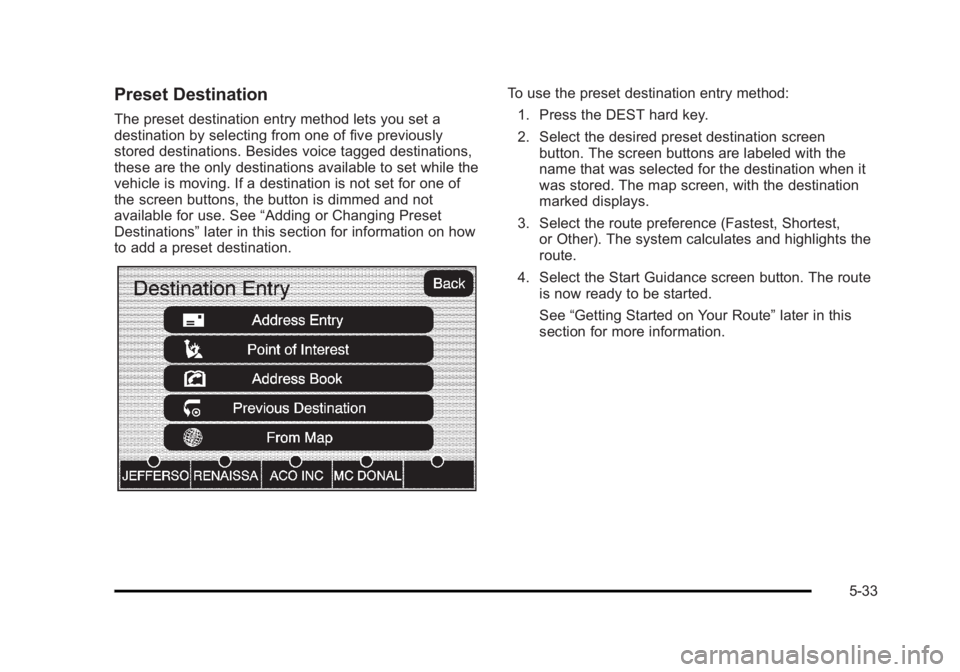
Preset Destination The preset destination entry method lets you set a
destination by selecting from one of five previously
stored destinations. Besides voice tagged destinations,
these are the only destinations available to set while the
vehicle is moving. If a destination is not set for one of
the screen buttons, the button is dimmed and not
available for use. See “ Adding or Changing Preset
Destinations ” later in this section for information on how
to add a preset destination. To use the preset destination entry method:
1. Press the DEST hard key.
2. Select the desired preset destination screen
button. The screen buttons are labeled with the
name that was selected for the destination when it
was stored. The map screen, with the destination
marked displays.
3. Select the route preference (Fastest, Shortest,
or Other). The system calculates and highlights the
route.
4. Select the Start Guidance screen button. The route
is now ready to be started.
See “ Getting Started on Your Route ” later in this
section for more information.
5-33
Page 343 of 620
Black plate (41,1)Cadillac Escalade/Escalade ESV Owner Manual - 2010
Adding or Changing Preset
Destinations This feature allows additions or changes one of five
preset destinations. When a destination has been
added as a preset destination, it is available to select
from the Destination Entry screen. See “ Preset
Destination ” previously for information on how to select
a preset destination as a final destination.
To store the current vehicle position as a preset
destination:
1. Select the Mark screen button from the map
screen to add the current vehicle position to the
address book. The Address Book screen appears.
2. Select the Name screen button. An alpha-keyboard
displays. Enter the name. Press the OK screen
button then the Back screen button to return to the
address book information screen.
3. Press and hold one of the buttons at the bottom of
the screen until the name appears in that preset
destination screen button. It is now available to
select from the Destination Entry screen. To store an address book entry as a preset destination:
1. Select the CONFIG hard key.
2. Select the Nav screen button or press the CONFIG
key until Nav is selected or touch the Nav screen
button.
3. Select the Edit/View screen button.
4. Select the address book entry to be stored as the
preset destination. Select the Name screen button
to add a name, if needed.
5. Press and hold one of the buttons at the bottom of
the screen until the name appears in that preset
destination screen button. It is now available to
select from the Destination Entry screen.
5-41
Page 344 of 620
Black plate (42,1)Cadillac Escalade/Escalade ESV Owner Manual - 2010
Configure Menu
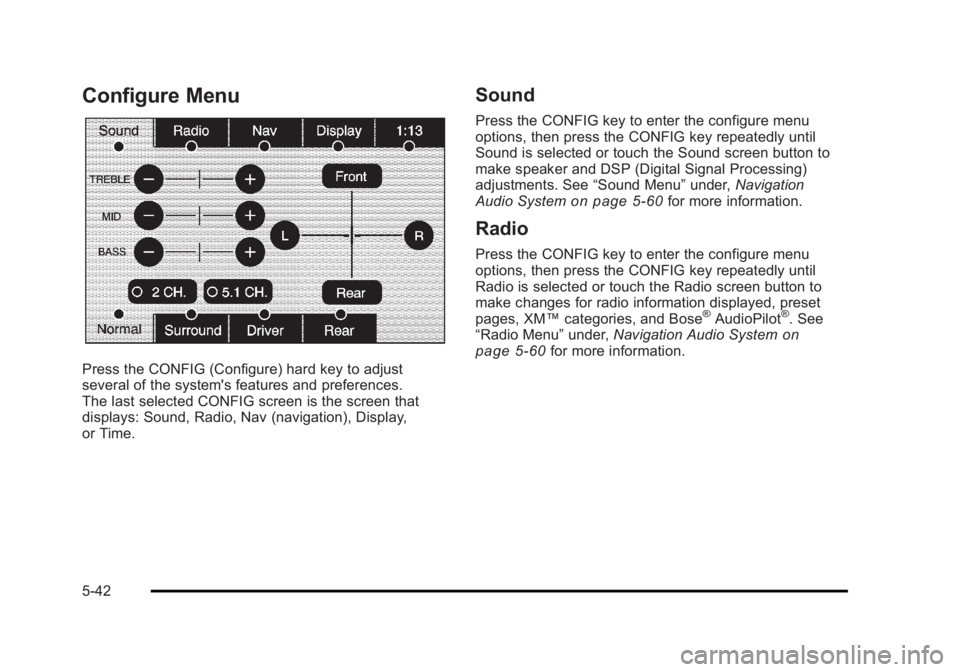
Press the CONFIG (Configure) hard key to adjust
several of the system's features and preferences.
The last selected CONFIG screen is the screen that
displays: Sound, Radio, Nav (navigation), Display,
or Time. Sound Press the CONFIG key to enter the configure menu
options, then press the CONFIG key repeatedly until
Sound is selected or touch the Sound screen button to
make speaker and DSP (Digital Signal Processing)
adjustments. See “ Sound Menu ” under, Navigation
Audio System on page 5 ‑ 60 for more information.
Radio Press the CONFIG key to enter the configure menu
options, then press the CONFIG key repeatedly until
Radio is selected or touch the Radio screen button to
make changes for radio information displayed, preset
pages, XM ™ categories, and Bose ®
AudioPilot ®
. See
“ Radio Menu ” under, Navigation Audio System on
page 5 ‑ 60 for more information.
5-42
Page 365 of 620
Black plate (63,1)Cadillac Escalade/Escalade ESV Owner Manual - 2010
Storing Radio Station Presets This feature stores a mix of up to 30 AM, FM, and
XM (if equipped) preset stations. To store presets:
1. Press
O to turn the system on.
2. If viewing a map screen, touch the source screen
button, press the AUDIO key, or press the FAV
(favorite) key.
3. Select the band.
4. Seek, scan, or tune to the desired station, to select
the station.
5. Press and hold one of the preset screen buttons
for more than two seconds or until a beep is heard.
6. Repeat the steps for each preset. Sound Menu
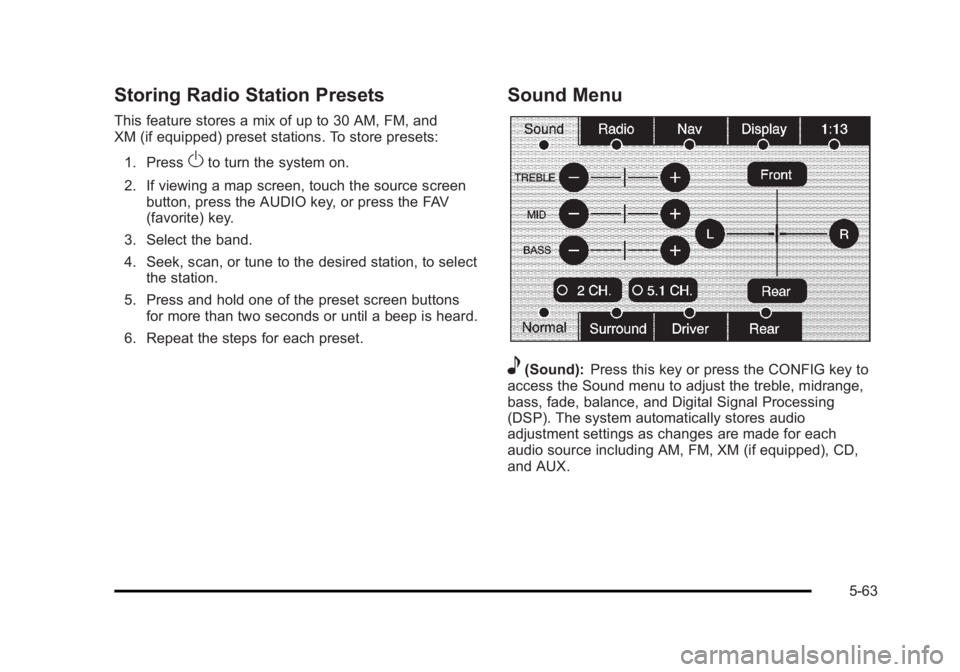
e (Sound): Press this key or press the CONFIG key to
access the Sound menu to adjust the treble, midrange,
bass, fade, balance, and Digital Signal Processing
(DSP). The system automatically stores audio
adjustment settings as changes are made for each
audio source including AM, FM, XM (if equipped), CD,
and AUX.
5-63
Page 367 of 620
Black plate (65,1)Cadillac Escalade/Escalade ESV Owner Manual - 2010
Radio Menu
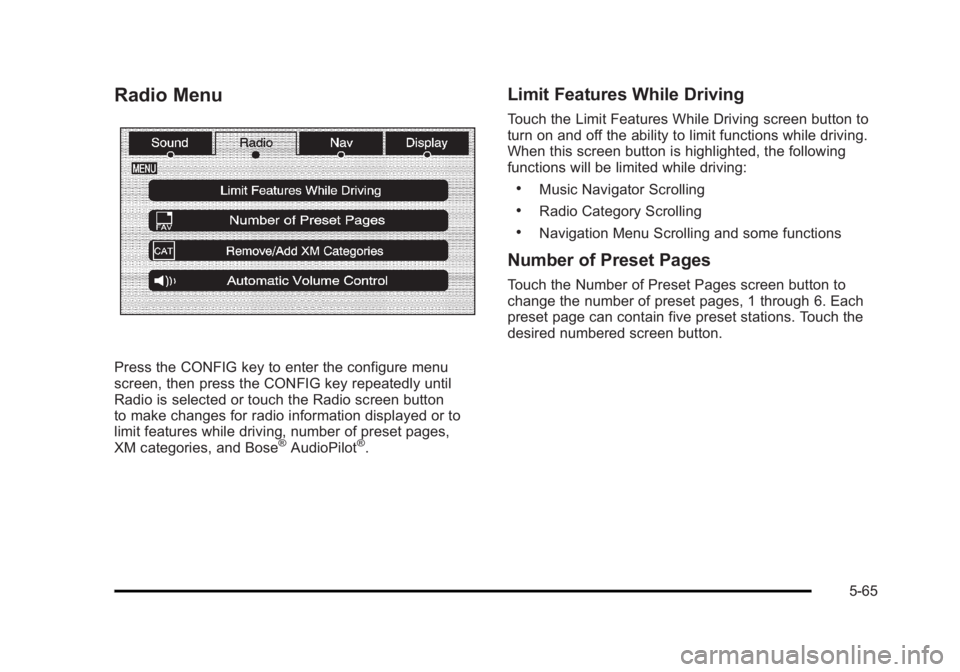
Press the CONFIG key to enter the configure menu
screen, then press the CONFIG key repeatedly until
Radio is selected or touch the Radio screen button
to make changes for radio information displayed or to
limit features while driving, number of preset pages,
XM categories, and Bose ®
AudioPilot ®
. Limit Features While Driving Touch the Limit Features While Driving screen button to
turn on and off the ability to limit functions while driving.
When this screen button is highlighted, the following
functions will be limited while driving: .
Music Navigator Scrolling .
Radio Category Scrolling .
Navigation Menu Scrolling and some functions
Number of Preset Pages Touch the Number of Preset Pages screen button to
change the number of preset pages, 1 through 6. Each
preset page can contain five preset stations. Touch the
desired numbered screen button.
5-65
Page 399 of 620

Black plate (7,1)Cadillac Escalade/Escalade ESV Owner Manual - 2010
If the system fails to turn on or activate, the StabiliTrak
light along with one of the following messages will be
displayed on the Driver Information Center (DIC):
TRACTION CONTROL OFF, SERVICE TRACTION
CONTROL, STABILITRAK OFF, SERVICE
STABILITRAK. If these DIC messages appear, make
sure the StabiliTrak system has not been turned off
using the StabiliTrak on/off button. Then turn the vehicle
off, wait 15 seconds, and then turn it back on again to
reset the system. If any of these messages still appear
on the Driver Information Center (DIC), the vehicle
should be taken in for service. For more information on
the DIC messages, see Driver Information Center (DIC)
on page 4 ‑ 41 .
The StabiliTrak light will
flash on the instrument
panel cluster when the
system is both on and
activated.
The system may be heard or felt while it is working; this
is normal. The traction control
disable button is located
on the instrument panel
below the climate
controls.
The traction control part of StabiliTrak can be turned
off by pressing and releasing the StabiliTrak button if
both systems (traction control and StabiliTrak) were
previously on. To disable both traction control and
StabiliTrak, press and hold the button for five seconds.
Traction control and StabiliTrak can be turned on by
pressing and releasing the StabiliTrak button if not
automatically shut off for any other reason.
When the TCS or StabiliTrak system is turned off,
the StabiliTrak light and the appropriate TCS off or
StabiliTrak off message will be displayed on the DIC to
warn the driver. The vehicle will still have brake-traction
control when traction control is off, but will not be able
to use the engine speed management system. See
“ Traction Control Operation ” next for more information.
When the traction control system has been turned off,
system noises may still be heard as a result of the
brake-traction control coming on.
6-7
Page 468 of 620
Black plate (20,1)Cadillac Escalade/Escalade ESV Owner Manual - 2010
Engine Oil Additives / Engine Oil
Flushes Do not add anything to the oil. The recommended oils
with the starburst symbol that meet GM standards are
all that is needed for good performance and engine
protection.
Engine oil system flushes are not recommended and
could cause engine damage not covered by the vehicle
warranty.
Engine Oil Life System
When to Change Engine Oil This vehicle has a computer system that indicates when
to change the engine oil and filter. This is based on
engine revolutions and engine temperature, and not on
mileage. Based on driving conditions, the mileage at
which an oil change is indicated can vary considerably.
For the oil life system to work properly, the system must
be reset every time the oil is changed. When the system has calculated that oil life has been
diminished, it indicates that an oil change is necessary.
A CHANGE ENGINE OIL SOON message comes on.
See DIC Warnings and Messages
on page 4 ‑ 49 .
Change the oil as soon as possible within the next
600 miles (1 000 km). It is possible that, if driving under
the best conditions, the oil life system might not indicate
that an oil change is necessary for over a year.
However, the engine oil and filter must be changed at
least once a year and at this time the system must be
reset. Your dealer has trained service people who will
perform this work using genuine parts and reset the
system. It is also important to check the oil regularly
and keep it at the proper level.
If the system is ever reset accidentally, the oil must be
changed at 3,000 miles (5 000 km) since the last oil
change. Remember to reset the oil life system
whenever the oil is changed.
7-20
Page 469 of 620

Black plate (21,1)Cadillac Escalade/Escalade ESV Owner Manual - 2010
How to Reset the Engine Oil Life
System The Engine Oil Life System calculates when to
change the engine oil and filter based on vehicle use.
Whenever the oil is changed, reset the system so it
can calculate when the next oil change is required.
If a situation occurs where the oil is changed prior to a
CHANGE ENGINE OIL SOON message being turned
on, reset the system.
Always reset the engine oil life to 100% after every oil
change. It will not reset itself. To reset the Engine Oil
Life System:
1. Display the OIL LIFE REMAINING on the DIC.
2. Press and hold the SET/RESET button on the DIC
for more than five seconds. The oil life will change
to 100%.
If the CHANGE ENGINE OIL SOON message comes
back on when the vehicle is started, the Engine Oil Life
System has not reset. Repeat the procedure. What to Do with Used Oil Used engine oil contains certain elements that can be
unhealthy for your skin and could even cause cancer.
Do not let used oil stay on your skin for very long. Clean
your skin and nails with soap and water, or a good hand
cleaner. Wash or properly dispose of clothing or rags
containing used engine oil. See the manufacturer's
warnings about the use and disposal of oil products.
Used oil can be a threat to the environment. If you
change your own oil, be sure to drain all the oil from the
filter before disposal. Never dispose of oil by putting it in
the trash, pouring it on the ground, into sewers, or into
streams or bodies of water. Recycle it by taking it to a
place that collects used oil.
7-21
Page 473 of 620

Black plate (25,1)Cadillac Escalade/Escalade ESV Owner Manual - 2010
4. Allow the engine to idle (500 – 800 rpm) for at least
one minute. Slowly release the brake pedal.
5. Keep the engine running and press the Trip/Fuel
button or trip odometer reset stem until TRANS
TEMP (Transmission Temperature) displays on the
Driver Information Center (DIC).
6. Using the TRANS TEMP reading, determine and
perform the appropriate check procedure. If the
TRANS TEMP reading is not within the required
temperature ranges, allow the vehicle to cool,
or operate the vehicle until the appropriate
transmission fluid temperature is reached.
Cold Check Procedure Use this procedure only as a reference to determine if
the transmission has enough fluid to be operated safely
until a hot check procedure can be made. The hot
check procedure is the most accurate method to check
the fluid level. Perform the hot check procedure at the
first opportunity. Use this cold check procedure to check
fluid level when the transmission temperature is
between 80°F and 90°F (27°C and 32°C). 1. Locate the
transmission dipstick at
the rear of the engine
compartment, on the
passenger side of the
vehicle.
See Engine Compartment Overview
on page 7 ‑ 16
for more information.
2. Flip the handle up and then pull out the dipstick
and wipe it with a clean rag or paper towel.
3. Install the dipstick by pushing it back in all the way,
wait three seconds, and then pull it back out again.
4. Check both sides of the dipstick and read the lower
level. Repeat the check procedure to verify the
reading.
7-25