ignition CADILLAC ESCALADE ESV 2010 Owners Manual
[x] Cancel search | Manufacturer: CADILLAC, Model Year: 2010, Model line: ESCALADE ESV, Model: CADILLAC ESCALADE ESV 2010Pages: 620, PDF Size: 7.4 MB
Page 11 of 620
Black plate (5,1)Cadillac Escalade/Escalade ESV Owner Manual - 2010
The engine will continue to run for 10 minutes. Repeat
the steps for a 10-minute time extension. Remote start
can be extended only once.
Canceling a Remote Start To cancel a remote start: .
Aim the RKE transmitter at the vehicle and press
and hold
/ until the parking lamps turn off..
Turn on the hazard warning flashers. .
Turn the ignition on and then back off.
See Remote Vehicle Start on page 3 ‑ 7 .
Door Locks There are several ways to lock and unlock the vehicle.
From outside, use the Remote Keyless Entry (RKE)
transmitter or the key in the driver door. From inside,
use the power door locks or the manual door locks. To
lock or unlock the door with the manual locks, push
down or pull up on the manual lock knob. Power Door Locks If available, these switches are located on the front
doors.
K : Press to unlock the doors.
Q : Remove the key from the ignition and press to lock
the doors.
For more information, see: .
Programmable Automatic Door Locks on
page 3 ‑ 11 . .
Rear Door Security Locks on page 3 ‑ 11 .
1-5
Page 27 of 620
Black plate (21,1)Cadillac Escalade/Escalade ESV Owner Manual - 2010
Rear Vision Camera (RVC) The rear vision camera displays a view of the area
behind the vehicle on the navigation screen when the
vehicle is shifted into R (Reverse). Once shifted out of
R (Reverse), the navigation screen will go back to the
last screen that had been displayed, after a delay.
To clean the camera lens, located above the license
plate, rinse it with water and wipe it with a soft cloth.
Ultrasonic Parking Assist This feature uses sensors on the rear bumper to
detect objects while parking the vehicle. URPA comes
on automatically when the shift lever is moved into
R (Reverse) and operates at speeds less than 8 km/h
(5 mph). URPA uses audio beeps to provide distance
and system information.
Keep the sensors on the vehicle's rear bumper clean to
ensure proper operation.
The system can be disabled by pressing the rear park
aid disable button located next to the radio.
See Ultrasonic Rear Parking Assist (URPA)
on
page 3 ‑ 46 for more information.
Power Outlets The accessory power outlets let you plug in auxiliary
electrical equipment, such as a cellular telephone. The vehicle has three accessory power outlets located: .
Inside the floor console storage bin. .
On the rear of the floor console. .
In the rear cargo area on the passenger side.
The accessory power outlets are powered, even when
the ignition is in LOCK/OFF. Continuing to use power
outlets while the ignition is in LOCK/OFF may cause the
vehicle's battery to run down.
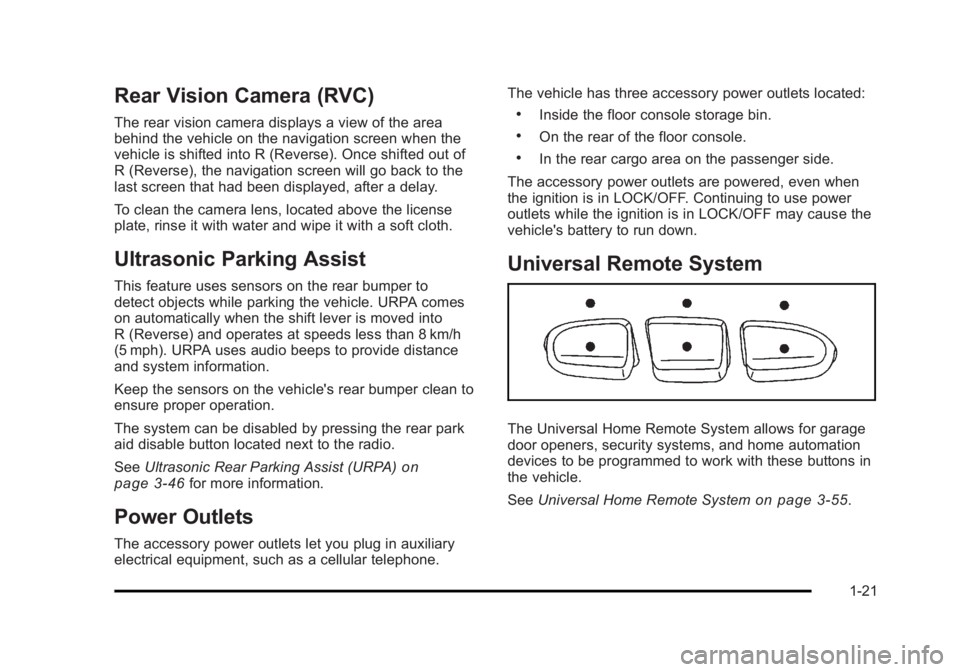
Universal Remote System
The Universal Home Remote System allows for garage
door openers, security systems, and home automation
devices to be programmed to work with these buttons in
the vehicle.
See Universal Home Remote System
on page 3 ‑ 55 .
1-21
Page 38 of 620

Black plate (6,1)Cadillac Escalade/Escalade ESV Owner Manual - 2010
This symbol will appear on the climate control display to
indicate that the feature is on. Press the button to cycle
through the temperature settings of high, medium, and
low and to turn the cooled seat off. Indicator bars next
to the symbol designate the level of cooling selected:
three for high, two for medium, and one for low.
+ (Heated Seatback): To heat only the seatback,
press the button with the heated seatback symbol.
This symbol will appear on the climate control display to
indicate that the feature is on. Press the button to cycle
through the temperature settings of high, medium, and
low and to turn the heated seatback off. Indicator bars
next to the symbol designate the level of heat selected:
three for high, two for medium, and one for low.
z (Heated Seat and Seatback): To heat the entire
seat, press the button with the heated seat and
seatback symbol.
This symbol will appear on the climate control display to
indicate that the feature is on. Press the button to cycle
through the temperature settings of high, medium, and
low and to turn the heated seat off. Indicator bars next
to the symbol designate the level of heat selected: three
for high, two for medium, and one for low. The heated and cooled seats will be canceled after the
ignition is turned off. If you want to use the heated and
cooled seat feature after you restart your vehicle, you
will need to press the appropriate seat button again.
Memory Features Your vehicle has the memory package.
The controls for this
feature are located on
the driver's door, and are
used to program and
recall memory settings for
the driver's seat, outside
mirrors, steering wheel
position, and the
adjustable throttle and
brake pedal feature,
if your vehicle has it.
2-6
Page 40 of 620

Black plate (8,1)Cadillac Escalade/Escalade ESV Owner Manual - 2010
Easy Exit Seat The control for this feature is located on the driver ’ s
door between buttons 1 and 2.
With the vehicle in P (Park), the exit position can be
recalled by pressing the exit button. You will hear a
single beep. The driver ’ s seat will move back
approximately 8 cm (3 in). To move the seat back
further, press the exit button again until the seat is all
the way back.
If the easy exit seat feature is on in the Driver
Information Center (DIC), automatic seat movement will
occur when the key is removed from the ignition. See
“ EASY EXIT SEAT ” under DIC Vehicle Customization
on page 4 ‑ 58 for more information.
Further programming for the memory seat feature can
be done using the DIC. You can select the automatic
easy exit seat feature or the remote memory seat recall
feature.
For programming information, see DIC Vehicle
Customization on page 4 ‑ 58 . Power Reclining Seatbacks
Driver's Seat with Power Seat Control, Power
Recline, and Power Lumbar shown
The controls for the power reclining seatback are
located on the outboard side of the front seats behind
the power seat control. .
To recline the seatback, tilt the top of the control
rearward. .
To bring the seatback forward, tilt the top of the
control forward.
2-8
Page 42 of 620

Black plate (10,1)Cadillac Escalade/Escalade ESV Owner Manual - 2010
Rear Seats Heated Seats
Driver's Side RSA Heated
Seat Button Only shown The rear outboard seats
have the heated seat
feature. The buttons used
to control this feature are
located on the Rear Seat
Audio (RSA) panel.
M (Heated Seat): To heat the seat cushion, press the
button with the heated seat symbol.
A heated seat symbol will be shown in the RSA display
to indicate that the feature is on. Press the button to
cycle through the temperature settings of high, medium,
and low, and to turn it off. Indicator bars next to the
symbol will designate the level of heat selected: three
for high, two for medium, and one for low. The heated seats will be canceled ten seconds after the
ignition is turned off. If the vehicle is restarted, the
heated seat button will need to be pressed again to
restart the feature.
60/40 Split Bench Seat If your vehicle has a 60/40 split bench, the seat(s) can
be folded for additional cargo space or folded and
tumbled for easy entry and exit to the third row seats,
if your vehicle has them. These seats will have either
the manual fold and tumble feature or the automatic
seat release fold and tumble feature.
Manual Fold and Tumble Feature Folding and Tumbling the Seat(s) To fold and tumble the seat:
1. Make sure that there is nothing under, in front of,
or on the seat.
Notice: Folding a rear seat with the safety belts still
fastened may cause damage to the seat or the
safety belts. Always unbuckle the safety belts and
return them to their normal stowed position before
folding a rear seat.
2-10
Page 121 of 620

Black plate (89,1)Cadillac Escalade/Escalade ESV Owner Manual - 2010
We recommend that you not use seat covers or other
aftermarket equipment except when approved by GM
for your specific vehicle. See Adding Equipment to Your
Airbag-Equipped Vehicle
on page 2 ‑ 90 for more
information about modifications that can affect how the
system operates.
The on indicator may be lit if an object, such as a
briefcase, handbag, grocery bag, laptop or other
electronic device, is put on an unoccupied seat.
If this is not desired remove the object from the seat.
{ WARNING: Stowing of articles under the passenger seat or
between the passenger seat cushion and
seatback may interfere with the proper operation
of the passenger sensing system. Servicing Your Airbag-Equipped
Vehicle Airbags affect how the vehicle should be serviced.
There are parts of the airbag system in several places
around the vehicle. Your dealer and the service manual
have information about servicing the vehicle and the
airbag system. To purchase a service manual, see
Service Publications Ordering Information on
page 9 ‑ 18 .
{ WARNING: For up to 10 seconds after the ignition is turned off
and the battery is disconnected, an airbag can still
inflate during improper service. You can be injured
if you are close to an airbag when it inflates. Avoid
yellow connectors. They are probably part of the
airbag system. Be sure to follow proper service
procedures, and make sure the person performing
work for you is qualified to do so.
2-89
Page 125 of 620
Black plate (1,1)Cadillac Escalade/Escalade ESV Owner Manual - 2010
Section 3 Features and ControlsKeys . . . . . . . . . . . . . . . . . . . . . . . . . . . . . . . . . . . . . . . . . . . . . . . . 3-3
Remote Keyless Entry (RKE) System . . . . . . . . . . . 3-4
Remote Keyless Entry (RKE) System
Operation . . . . . . . . . . . . . . . . . . . . . . . . . . . . . . . . . . . . . 3-4
Remote Vehicle Start . . . . . . . . . . . . . . . . . . . . . . . . . . . 3-7
Doors and Locks . . . . . . . . . . . . . . . . . . . . . . . . . . . . . . . . . 3-10
Door Locks . . . . . . . . . . . . . . . . . . . . . . . . . . . . . . . . . . . . 3-10
Power Door Locks . . . . . . . . . . . . . . . . . . . . . . . . . . . . . 3-10
Delayed Locking . . . . . . . . . . . . . . . . . . . . . . . . . . . . . . . 3-11
Programmable Automatic Door Locks . . . . . . . . . . 3-11
Rear Door Security Locks . . . . . . . . . . . . . . . . . . . . . . 3-11
Lockout Protection . . . . . . . . . . . . . . . . . . . . . . . . . . . . . 3-12
Liftgate/Liftglass . . . . . . . . . . . . . . . . . . . . . . . . . . . . . . . 3-12
Power Liftgate . . . . . . . . . . . . . . . . . . . . . . . . . . . . . . . . . 3-14
Power Assist Steps . . . . . . . . . . . . . . . . . . . . . . . . . . . . 3-17
Windows . . . . . . . . . . . . . . . . . . . . . . . . . . . . . . . . . . . . . . . . . . 3-18
Power Windows . . . . . . . . . . . . . . . . . . . . . . . . . . . . . . . 3-19
Sun Visors . . . . . . . . . . . . . . . . . . . . . . . . . . . . . . . . . . . . . 3-21 Theft-Deterrent Systems . . . . . . . . . . . . . . . . . . . . . . . . . 3-22
Content Theft-Deterrent . . . . . . . . . . . . . . . . . . . . . . . . 3-22
PASS-Key ®
III+ Electronic Immobilizer . . . . . . . . . 3-24
PASS-Key ®
III+ Electronic Immobilizer
Operation . . . . . . . . . . . . . . . . . . . . . . . . . . . . . . . . . . . . 3-24
Starting and Operating Your Vehicle . . . . . . . . . . . . 3-26
New Vehicle Break-In . . . . . . . . . . . . . . . . . . . . . . . . . . 3-26
Ignition Positions . . . . . . . . . . . . . . . . . . . . . . . . . . . . . . 3-27
Retained Accessory Power (RAP) . . . . . . . . . . . . . 3-28
Starting the Engine . . . . . . . . . . . . . . . . . . . . . . . . . . . . 3-29
Adjustable Throttle and Brake Pedal . . . . . . . . . . . 3-30
Engine Coolant Heater . . . . . . . . . . . . . . . . . . . . . . . . . 3-31
Active Fuel Management ™ . . . . . . . . . . . . . . . . . . . . 3-32
Automatic Transmission Operation . . . . . . . . . . . . . 3-32
Tow/Haul Mode . . . . . . . . . . . . . . . . . . . . . . . . . . . . . . . . 3-36
Parking Brake . . . . . . . . . . . . . . . . . . . . . . . . . . . . . . . . . 3-38
Shifting Into Park . . . . . . . . . . . . . . . . . . . . . . . . . . . . . . 3-39
Shifting Out of Park . . . . . . . . . . . . . . . . . . . . . . . . . . . . 3-40
Parking Over Things That Burn . . . . . . . . . . . . . . . . 3-41
Engine Exhaust . . . . . . . . . . . . . . . . . . . . . . . . . . . . . . . . 3-41
Running the Vehicle While Parked . . . . . . . . . . . . . 3-42
3-1
Page 127 of 620

Black plate (3,1)Cadillac Escalade/Escalade ESV Owner Manual - 2010
Keys
{ WARNING: Leaving children in a vehicle with the ignition key
is dangerous for many reasons. Children or others
could be badly injured or even killed. They could
operate the power windows or other controls or
even make the vehicle move. The windows will
function with the keys in the ignition and children
could be seriously injured or killed if caught in the
path of a closing window. Do not leave the keys in
a vehicle with children.
The key can be used for the ignition and door locks.
See your dealer if a replacement key or additional key
is needed.
Notice: If the keys get locked in the vehicle, it may
have to be damaged to get them out. Always carry a
spare key.
If you are locked out of your vehicle, contact Roadside
Service. See Roadside Service
on page 9 ‑ 8 for more
information.
3-3
Page 129 of 620

Black plate (5,1)Cadillac Escalade/Escalade ESV Owner Manual - 2010
The following functions may be available if this vehicle
has the RKE system:
Q (Lock): Press to lock all the doors.
If enabled through the Driver Information Center (DIC),
the turn signal lamps flash once to indicate locking has
occurred. If enabled through the DIC, the horn chirps
when
Q is pressed again within three seconds. See DIC
Vehicle Customization on page 4 ‑ 58 for additional
information.
Pressing
Q arms the content theft ‐ deterrent system.
See Content Theft-Deterrent on page 3 ‑ 22 .
K (Unlock): Press once to unlock only the driver door.
If
K is pressed again within three seconds, all
remaining doors unlock. The interior lamps may come
on and stay on for 20 seconds or until the ignition is
turned on.
If enabled through the DIC, the turn signal lamps flash
twice to indicate unlocking has occurred. See DIC
Vehicle Customization on page 4 ‑ 58 . If enabled
through the DIC, the exterior lights turn on briefly if it is
dark enough outside. See “ APPROACH LIGHTING ”
under DIC Vehicle Customization
on page 4 ‑ 58 . Pressing
K on the RKE transmitter disarms the content
theft ‐ deterrent system. See Content Theft-Deterrent
on
page 3 ‑ 22 .
/ (Remote Vehicle Start): For vehicles with this
feature, press
/ to start the engine from outside the
vehicle using the RKE transmitter. See Remote Vehicle
Start
on page 3 ‑ 7 for additional information.
& (Power Liftgate): Press and hold to open and
close the liftgate. The taillamps flash and a chime
sounds to indicate when the liftgate is opening and
closing.
m (Liftglass): Press and hold to open the liftglass.
L (Vehicle Locator/Panic Alarm): Press and release
to locate the vehicle. The turn signal lamps flash and
the horn sounds three times.
Press and hold
L for more than two seconds to
activate the panic alarm. The turn signal lamps flash
and the horn sounds repeatedly for 30 seconds.
The alarm turns off when the ignition is moved to
ON/RUN or
L is pressed again. The ignition must
be in LOCK/OFF for the panic alarm to work.
3-5
Page 132 of 620

Black plate (8,1)Cadillac Escalade/Escalade ESV Owner Manual - 2010
If your vehicle has the remote start feature, the RKE
transmitter functions will have an increased range of
operation. However, the range may be less while the
vehicle is running.
There are other conditions which can affect the
performance of the transmitter, see Remote Keyless
Entry (RKE) System
on page 3 ‑ 4 for additional
information.
/ (Remote Start): This button will be on the RKE
transmitter if you have remote start.
To start the vehicle using the remote start feature:
1. Aim the transmitter at the vehicle.
2. Press and release the transmitter's lock button.
The vehicle's doors will lock. Immediately press
and hold the transmitter's remote start button until
the turn signal lights flash. If you cannot see the
vehicle's lights, press and hold the remote start
button for two to four seconds. Pressing the remote
start button again after the vehicle has started will
turn the engine off.
When the vehicle starts, the parking lamps will turn
on and remain on while the vehicle is running.
If the vehicle is left running it will automatically shut
off after 10 minutes unless a time extension has
been done. 3. If it is the first remote start since the vehicle has
been driven, repeat these steps, while the engine
is still running, to extend the engine running time
by 10 minutes. Remote start can be extended
one time.
After entering the vehicle during a remote start, insert
and turn the key to ON/RUN to drive the vehicle.
To manually shut off a remote start, do any of the
following: .
Aim the RKE transmitter at the vehicle and press
the remote start button until the parking lamps
turn off. .
Turn on the hazard warning flashers. .
Turn the ignition switch on and then off.
The vehicle can be remote started two separate times
between driving sequences. The engine will run for
10 minutes after each remote start.
Or, you can extend the engine run time by another
10 minutes within the first 10 minute remote start time
frame, and before the engine stops.
3-8