instrument panel CADILLAC ESCALADE ESV 2010 Owners Manual
[x] Cancel search | Manufacturer: CADILLAC, Model Year: 2010, Model line: ESCALADE ESV, Model: CADILLAC ESCALADE ESV 2010Pages: 620, PDF Size: 7.4 MB
Page 1 of 620
Black plate (1,1)Cadillac Escalade/Escalade ESV Owner Manual - 2010
2010 Cadillac Escalade/Escalade ESV Owner Manual MIn Brief . . . . . . . . . . . . . . . . . . . . . . . . . . . . . . . . . . . . . . . . . . . . 1-1
Instrument Panel . . . . . . . . . . . . . . . . . . . . . . . . . . . . . . . . . 1-2
Initial Drive Information . . . . . . . . . . . . . . . . . . . . . . . . . . . 1-4
Vehicle Features . . . . . . . . . . . . . . . . . . . . . . . . . . . . . . . . 1-16
Performance and Maintenance . . . . . . . . . . . . . . . . . . 1-22
Seats and Restraint System . . . . . . . . . . . . . . . . . . . . . . 2-1
Head Restraints . . . . . . . . . . . . . . . . . . . . . . . . . . . . . . . . . . 2-2
Front Seats . . . . . . . . . . . . . . . . . . . . . . . . . . . . . . . . . . . . . . . 2-4
Rear Seats . . . . . . . . . . . . . . . . . . . . . . . . . . . . . . . . . . . . . . 2-10
Safety Belts . . . . . . . . . . . . . . . . . . . . . . . . . . . . . . . . . . . . . 2-26
Child Restraints . . . . . . . . . . . . . . . . . . . . . . . . . . . . . . . . . 2-49
Airbag System . . . . . . . . . . . . . . . . . . . . . . . . . . . . . . . . . . 2-74
Restraint System Check . . . . . . . . . . . . . . . . . . . . . . . . . 2-91 Features and Controls . . . . . . . . . . . . . . . . . . . . . . . . . . . . 3-1
Keys . . . . . . . . . . . . . . . . . . . . . . . . . . . . . . . . . . . . . . . . . . . . . 3-3
Doors and Locks . . . . . . . . . . . . . . . . . . . . . . . . . . . . . . . . 3-10
Windows . . . . . . . . . . . . . . . . . . . . . . . . . . . . . . . . . . . . . . . . 3-18
Theft-Deterrent Systems . . . . . . . . . . . . . . . . . . . . . . . . 3-22
Starting and Operating Your Vehicle . . . . . . . . . . . . . 3-26
Mirrors . . . . . . . . . . . . . . . . . . . . . . . . . . . . . . . . . . . . . . . . . . 3-43
Object Detection Systems . . . . . . . . . . . . . . . . . . . . . . . 3-46
Universal Home Remote System . . . . . . . . . . . . . . . . 3-55
Storage Areas . . . . . . . . . . . . . . . . . . . . . . . . . . . . . . . . . . . 3-62
Sunroof . . . . . . . . . . . . . . . . . . . . . . . . . . . . . . . . . . . . . . . . . 3-66
Instrument Panel . . . . . . . . . . . . . . . . . . . . . . . . . . . . . . . . . 4-1
Instrument Panel Overview . . . . . . . . . . . . . . . . . . . . . . . 4-3
Climate Controls . . . . . . . . . . . . . . . . . . . . . . . . . . . . . . . . 4-20
Warning Lights, Gauges, and Indicators . . . . . . . . . 4-27
Driver Information Center (DIC) . . . . . . . . . . . . . . . . . 4-41
Audio System(s) . . . . . . . . . . . . . . . . . . . . . . . . . . . . . . . . 4-68
Page 7 of 620
Black plate (1,1)Cadillac Escalade/Escalade ESV Owner Manual - 2010
Section 1 In BriefInstrument Panel . . . . . . . . . . . . . . . . . . . . . . . . . . . . . . . . . . . 1-2
Initial Drive Information . . . . . . . . . . . . . . . . . . . . . . . . . . . 1-4
Remote Keyless Entry (RKE) System . . . . . . . . . . . 1-4
Remote Vehicle Start . . . . . . . . . . . . . . . . . . . . . . . . . . . 1-4
Door Locks . . . . . . . . . . . . . . . . . . . . . . . . . . . . . . . . . . . . . 1-5
Liftgate . . . . . . . . . . . . . . . . . . . . . . . . . . . . . . . . . . . . . . . . . . 1-6
Windows . . . . . . . . . . . . . . . . . . . . . . . . . . . . . . . . . . . . . . . . 1-7
Seat Adjustment . . . . . . . . . . . . . . . . . . . . . . . . . . . . . . . . 1-7
Second Row Seats . . . . . . . . . . . . . . . . . . . . . . . . . . . . . 1-9
Third Row Seats . . . . . . . . . . . . . . . . . . . . . . . . . . . . . . . . 1-9
Heated Seats . . . . . . . . . . . . . . . . . . . . . . . . . . . . . . . . . . 1-10
Head Restraint Adjustment . . . . . . . . . . . . . . . . . . . . 1-10
Safety Belt . . . . . . . . . . . . . . . . . . . . . . . . . . . . . . . . . . . . . 1-11
Sensing System for Passenger Airbag . . . . . . . . . 1-11
Mirror Adjustment . . . . . . . . . . . . . . . . . . . . . . . . . . . . . . 1-12
Steering Wheel Adjustment . . . . . . . . . . . . . . . . . . . . 1-13
Interior Lighting . . . . . . . . . . . . . . . . . . . . . . . . . . . . . . . . 1-13
Exterior Lighting . . . . . . . . . . . . . . . . . . . . . . . . . . . . . . . 1-14
Windshield Wiper/Washer . . . . . . . . . . . . . . . . . . . . . . 1-15
Climate Controls . . . . . . . . . . . . . . . . . . . . . . . . . . . . . . . 1-15
Transmission . . . . . . . . . . . . . . . . . . . . . . . . . . . . . . . . . . 1-16 Vehicle Features . . . . . . . . . . . . . . . . . . . . . . . . . . . . . . . . . . 1-16
Satellite Radio . . . . . . . . . . . . . . . . . . . . . . . . . . . . . . . . . 1-16
Portable Audio Devices . . . . . . . . . . . . . . . . . . . . . . . . 1-17
Steering Wheel Controls . . . . . . . . . . . . . . . . . . . . . . . 1-17
Bluetooth ®
. . . . . . . . . . . . . . . . . . . . . . . . . . . . . . . . . . . . . 1-18
Navigation System . . . . . . . . . . . . . . . . . . . . . . . . . . . . . 1-18
Driver Information Center (DIC) . . . . . . . . . . . . . . . . 1-18
Cruise Control . . . . . . . . . . . . . . . . . . . . . . . . . . . . . . . . . 1-20
Side Blind Zone Alert (SBZA) . . . . . . . . . . . . . . . . . . 1-20
Rear Vision Camera (RVC) . . . . . . . . . . . . . . . . . . . . 1-21
Ultrasonic Parking Assist . . . . . . . . . . . . . . . . . . . . . . 1-21
Power Outlets . . . . . . . . . . . . . . . . . . . . . . . . . . . . . . . . . 1-21
Universal Remote System . . . . . . . . . . . . . . . . . . . . . 1-21
Performance and Maintenance . . . . . . . . . . . . . . . . . . 1-22
StabiliTrak ®
System . . . . . . . . . . . . . . . . . . . . . . . . . . . 1-22
Tire Pressure Monitor . . . . . . . . . . . . . . . . . . . . . . . . . . 1-22
Engine Oil Life System . . . . . . . . . . . . . . . . . . . . . . . . 1-23
Fuel E85 (85% Ethanol) . . . . . . . . . . . . . . . . . . . . . . . 1-23
Driving for Better Fuel Economy . . . . . . . . . . . . . . . 1-23
Roadside Service . . . . . . . . . . . . . . . . . . . . . . . . . . . . . . 1-24
OnStar ®
. . . . . . . . . . . . . . . . . . . . . . . . . . . . . . . . . . . . . . . 1-24
1-1
Page 8 of 620
Black plate (2,1)Cadillac Escalade/Escalade ESV Owner Manual - 2010
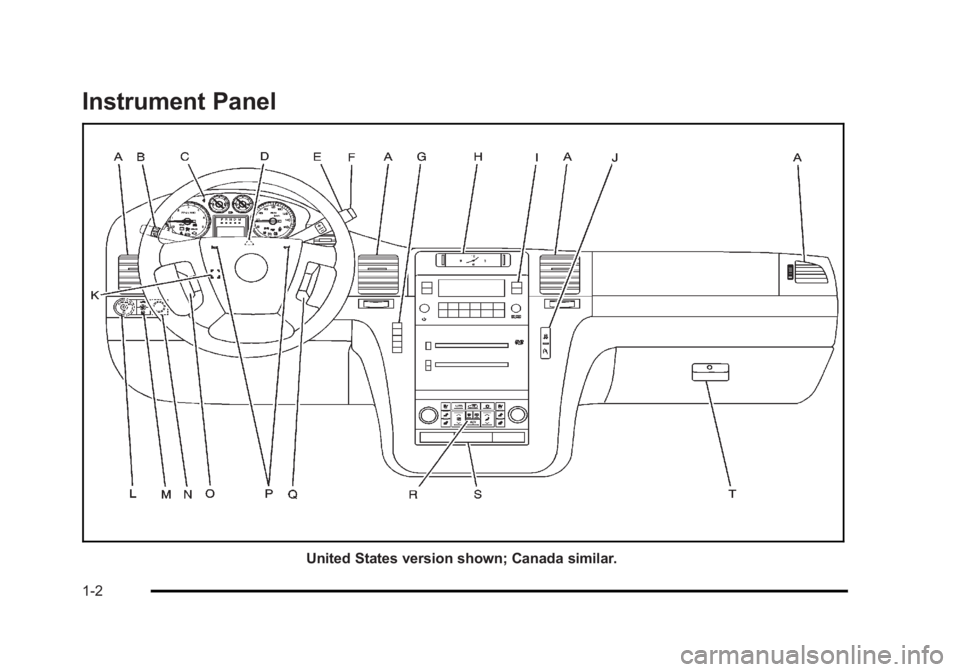
Instrument Panel
United States version shown; Canada similar.
1-2
Page 9 of 620
Black plate (3,1)Cadillac Escalade/Escalade ESV Owner Manual - 2010
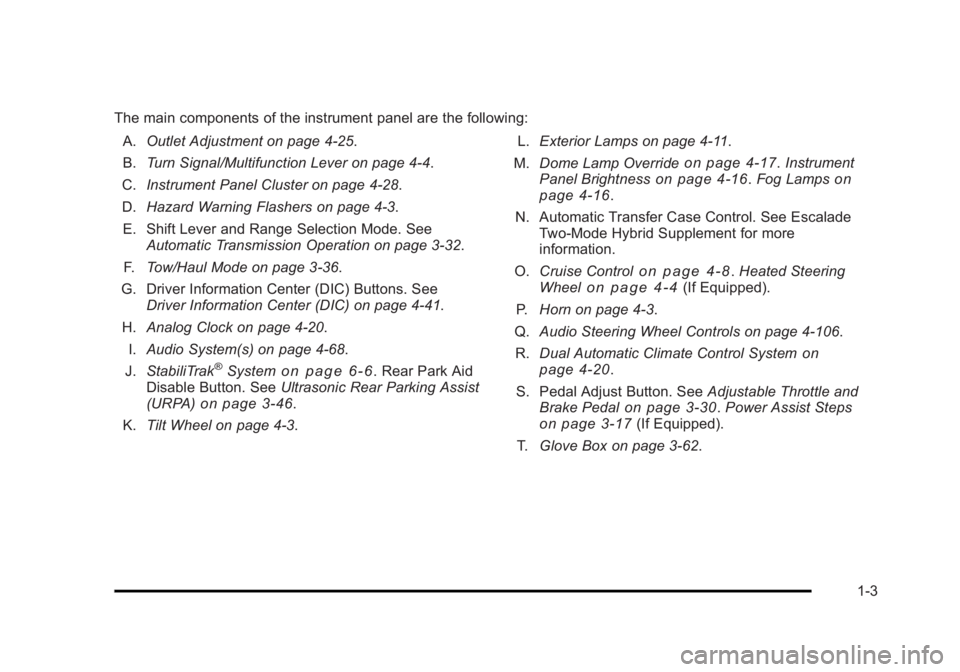
The main components of the instrument panel are the following:
A. Outlet Adjustment on page 4 ‑ 25 .
B. Turn Signal/Multifunction Lever on page 4 ‑ 4 .
C. Instrument Panel Cluster on page 4 ‑ 28 .
D. Hazard Warning Flashers on page 4 ‑ 3 .
E. Shift Lever and Range Selection Mode. See
Automatic Transmission Operation on page 3 ‑ 32 .
F. Tow/Haul Mode on page 3 ‑ 36 .
G. Driver Information Center (DIC) Buttons. See
Driver Information Center (DIC) on page 4 ‑ 41 .
H. Analog Clock on page 4 ‑ 20 .
I. Audio System(s) on page 4 ‑ 68 .
J. StabiliTrak ®
System on page 6 ‑ 6 . Rear Park Aid
Disable Button. See Ultrasonic Rear Parking Assist
(URPA) on page 3 ‑ 46 .
K. Tilt Wheel on page 4 ‑ 3 . L. Exterior Lamps on page 4 ‑ 11 .
M. Dome Lamp Override on page 4 ‑ 17 . Instrument
Panel Brightness on page 4 ‑ 16 . Fog Lamps on
page 4 ‑ 16 .
N. Automatic Transfer Case Control. See Escalade
Two ‐ Mode Hybrid Supplement for more
information.
O. Cruise Control
on page 4 ‑ 8 . Heated Steering
Wheel on page 4 ‑ 4 (If Equipped).
P. Horn on page 4 ‑ 3 .
Q. Audio Steering Wheel Controls on page 4 ‑ 106 .
R. Dual Automatic Climate Control System
on
page 4 ‑ 20 .
S. Pedal Adjust Button. See Adjustable Throttle and
Brake Pedal on page 3 ‑ 30 . Power Assist Steps
on page 3 ‑ 17 (If Equipped).
T. Glove Box on page 3 ‑ 62 .
1-3
Page 19 of 620
Black plate (13,1)Cadillac Escalade/Escalade ESV Owner Manual - 2010
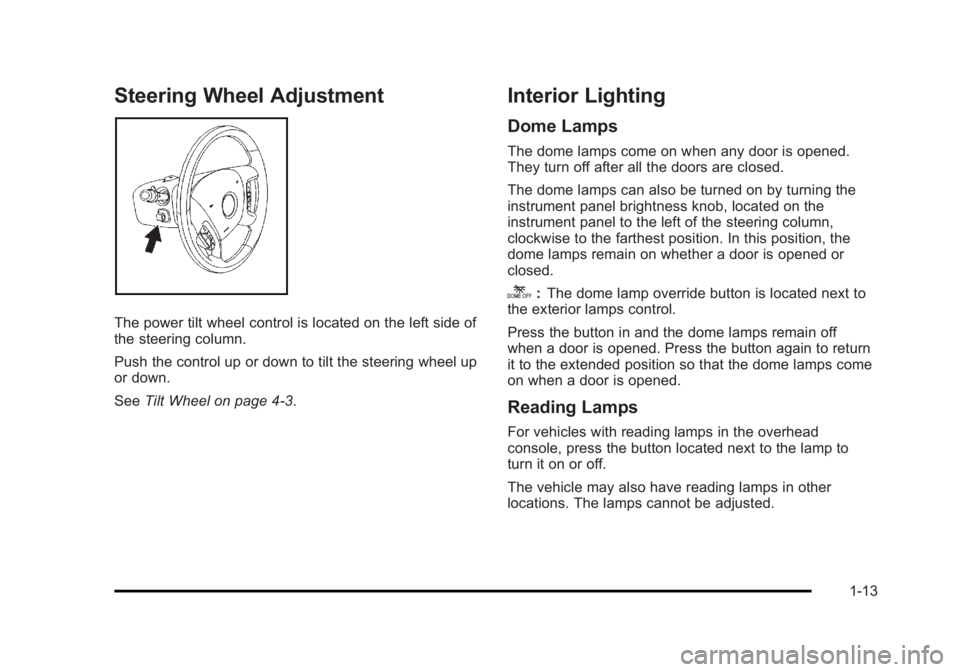
Steering Wheel Adjustment
The power tilt wheel control is located on the left side of
the steering column.
Push the control up or down to tilt the steering wheel up
or down.
See Tilt Wheel on page 4 ‑ 3 . Interior Lighting Dome Lamps The dome lamps come on when any door is opened.
They turn off after all the doors are closed.
The dome lamps can also be turned on by turning the
instrument panel brightness knob, located on the
instrument panel to the left of the steering column,
clockwise to the farthest position. In this position, the
dome lamps remain on whether a door is opened or
closed.
k : The dome lamp override button is located next to
the exterior lamps control.
Press the button in and the dome lamps remain off
when a door is opened. Press the button again to return
it to the extended position so that the dome lamps come
on when a door is opened.
Reading Lamps For vehicles with reading lamps in the overhead
console, press the button located next to the lamp to
turn it on or off.
The vehicle may also have reading lamps in other
locations. The lamps cannot be adjusted.
1-13
Page 20 of 620

Black plate (14,1)Cadillac Escalade/Escalade ESV Owner Manual - 2010
For more information about interior lamps, see: .
Dome Lamps on page 4 ‑ 17 ..
Reading Lamps on page 4 ‑ 17 ..
Instrument Panel Brightness on page 4 ‑ 16 .
Exterior Lighting The exterior lamps
control is located on the
instrument panel to the
left of the steering wheel.
9 : Turns off the automatic headlamps and daytime
running lamps (DRL). Turning the headlamp control to
the off position again will turn the automatic headlamps
or DRL back on.
For vehicles first sold in Canada, the off position only
works when the vehicle is shifted into the P (Park)
position. AUTO: Automatically turns on the headlamps at normal
brightness, along with the parking lamps and taillamps.
; : Turns on the parking lamps and taillamps.
2 : Turns on the headlamps, parking lamps, and
taillamps.
For more information, see: .
Exterior Lamps on page 4 ‑ 11 . .
Daytime Running Lamps (DRL) on page 4 ‑ 15 ..
Fog Lamps on page 4 ‑ 16 .
1-14
Page 24 of 620

Black plate (18,1)Cadillac Escalade/Escalade ESV Owner Manual - 2010
Bluetooth ®
For vehicles with an in-vehicle Bluetooth system, it
allows users with a Bluetooth enabled cell phone to
make and receive hands-free calls using the vehicle ’ s
audio system and controls.
The Bluetooth enabled cell phone must be paired with
the in-vehicle Bluetooth system before it can be used in
the vehicle. Not all phones will support all functions. For
more information visit www.gm.com/bluetooth.
For more information, see Bluetooth ®
on page 4 ‑ 68 .
Navigation System The vehicle's navigation system provides detailed maps
of most major freeways and roads throughout the
United States and Canada. After a destination has been
set, the system provides turn-by-turn instructions for
reaching the destination. In addition, the system can
help locate a variety of points of interest (POI), such as
banks, airports, restaurants, and more.
See Navigation System in the owner's manual for more
information. Driver Information Center (DIC) The DIC display is located at the bottom of the
instrument panel cluster. It shows the status of many
vehicle systems and enables access to the
personalization menu.
The DIC buttons are
located on the instrument
panel, next to the steering
wheel.
3 (Trip/Fuel): Press this button to display the
odometer, trip odometer, fuel range, average economy,
fuel used, timer, and transmission temperature. The
compass and outside air temperature will also be shown
in the display. The temperature will be shown in °F or
°C depending on the units selected.
1-18
Page 28 of 620

Black plate (22,1)Cadillac Escalade/Escalade ESV Owner Manual - 2010
Performance and Maintenance StabiliTrak ®
SystemThe vehicle may have a traction control system that
limits wheel spin and the StabiliTrak system that assists
with directional control of the vehicle in difficult driving
conditions. Both systems turn on automatically every
time the vehicle is started. .
To turn off traction control, press and release
5 on
the instrument panel.
F illuminates and the
appropriate DIC message displays. See DIC
Warnings and Messages on page 4 ‑ 49 ..
To turn off both traction control and Electronic
Stability Control, press and hold
5 until
Filluminates and the appropriate DIC message
displays. See DIC Warnings and Messages on
page 4 ‑ 49
..
Press and release the button again to turn on both
systems.
For more information, see StabiliTrak ®
System on
page 6 ‑ 6
. Tire Pressure Monitor This vehicle may have a Tire Pressure Monitor
System (TPMS).
The TPMS warming light
alerts you to a significant
loss in pressure of one of
the vehicles tires.
If the warning light comes on, stop as soon as possible
and inflate the tires to the recommended pressure
shown on the tire loading information label. See
Loading the Vehicle on page 6 ‑ 32 . The warning light
will remain on until the tire pressure is corrected.
During cooler conditions, the low tire pressure warning
light may appear when the vehicle is first started and
then turn off. This may be an early indicator that the tire
pressures are getting low and the tires need to be
inflated to the proper pressure.
The TPMS does not replace normal monthly tire
maintenance. It is the driver ’ s responsibility to maintain
correct tire pressures.
See Tire Pressure Monitor System on page 7 ‑ 67 and
Tire Pressure Monitor Operation on page 7 ‑ 68 .
1-22
Page 61 of 620
Black plate (29,1)Cadillac Escalade/Escalade ESV Owner Manual - 2010
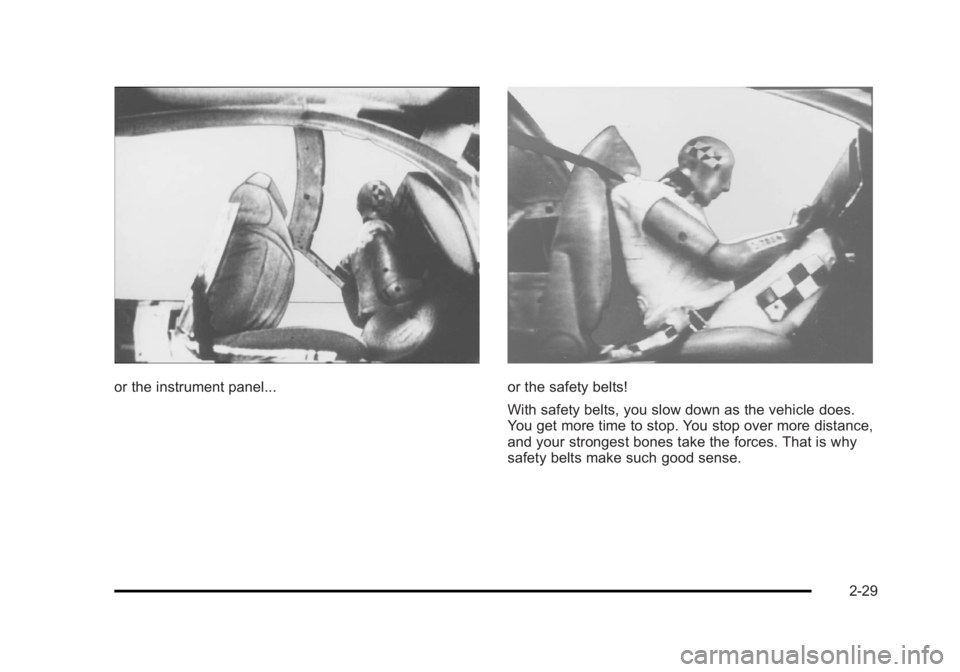
or the instrument panel... or the safety belts!
With safety belts, you slow down as the vehicle does.
You get more time to stop. You stop over more distance,
and your strongest bones take the forces. That is why
safety belts make such good sense.
2-29
Page 106 of 620
Black plate (74,1)Cadillac Escalade/Escalade ESV Owner Manual - 2010
If the vehicle is equipped with the passenger sensing
system, and when the passenger sensing system has
turned off the right front passenger frontal airbag, the off
indicator in the passenger airbag status indicator should
light and stay lit when you start the vehicle. See
Passenger Airbag Status Indicator on page 4 ‑ 31 .
If a child restraint has been installed and the on
indicator is lit, see “ If the On Indicator is Lit for a Child
Restraint ” under Passenger Sensing System
on
page 2 ‑ 84 for more information.
To remove the child restraint, unbuckle the vehicle
safety belt and let it return to the stowed position.
Airbag System The vehicle has the following airbags: .
A frontal airbag for the driver. .
A frontal airbag for the right front passenger. .
A roof-rail airbag for the driver and passenger
directly behind the driver. .
A roof-rail airbag for the right front passenger and
the person seated directly behind that passenger. The vehicle may have the following airbags: .
A seat ‐ mounted side impact airbag for the driver. .
A seat ‐ mounted side impact airbag for the right
front passenger. .
If the vehicle has a third row seat, it will have a
third row roof-rail airbag.
All of the airbags in the vehicle will have the word
AIRBAG embossed in the trim or on an attached label
near the deployment opening.
For frontal airbags, the word AIRBAG will appear on the
middle part of the steering wheel for the driver and on
the instrument panel for the right front passenger.
With seat ‐ mounted side impact airbags, the word
AIRBAG will appear on the side of the seatback closest
to the door.
With roof-rail airbags, the word AIRBAG will appear
along the headliner or trim.
Airbags are designed to supplement the protection
provided by safety belts. Even though today's airbags
are also designed to help reduce the risk of injury from
the force of an inflating bag, all airbags must inflate very
quickly to do their job.
2-74