instrument panel CADILLAC ESCALADE ESV 2010 Owner's Guide
[x] Cancel search | Manufacturer: CADILLAC, Model Year: 2010, Model line: ESCALADE ESV, Model: CADILLAC ESCALADE ESV 2010Pages: 620, PDF Size: 7.4 MB
Page 209 of 620

Black plate (17,1)Cadillac Escalade/Escalade ESV Owner Manual - 2010
Dome Lamps The dome lamps come on when any door is opened.
They turn off after all the doors are closed.
The dome lamps can also be turned on by turning the
instrument panel brightness knob, located on the
instrument panel to the left of the steering column,
clockwise to the farthest position. In this position, the
dome lamps remain on whether a door is opened or
closed.
Dome Lamp Override The dome lamp override button is located next to the
exterior lamps control.
k (Dome Off): Press the button in and the dome
lamps remain off when a door is opened. Press the
button again to return it to the extended position so that
the dome lamps come on when a door is opened. Entry Lighting The vehicle has an illuminated entry feature.
When the doors are opened, the dome lamps will come
on if the dome override button is in the extended
position. If the dome override button is pressed in, the
lamps will not come on.
Exit Lighting The interior lamps come on when the key is removed
from the ignition. They turn off automatically in
20 seconds. The lights do not come on if the dome
override button is pressed in.
Reading Lamps If the vehicle has front reading lamps, press the button
located next to the lamp to turn it on or off.
The vehicle may also have reading lamps in other
locations. The lamps cannot be adjusted.
4-17
Page 214 of 620

Black plate (22,1)Cadillac Escalade/Escalade ESV Owner Manual - 2010
Automatic Operation AUTO (Automatic): When automatic operation is active
the system will control the inside temperature, the air
delivery, and the fan speed.
Use the steps below to place the entire system in
automatic mode:
1. Press the AUTO button.
When AUTO is selected, the display will change to
show the current temperature(s) and AUTO come
on the display. The current delivery mode and fan
speed will also be displayed for approximately
five seconds.
When AUTO is selected, the air conditioning
operation and air inlet will be automatically
controlled. The air conditioning compressor will
run when the outside temperature is over about
4°C (40°F). The air inlet will normally be set to
outside air. If it is hot outside, the air inlet may
automatically switch to recirculate inside air to
help quickly cool down the vehicle. The light on
the button comes on in recirculation. 2. Set the driver's and passenger's temperature.
To find your comfort setting, start with a
23°C (74°F) temperature setting and allow
about 20 minutes for the system to regulate. Use
the driver or passenger temperature buttons to
adjust the temperature setting as necessary. If a
temperature setting of 15°C (60°F) is chosen, the
system remains at the maximum cooling setting.
If a temperature setting of 32°C (90°F) is chosen,
the system remains at the maximum heat setting.
Choosing either maximum setting will not cause
the vehicle to heat or cool any faster.
Be careful not to cover the sensor located on the top of
the instrument panel near the windshield. This sensor
regulates air temperature based on sun load and also
turns on the headlamps.
To avoid blowing cold air in cold weather, the system
will delay turning on the fan until warm air is available.
The length of delay depends on the engine coolant
temperature. Pressing the fan switch will override this
delay and change the fan to a selected speed.
4-22
Page 215 of 620

Black plate (23,1)Cadillac Escalade/Escalade ESV Owner Manual - 2010
Manual Operation
y 9 z (Fan Control): Press the up or down arrows
to increase or decrease the fan speed
Pressing this button when the system is off will turn the
system on.
Pressing either arrow while using automatic operation
will place the fan in manual operation. The fan setting
will display and the AUTO light will turn off. The air
delivery will remain in automatic operation.
N (Air Delivery Mode Control): Press to change the
direction of the airflow in the vehicle. Repeatedly press
the button until the desired mode appears on the
display.
When the system is turned off, the display goes blank
after displaying the current status of the system.
H (Vent): Air is directed to the instrument panel
outlets.
) (Bi-Level): Air is divided between the instrument
panel and floor outlets. Some air is directed towards the
windshield and side window outlets. Cooler air is
directed to the upper vents and warmer air to the floor
vents.
6 (Floor): Air is directed to the floor outlets, with some
to the windshield, side window outlets, and second row
floor outlets. In this mode, the system automatically
selects outside air. - (Defog): This mode clears the windows of fog or
moisture. Air is directed to the windshield, floor outlets,
and side window vents. In this mode, the system
turns off recirculation and runs the air conditioning
compressor unless the outside temperature is close to
freezing. The recirculation mode cannot be selected
while in the defog mode.
0 (Defrost): This mode removes fog or frost from
the windshield more quickly. Air is directed to the
windshield and side window vents, with some
directed to the floor vents. In this mode, the system
automatically forces outside air into the vehicle and
runs the air conditioning compressor unless the outside
temperature is close to freezing. The recirculation mode
cannot be selected while in the defrost mode.
The passenger temperature control cannot be activated
while in defrost mode. If the passenger control knob is
pressed, the passenger temperature flashes three times
and will not work. If the passenger control knob is
adjusted, the driver temperature indicator changes. The
passenger temperature will not be displayed.
If vent, bi-level, or floor mode is selected again, the
climate control system displays the previous
temperature settings.
Do not drive the vehicle until all the windows are clear.
4-23
Page 217 of 620
Black plate (25,1)Cadillac Escalade/Escalade ESV Owner Manual - 2010
Rear Window Defogger The rear window defogger uses a warming grid to
remove fog from the rear window.
< (Rear Window Defogger): Press to turn the rear
window defogger on or off. It automatically turns off
after it has been activated. The defogger can also be
turned off by turning off the engine. Do not drive the
vehicle until all the windows are clear.
Notice: Do not use a razor blade or sharp object to
clear the inside rear window. Do not adhere
anything to the defogger grid lines in the rear glass.
These actions may damage the rear defogger.
Repairs would not be covered by your warranty.
Heated Mirrors: For vehicles with heated outside
rearview mirrors, the mirrors heat to help clear fog or
frost from the surface of the mirror when the rear
window defog button is pressed. See Outside Heated
Mirrors on page 3 ‑ 45 .
Heated or Cooled Seats: For vehicles with heated and
cooled seats, see Heated and Cooled Seats on
page 2 ‑ 5 . Outlet Adjustment Use the air outlets located in the center and on the side
of the instrument panel to direct the airflow.
Operation Tips .
Keep the hood and front air inlets free of ice, snow,
or any other obstruction (such as leaves). The
heater and defroster will work far better, reducing
the chance of fogging the inside of the windows. .
When you enter a vehicle in cold weather, press
the fan up button to the maximum fan level before
driving. This helps clear the intake ducts of snow
and moisture, and reduces the chance of fogging
the inside of the window. .
Keep the air path under the front seats clear of
objects. This helps air to circulate throughout the
vehicle. .
Adding outside equipment to the front of the
vehicle, such as hood-air deflectors, may affect the
performance of the heating and air conditioning
system. Check with your dealer before adding
equipment to the outside of the vehicle.
4-25
Page 220 of 620
Black plate (28,1)Cadillac Escalade/Escalade ESV Owner Manual - 2010
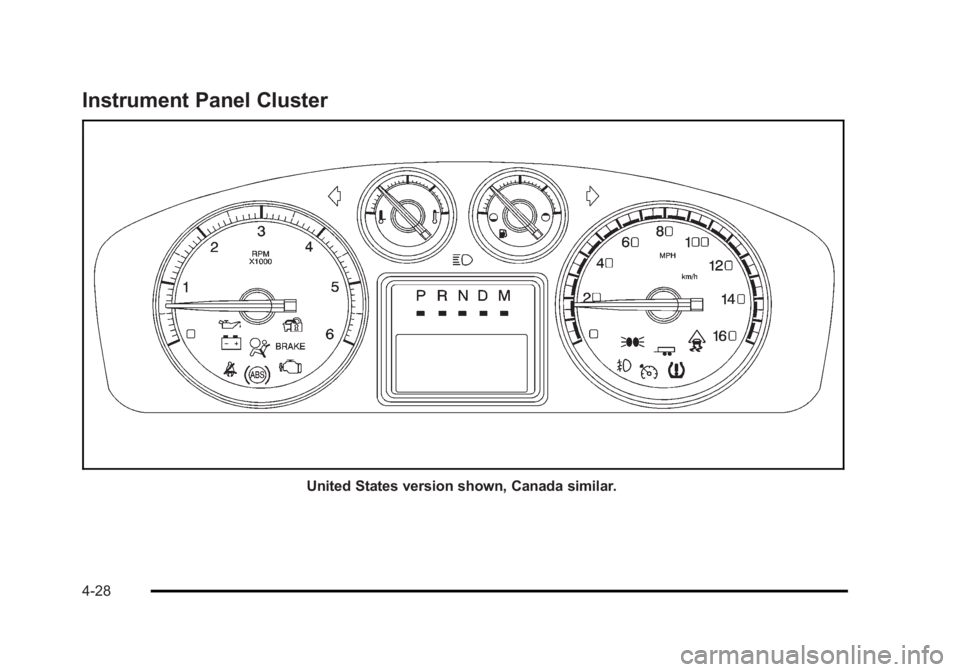
Instrument Panel Cluster
United States version shown, Canada similar.
4-28
Page 221 of 620

Black plate (29,1)Cadillac Escalade/Escalade ESV Owner Manual - 2010
Speedometer and Odometer The speedometer shows the vehicle's speed in both
kilometers per hour (km/h) and miles per hour (mph).
The vehicle's odometer works together with the Driver
Information Center (DIC). The Trip odometer can be set.
See “ Trip Odometer ” under DIC Operation and Displays
on page 4 ‑ 42 for more information.
To check the odometer mileage while the vehicle is not
running, press the trip stem on the instrument panel
cluster.
If the vehicle ever needs a new odometer installed, the
new one will be set to the correct mileage total of the
old odometer.
Trip Odometer The trip odometer can show how far the vehicle has
been driven since the trip odometer was last set to zero.
For more information see “ Trip Odometer ” under DIC
Operation and Displays on page 4 ‑ 42 .Tachometer The tachometer displays the engine speed in
revolutions per minute (rpm).
Safety Belt Reminders Driver Safety Belt Reminder Light When the engine is started, a chime sounds for several
seconds to remind a driver to fasten the safety belt,
unless the driver safety belt is already buckled.
The safety belt light
flashes for several
seconds, then comes on
solid for several more.
This chime and light sequence are repeated if the driver
remains unbuckled and the vehicle is in motion. If the
driver safety belt is already buckled, neither the chime
nor the light comes on.
4-29
Page 230 of 620

Black plate (38,1)Cadillac Escalade/Escalade ESV Owner Manual - 2010
Emissions Inspection and Maintenance
Programs Some state/provincial and local governments may have
programs to inspect the on-vehicle emission control
equipment For the inspection, the emission system test
equipment is connected to the vehicle ’ s Data Link
Connector (DLC).
The DLC is under the instrument panel to the left of the
steering wheel. See your dealer if assistance is needed. The vehicle may not pass inspection if: .
the Malfunction Indicator Lamp is on with the
engine running, or if the light does not come on
when the ignition is turned to ON/RUN while the
engine is off. .
the critical emission control systems have not been
completely diagnosed by the system. This can
happen if the battery has recently been replaced or
if the battery has run down. The diagnostic system
evaluates critical emission control systems during
normal driving. This can take several days of
routine driving. If this has been done and the
vehicle still does not pass the inspection, your
dealer can prepare the vehicle for inspection.
4-38
Page 233 of 620

Black plate (41,1)Cadillac Escalade/Escalade ESV Owner Manual - 2010
Fuel Gauge When the ignition is on,
the fuel gauge shows
about how much fuel the
vehicle has left in
the tank.
An arrow on the fuel gauge indicates the side of the
vehicle the fuel door is on.
The gauge will first indicate empty before the vehicle is
out of fuel, but the vehicle's fuel tank should be
filled soon. Here are some situations owners may experience with
the fuel gauge. None of these indicate a problem with
the fuel gauge. .
At the gas station, the fuel pump shuts off before
the gauge reads full. .
It takes a little more or less fuel to fill up than the
fuel gauge indicated. For example, the gauge may
have indicated the tank was half full, but it actually
took a little more or less than half the tank's
capacity to fill the tank. .
The gauge goes back to empty when the ignition is
turned off.
Driver Information Center (DIC) Your vehicle has a Driver Information Center (DIC).
The DIC displays information about your vehicle. It also
displays warning messages if a system problem is
detected. The DIC also allows some features to be
customized. See DIC Vehicle Customization
on
page 4 ‑ 58
for more information.
All messages will appear in the DIC display located in
the center of the instrument panel cluster.
4-41
Page 234 of 620
Black plate (42,1)Cadillac Escalade/Escalade ESV Owner Manual - 2010
The DIC comes on when the ignition is on. After a short
delay, the DIC will display the information that was last
displayed before the engine was turned off.
See DIC Operation and Displays
on page 4 ‑ 42 and
DIC Vehicle Customization on page 4 ‑ 58 for the
displays available.
DIC Operation and Displays The DIC has different displays which can be accessed
by pressing the DIC buttons located on the instrument
panel, next to the steering wheel.
The DIC displays trip, fuel, and vehicle system
information, and warning messages if a system problem
is detected. A digital speedometer also appears at the
bottom of the DIC display. The digital speedometer can
be enabled or disabled. See “ DISPLAY DIGITAL
SPEED ” under DIC Vehicle Customization
on
page 4 ‑ 58
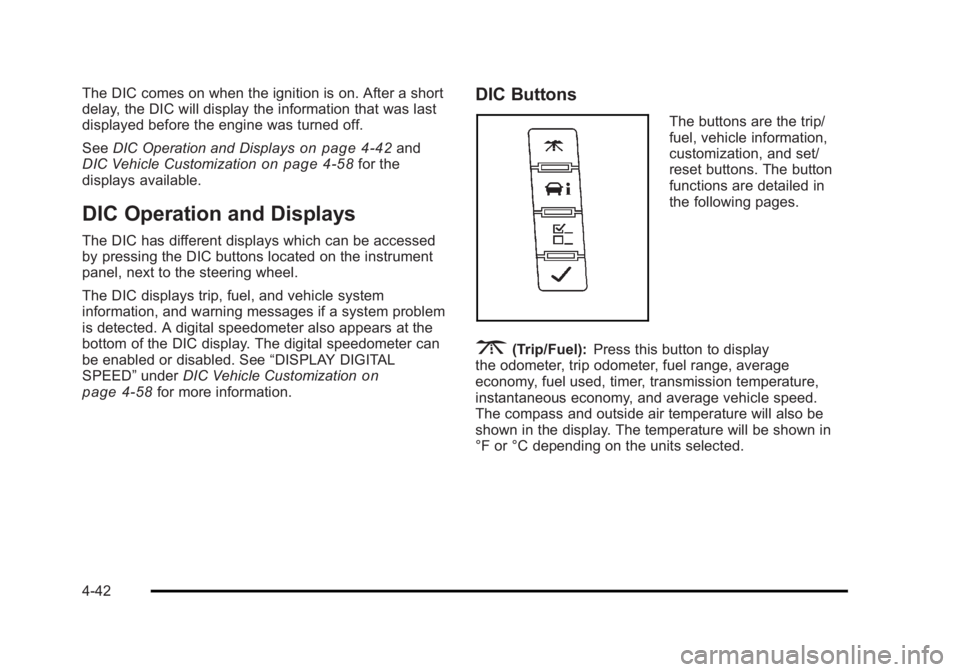
for more information. DIC Buttons The buttons are the trip/
fuel, vehicle information,
customization, and set/
reset buttons. The button
functions are detailed in
the following pages.
3 (Trip/Fuel): Press this button to display
the odometer, trip odometer, fuel range, average
economy, fuel used, timer, transmission temperature,
instantaneous economy, and average vehicle speed.
The compass and outside air temperature will also be
shown in the display. The temperature will be shown in
°F or °C depending on the units selected.
4-42
Page 241 of 620

Black plate (49,1)Cadillac Escalade/Escalade ESV Owner Manual - 2010
Compass Calibration The compass can be manually calibrated. Only calibrate
the compass in a magnetically clean and safe location,
such as an open parking lot, where driving the vehicle
in circles is not a danger. It is suggested to calibrate
away from tall buildings, utility wires, manhole covers,
or other industrial structures, if possible.
If CAL should ever appear in the DIC display, the
compass should be calibrated.
If the DIC display does not show a heading, for
example, N for North, or the heading does not change
after making turns, there may be a strong magnetic field
interfering with the compass. Such interference may be
caused by a magnetic CB or cell phone antenna mount,
a magnetic emergency light, magnetic note pad holder,
or any other magnetic item. Turn off the vehicle, move
the magnetic item, then turn on the vehicle and calibrate
the compass.
To calibrate the compass, use the following procedure:
Compass Calibration Procedure 1. Before calibrating the compass, make sure the
compass zone is set to the variance zone in which
the vehicle is located. See “ Compass Variance
(Zone) Procedure ” earlier in this section.
Do not operate any switches such as window,
sunroof, climate controls, seats, etc. during the
calibration procedure. 2. Press the vehicle information button until
PRESS
V TO CALIBRATE COMPASS displays.
3. Press the set/reset button to start the compass
calibration.
4. The DIC will display CALIBRATING: DRIVE IN
CIRCLES. Drive the vehicle in tight circles at less
than 5 mph (8 km/h) to complete the calibration.
The DIC will display CALIBRATION COMPLETE
for a few seconds when the calibration is complete.
The DIC display will then return to the
previous menu.
DIC Warnings and Messages Messages are displayed on the DIC to notify the driver
that the status of the vehicle has changed and that
some action may be needed by the driver to correct the
condition. Multiple messages may appear one after
another.
Some messages may not require immediate action, but
you can press any of the DIC buttons on the instrument
panel to acknowledge that you received the messages
and to clear them from the display.
Some messages cannot be cleared from the DIC
display because they are more urgent. These
messages require action before they can be cleared.
4-49