audio CADILLAC ESCALADE ESV 2011 Workshop Manual
[x] Cancel search | Manufacturer: CADILLAC, Model Year: 2011, Model line: ESCALADE ESV, Model: CADILLAC ESCALADE ESV 2011Pages: 548, PDF Size: 8.45 MB
Page 260 of 548
Black plate (58,1)Cadillac Escalade/Escalade ESV Owner Manual - 2011
7-58 Infotainment System Handle CDs and DVDs carefully.
Store them in their original cases or
other protective cases and away
from direct sunlight and dust. The
DVD player scans the bottom
surface of the disc. If the surface of
a CD or DVD is damaged, such as
cracked, broken, or scratched, the
CD or DVD may not play properly or
not at all. If the surface of a CD or
DVD is soiled, take a soft, lint free
cloth or dampen a clean, soft cloth
in a mild, neutral detergent solution
mixed with water, and clean it. Make
sure the wiping process starts from
the center to the edge.
Do not touch the bottom side of a
CD or DVD while handling it; this
could damage the surface. Pick up
CDs or DVDs by grasping the outer
edges or the edge of the hole and
the outer edge. Rear Seat Audio (RSA)
System Vehicles with this feature allow
the rear seat passengers to listen
to and control any of the music
sources: radio, CD, DVD, or other
auxiliary sources. The rear seat
passengers can control the same
music sources the front seat
passengers are listening to (dual
control) or a different source. For
example, rear seat passengers can
listen to and control a CD through
the headphones, while the driver
listens to the radio through the
speakers. The rear seat passengers
have control of the volume for each
set of headphones.
The radio functionality is controlled
by both the RSA and the front radio,
only one band can be tuned to at
one time. Changing the band on the
RSA or the front radio will change
band on the other system. RSA functions can be operated
even when the main radio is off.
Audio can be heard through wired
headphones (not included) plugged
into the jacks on the RSA. If the
vehicle has this feature, audio can
also be heard on Channel 2 of the
wireless headphones.
The audio system allows the rear
speakers to continue playing even
when the RSA audio is active
through the headphones.
To listen to an iPod or portable
audio device through the RSA,
attach the iPod or portable audio
device to the auxiliary input (if
available), located below the RSA.
Turn the iPod on, then choose the
auxiliary input with the RSA SRCE
button. An iPod ®
or portable audio
device can be connected to the front
auxiliary jack or the USB port.
Page 261 of 548

Black plate (59,1)Cadillac Escalade/Escalade ESV Owner Manual - 2011
Infotainment System 7-59
P (Power): Press the
P button to
turn RSA on and off.
Volume: Turn this knob to increase
or to decrease the volume of the
wired headphones. The left knob
controls the left headphones and
the right knob controls the right
headphones.
SRCE (Source): Press this
button to switch between the
radio (AM/FM), XM ™ (if equipped),
CD, and if the vehicle has these
features, DVD, USB, auxiliary jack,
and rear auxiliary.
© ¨ (Seek): When listening to FM,
AM, or XM (if equipped), press
either the left
© or right
¨ seek
arrow to go to the previous or to the next station or channels and stay
there. This function is inactive,
with some radios, if the front seat
passengers are listening to the
radio.
Press and hold either the left
© or
right
¨ seek arrow until the display
flashes, to tune to an individual
station. The display stops flashing
after the buttons have not been
pushed for more than two seconds.
This function is inactive, with some
radios, if the front seat passengers
are listening to the radio.
While listening to a disc, press the
right
¨ seek arrow to go to the next
track or chapter on the disc. Press
the left
© seek arrow to go back to
the start of the current track or
chapter (if more than ten seconds
have played). This function is
inactive, with some radios, if the
front seat passengers are listening
to the disc. When a DVD video menu is being
displayed, press either the left
© or
right
¨ seek arrow to perform a
cursor up or down on the menu.
Hold the left
© or right
¨ seek arrow
to perform a cursor left or right on
the menu.
When a USB device is playing, the
right or left seek button can be used
to control the device.
PROG (Program): Press this
button to go to the next preset radio
station or channel set on the main
radio. This function is inactive,
with some radios, if the front seat
passengers are listening to the
radio.
When a CD or DVD audio disc is
playing, press this button to go to
the beginning of the CD or DVD
audio. This function is inactive,
with some radios, if the front seat
passengers are listening to the disc.
When a DVD video menu is being
displayed, press the PROG button
to perform the menu function, enter.
Page 262 of 548

Black plate (60,1)Cadillac Escalade/Escalade ESV Owner Manual - 2011
7-60 Infotainment System
Navigation Using the Navigation
System This section presents basic
information needed to operate the
navigation system.
Use the buttons located on the
navigation system along with the
available touch-sensitive screen
buttons on the navigation screen to
operate the system. See Overview
on page 7 ‑ 3 for more information.
Once the vehicle is moving, various
functions are disabled to reduce
driver distractions. Navigation Buttons The following buttons are located on
the navigation system:
O /
n (Power/Volume):
1. Press to turn the system on
and off.
2. Turn to increase or decrease the
volume to the audio system.
3. Press and hold for more than
two seconds to turn off the
navigation system, the Rear
Seat Entertainment (RSE), and
Rear Seat Audio (RSA). If the
vehicle has not been tuned off,
the RSE and the RSA can be
turned back on by pressing this
knob and continues play of the
last active source.
X (Eject): Press to eject the
CD/DVD Disc. See CD/DVD Player
on page 7 ‑ 19 . w (Tune): Turn to go to the next
or previous frequency or disc track
or chapter. See CD/DVD Player on
page 7 ‑ 19 or MP3 on page 7 ‑ 28 for
more information.
AUDIO: Press to display the audio
screen. Press to switch between
AM, FM, or XM, if equipped, DISC,
or AUX (Auxiliary), or press on the
screen button. See CD/DVD Player
on page 7 ‑ 19 , MP3 on page 7 ‑ 28 ,
and Auxiliary Devices on page 7 ‑ 31
for more information.
FAV (Favorite): Press to access
the preset stations. See “ Storing
Radio Station Presets ” under,
Overview on page 7 ‑ 3 .
5 (Phone): See the OnStar ®
(if equipped) owner guide and
Bluetooth (if equipped) for more
information.
e (Sound): Press to access the
Sound menu to adjust the treble,
midrange, bass, fade, balance, and
Digital Signal Processing (DSP).
Page 263 of 548

Black plate (61,1)Cadillac Escalade/Escalade ESV Owner Manual - 2011
Infotainment System 7-61
y z (Scan Up/Down): Press to
scan the tracks/chapters up or down
on a disc.
y © ¨ z (Seek) (Previous/
Next): Press the up or down arrows
to go to the next or previous station.
Press and hold either arrow for
more than two seconds. The radio
goes to a station, plays for a few
seconds, then goes to the next
station.
NAV (Navigation): Press to view
the vehicle's current position on the
map screen. Each press of this
button cycles through Full Map and
the tab that displays the current
audio source (AM, FM, XM (if
equipped), CD, etc.). Full Map
displays the screen in full map view. Selecting the audio tab splits the
screen between the map screen
and the current audio source
screen menu.
RPT (Repeat): Press to repeat the
last voice guidance prompt.
DEST (Destination): Press to
access the Destination Entry
screen. From this screen, you can
select from several options to plan a
route by entering destination points.
CONFIG (Configure): Press to
adjust several of the system's
features and preferences.
Touch-Sensitive Screen
Buttons Touch-sensitive screen buttons are
located on the screen. When a
screen button has been selected, a
beep sounds. Screen buttons are
highlighted when a feature is
available. Alpha-Numeric Keyboard Letters of the alphabet, symbols,
punctuation, and numbers, when
available, displays on the navigation
screen as an alpha or numeric
keyboard. The alpha keyboard
displays when the system requires
entry of a city or street name.
All characters are touch-sensitive
screen buttons. Press a character to
select it.
A-Y (Accent Alphabet): Select to
enter letters with accent symbols.
This button may toggle to A-Z.
A-Z (Alphabet): Select to enter
letters from the alphabet. This
button may toggle to A-Y.
0-9 (Numbers): Select to enter
numbers.
Page 286 of 548
Black plate (84,1)Cadillac Escalade/Escalade ESV Owner Manual - 2011
7-84 Infotainment System Sound Press CONFIG to enter the
configure menu options, then press
CONFIG again, repeatedly until
Sound is selected or press the
Sound screen button to make
speaker and DSP (Digital Signal
Processing) adjustments. See
“ Sound Menu ” under, AM-FM Radio
on page 7 ‑ 10 for more information.
Radio Press CONFIG to enter the
configure menu options, then press
CONFIG again, repeatedly until
Radio is selected or press the Radio
screen button to make changes for
radio information displayed, preset
pages, XM (if equipped) categories,
and Bose AudioPilot. See “ Radio
Menu ” under, AM-FM Radio on
page 7 ‑ 10 for more information. Nav (Navigation)
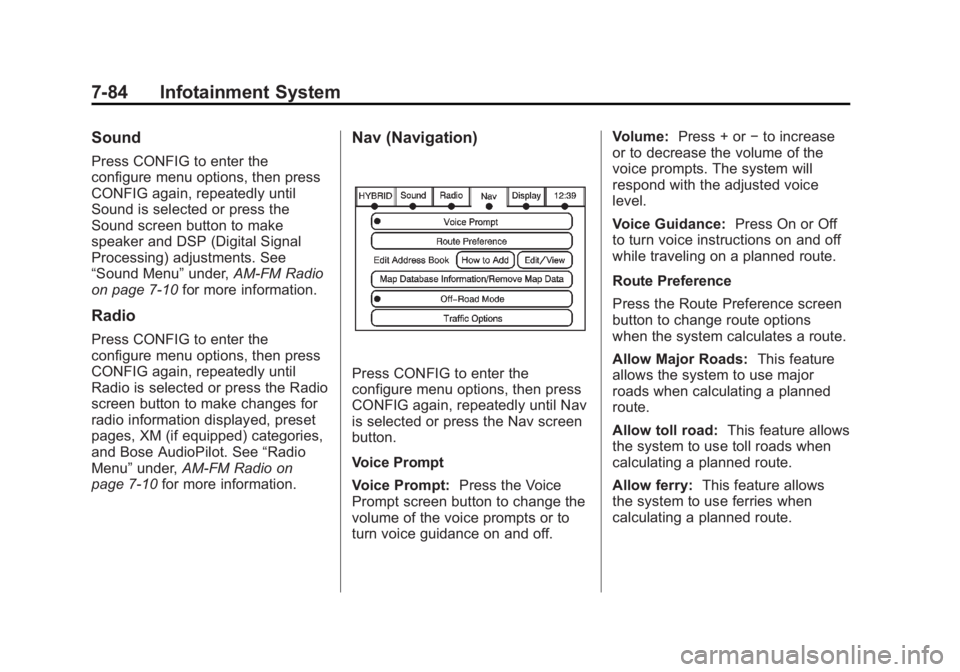
Press CONFIG to enter the
configure menu options, then press
CONFIG again, repeatedly until Nav
is selected or press the Nav screen
button.
Voice Prompt
Voice Prompt: Press the Voice
Prompt screen button to change the
volume of the voice prompts or to
turn voice guidance on and off. Volume: Press + or − to increase
or to decrease the volume of the
voice prompts. The system will
respond with the adjusted voice
level.
Voice Guidance: Press On or Off
to turn voice instructions on and off
while traveling on a planned route.
Route Preference
Press the Route Preference screen
button to change route options
when the system calculates a route.
Allow Major Roads: This feature
allows the system to use major
roads when calculating a planned
route.
Allow toll road: This feature allows
the system to use toll roads when
calculating a planned route.
Allow ferry: This feature allows
the system to use ferries when
calculating a planned route.
Page 302 of 548
Black plate (100,1)Cadillac Escalade/Escalade ESV Owner Manual - 2011
7-100 Infotainment System
Voice Recognition The navigation system's voice
recognition allows for hands-free
operation of the navigation system,
audio system, and OnStar (if
equipped) features.
Voice recognition can be used when
the ignition is on or when Retained
Accessory Power (RAP) is active.
See Retained Accessory Power
(RAP) on page 9 ‑ 35 for more
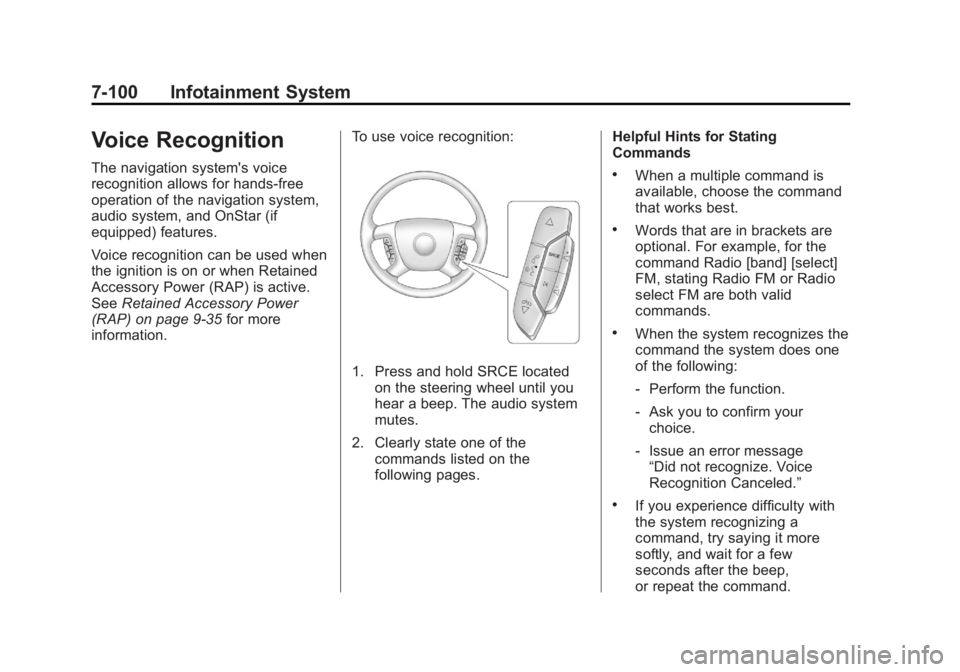
information. To use voice recognition:
1. Press and hold SRCE located
on the steering wheel until you
hear a beep. The audio system
mutes.
2. Clearly state one of the
commands listed on the
following pages. Helpful Hints for Stating
Commands .
When a multiple command is
available, choose the command
that works best. .
Words that are in brackets are
optional. For example, for the
command Radio [band] [select]
FM, stating Radio FM or Radio
select FM are both valid
commands. .
When the system recognizes the
command the system does one
of the following:
‐ Perform the function.
‐ Ask you to confirm your
choice.
‐ Issue an error message
“ Did not recognize. Voice
Recognition Canceled. ” .
If you experience difficulty with
the system recognizing a
command, try saying it more
softly, and wait for a few
seconds after the beep,
or repeat the command.
Page 304 of 548

Black plate (102,1)Cadillac Escalade/Escalade ESV Owner Manual - 2011
7-102 Infotainment System System help: Instructs the system
to assist with display commands.
Radio Commands
The following are radio commands
that can be accessed by clearly
stating the commands exactly as
they are written.
Radio [band] [select] AM,
radio [band] [select] FM, radio
[band] [select] XM (if equipped),
radio [band] [select] satellite
(if equipped): Instructs the system
to go to either the AM, FM, or XM
(if equipped).
Radio [select] (frequency) AM,
radio [select] (frequency) FM:
Instructs the system to go to a
specific frequency on either AM
or FM.
Radio [select] (channel) XM
(if equipped), radio [select]
(channel) satellite (if equipped):
Instructs the system to go to a
specific channel on the XM band
(if equipped). Radio help: Instructs the system
to assist with radio commands.
CD Commands
The following are CD, MP3, and
DVD commands that can be
accessed by clearly stating the
commands exactly as they are
written.
CD, DVD, Disc: Use this command
to select a CD, DVD, or disc that is
currently loaded.
CD, DVD, Disc, [select] track
(one, two, three, etc.): Instructs
the system to select a specific track
number.
CD, DVD, Disc select next
folder: Use this command to
select the next folder on the MP3 or
audio DVD.
CD, DVD, Disc select previous
folder: Use this command to select
the previous folder on the MP3 or
audio DVD. CD help, DVD help, Disc help:
Instructs the system to assist with
CD and DVD commands.
Auxiliary Commands
The following auxiliary commands
can be accessed by clearly stating
the commands exactly as they are
written. The commands are
available when the auxiliary source
is available.
Aux, Auxiliary: Use this command
to select the auxiliary device, when
a device is connected.
Voice Help
Voice help: Provides a description
of help commands that can be used.
Page 306 of 548
Black plate (104,1)Cadillac Escalade/Escalade ESV Owner Manual - 2011
7-104 Infotainment System When to Speak: A short tone
sounds after the system responds
indicating when it is waiting for a
voice command. Wait until the tone
and then speak.
How to Speak: Speak clearly in a
calm and natural voice.
Audio System When using the in ‐ vehicle Bluetooth
system, sound comes through the
vehicle's front audio system
speakers and overrides the audio
system. Use the audio system
volume knob, during a call, to
change the volume level. The
adjusted volume level remains in
memory for later calls. To prevent
missed calls, a minimum volume
level is used if the volume is turned
down too low. Bluetooth Controls Use the buttons located on the
steering wheel to operate the
in ‐ vehicle Bluetooth system. See
Steering Wheel Controls on
page 5 ‑ 3 for more information.
b g (Push To Talk): Press to
answer incoming calls, confirm
system information, and start
speech recognition.
c x (Phone On Hook): Press to
end a call, reject a call, or cancel an
operation.
Pairing A Bluetooth cell phone must be
paired to the Bluetooth system and
then connected to the vehicle before
it can be used. See the cell phone
manufacturer's user guide for
Bluetooth functions before pairing
the cell phone. If a Bluetooth phone
is not connected, calls will be made
using OnStar Hands ‐ Free Calling,
if equipped. Refer to the OnStar
Owner's Guide for more information. Pairing Information .
Up to five cell phones can be
paired to the Bluetooth system. .
The pairing process is disabled
when the vehicle is moving. .
Pairing only needs to be
completed once, unless the
pairing information on the cell
phone changes or the cell phone
is deleted from the system. .
Only one paired cell phone can
be connected to the Bluetooth
system at a time. .
If multiple paired cell phones are
within range of the system, the
system connects to the first
available paired cell phone in the
order that they were first paired
to the system. To connect to a
different paired phone, see
“ Connecting to a Different
Phone ” later in this section.
Page 309 of 548
Black plate (107,1)Cadillac Escalade/Escalade ESV Owner Manual - 2011
Infotainment System 7-1073. Say each digit, one at a time,
that you want to store. After
each digit is entered, the system
repeats back the digit it heard
followed by a tone. After the last
digit has been entered, say
“ Store, ” and then follow the
directions given by the system to
save a name tag for this number.
Using the “ Delete ” Command
1. Press and hold
b g for
two seconds.
2. Say “ Delete. ”
3. Say the name tag you want to
delete.
Using the “ Delete All Name Tags ”
Command
This command deletes all stored
name tags in the Hands ‐ Free
Calling Directory and the OnStar
Turn ‐ by ‐ Turn Destinations Directory,
if equipped. To delete all name tags:
1. Press and hold
b g for
two seconds.
2. Say “ Delete all name tags. ”
Listing Stored Numbers The list command will list all stored
numbers and name tags.
Using the “ List ” Command
1. Press and hold
b g for
two seconds.
2. Say “ Directory. ”
3. Say “ Hands ‐ Free Calling. ”
4. Say “ List. ”
Making a Call Calls can be made using the
following commands.
Dial or Call: The dial or call
command can be used
interchangeably to dial a phone
number or a stored name tag. Digit Dial: This command allows a
phone number to be dialed by
entering the digits one at a time.
Re ‐ dial: This command is used to
dial the last number used on the cell
phone.
Using the “ Dial ” or “ Call ”
Command
1. Press and hold
b g for
two seconds.
2. Say “ Dial ” or “ Call. ”
3. Say the entire number without
pausing, or say the name tag.
Once connected, the person called
will be heard through the audio
speakers.
Page 310 of 548
Black plate (108,1)Cadillac Escalade/Escalade ESV Owner Manual - 2011
7-108 Infotainment System Using the “ Digit Dial ” Command
The digit dial command allows a
phone number to be dialed by
entering the digits one at a time.
After each digit is entered, the
system repeats back the digit it
heard followed by a tone.
If an unwanted number is
recognized by the system, say
“ Clear ” at any time to clear the last
number.
To hear all of the numbers
recognized by the system, say
“ Verify ” at any time.
1. Press and hold
b g for
two seconds.
2. Say “ Digit Dial. ”
3. Say each digit, one at a time,
that you want to dial. After each
digit is entered, the system
repeats back the digit it heard
followed by a tone. After the last
digit has been entered,
say “ Dial. ” Once connected, the person called
will be heard through the audio
speakers.
Using the “ Re ‐ dial ” Command
1. Press and hold
b g for
two seconds.
2. After the tone, say “ Re ‐ dial. ”
Once connected, the person called
will be heard through the audio
speakers.
Receiving a Call When an incoming call is received,
the audio system mutes and a ring
tone is heard in the vehicle. .
Press
b g to answer the call. .
Press
c x to ignore a call. Call Waiting Call waiting must be supported on
the cell phone and enabled by the
wireless service carrier. .
Press
b g to answer an
incoming call when another
call is active. The original call
is placed on hold. .
Press
b g again to return to the
original call. .
To ignore the incoming call, no
action is required. .
Press
c x to disconnect the
current call and switch to the call
on hold.