radio CADILLAC ESCALADE ESV 2011 Workshop Manual
[x] Cancel search | Manufacturer: CADILLAC, Model Year: 2011, Model line: ESCALADE ESV, Model: CADILLAC ESCALADE ESV 2011Pages: 548, PDF Size: 8.45 MB
Page 289 of 548
Black plate (87,1)Cadillac Escalade/Escalade ESV Owner Manual - 2011
Infotainment System 7-872. Press the Remove Map Data
screen button to remove the
map data. A screen showing,
“ The Map can now be safely
removed ” displays.
3. Press the confirmation screen
button to safely remove the
map data.
If the map data is not removed, the
map database will not be available
for that ignition cycle. Map database
functionality can be restored by
cycling the ignition. Off-Road Mode
To turn the Off-road mode on or off:
1. Press CONFIG.
2. Press the Nav screen button.
3. Press Off-Road mode. The
button will be highlighted when
the feature is on.
When the off-road mode is turned
on, the navigation system will show
the path being traveled by the
vehicle when not on a marked road.
This path will be a simulation since
the map database coverage will not
have these roads on the DVD. This
path will be stored in the navigation
system's memory, see “ Previous
Destination ” under Destination on
page 7 ‑ 69 for more information.
See Defensive Driving on page 9 ‑ 2
for more information about off-road
driving. Traffic Options
(US and Canada) Read the following Options
descriptions to understand how the
XM NavTraffic ™ operates.
XM NavTraffic
(USA and Canada) Vehicles with the navigation system
have an XM NavTraffic receiver. XM
NavTraffic is a subscription service
provided via XM Satellite Radio. XM
NavTraffic provides real-time traffic
information fully integrated to the
navigation system to display current
traffic conditions for a driver ’ s
chosen route. XM NavTraffic allows
drivers to make the most informed,
timesaving routing decisions.
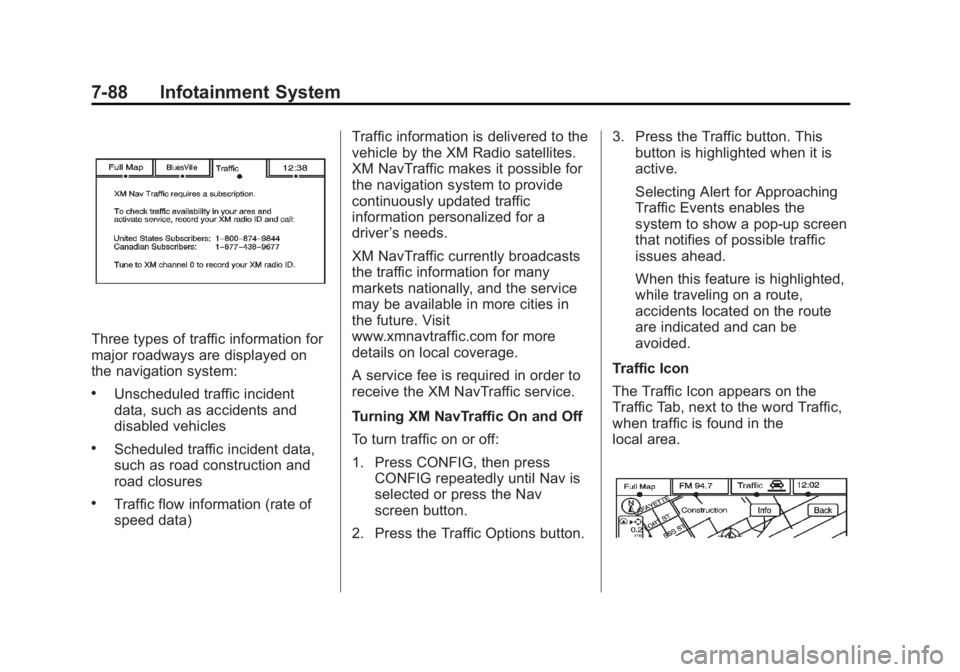
If the Traffic screen button is
pressed or if an attempt is made to
turn on the traffic display in the
Navigation Setup Menu without a
subscription, a Caution screen
displays indicating that XM traffic is
not activated.
Page 290 of 548
Black plate (88,1)Cadillac Escalade/Escalade ESV Owner Manual - 2011
7-88 Infotainment System
Three types of traffic information for
major roadways are displayed on
the navigation system: .
Unscheduled traffic incident
data, such as accidents and
disabled vehicles .
Scheduled traffic incident data,
such as road construction and
road closures .
Traffic flow information (rate of
speed data) Traffic information is delivered to the
vehicle by the XM Radio satellites.
XM NavTraffic makes it possible for
the navigation system to provide
continuously updated traffic
information personalized for a
driver ’ s needs.
XM NavTraffic currently broadcasts
the traffic information for many
markets nationally, and the service
may be available in more cities in
the future. Visit
www.xmnavtraffic.com for more
details on local coverage.
A service fee is required in order to
receive the XM NavTraffic service.
Turning XM NavTraffic On and Off
To turn traffic on or off:
1. Press CONFIG, then press
CONFIG repeatedly until Nav is
selected or press the Nav
screen button.
2. Press the Traffic Options button. 3. Press the Traffic button. This
button is highlighted when it is
active.
Selecting Alert for Approaching
Traffic Events enables the
system to show a pop-up screen
that notifies of possible traffic
issues ahead.
When this feature is highlighted,
while traveling on a route,
accidents located on the route
are indicated and can be
avoided.
Traffic Icon
The Traffic Icon appears on the
Traffic Tab, next to the word Traffic,
when traffic is found in the
local area.
Page 302 of 548
Black plate (100,1)Cadillac Escalade/Escalade ESV Owner Manual - 2011
7-100 Infotainment System
Voice Recognition The navigation system's voice
recognition allows for hands-free
operation of the navigation system,
audio system, and OnStar (if
equipped) features.
Voice recognition can be used when
the ignition is on or when Retained
Accessory Power (RAP) is active.
See Retained Accessory Power
(RAP) on page 9 ‑ 35 for more
information. To use voice recognition:
1. Press and hold SRCE located
on the steering wheel until you
hear a beep. The audio system
mutes.
2. Clearly state one of the
commands listed on the
following pages. Helpful Hints for Stating
Commands .
When a multiple command is
available, choose the command
that works best. .
Words that are in brackets are
optional. For example, for the
command Radio [band] [select]
FM, stating Radio FM or Radio
select FM are both valid
commands. .
When the system recognizes the
command the system does one
of the following:
‐ Perform the function.
‐ Ask you to confirm your
choice.
‐ Issue an error message
“ Did not recognize. Voice
Recognition Canceled. ” .
If you experience difficulty with
the system recognizing a
command, try saying it more
softly, and wait for a few
seconds after the beep,
or repeat the command.
Page 304 of 548

Black plate (102,1)Cadillac Escalade/Escalade ESV Owner Manual - 2011
7-102 Infotainment System System help: Instructs the system
to assist with display commands.
Radio Commands
The following are radio commands
that can be accessed by clearly
stating the commands exactly as
they are written.
Radio [band] [select] AM,
radio [band] [select] FM, radio
[band] [select] XM (if equipped),
radio [band] [select] satellite
(if equipped): Instructs the system
to go to either the AM, FM, or XM
(if equipped).
Radio [select] (frequency) AM,
radio [select] (frequency) FM:
Instructs the system to go to a
specific frequency on either AM
or FM.
Radio [select] (channel) XM
(if equipped), radio [select]
(channel) satellite (if equipped):
Instructs the system to go to a
specific channel on the XM band
(if equipped). Radio help: Instructs the system
to assist with radio commands.
CD Commands
The following are CD, MP3, and
DVD commands that can be
accessed by clearly stating the
commands exactly as they are
written.
CD, DVD, Disc: Use this command
to select a CD, DVD, or disc that is
currently loaded.
CD, DVD, Disc, [select] track
(one, two, three, etc.): Instructs
the system to select a specific track
number.
CD, DVD, Disc select next
folder: Use this command to
select the next folder on the MP3 or
audio DVD.
CD, DVD, Disc select previous
folder: Use this command to select
the previous folder on the MP3 or
audio DVD. CD help, DVD help, Disc help:
Instructs the system to assist with
CD and DVD commands.
Auxiliary Commands
The following auxiliary commands
can be accessed by clearly stating
the commands exactly as they are
written. The commands are
available when the auxiliary source
is available.
Aux, Auxiliary: Use this command
to select the auxiliary device, when
a device is connected.
Voice Help
Voice help: Provides a description
of help commands that can be used.
Page 353 of 548

Black plate (33,1)Cadillac Escalade/Escalade ESV Owner Manual - 2011
Driving and Operating 9-33The steering may bind with the
wheels turned off center. If this
happens, move the steering wheel
from right to left while turning the
key to ACC/ACCESSORY. If this
doesn't work, then the vehicle needs
service.
Notice: Using a tool to force the
key to turn in the ignition could
cause damage to the switch or
break the key. Use the correct
key, make sure it is all the way in,
and turn it only with your hand.
If the key cannot be turned by
hand, see your dealer.
B (ACC/ACCESSORY): This
position lets things like the radio
and the windshield wipers operate
while the engine is off. Use this
position if the vehicle must be
pushed or towed. C (ON/RUN): This position can
be used to operate the electrical
accessories and to display some
instrument panel cluster warning
and indicator lights. The switch
stays in this position when the
engine is running. The transmission
is also unlocked in this position on
automatic transmission vehicles.
If you leave the key in the ACC/
ACCESSORY or ON/RUN position
with the engine off, the battery could
be drained. You may not be able to
start the vehicle if the battery is
allowed to drain for an extended
period of time.
D (START): This is the position
that starts the engine. When the
engine starts, release the key. The
ignition switch returns to ON/RUN
for driving.
A warning tone will sound when the
driver door is opened, the ignition is
in ACC/ACCESSORY or LOCK/OFF
and the key is in the ignition. Starting the Engine If the vehicle is a hybrid, see
the hybrid supplement for more
information.
Move the shift lever to P (Park) or
N (Neutral). The engine will not start
in any other position. To restart the
engine when the vehicle is already
moving, use N (Neutral) only.
Notice: Do not try to shift to
P (Park) if the vehicle is moving.
If you do, you could damage the
transmission. Shift to P (Park)
only when the vehicle is stopped.
Starting Procedure 1. With your foot off the accelerator
pedal, turn the ignition to START.
When the engine starts, let go of
the key. The idle speed will go
down as the engine warms. Do
not race the engine immediately
after starting it. Operate the
engine and transmission gently
to allow the oil to warm up and
lubricate all moving parts.
Page 355 of 548

Black plate (35,1)Cadillac Escalade/Escalade ESV Owner Manual - 2011
Driving and Operating 9-35
Engine Heater The engine coolant heater can
provide easier starting and better
fuel economy during engine
warm-up in cold weather conditions
at or below − 18°C (0°F). Vehicles
with an engine heater should be
plugged in at least four hours before
starting. An internal thermostat in
the plug-end of the cord may exist
which will prevent engine coolant
heater operation at temperatures
above − 18°C (0°F).
To Use the Engine Coolant
Heater 1. Turn off the engine.
2. Open the hood and unwrap
the electrical cord. The cord
is secured to the Engine
Compartment Fuse Block with a
clip. Carefully remove the wire
tie which secures the electrical
cord. Do not cut the
electrical cord.
3. Plug the cord into a normal,
grounded 110-volt AC outlet. { WARNINGPlugging the cord into an
ungrounded outlet could cause
an electrical shock. Also, the
wrong kind of extension cord
could overheat and cause a fire.
You could be seriously injured.
Plug the cord into a properly
grounded three-prong 110-volt
AC outlet. If the cord will not
reach, use a heavy-duty
three-prong extension cord rated
for at least 15 amps.
4. Before starting the engine, be
sure to unplug and store the
cord as it was before to keep it
away from moving engine parts.
If you do not, it could be
damaged.
The length of time the heater should
remain plugged in depends on
several factors. Ask a dealer in the
area where you will be parking the
vehicle for the best advice on this. Retained Accessory
Power (RAP) The following vehicle accessories
can be used for up to 10 minutes
after the engine is turned off: .
Audio System .
Power Windows .
OnStar System (if equipped) .
Sunroof (if equipped)
These features work when the key
is in ON/RUN or ACC/
ACCESSORY. Once the key is
turned from ON/RUN to LOCK/OFF,
the windows and sunroof continue
to work up to 10 minutes until any
door is opened. The radio continues
to work for up to 10 minutes or until
the driver door is opened.
Page 375 of 548

Black plate (55,1)Cadillac Escalade/Escalade ESV Owner Manual - 2011
Driving and Operating 9-55
The system can be disabled by
pressing the rear park aid disable
button located next to the radio.
The indicator light will come on and
PARK ASSIST OFF displays on the
Driver Information Center (DIC) to
indicate that URPA is off, see Object
Detection System Messages on
page 5 ‑ 36 .
When the System Does Not
Seem to Work Properly If the URPA system will not activate
due to a temporary condition, the
messages PARK ASSIST OFF or
PARK ASST BLOCKED SEE
OWNERS MANUAL will be
displayed on the DIC. SERVICE PARK ASSIST: If this
message occurs, take the vehicle
to your dealer to repair the system.
PARK ASSIST OFF: This message
occurs if the driver disables the
system.
PARK ASST BLOCKED SEE
OWNERS MANUAL: This
message can occur under the
following conditions: .
The ultrasonic sensors are not
clean. Keep the vehicle's rear
bumper free of mud, dirt, snow,
ice and slush. For cleaning
instructions, see “ Washing the
Vehicle ” under Exterior Care on
page 10 ‑ 90 . .
The park assist sensors are
covered by frost or ice. Frost or
ice can form around and behind
the sensors and may not always
be seen; this can occur after
washing the vehicle in cold
weather. The message may
not clear until the frost or ice
has melted. .
A trailer was attached to the
vehicle, or a bicycle or an object
was hanging out of the liftgate
during the last drive cycle. Once
the attached object is removed,
URPA will return to normal
operation. .
A tow bar is attached to the
vehicle. .
The vehicle's bumper is
damaged. Take the vehicle to
your dealer to repair the system. .
Other conditions may affect
system performance, such as
vibrations from a jackhammer or
the compression of air brakes on
a very large truck.
Page 378 of 548
Black plate (58,1)Cadillac Escalade/Escalade ESV Owner Manual - 2011
9-58 Driving and Operating The SBZA displays may remain on
if a trailer is attached to the vehicle,
or a bicycle or object is extending
out to either side of the vehicle.
When SBZA is disabled for any
reason other than the driver turning
it off, the driver will not be able to
turn SBZA back on using the DIC.
The SIDE BLIND ZONE ALERT
ON option will not be selectable if
the conditions for normal system
operation are not met. Until normal
operating conditions for SBZA are
met, you should not rely upon SBZA
while driving.
SBZA Error Messages
The following messages may
appear in the DIC:
SIDE BLIND ZONE ALERT
SYSTEM OFF: This message
indicates that the driver has turned
the system off. SIDE BLIND ZONE SYS.
UNAVAILABLE: This message
indicates that the SBZA system is
disabled either because the sensor
is blocked and cannot detect
vehicles in your blind zone, or the
vehicle is passing through an open
field of view area, such as the
desert, where there is insufficient
data for operation. The sensor may
be blocked by mud, dirt, snow, ice,
slush, or even heavy rainstorms.
This message may also activate
during heavy rain or due to road
spray. The vehicle does not need
service. For cleaning, see “ Washing
the Vehicle ” under Exterior Care on
page 10 ‑ 90 .
SERVICE SIDE BLIND ZONE
ALERT SYSTEM: If this message
appears, both SBZA displays will
remain on indicating there is a
problem with the SBZA system.
If these displays remain on after
continued driving, the system needs
service. Take the vehicle to your
dealer. FCC Information See Radio Frequency Statement on
page 13 ‑ 19 for information
regarding Part 15 of the Federal
Communications Commission (FCC)
rules and Industry Canada
Standards RSS-210/220/310.
Frequency of operation:
24.05GHz – 24.25GHz
Field Strength: Not greater than
2.5V/m peak (0.25V/m average)
at a distance of 3m
The manufacturer is not
responsible for any radio or
TV interference caused by
unauthorized modifications to this
equipment. Such modifications
could void the user's authority to
operate the equipment.
Page 441 of 548

Black plate (39,1)Cadillac Escalade/Escalade ESV Owner Manual - 2011
Vehicle Care 10-39Headlamp Wiring An electrical overload may cause
the lamps to go on and off, or in
some cases to remain off. Have
the headlamp wiring checked right
away if the lamps go on and off or
remain off.
Windshield Wipers If the wiper motor overheats due to
heavy snow or ice, the windshield
wipers will stop until the motor cools
and will then restart.
Although the circuit is protected
from electrical overload, overload
due to heavy snow or ice may
cause wiper linkage damage.
Always clear ice and heavy snow
from the windshield before using the
windshield wipers.
If the overload is caused by an
electrical problem and not snow or
ice, be sure to get it fixed. Fuses and Circuit
Breakers If the vehicle is a hybrid, see
the hybrid supplement for more
information.
The wiring circuits in the vehicle
are protected from short circuits
by a combination of fuses, circuit
breakers and fusible thermal links.
This greatly reduces the chance of
fires caused by electrical problems.
Look at the silver-colored band
inside the fuse. If the band is broken
or melted, replace the fuse. Be sure
you replace a bad fuse with a new
one of the identical size and rating.
If you ever have a problem on the
road and don't have a spare fuse,
you can borrow one that has the
same amperage. Just pick some
feature of your vehicle that you can
get along without – like the radio
or cigarette lighter – and use its
fuse, if it is the correct amperage.
Replace it as soon as you can. Engine Compartment
Fuse Block
The Engine Compartment Fuse
Block is located in the engine
compartment, on the driver side of
the vehicle. Lift the cover for access
to the fuse/relay block.
If the vehicle is a hybrid, see
the hybrid supplement for more
information.
Notice: Spilling liquid on any
electrical component on the
vehicle may damage it. Always
keep the covers on any electrical
component.
To remove fuses, hold the end of
the fuse between your thumb and
index finger and pull straight out.
Page 456 of 548

Black plate (54,1)Cadillac Escalade/Escalade ESV Owner Manual - 2011
10-54 Vehicle Care If you overfill the tire, release air
by pushing on the metal stem
in the center of the tire valve.
Recheck the tire pressure with
the tire gauge.
Be sure to put the valve caps
back on the valve stems. They
help prevent leaks by keeping
out dirt and moisture.
Tire Pressure for
High-Speed Operation
{ WARNING
Driving at high speeds, 160 km/h
(100 mph) or higher, puts an
additional strain on tires.
Sustained high-speed driving
causes excessive heat build up
and can cause sudden tire failure.
You could have a crash and you
or others could be killed. Some
high-speed rated tires require
(Continued) WARNING (Continued) inflation pressure adjustment for
high speed operation. When
speed limits and road conditions
are such that a vehicle can be
driven at high speeds, make sure
the tires are rated for high speed
operation, in excellent condition,
and set to the correct cold tire
inflation pressure for the
vehicle load.
If your vehicle has P265/65R18 or
P285/45R22 size tires and you will
be driving at high speeds, speeds of
160 km/h (100 mph) or higher, set
the cold inflation pressure to 20 kPa
(3 psi) above the recommended tire
pressure shown on the Tire and
Loading Information Label. When
you end this high ‐ speed driving,
return the tires to the cold inflation
pressure shown on the Tire and
Loading Information label. See
Vehicle Load Limits on page 9 ‑ 24
and Tire Pressure on page 10 ‑ 52 .Tire Pressure Monitor
System The Tire Pressure Monitor System
(TPMS) uses radio and sensor
technology to check tire pressure
levels. The TPMS sensors monitor
the air pressure in your tires and
transmit tire pressure readings to a
receiver located in the vehicle.
Each tire, including the spare
(if provided), should be checked
monthly when cold and inflated to
the inflation pressure recommended
by the vehicle manufacturer on
the vehicle placard or tire inflation
pressure label. (If your vehicle has
tires of a different size than the size
indicated on the vehicle placard or
tire inflation pressure label, you
should determine the proper tire
inflation pressure for those tires.)