radio CADILLAC ESCALADE ESV 2011 User Guide
[x] Cancel search | Manufacturer: CADILLAC, Model Year: 2011, Model line: ESCALADE ESV, Model: CADILLAC ESCALADE ESV 2011Pages: 548, PDF Size: 8.45 MB
Page 138 of 548

Black plate (4,1)Cadillac Escalade/Escalade ESV Owner Manual - 2011
5-4 Instruments and Controls Navigating an iPod or USB Device
on the Main Audio Screen
(Vehicles with a Navigation
System)
1. Press and release
w or
c xto select the next or previous
track within the selected
category.
2. Press and hold
w or
c x to
move quickly through the tracks.
3. Press and release
¨ to move up
one track within the selected
category. Navigating an iPod or USB Device
on the Music Navigator Screen
(Vehicles with a Navigation
System)
1. Press and release
w or
c xto select the next or previous
track within the selected
category.
2. Press and hold
w or
c x to
move quickly through the tracks
within the selected category.
3. Press and release
¨ to move up
one track within the selected
category.
b g (Mute/Push to Talk): Press to
silence the vehicle speakers only.
Press again to turn the sound on. For vehicles with Bluetooth or
OnStar systems, press and hold for
longer than two seconds to interact
with those systems. See Bluetooth
on page 7 ‑ 103 and the OnStar
Owner's Guide for more information.
c x (End): Press to reject an
incoming call, or end a current call.
SRCE (Source/Voice
Recognition): Press to switch
between the radio and CD, and for
equipped vehicles, the DVD, front
auxiliary, and rear auxiliary.
For vehicles with the navigation
system, press and hold this button
for longer than one second to
initiate voice recognition. See
“ Voice Recognition ” in the
Navigation System manual for
more information.
Page 139 of 548

Black plate (5,1)Cadillac Escalade/Escalade ESV Owner Manual - 2011
Instruments and Controls 5-5
¨ (Seek): Press to go to the next
radio station while in AM,
FM, or XM ™ .
For vehicles with or without a
navigation system:
Press
¨ to go to the next track or
chapter while sourced to the CD or
DVD slot.
Press
¨ to select a track or a folder
when navigating folders on an iPod
or USB device.
For vehicles with a navigation
system:
1. Press and hold
¨ until a beep is
heard, to place the radio into
SCAN mode. A station will play
for five seconds before moving
to the next station.
2. To stop the SCAN function,
press
¨ again. While listening to a CD/DVD, press
and hold
¨ to quickly move forward
through the tracks. Release to stop
on the desired track.
+
e −
e (Volume): Press to
increase or to decrease the volume.
Heated Steering Wheel For vehicles with a heated steering
wheel, the button for this feature is
located on the steering wheel.
( : Press to turn the heated
steering wheel on or off. A light on
the button displays when the feature
is turned on.
The steering wheel takes about
three minutes to start heating.
Horn To sound the horn, press the center
pad on the steering wheel. Windshield Wiper/Washer
Turn the band with the wiper symbol
to control the windshield wipers.
8 (Mist): Single wipe, turn to
8 ,
then release. Several wipes, hold
the band on
8 longer.
9 (Off): Turns the windshield
wipers off.
6 (Adjustable Interval Wipes):
Turn the band up for more frequent
wipes or down for less frequent
wipes.
6 (Low Speed): Slow
wipes.
Page 152 of 548

Black plate (18,1)Cadillac Escalade/Escalade ESV Owner Manual - 2011
5-18 Instruments and Controls
Charging System Light
This light comes on briefly when
the ignition key is turned to START,
but the engine is not running, as a
check to show it is working.
If it does not, have the vehicle
serviced by your dealer.
The light should go out once the
engine starts. If it stays on,
or comes on while driving, there
could be a problem with the
charging system. A charging system
message in the Driver Information Center (DIC) can also appear. See
Battery Voltage and Charging
Messages on page 5 ‑ 31 for more
information. This light could indicate
that there are problems with a
generator drive belt, or that there is
an electrical problem. Have it
checked right away. If the vehicle
must be driven a short distance with
the light on, turn off accessories,
such as the radio and air
conditioner.
If the vehicle is a hybrid, see the
hybrid supplement for more
information. Malfunction
Indicator Lamp A computer system called OBD II
(On-Board Diagnostics-Second
Generation) monitors operation of
the fuel, ignition, and emission
control systems. It ensures that
emissions are at acceptable levels
for the life of the vehicle, helping to
produce a cleaner environment.
This light should come on when the
ignition is on, but the engine is not
running, as a check to show it is
working. If it does not, have the
vehicle serviced by your dealer.
Page 184 of 548
Black plate (50,1)Cadillac Escalade/Escalade ESV Owner Manual - 2011
5-50 Instruments and Controls Exiting the Feature
Settings Menu The feature settings menu will be
exited when any of the following
occurs: .
The vehicle is no longer in
ON/RUN. .
The trip/fuel or vehicle
information DIC buttons are
pressed. .
The end of the feature settings
menu is reached and exited. .
A 40 second time period has
elapsed with no selection made. Universal Remote
System See Radio Frequency Statement on
page 13 ‑ 19 for information
regarding Part 15 of the Federal
Communications Commission (FCC)
rules and Industry Canada
Standards RSS-210/220/310.
Universal Remote System
Programming
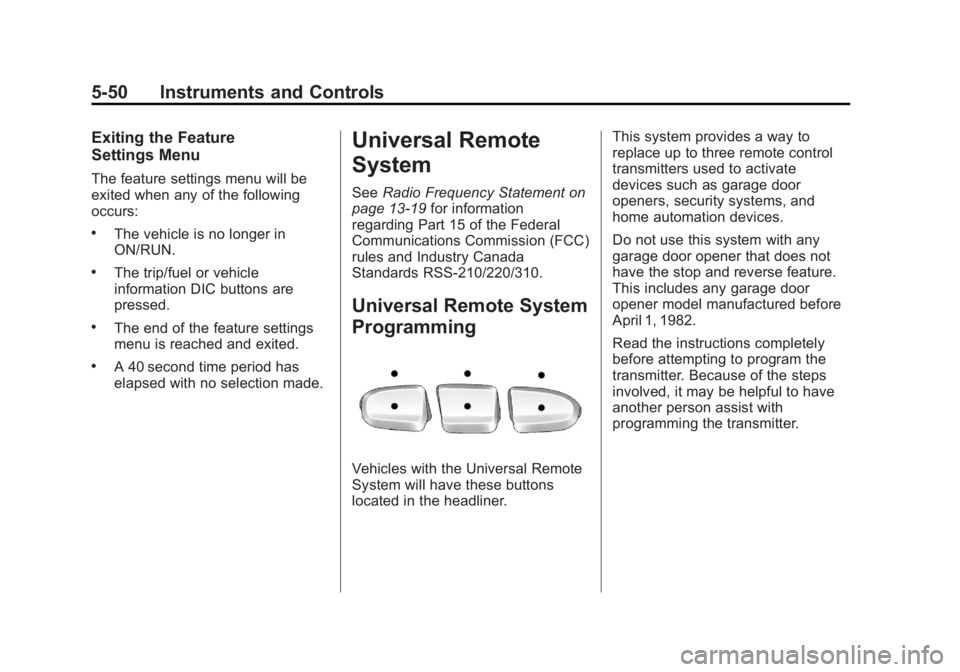
Vehicles with the Universal Remote
System will have these buttons
located in the headliner. This system provides a way to
replace up to three remote control
transmitters used to activate
devices such as garage door
openers, security systems, and
home automation devices.
Do not use this system with any
garage door opener that does not
have the stop and reverse feature.
This includes any garage door
opener model manufactured before
April 1, 1982.
Read the instructions completely
before attempting to program the
transmitter. Because of the steps
involved, it may be helpful to have
another person assist with
programming the transmitter.
Page 197 of 548

Black plate (7,1)Cadillac Escalade/Escalade ESV Owner Manual - 2011
Lighting 6-7When the DRL system is on,
only the DRL lamps are on. The
taillamps, sidemarker, instrument
panel lights, and other lamps will
not be on.
When it begins to get dark, the
automatic headlamp system
switches from DRL to the
headlamps.
To turn off the DRL lamps, turn the
exterior lamps control to the OFF
position and then release. For
vehicles first sold in Canada, the
transmission must be in the P (Park)
position before the DRL lamps can
be turned off. Automatic Headlamp
System When it is dark enough outside, the
automatic headlamp system turns
on the headlamps at the normal
brightness, along with the taillamps,
sidemarker, parking lamps, and the
instrument panel lights. The radio
lights will also be dim.
To turn off the automatic headlamp
system, turn the exterior lamps
switch to the off position and then
release it. The vehicle has a light sensor
located on the top of the instrument
panel which regulates when the
automatic headlamps turn on. Do
not cover the sensor, otherwise the
headlamps will come on whenever
the ignition is on.
The system may also turn on the
headlamps when driving through a
parking garage, heavy overcast
weather, or a tunnel. This is normal.
Page 203 of 548

Black plate (1,1)Cadillac Escalade/Escalade ESV Owner Manual - 2011
Infotainment System 7-1
Infotainment
System Introduction Infotainment . . . . . . . . . . . . . . . . . . . 7-2
Theft-Deterrent Feature . . . . . . . 7-3
Overview . . . . . . . . . . . . . . . . . . . . . . 7-3
Radio AM-FM Radio . . . . . . . . . . . . . . . . 7-10
Satellite Radio . . . . . . . . . . . . . . . 7-16
Radio Reception . . . . . . . . . . . . . 7-17
Rear Side Window
Antenna . . . . . . . . . . . . . . . . . . . . 7-18
Satellite Radio Antenna . . . . . . 7-18
Audio Players CD/DVD Player . . . . . . . . . . . . . . 7-19
MP3 . . . . . . . . . . . . . . . . . . . . . . . . . 7-28
Auxiliary Devices . . . . . . . . . . . . 7-31 Rear Seat Infotainment Rear Seat Entertainment
(RSE) System
(Overhead) . . . . . . . . . . . . . . . . . 7-33
Rear Seat Entertainment
(RSE) System
(Headrest DVD) . . . . . . . . . . . . 7-43
Rear Seat Audio (RSA)
System . . . . . . . . . . . . . . . . . . . . . 7-58
Navigation Using the Navigation
System . . . . . . . . . . . . . . . . . . . . . 7-60
Maps . . . . . . . . . . . . . . . . . . . . . . . . 7-62
Navigation Symbols . . . . . . . . . 7-64
Destination . . . . . . . . . . . . . . . . . . 7-69
Configure Menu . . . . . . . . . . . . . 7-83
Global Positioning
System (GPS) . . . . . . . . . . . . . . 7-96 Vehicle Positioning . . . . . . . . . . 7-97
Problems with Route
Guidance . . . . . . . . . . . . . . . . . . . 7-97
If the System Needs
Service . . . . . . . . . . . . . . . . . . . . . 7-98
Map Data Updates . . . . . . . . . . . 7-99
Database Coverage
Explanations . . . . . . . . . . . . . . . 7-99
Voice Recognition Voice Recognition . . . . . . . . . . 7-100
Phone Bluetooth . . . . . . . . . . . . . . . . . . . 7-103
Page 205 of 548
Black plate (3,1)Cadillac Escalade/Escalade ESV Owner Manual - 2011
Infotainment System 7-3Use the navigation system to: .
Plan a route. .
Select a destination using
various methods and choices. .
Follow turn-by-turn route and
map guidance with voice
prompts, only if permitted by
traffic laws, controls, and
conditions.
Always be alert and obey traffic
and roadway laws and instructions,
regardless of the guidance from
the navigation system. Because
the navigation system uses street
map information that does not
include all traffic restrictions or
the latest road changes, it may
suggest using a road that is now
closed for construction or a turn
that is prohibited by signs at the
intersection. Because the system
uses limited information, you must
always evaluate whether following
the system's directions is safe and
legal for the current conditions. Theft-Deterrent Feature TheftLock ®
is designed to
discourage theft of the vehicle's
radio by learning a portion of the
Vehicle Identification Number (VIN).
The radio does not operate if it is
stolen or moved to a different
vehicle.
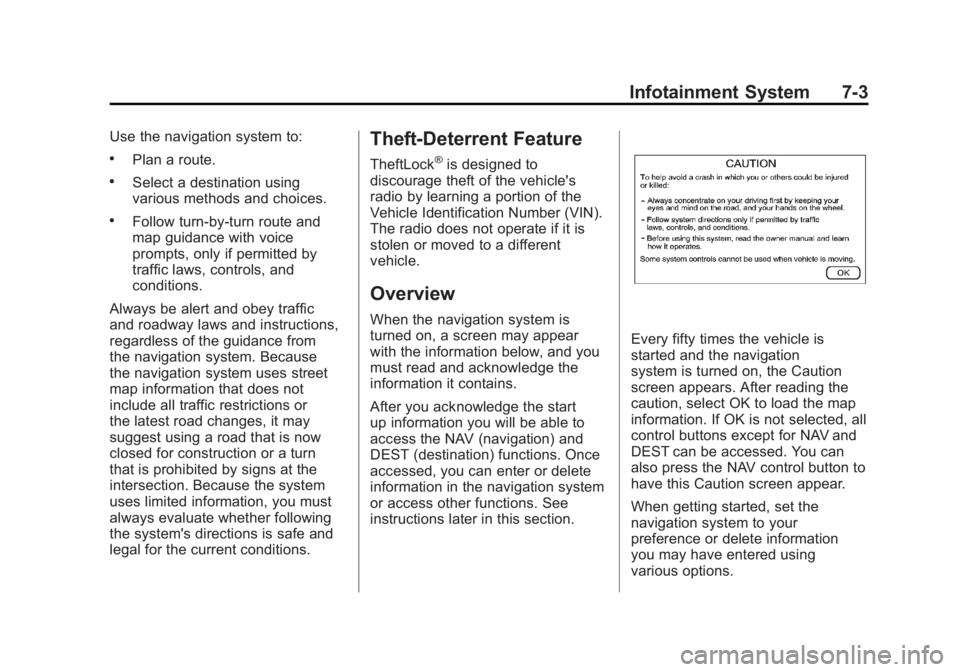
Overview When the navigation system is
turned on, a screen may appear
with the information below, and you
must read and acknowledge the
information it contains.
After you acknowledge the start
up information you will be able to
access the NAV (navigation) and
DEST (destination) functions. Once
accessed, you can enter or delete
information in the navigation system
or access other functions. See
instructions later in this section. Every fifty times the vehicle is
started and the navigation
system is turned on, the Caution
screen appears. After reading the
caution, select OK to load the map
information. If OK is not selected, all
control buttons except for NAV and
DEST can be accessed. You can
also press the NAV control button to
have this Caution screen appear.
When getting started, set the
navigation system to your
preference or delete information
you may have entered using
various options.
Page 207 of 548

Black plate (5,1)Cadillac Escalade/Escalade ESV Owner Manual - 2011
Infotainment System 7-5M. Auxiliary Jack
N.
y © ¨ z (Seek) Key
(Previous/Next)
O.
w (Tune) Knob
P.
y z (Scan Up/Down)
Q. AUDIO
R. FAV (Favorite)
S.
5 (Phone)
T.
e (Sound)
U. CONFIG (Configure)
V. DEST (Destination)
W. RPT (Repeat)
X. NAV (Navigation) Language — English/MetricTo change the language of the
navigation screens or to change
the navigation screens from English
or metric, see Driver Information
Center (DIC) on page 5 ‑ 26 for
more information.
Deleting Personal Information This navigation system can record
and store personal information
such as names and addresses.
Delete this information when
selling your vehicle or returning a
leased vehicle. See “ Edit Address
Book — Edit/View ” under Configure
Menu on page 7 ‑ 83 for deleting
information from the address book. Limit Features While Driving The navigation system may have
this feature.
Touch the Limit Features While
Driving screen button to turn the
ability to limit functions on and off
while driving. When this screen
button is highlighted, the following
functions are limited while driving: .
Music Navigator Scrolling .
Radio Category Scrolling .
Navigation Menu Scrolling and
some functions
See “ Category ” under AM-FM Radio
on page 7 ‑ 10 for more information.
See “ From Map ” under Destination
on page 7 ‑ 69 for more information.
Some functions will remain limited
regardless of the setting.
Page 208 of 548

Black plate (6,1)Cadillac Escalade/Escalade ESV Owner Manual - 2011
7-6 Infotainment System Storing Radio Station Presets To set preset radio stations, do the
following:
1. Press
O to turn the system on.
2. Press AUDIO and select the
desired band (AM, FM, or XM
(if equipped)).
3. Use the
w (tuning) knob or
the SEEK arrows to tune to the
desired station.
4. Press and hold one of the five
preset screen buttons, at the
bottom of the screen, until a
beep is heard.
5. Repeat the steps for each
preset.
See “ Storing Radio Station Presets ”
under AM-FM Radio on page 7 ‑ 10
for more information. Setting the Clock The navigation system time and the
analog clock operate independently.
Changing the time through the
navigation system does not change
the time on the analog clock. See
Clock on page 5 ‑ 8 to change the
analog clock time.
To set the time for the navigation
system:
1. Press CONFIG to enter the
configure menu options, then
press CONFIG again, repeatedly
until the time is selected or touch
the time screen button.
2. Press the Hours and
Minutes − and + to decrease
or to increase the time.
See “ Setting the Clock ” under
Configure Menu on page 7 ‑ 83 for
more information. Entering an Address and Point
of Interest, and Storing Preset
Destinations Entering an Address
Enter a destination by inputting the
city name first:
1. Press
O to turn the system on.
2. A caution may appear. Press OK
to proceed.
3. Press DEST.
4. Press
2 (Address Entry).
5. Select the state/province screen
button, if needed, to change the
current state or province. A list
of all of the available states and
provinces appear. Select the
state or province.
Page 212 of 548
Black plate (10,1)Cadillac Escalade/Escalade ESV Owner Manual - 2011
7-10 Infotainment System
Radio AM-FM Radio Notice: Before adding any sound
equipment to the vehicle, such
as an audio system, CD player,
CB radio, mobile telephone,
or two-way radio, make sure that
it can be added by checking with
your dealer. Also, check federal
rules covering mobile radio
and telephone units. If sound
equipment can be added, it is
very important to do it properly.
Added sound equipment can
interfere with the operation of the
vehicle's engine, radio, or other
systems, and even damage them.
The vehicle's systems can
interfere with the operation of
sound equipment that has been
added. Notice: The chime signals related
to safety belts, parking brake, and
other functions of the vehicle
operate through the navigation
system. If that equipment is
replaced or additional equipment
is added to the vehicle, the
chimes may not work. Make sure
that replacement or additional
equipment is compatible with the
vehicle before installing it. See
“ Accessories and Modifications ”
in the vehicle's owner manual.
Playing the Radio
O /
n (Power/Volume):
1. Press to turn the audio system
on and off.
2. Turn to increase or to decrease
the volume. 3. Press and hold for more than
two seconds to turn off the
navigation system, the Rear
Seat Entertainment (RSE) video
screen, and Rear Seat Audio
(RSA). If the vehicle has not
been turned off, press this knob
to turn RSE and RSA back on
and to continue playback of the
last active source.
w (Tuning Knob): Turn to go to
the next or previous frequency or
disc track or chapter. See CD/DVD
Player on page 7 ‑ 19 or MP3 on
page 7 ‑ 28 for more information.
AUDIO: Press to display the audio
screen. Press to switch between
AM, FM, or XM, if equipped, Disc,
or AUX (Auxiliary), or press the
screen button. See CD/DVD Player
on page 7 ‑ 19 , MP3 on page 7 ‑ 28 ,
and Auxiliary Devices on page 7 ‑ 31
for more information.