transmission CADILLAC ESCALADE ESV 2011 Owners Manual
[x] Cancel search | Manufacturer: CADILLAC, Model Year: 2011, Model line: ESCALADE ESV, Model: CADILLAC ESCALADE ESV 2011Pages: 548, PDF Size: 8.45 MB
Page 1 of 548
Black plate (1,1)Cadillac Escalade/Escalade ESV Owner Manual - 2011
2011 Cadillac Escalade/Escalade ESV Owner Manual MIn Brief . . . . . . . . . . . . . . . . . . . . . . . . 1-1
Instrument Panel . . . . . . . . . . . . . . 1-2
Initial Drive Information . . . . . . . . 1-4
Vehicle Features . . . . . . . . . . . . . 1-16
Performance and
Maintenance . . . . . . . . . . . . . . . . 1-21
Keys, Doors and Windows . . . 2-1
Keys and Locks . . . . . . . . . . . . . . . 2-2
Doors . . . . . . . . . . . . . . . . . . . . . . . . . . 2-9
Vehicle Security . . . . . . . . . . . . . . 2-13
Exterior Mirrors . . . . . . . . . . . . . . . 2-16
Interior Mirrors . . . . . . . . . . . . . . . . 2-18
Windows . . . . . . . . . . . . . . . . . . . . . 2-19
Roof . . . . . . . . . . . . . . . . . . . . . . . . . . 2-22
Seats and Restraints . . . . . . . . . 3-1
Head Restraints . . . . . . . . . . . . . . . 3-2
Front Seats . . . . . . . . . . . . . . . . . . . . 3-3
Rear Seats . . . . . . . . . . . . . . . . . . . . 3-9
Safety Belts . . . . . . . . . . . . . . . . . . 3-18
Airbag System . . . . . . . . . . . . . . . . 3-35
Child Restraints . . . . . . . . . . . . . . 3-51 Storage . . . . . . . . . . . . . . . . . . . . . . . 4-1
Storage Compartments . . . . . . . . 4-1
Roof Rack System . . . . . . . . . . . . . 4-3
Instruments and Controls . . . . 5-1
Controls . . . . . . . . . . . . . . . . . . . . . . . 5-2
Warning Lights, Gauges, and
Indicators . . . . . . . . . . . . . . . . . . . 5-11
Information Displays . . . . . . . . . . 5-26
Vehicle Messages . . . . . . . . . . . . 5-31
Vehicle Personalization . . . . . . . 5-40
Universal Remote System . . . . 5-50
Lighting . . . . . . . . . . . . . . . . . . . . . . . 6-1
Exterior Lighting . . . . . . . . . . . . . . . 6-1
Interior Lighting . . . . . . . . . . . . . . . 6-10
Lighting Features . . . . . . . . . . . . . 6-11
Infotainment System . . . . . . . . . 7-1
Introduction . . . . . . . . . . . . . . . . . . . . 7-2
Radio . . . . . . . . . . . . . . . . . . . . . . . . . 7-10
Audio Players . . . . . . . . . . . . . . . . 7-19
Rear Seat Infotainment . . . . . . . 7-33
Navigation . . . . . . . . . . . . . . . . . . . . 7-60
Voice Recognition . . . . . . . . . . . 7-100
Phone . . . . . . . . . . . . . . . . . . . . . . . 7-103 Climate Controls . . . . . . . . . . . . . 8-1
Climate Control Systems . . . . . . 8-1
Air Vents . . . . . . . . . . . . . . . . . . . . . . . 8-8
Driving and Operating . . . . . . . . 9-1
Driving Information . . . . . . . . . . . . . 9-2
Starting and Operating . . . . . . . 9-30
Engine Exhaust . . . . . . . . . . . . . . 9-38
Automatic Transmission . . . . . . 9-40
Drive Systems . . . . . . . . . . . . . . . . 9-45
Brakes . . . . . . . . . . . . . . . . . . . . . . . 9-45
Ride Control Systems . . . . . . . . 9-47
Cruise Control . . . . . . . . . . . . . . . . 9-51
Object Detection Systems . . . . 9-54
Fuel . . . . . . . . . . . . . . . . . . . . . . . . . . 9-63
Towing . . . . . . . . . . . . . . . . . . . . . . . 9-70
Conversions and Add-Ons . . . 9-82
Vehicle Care . . . . . . . . . . . . . . . . . 10-1
General Information . . . . . . . . . . 10-2
Vehicle Checks . . . . . . . . . . . . . . . 10-4
Headlamp Aiming . . . . . . . . . . . 10-34
Bulb Replacement . . . . . . . . . . 10-36
Page 7 of 548
Black plate (1,1)Cadillac Escalade/Escalade ESV Owner Manual - 2011
In Brief 1-1
In Brief Instrument Panel Instrument Panel . . . . . . . . . . . . . . 1-2
Initial Drive Information Initial Drive Information . . . . . . . . 1-4
Remote Keyless Entry (RKE)
System . . . . . . . . . . . . . . . . . . . . . . 1-4
Remote Vehicle Start . . . . . . . . . 1-5
Door Locks . . . . . . . . . . . . . . . . . . . 1-5
Liftgate . . . . . . . . . . . . . . . . . . . . . . . . 1-6
Windows . . . . . . . . . . . . . . . . . . . . . . 1-6
Seat Adjustment . . . . . . . . . . . . . . 1-7
Memory Features . . . . . . . . . . . . . 1-8
Second Row Seats . . . . . . . . . . . 1-9
Third Row Seats . . . . . . . . . . . . . . 1-9
Heated and Ventilated
Seats . . . . . . . . . . . . . . . . . . . . . . . . 1-9 Head Restraint
Adjustment . . . . . . . . . . . . . . . . . 1-10
Safety Belts . . . . . . . . . . . . . . . . . . 1-10
Sensing System for
Passenger Airbag . . . . . . . . . . 1-10
Mirror Adjustment . . . . . . . . . . . . 1-11
Steering Wheel
Adjustment . . . . . . . . . . . . . . . . . 1-12
Throttle and Brake Pedal
Adjustment . . . . . . . . . . . . . . . . . 1-12
Interior Lighting . . . . . . . . . . . . . . 1-12
Exterior Lighting . . . . . . . . . . . . . 1-13
Windshield Wiper/Washer . . . . 1-14
Climate Controls . . . . . . . . . . . . . 1-15
Transmission . . . . . . . . . . . . . . . . 1-15
Vehicle Features Radio(s) . . . . . . . . . . . . . . . . . . . . . 1-16
Satellite Radio . . . . . . . . . . . . . . . 1-16
Portable Audio Devices . . . . . . 1-16
Bluetooth ®
. . . . . . . . . . . . . . . . . . . 1-17
Steering Wheel Controls . . . . . 1-17 Cruise Control . . . . . . . . . . . . . . . 1-18
Navigation System . . . . . . . . . . . 1-18
Driver Information
Center (DIC) . . . . . . . . . . . . . . . 1-19
Side Blind Zone
Alert (SBZA) . . . . . . . . . . . . . . . 1-20
Rear Vision
Camera (RVC) . . . . . . . . . . . . . 1-20
Ultrasonic Parking Assist . . . . 1-20
Power Outlets . . . . . . . . . . . . . . . 1-21
Universal Remote System . . . 1-21
Performance and Maintenance StabiliTrak ®
System . . . . . . . . . 1-21
Tire Pressure Monitor . . . . . . . . 1-22
Engine Oil Life System . . . . . . 1-22
Fuel E85 (85% Ethanol) . . . . . 1-23
Driving for Better Fuel
Economy . . . . . . . . . . . . . . . . . . . 1-23
Roadside Service . . . . . . . . . . . . 1-23
OnStar ®
. . . . . . . . . . . . . . . . . . . . . 1-24
Page 9 of 548
Black plate (3,1)Cadillac Escalade/Escalade ESV Owner Manual - 2011
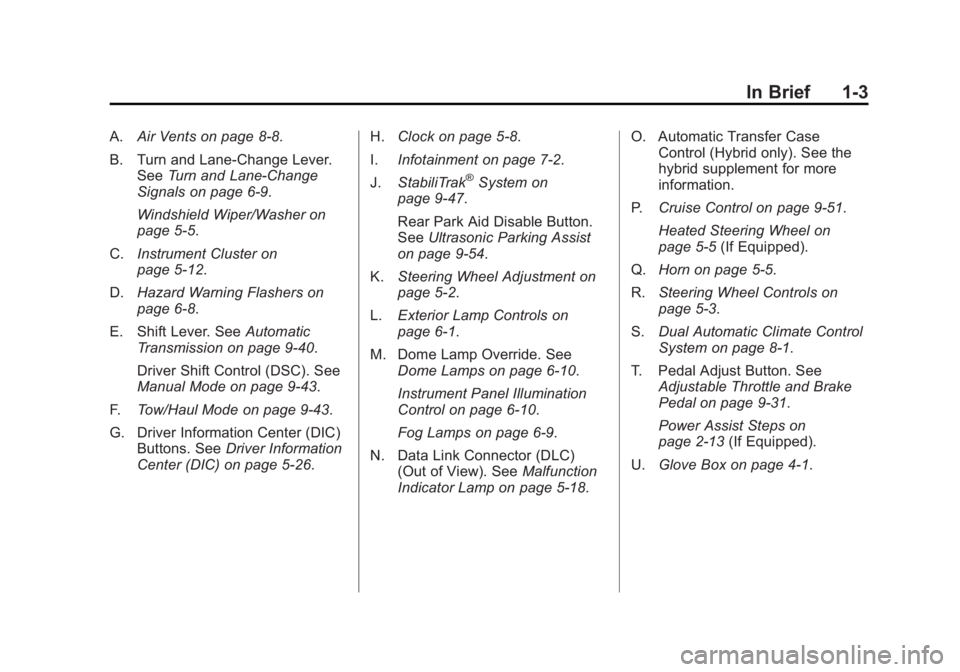
In Brief 1-3A. Air Vents on page 8 ‑ 8 .
B. Turn and Lane ‐ Change Lever.
See Turn and Lane-Change
Signals on page 6 ‑ 9 .
Windshield Wiper/Washer on
page 5 ‑ 5 .
C. Instrument Cluster on
page 5 ‑ 12 .
D. Hazard Warning Flashers on
page 6 ‑ 8 .
E. Shift Lever. See Automatic
Transmission on page 9 ‑ 40 .
Driver Shift Control (DSC). See
Manual Mode on page 9 ‑ 43 .
F. Tow/Haul Mode on page 9 ‑ 43 .
G. Driver Information Center (DIC)
Buttons. See Driver Information
Center (DIC) on page 5 ‑ 26 . H. Clock on page 5 ‑ 8 .
I. Infotainment on page 7 ‑ 2 .
J. StabiliTrak ®
System on
page 9 ‑ 47 .
Rear Park Aid Disable Button.
See Ultrasonic Parking Assist
on page 9 ‑ 54 .
K. Steering Wheel Adjustment on
page 5 ‑ 2 .
L. Exterior Lamp Controls on
page 6 ‑ 1 .
M. Dome Lamp Override. See
Dome Lamps on page 6 ‑ 10 .
Instrument Panel Illumination
Control on page 6 ‑ 10 .
Fog Lamps on page 6 ‑ 9 .
N. Data Link Connector (DLC)
(Out of View). See Malfunction
Indicator Lamp on page 5 ‑ 18 . O. Automatic Transfer Case
Control (Hybrid only). See the
hybrid supplement for more
information.
P. Cruise Control on page 9 ‑ 51 .
Heated Steering Wheel on
page 5 ‑ 5 (If Equipped).
Q. Horn on page 5 ‑ 5 .
R. Steering Wheel Controls on
page 5 ‑ 3 .
S. Dual Automatic Climate Control
System on page 8 ‑ 1 .
T. Pedal Adjust Button. See
Adjustable Throttle and Brake
Pedal on page 9 ‑ 31 .
Power Assist Steps on
page 2 ‑ 13 (If Equipped).
U. Glove Box on page 4 ‑ 1 .
Page 21 of 548
Black plate (15,1)Cadillac Escalade/Escalade ESV Owner Manual - 2011
In Brief 1-15
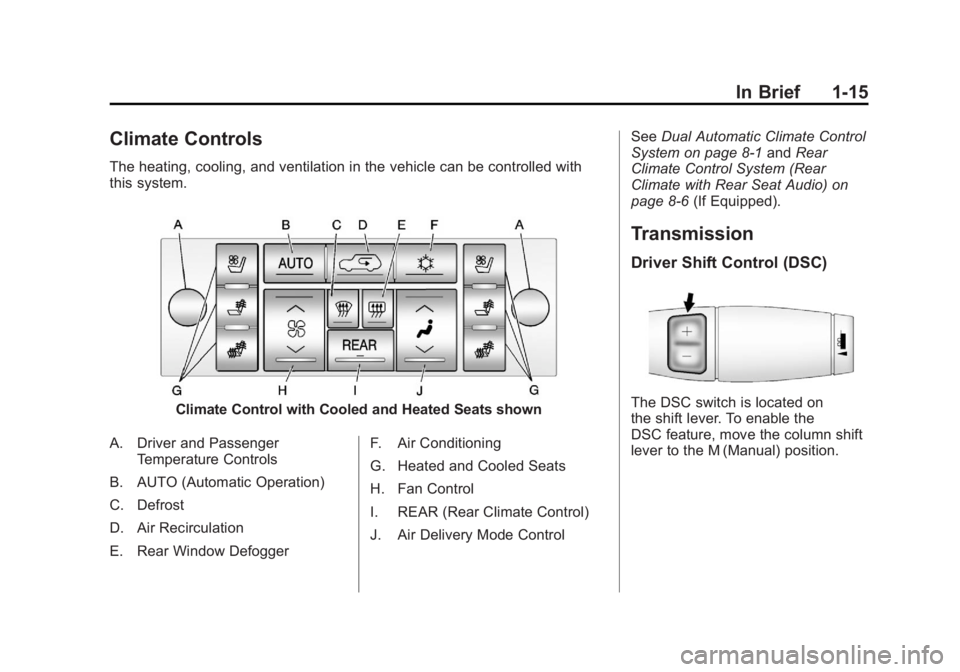
Climate Controls The heating, cooling, and ventilation in the vehicle can be controlled with
this system.
Climate Control with Cooled and Heated Seats shown
A. Driver and Passenger
Temperature Controls
B. AUTO (Automatic Operation)
C. Defrost
D. Air Recirculation
E. Rear Window Defogger F. Air Conditioning
G. Heated and Cooled Seats
H. Fan Control
I. REAR (Rear Climate Control)
J. Air Delivery Mode Control See Dual Automatic Climate Control
System on page 8 ‑ 1 and Rear
Climate Control System (Rear
Climate with Rear Seat Audio) on
page 8 ‑ 6 (If Equipped).
Transmission Driver Shift Control (DSC)
The DSC switch is located on
the shift lever. To enable the
DSC feature, move the column shift
lever to the M (Manual) position.
Page 25 of 548
Black plate (19,1)Cadillac Escalade/Escalade ESV Owner Manual - 2011
In Brief 1-19
Driver Information
Center (DIC) The DIC display is located at the
bottom of the instrument panel
cluster. It shows the status of
many vehicle systems and enables
access to the personalization menu.
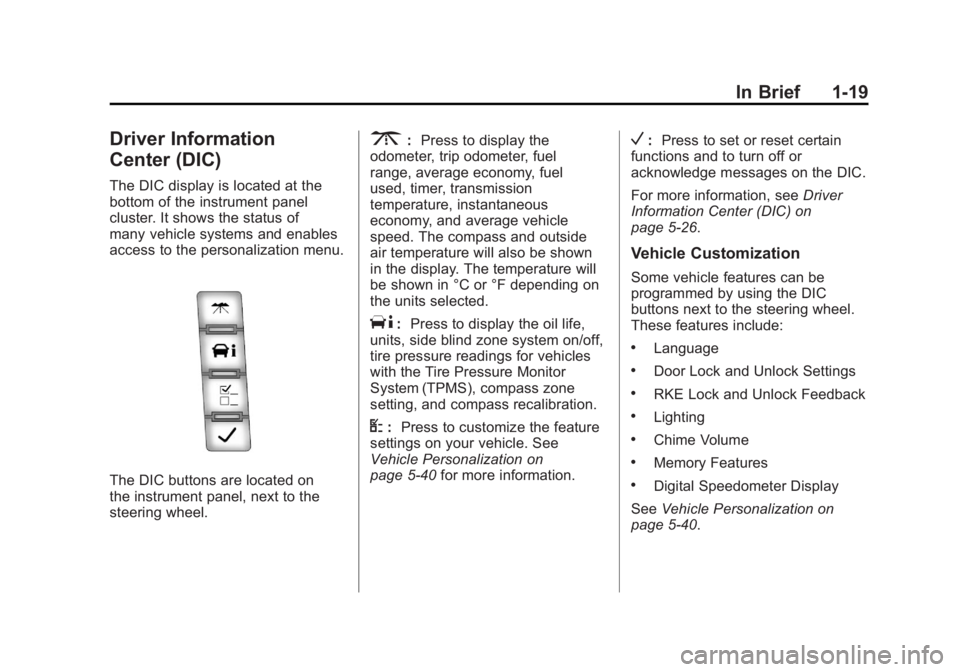
The DIC buttons are located on
the instrument panel, next to the
steering wheel. 3 : Press to display the
odometer, trip odometer, fuel
range, average economy, fuel
used, timer, transmission
temperature, instantaneous
economy, and average vehicle
speed. The compass and outside
air temperature will also be shown
in the display. The temperature will
be shown in °C or °F depending on
the units selected.
T : Press to display the oil life,
units, side blind zone system on/off,
tire pressure readings for vehicles
with the Tire Pressure Monitor
System (TPMS), compass zone
setting, and compass recalibration.
U : Press to customize the feature
settings on your vehicle. See
Vehicle Personalization on
page 5 ‑ 40 for more information. V : Press to set or reset certain
functions and to turn off or
acknowledge messages on the DIC.
For more information, see Driver
Information Center (DIC) on
page 5 ‑ 26 .
Vehicle Customization Some vehicle features can be
programmed by using the DIC
buttons next to the steering wheel.
These features include: .
Language .
Door Lock and Unlock Settings .
RKE Lock and Unlock Feedback .
Lighting .
Chime Volume .
Memory Features .
Digital Speedometer Display
See Vehicle Personalization on
page 5 ‑ 40 .
Page 43 of 548

Black plate (11,1)Cadillac Escalade/Escalade ESV Owner Manual - 2011
Keys, Doors and Windows 2-11The taillamps will flash and a chime
will sound when the power liftgate is
moving.
{ WARNINGYou or others could be injured if
caught in the path of the power
liftgate. Make sure there is no one
in the way of the liftgate as it is
opening and closing.
Notice: If you open the liftgate
without checking for overhead
obstructions such as a garage
door, you could damage the
liftgate or the liftgate glass.
Always check to make sure the
area above and behind the liftgate
is clear before opening it. The power liftgate can be power
opened and closed in the
following ways: .
Press and hold
& on the
Remote Keyless Entry (RKE)
transmitter until the liftgate starts
moving. See Remote Keyless
Entry (RKE) System Operation
on page 2 ‑ 3 . .
Press
& on the overhead
console. .
Press the touchpad on the
outside liftgate handle.
Pressing the buttons, or touchpad
switch a second time while the
liftgate is moving reverses the
direction.
l : The liftgate can also be
closed by pressing this button
next to the liftgate latch.
Press the button a second time
during liftgate operation to reverse
that operation. The power liftgate may be
temporarily disabled under extreme
temperatures, or under low battery
conditions. If this occurs, the liftgate
can still be operated manually.
If the transmission is shifted out of
P (Park) while the power function is
in progress, the liftgate power
function will continue to completion.
If the transmission is shifted out of
P (Park) and the vehicle accelerates
before the power liftgate latches
closed, the liftgate may reverse to
the open position. Cargo could fall
out of the vehicle. Always make
sure the power liftgate is closed and
latched before you drive away.
If you power open the liftgate and
the liftgate support struts have lost
pressure, the lamps will flash and a
chime will sound. The liftgate will
stay open temporarily, then slowly
close. See your dealer for service
before using the liftgate.
Page 69 of 548

Black plate (13,1)Cadillac Escalade/Escalade ESV Owner Manual - 2011
Seats and Restraints 3-13Automatic Fold and Tumble
Feature The transmission must be in
P (Park) for this feature to work.
{ WARNINGAutomatically folding and
tumbling the seat when someone
is sitting in the seat, could cause
injury to the person sitting there.
Always make sure there is no one
sitting in the seat before pressing
the automatic seat release button.
Folding and Tumbling the Second
Row Seat from the Third Row Seat
or Outside the Vehicle
{ WARNING
Using the third row seating
position while the second row is
folded, or folded and tumbled,
(Continued) WARNING (Continued) could cause injury in a sudden
stop or crash. Be sure to return
the seat to the passenger seating
position. Push and pull on the
seat to make sure it is locked into
place.
To fold and tumble the seat from the
third row seat, if equipped:
1. Make sure that there is nothing
under, in front of, or on the seat.
Notice: Folding a rear seat with
the safety belts still fastened may
cause damage to the seat or the
safety belts. Always unbuckle the
safety belts and return them to
their normal stowed position
before folding a rear seat. Driver Side Rear Panel Button
Shown
2. Press the automatic seat release
button on the panel behind the
rear doors.
The seatback automatically
folds flat and the seat tumbles
forward. There will be a slight
delay between the folding of the
seatback and the tumbling of
the seat.
Page 136 of 548

Black plate (2,1)Cadillac Escalade/Escalade ESV Owner Manual - 2011
5-2 Instruments and Controls Vehicle Messages Vehicle Messages . . . . . . . . . . . 5-31
Battery Voltage and Charging
Messages . . . . . . . . . . . . . . . . . . 5-31
Brake System Messages . . . . 5-31
Door Ajar Messages . . . . . . . . . 5-32
Engine Cooling System
Messages . . . . . . . . . . . . . . . . . . 5-33
Engine Oil Messages . . . . . . . . 5-34
Engine Power Messages . . . . 5-34
Fuel System Messages . . . . . . 5-35
Key and Lock Messages . . . . . 5-35
Lamp Messages . . . . . . . . . . . . . 5-35
Object Detection System
Messages . . . . . . . . . . . . . . . . . . 5-36
Ride Control System
Messages . . . . . . . . . . . . . . . . . . 5-37
Airbag System Messages . . . . 5-38 Anti-Theft Alarm System
Messages . . . . . . . . . . . . . . . . . . 5-38
Tire Messages . . . . . . . . . . . . . . . 5-39
Transmission Messages . . . . . 5-40
Vehicle Reminder
Messages . . . . . . . . . . . . . . . . . . 5-40
Washer Fluid Messages . . . . . 5-40
Vehicle Personalization Vehicle Personalization . . . . . . 5-40
Universal Remote System Universal Remote System . . . 5-50
Universal Remote System
Programming . . . . . . . . . . . . . . . 5-50
Universal Remote System
Operation . . . . . . . . . . . . . . . . . . 5-55 Controls Steering Wheel
Adjustment
The power tilt wheel control is
located on the left side of the
steering column.
Push the control up or down to tilt
the steering wheel up or down.
To set the memory position, see
“ Memory Features ” in Power Seat
Adjustment on page 3 ‑ 3 .
Page 153 of 548

Black plate (19,1)Cadillac Escalade/Escalade ESV Owner Manual - 2011
Instruments and Controls 5-19If the malfunction indicator lamp
comes on and stays on while the
engine is running, this indicates that
there is an OBD II problem and
service is required.
Malfunctions often are indicated by
the system before any problem is
apparent. Being aware of the light
can prevent more serious damage
to the vehicle. This system assists
the service technician in correctly
diagnosing any malfunction.
Notice: If the vehicle is
continually driven with this light
on the emission controls might
not work as well, the vehicle fuel
economy might not be as good,
and the engine might not run as
smoothly. This could lead to
costly repairs that might not be
covered by the vehicle warranty. Notice: Modifications made to the
engine, transmission, exhaust,
intake, or fuel system of the
vehicle or the replacement of
the original tires with other
than those of the same Tire
Performance Criteria (TPC) can
affect the vehicle's emission
controls and can cause this light
to come on. Modifications to
these systems could lead to
costly repairs not covered by
the vehicle warranty. This
could also result in a failure to
pass a required Emission
Inspection/Maintenance test.
See Accessories and
Modifications on page 10 ‑ 3 .
This light comes on during a
malfunction in one of two ways:
Light Flashing: A misfire condition
has been detected. A misfire
increases vehicle emissions and
could damage the emission control
system on the vehicle. Diagnosis
and service might be required. To prevent more serious damage to
the vehicle: .
Reduce vehicle speed. .
Avoid hard accelerations. .
Avoid steep uphill grades. .
If towing a trailer, reduce the
amount of cargo being hauled as
soon as it is possible.
If the light continues to flash, when
it is safe to do so, stop the vehicle.
Find a safe place to park the
vehicle. Turn the vehicle off, wait at
least 10 seconds, and restart the
engine. If the light is still flashing,
follow the previous steps and see
your dealer for service as soon as
possible.
Light On Steady: An emission
control system malfunction has
been detected on the vehicle.
Diagnosis and service might be
required.
Page 160 of 548

Black plate (26,1)Cadillac Escalade/Escalade ESV Owner Manual - 2011
5-26 Instruments and Controls
Information Displays Driver Information
Center (DIC) Your vehicle has a Driver
Information Center (DIC).
The DIC displays information
about your vehicle. It also displays
warning messages if a system
problem is detected. The DIC
also allows some features to
be customized. See Vehicle
Personalization on page 5 ‑ 40
for more information.
All messages will appear in the DIC
display located in the center of the
instrument panel cluster.
The DIC comes on when the ignition
is on. After a short delay, the DIC
will display the information that was
last displayed before the engine
was turned off. Operation and Displays The DIC has different displays
which can be accessed by pressing
the DIC buttons located on the
instrument panel, next to the
steering wheel.
The DIC displays trip, fuel, and
vehicle system information, and
warning messages if a system
problem is detected. A digital
speedometer also appears at the
bottom of the DIC display. The
digital speedometer can be
enabled or disabled. See “ DISPLAY
DIGITAL SPEED ” under Vehicle
Personalization on page 5 ‑ 40 for
more information. DIC Buttons
The buttons are the trip/fuel,
vehicle information, customization,
and set/reset buttons. The button
functions are detailed in the
following pages.
3 (Trip/Fuel): Press to display
the odometer, trip odometer, fuel
range, average economy, fuel
used, timer, transmission
temperature, instantaneous
economy, and average vehicle