radio CADILLAC ESCALADE EXT 2007 3.G User Guide
[x] Cancel search | Manufacturer: CADILLAC, Model Year: 2007, Model line: ESCALADE EXT, Model: CADILLAC ESCALADE EXT 2007 3.GPages: 580, PDF Size: 3.01 MB
Page 210 of 580
Automatic Headlamp System
When it is dark enough outside and the headlamp
switch is in AUTO, your automatic headlamp
system will turn on your headlamps at the normal
brightness along with other lamps such as the
taillamps, sidemarker, parking lamps, roof marker
lamps, and the instrument panel lights. The
radio lights will also be dim.
To turn off the automatic headlamp system, turn
the exterior lamps switch to the off position
and then release. For vehicles rst sold in Canada,
the transaxle must be in the Park (P) position,
before the automatic headlamp system can
be turned off.
Your vehicle has a light sensor located on the
top of the instrument panel. Be sure it is not
covered, or the system will be on whenever the
ignition is on.
The system may also turn on your headlamps
when driving through a parking garage, heavy
overcast weather, or a tunnel. This is normal.There is a delay in the transition between the
daytime and nighttime operation of the Daytime
Running Lamps (DRL) and the automatic headlamp
systems so that driving under bridges or bright
overhead street lights does not affect the system.
The DRL and automatic headlamp system will only
be affected when the light sensor sees a change in
lighting lasting longer than the delay.
If you start your vehicle in a dark garage, the
automatic headlamp system will come on
immediately. Once you leave the garage, it will
take approximately one minute for the automatic
headlamp system to change to DRL if it is
light outside. During that delay, your instrument
panel cluster may not be as bright as usual. Make
sure your instrument panel brightness control is
in the full bright position. SeeInstrument
Panel Brightness on page 211.
210
Page 211 of 580

Fog Lamps
If your vehicle has fog lamps you can use them
for better vision in foggy or misty conditions. Your
parking lamps and/or low-beam headlamps
must be on for your fog lamps to work.
The fog lamp button is located on the left side of
your instrument panel.
-(Fog Lamps):Press the button to turn the fog
lamps on. An indicator light will come on in the
instrument panel cluster to let you know that
the fog lamps are on. Press the button again to
turn them off.
Remember, fog lamps alone will not give off as
much light as your headlamps. Never use your fog
lamps in the dark without turning on the headlamps.
The fog lamps will go off whenever your
high-beam headlamps come on. When the high
beams go off, the fog lamps will come on again.
The fog lamps will be cancelled after the ignition is
turned off. If you still want to use the fog lamps
after you restart the vehicle, you will need to press
the fog lamp button again.Some localities have laws that require the
headlamps to be on along with the fog lamps.
Exterior Cargo Lamps
You can use the cargo lamp if you need more
light in the cargo area of your vehicle or in
the top-box storage units. Some vehicles will only
have a cargo lamp in the driver side top box.
The cargo lamps come on by turning on the
interior dome lamps.
Instrument Panel Brightness
The knob for this feature is located next to the
exterior lamps control.
D(Instrument Panel Lights):Turn the knob
clockwise or counterclockwise to brighten or dim
the instrument panel lights and the radio
display. This will only work if the headlamps or
parking lamps are on.
To turn on the dome lamps, with the vehicle doors
closed, turn the knob all the way to the right.
211
Page 214 of 580

The URPA display is
located above the rear
window towards the
center of the vehicle
and can be seen
by looking over your
right shoulder.
The URPA display has three color-coded lights.
The lights are used to provide distance and system
information, along with beeps that will be heard
through the speakers.
URPA can be turned off
by pressing the rear park
aid disable button
located next to the radio.
The indicator light will
come on to indicate that
URPA is off.The red light in the URPA display will also be lit if
the vehicle is in REVERSE (R). If the vehicle
has a Driver Information Center (DIC), PARKING
ASSIST OFF will display on the screen. URPA
automatically turns back on each time the vehicle
is started.
How the System Works
When the shift lever is moved into REVERSE (R),
the rear display will briey come on to let you
know the display is operating correctly. URPA
comes on automatically when the shift lever
is moved into REVERSE (R).
The system does not work at a reverse speed
greater than 5 mph (8 km/h). To remind you of this,
the red light on the rear display will ash.
214
Page 217 of 580
Accessory Power Outlet(s)
Accessory power outlets can be used to connect
auxiliary electrical equipment, such as a cellular
telephone or CB radio.
One outlet is located in the center console. Lift
up on the lower latch located at the front of
the console lid to access the outlet.
There may also be an accessory power outlet
located on the back of the center console above
the cupholder.
To use an outlet, lift up on the spring-loaded
protective cap. When not in use, the cap
will automatically close over the outlet. The
accessory power outlet is powered at all times.
Do not try to put the cigarette lighter in any of the
accessory outlets.
Notice:If electrical devices are left plugged
into a power outlet, the battery may drain
causing your vehicle not to start or damage to
the battery. This would not be covered by
the warranty. Always unplug all electrical
devices when turning off your vehicle.Certain electrical accessories may not be
compatible with the accessory power outlet and
could result in blown vehicle or adapter fuses.
If you experience a problem see your dealer for
additional information on accessory power outlets.
Notice:Adding any electrical equipment to
your vehicle may damage it or keep other
components from working as they should.
The repairs would not be covered by your
warranty. Do not use equipment exceeding
maximum amperage rating of 20 amperes.
Check with your dealer before adding
electrical equipment.
When adding electrical equipment, be sure to
follow the proper installation instructions included
with the electrical equipment you install.
Notice:Improper use of the power outlet can
cause damage not covered by your warranty.
Do not hang any type of accessory or accessory
bracket from the plug because the power
outlets are designed for accessory power
plugs only.
217
Page 232 of 580
Charging System Light
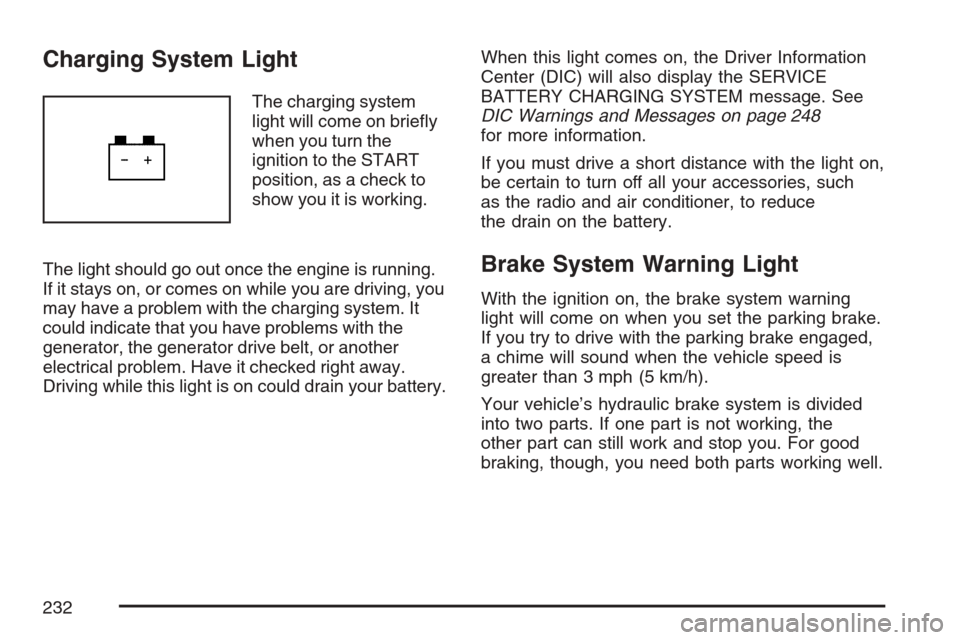
The charging system
light will come on briey
when you turn the
ignition to the START
position, as a check to
show you it is working.
The light should go out once the engine is running.
If it stays on, or comes on while you are driving, you
may have a problem with the charging system. It
could indicate that you have problems with the
generator, the generator drive belt, or another
electrical problem. Have it checked right away.
Driving while this light is on could drain your battery.When this light comes on, the Driver Information
Center (DIC) will also display the SERVICE
BATTERY CHARGING SYSTEM message. See
DIC Warnings and Messages on page 248
for more information.
If you must drive a short distance with the light on,
be certain to turn off all your accessories, such
as the radio and air conditioner, to reduce
the drain on the battery.
Brake System Warning Light
With the ignition on, the brake system warning
light will come on when you set the parking brake.
If you try to drive with the parking brake engaged,
a chime will sound when the vehicle speed is
greater than 3 mph (5 km/h).
Your vehicle’s hydraulic brake system is divided
into two parts. If one part is not working, the
other part can still work and stop you. For good
braking, though, you need both parts working well.
232
Page 267 of 580

Press the customization button until FACTORY
SETTINGS appears on the DIC display. Press the
set/reset button once to access the settings for
this feature. Then press the customization button
to scroll through the following settings:
RESTORE ALL (default):The customization
features will be set to their factory default settings.
DO NOT RESTORE:The customization features
will not be set to their factory default settings.
Choose one of the available settings and press
the set/reset button while it is displayed on the
DIC to select it.
EXIT FEATURE SETTINGS
This feature allows you to exit the feature
settings menu.
Press the customization button until PRESS
VTO
EXIT FEATURE SETTINGS appears in the DIC
display. Press the set/reset button once to exit the
menu.
If you do not exit, pressing the customization
button again will return you to the beginning of the
feature settings menu.
Exiting the Feature Settings Menu
The feature settings menu will be exited when any
of the following occurs:
The vehicle is no longer in RUN.
The trip/fuel or vehicle information DIC buttons
are pressed.
The end of the feature settings menu is
reached and exited.
A 40 second time period has elapsed with no
selection made.
Audio System(s)
Determine which radio your vehicle has and then
read the pages following to familiarize yourself
with its features.
Driving without distraction is a necessity for a
safer driving experience. SeeDefensive Driving on
page 322. By taking a few moments to read this
manual and get familiar with your vehicle’s
audio system, you can use it with less effort, as
well as take advantage of its features. While your
vehicle is parked, set up your audio system by
presetting your favorite radio stations, setting the
tone, and adjusting the speakers.
267
Page 268 of 580
Then, when driving conditions permit, you can
tune to your favorite stations using the presets and
steering wheel controls if the vehicle has them.
{CAUTION:
This system provides you with a far greater
access to audio stations and song listings.
Giving extended attention to entertainment
tasks while driving can cause a crash and
you or others can be injured or killed.
Always keep your eyes on the road and
your mind on the drive — avoid engaging
in extended searching while driving.
Keeping your mind on the drive is important for
safe driving. For more information, seeDefensive
Driving on page 322.Here are some ways in which you can help avoid
distraction while driving.
While your vehicle is parked:
Familiarize yourself with all of its controls.
Familiarize yourself with its operation.
Set up your audio system by presetting your
favorite radio stations, setting the tone, and
adjusting the speakers. Then, when driving
conditions permit, you can tune to your favorite
radio stations using the presets and steering
wheel controls if the vehicle has them.
Notice:Before adding any sound equipment
to your vehicle, such as an audio system,
CD player, CB radio, mobile telephone,
or two-way radio, make sure that it can be
added by checking with your dealer. Also,
check federal rules covering mobile radio and
telephone units. If sound equipment can be
added, it is very important to do it properly.
Added sound equipment may interfere with the
operation of your vehicle’s engine, radio, or
other systems, and even damage them.
Your vehicle’s systems may interfere with
the operation of sound equipment that
has been added.
268
Page 269 of 580
Notice:The chime signals related to safety
belts, parking brake, and other functions of
your vehicle operate through the radio/
entertainment system. If that equipment is
replaced or additional equipment is added to
your vehicle, the chimes may not work. Make
sure that replacement or additional equipment
is compatible with your vehicle before installing
it. SeeAccessories and Modifications on
page 397.
Your vehicle has a feature called Retained
Accessory Power (RAP). With RAP, the audio
system can be played even after the ignition
is turned off. SeeRetained Accessory Power
(RAP) on page 125for more information.Setting the Time
1. Press the tune/select knob (the right knob)
to enter the main menu.
2. Turn the tune/select knob until SET CLOCK
appears on the display.
3. Press the tune/select knob to select
SET CLOCK.
4. Turn the tune/select knob to adjust the time.
5. Press the tune/select knob to update the time.
VEHICLE TIME UPDATED will appear on
the display.
If the CLOCK/RADIO DISP (display) is
programmed into one of the congurable keys,
pressing the key will switch the display back to the
clock set function. The time and date will always
appear on the radio display. See “Congurable
Radio Display Keys” underRadio with CD and DVD
on page 270for more information on conguring
the keys.
269
Page 270 of 580
Setting the Date
1. Press the tune/select knob (the right knob)
to enter the main menu.
2. Turn the tune/select knob until SET DATE
appears on the display.
3. Press the tune/select knob to select
SET DATE.
4. Turn the tune/select knob to adjust the date.
5. Press the tune/select knob to update the
time. VEHICLE DATE UPDATED will
appear on the display.
If the DATE is programmed into one of the
congurable keys, pressing the key will switch
the display back to the date set function. The time
and date will always appear on the radio display.
See “Congurable Radio Display Keys” under
Radio with CD and DVD on page 270for more
information on conguring the keys.
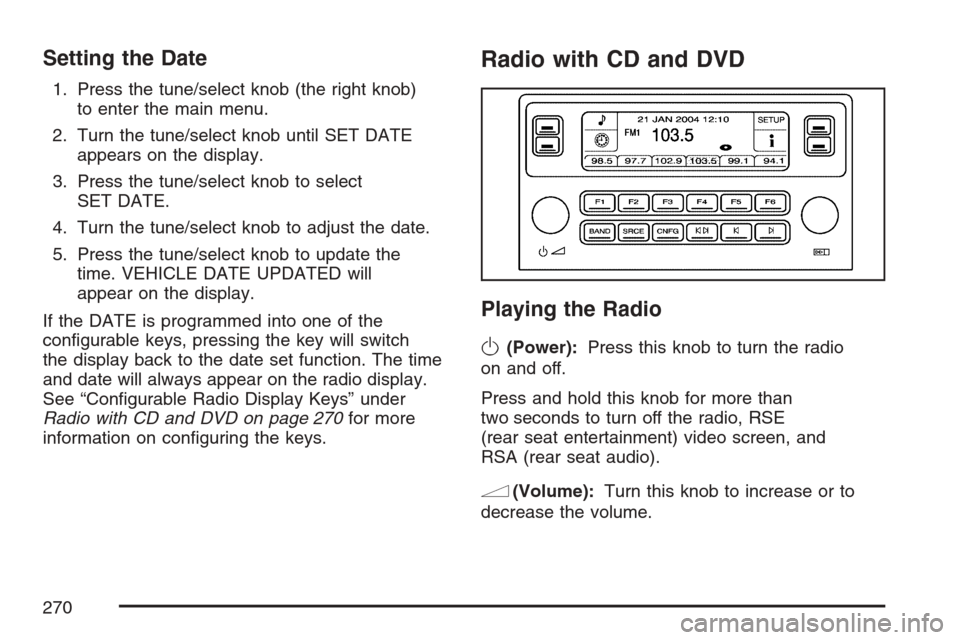
Radio with CD and DVD
Playing the Radio
O
(Power):Press this knob to turn the radio
on and off.
Press and hold this knob for more than
two seconds to turn off the radio, RSE
(rear seat entertainment) video screen, and
RSA (rear seat audio).
n(Volume):Turn this knob to increase or to
decrease the volume.
270
Page 271 of 580
SRCE (Source):Press this button to select a
source, either radio, CD, DVD, or auxiliary, if your
vehicle has this feature. The CD or DVD must be
loaded to select the source and to play. CD or DVD
will appear on the display if a disc is loaded. If a CD
or DVD is not loaded, the display will change to the
auxiliary source, if your vehicle has this feature, or
stay on the radio.
Vehicle Noise Compensation (VNC):Your
vehicle has a Bose
®audio system. It includes Bose
AudioPilot®noise compensation technology. When
turned on, AudioPilot®continuously adjusts the
audio system equalization, to compensate for
background noise, so that your music always
sounds the same at the set volume level.
This feature is most effective at lower radio volume
settings where background noise can affect how
well you hear the music being played through your
vehicle’s audio system. At higher volume settings,
where the music is much louder than the
background noise, there may be little or no
adjustments by AudioPilot
®.To use AudioPilot
®, set the radio volume at a low to
moderate listening level. Begin listening while the
vehicle is stopped with the motor running. Turn the
AudioPilot
®on by pressing the tune/sel (select)
knob to enter the main menu. Then turn the tune/sel
knob until VNC:AUDIOPILOT appears on the
display. Press the tune/sel knob to turn AudioPilot
®
on and off. An X will appear in the box when it is
turned on. Then, resume driving, gradually
increasing the vehicle speed. You will notice that
your music sounds the same regardless of
background noises; such as road noise, tire hum, or
wind. With the AudioPilot
®turned off, repeat this
process again without adjusting the volume or tone
controls. You will notice that background noise is
now audible, and will prevent you from hearing
softer passages of the music. To turn AudioPilot
®
off, press the tune/sel knob to enter the main menu,
turn the tune/sel knob until VNC:AUDIOPILOT
appears, and press the tune/sel knob. The X in the
box will disappear when it is turned off. For
additional information on AudioPilot
®, please visit
www.bose.com.
271