phone CADILLAC ESCALADE EXT 2009 3.G Owner's Manual
[x] Cancel search | Manufacturer: CADILLAC, Model Year: 2009, Model line: ESCALADE EXT, Model: CADILLAC ESCALADE EXT 2009 3.GPages: 546, PDF Size: 4.43 MB
Page 244 of 546

Problem Recommended Action
No power. The ignition might not be
turned ON/RUN or in
ACC/ACCESSORY.
The picture does not ll
the screen. There are
black borders on the
top and bottom or on
both sides or it looks
stretched out.Check the display mode
settings in the setup menu
by pressing the display
menu button on the
remote control.
In auxiliary mode, the
picture moves or scrolls.Check the auxiliary input
connections at both
devices.
The remote control does
not work.Check to make sure there
is no obstruction between
the remote control and the
transmitter window.
Check the batteries to
make sure they are not
dead or installed
incorrectly.
After stopping the player, I
push Play but sometimes
the DVD starts where I
left off and sometimes at
the beginning.If the stop button was
pressed one time, the
DVD player resumes
playing where the DVD
was stopped. If the stop
button was pressed two
times the DVD player
begins to play from the
beginning of the DVD.Problem Recommended Action
The auxiliary source is
running but there is no
picture or sound.Check that the RSE video
screen is in the auxiliary
source mode.
Check the auxiliary input
connections at both
devices.
Sometimes the wireless
headphone audio cuts out
or buzzes.Check for obstructions,
low batteries, reception
range, and interference
from cellular telephone
towers or by using your
cellular telephone in the
vehicle.
Check that the
headphones are on
correctly using the L (left)
and R (right) on the
headphones.
I lost the remote and/or
the headphones.See your dealer/retailer
for assistance.
The DVD is playing, but
there is no picture or
sound.Check that the RSE video
screen is sourced to the
DVD player.
3-84
Page 245 of 546

DVD Display Error Messages
The DVD display error message depends on which
radio you have. The video screen might display one of
the following:
Disc Load/Eject Error:Displays when there are disc
load or eject problems.
Disc Format Error:Displays if the disc is inserted with
the disc label wrong side up, or if the disc is damaged.
Disc Region Error:Displays, if the disc is not from
a correct region.
No Disc Inserted:Displays, if no disc is present when
Zor DVD AUX is pressed on the radio.
DVD Distortion
Video distortion may occur when operating cellular
phones, scanners, CB radios, Global Position Systems
(GPS)*, two-way radios, mobile fax, or walkie talkies.
It might be necessary to turn off the DVD player when
operating one of these devices in or near the vehicle.
*Excludes the OnStar
®System.
Cleaning the RSE Overhead Console
When cleaning the RSE overhead console surface, use
only a clean cloth dampened with clean water.
Cleaning the Video Screen
When cleaning the video screen, use only a clean cloth
dampened with clean water. Use care when directly
touching or cleaning the screen, as damage can result.
Rear Seat Audio (RSA)
Vehicles with this feature allow the rear seat
passengers to listen to and control any of the music
sources: radio, CDs, DVDs, or other auxiliary sources.
The rear seat passengers can control the same
music sources the front seat passengers are listening to
(dual control) or a different source. For example, rear
seat passengers can control and listen to a CD through
the headphones, while the driver listens to the radio
through the speakers. The rear seat passengers have
control of the volume for each set of headphones.
The RSA functions can be used even when the main
radio is off.
3-85
Page 246 of 546
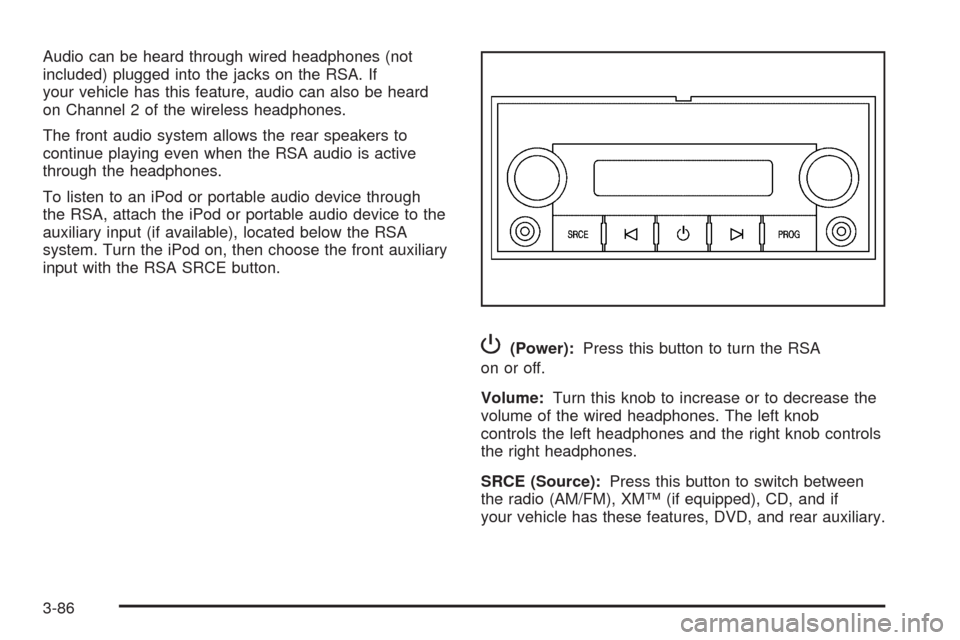
Audio can be heard through wired headphones (not
included) plugged into the jacks on the RSA. If
your vehicle has this feature, audio can also be heard
on Channel 2 of the wireless headphones.
The front audio system allows the rear speakers to
continue playing even when the RSA audio is active
through the headphones.
To listen to an iPod or portable audio device through
the RSA, attach the iPod or portable audio device to the
auxiliary input (if available), located below the RSA
system. Turn the iPod on, then choose the front auxiliary
input with the RSA SRCE button.
P(Power):Press this button to turn the RSA
on or off.
Volume:Turn this knob to increase or to decrease the
volume of the wired headphones. The left knob
controls the left headphones and the right knob controls
the right headphones.
SRCE (Source):Press this button to switch between
the radio (AM/FM), XM™ (if equipped), CD, and if
your vehicle has these features, DVD, and rear auxiliary.
3-86
Page 249 of 546

Radio Reception
Frequency interference and static can occur during
normal radio reception if items such as cell phone
chargers, vehicle convenience accessories, and external
electronic devices are plugged into the accessory
power outlet. If there is interference or static, unplug the
item from the accessory power outlet.
AM
The range for most AM stations is greater than for FM,
especially at night. The longer range can cause
station frequencies to interfere with each other. For
better radio reception, most AM radio stations boost the
power levels during the day, and then reduce these
levels during the night. Static can also occur when things
like storms and power lines interfere with radio
reception. When this happens, try reducing the treble on
the radio.
FM Stereo
FM signals only reach about 10 to 40 miles
(16 to 65 km). Although the radio has a built-in electronic
circuit that automatically works to reduce interference,
some static can occur, especially around tall buildings or
hills, causing the sound to fade in and out.
XM™ Satellite Radio Service
XM Satellite Radio Service gives digital radio reception
from coast-to-coast in the 48 contiguous United
States, and in Canada. Just as with FM, tall buildings or
hills can interfere with satellite radio signals, causing
the sound to fade in and out. In addition, traveling
or standing under heavy foliage, bridges, garages, or
tunnels may cause loss of the XM signal for a period
of time.
Cellular Phone Usage
Cellular phone usage may cause interference with the
vehicle’s radio. This interference may occur when
making or receiving phone calls, charging the phone’s
battery, or simply having the phone on. This interference
causes an increased level of static while listening to
the radio. If static is received while listening to the radio,
unplug the cellular phone and turn it off.
3-89
Page 253 of 546

A. Source (AM, FM, XM, CD, etc.) Touch Screen
Button. SeeNavigation Audio System on page 4-57
for more information.
B. Clock Touch Screen Button. See “Setting the Clock”
underCongure Menu on page 4-40for more
information.
C. POI (Point of Interest) Touch Screen Button. See
“Displaying Points of Interest (POI) on the Map
Screen” underSymbols on page 4-16for more
information.
D.
1(Zoom Out) Touch Screen Button. See “Map
Scales” underMaps on page 4-14for more
information.
E.
y©¨z(Seek) Key (Previous/Next). See
Navigation Audio System on page 4-57for more
information.
F.
w(Tune) Knob. SeeNavigation Audio System
on page 4-57for more information.
G. NAV (Navigation) Key. See “Hard Keys” underUsing
the Navigation System on page 4-11for more
information.
H. RPT (Repeat) Key. See “Hard Keys” underUsing
the Navigation System on page 4-11for more
information.
I. DEST (Destination) Key. SeeDestination on
page 4-23for more information.J. CONFIG (Congure) Key. SeeCongure Menu on
page 4-40for more information.
K.
e(Sound) Key. See “Sound Menu” under
Navigation Audio System on page 4-57for more
information.
L.
5(Phone) Key. SeeOnStar®System on page 2-56
andBluetooth®on page 3-66for more information.
M. FAV (Favorite) Key. See “Storing Radio Station
Presets” underNavigation Audio System on
page 4-57for more information.
N. AUDIO Key. SeeNavigation Audio System on
page 4-57for more information.
O.
m(Tilt) Key. See “Hard Keys” underUsing the
Navigation System on page 4-11for more
information.
P.
O/n(Power/Volume) Knob. SeeNavigation
Audio System on page 4-57for more information.
Q. CD/DVD Video/Audio Slot. SeeCD Player on
page 4-64orDVD Player on page 4-71for more
information.
R.
Z(CD/DVD Video/Audio Eject) Key. SeeCD
Player on page 4-64orDVD Player on page 4-71for
more information.
S.
M(Load) Key. SeeCD Player on page 4-64or
DVD Player on page 4-71for more information.
4-3
Page 255 of 546

Set up the navigation features before beginning
driving, such as entering an address or a preset
destination.
Set up your phone numbers in advance so they can
be called easily with the press of a single button or
a single voice command (for navigation systems
equipped with phone capability).
{CAUTION:
Taking your eyes off the road too long or too often
while using the navigation system could cause a
crash resulting in injury or death to you or others.
Focus your attention on driving.
{CAUTION:
Avoid looking too long or too often at the moving
map on the navigation screen. This could cause a
crash and you or others can be injured or killed.
Use the turn-by-turn voice guidance directions
whenever possible.Use the navigation system to:
Plan a route.
Select a destination using various methods and
choices.
Follow turn-by-turn route and map guidance with
voice prompts, only if permitted by traffic laws,
controls, and conditions.
You should always be alert and obey traffic and roadway
laws and instructions, regardless of the guidance from
the navigation system. Because the navigation
system uses street map information that does not
include all traffic restrictions or the latest road changes,
it may suggest using a road that is now closed for
construction or a turn that is prohibited by signs at the
intersection. Because the system uses limited
information, you must always evaluate whether following
the system’s directions is safe and legal for the
current conditions.
4-5
Page 262 of 546
Hard Keys
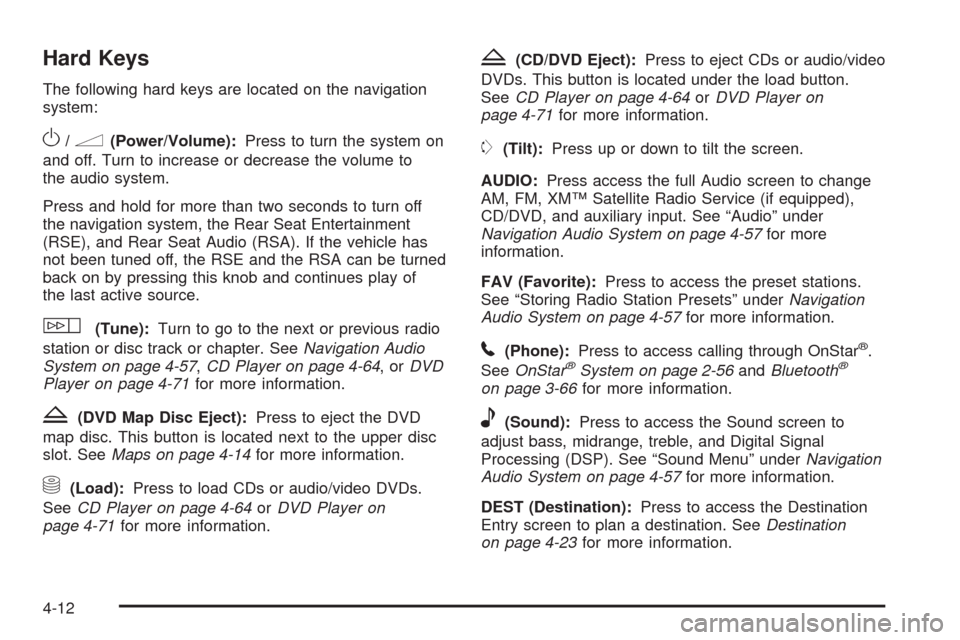
The following hard keys are located on the navigation
system:
O/n(Power/Volume):Press to turn the system on
and off. Turn to increase or decrease the volume to
the audio system.
Press and hold for more than two seconds to turn off
the navigation system, the Rear Seat Entertainment
(RSE), and Rear Seat Audio (RSA). If the vehicle has
not been tuned off, the RSE and the RSA can be turned
back on by pressing this knob and continues play of
the last active source.
w(Tune):Turn to go to the next or previous radio
station or disc track or chapter. SeeNavigation Audio
System on page 4-57,CD Player on page 4-64,orDVD
Player on page 4-71for more information.
Z(DVD Map Disc Eject):Press to eject the DVD
map disc. This button is located next to the upper disc
slot. SeeMaps on page 4-14for more information.
M(Load):Press to load CDs or audio/video DVDs.
SeeCD Player on page 4-64orDVD Player on
page 4-71for more information.
Z(CD/DVD Eject):Press to eject CDs or audio/video
DVDs. This button is located under the load button.
SeeCD Player on page 4-64orDVD Player on
page 4-71for more information.
m(Tilt):Press up or down to tilt the screen.
AUDIO:Press access the full Audio screen to change
AM, FM, XM™ Satellite Radio Service (if equipped),
CD/DVD, and auxiliary input. See “Audio” under
Navigation Audio System on page 4-57for more
information.
FAV (Favorite):Press to access the preset stations.
See “Storing Radio Station Presets” underNavigation
Audio System on page 4-57for more information.
5(Phone):Press to access calling through OnStar®.
SeeOnStar®System on page 2-56andBluetooth®
on page 3-66for more information.
e(Sound):Press to access the Sound screen to
adjust bass, midrange, treble, and Digital Signal
Processing (DSP). See “Sound Menu” underNavigation
Audio System on page 4-57for more information.
DEST (Destination):Press to access the Destination
Entry screen to plan a destination. SeeDestination
on page 4-23for more information.
4-12
Page 270 of 546

POI Close to:
1. Once a category has been selected, touch this
button to display the list of available POIs for the
selected POI category. The list provides the
POI icon, the name, the direction, and the distance
to the POI from the vehicle’s current position.
2. Use the scroll arrows to move up and down the list.
3. Use the sorting screen buttons: Dist (distance),
Icon, Name, and on Route as needed.
Go:Select this screen button, next to the desired POI,
to make this POI a destination or a stopover.Select a POI name to receive information about the
POI. From this screen you can select: Address Book,
Go, Map, or Call (if Bluetooth
®or OnStar®personal
calling is activated).
Address Book:Press to add this POI to the address
book. See “Nav” underCongure Menu on page 4-40for
information on editing address book entries.
Go:Select to make this POI a destination or a stopover.
Map:Select to display the map showing the location
of the POI.
Call:Select to dial the phone number using your
Bluetooth
®phone (if “paired” with the vehicle) or the
OnStar HandsFree Calling system. For more information
about Bluetooth calling, seeBluetooth
®on page 3-66.
For more information about OnStar HandsFree
calling, see the OnStar Owner Guide.
OK:Select to display the map screen.
Show POI:Select to display or remove the POI icons
from the map screen.
List all Categories:Select to list all POIs sorted
alphabetically.
Delete:To delete a specic POI category, select the
category.
Clear All:Select this screen button to clear all selected
POI categories.
4-20
Page 283 of 546

Using OnStar®Destination Download
Press the blue OnStar button and an Advisor can locate
a point-of-interest or an address and download the
necessary information or coordinates to your navigation
system. Once the destination is downloaded, the
navigation system will search for the address in the
mapping disc’s database. When the address is found, it
will be shown on your navigation system’s screen
along with the buttons described below.
Select Go, the navigation system calculates
route(s). Select a route (i.e. Shortest Route),
and Start Guidance.
Select Map, the navigation system displays the
Destination Map Screen.
Select Call, the navigation system initiates a call to
your destination with your Bluetooth phone (if
available) or OnStar Hands-Free Calling (if minutes
are available).
Select Add to Address Book, the navigation system
copies the downloaded destination to the address
book and displays the new address book entry.
Select Back, the navigation system cancels your
OnStar Destination Download and returns to the
previous screen. The downloaded address will not
be added to the previous destinations
OnStar Download Screen
4-33
Page 284 of 546

Route Guidance Not Active
If an OnStar destination is downloaded while route
guidance is not active, the navigation system displays
an OnStar Destination Download Screen and operations
will continue as outlined in the Using OnStar Destination
Download section:
Route Guidance Active
If OnStar downloads a destination while route guidance
is already active, the navigation system adds the
downloaded destination as the next waypoint in the
existing route. All features such as Call and Add
to Address Book will be available for the waypoint.
Refer to the section on Waypoints for more information.
Previous Destinations
Previous OnStar Destination Downloads are saved
under Previous Destinations in the navigation
system where they can be accessed or saved to the
address book.Important Notes regarding OnStar Destination
Download:
If the navigation system is turned off when the
destination download is attempted, the navigation
system will automatically turn on and display
the OnStar Destination Download Screen. The radio
will remain on after the download occurs.
If OnStar downloads a destination and the address
is not found in the mapping disc’s database and
routing by coordinates is not available, the Go and
Map buttons gray out and routing will not be
available. Press the blue OnStar button for further
assistance.
The Call button grays out when there is no phone
number available for your destination and while
connected to OnStar.
4-34