power steering CADILLAC ESCALADE EXT 2009 3.G Owners Manual
[x] Cancel search | Manufacturer: CADILLAC, Model Year: 2009, Model line: ESCALADE EXT, Model: CADILLAC ESCALADE EXT 2009 3.GPages: 546, PDF Size: 4.43 MB
Page 13 of 546
Memory Features
Your vehicle has the memory package.
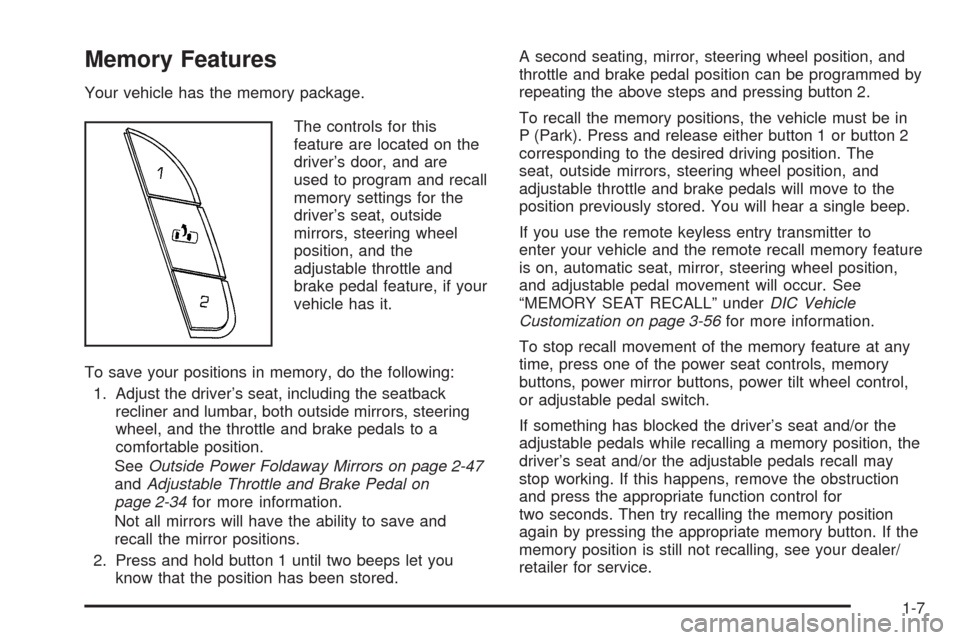
The controls for this
feature are located on the
driver’s door, and are
used to program and recall
memory settings for the
driver’s seat, outside
mirrors, steering wheel
position, and the
adjustable throttle and
brake pedal feature, if your
vehicle has it.
To save your positions in memory, do the following:
1. Adjust the driver’s seat, including the seatback
recliner and lumbar, both outside mirrors, steering
wheel, and the throttle and brake pedals to a
comfortable position.
SeeOutside Power Foldaway Mirrors on page 2-47
andAdjustable Throttle and Brake Pedal on
page 2-34for more information.
Not all mirrors will have the ability to save and
recall the mirror positions.
2. Press and hold button 1 until two beeps let you
know that the position has been stored.A second seating, mirror, steering wheel position, and
throttle and brake pedal position can be programmed by
repeating the above steps and pressing button 2.
To recall the memory positions, the vehicle must be in
P (Park). Press and release either button 1 or button 2
corresponding to the desired driving position. The
seat, outside mirrors, steering wheel position, and
adjustable throttle and brake pedals will move to the
position previously stored. You will hear a single beep.
If you use the remote keyless entry transmitter to
enter your vehicle and the remote recall memory feature
is on, automatic seat, mirror, steering wheel position,
and adjustable pedal movement will occur. See
“MEMORY SEAT RECALL” underDIC Vehicle
Customization on page 3-56for more information.
To stop recall movement of the memory feature at any
time, press one of the power seat controls, memory
buttons, power mirror buttons, power tilt wheel control,
or adjustable pedal switch.
If something has blocked the driver’s seat and/or the
adjustable pedals while recalling a memory position, the
driver’s seat and/or the adjustable pedals recall may
stop working. If this happens, remove the obstruction
and press the appropriate function control for
two seconds. Then try recalling the memory position
again by pressing the appropriate memory button. If the
memory position is still not recalling, see your dealer/
retailer for service.
1-7
Page 111 of 546

To Use the Engine Coolant Heater
1. Turn off the engine.
2. Open the hood and unwrap the electrical cord. The
cord is located on the driver’s side of the engine
compartment, near the power steering uid
reservoir.
3. Plug the cord into a normal, grounded 110-volt AC
outlet.{CAUTION:
Plugging the cord into an ungrounded outlet could
cause an electrical shock. Also, the wrong kind of
extension cord could overheat and cause a re.
You could be seriously injured. Plug the cord into
a properly grounded three-prong 110-volt AC
outlet. If the cord will not reach, use a heavy-duty
three-prong extension cord rated for at least
15 amps.
4. Before starting the engine, be sure to unplug and
store the cord as it was before to keep it away
from moving engine parts. If you do not, it could be
damaged.
The length of time the heater should remain plugged in
depends on several factors. Ask a dealer/retailer in
the area where you will be parking the vehicle for the
best advice on this.
2-35
Page 161 of 546

Instrument Panel Overview...............................3-4
Hazard Warning Flashers................................3-5
Horn .............................................................3-5
Tilt Wheel.....................................................3-6
Heated Steering Wheel...................................3-6
Turn Signal/Multifunction Lever.........................3-6
Turn and Lane-Change Signals........................3-7
Headlamp High/Low-Beam Changer..................3-7
Flash-to-Pass.................................................3-8
Windshield Wipers..........................................3-8
Rainsense™ II Wipers.....................................3-8
Windshield Washer.........................................3-9
Cruise Control..............................................3-10
Exterior Lamps.............................................3-13
Headlamps on Reminder................................3-16
Daytime Running Lamps (DRL).......................3-17
Automatic Headlamp System..........................3-17
Fog Lamps ..................................................3-18
Exterior Cargo Lamps....................................3-18
Instrument Panel Brightness...........................3-18
Dome Lamps ...............................................3-19
Dome Lamp Override....................................3-19
Entry/Exit Lighting.........................................3-19
Reading Lamps............................................3-19
Electric Power Management...........................3-19
Battery Run-Down Protection..........................3-20Accessory Power Outlet(s).............................3-20
Ashtray(s) and Cigarette Lighter......................3-21
Analog Clock...............................................3-22
Climate Controls............................................3-22
Dual Automatic Climate Control System...........3-22
Outlet Adjustment.........................................3-26
Warning Lights, Gages, and Indicators............3-27
Instrument Panel Cluster................................3-28
Speedometer and Odometer..........................
.3-29
Trip Odometer..............................................3-29
Tachometer.................................................3-29
Safety Belt Reminders...................................3-29
Airbag Readiness Light..................................3-30
Passenger Airbag Status Indicator...................3-31
Charging System Light..................................3-32
Brake System Warning Light..........................3-33
Antilock Brake System (ABS) Warning Light.....3-34
StabiliTrak
®Indicator Light.............................3-34
Engine Coolant Temperature Gage..................3-35
Tire Pressure Light.......................................3-35
Malfunction Indicator Lamp.............................3-36
Oil Pressure Light.........................................3-39
Security Light...............................................3-39
Fog Lamp Light............................................3-40
Lights On Reminder......................................3-40
Section 3 Instrument Panel
3-1
Page 165 of 546
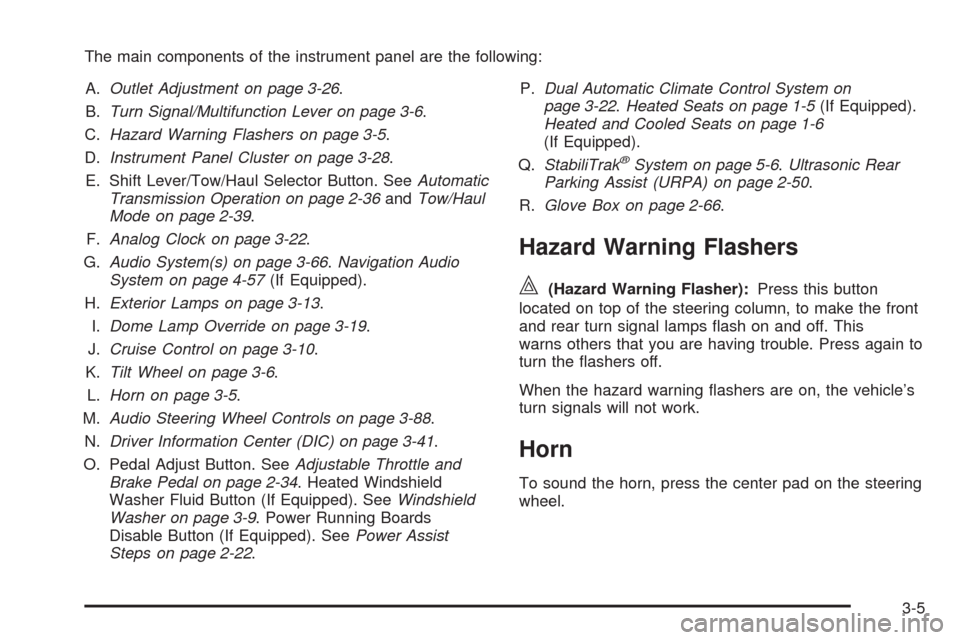
The main components of the instrument panel are the following:
A.Outlet Adjustment on page 3-26.
B.Turn Signal/Multifunction Lever on page 3-6.
C.Hazard Warning Flashers on page 3-5.
D.Instrument Panel Cluster on page 3-28.
E. Shift Lever/Tow/Haul Selector Button. SeeAutomatic
Transmission Operation on page 2-36andTow/Haul
Mode on page 2-39.
F.Analog Clock on page 3-22.
G.Audio System(s) on page 3-66.Navigation Audio
System on page 4-57(If Equipped).
H.Exterior Lamps on page 3-13.
I.Dome Lamp Override on page 3-19.
J.Cruise Control on page 3-10.
K.Tilt Wheel on page 3-6.
L.Horn on page 3-5.
M.Audio Steering Wheel Controls on page 3-88.
N.Driver Information Center (DIC) on page 3-41.
O. Pedal Adjust Button. SeeAdjustable Throttle and
Brake Pedal on page 2-34. Heated Windshield
Washer Fluid Button (If Equipped). SeeWindshield
Washer on page 3-9. Power Running Boards
Disable Button (If Equipped). SeePower Assist
Steps on page 2-22.P.Dual Automatic Climate Control System on
page 3-22.Heated Seats on page 1-5(If Equipped).
Heated and Cooled Seats on page 1-6
(If Equipped).
Q.StabiliTrak
®System on page 5-6.Ultrasonic Rear
Parking Assist (URPA) on page 2-50.
R.Glove Box on page 2-66.
Hazard Warning Flashers
|(Hazard Warning Flasher):Press this button
located on top of the steering column, to make the front
and rear turn signal lamps ash on and off. This
warns others that you are having trouble. Press again to
turn the ashers off.
When the hazard warning ashers are on, the vehicle’s
turn signals will not work.
Horn
To sound the horn, press the center pad on the steering
wheel.
3-5
Page 166 of 546
Tilt Wheel
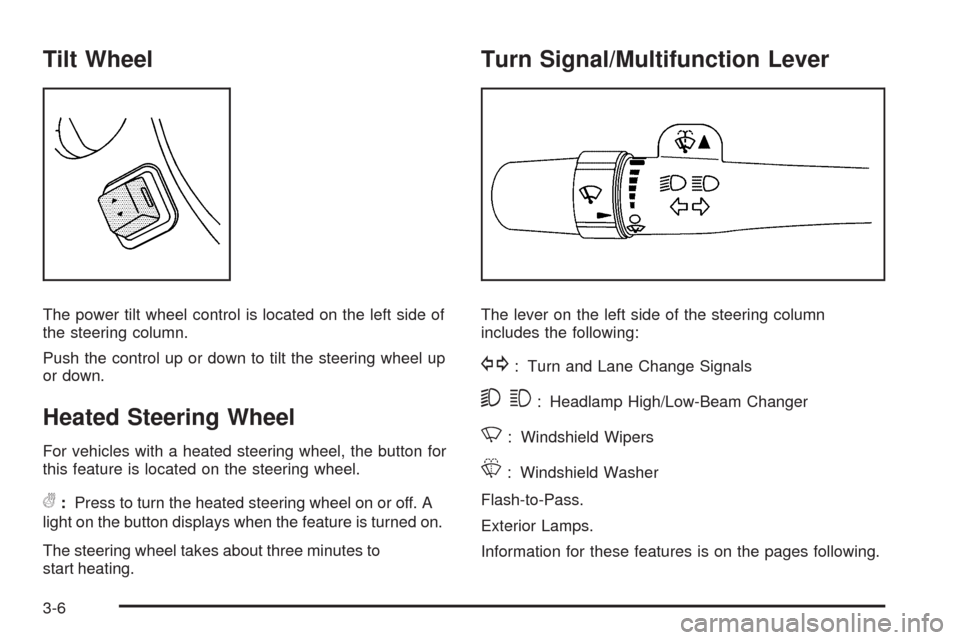
The power tilt wheel control is located on the left side of
the steering column.
Push the control up or down to tilt the steering wheel up
or down.
Heated Steering Wheel
For vehicles with a heated steering wheel, the button for
this feature is located on the steering wheel.
(:Press to turn the heated steering wheel on or off. A
light on the button displays when the feature is turned on.
The steering wheel takes about three minutes to
start heating.
Turn Signal/Multifunction Lever
The lever on the left side of the steering column
includes the following:
G: Turn and Lane Change Signals
53: Headlamp High/Low-Beam Changer
N: Windshield Wipers
L: Windshield Washer
Flash-to-Pass.
Exterior Lamps.
Information for these features is on the pages following.
3-6
Page 179 of 546

Dome Lamps
The dome lamps come on when any door is opened.
They turn off after all the doors are closed.
The dome lamps can also be turned on by turning the
instrument panel brightness knob, located on the
instrument panel to the left of the steering column,
clockwise to the farthest position. In this position, the
dome lamps remain on whether a door is opened
or closed.
Dome Lamp Override
The dome lamp override button is located next to the
exterior lamps control.
k(Dome Off):Press the button in and the dome
lamps remain off when a door is opened. Press the
button again to return it to the extended position so that
the dome lamps come on when a door is opened.
Entry/Exit Lighting
The vehicle has an illuminated entry/exit feature.
The dome lamps come on if the dome override button is
in the out position, when a door is opened or the key
is removed from the ignition.
Reading Lamps
If the vehicle has reading lamps, press the button
located next to the lamp to turn it on or off.
The vehicle may also have reading lamps in other
locations. The lamps cannot be adjusted.
Electric Power Management
The vehicle has Electric Power Management (EPM) that
estimates the battery’s temperature and state of
charge. It then adjusts the voltage for best performance
and extended life of the battery.
When the battery’s state of charge is low, the voltage is
raised slightly to quickly bring the charge back up.
When the state of charge is high, the voltage is lowered
slightly to prevent overcharging. If the vehicle has a
voltmeter gage or a voltage display on the Driver
Information Center (DIC), you may see the voltage move
up or down. This is normal. If there is a problem, an
alert will be displayed.
The battery can be discharged at idle if the electrical
loads are very high. This is true for all vehicles. This is
because the generator (alternator) may not be
spinning fast enough at idle to produce all the power
that is needed for very high electrical loads.
3-19
Page 222 of 546
PARK TILT MIRRORS
This feature allows you to select whether or not the
outside mirror(s) will automatically tilt down when
the vehicle is shifted into R (Reverse). SeeOutside
Power Foldaway Mirrors on page 2-47for more
information.
Press the customization button until PARK TILT
MIRRORS appears on the DIC display. Press the
set/reset button once to access the settings for
this feature. Then press the customization button to
scroll through the following settings:
OFF (default):Neither outside mirror will be tilted down
when the vehicle is shifted into R (Reverse).
DRIVER MIRROR:The driver’s outside mirror will be
tilted down when the vehicle is shifted into R (Reverse).
PASSENGER MIRROR:The passenger’s outside
mirror will be tilted down when the vehicle is shifted into
R (Reverse).
BOTH MIRRORS:The driver’s and passenger’s outside
mirrors will be tilted down when the vehicle is shifted
into R (Reverse).
NO CHANGE:No change will be made to this feature.
The current setting will remain.
To select a setting, press the set/reset button while the
desired setting is displayed on the DIC.
EASY EXIT RECALL
If your vehicle has this feature, it allows you to select
your preference for the automatic easy exit seat feature.
SeeMemory Features on page 1-7for more information.
Press the customization button until EASY EXIT
RECALL appears on the DIC display. Press the set/reset
button once to access the settings for this feature.
Then press the customization button to scroll through
the following settings:
DOOR BUTTON ONLY:No automatic seat exit recall
will occur. The recall will only occur after pressing
the easy exit seat button.
BUTTON AND KEY OUT (default):If the features are
enabled through the EASY EXIT SETUP menu, the
driver’s seat will move back, and the power steering
column will move up when the key is removed from the
ignition or after pressing the easy exit seat button.
The automatic easy exit seat movement will only occur
one time after the key is removed from the ignition.
If the automatic movement has already occurred, and
you put the key back in the ignition and remove it again,
the seat and steering column will stay in the original
exit position, unless a memory recall took place prior to
removing the key again.
3-62
Page 329 of 546

Voice recognition can be used when the ignition is on or
when Retained Accessory Power (RAP) is active. See
“Retained Accessory Power (RAP)” in the Index of
your vehicle’s owner manual for more information.
To use voice recognition, do the following:
1. Push and hold the
SRCE button on the
steering wheel until you
hear a beep. The
audio system mutes.
2. Clearly state one of the commands listed on the
following pages.Helpful Hints for Stating Commands
When a multiple command is available, choose the
command that works best.
Words that are in brackets are optional. For
example, for the command Radio [band] [select] FM,
stating Radio FM or Radio select FM are both
valid commands.
When the system recognizes the command the
system does one of the following:
Perform the function.
Ask you to conrm your choice.
Issue an error message “Did not recognize.
Voice Recognition Canceled.”
If you experience difficulty with the system
recognizing a command, try saying it more softly,
and wait for a few seconds after the beep, or repeat
the command.
Background noise may cause voice commands
to be misunderstood, including airow noise
from wind.
To use the voice recognition system, the map
DVD must be loaded and the navigation system
must be on.
4-79
Page 338 of 546
Braking in Emergencies
ABS allows the driver to steer and brake at the same
time. In many emergencies, steering can help more than
even the very best braking.
Brake Assist
This vehicle has a Brake Assist feature designed to
assist the driver in stopping or decreasing vehicle speed
in emergency driving conditions. This feature uses the
stability system hydraulic brake control module to
supplement the power brake system under conditions
where the driver has quickly and forcefully applied
the brake pedal in an attempt to quickly stop or slow
down the vehicle. The stability system hydraulic
brake control module increases brake pressure at each
corner of the vehicle until the ABS activates. Minor
brake pedal pulsations or pedal movement during this
time is normal and the driver should continue to
apply the brake pedal as the driving situation dictates
The Brake Assist feature will automatically disengage
when the brake pedal is released or brake pedal
pressure is quickly decreased.
StabiliTrak®System
The vehicle has a vehicle stability enhancement
system called StabiliTrak. It is an advanced computer
controlled system that assists the driver with directional
control of the vehicle in difficult driving conditions.
StabiliTrak activates when the computer senses a
discrepancy between the intended path and the direction
the vehicle is actually traveling. StabiliTrak selectively
applies braking pressure at any one of the vehicle’s
brakes to assist the driver with keeping the vehicle on
the intended path.
When the vehicle is started and begins to move, the
system performs several diagnostic checks to insure
there are no problems. The system may be heard or felt
while it is working. This is normal and does not mean
there is a problem with the vehicle. The system
should initialize before the vehicle reaches 20 mph
(32 km/h). In some cases, it may take approximately
two miles of driving before the system initializes.
If cruise control is being used when StabiliTrak activates,
the cruise control automatically disengages. The
cruise control can be re-engaged when road conditions
allow. SeeCruise Control on page 3-10.
5-6
Page 341 of 546

Magnetic Ride Control™
The vehicle may have the MagneRide control system.
MagneRide constantly checks speed, wheel position,
lift/dive and steering of the vehicle. The damping force
for each shock absorber and adjustment level is
chosen for the best ride and handling.
MagneRide also works with the tow/haul switch that,
when engaged, will provide more rmness from
the shock absorbers. This added control gives better
ride and handling when carrying heavy loads or towing a
trailer. SeeTow/Haul Mode on page 2-39for more
information.
Road Sensing Suspension
The Road Sensing Suspension (RSS) feature provides
superior vehicle ride and handling under a variety of
passenger and loading conditions.
The system is fully automatic and uses a computer
controller to continuously monitor vehicle speed, wheel
to body position, lift/dive and steering position of the
vehicle. The controller then sends signals to each shock
absorber to independently adjust the damping level to
provide the optimum vehicle ride.
RSS also interacts with the tow/haul mode that, when
engaged, will provide additional control of the shock
absorbers. This additional control results in better rideand handling characteristics when the vehicle is loaded
or towing a trailer. See “Tow/Haul Mode” under
Towing a Trailer on page 5-40.
Locking Rear Axle
Vehicles with a locking rear axle can give more traction
on snow, mud, ice, sand or gravel. It works like a
standard axle most of the time, but when traction is low,
this feature will allow the rear wheel with the most
traction to move the vehicle.
All-Wheel Drive (AWD) System
With this feature, engine power is sent to all four wheels
at all times. This is like four-wheel drive, but there is
no separate lever or switch to engage or disengage the
front axle. It is fully automatic, and adjusts itself as
needed for road conditions.
Steering
Power Steering
If power steering assist is lost because the engine stops
or the system is not functioning, the vehicle can be
steered but it will take more effort.
5-9