steering CADILLAC ESCALADE EXT 2011 3.G User Guide
[x] Cancel search | Manufacturer: CADILLAC, Model Year: 2011, Model line: ESCALADE EXT, Model: CADILLAC ESCALADE EXT 2011 3.GPages: 508, PDF Size: 7.6 MB
Page 23 of 508
Black plate (17,1)Cadillac Escalade EXT Owner Manual - 2011
In Brief 1-17
Cruise Control
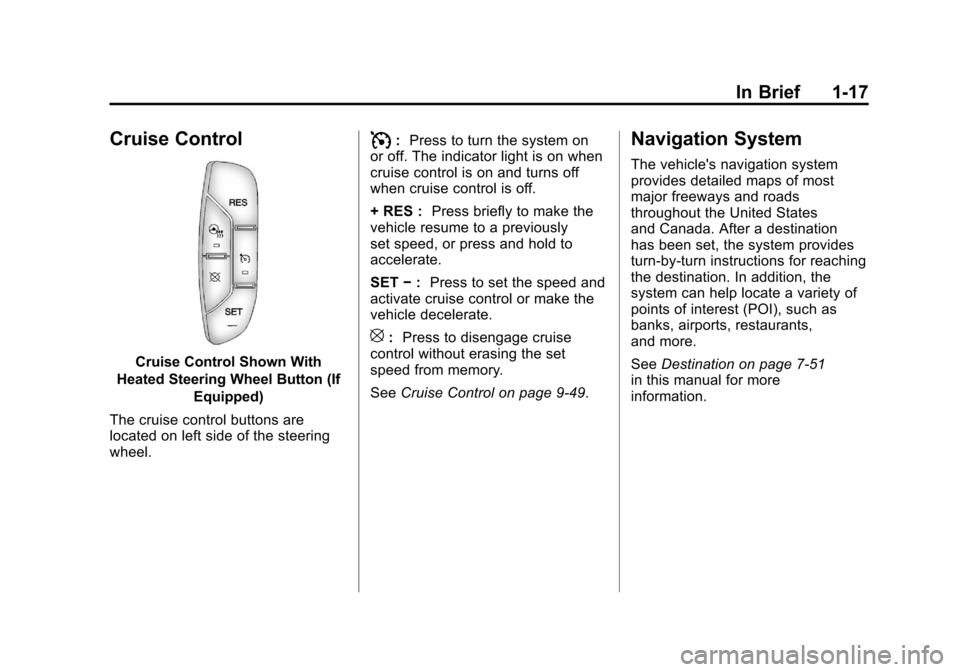
Cruise Control Shown With
Heated Steering Wheel Button (If Equipped)
The cruise control buttons are
located on left side of the steering
wheel.
I: Press to turn the system on
or off. The indicator light is on when
cruise control is on and turns off
when cruise control is off.
+ RES : Press briefly to make the
vehicle resume to a previously
set speed, or press and hold to
accelerate.
SET −: Press to set the speed and
activate cruise control or make the
vehicle decelerate.
[: Press to disengage cruise
control without erasing the set
speed from memory.
See Cruise Control on page 9‑49.
Navigation System
The vehicle's navigation system
provides detailed maps of most
major freeways and roads
throughout the United States
and Canada. After a destination
has been set, the system provides
turn-by-turn instructions for reaching
the destination. In addition, the
system can help locate a variety of
points of interest (POI), such as
banks, airports, restaurants,
and more.
SeeDestination on page 7‑51
in this manual for more
information.
Page 24 of 508
Black plate (18,1)Cadillac Escalade EXT Owner Manual - 2011
1-18 In Brief
Driver Information
Center (DIC)
The DIC display is located at the
bottom of the instrument panel
cluster. It shows the status of
many vehicle systems and enables
access to the personalization menu.
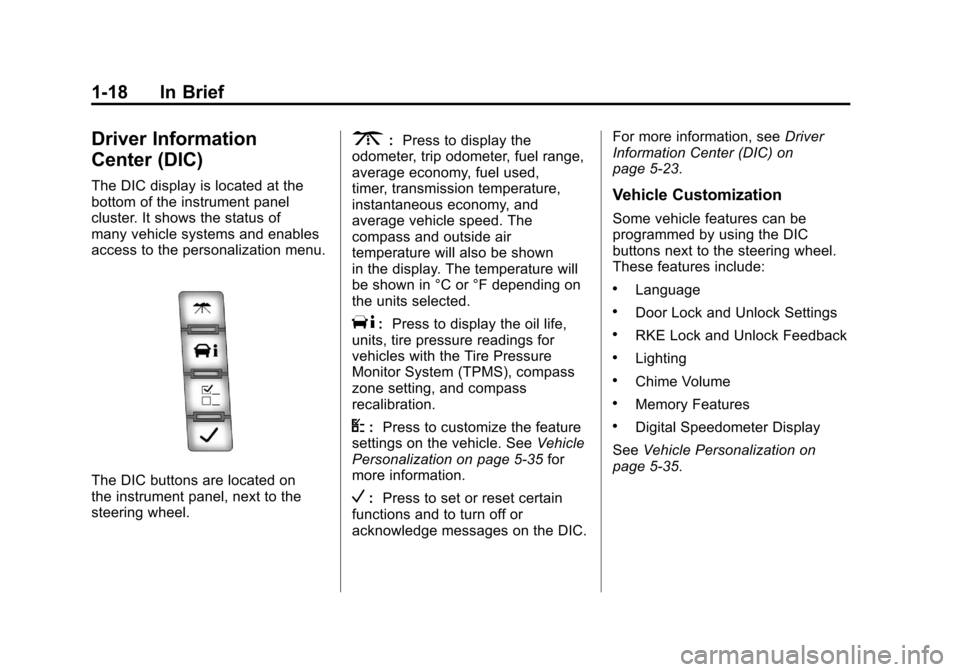
The DIC buttons are located on
the instrument panel, next to the
steering wheel.
3:Press to display the
odometer, trip odometer, fuel range,
average economy, fuel used,
timer, transmission temperature,
instantaneous economy, and
average vehicle speed. The
compass and outside air
temperature will also be shown
in the display. The temperature will
be shown in °C or °F depending on
the units selected.
T: Press to display the oil life,
units, tire pressure readings for
vehicles with the Tire Pressure
Monitor System (TPMS), compass
zone setting, and compass
recalibration.
U: Press to customize the feature
settings on the vehicle. See Vehicle
Personalization on page 5‑35 for
more information.
V: Press to set or reset certain
functions and to turn off or
acknowledge messages on the DIC. For more information, see
Driver
Information Center (DIC) on
page 5‑23.
Vehicle Customization
Some vehicle features can be
programmed by using the DIC
buttons next to the steering wheel.
These features include:
.Language
.Door Lock and Unlock Settings
.RKE Lock and Unlock Feedback
.Lighting
.Chime Volume
.Memory Features
.Digital Speedometer Display
See Vehicle Personalization on
page 5‑35.
Page 30 of 508
Black plate (24,1)Cadillac Escalade EXT Owner Manual - 2011
1-24 In Brief
The OnStar system can record and
transmit vehicle information. This
information is automatically sent to
an OnStar call center when
Qis
pressed,
]is pressed, or if the
airbags or ACR system deploy. This
information usually includes the
vehicle's GPS location and, in
the event of a crash, additional
information regarding the crash that
the vehicle was involved in (e.g. the
direction from which the vehicle was
hit). When the virtual advisor feature
of OnStar hands-free calling is
used, the vehicle also sends OnStar
the vehicle's GPS location so they
can provide services where it is
located.
Location information about the
vehicle is only available if the GPS
satellite signals are unobstructed
and available. The vehicle must have a working
electrical system, including
adequate battery power, for the
OnStar equipment to operate. There
are other problems OnStar cannot
control that may prevent OnStar
from providing OnStar service at
any particular time or place. Some
examples are damage to important
parts of the vehicle in a crash, hills,
tall buildings, tunnels, weather or
wireless phone network congestion.
See
Radio Frequency Statement on
page 13‑20 for information
regarding Part 15 of the Federal
Communications Commission (FCC)
rules and Industry Canada
Standards RSS-210/220/310.
OnStar Steering Wheel
Controls
This vehicle may have a Talk/Mute
button that can be used to interact
with OnStar hands-free calling.
See Steering Wheel Controls on
page 5‑2 for more information. On some vehicles, the mute button
can be used to dial numbers into
voice mail systems, or to dial phone
extensions. See the OnStar Owner's
Guide for more information.
Your Responsibility
Increase the volume of the radio if
the OnStar advisor cannot be heard.
If the light next to the OnStar
buttons is red, the system may
not be functioning properly.
Press
Qand request a vehicle
diagnostic. If the light appears clear
(no light is appearing), your OnStar
subscription has expired and all
services have been deactivated.
Press
Qto confirm that the OnStar
equipment is active.
Page 59 of 508

Black plate (3,1)Cadillac Escalade EXT Owner Manual - 2011
Seats and Restraints 3-3
Front Seats
Power Seat Adjustment
To adjust a power seat:
.Move the seat forward or
rearward by sliding the control
forward or rearward.
.Raise or lower the front or rear
part of the seat cushion by
moving the front or rear of the
control up or down.
.Raise or lower the entire seat by
moving the entire control up
or down.
To adjust the seatback, see
Reclining Seatbacks on page 3‑6.
Memory Features
The controls on the driver door are
used to program and recall memory
settings for the driver seat, outside
mirrors, power steering column, and
the adjustable throttle and brake
pedals. Storing Memory Positions
To save into memory:
1. Adjust the driver seat, including
the seatback recliner and
lumbar, both outside mirrors,
power steering column, and the
throttle and brake pedals.
See Power Mirrors on page 2‑19
and Adjustable Throttle and
Brake Pedal on page 9‑30 for
more information.
Not all mirrors and adjustable
throttles and brake pedals will
have the ability to save and
recall their positions.
2. Press and hold “1”until
two beeps sound.
3. Repeat for a second driver position using “2.”
Page 60 of 508

Black plate (4,1)Cadillac Escalade EXT Owner Manual - 2011
3-4 Seats and Restraints
To recall, press and release“1”
or “2.” The vehicle must be in
P (Park). A single beep will sound.
The seat, outside mirrors, power
steering column, and adjustable
throttle and brake pedals will move
to the positions previously stored for
the identified driver.
Memory Remote Recall
The memory feature can recall the
driver seat, outside mirrors, power
steering column, and pedals to
stored positions when entering the
vehicle. To activate, unlock the driver
door with the Remote Keyless
Entry (RKE) transmitter. The driver
seat, outside mirrors, power steering
column, and adjustable pedals
will move to the memory positions
associated with the transmitter used
to unlock the vehicle.
This feature can be turned on or off
using the vehicle personalization
menu. See
“Memory Seat Recall”
under Vehicle Personalization on
page 5‑35 for more information.
To stop recall movement, press
one of the power seat controls,
memory or power mirror buttons,
power steering column control,
or the adjustable pedal switch. If something has blocked the driver
seat, power steering column, or the
adjustable pedals while recalling a
memory position, the recall may
stop. Remove the obstruction; then
press and hold the appropriate
manual control for the memory item
that is not recalling for two seconds.
Try recalling the memory position
again by pressing the appropriate
memory button. If the memory
position is still not recalling, see
your dealer for service.
Easy Exit Positions
This feature can move the driver
seat rearward and the power
steering column up and forward to
allow extra room to exit the vehicle.
B(Easy Exit Positions):
Press to
recall the easy exit positions. The
vehicle must be in P (Park).
Page 61 of 508
Black plate (5,1)Cadillac Escalade EXT Owner Manual - 2011
Seats and Restraints 3-5
If the easy exit feature is
programmed on in the vehicle
personalization menu, automatic
driver seat and power steering
column movement occur when the
ignition key is removed.
A single beep sounds. The driver
seat moves back approximately
8 cm (3 in) and the power steering
column moves up and forward. To
move the seat back farther, press
the easy exit button again until the
seat is all the way back.If something has blocked the driver
seat while recalling the exit position,
the recall may stop. Remove the
obstruction; then press and hold
the power seat control rearward for
two seconds. Try recalling the exit
position again. If the exit position is
still not recalling, see your dealer for
service.
See
“Easy Exit Recall” and
“Easy Exit Setup” underVehicle
Personalization on page 5‑35 for
more information.Lumbar Adjustment
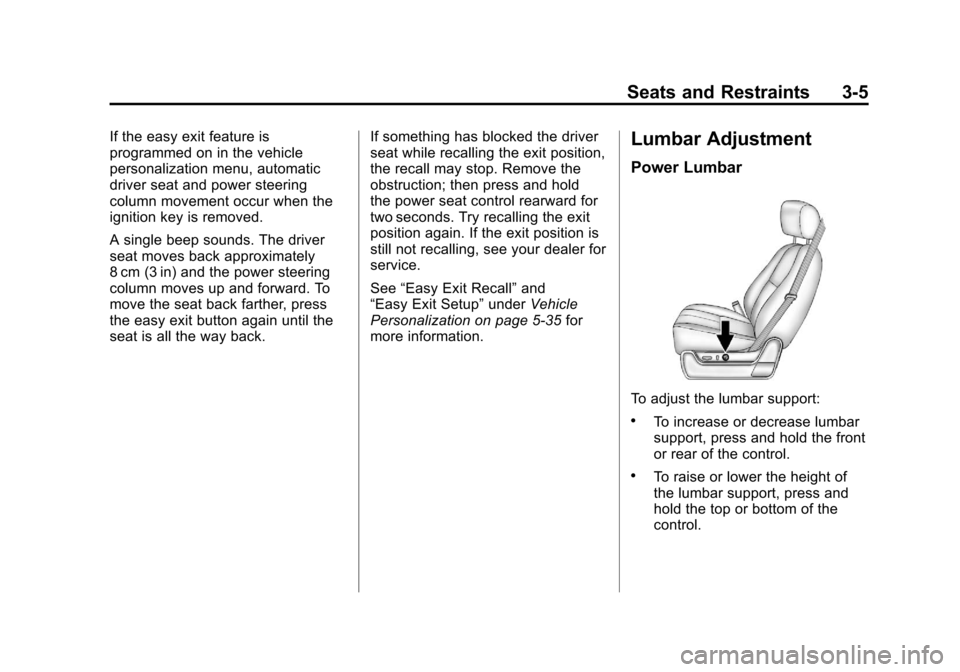
Power Lumbar
To adjust the lumbar support:
.To increase or decrease lumbar
support, press and hold the front
or rear of the control.
.To raise or lower the height of
the lumbar support, press and
hold the top or bottom of the
control.
Page 81 of 508
Black plate (25,1)Cadillac Escalade EXT Owner Manual - 2011
Seats and Restraints 3-25
See your dealer to have the safety
belt assemblies inspected or
replaced.
New parts and repairs may be
necessary even if the safety belt
system was not being used at the
time of the crash.
Have the safety belt pretensioners
checked if the vehicle has been in a
crash, or if the airbag readiness light
stays on after you start the vehicle
or while you are driving. SeeAirbag
Readiness Light on page 5‑13.Airbag System
The vehicle has the following
airbags:
.A frontal airbag for the driver.
.A frontal airbag for the right front
passenger.
.A seat‐mounted side impact
airbag for the driver.
.A seat‐mounted side impact
airbag for the right front
passenger.
.A roof-rail airbag for the driver
and passenger directly behind
the driver.
.A roof-rail airbag for the right
front passenger and passenger
seated directly behind the right
front passenger.
All of the airbags in the vehicle will
have the word AIRBAG embossed
in the trim or on an attached label
near the deployment opening. For frontal airbags, the word
AIRBAG will appear on the middle
part of the steering wheel for the
driver and on the instrument panel
for the right front passenger.
With seat‐mounted side impact
airbags, the word AIRBAG will
appear on the side of the seatback
closest to the door.
With roof-rail airbags, the word
AIRBAG will appear along the
headliner or trim.
Airbags are designed to supplement
the protection provided by safety
belts. Even though today's airbags
are also designed to help reduce
the risk of injury from the force of an
inflating bag, all airbags must inflate
very quickly to do their job.
Page 83 of 508
Black plate (27,1)Cadillac Escalade EXT Owner Manual - 2011
Seats and Restraints 3-27
There is an airbag readiness light
on the instrument panel cluster,
which shows the airbag symbol.
The system checks the airbag
electrical system for malfunctions.
The light tells you if there is an
electrical problem. SeeAirbag
Readiness Light on page 5‑13 for
more information.
Where Are the Airbags?
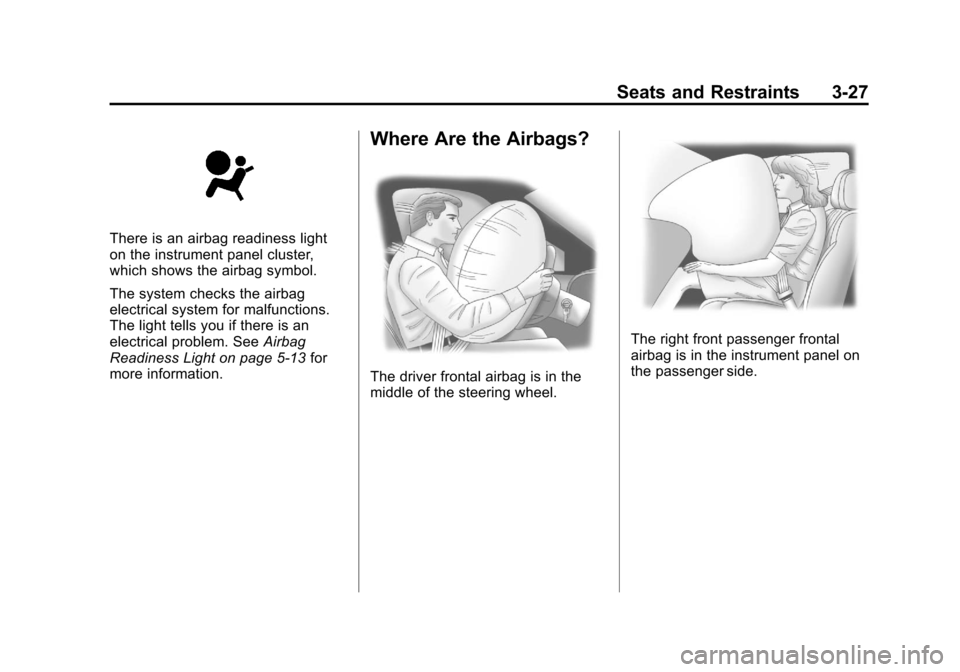
The driver frontal airbag is in the
middle of the steering wheel.
The right front passenger frontal
airbag is in the instrument panel on
the passenger side.
Page 84 of 508
Black plate (28,1)Cadillac Escalade EXT Owner Manual - 2011
3-28 Seats and Restraints
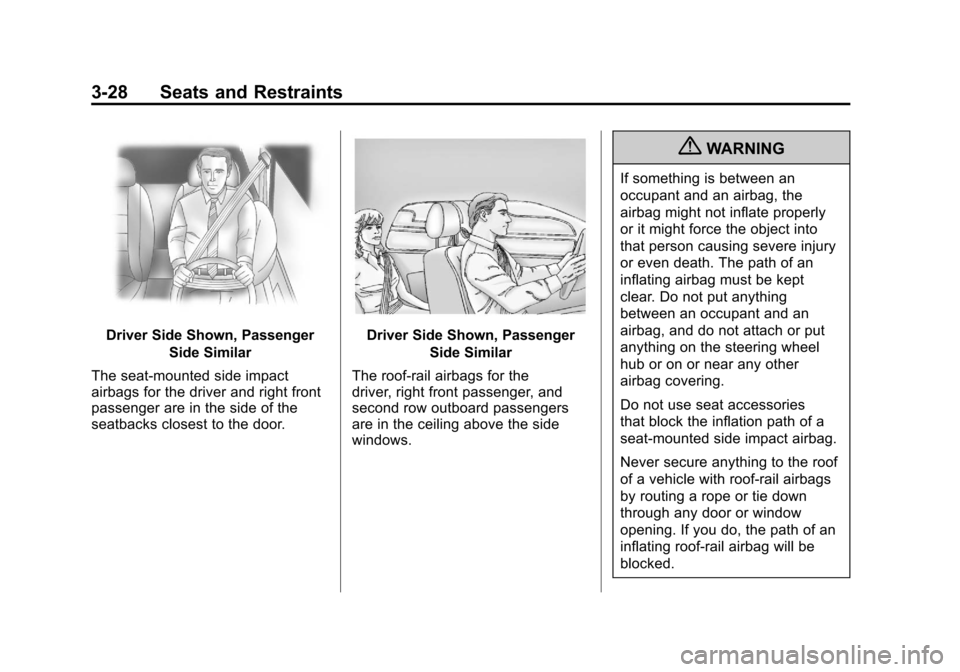
Driver Side Shown, PassengerSide Similar
The seat‐mounted side impact
airbags for the driver and right front
passenger are in the side of the
seatbacks closest to the door.Driver Side Shown, Passenger Side Similar
The roof-rail airbags for the
driver, right front passenger, and
second row outboard passengers
are in the ceiling above the side
windows.
{WARNING
If something is between an
occupant and an airbag, the
airbag might not inflate properly
or it might force the object into
that person causing severe injury
or even death. The path of an
inflating airbag must be kept
clear. Do not put anything
between an occupant and an
airbag, and do not attach or put
anything on the steering wheel
hub or on or near any other
airbag covering.
Do not use seat accessories
that block the inflation path of a
seat-mounted side impact airbag.
Never secure anything to the roof
of a vehicle with roof-rail airbags
by routing a rope or tie down
through any door or window
opening. If you do, the path of an
inflating roof-rail airbag will be
blocked.
Page 86 of 508
Black plate (30,1)Cadillac Escalade EXT Owner Manual - 2011
3-30 Seats and Restraints
The vehicle has seat‐mounted side
impact and roof-rail airbags. See
Airbag System on page 3‑25.
Seat‐mounted side impact and
roof-rail airbags are intended to
inflate in moderate to severe side
crashes. In addition, these roof-rail
airbags are intended to inflate
during a rollover or in a severe
frontal impact. Seat‐mounted side
impact and roof-rail airbags will
inflate if the crash severity is above
the system's designed threshold
level. The threshold level can vary
with specific vehicle design.
Roof-rail airbags are not
intended to inflate in rear impacts.
A seat‐mounted side impact airbag
is intended to deploy on the side
of the vehicle that is struck. Both
roof-rail airbags will deploy when
either side of the vehicle is struck or
if the sensing system predicts that
the vehicle is about to roll over, or in
a severe frontal impact.In any particular crash, no one can
say whether an airbag should have
inflated simply because of the
damage to a vehicle or because
of what the repair costs were.
For frontal airbags, inflation is
determined by what the vehicle hits,
the angle of the impact, and how
quickly the vehicle slows down. For
seat‐mounted side impact and
roof-rail airbags, deployment is
determined by the location and
severity of the side impact. In a
rollover event, roof-rail airbag
deployment is determined by the
direction of the roll.
What Makes an Airbag
Inflate?
In a deployment event, the sensing
system sends an electrical signal
triggering a release of gas from the
inflator. Gas from the inflator fills the
airbag causing the bag to break out
of the cover and deploy. The inflator,
the airbag, and related hardware are
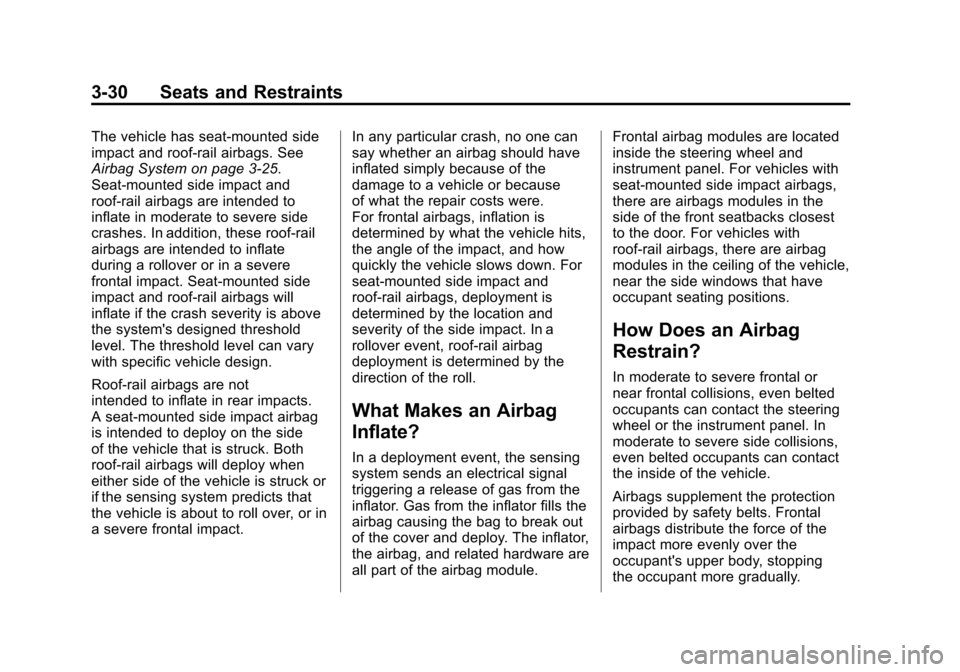
all part of the airbag module.Frontal airbag modules are located
inside the steering wheel and
instrument panel. For vehicles with
seat‐mounted side impact airbags,
there are airbags modules in the
side of the front seatbacks closest
to the door. For vehicles with
roof-rail airbags, there are airbag
modules in the ceiling of the vehicle,
near the side windows that have
occupant seating positions.
How Does an Airbag
Restrain?
In moderate to severe frontal or
near frontal collisions, even belted
occupants can contact the steering
wheel or the instrument panel. In
moderate to severe side collisions,
even belted occupants can contact
the inside of the vehicle.
Airbags supplement the protection
provided by safety belts. Frontal
airbags distribute the force of the
impact more evenly over the
occupant's upper body, stopping
the occupant more gradually.