clock CADILLAC ESCALADE EXT 2012 3.G User Guide
[x] Cancel search | Manufacturer: CADILLAC, Model Year: 2012, Model line: ESCALADE EXT, Model: CADILLAC ESCALADE EXT 2012 3.GPages: 494, PDF Size: 7.71 MB
Page 209 of 494

Black plate (29,1)Cadillac Escalade EXT Owner Manual - 2012
Infotainment System 7-29
j/r(Pause/Play):Press to pause
the CD. This button will then change
to the play button. Press the play
button to play the CD.
Random:
1. Press to hear the tracks in random, rather than sequential,
order.
2. Press Random again to turn off random play.
r(Rewind):
1. Press and hold to rewind quickly through a track selection. You
will hear sound at a reduced
volume.
2. Release to stop rewinding. The display will show the elapsed
time of the track.
[(Forward):
1. Press and hold to fast forward quickly through a track selection.
You will hear sound at a reduced
volume.
2. Release to stop fast forwarding. The display shows the elapsed
time of the track.
q r(Folder/Artist/Album):
1. Select the left or right arrow to go to the previous or next folder,
artist, or album on the disc.
2. Press the middle screen button, with the folder, artist, or album
name, to sort the MP3 by folder, artist, or album. It may take a
few minutes for the system to
sort the MP3.
y/©or¨/z(Seek/Scan):
1. To seek tracks, press the up arrow to go to the next track.
2. Press the down arrow to go to the start of the current track,
if more than eight seconds have
played.
3. If either arrow is pressed more than once, the player continues
moving backward or forward
through the CD. The sound
mutes while seeking.
w(Tuning Knob):
1. Turn counterclockwise one notch to go to the start of the current
track, turn it again to go to the
previous track.
2. Turn clockwise to go to the next track.
Page 256 of 494

Black plate (76,1)Cadillac Escalade EXT Owner Manual - 2012
7-76 Infotainment System
For more information about the Rear
Vision Camera, seeRear Vision
Camera (RVC) on page 9‑47 in the
vehicle owner manual.
Rear Display(s)
Press the Rear Display(s) screen
button to allow the choice of
sources for rear display between
front disc, rear aux, or usb,
if connected.
Setting the Clock
The navigation system time and the
analog clock operate independently.
Changing the time through the
navigation system does not change
the time on the analog clock. See
Clock on page 5‑7 to change the
analog clock time.
Press CONFIG to enter the
configure menu options, then press
CONFIG repeatedly until the time is
selected or press the time screen
button.
Hours: Press−or + to decrease or
increase the hours.
Minutes: Press−or + to decrease
or increase the minutes.
12/24 Format: Select the
12 screen button for standard time;
select the 24 screen button for
military time.
Global Positioning
System (GPS)
The navigation system determines
the position of the vehicle by using
satellite signals, various vehicle
signals, and map data.
At times, other interferences such
as the satellite condition, road
configuration, the condition of the
vehicle and/or other circumstances
can interfere with the navigation
system's ability to determine the
accurate position of the vehicle.
The GPS shows the current position
of the vehicle using signals sent by
the GPS Satellites of the United
States Department of Defense.
When the vehicle is not receiving
signals from the satellites, a symbol
appears on the map screen. Refer
to Global Positioning System (GPS)
on page 7‑76.
Page 270 of 494

Black plate (2,1)Cadillac Escalade EXT Owner Manual - 2012
8-2 Climate Controls
O(Off):Press the driver side
temperature knob to turn the climate
control system off. Outside air still
enters the vehicle, and is directed to
the floor. This direction can be
changed by pressing the mode
button. The temperature can also be
adjusted using either temperature
knob. Press the up or down arrows
on the fan switch, the defrost button,
the AUTO button, driver side
temperature knob, or the air
conditioning button to turn the
system on when it is off.
Driver and Passenger Side
Temperature Knob
The driver and passenger side
temperature knobs are used to
adjust the temperature of the air
coming through the system on the
driver or passenger's side of the
vehicle. The temperature can be
adjusted even if the system is
turned off. This is possible since
outside air always flows through the system as the vehicle is
moving forward unless it is set to
recirculation mode. See
“Recirculation”
later in this section.
Turn the knob clockwise or
counterclockwise to increase or
decrease the cabin temperature.
The display will show the
temperature setting increasing
or decreasing.
Set the passenger's temperature
setting to match the driver
temperature setting by pressing the
passenger power knob.
When in defrost mode the
passenger temperature setting
cannot be changed.
Automatic Operation
AUTO (Automatic): When
automatic operation is active the
system will control the inside
temperature, the air delivery, and
the fan speed. Use the steps below to place the
entire system in automatic mode:
1. Press the AUTO button.
When AUTO is selected, the
display will change to show the
current temperature(s) and
AUTO will appear. The current
delivery mode and fan speed
will also be displayed for
approximately five seconds.
When AUTO is selected, the air
conditioning operation and air
inlet will be automatically
controlled. The air conditioning
compressor will run when the
outside temperature is over
about 4°C (40°F). The air inlet
will normally be set to outside
air. If it is hot outside, the air
inlet may automatically switch to
recirculate inside air to help
quickly cool down the vehicle.
The light on the button comes on
in recirculation.
Page 329 of 494
Black plate (55,1)Cadillac Escalade EXT Owner Manual - 2012
Driving and Operating 9-55
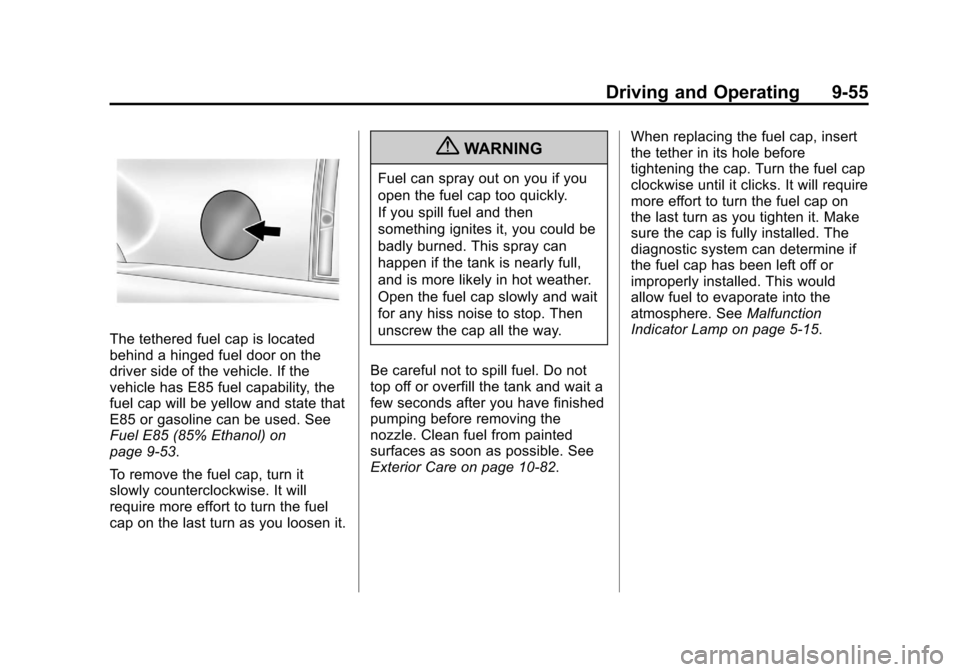
The tethered fuel cap is located
behind a hinged fuel door on the
driver side of the vehicle. If the
vehicle has E85 fuel capability, the
fuel cap will be yellow and state that
E85 or gasoline can be used. See
Fuel E85 (85% Ethanol) on
page 9‑53.
To remove the fuel cap, turn it
slowly counterclockwise. It will
require more effort to turn the fuel
cap on the last turn as you loosen it.
{WARNING
Fuel can spray out on you if you
open the fuel cap too quickly.
If you spill fuel and then
something ignites it, you could be
badly burned. This spray can
happen if the tank is nearly full,
and is more likely in hot weather.
Open the fuel cap slowly and wait
for any hiss noise to stop. Then
unscrew the cap all the way.
Be careful not to spill fuel. Do not
top off or overfill the tank and wait a
few seconds after you have finished
pumping before removing the
nozzle. Clean fuel from painted
surfaces as soon as possible. See
Exterior Care on page 10‑82. When replacing the fuel cap, insert
the tether in its hole before
tightening the cap. Turn the fuel cap
clockwise until it clicks. It will require
more effort to turn the fuel cap on
the last turn as you tighten it. Make
sure the cap is fully installed. The
diagnostic system can determine if
the fuel cap has been left off or
improperly installed. This would
allow fuel to evaporate into the
atmosphere. See
Malfunction
Indicator Lamp on page 5‑15.
Page 361 of 494
Black plate (19,1)Cadillac Escalade EXT Owner Manual - 2012
Vehicle Care 10-19
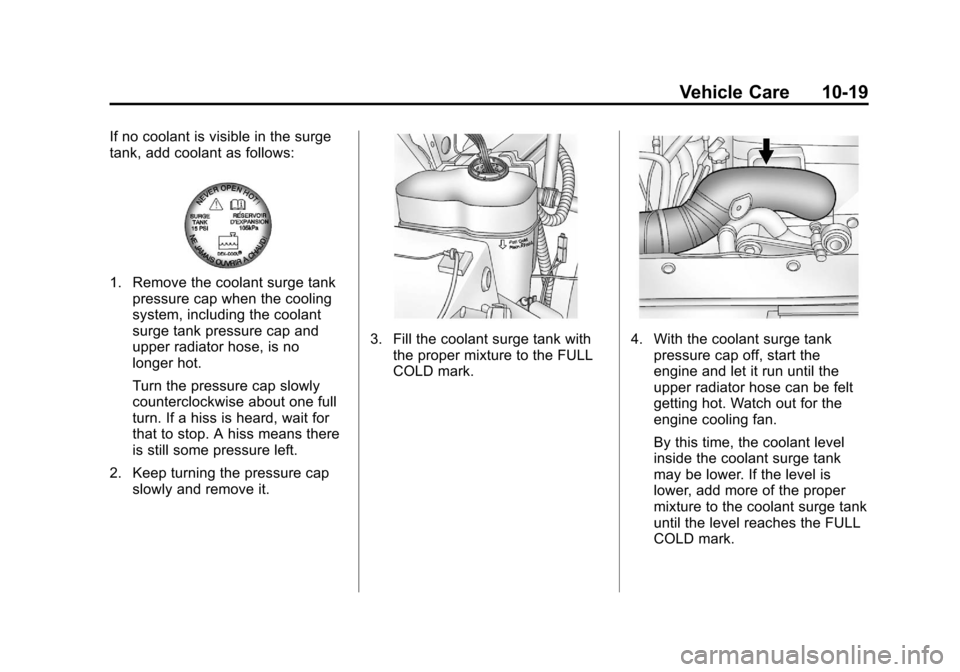
If no coolant is visible in the surge
tank, add coolant as follows:
1. Remove the coolant surge tankpressure cap when the cooling
system, including the coolant
surge tank pressure cap and
upper radiator hose, is no
longer hot.
Turn the pressure cap slowly
counterclockwise about one full
turn. If a hiss is heard, wait for
that to stop. A hiss means there
is still some pressure left.
2. Keep turning the pressure cap slowly and remove it.
3. Fill the coolant surge tank with
the proper mixture to the FULL
COLD mark.4. With the coolant surge tankpressure cap off, start the
engine and let it run until the
upper radiator hose can be felt
getting hot. Watch out for the
engine cooling fan.
By this time, the coolant level
inside the coolant surge tank
may be lower. If the level is
lower, add more of the proper
mixture to the coolant surge tank
until the level reaches the FULL
COLD mark.
Page 375 of 494

Black plate (33,1)Cadillac Escalade EXT Owner Manual - 2012
Vehicle Care 10-33
4. At a wall, measure from theground upward (A) to the
recorded distance from
Step 3 and mark it.
5. Draw or tape a horizontal line (B) on the wall the width of the
vehicle at the height of the mark
in Step 4.
Notice: Do not cover a headlamp
to improve beam cut-off when
aiming. Covering a headlamp may
cause excessive heat build-up
which may cause damage to the
headlamp. 6. Turn on the low-beam
headlamps and place a piece of
cardboard or equivalent in front
of the headlamp not being
adjusted. This allows only the
beam of light from the headlamp
being adjusted to be seen on the
flat surface.
7. Locate the vertical headlamp
aiming screws, which are under
the hood near each headlamp
assembly. 8. Turn the vertical aiming screw
until the headlamp beam is
aimed to the horizontal tape line.
Turn it clockwise or
counterclockwise to raise or
lower the angle of the beam.
9. Make sure that the light from theheadlamp is positioned at the
bottom edge of the horizontal
tape line. The lamp on the
left (A) shows the correct
headlamp aim. The lamp on the
right (B) shows the incorrect
headlamp aim.
10. Repeat Steps 7 through 9 for the opposite headlamp.
Page 376 of 494
Black plate (34,1)Cadillac Escalade EXT Owner Manual - 2012
10-34 Vehicle Care
Bulb Replacement
For the proper type of replacement
bulbs, seeReplacement Bulbs on
page 10‑35.
For any bulb‐changing procedure
not listed in this section, contact
your dealer.
High Intensity Discharge
(HID) Lighting
{WARNING
The low beam high intensity
discharge lighting system
operates at a very high voltage.
If you try to service any of the
system components, you could be
seriously injured. Have your
dealer or a qualified technician
service them.
The vehicle may have HID
headlamps. After an HID headlamp
bulb has been replaced, you may notice that the beam is a slightly
different shade than it was originally.
This is normal.
Taillamps, Turn Signal,
Sidemarker, Stoplamps,
and Back-Up Lamps
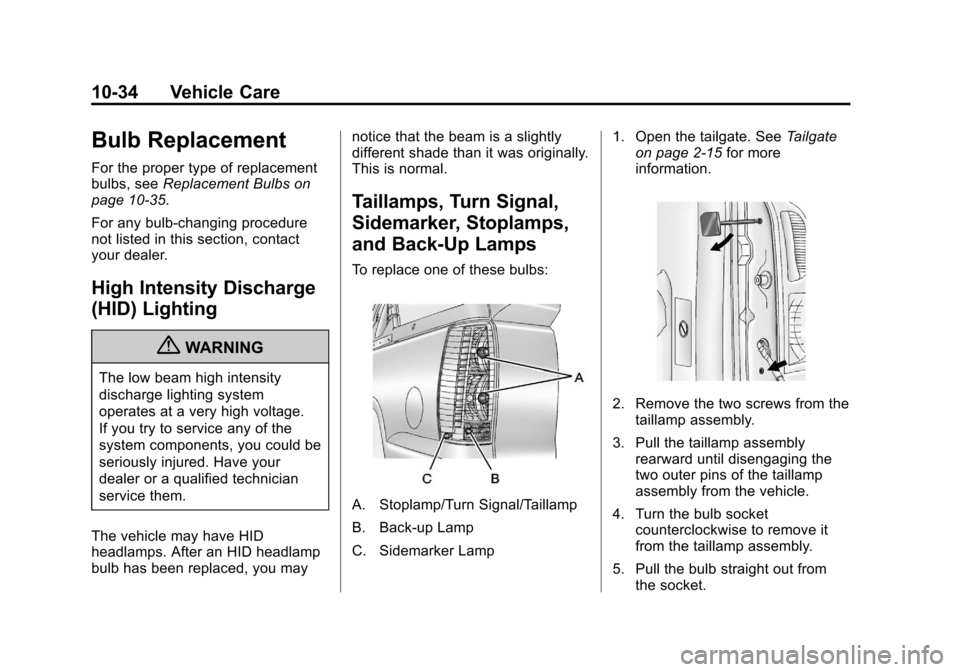
To replace one of these bulbs:
A. Stoplamp/Turn Signal/Taillamp
B. Back-up Lamp
C. Sidemarker Lamp
1. Open the tailgate. See
Tailgate
on page 2‑15 for more
information.
2. Remove the two screws from the taillamp assembly.
3. Pull the taillamp assembly rearward until disengaging the
two outer pins of the taillamp
assembly from the vehicle.
4. Turn the bulb socket counterclockwise to remove it
from the taillamp assembly.
5. Pull the bulb straight out from the socket.
Page 377 of 494
Black plate (35,1)Cadillac Escalade EXT Owner Manual - 2012
Vehicle Care 10-35
6. Press a new bulb into the bulbsocket.
7. Reinstall the socket into the taillamp assembly by turning the
bulb socket clockwise until it
clicks.
8. Reinstall the taillamp assembly making sure to line up the pins
with the vehicle and tighten the
screws.
License Plate Lamp
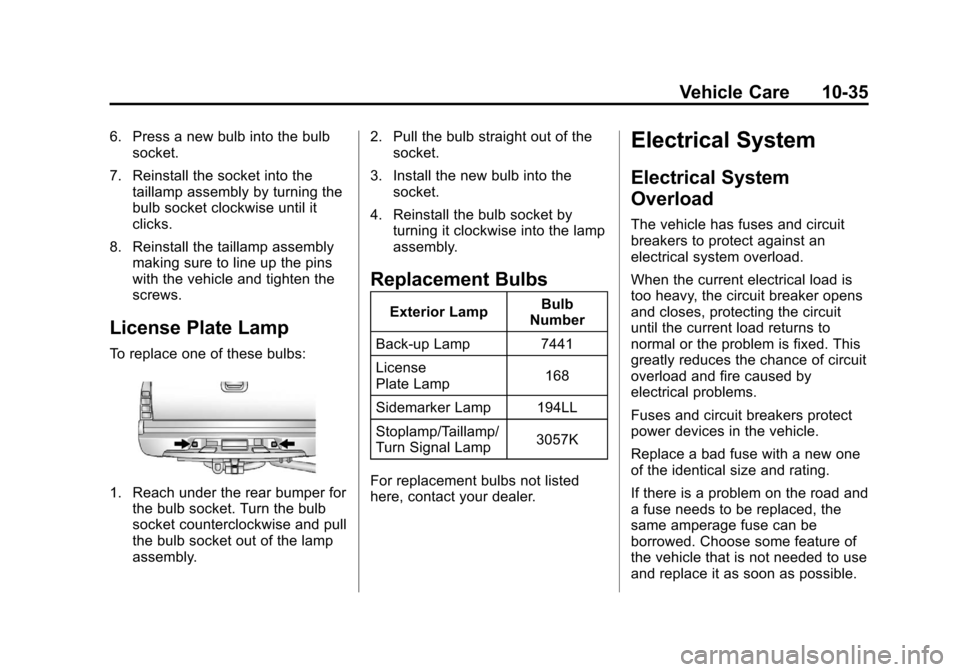
To replace one of these bulbs:
1. Reach under the rear bumper forthe bulb socket. Turn the bulb
socket counterclockwise and pull
the bulb socket out of the lamp
assembly. 2. Pull the bulb straight out of the
socket.
3. Install the new bulb into the socket.
4. Reinstall the bulb socket by turning it clockwise into the lamp
assembly.
Replacement Bulbs
Exterior Lamp Bulb
Number
Back-up Lamp 7441
License
Plate Lamp 168
Sidemarker Lamp 194LL
Stoplamp/Taillamp/
Turn Signal Lamp 3057K
For replacement bulbs not listed
here, contact your dealer.
Electrical System
Electrical System
Overload
The vehicle has fuses and circuit
breakers to protect against an
electrical system overload.
When the current electrical load is
too heavy, the circuit breaker opens
and closes, protecting the circuit
until the current load returns to
normal or the problem is fixed. This
greatly reduces the chance of circuit
overload and fire caused by
electrical problems.
Fuses and circuit breakers protect
power devices in the vehicle.
Replace a bad fuse with a new one
of the identical size and rating.
If there is a problem on the road and
a fuse needs to be replaced, the
same amperage fuse can be
borrowed. Choose some feature of
the vehicle that is not needed to use
and replace it as soon as possible.
Page 406 of 494

Black plate (64,1)Cadillac Escalade EXT Owner Manual - 2012
10-64 Vehicle Care
Tire Changing
Removing the Spare Tire and
Tools
The jack and the wheel blocks are
located under a cover near the
passenger side rear seat.
Rear Seat (Passenger Side) JackCover
1. Remove the jack cover by turning the two wing nuts
one-quarter turn
counterclockwise and pulling the
jack cover off.
A. Wheel Blocks
B. Jack Knob
C. Wing Nut
D. Retaining Hook
E. Jack
F. Mounting Bracket
2. Turn the jack knob (B) on the jack counterclockwise to release
the jack (E) from the mounting
bracket (F). 3. Turn the wing nut (C)
counterclockwise to remove the
wheel blocks (A) attached to the
jack (E). Place the wheel blocks
where needed as indicated in
previously in this section.
The tools for changing a flat tire are
located in the passenger side
top-box storage unit.
To remove the tools:
1. Open the top door on the passenger side top-box storage
unit. Use the ignition/door key to
unlock it if it is locked. See
Top-Box Storage on page 4‑2 for
more information.
2. Remove the black pouch from the storage box.
Page 407 of 494

Black plate (65,1)Cadillac Escalade EXT Owner Manual - 2012
Vehicle Care 10-65
To access the spare tire:
A. Spare Tire (Valve StemPointed Down)
B. Hoist Assembly
C. Hoist Cable
D. Tire/Wheel Retainer
E. Hoist Shaft
F. Hoist End of Extension Tool
G. Hoist Shaft Access Hole H. Wheel Wrench
I. Jack Handle Extension(s)
J. Spare Tire Lock
1. Open the hoist shaft access
cover on the bumper to access
the spare tire lock (J).
2. To remove the spare tire lock, insert the ignition key, turn it
clockwise and pull it straight out.
3. Assemble the two jack handleextensions (I) and wheel
wrench (H), as shown.
4. Insert the open end of theextension (F) through the hole in
the rear bumper (G) (hoist shaft
access hole).
Be sure the hoist end (F) of the
extension connects to the hoist
shaft. The ribbed square end of
the extension is used to lower
the spare tire.
Do not use the chiseled end of
the wheel wrench.
5. Turn the wheel wrench counterclockwise to lower the
spare tire to the ground.