clock CADILLAC ESCALADE EXT 2012 3.G Owners Manual
[x] Cancel search | Manufacturer: CADILLAC, Model Year: 2012, Model line: ESCALADE EXT, Model: CADILLAC ESCALADE EXT 2012 3.GPages: 494, PDF Size: 7.71 MB
Page 9 of 494

Black plate (3,1)Cadillac Escalade EXT Owner Manual - 2012
In Brief 1-3
A.Air Vents on page 8‑6.
B. Turn and Lane-Change Signals
on page 6‑7.
Windshield Wiper/Washer on
page 5‑4.
C. Hazard Warning Flashers on
page 6‑7.
D. Instrument Cluster on
page 5‑10.
E. Shift Lever/Tow/Haul Selector Button. See Automatic
Transmission on page 9‑31 and
Tow/Haul Mode on page 9‑35.
F. Clock on page 5‑7.
G. Infotainment on page 7‑1. H.
Exterior Lamp Controls on
page 6‑1.
I. Dome Lamp Override. See Dome Lamps on page 6‑9.
J. Data Link Connector (DLC) (Out of View). See Malfunction
Indicator Lamp on page 5‑15.
K. Cruise Control on page 9‑43.
L. Steering Wheel Adjustment on
page 5‑2.
M. Horn on page 5‑4.
N. Steering Wheel Controls on
page 5‑2.
O. Driver Information Center (DIC) Buttons. See Driver Information
Center (DIC) on page 5‑23. P. Pedal Adjust Button. See
Adjustable Throttle and Brake
Pedal on page 9‑23.
Power Running Boards Disable
Button (If Equipped). See
Power Assist Steps on
page 2‑15.
Q. Dual Automatic Climate Control
System on page 8‑1.
Heated and Ventilated Front
Seats on page 3‑7
(If Equipped).
R. StabiliTrak
®System on
page 9‑39.
Ultrasonic Parking Assist on
page 9‑45.
Page 18 of 494
Black plate (12,1)Cadillac Escalade EXT Owner Manual - 2012
1-12 In Brief
Interior Lighting
Dome Lamps
The dome lamps are located in the
overhead console.
They come on when any door is
opened and turn off after all the
doors are closed.
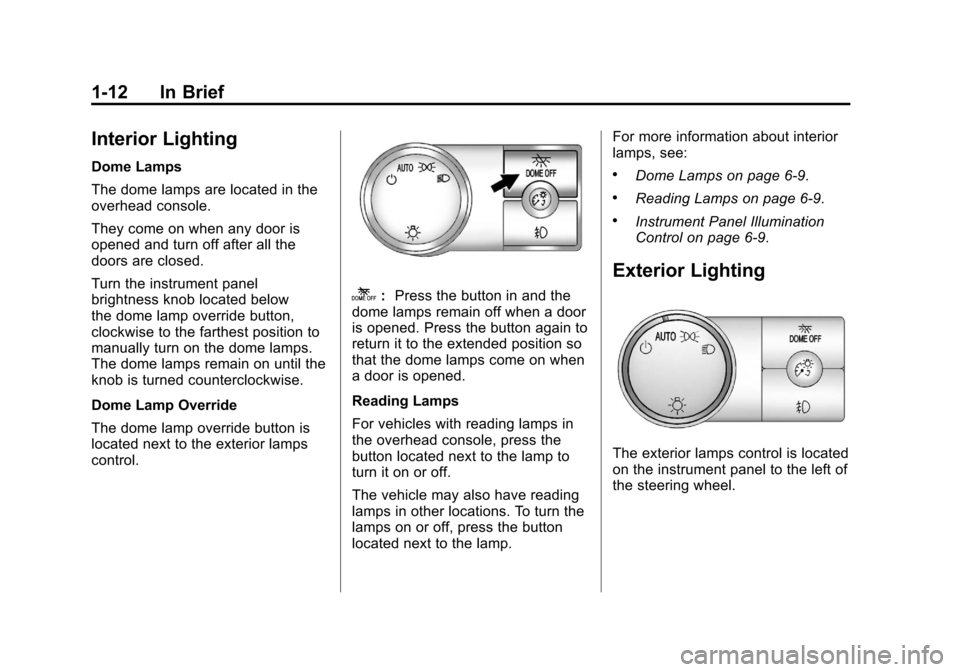
Turn the instrument panel
brightness knob located below
the dome lamp override button,
clockwise to the farthest position to
manually turn on the dome lamps.
The dome lamps remain on until the
knob is turned counterclockwise.
Dome Lamp Override
The dome lamp override button is
located next to the exterior lamps
control.
k:Press the button in and the
dome lamps remain off when a door
is opened. Press the button again to
return it to the extended position so
that the dome lamps come on when
a door is opened.
Reading Lamps
For vehicles with reading lamps in
the overhead console, press the
button located next to the lamp to
turn it on or off.
The vehicle may also have reading
lamps in other locations. To turn the
lamps on or off, press the button
located next to the lamp. For more information about interior
lamps, see:
.Dome Lamps on page 6‑9.
.Reading Lamps on page 6‑9.
.Instrument Panel Illumination
Control on page 6‑9.
Exterior Lighting
The exterior lamps control is located
on the instrument panel to the left of
the steering wheel.
Page 42 of 494

Black plate (14,1)Cadillac Escalade EXT Owner Manual - 2012
2-14 Keys, Doors, and Windows
Rear Glass in Normal Position
2. Standing outside of the vehicle, hold the Midgate securely so it
does not fall forward. Turn the
Midgate handle clockwise and
pull the Midgate toward you.
3. Lower the Midgate until it is flat.
Lowering the Midgate with the
Rear Glass in the Storage
Pocket
Rear Glass Stored in Glass
Storage Pocket
Midgate Lowered with Crossbar
Attached
This procedure works the same as
the procedure described previously,
but when you lower the Midgate
with the rear glass in the stored
position, you will notice that the
entire crossbar will lower with the
Midgate. This is completely normal;
however, since the crossbar lowers
with the Midgate, it will be heavier.
As you lower the Midgate be ready
for the extra weight and do not let
the Midgate fall as you lower it.
Page 121 of 494
Black plate (1,1)Cadillac Escalade EXT Owner Manual - 2012
Instruments and Controls 5-1
Instruments and
Controls
Controls
Steering Wheel Adjustment . . . 5-2
Steering Wheel Controls . . . . . . 5-2
Heated Steering Wheel . . . . . . . 5-4
Horn . . . . . . . . . . . . . . . . . . . . . . . . . . 5-4
Windshield Wiper/Washer . . . . . 5-4
Compass . . . . . . . . . . . . . . . . . . . . . 5-5
Clock . . . . . . . . . . . . . . . . . . . . . . . . . 5-7
Power Outlets . . . . . . . . . . . . . . . . . 5-7
Cigarette Lighter . . . . . . . . . . . . . . 5-8
Ashtrays . . . . . . . . . . . . . . . . . . . . . . 5-9
Warning Lights, Gauges, and
Indicators
Warning Lights, Gauges, andIndicators . . . . . . . . . . . . . . . . . . . . 5-9
Instrument Cluster . . . . . . . . . . . 5-10
Speedometer . . . . . . . . . . . . . . . . 5-11
Odometer . . . . . . . . . . . . . . . . . . . . 5-11
Trip Odometer . . . . . . . . . . . . . . . 5-11
Tachometer . . . . . . . . . . . . . . . . . . 5-11
Fuel Gauge . . . . . . . . . . . . . . . . . . 5-11 Engine Coolant Temperature
Gauge . . . . . . . . . . . . . . . . . . . . . . 5-12
Safety Belt Reminders . . . . . . . 5-12
Airbag Readiness Light . . . . . . 5-13
Passenger Airbag Status Indicator . . . . . . . . . . . . . . . . . . . . 5-14
Charging System Light . . . . . . 5-15
Malfunction Indicator Lamp . . . . . . . . . . . . . 5-15
Brake System Warning Light . . . . . . . . . . . . . . . . . . . . . . . 5-18
Antilock Brake System (ABS) Warning Light . . . . . . . . . . . . . . 5-19
Tow/Haul Mode Light . . . . . . . . 5-19
StabiliTrak
®OFF Light . . . . . . . 5-20
Traction Control System (TCS)/StabiliTrak
®Light . . . . 5-20
Tire Pressure Light . . . . . . . . . . 5-20
Engine Oil Pressure Light . . . . 5-21
Security Light . . . . . . . . . . . . . . . . 5-21
High-Beam On Light . . . . . . . . . 5-22
Front Fog Lamp Light . . . . . . . . 5-22
Lamps On Reminder . . . . . . . . . 5-22
Cruise Control Light . . . . . . . . . 5-23
Information Displays
Driver Information Center (DIC) . . . . . . . . . . . . . . . 5-23
Vehicle Messages
Vehicle Messages . . . . . . . . . . . 5-28
Battery Voltage and ChargingMessages . . . . . . . . . . . . . . . . . . 5-28
Brake System Messages . . . . 5-28
Door Ajar Messages . . . . . . . . . 5-29
Engine Cooling System Messages . . . . . . . . . . . . . . . . . . 5-29
Engine Oil Messages . . . . . . . . 5-30
Engine Power Messages . . . . 5-31
Fuel System Messages . . . . . . 5-31
Key and Lock Messages . . . . . 5-32
Lamp Messages . . . . . . . . . . . . . 5-32
Object Detection System Messages . . . . . . . . . . . . . . . . . . 5-32
Ride Control System Messages . . . . . . . . . . . . . . . . . . 5-32
Page 127 of 494

Black plate (7,1)Cadillac Escalade EXT Owner Manual - 2012
Instruments and Controls 5-7
cell phone antenna mount, a
magnetic emergency light, magnetic
note pad holder, or any other
magnetic item. Turn off the vehicle,
move the magnetic item, then turn
on the vehicle and calibrate the
compass.
To calibrate the compass, use the
following procedure:
Compass Calibration Procedure
1. Before calibrating the compass,make sure the compass zone is
set to the variance zone in which
the vehicle is located. See
“Compass Variance (Zone)
Procedure” earlier in this
section.
Do not operate any switches
such as window, sunroof,
climate controls, seats, etc.
during the calibration procedure.
2. Press the vehicle information button until PRESS
VTO
CALIBRATE COMPASS
displays. 3. Press the set/reset button to
start the compass calibration.
4. The DIC will display CALIBRATING: DRIVE IN
CIRCLES. Drive the vehicle in
tight circles at less than 8 km/h
(5 mph) to complete the
calibration. The DIC will display
CALIBRATION COMPLETE for a
few seconds when the
calibration is complete. The DIC
display will then return to the
previous menu.
Clock
The analog clock is located on the
instrument panel above the radio.
The clock is not connected with any
other vehicle system and runs by
itself. To adjust the clock:
1. The adjustment button is locatedin the lower left corner of the
clock.
2. Push and hold the adjustment button to advance the clock
hands. Holding the button down will cause the clock to advance
faster. Release the button before
reaching the desired time.
3. Push and release the button to increase the time by one minute
increments until the desired time
is reached.
Power Outlets
Accessory power outlets can be
used to plug in electrical equipment,
such as a cell phone or MP3 player.
One accessory power outlet is
located inside the center floor
console. Lift up on the lower latch
located at the front of the console lid
to access the accessory power
outlet.
There may also be an accessory
power outlet located on the rear of
the center floor console above the
cupholder.
Remove the cover to access and
replace when not in use.
Page 179 of 494
Black plate (9,1)Cadillac Escalade EXT Owner Manual - 2012
Lighting 6-9
Interior Lighting
Instrument Panel
Illumination Control
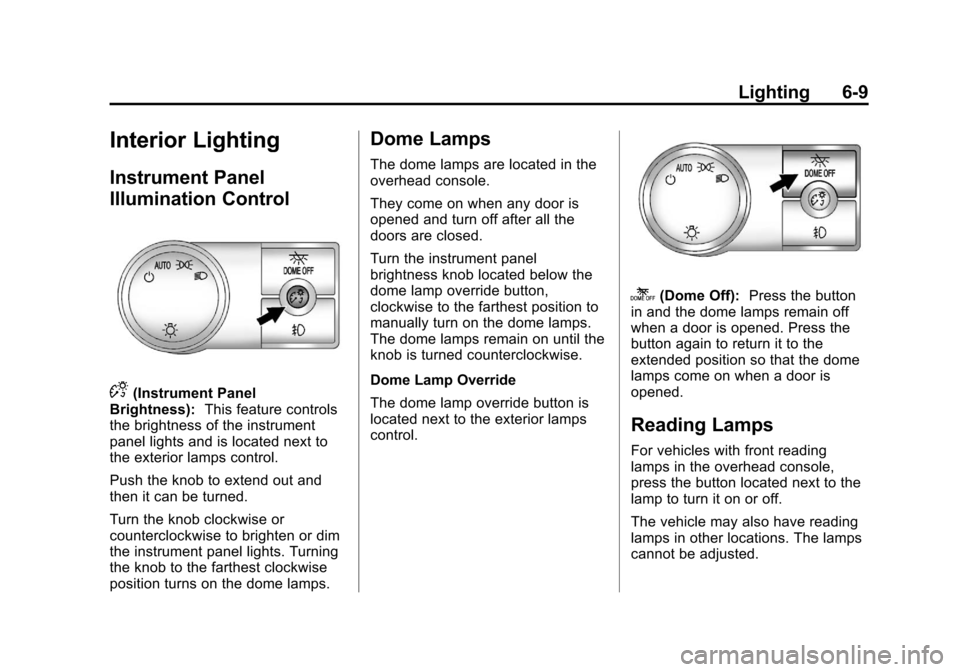
D(Instrument Panel
Brightness): This feature controls
the brightness of the instrument
panel lights and is located next to
the exterior lamps control.
Push the knob to extend out and
then it can be turned.
Turn the knob clockwise or
counterclockwise to brighten or dim
the instrument panel lights. Turning
the knob to the farthest clockwise
position turns on the dome lamps.
Dome Lamps
The dome lamps are located in the
overhead console.
They come on when any door is
opened and turn off after all the
doors are closed.
Turn the instrument panel
brightness knob located below the
dome lamp override button,
clockwise to the farthest position to
manually turn on the dome lamps.
The dome lamps remain on until the
knob is turned counterclockwise.
Dome Lamp Override
The dome lamp override button is
located next to the exterior lamps
control.
k(Dome Off): Press the button
in and the dome lamps remain off
when a door is opened. Press the
button again to return it to the
extended position so that the dome
lamps come on when a door is
opened.
Reading Lamps
For vehicles with front reading
lamps in the overhead console,
press the button located next to the
lamp to turn it on or off.
The vehicle may also have reading
lamps in other locations. The lamps
cannot be adjusted.
Page 184 of 494
Black plate (4,1)Cadillac Escalade EXT Owner Manual - 2012
7-4 Infotainment System
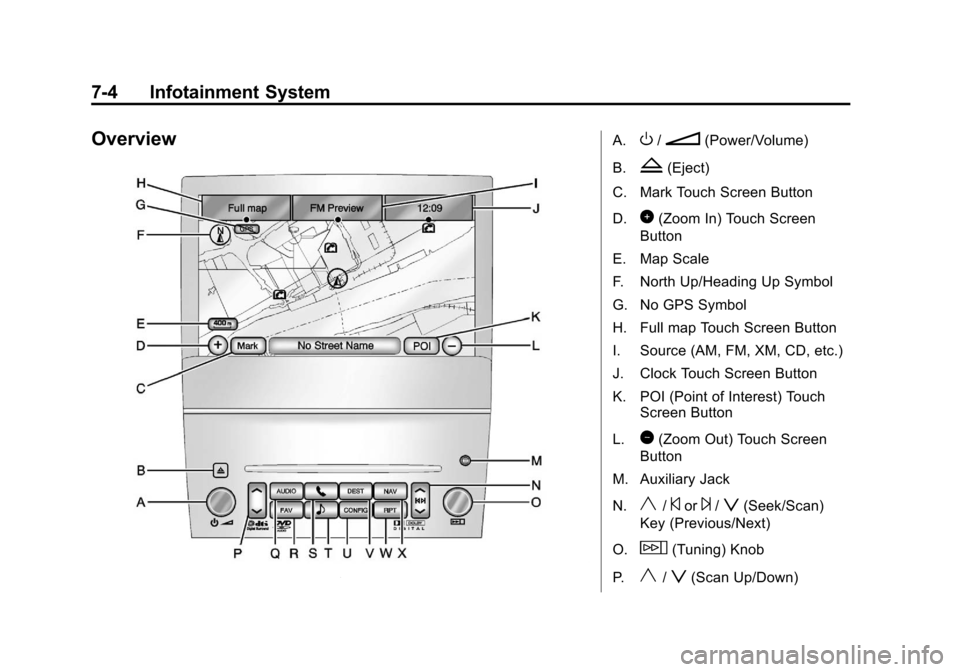
OverviewA.O/n(Power/Volume)
B.
Z(Eject)
C. Mark Touch Screen Button
D.
0(Zoom In) Touch Screen
Button
E. Map Scale
F. North Up/Heading Up Symbol
G. No GPS Symbol
H. Full map Touch Screen Button
I. Source (AM, FM, XM, CD, etc.)
J. Clock Touch Screen Button
K. POI (Point of Interest) Touch Screen Button
L.
1(Zoom Out) Touch Screen
Button
M. Auxiliary Jack
N.
y/©or¨/z(Seek/Scan)
Key (Previous/Next)
O.
w(Tuning) Knob
P.
y/z(Scan Up/Down)
Page 186 of 494
Black plate (6,1)Cadillac Escalade EXT Owner Manual - 2012
7-6 Infotainment System
Setting the Clock
The navigation system time and the
analog clock operate independently.
Changing the time through the
navigation system does not change
the time on the analog clock. See
Clock on page 5‑7to change the
analog clock time.
To set the time for the navigation
system:
1. Press CONFIG to enter the
configure menu options, then
press CONFIG again, repeatedly
until the time is selected or touch
the time screen button.
2. Press the Hours and Minutes −and + to decrease or
to increase the time.
See “Setting the Clock” under
Configure Menu on page 7‑64 for
more information.
Entering an Address and Point
of Interest, and Storing Preset
Destinations
Entering an Address
Enter a destination by inputting the
city name first:
1. Press
Oto turn the system on.
2. A caution may appear. Press OK to proceed.
3. Press DEST.
4. Press
2(Address Entry).
5. Select the state/province screen button, if needed, to change the
current state or province. A list
of all of the available states and
provinces appear. Select the
state or province.
6. Once a state or province has been selected the City name
category is automatically
selected for entry. If five or fewer names are
available, a list displays. If
more than five are available, the
List screen button displays a
number. This number represents
the number of available cities.
Press this button to view the list
and select a city.
7. Once a city has been selected the Street name category is
automatically selected for entry.
If five or fewer streets are
available for the selected city,
the system displays the list of
streets. If more than five streets
are available the system
displays the alpha keyboard.
Start entering the street name.
If five or fewer names are
available, a list displays. If
more than five are available, the
List screen button displays a
number. This button represents
the number of available streets.
Select this button to view the list
and select a street.
Page 200 of 494
Black plate (20,1)Cadillac Escalade EXT Owner Manual - 2012
7-20 Infotainment System
2. Press the down arrow to go tothe start of the current track,
if more than eight seconds have
played.
3. If either arrow is pressed more than once, the player continues
moving backward or forward
through the CD. The sound
mutes while seeking.
w(Tuning Knob):
1. Turn counterclockwise one notch to go to the start of the current
track, turn it again to go to the
previous track.
2. Turn clockwise to go to the next track.
Playing a DVD
DVD video does not display on the
navigation screen unless the vehicle
is in P (Park). It will operate on the
rear seat entertainment screens
while the vehicle is moving. The
Rear Seat Entertainment (RSE)
video screen starts play of the
DVD when a DVD video has been
inserted into the CD/DVD slot. The DVD player can be controlled
by the buttons on the navigation
system, the Rear Seat Audio (RSA)
system, and the remote control. The
DVD player can also be used for the
rear seat passengers with the radio
off. The rear seat passengers can
power on the video screen and use
the remote control to navigate the
disc. See the Rear Seat
Infotainment user guide for more
information.
The DVD player is only compatible
with DVDs of the appropriate region
code that is printed on the jacket of
most DVDs.
The CD/DVD slot is compatible with
most audio CDs, CD-R, CD-RW,
DVD-Video, DVD-R/RW, DVD+R/
RW media along with MP3 and
WMA formats.
If an error appears on the display,
see
“CD/DVD Messages” in this
section.
Once a DVD starts to play, the
menu options and cursor screen
buttons will automatically appear. To display the menu Options screen
button while a DVD is playing, touch
anywhere on the screen.
There are three ways to play
a DVD:
.Once a DVD is inserted, the
system will automatically start
play of the DVD.
.If you are on a map screen,
press the DVD screen button.
.Press AUDIO, then press the
DVD screen button.
When a DVD is loaded, the rear
seat passengers can power on the
RSE video screen and use the
remote control to navigate through
the DVD.
O/3(Power/Volume):
1. Press to turn the system on and off.
2. Turn the knob to increase or decrease the volume of the
audio system.
Page 204 of 494

Black plate (24,1)Cadillac Escalade EXT Owner Manual - 2012
7-24 Infotainment System
w(Tuning Knob):
1. Turn counterclockwise one notch to go to the start of the current
chapter/track, turn it again to go
to the previous chapter/track.
2. Turn clockwise to go to the next chapter/track.
Care of Your CDs and DVDs
Sound quality can be reduced due
to disc quality, recording method,
quality of the music recorded, and
how the disc has been handled.
Handle discs carefully and store
them in their original cases or other
protective cases away from direct
sunlight and dust. If the bottom
surface of a disc is damaged, the
disc may not play properly or at all.
Do not touch the bottom surface of
a disc while handling it; this could
damage the surface. Pick up discs
by grasping the outer edges or the
edge of the hole and the outer edge. If the bottom surface of a disc is
dirty, take a soft lint free cloth,
or dampen a clean soft cloth in a
mild neutral detergent solution
mixed with water, and clean it. Wipe
the disc from the center to the
outer edge.
Notice:
If a label is added to a CD
or DVD, or more than one CD or
DVD is inserted into the slot at a
time, or an attempt is made to
play scratched or damaged CDs
or DVDs, the player could be
damaged. While using the CD or
DVD player, use only CDs or
DVDs in good condition without
any label, load one CD or DVD at
a time, and keep the player and
the loading slot free of foreign
materials, liquids, and debris.
Do not add any label to a CD or
DVD, it could get caught in the
player. If a CD or DVD is recorded
on a personal computer and a
description label is needed, try
labeling the top of the recorded CD
or DVD with a soft marker.
CD/DVD Messages
If Disc Read Error appears on the
display and/or the CD/DVD comes
out, it could be for one of the
following reasons:
.If a CD was inserted with an
invalid or unknown format.
.If a DVD is not from a correct
region.
.It is very hot. When the
temperature returns to normal,
the CD should play.
.You are driving on a very rough
road. When the road becomes
smoother, the CD/DVD
should play.
.The CD/DVD is dirty, scratched,
wet, or upside down.
.The air is very humid. If so, wait
about an hour and try again.