Drive mode CADILLAC LYRIC 2023 User Guide
[x] Cancel search | Manufacturer: CADILLAC, Model Year: 2023, Model line: LYRIC, Model: CADILLAC LYRIC 2023Pages: 424, PDF Size: 4.76 MB
Page 112 of 424
Cadillac Lyriq Owner Manual (GMNA-Localizing-U.S./Canada-15644413) -
2023 - CRC - 2/23/22
Instruments and Controls 111
This displays the high voltage
battery state of charge. The
value at the bottom is an
estimate of how far the
vehicle can be driven on the
remaining charge based on
recent driving habits,
conditions, and HVAC usage.
The fill bars shown inside of
the gauge indicate
the percentage range as
estimated from current vehicle
conditions and climate
settings. The range estimate
on the bottom also may be
affected by climate settings,
current vehicle conditions and
ambient conditions. Estimated
range may increase and
decrease based on climate
control energy consumption.
Driving aggressively through
hard acceleration and/or
braking events, excessive
HVAC usage, using heated or
cooled seats, battery
preconditioning, and
performance modes can affect
vehicle range estimates.When the high voltage battery
state of charge level gets low,
the gauge will change color to
amber. When the charge is
very low the gauge will flash,
and the estimated range value
on the bottom will change to
LOW. Additional alerts may
display and a sound may also
be heard at low state of
charge.
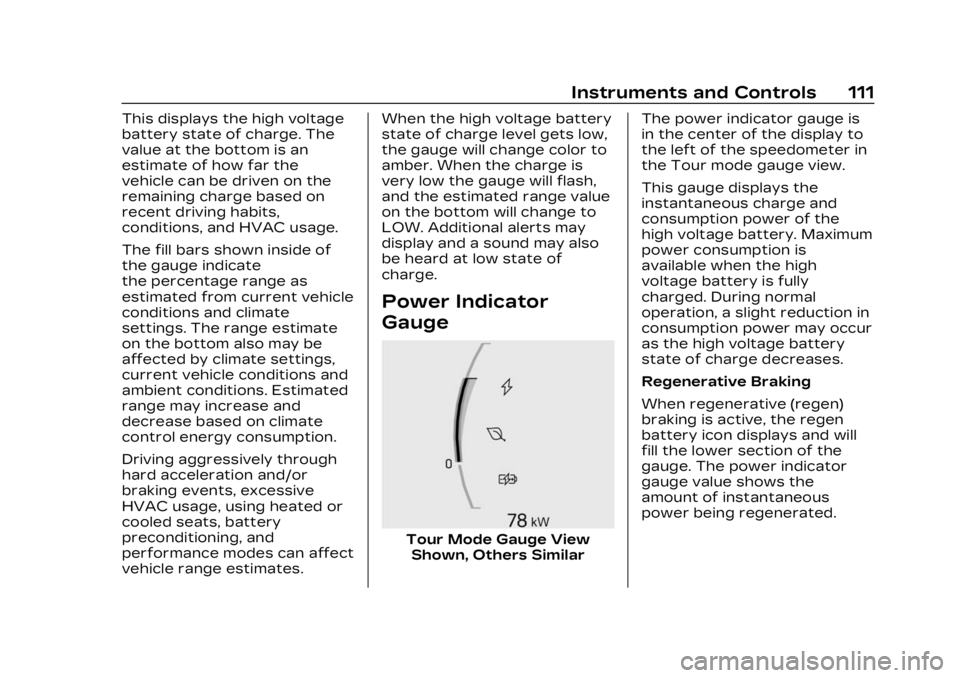
Power Indicator
Gauge
Tour Mode Gauge View
Shown, Others Similar The power indicator gauge is
in the center of the display to
the left of the speedometer in
the Tour mode gauge view.
This gauge displays the
instantaneous charge and
consumption power of the
high voltage battery. Maximum
power consumption is
available when the high
voltage battery is fully
charged. During normal
operation, a slight reduction in
consumption power may occur
as the high voltage battery
state of charge decreases.
Regenerative Braking
When regenerative (regen)
braking is active, the regen
battery icon displays and will
fill the lower section of the
gauge. The power indicator
gauge value shows the
amount of instantaneous
power being regenerated.
Page 121 of 424
Cadillac Lyriq Owner Manual (GMNA-Localizing-U.S./Canada-15644413) -
2023 - CRC - 2/23/22
120 Instruments and Controls
system are not fully
operational and may not assist
in maintaining control. Adjust
driving accordingly. If the
condition persists, see your
dealer as soon as possible.
A Driver Information Center
(DIC) message may display.
The light flashes when the
TCS and/or the StabiliTrak/
ESC system is actively
working.
See Traction Control/
Electronic Stability Control
0221.
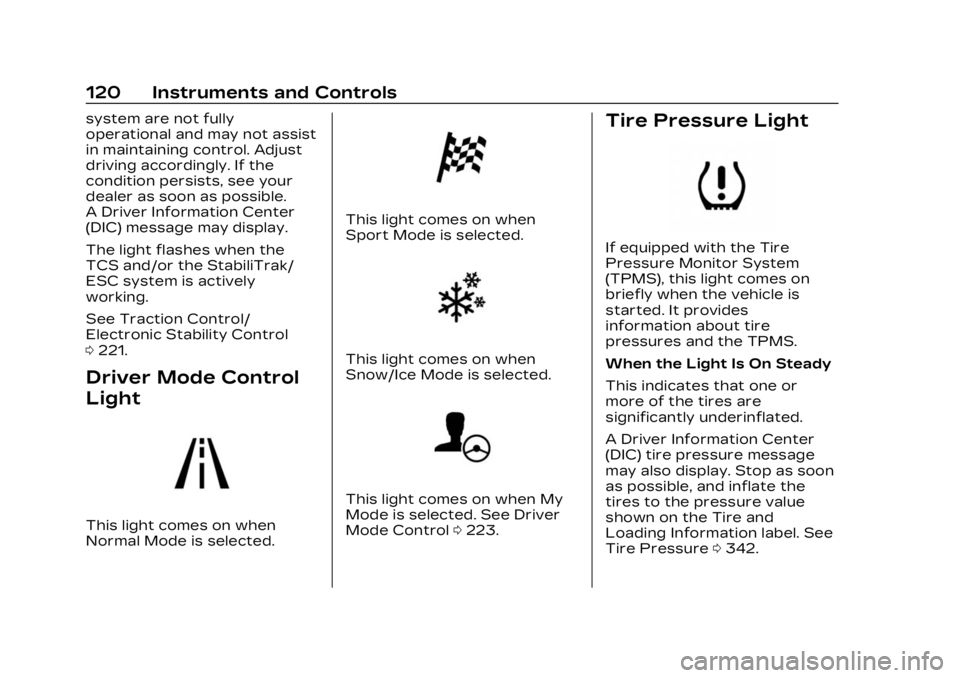
Driver Mode Control
Light
This light comes on when
Normal Mode is selected.
This light comes on when
Sport Mode is selected.
This light comes on when
Snow/Ice Mode is selected.
This light comes on when My
Mode is selected. See Driver
Mode Control 0223.
Tire Pressure Light
If equipped with the Tire
Pressure Monitor System
(TPMS), this light comes on
briefly when the vehicle is
started. It provides
information about tire
pressures and the TPMS.
When the Light Is On Steady
This indicates that one or
more of the tires are
significantly underinflated.
A Driver Information Center
(DIC) tire pressure message
may also display. Stop as soon
as possible, and inflate the
tires to the pressure value
shown on the Tire and
Loading Information label. See
Tire Pressure 0342.
Page 126 of 424
Cadillac Lyriq Owner Manual (GMNA-Localizing-U.S./Canada-15644413) -
2023 - CRC - 2/23/22
Instruments and Controls 125
{Warning
Do not charge your vehicle’s
battery above an 80%
charge if you are going to
drive down long, steep
grades such as mountain
passes. This provides room
in the battery for
regenerative braking to
supplement your
conventional brakes during
the descent. This is
especially important when
towing a trailer, which puts
additional stress on your
vehicle’s braking system.
See Hill and Mountain Roads
0200 for important
information about driving on
grades.
The default charge level is
100% when plugged in. To set
a different charge level, drag
the circular marker on the
Target Charge Level Gauge to
the preferred value. To lower
the desired Charge Level, drag the Charge Level marker
counterclockwise, and to
increase it drag the marker
clockwise. The Charge Level
can also be changed by
tapping
«andªinside the
gauge on the screen. The
multifunction controller (MCF)
on the center console can also
be used to set the Charge
Level by rotating clockwise or
counterclockwise when the
Target Charge Level Gauge is
highlighted. The Range
estimate updates once the
desired Charge Level is set.
To optimize battery health, the
minimum allowable Charge
Level is determined by the
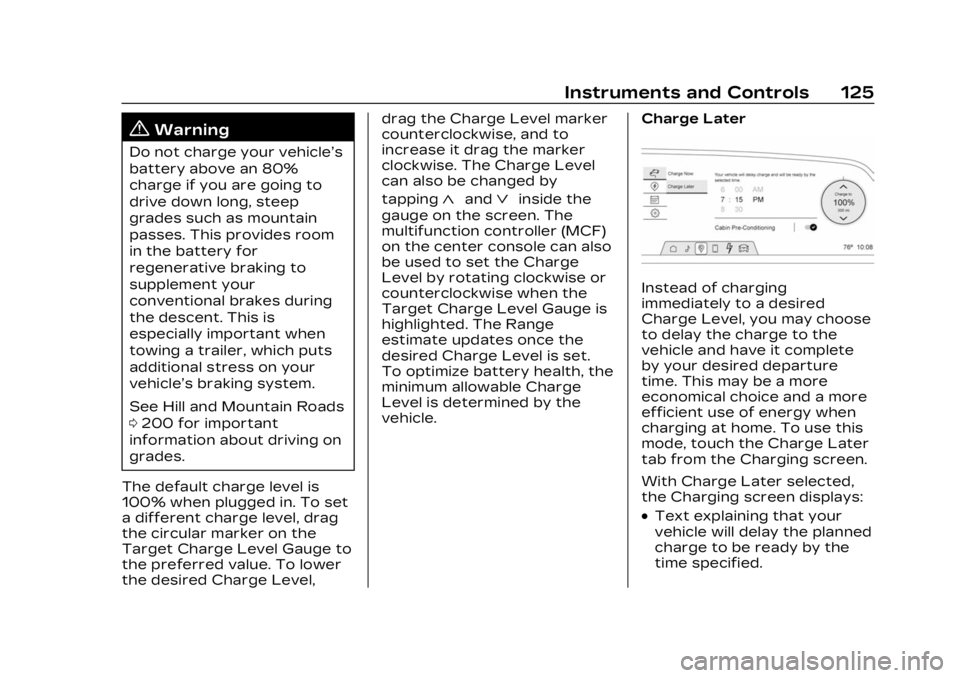
vehicle. Charge Later
Instead of charging
immediately to a desired
Charge Level, you may choose
to delay the charge to the
vehicle and have it complete
by your desired departure
time. This may be a more
economical choice and a more
efficient use of energy when
charging at home. To use this
mode, touch the Charge Later
tab from the Charging screen.
With Charge Later selected,
the Charging screen displays:
.Text explaining that your
vehicle will delay the planned
charge to be ready by the
time specified.
Page 137 of 424
Cadillac Lyriq Owner Manual (GMNA-Localizing-U.S./Canada-15644413) -
2023 - CRC - 2/23/22
136 Instruments and Controls
battery temperature will
increase, and the vehicle will
return to normal operation.
If the high voltage battery
charge level is relatively low
the vehicle will not return to
normal operation until
charged.
Keep the vehicle plugged in,
even when fully charged, to
keep the high voltage battery
temperature ready for the
next drive. This is important
when outside temperatures
are extremely hot or cold.
Vehicle Speed
Messages
SPEED LIMITED TO XXX
KM/H (MPH)
This message shows that the
vehicle speed has been limited
to the speed displayed. The
limited speed is a protection
for various propulsion and
vehicle systems, such aslubrication, thermal, brakes,
suspension, Teen Driver if
equipped, or tires.
Universal Remote
System
See Radio Frequency
Statement
0395.
Universal Remote
System Programming
If equipped, the Universal
Garage Door (Universal
Remote) controls are located
on the infotainment screen.
This system can replace up to
eight remote control
transmitters used to activate
devices such as garage door
openers, security systems,
and home automation devices.
These instructions refer to a
garage door opener, but can
be used for other devices.
Do not use the Universal
Remote system with any
garage door opener that does not have the stop and reverse
feature. This includes any
garage door opener model
manufactured before April
1, 1982.
Keep the original hand-held
transmitter for use in other
vehicles as well as for future
programming. Erase the
programming when vehicle
ownership is terminated. See
“Erasing Universal Remotes.”
To program a garage door
opener, park outside directly in
line with and facing the garage
door opener receiver. Clear all
people and objects away from
the garage door.
Make sure the hand-held
transmitter has a new battery
for quick and accurate
transmission of the
radio-frequency signal.
Programming the
Universal Remote System
Programming involves
time-sensitive actions and may
time out, requiring the
Page 187 of 424
Cadillac Lyriq Owner Manual (GMNA-Localizing-U.S./Canada-15644413) -
2023 - CRC - 2/23/22
186 Climate Controls
Climate Control Display
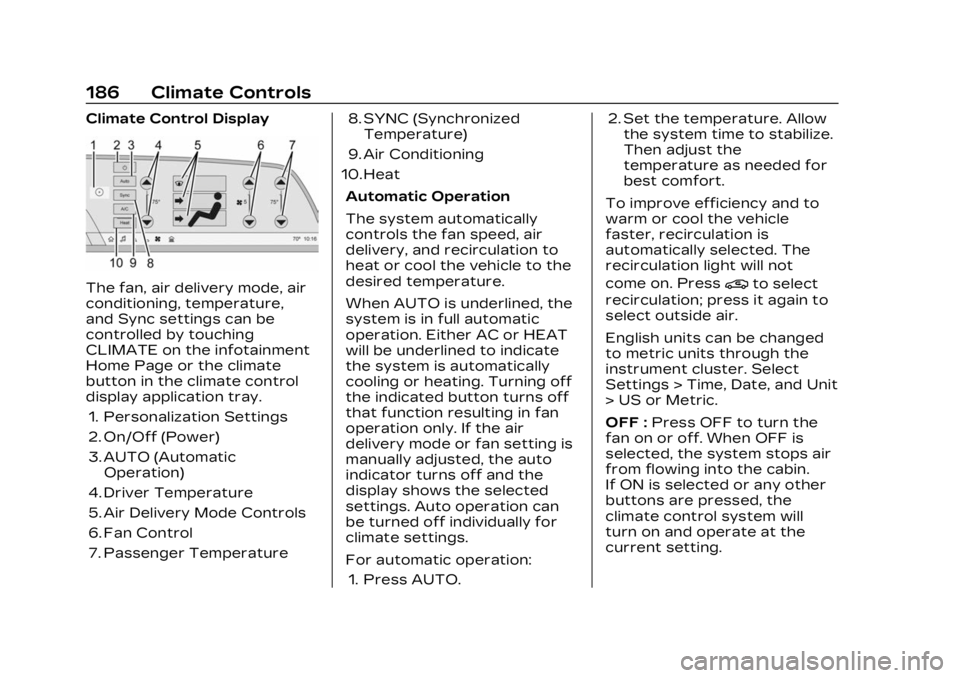
The fan, air delivery mode, air
conditioning, temperature,
and Sync settings can be
controlled by touching
CLIMATE on the infotainment
Home Page or the climate
button in the climate control
display application tray.1. Personalization Settings
2. On/Off (Power)
3. AUTO (Automatic Operation)
4. Driver Temperature
5. Air Delivery Mode Controls
6. Fan Control
7. Passenger Temperature 8. SYNC (Synchronized
Temperature)
9. Air Conditioning
10. Heat
Automatic Operation
The system automatically
controls the fan speed, air
delivery, and recirculation to
heat or cool the vehicle to the
desired temperature.
When AUTO is underlined, the
system is in full automatic
operation. Either AC or HEAT
will be underlined to indicate
the system is automatically
cooling or heating. Turning off
the indicated button turns off
that function resulting in fan
operation only. If the air
delivery mode or fan setting is
manually adjusted, the auto
indicator turns off and the
display shows the selected
settings. Auto operation can
be turned off individually for
climate settings.
For automatic operation:1. Press AUTO. 2. Set the temperature. Allow
the system time to stabilize.
Then adjust the
temperature as needed for
best comfort.
To improve efficiency and to
warm or cool the vehicle
faster, recirculation is
automatically selected. The
recirculation light will not
come on. Press@to select
recirculation; press it again to
select outside air.
English units can be changed
to metric units through the
instrument cluster. Select
Settings > Time, Date, and Unit
> US or Metric.
OFF : Press OFF to turn the
fan on or off. When OFF is
selected, the system stops air
from flowing into the cabin.
If ON is selected or any other
buttons are pressed, the
climate control system will
turn on and operate at the
current setting.
Page 188 of 424
Cadillac Lyriq Owner Manual (GMNA-Localizing-U.S./Canada-15644413) -
2023 - CRC - 2/23/22
Climate Controls 187
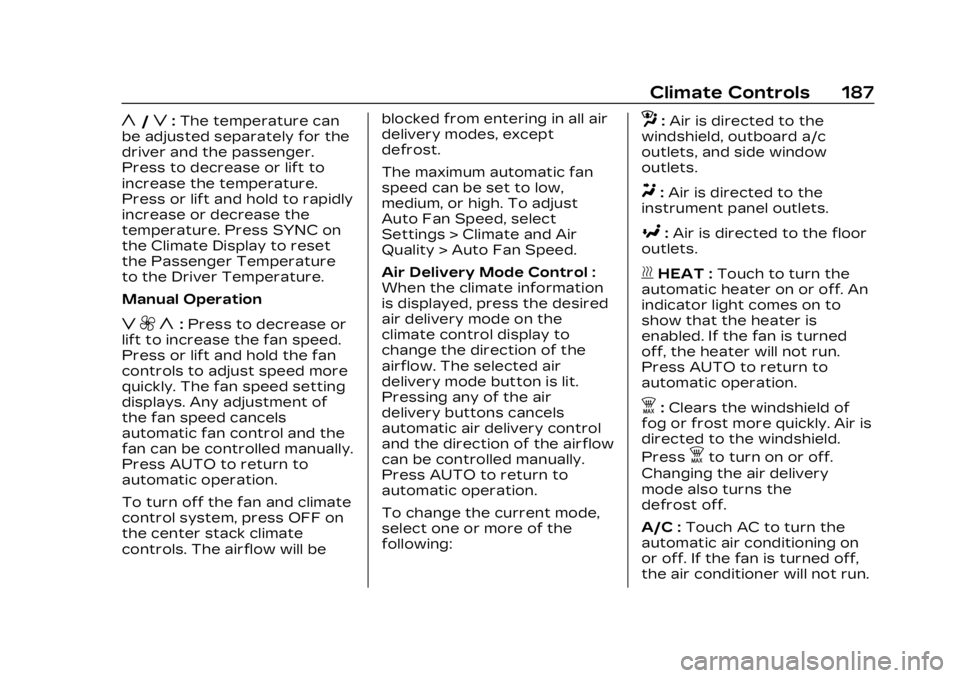
y/z:The temperature can
be adjusted separately for the
driver and the passenger.
Press to decrease or lift to
increase the temperature.
Press or lift and hold to rapidly
increase or decrease the
temperature. Press SYNC on
the Climate Display to reset
the Passenger Temperature
to the Driver Temperature.
Manual Operation
z 9 y: Press to decrease or
lift to increase the fan speed.
Press or lift and hold the fan
controls to adjust speed more
quickly. The fan speed setting
displays. Any adjustment of
the fan speed cancels
automatic fan control and the
fan can be controlled manually.
Press AUTO to return to
automatic operation.
To turn off the fan and climate
control system, press OFF on
the center stack climate
controls. The airflow will be blocked from entering in all air
delivery modes, except
defrost.
The maximum automatic fan
speed can be set to low,
medium, or high. To adjust
Auto Fan Speed, select
Settings > Climate and Air
Quality > Auto Fan Speed.
Air Delivery Mode Control :
When the climate information
is displayed, press the desired
air delivery mode on the
climate control display to
change the direction of the
airflow. The selected air
delivery mode button is lit.
Pressing any of the air
delivery buttons cancels
automatic air delivery control
and the direction of the airflow
can be controlled manually.
Press AUTO to return to
automatic operation.
To change the current mode,
select one or more of the
following:
z:
Air is directed to the
windshield, outboard a/c
outlets, and side window
outlets.
Y: Air is directed to the
instrument panel outlets.
[: Air is directed to the floor
outlets.
vHEAT : Touch to turn the
automatic heater on or off. An
indicator light comes on to
show that the heater is
enabled. If the fan is turned
off, the heater will not run.
Press AUTO to return to
automatic operation.
d: Clears the windshield of
fog or frost more quickly. Air is
directed to the windshield.
Press
dto turn on or off.
Changing the air delivery
mode also turns the
defrost off.
A/C : Touch AC to turn the
automatic air conditioning on
or off. If the fan is turned off,
the air conditioner will not run.
Page 190 of 424
Cadillac Lyriq Owner Manual (GMNA-Localizing-U.S./Canada-15644413) -
2023 - CRC - 2/23/22
Climate Controls 189
Caution (Continued)
with a razor blade or
anything else that is sharp.
This may damage the rear
window defogger grid and
affect the radio's ability to
pick up stations clearly. The
repairs would not be
covered by the vehicle
warranty.
Sensor
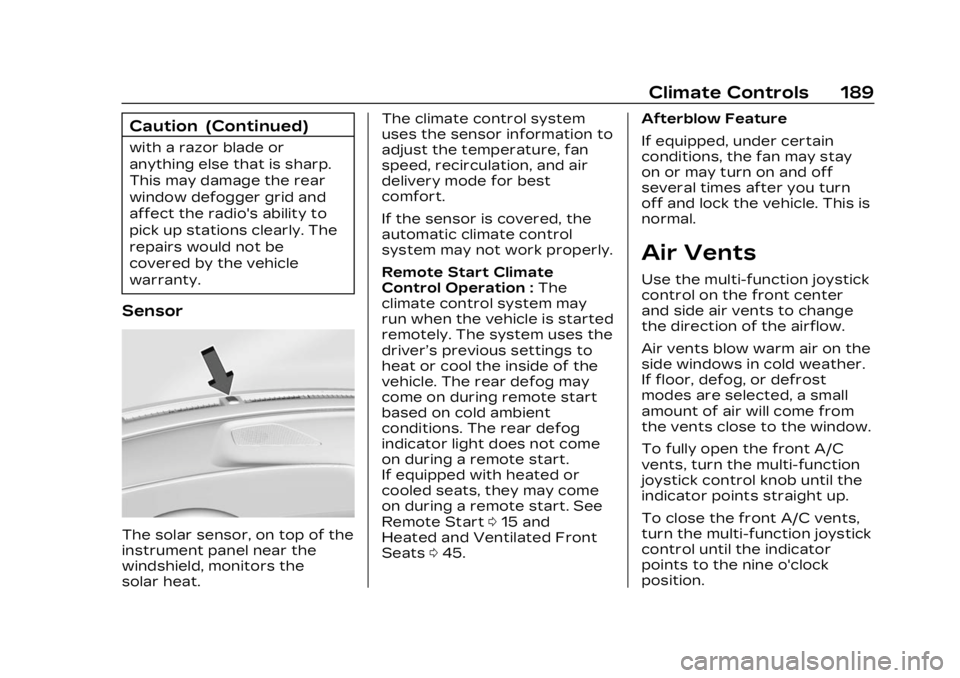
The solar sensor, on top of the
instrument panel near the
windshield, monitors the
solar heat.The climate control system
uses the sensor information to
adjust the temperature, fan
speed, recirculation, and air
delivery mode for best
comfort.
If the sensor is covered, the
automatic climate control
system may not work properly.
Remote Start Climate
Control Operation :
The
climate control system may
run when the vehicle is started
remotely. The system uses the
driver’s previous settings to
heat or cool the inside of the
vehicle. The rear defog may
come on during remote start
based on cold ambient
conditions. The rear defog
indicator light does not come
on during a remote start.
If equipped with heated or
cooled seats, they may come
on during a remote start. See
Remote Start 015 and
Heated and Ventilated Front
Seats 045. Afterblow Feature
If equipped, under certain
conditions, the fan may stay
on or may turn on and off
several times after you turn
off and lock the vehicle. This is
normal.
Air Vents
Use the multi-function joystick
control on the front center
and side air vents to change
the direction of the airflow.
Air vents blow warm air on the
side windows in cold weather.
If floor, defog, or defrost
modes are selected, a small
amount of air will come from
the vents close to the window.
To fully open the front A/C
vents, turn the multi-function
joystick control knob until the
indicator points straight up.
To close the front A/C vents,
turn the multi-function joystick
control until the indicator
points to the nine o'clock
position.
Page 193 of 424

Cadillac Lyriq Owner Manual (GMNA-Localizing-U.S./Canada-15644413) -
2023 - CRC - 2/23/22
192 Driving and Operating
Driving and
Operating
Driving Information
Driving for Better EnergyEfficiency . . . . . . . . . . . . . . . . . . . 193
Distracted Driving . . . . . . . . . 195
Defensive Driving . . . . . . . . . . 196
Impaired Driving . . . . . . . . . . . . 196
Control of a Vehicle . . . . . . . 196
Braking . . . . . . . . . . . . . . . . . . . . . . . . 196
Steering . . . . . . . . . . . . . . . . . . . . . . . 197
Off-Road Recovery . . . . . . . . 198
Loss of Control . . . . . . . . . . . . . 198
Driving on Wet Roads . . . . 199
Hill and Mountain Roads . . . . . . . . . . . . . . . . . . . . . . . 200
Winter Driving . . . . . . . . . . . . . . 201
If the Vehicle Is Stuck . . . . 202
Vehicle Load Limits . . . . . . . 202
Starting and Operating
New Vehicle Break-In . . . . 206
Power Button . . . . . . . . . . . . . . 206
Starting and Stopping the Vehicle . . . . . . . . . . . . . . . . 208
Retained Accessory Power (RAP) . . . . . . . . . . . . . . 209
Shifting Into Park . . . . . . . . . . 209 Shifting out of Park . . . . . . . 210
Extended Parking . . . . . . . . . . 210
Electric Drive Unit
Electric Drive Unit . . . . . . . . . . 211
One-Pedal Driving . . . . . . . . . 214
Drive Systems
All-Wheel Drive . . . . . . . . . . . . . 215
Brakes
Electric Brake Boost . . . . . . 216
Antilock Brake
System (ABS) . . . . . . . . . . . . . . 216
Electric Parking Brake . . . . 217
Brake Assist . . . . . . . . . . . . . . . . . 218
Hill Start Assist (HSA) . . . . 218
Automatic Vehicle Hold (AVH) . . . . . . . . . . . . . . . . . . 219
Regenerative Braking . . . . 220
Ride Control Systems
Traction Control/ Electronic Stability
Control . . . . . . . . . . . . . . . . . . . . . . 221
Driver Mode Control . . . . . . 223
Cruise Control
Adaptive Cruise Control (Advanced) . . . . . . . . . . . . . . . . . 225
Super Cruise . . . . . . . . . . . . . . . . 236
Driver Assistance
Systems
Driver Assistance Systems . . . . . . . . . . . . . . . . . . . . 255
Assistance Systems for Parking or Backing . . . . . . 257
Rear Vision Camera (RVC) . . . . . . . . . . . . . 257
Surround Vision System . . . . . . . . . . . . . . . . . . . . . . 258
Park Assist . . . . . . . . . . . . . . . . . . 260
Automatic Parking Assist (APA) . . . . . . . . . . . . . . . 262
Reverse Automatic Braking (RAB) . . . . . . . . . . . . . 267
Rear Pedestrian Alert . . . . 268
Rear Cross Traffic Alert (RCTA) System . . . . . . . . . . . 269
Assistance Systems for Driving . . . . . . . . . . . . . . . . . . . . . . 270
Forward Collision Alert (FCA) System . . . . . . . . . . . . . 270
Automatic Emergency Braking (AEB) . . . . . . . . . . . . . 273
Front Pedestrian Braking (FPB) System . . . . . . . . . . . . . . 274
Side Blind Zone Alert (SBZA) . . . . . . . . . . . . . . . 277
Lane Change Alert (LCA) . . . . . . . . . . . . . . . . . 277
Page 195 of 424
Cadillac Lyriq Owner Manual (GMNA-Localizing-U.S./Canada-15644413) -
2023 - CRC - 2/23/22
194 Driving and Operating
Acceleration/Braking/
Coasting
Avoid rapid accelerations and
decelerations.
Use cruise control when
appropriate.
Plan ahead for decelerations,
and coast whenever possible.
Do not rush to traffic signals,
and do not shift to N (Neutral)
to coast.
Use the One-Pedal Driving
feature when appropriate to
help recover energy during
coasting and braking.
One-Pedal mode recovers
more energy while coasting
and braking than D (Drive)
mode. See One-Pedal Driving
0214.
Use the steering wheel Regen
on Demand paddle during
deceleration to help recover
energy. See Regenerative
Braking 0220. Terrain and Vehicle Speed
Higher speeds and grade
changes use more energy and
can significantly reduce
electric range.
Climate Setting
Using the heat and air
conditioning systems
decreases the energy
available for electric driving.
Optimal energy efficiency is
achieved when the heat, air
conditioning, and fan are
turned off.
Use the heated and ventilated
seat features (if equipped)
instead of the climate control
system. Heating and
ventilating the seat uses less
energy than heating and
cooling the interior. See
Heated and Ventilated Front
Seats
045 and
Heated Rear Seats 049.
Use the Remote Start Climate
Control feature to heat or cool
the interior while the vehicle is
plugged in to use electricity from the electrical outlet
instead of using energy from
the battery. See Remote Start
0
15.
In hot weather, avoid parking
in direct sunlight. Use
sunshades inside the vehicle.
Keep the inside of the
windows clean to reduce
fogging. Turn off the front
defroster and rear defogger
when they are not needed.
Avoid driving with the
windows open at highway
speeds.
Use the Battery Gauge on the
Instrument Cluster to view the
effect of climate control
settings on your estimated
range. See Battery Gauge
(High Voltage) 0110.
Outside Temperature
On colder days, it is best to
plug in the vehicle overnight,
and then remote start the
vehicle.
Page 202 of 424
Cadillac Lyriq Owner Manual (GMNA-Localizing-U.S./Canada-15644413) -
2023 - CRC - 2/23/22
Driving and Operating 201
Winter Driving
Driving on Snow or IceCaution
To avoid damage to the
wheels and brake
components, always clear
snow and ice from inside the
wheels and underneath the
vehicle before driving.
Snow or ice between the tires
and the road creates less
traction or grip, so drive
carefully. Wet ice can occur at
about 0°C (32°F) when
freezing rain begins to fall.
Avoid driving on wet ice or in
freezing rain until roads can be
treated.
For Slippery Road Driving:
.Turn off cruise control.
.If enabled, turn off
One-Pedal Driving. See
One-Pedal Driving 0214
.If turned off, turn on the
Traction Control and the
Electronic Stability Control systems. See Traction
Control/Electronic Stability
Control
0221.
.Select the Snow/Ice driver
mode. See Driver Mode
Control 0223.
.Accelerate gently.
Accelerating too quickly
causes the wheels to spin
and makes the surface under
the tires slick.
.Allow greater following
distance and watch for
slippery spots. Icy patches
can occur on otherwise clear
roads in shaded areas. The
surface of a curve or an
overpass can remain icy
when the surrounding roads
are clear. Avoid sudden
steering maneuvers and
braking while on ice.
.Antilock Brake System (ABS)
improves vehicle stability
during hard stops, but the
brakes should be applied
sooner than when on dry
pavement. See Antilock
Brake System (ABS) 0216.
Blizzard Conditions
If you become stranded or
cannot continue driving due to
winter storm conditions, stop
the vehicle in a safe place and
signal for help. Stay with the
vehicle unless there is help
nearby.
If you stay in your vehicle
while waiting, signal for help
and keep everyone in the
vehicle safe by turning on the
hazard warning flashers and
tying a red cloth to an outside
mirror.
To conserve battery energy
while waiting for help, run the
vehicle for only short periods
as needed to warm the vehicle
and then shut the vehicle off
and partially close the window.
Moving about to keep warm
also helps. For additional tips
to help conserve battery
energy in cold weather, see
Driving for Better Energy
Efficiency 0193.