Drive mode CADILLAC LYRIC 2023 Owner's Manual
[x] Cancel search | Manufacturer: CADILLAC, Model Year: 2023, Model line: LYRIC, Model: CADILLAC LYRIC 2023Pages: 424, PDF Size: 4.76 MB
Page 208 of 424

Cadillac Lyriq Owner Manual (GMNA-Localizing-U.S./Canada-15644413) -
2023 - CRC - 2/23/22
Driving and Operating 207
ON/RUN :This position is for
starting and driving. With the
vehicle off, and the brake
pedal applied, pressing
POWER
Oonce will place the
vehicle in ON/RUN. When the
vehicle ready light is on in the
instrument cluster, the vehicle
is ready to be driven. This
could take up to 15 seconds at
extremely cold temperatures.
Service Mode
This power mode is available
for service and diagnostics,
and to verify the proper
operation of the service
vehicle soon light as may be
required for inspection or
maintenance purposes. With
the vehicle off, and the brake
pedal not applied, pressing
and holding POWER
Ofor
more than five seconds will
place the vehicle in Service
Mode. The instruments and
audio systems will operate as
they do in ON/RUN, but the
vehicle will not be able to be
driven. The propulsion system will not start in Service Mode.
Press POWER
Oagain to turn
the vehicle off.
Caution
Placing the vehicle in
Service Mode will use the
12-volt battery. Do not use
Service Mode for an
extended period, or the
vehicle may not start.
STOPPING THE VEHICLE/
OFF : To turn the vehicle off,
apply the brakes, press the
button on top of the shift lever
to shift to P (Park) and press
POWER
O.
Alternatively, apply the brakes
and press POWER
O. The
electric drive unit will shift to
P (Park) then shut off
automatically.
Retained Accessory
Power (RAP) will remain active
until the driver door is opened.
If the vehicle must be shut off
in an emergency: 1. Brake using a firm and
steady pressure. Do not
pump the brakes
repeatedly. This may
deplete power assist,
requiring increased brake
pedal force.
2. Shift the vehicle to N (Neutral). This can be
done while the vehicle is
moving. After shifting to
N (Neutral), firmly apply the
brakes and steer the vehicle
to a safe location.
3. Come to a complete stop, shift to P (Park), and turn
the vehicle off by pressing
POWER
O.
4. Set the parking brake.
{Warning
Turning off the vehicle while
moving may disable the
airbags. While driving, only
shut the propulsion system
off in an emergency.
Page 212 of 424
Cadillac Lyriq Owner Manual (GMNA-Localizing-U.S./Canada-15644413) -
2023 - CRC - 2/23/22
Driving and Operating 211
Electric Drive Unit
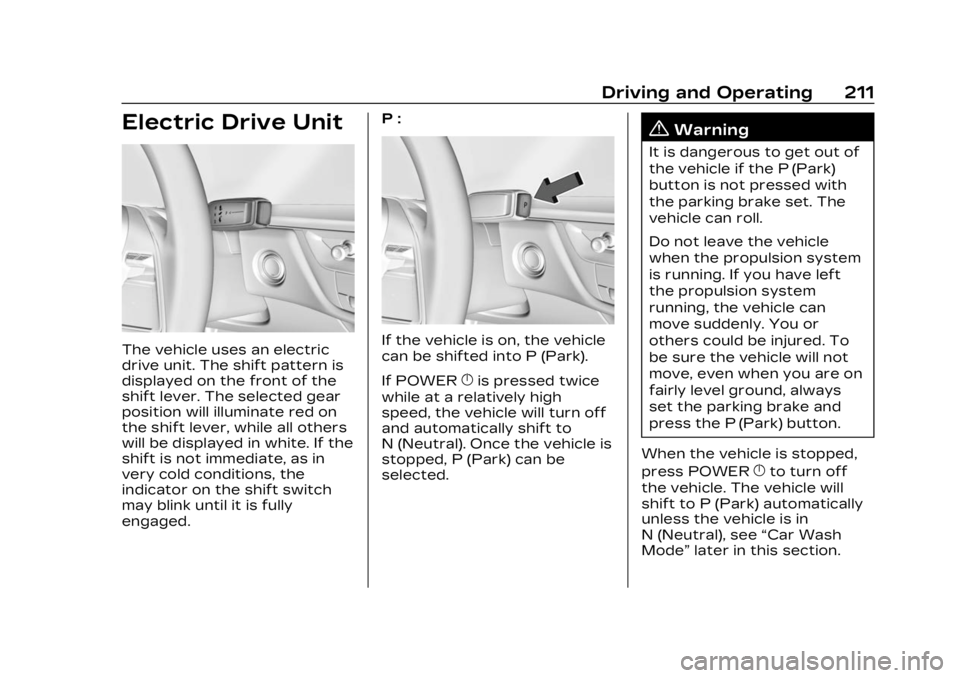
The vehicle uses an electric
drive unit. The shift pattern is
displayed on the front of the
shift lever. The selected gear
position will illuminate red on
the shift lever, while all others
will be displayed in white. If the
shift is not immediate, as in
very cold conditions, the
indicator on the shift switch
may blink until it is fully
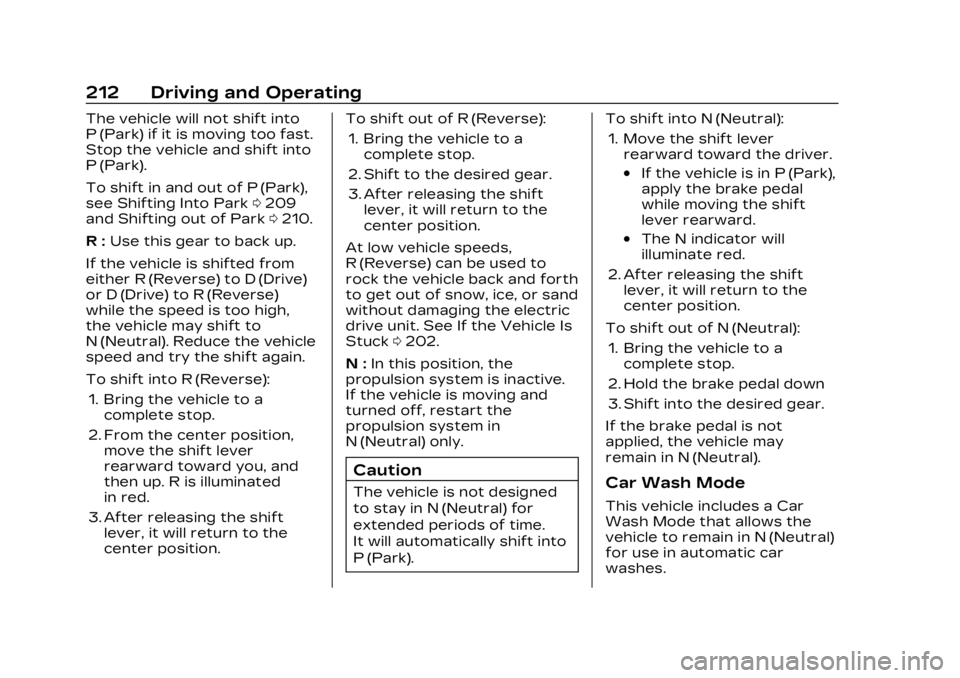
engaged.P :If the vehicle is on, the vehicle
can be shifted into P (Park).
If POWER
}is pressed twice
while at a relatively high
speed, the vehicle will turn off
and automatically shift to
N (Neutral). Once the vehicle is
stopped, P (Park) can be
selected.
{Warning
It is dangerous to get out of
the vehicle if the P (Park)
button is not pressed with
the parking brake set. The
vehicle can roll.
Do not leave the vehicle
when the propulsion system
is running. If you have left
the propulsion system
running, the vehicle can
move suddenly. You or
others could be injured. To
be sure the vehicle will not
move, even when you are on
fairly level ground, always
set the parking brake and
press the P (Park) button.
When the vehicle is stopped,
press POWER
}to turn off
the vehicle. The vehicle will
shift to P (Park) automatically
unless the vehicle is in
N (Neutral), see “Car Wash
Mode” later in this section.
Page 213 of 424
Cadillac Lyriq Owner Manual (GMNA-Localizing-U.S./Canada-15644413) -
2023 - CRC - 2/23/22
212 Driving and Operating
The vehicle will not shift into
P (Park) if it is moving too fast.
Stop the vehicle and shift into
P (Park).
To shift in and out of P (Park),
see Shifting Into Park0209
and Shifting out of Park 0210.
R : Use this gear to back up.
If the vehicle is shifted from
either R (Reverse) to D (Drive)
or D (Drive) to R (Reverse)
while the speed is too high,
the vehicle may shift to
N (Neutral). Reduce the vehicle
speed and try the shift again.
To shift into R (Reverse): 1. Bring the vehicle to a complete stop.
2. From the center position, move the shift lever
rearward toward you, and
then up. R is illuminated
in red.
3. After releasing the shift lever, it will return to the
center position. To shift out of R (Reverse):
1. Bring the vehicle to a complete stop.
2. Shift to the desired gear.
3. After releasing the shift lever, it will return to the
center position.
At low vehicle speeds,
R (Reverse) can be used to
rock the vehicle back and forth
to get out of snow, ice, or sand
without damaging the electric
drive unit. See If the Vehicle Is
Stuck 0202.
N : In this position, the
propulsion system is inactive.
If the vehicle is moving and
turned off, restart the
propulsion system in
N (Neutral) only.
Caution
The vehicle is not designed
to stay in N (Neutral) for
extended periods of time.
It will automatically shift into
P (Park). To shift into N (Neutral):
1. Move the shift lever rearward toward the driver.
.If the vehicle is in P (Park),
apply the brake pedal
while moving the shift
lever rearward.
.The N indicator will
illuminate red.
2. After releasing the shift lever, it will return to the
center position.
To shift out of N (Neutral): 1. Bring the vehicle to a complete stop.
2. Hold the brake pedal down
3. Shift into the desired gear.
If the brake pedal is not
applied, the vehicle may
remain in N (Neutral).
Car Wash Mode
This vehicle includes a Car
Wash Mode that allows the
vehicle to remain in N (Neutral)
for use in automatic car
washes.
Page 214 of 424
Cadillac Lyriq Owner Manual (GMNA-Localizing-U.S./Canada-15644413) -
2023 - CRC - 2/23/22
Driving and Operating 213
Car Wash Mode is not to be
used for vehicle towing. If the
vehicle needs to be towed, see
Transporting a Disabled
Vehicle0359.
Caution
The vehicle is not designed
to stay in N (Neutral) for
extended periods of time.
It will automatically shift into
P (Park).
Car Wash Mode (Vehicle
On) - Driver In Vehicle
To place the vehicle in
N (Neutral) with the vehicle on
and occupied: 1. Drive to the entrance of the car wash.
2. Apply the brake pedal.
3. Shift to N (Neutral).
4. Release the brake pedal. The vehicle is now ready for
the car wash. Car Wash Mode (Vehicle
On) - Driver Out of Vehicle
To place the vehicle in
N (Neutral) with the vehicle on
and unoccupied:
1. Drive to the entrance of the car wash.
2. Apply the brake pedal.
3. Open the door.
4. Shift to N (Neutral), then release the brake pedal.
5. The indicator should continue to show N. If it
does not, repeat Steps 2–4.
6. Exit the vehicle and close the door. The vehicle is now
ready for the car wash.
7. The vehicle may automatically shift into
P (Park) upon reentry.
D : This position is for normal
driving. If more power is
needed for passing, press the
accelerator pedal down. To shift into D (Drive):
1. Bring the vehicle to a complete stop.
2. From the center position, move the shift lever
rearward toward you and
then down..If the vehicle is in P (Park),
press the brake pedal
while moving the shift
lever.
.D will illuminate red.
3. After releasing the shift lever, it will return to the
center position.
To shift out of D (Drive): 1. Bring the vehicle to a complete stop.
2. Shift to the desired gear.
Page 215 of 424
Cadillac Lyriq Owner Manual (GMNA-Localizing-U.S./Canada-15644413) -
2023 - CRC - 2/23/22
214 Driving and Operating
Caution
Spinning the tires
excessively may damage the
electric drive unit. The repair
will not be covered by the
vehicle warranty. If you are
stuck, do not spin the tires.
When stopping on a steep hill,
use the brakes to hold the
vehicle in place.
When shifting to P (Park) on a
hill, use the brakes to hold the
vehicle then shift to P (Park).
One-Pedal Driving
One-Pedal Driving allows the
use of the accelerator pedal to
control the deceleration of the
vehicle to a complete stop.
Completely releasing the
accelerator pedal will result in
aggressive deceleration. Partially lifting off the
accelerator pedal allows the
deceleration of the vehicle to
be adjusted as desired.
Use the brake pedal if
emergency braking is required.
To view and configure
One-Pedal Driving, from the
infotainment display home
screen, Select Virtual Controls
> Drive & Park > One-Pedal
Driving.
Select Off to disable
One-Pedal Driving for
traditional two-pedal driving,
similar to a gasoline vehicle.
Select On to enable one-pedal
driving where a moderate level
of braking is applied when the
accelerator pedal is released
while driving.
Select High to enable
one-pedal driving where a
strong level of braking is
applied when the accelerator
pedal is released while driving.
When enabled, One-Pedal
Driving applies in R (Reverse),
D (Drive). This feature remains
enabled until manually disabled
by the driver. Press the
accelerator pedal to the
desired speed. The brake
lamps will come on during
substantial deceleration and
when the vehicle is stopped.
If One-Pedal Driving is turned
off while stopped, the vehicle
will stay stopped. Press the
brake pedal or accelerator
pedal to return to two-pedal
driving.
Page 216 of 424
Cadillac Lyriq Owner Manual (GMNA-Localizing-U.S./Canada-15644413) -
2023 - CRC - 2/23/22
Driving and Operating 215
For faster access, One-Pedal
Driving can be toggled on the
Driver Mode screen. From the
infotainment display home
screen, select Drive Mode to
open the Drive Mode screen.
Touch
lto toggle One-Pedal
Driving on or off. When turned
on, One-Pedal Driving returns
to the previously selected
level. To change the level,
press the Settings link in the
pop-up box to go to the full
One-Pedal Driving selection.
When possible, One-Pedal
Driving uses regenerative
braking to slow the vehicle for
energy efficiency. Friction
brakes may be used in some
cases when regenerative
braking is reduced. Friction
brakes will be used to hold the
vehicle after coming to a stop,
and a noise may be noticed
when the brakes apply. When driving on slippery
roads, it is recommended to
turn off One-Pedal Driving.
See Winter Driving
0201.
While using One-Pedal Driving,
the Electric Parking Brake may
apply in some circumstances.
This can occur when:
.The driver exits the vehicle.
.The vehicle has remained
stationary for five minutes.
To resume driving, press the
accelerator pedal, and the
Electric Parking Brake will
automatically disengage.
Drive Systems
All-Wheel Drive
This vehicle may be equipped
with advanced electric
All-Wheel Drive (eAWD). The
eAWD system delivers power to all four wheels, and the
system adjusts automatically
to the driving conditions. The
eAWD system continuously
varies the drive power to the
front and rear wheels to
maximize driving efficiency and
improve driving dynamics.
Your vehicle has exceptional
driving capability, but care
must always be taken to
adjust driving style to the
traffic and road conditions.
The vehicle eAWD settings
may be customized for the
driver mode selected. See
Driver Mode Control
0223 for
more information.
Page 224 of 424
Cadillac Lyriq Owner Manual (GMNA-Localizing-U.S./Canada-15644413) -
2023 - CRC - 2/23/22
Driving and Operating 223
on, the traction off lighti
displayed in the instrument
cluster will turn off. See
Traction Off Light0119.
If TCS is actively limiting wheel
spin when disabled, the
system will not turn off until
the wheels stop spinning.
To turn StabiliTrak/ESC off,
select
Tnext to the Traction
Control menu. Select the
Traction Control and ESC Off
option. The StabiliTrak/ESC
off light
gwill display in the
instrument cluster. See
StabiliTrak OFF Light 0119.
TCS cannot be on when
StabiliTrak/ESC is off.
StabiliTrak/ESC will
automatically turn on if the
vehicle exceeds 56 km/h
(35 mph) and cannot be turned
off again until speed is
reduced. Traction control will
remain off.
The vehicle has a Trailer Sway
Control (TSC) feature and a
Hill Start Assist (HSA) feature. See Trailer Sway Control
(TSC)
0304 or
Hill Start Assist (HSA) 0218.
Entering Teen Driver will
automatically enable both TCS
and StabiliTrak/ESC, and
prevent these safety features
from being turned off. See
Teen Driver 0178.
Adding accessories can affect
the vehicle performance. See
Accessories and Modifications
0 308.Driver Mode Control
Driver Mode Control allows
the driver to adjust the overall
driving experience by selecting
different modes. Driver Mode
Control has the following
modes: Tour, Sport, Snow/Ice,
and a customizable mode: My
mode. Driver mode availability
and affected vehicle
subsystems are dependent
upon trim level, region, and
optional features. If the vehicle is in Tour mode,
My mode, or Sport mode it will
stay in that mode through
future on/off cycles. If the
vehicle is in Snow/Ice mode, it
will return to Tour mode when
the vehicle is restarted. When
each mode is selected, a
unique and persistent
indicator is displayed in the
instrument cluster.
Mode Activation
To activate each mode, open
the Drive Mode App on the
infotainment home screen.
Activate each mode by
selecting the mode icon.
Mode Descriptions
Tour Mode :
Use for normal
city and highway driving to
provide a smooth ride. This
setting provides balance
between comfort and
handling.
Sport Mode : Use where road
conditions or personal
preference demand a more
controlled response. Sport
Page 225 of 424
Cadillac Lyriq Owner Manual (GMNA-Localizing-U.S./Canada-15644413) -
2023 - CRC - 2/23/22
224 Driving and Operating
mode improves vehicle
handling and acceleration on
dry pavement. When active,
Sport mode modifies steering
efforts, pedal tuning, electric
vehicle sound enhancement
(EVSE), adaptive cruise
control, and suspension
tuning, if equipped.
Snow/Ice Mode :Snow/Ice
mode improves vehicle
acceleration on snow covered
roads. When active, Snow/Ice
mode adjusts pedal tuning to
optimize traction on slippery
surfaces. This can affect the
acceleration on dry asphalt.
Snow/Ice mode also modifies
electric All-Wheel Drive
(eAWD) and steering.
My Mode : My mode is used to
personalize everyday driving.
This mode allows the driver to
configure the vehicle
subsystem settings to their
driving preferences. My mode
remains active across on/off
cycles. Through the infotainment
display, the following vehicle
subsystems may be available
for customization in this mode:
Acceleration Feel :
Relaxed,
Tour, Sport
Brake Feel : Tour, Sport
Steering : Tour, Sport
Motor Sound : Tour, Sport
For a more detailed
description of each selectable
option, refer to “Drive Mode
Customization.”
Drive Mode Customization
The vehicle is equipped to
modify the following settings
based on vehicle content.
Through the infotainment
home screen, select Settings >
Vehicle > Drive Mode
Customization to personalize
My mode. These settings will
be retained over each on/off
cycle, and do not have to be
reset each time the vehicle is
started. Acceleration Feel :
Choose
how responsive you want
acceleration to feel. You can
adjust the accelerator pedal to
provide increased power.
Brake Feel : Brake response
settings adjust the brake
pedal response. Brake pedal
feel is less sensitive at lower
settings and more sensitive at
higher settings.
Motor Sound : Customize how
your vehicle sounds when you
are accelerating. Your electric
motor remains quiet outside
but the sound you hear inside
changes as you drive faster or
slower.
Steering : Choose how
responsive you want the
steering to feel. You can set
the steering wheel to provide
more feedback, which requires
more steering effort.
Page 226 of 424
Cadillac Lyriq Owner Manual (GMNA-Localizing-U.S./Canada-15644413) -
2023 - CRC - 2/23/22
Driving and Operating 225
Cruise Control
Adaptive Cruise
Control (Advanced)
Adaptive Cruise Control (ACC)
allows the cruise control set
speed and following gap to be
selected. Read this entire
section before using this
system. The following gap is
the following time (or distance)
between your vehicle and a
vehicle detected directly
ahead in your path, moving in
the same direction. If no
vehicle is detected in your
path, ACC works like regular
cruise control. ACC uses a
camera and radar sensor(s) to
detect other vehicles. See
Radio Frequency Statement
0395.
If a vehicle is detected in your
path, ACC can apply
acceleration or limited,
moderate braking to maintain
the selected following gap. To
disengage ACC, apply the
brake. If ACC is controlling the vehicle speed when the
Traction Control System (TCS)
or StabiliTrak/Electronic
Stability Control (ESC) system
activates, ACC may
automatically disengage. See
Traction Control/Electronic
Stability Control
0221. When
road conditions allow ACC to
be safely used, ACC can be
turned back on.
Disabling the TCS or
StabiliTrak/ESC system will
disengage and prevent
engagement of ACC.
ACC can reduce the need for
you to frequently brake and
accelerate, especially when
used on expressways,
freeways, and interstate
highways. When used on other
roads, you may need to take
over the control of braking or
acceleration more often.
{Warning
ACC has limited braking
ability and may not have
time to slow the vehicle
down enough to avoid a
collision with another vehicle
you are following. This can
occur when vehicles
suddenly slow or stop
ahead, or enter your lane.
Also see “Alerting the
Driver” later in this section.
Complete attention is
always required while driving
and you should be ready to
take action and apply the
brakes. See Defensive
Driving 0196.
{Warning
ACC will not detect or brake
for children, pedestrians,
animals, or other objects.
(Continued)
Page 228 of 424
Cadillac Lyriq Owner Manual (GMNA-Localizing-U.S./Canada-15644413) -
2023 - CRC - 2/23/22
Driving and Operating 227
The speedometer reading can
be displayed in either English
or metric units. See
Instrument Cluster0108. The
increment value used depends
on the units displayed.
Switching Between ACC and
Regular Cruise Control
To switch between ACC and
regular cruise control, press
and hold
*. A Driver
Information Center (DIC)
message displays. See Vehicle
Messages 0134.
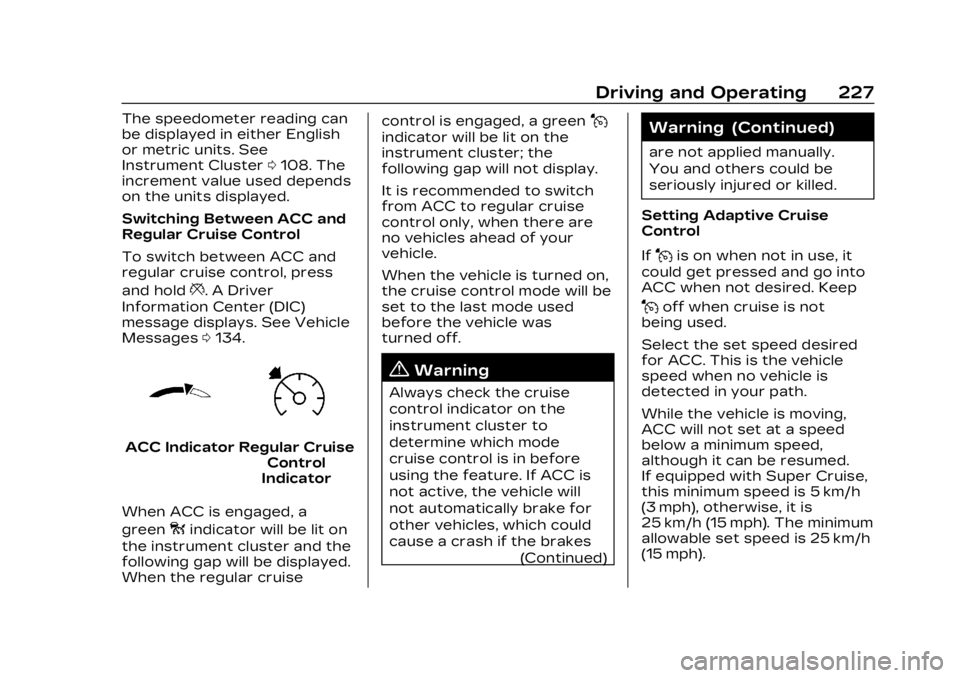
ACC IndicatorRegular Cruise
Control
Indicator
When ACC is engaged, a
green
oindicator will be lit on
the instrument cluster and the
following gap will be displayed.
When the regular cruise control is engaged, a green
J
indicator will be lit on the
instrument cluster; the
following gap will not display.
It is recommended to switch
from ACC to regular cruise
control only, when there are
no vehicles ahead of your
vehicle.
When the vehicle is turned on,
the cruise control mode will be
set to the last mode used
before the vehicle was
turned off.
{Warning
Always check the cruise
control indicator on the
instrument cluster to
determine which mode
cruise control is in before
using the feature. If ACC is
not active, the vehicle will
not automatically brake for
other vehicles, which could
cause a crash if the brakes
(Continued)
Warning (Continued)
are not applied manually.
You and others could be
seriously injured or killed.
Setting Adaptive Cruise
Control
If
Jis on when not in use, it
could get pressed and go into
ACC when not desired. Keep
Joff when cruise is not
being used.
Select the set speed desired
for ACC. This is the vehicle
speed when no vehicle is
detected in your path.
While the vehicle is moving,
ACC will not set at a speed
below a minimum speed,
although it can be resumed.
If equipped with Super Cruise,
this minimum speed is 5 km/h
(3 mph), otherwise, it is
25 km/h (15 mph). The minimum
allowable set speed is 25 km/h
(15 mph).