change time CADILLAC LYRIC 2023 User Guide
[x] Cancel search | Manufacturer: CADILLAC, Model Year: 2023, Model line: LYRIC, Model: CADILLAC LYRIC 2023Pages: 424, PDF Size: 4.76 MB
Page 134 of 424
Cadillac Lyriq Owner Manual (GMNA-Localizing-U.S./Canada-15644413) -
2023 - CRC - 2/23/22
Instruments and Controls 133
reflects the approximate
average electrical energy
economy that the vehicle has
at that moment, and changes
as driving conditions change.
Left Zone
Time/Date :Displays current
date and time information.
Auto Lane Change : Displays
the status of a
driver-requested lane change
when Super Cruise is active.
See Super Cruise 0236.
Tire Pressure : Displays the
approximate pressures of all
four tires. Tire pressure is
displayed in either
kilopascal (kPa) or in pounds
per square inch (psi). If the
pressure is low, the value for
that tire is shown in amber.
See Tire Pressure Monitor
System 0343 and
Tire Pressure Monitor
Operation 0344.
Energy Usage : Displays
energy usage of the Driving,
Remote Start, Climate and Conditioning vehicle systems
as percentages of overall
vehicle energy use.
Energy Efficiency :
Displays a
graph showing the energy
efficiency that has been used
by the vehicle over the last
48 km (30 mi).
Right Zone
Audio Now Playing : Displays
the actively playing audio.
Navigation : Displays a variety
of navigation information.
Vehicle Information
The following are all possible
vehicle information features.
To access the vehicle
information menu touch
A
from the list of home page
icons displayed on the left side
of the infotainment display.
Vehicle information content is
shown on cards that are
grouped together in option
tabs that are displayed on the
infotainment display. Touching a card on the
infotainment display opens up
a dialog box for that card. To
select a desired option within
a dialog box, touch the option
and follow any message or
alerts that may display. Some
options may be unavailable
while driving.
Touch Show in Cluster to send
the desired card to the left
zone of the instrument cluster.
Touch Remove from Cluster to
remove the selected card from
the instrument cluster. See
Driver Information Center
(DIC)
0132.
Options
The following is the list of all
possible cards and their
locations. Some of the cards
may not be available for your
particular vehicle.
Summary : Displays an
interactive 3–D rendered
image of your vehicle that
shows performance and
health information.
Page 139 of 424
Cadillac Lyriq Owner Manual (GMNA-Localizing-U.S./Canada-15644413) -
2023 - CRC - 2/23/22
138 Instruments and Controls
Steps 8–9, or consult
HomeLink by website or
phone.
After your Universal Remote
has been successfully
programmed, you can change
the name of the remote on the
screen as desired.
Some garage door openers
require a modification of
Step 4. See “Radio Signals for
Some Gate Operators.”
For questions or programming
help, visit www.homelink.com/
gm for self-help videos or call
1–800–355–3515. For calls
placed outside the U.S.,
Canada, or Puerto Rico,
international rates will apply
and may differ based on
landline or mobile phone.
Erasing Universal
Remotes
To erase a programmed
Universal Remote, select the
remote on the infotainment
screen. Then select “Delete.”To erase ALL programmed
Universal Remotes, select any
remote on the infotainment
screen. Then select
“Delete All.”
Radio Signals for Some
Gate Operators
Some gate operators and
radio-frequency laws require
transmitter signals to time out
or quit after several seconds
of transmission. This may not
be long enough for the
Universal Remote system to
pick up the signal during
programming.
If programming did not work,
replace Step 4 under
“Programming the Universal
Remote System,”
with the
following:
Press and release the
hand-held transmitter button
every two seconds until the
signal has been found by the
Universal Remote System.
Proceed to Step 5 under “Programming the Universal
Remote System”
to complete
programming.
Universal Remote
System Operation
Using the Universal
Remote System
Press the desired Universal
Remote button on the
infotainment screen.
Reprogramming a Single
Universal Remote System
Button
To reprogram any of the
system buttons:
1. Select the universal remote to be reprogrammed.
2. Select “Delete”.
3. Select “Add Remote”. Follow
the instructions in Universal
Remote System
Programming 0136.
Page 140 of 424
Cadillac Lyriq Owner Manual (GMNA-Localizing-U.S./Canada-15644413) -
2023 - CRC - 2/23/22
Lighting 139
Lighting
Exterior Lighting
Exterior LampControls . . . . . . . . . . . . . . . . . . . . . 139
Exterior Lamps Off Reminder . . . . . . . . . . . . . . . . . . . . 142
Headlamp High/ Low-Beam Changer . . . . . 142
Flash-to-Pass . . . . . . . . . . . . . . . 142
Daytime Running Lamps (DRL) . . . . . . . . . . . . . . . 142
Automatic Headlamp System . . . . . . . . . . . . . . . . . . . . . . 143
Adaptive Forward Lighting (AFL) . . . . . . . . . . . . . 143
Headlamp Leveling Control . . . . . . . . . . . . . . . . . . . . . . 145
Hazard Warning Flashers . . . . . . . . . . . . . . . . . . . . . 145
Turn and Lane-Change Signals . . . . . . . . . . . . . . . . . . . . . . . 146
Cornering Lamps . . . . . . . . . . 146
Interior Lighting
Instrument Panel Illumination Control . . . . . . 146
Dome Lamps . . . . . . . . . . . . . . . . 147
Reading Lamps . . . . . . . . . . . . . 147
Lighting Features
Entry Lighting . . . . . . . . . . . . . . . 147
Exit Lighting . . . . . . . . . . . . . . . . . 148
Battery Load Management . . . . . . . . . . . . . . . 148
Battery Power
Protection . . . . . . . . . . . . . . . . . . 149
Exterior Lighting Battery Saver . . . . . . . . . . . . . . . . . . . . . . . . . 149Exterior Lighting
Exterior Lamp
Controls
The exterior lamp controls,
also known as headlights, are
in the Virtual Controls App on
the infotainment home screen.
Select Virtual Controls >
Lights > Headlights.
To operate, select the
following options:
Off : Turns off the exterior
lamps.
For vehicles first sold in
Canada, the headlamps will
automatically reactivate when
the vehicle is shifted out of
P (Park).
Auto : Automatically turns the
exterior lamps on and off,
depending on outside lighting.
Parking : Turns on the parking
lamps.
On : Turns on the exterior
lamps.
Page 143 of 424
Cadillac Lyriq Owner Manual (GMNA-Localizing-U.S./Canada-15644413) -
2023 - CRC - 2/23/22
142 Lighting
.The vehicle windshield is
dirty, cracked, or obstructed
by something that blocks the
view of the light sensor.
.The vehicle is loaded in a
way that the front end
points upward, causing the
light sensor to aim high and
not detect headlamps and
taillamps.
.The vehicle is being driven
on winding or hilly roads.
The Adaptive Headlight
system may need to be
disabled if any of the above
conditions exist.
Exterior Lamps Off
Reminder
A warning chime sounds if the
driver door is opened while
the vehicle is off and the
exterior lamps are on.
Headlamp High/
Low-Beam Changer
Push the turn signal lever
away from you and release, to
turn the high beams on. To
return to low beams, push the
lever again or pull it toward
you and release.
This indicator light turns on in
the instrument cluster when
the high-beam headlamps
are on.
Flash-to-Pass
To flash the high beams, pull
the turn signal lever toward
you, and release.
Daytime Running
Lamps (DRL)
DRL can make it easier for
others to see the front of your
vehicle during the day.
Fully functional DRL are
required on all vehicles first
sold in Canada.
The DRL come on when all of
the following conditions
are met:
.The vehicle is on.
.The exterior lamp control is
in AUTO.
.The light sensor determines
it is daytime.
The taillamps, instrument
panel lights, and other lamps
will not turn on when this
feature is activated.
The DRL turn off when the
headlamps are turned to
Oor
the vehicle is off.
Page 144 of 424
Cadillac Lyriq Owner Manual (GMNA-Localizing-U.S./Canada-15644413) -
2023 - CRC - 2/23/22
Lighting 143
For vehicles first sold in
Canada, the DRL can only be
turned off when the vehicle is
parked.
Automatic Headlamp
System
When the exterior lamp
control is set to Auto and it is
dark enough outside, the
headlamps come on
automatically.
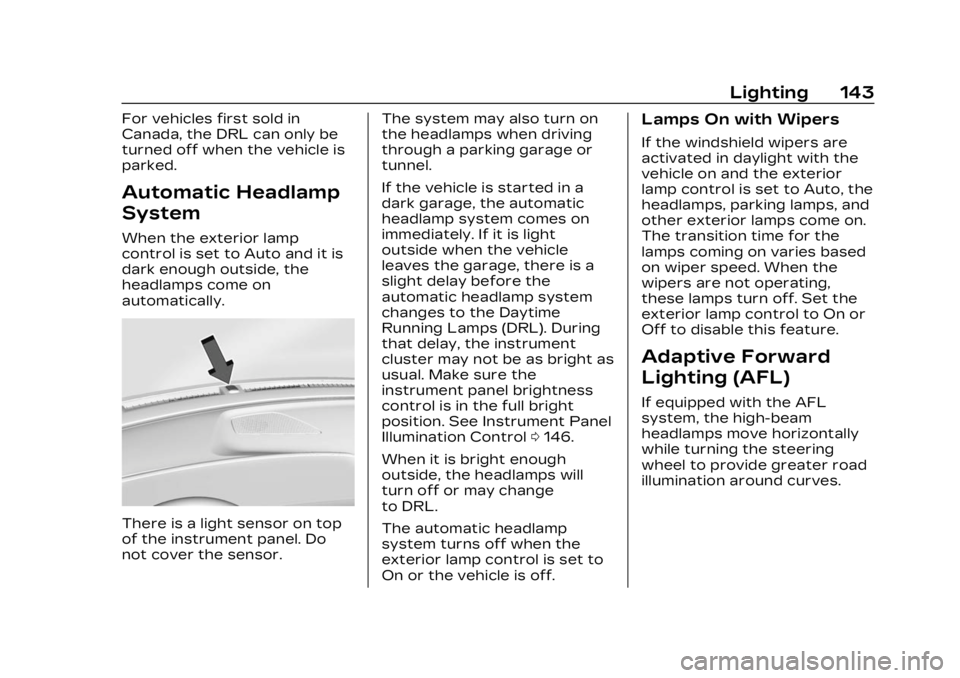
There is a light sensor on top
of the instrument panel. Do
not cover the sensor.The system may also turn on
the headlamps when driving
through a parking garage or
tunnel.
If the vehicle is started in a
dark garage, the automatic
headlamp system comes on
immediately. If it is light
outside when the vehicle
leaves the garage, there is a
slight delay before the
automatic headlamp system
changes to the Daytime
Running Lamps (DRL). During
that delay, the instrument
cluster may not be as bright as
usual. Make sure the
instrument panel brightness
control is in the full bright
position. See Instrument Panel
Illumination Control
0146.
When it is bright enough
outside, the headlamps will
turn off or may change
to DRL.
The automatic headlamp
system turns off when the
exterior lamp control is set to
On or the vehicle is off.
Lamps On with Wipers
If the windshield wipers are
activated in daylight with the
vehicle on and the exterior
lamp control is set to Auto, the
headlamps, parking lamps, and
other exterior lamps come on.
The transition time for the
lamps coming on varies based
on wiper speed. When the
wipers are not operating,
these lamps turn off. Set the
exterior lamp control to On or
Off to disable this feature.
Adaptive Forward
Lighting (AFL)
If equipped with the AFL
system, the high-beam
headlamps move horizontally
while turning the steering
wheel to provide greater road
illumination around curves.
Page 147 of 424
Cadillac Lyriq Owner Manual (GMNA-Localizing-U.S./Canada-15644413) -
2023 - CRC - 2/23/22
146 Lighting
Turn and
Lane-Change Signals
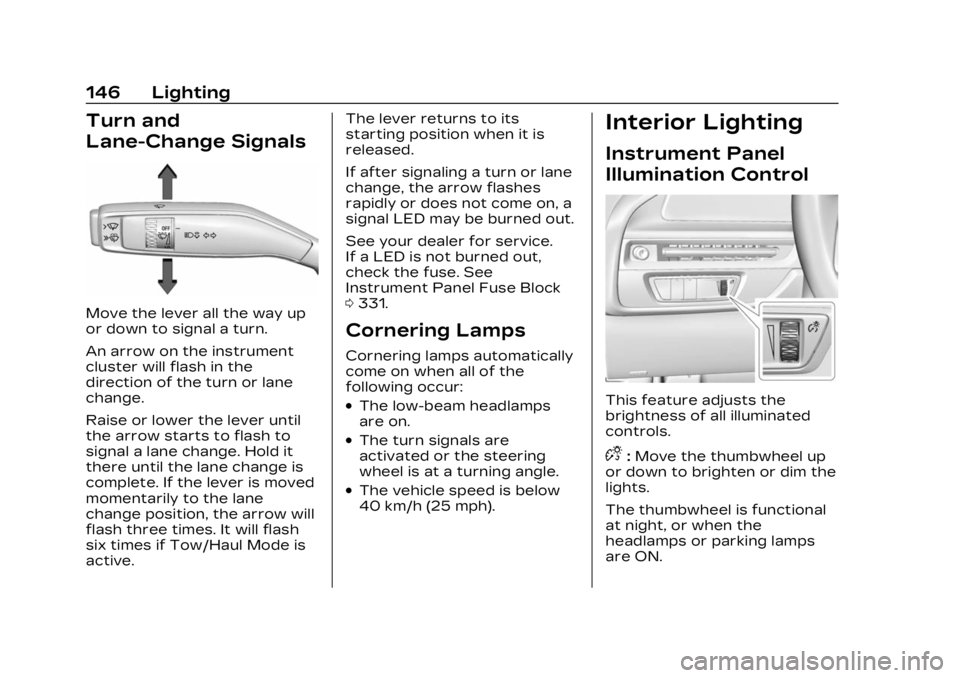
Move the lever all the way up
or down to signal a turn.
An arrow on the instrument
cluster will flash in the
direction of the turn or lane
change.
Raise or lower the lever until
the arrow starts to flash to
signal a lane change. Hold it
there until the lane change is
complete. If the lever is moved
momentarily to the lane
change position, the arrow will
flash three times. It will flash
six times if Tow/Haul Mode is
active.The lever returns to its
starting position when it is
released.
If after signaling a turn or lane
change, the arrow flashes
rapidly or does not come on, a
signal LED may be burned out.
See your dealer for service.
If a LED is not burned out,
check the fuse. See
Instrument Panel Fuse Block
0
331.
Cornering Lamps
Cornering lamps automatically
come on when all of the
following occur:
.The low-beam headlamps
are on.
.The turn signals are
activated or the steering
wheel is at a turning angle.
.The vehicle speed is below
40 km/h (25 mph).
Interior Lighting
Instrument Panel
Illumination Control
This feature adjusts the
brightness of all illuminated
controls.
D:Move the thumbwheel up
or down to brighten or dim the
lights.
The thumbwheel is functional
at night, or when the
headlamps or parking lamps
are ON.
Page 149 of 424
Cadillac Lyriq Owner Manual (GMNA-Localizing-U.S./Canada-15644413) -
2023 - CRC - 2/23/22
148 Lighting
doors, and the dome lamp
control is in the DOOR
position.
Some exterior lamps also turn
on when pressing
Kon the
remote key or opening any
doors. Low-beam lamps will
only turn on briefly at night,
or in areas with limited lighting.
All lamps will gradually fade
out after about 30 seconds.
Entry lighting can be disabled
manually by closing all doors,
pressing
Qon the remote key,
or starting the vehicle.
This feature can be changed.
On the infotainment home
screen, select the Settings
icon
TVehicleTVehicle
Locator Lights.
Exit Lighting
Some exterior lamps and
interior lamps turn on when
the driver door is opened after
the vehicle is turned off The exterior and interior lamps
remain on for a set amount of
time, then automatically
turn off.
The interior lights turn on
when the vehicle is turned off.
The exterior lamps turn off
immediately by turning the
exterior lamp control off.
This feature can be changed.
On the infotainment home
screen, select the Settings
icon
TVehicleTExit Lighting.
Battery Load
Management
The vehicle has Electric Power
Management (EPM) that
estimates the battery
temperature and state of
charge. It then adjusts the
voltage for best performance
and extended life of the 12–
volt battery
When the battery state of
charge is low, the voltage is
raised slightly to quickly
increase the charge. When thestate of charge is high, the
voltage is lowered slightly to
prevent over charging. As this
adjustment occurs, you may
see the voltage move up or
down on the voltmeter gauge
or voltage display on the
Driver Information (DIC),
if equipped. This is normal. If a
problem occurs, an alert will be
displayed.
If the electrical loads are very
high, the battery can be
discharged when the vehicle is
stationary. A high electrical
load occurs when several
features are on, such as:
headlamps, high beams, rear
window defogger, climate
control fan at high speed,
heated seats, motor cooling
fans, trailer loads, and loads
plugged into accessory power
outlets.
EPM works to prevent
excessive discharge of the
battery by balancing the
electrical system output and
the vehicle's electrical needs.
Page 164 of 424
Cadillac Lyriq Owner Manual (GMNA-Localizing-U.S./Canada-15644413) -
2023 - CRC - 2/23/22
Infotainment System 163
To change the units, see
Instrument Cluster0108.
Mute Settings
During active route guidance,
Google Maps can give audible
voice directions, traffic alerts,
or can be muted. In the Google
Maps app, touch Settings,
then Mute settings to access
the options.
Compass
The Google Maps orientation
can be changed between the
direction currently traveling
and pointing north. Touch the
compass to switch between
these options.
To recenter the map to the
current location, touch the
location icon.
Super Cruise
If equipped, Super Cruise
highlights routes in a specific
outline. See Super Cruise
0 236.Electric Vehicle (EV)
Features with
Google Maps
When vehicle data is shared
with Google, some of the
Maps features for EVs are as
follows:
.Battery charge level at
arrival
.Estimated minimum
charging time
If the vehicle needs to be
charged to reach a
destination, charging stations
may automatically be added to
a route.
Maps
Auto-downloaded Maps
Google Maps downloads
offline maps automatically for
use when not connected to
the Internet and for making
map data available to vehicle
features regardless of
connectivity. These offline maps are only available when
the vehicle has a subscription
data plan.
To turn on auto-download:
1. Open Google Maps.
2. Touch Settings.
3. Touch Privacy Center, then select Offline maps.
4. Select Auto-download offline maps.
5. Check the Internet connection and wait for the
download to finish.
Downloading Offline Maps 1. Open Google Maps.
2. Touch Settings, then Offline maps.
3. Touch the square with the Select your own map icon.
4. Adjust the map to cover the desired area to download.
5. Touch Download.
Page 166 of 424
Cadillac Lyriq Owner Manual (GMNA-Localizing-U.S./Canada-15644413) -
2023 - CRC - 2/23/22
Infotainment System 165
Search by Category
Destinations can be searched
by category, such as
restaurant or grocery store.1. Open Google Maps.
2. Touch the search bar.
3. Touch Categories, then select a category.
4. Touch the desired location, then touch Start.
Avoid Tolls, Highways,
or Ferries 1. Open Google Maps.
2. Search destination and touch the destination on
the map.
3. Touch Route overview and then Route options.
4. Touch an option and then touch Back.
Traffic Layers 1. Open Google Maps.
2. Touch Settings.
3. Toggle between Traffic on or off.Global Positioning
System (GPS)
The current position of the
vehicle is determined by using
satellite signals and various
vehicle signals.
At times, other interference
such as the satellite condition,
road configuration, condition
of the vehicle, and/or other
circumstances can affect the
navigation system's ability to
determine the accurate
position of the vehicle.
This system might not be
available or interference can
occur if any of the following
are true:
.Signals are obstructed by
tall buildings, trees, large
trucks, or a tunnel.
.Satellites are being repaired
or improved.
For more information if the
GPS is not functioning
properly, see Problems with
Route Guidance 0166.
Vehicle Positioning
At times, the position of the
vehicle on the map could be
inaccurate due to one or more
of the following reasons:
.The road system has
changed.
.The vehicle is driving on
slippery road surfaces such
as sand, gravel, or snow.
.The vehicle is traveling on
winding roads or long,
straight roads.
.The vehicle is approaching a
tall building or a large
vehicle.
.The surface streets run
parallel to a freeway.
.The vehicle has been
transferred by a vehicle
carrier or a ferry.
.The current position
calibration is set incorrectly.
.The vehicle is traveling at
high speed.
Page 167 of 424
Cadillac Lyriq Owner Manual (GMNA-Localizing-U.S./Canada-15644413) -
2023 - CRC - 2/23/22
166 Infotainment System
.The vehicle changes
directions more than once,
or the vehicle is turning on a
turn table in a parking lot.
.The vehicle is entering and/
or exiting a parking lot,
garage, or a lot with a roof.
.The GPS signal is not
received.
.A roof carrier is installed on
the vehicle.
.Tire chains are installed on
the vehicle.
.The tires are replaced
or worn.
.The tire pressure for the
tires is incorrect.
.This is the first navigation
use after the map data is
updated.
.The 12-volt battery has been
disconnected for
several days.
.The vehicle is driving in
heavy traffic where driving is
at low speeds, and the
vehicle is stopped and
started repeatedly.
Problems with Route
Guidance
Inappropriate route guidance
can occur under one or more
of the following conditions:
.The turn was not made on
the road indicated.
.Route guidance might not be
available when using
automatic rerouting for the
next right or left turn.
.The route might not be
changed when using
automatic rerouting.
.There is no route guidance
when turning at an
intersection.
.Automatic rerouting might
display a route returning to
the set waypoint if heading
for a destination without
passing through a set
waypoint.
.The route prohibits the
entry of a vehicle due to a
regulation by time or season
or any other regulation
which may be given.
.Some routes might not be
searched.
.The route to the destination
might not be shown if there
are new roads, if roads have
recently changed, or if
certain roads are not listed
in Maps.
To recalibrate the vehicle's
position on the map, park with
the vehicle running for two to
five minutes, until the vehicle
position updates. Make sure
the vehicle is parked in a
location that is safe and has a
clear view of the sky and away
from large obstructions.
Voice Recognition
If equipped, Google Assistant
allows for hands-free use of,
media and messaging,
navigation and climate control
functionality in the vehicle.
This feature can be started by
pressing
gon the steering
wheel, touching Google