change time CADILLAC LYRIC 2023 Owner's Guide
[x] Cancel search | Manufacturer: CADILLAC, Model Year: 2023, Model line: LYRIC, Model: CADILLAC LYRIC 2023Pages: 424, PDF Size: 4.76 MB
Page 242 of 424
Cadillac Lyriq Owner Manual (GMNA-Localizing-U.S./Canada-15644413) -
2023 - CRC - 2/23/22
Driving and Operating 241
When engaged and not
steering the vehicle, the
steering wheel light bar
flashes blue, and
Zwill be
blue. The driver is in control of
steering and Super Cruise is
not steering the vehicle.
When the vehicle is positioned
in the center of the lane, the
steering wheel light bar and
Z
display will turn green,
indicating Super Cruise is
steering the vehicle.
When Super Cruise controls
the steering, traffic and other
conditions and laws permit,
and it is safe to do so, your
hands can be taken off the
steering wheel.
Always pay attention to the
road and the operation of the
vehicle. Always monitor and be
attentive of surrounding
traffic, including vehicles that
may cross the road in front of
your vehicle. Super Cruise steering can be
overridden with manual
steering at any time. When
Super Cruise is engaged,
always be prepared to take
immediate action
—including
steering, accelerating, and
braking quickly, if necessary.
Super Cruise, when engaged,
will enable Forward Collision
System to Alert and Brake.
Steering Manually and
Changing Lanes
The vehicle can always be
manually steered, even with
Super Cruise engaged; for
example, when changing lanes.
When the steering wheel is
moved manually, the steering
wheel light bar pulses blue and
Zon the instrument cluster
turns blue to indicate Super
Cruise is not steering the
vehicle.
When ready to allow Super
Cruise to resume steering
again, position the vehicle in
the center of the lane, hold the steering wheel until the
steering wheel light bar turns
green, and then release the
steering wheel when it is safe
to do so.
{Warning
To help prevent crashes
before making a lane
change:
.Always check mirrors.
.Glance over your shoulder.
.Use the turn signals.
Super Cruise Lane Change
On Demand Lane Changes
Super Cruise can steer to
perform a single lane change
under certain conditions when
requested by the driver or
initiated by the Super Cruise
System.
To request a lane change: 1. Verify the lane next to your vehicle is clear and
conditions are safe to make
a lane change.
Page 243 of 424
Cadillac Lyriq Owner Manual (GMNA-Localizing-U.S./Canada-15644413) -
2023 - CRC - 2/23/22
242 Driving and Operating
2. Use the turn signal lever toactivate the turn signal in
the direction of the desired
lane change.
3. Return the turn signal lever to the neutral position after
the lane change. See Turn
and Lane-Change Signals
0146.
4. To cancel a lane change, return the turn signal lever
to the neutral position,
move the lever in the
opposite direction of the
lane change, or steer
manually at any time.
Automatic Lane Changes
Super Cruise System may
initiate a single lane change
when enabled through Vehicle
Personalization under
following conditions:
.The Super Cruise System
may initiate an automatic
lane change to the left to
pass a slower moving vehicle
ahead and a subsequent
lane change to right to
return to your original lane.
.Super Cruise System may
initiate an automatic lane
change to left or right when
current lane is ending ahead.
.To cancel a Super Cruise
lane change, move the turn
signal lever or steer manually
at any time..
If Super Cruise detects that
traffic is clear, Super Cruise
will steer the vehicle to
perform the lane change.
A message appears on the
Driver Information Center
(DIC) during the lane change to
provide more information on
the status of the lane change.
Super Cruise Lane Change
functionality is only available
on Super Cruise capable
Divided Roads.
Super Cruise Lane Change
may be disabled when a trailer
or other accessories (e.g. bike
rack, cargo tray, etc.) are
detected.
Do not use Super Cruise Lane
Change when towing a trailer. The Super Cruise Lane
Change feature can be
customized to be Off, On
Demand Lane Change, or On
Demand Lane Change &
Automatic Lane Change
through the vehicle
personalization menu. Touch
the Settings icon on the
infotainment home page.
Select "Vehicle" to display the
list of available options and
select "Super Cruise Lane
Change".
{Warning
Super Cruise Lane Change
may not detect a vehicle in
an adjacent lane. Always
supervise the driving task
and monitor traffic
conditions when using the
Super Cruise Lane Change
feature. Only request a lane
change when traffic
conditions are safe for a
lane change, and always be
ready to manually steer the
(Continued)
Page 245 of 424
Cadillac Lyriq Owner Manual (GMNA-Localizing-U.S./Canada-15644413) -
2023 - CRC - 2/23/22
244 Driving and Operating
.Super Cruise is unable to
complete the lane change
maneuver.
Attention to the Road
{Warning
Super Cruise is a driver
assistance system and
cannot accurately detect or
predict all situations. Super
Cruise is not a crash
avoidance system. To
prevent serious injury or
death, you must supervise
the driving task and monitor
the road conditions. You
may need to respond to
traffic events by steering,
braking, or accelerating. See
Defensive Driving 0196.
Super Cruise also cannot
determine whether you are
awake, asleep, impaired,
or properly focused on safe
driving. The vehicle could
crash into other vehicles,
drive out of the lane, or drive (Continued)
Warning (Continued)
off the road. Complete
attention is always required
while driving, even while
using Super Cruise. Be
prepared to take over
steering or apply the brakes
at any time.
{Warning
To prevent serious injury or
death, be alert and pay
special attention when
passing highway exits,
entrances, and crossings
with Super Cruise, and be
ready to take control of the
vehicle when necessary.
Changes in lane markings
around exits and entrances
can momentarily cause
Super Cruise to not detect
the correct lane. If this
occurs, Super Cruise may
attempt steering inputs to
(Continued)
Warning (Continued)
bring the vehicle back into
the correct lane and, in rare
circumstances, could
over-correct and cause the
vehicle to momentarily cross
into a lane next to your
vehicle unless you manually
steer to maintain your lane
position.
The Driver Attention System
(DAS) on the steering column
continually monitors driver
head and eye position to
estimate driver attention to
the road. The camera does not
record or share pictures,
audio, or video.
Sunglasses, hats, or other
types of clothing that change
the shape of the head may
interfere with camera
performance. To improve
camera performance, raise or
lower the steering wheel,
or change the seat position.
Page 262 of 424
Cadillac Lyriq Owner Manual (GMNA-Localizing-U.S./Canada-15644413) -
2023 - CRC - 2/23/22
Driving and Operating 261
Sensors located in the
bumpers measure the
distance between the vehicle
and objects using sonar
technology. These sensors are
designed to detect certain
objects up to 2.5 m (8 ft)
behind and 1.2 m (4 ft) in front
of your vehicle that are taller
than 25 cm (10 in).
Different environmental
conditions may affect whether
and how far the Park Assist
system can detect objects.
Keep the sensors clean of
mud, dirt, snow, ice, and slush;
and clean sensors after a car
wash in freezing
temperatures. Sensors that
are not clean may not detect
objects or may cause the
system to alert when not
required.
{Warning
The Park Assist System is
no substitute for careful and
attentive driving. The Park(Continued)
Warning (Continued)
Assist system does not
detect children, pedestrians,
bicyclists, animals, or objects
located below the bumper or
that are too close or too far
from the vehicle. It is not
available at speeds greater
than 9 km/h (6 mph). To
prevent injury, death,
or vehicle damage, even with
Park Assist, always check
the area around the vehicle
and check all mirrors before
moving forward or backing.
How the System Works
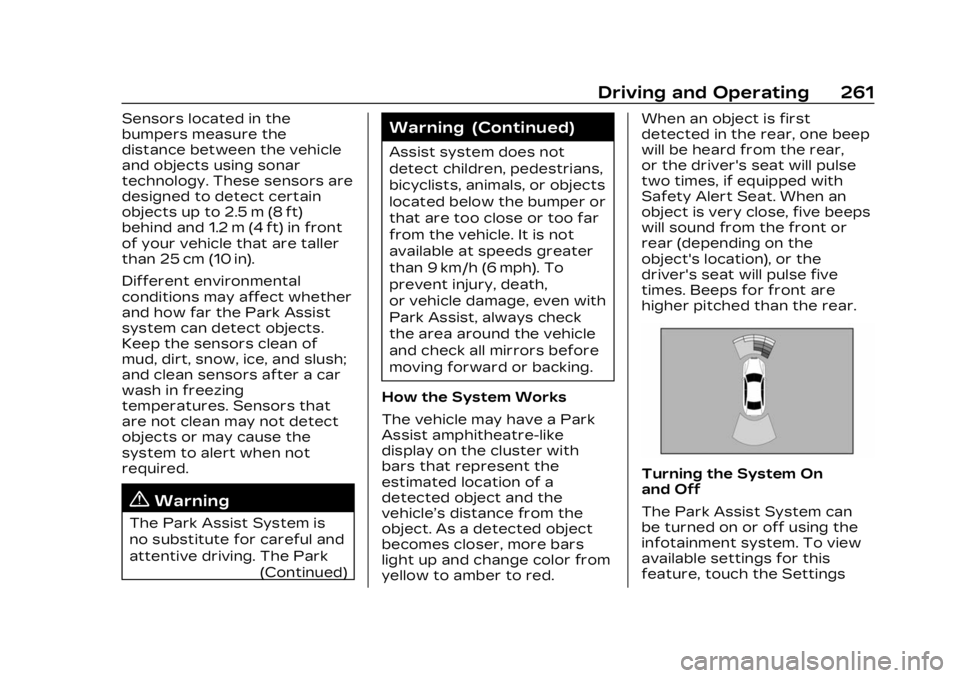
The vehicle may have a Park
Assist amphitheatre-like
display on the cluster with
bars that represent the
estimated location of a
detected object and the
vehicle’s distance from the
object. As a detected object
becomes closer, more bars
light up and change color from
yellow to amber to red. When an object is first
detected in the rear, one beep
will be heard from the rear,
or the driver's seat will pulse
two times, if equipped with
Safety Alert Seat. When an
object is very close, five beeps
will sound from the front or
rear (depending on the
object's location), or the
driver's seat will pulse five
times. Beeps for front are
higher pitched than the rear.
Turning the System On
and Off
The Park Assist System can
be turned on or off using the
infotainment system. To view
available settings for this
feature, touch the Settings
Page 267 of 424

Cadillac Lyriq Owner Manual (GMNA-Localizing-U.S./Canada-15644413) -
2023 - CRC - 2/23/22
266 Driving and Operating
to the left or right of the
vehicle up to the sensors’
ranges of 1.5 m (5 ft). To
choose or change the parking
mode or side, make a selection
in the infotainment display.
After completely passing an
eligible parking spot, a beep
sounds and a notification to
stop the vehicle is displayed in
the driver information center.
Generally, Remote Auto
Parking selects the nearest
empty parking spot behind the
vehicle, but under some
conditions may select a space
that is further back. Slow
down and bring the vehicle to
a complete stop to begin.
Follow the instructions in the
vehicle’s infotainment display.
Select the option to supervise
the maneuver remotely. When
prompted, check all your
belongings and exit the
vehicle. Press and hold the
authorization button on the
myCadillac app to allow the
maneuver to complete. As thevehicle automatically steers,
brakes, accelerates, and shifts
gears into the parking spot,
stay in close proximity of the
vehicle, and check
surroundings. Be prepared to
release the authorization
button, or cancel the
maneuver, to avoid vehicles,
pedestrians, or objects.
Once automatic parking is
finished and the vehicle has
come to a full stop, a message
will be displayed indicating
parking is complete.
How to Activate Remote
Unparking
To activate the unparking
maneuver remotely, launch
Remote Auto Parking from
myCadillac app. A screen will
be displayed for unparking
options. Similar to automatic
parking, follow the displayed
instructions, press and hold
the authorization button,
check surroundings as the
vehicle unparks.
Once automatic unparking is
finished and the vehicle has
come to a full stop, a message
will be displayed indicating
unparking is complete. The
vehicle is now positioned such
that the path to exit the
parking spot is free of
obstructions. Enter the vehicle
to start driving away.
How to Cancel Remote
Automatic Parking or
Automatic Unparking
To cancel automatic parking or
automatic unparking at any
time, press the cancel button
on the myCadillac app. Remote
Auto Parking applies the
parking brake and shifts into
P (Park) to hold the vehicle.
Page 271 of 424
Cadillac Lyriq Owner Manual (GMNA-Localizing-U.S./Canada-15644413) -
2023 - CRC - 2/23/22
270 Driving and Operating
the vehicle do not move
farther back when a trailer is
attached to the vehicle.
Driving With a Trailer
Use caution while backing up
when towing a trailer. The
RCTA feature is automatically
disabled when a trailer is
attached to the vehicle.
Turning the Features On
or Off
The
Xbutton on the center
stack is used to turn on or off
the Front and Rear Park
Assist, and Backing Warning
and Reverse Automatic
Braking (RAB) systems at the
same time. The indicator light
next to the button comes on
when the features are on and
turns off when the features
have been disabled.
RCTA can be turned on or off
using the infotainment system.
To view available settings for
this feature, touch the
Settings icon on the
infotainment home page. Select
“Vehicle” to display the
list of available options and
select “Collision/Detection
Systems”.
Assistance Systems
for Driving
If equipped, when driving the
vehicle in a forward gear,
Forward Collision Alert (FCA),
Lane Departure Warning
(LDW), Lane Keep Assist
(LKA), Side Blind Zone Alert
(SBZA), Lane Change Alert
(LCA), Automatic Emergency
Braking (AEB), and/or the
Front Pedestrian Braking
(FPB) System can help to
avoid a crash or reduce crash
damage.
Forward Collision
Alert (FCA) System
The FCA system may help to
avoid or reduce the harm
caused by front-end crashes.
When approaching a vehicle
ahead too quickly, FCA
provides a red flashing alert on the windshield and rapidly
beeps or pulses the driver
seat. FCA also lights an amber
visual alert if following another
vehicle much too closely.
FCA detects vehicles within a
distance of approximately
110 m (360 ft) and operates at
all speeds.
{Warning
FCA is a warning system and
does not apply the brakes.
When approaching a
slower-moving or stopped
vehicle ahead too rapidly,
or when following a vehicle
too closely, FCA may not
provide a warning with
enough time to help avoid a
crash. It also may not
provide any warning at all.
FCA does not warn of
pedestrians, animals, signs,
guardrails, bridges,
construction barrels,
or other objects. Be ready to
(Continued)
Page 273 of 424
Cadillac Lyriq Owner Manual (GMNA-Localizing-U.S./Canada-15644413) -
2023 - CRC - 2/23/22
272 Driving and Operating
Tailgating Alert
The vehicle ahead indicator
will display amber when you
are following a vehicle ahead
much too closely.
Selecting the Alert Timing
The Collision Alert control is
on the steering wheel. Press
[to set the FCA timing to
Far, Medium, or Near. The first
button press shows the
current setting on the DIC.
Additional button presses will
change this setting. The
chosen setting will remain until it is changed and will affect
the timing of both the Collision
Alert and the Tailgating Alert
features. The timing of both
alerts will vary based on
vehicle speed. The faster the
vehicle speed, the farther
away the alert will occur.
Consider traffic and weather
conditions when selecting the
alert timing. The range of
selectable alert timings may
not be appropriate for all
drivers and driving conditions.
If your vehicle is equipped with
Adaptive Cruise Control (ACC),
changing the FCA timing
setting automatically changes
the following gap setting (Far,
Medium, or Near).
Following Distance
Indicator
The following distance to a
moving vehicle ahead in your
path is indicated in following
time in seconds on the Driver
Information Center (DIC). The
minimum following time is
0.5 seconds away. If there isno vehicle detected ahead,
or the vehicle ahead is out of
sensor range, dashes will be
displayed.
Unnecessary Alerts
FCA may provide unnecessary
alerts for turning vehicles,
vehicles in other lanes, objects
that are not vehicles,
or shadows. These alerts are
normal operation and the
vehicle does not need service.
Cleaning the System
If the FCA system does not
seem to operate properly, this
may correct the issue:
.Clean the outside of the
windshield in front of the
rearview mirror.
.Clean the entire front of the
vehicle.
.Clean the headlamps.
Page 283 of 424
Cadillac Lyriq Owner Manual (GMNA-Localizing-U.S./Canada-15644413) -
2023 - CRC - 2/23/22
282 Driving and Operating
(LDW) alert by flashingn
amber if the vehicle crosses a
detected lane marking.
Additionally, there may be
three beeps, or the driver seat
may pulse three times, on the
right or left, depending on the
lane departure direction.
Take Steering
The LKA system does not
continuously steer the vehicle.
If LKA does not detect active
driver steering, an alert and
chime may be provided. Steer
the vehicle to dismiss. LKA
may become temporarily
unavailable after repeated
take steering alerts.
When the System Does
Not Seem to Work
Properly
The system performance may
be affected by:
.Close vehicles ahead
.Sudden lighting changes,
such as when driving
through tunnels
.Banked roads
.Roads with poor lane
markings, such as two-lane
roads
If the LKA system is not
functioning properly when lane
markings are clearly visible,
cleaning the windshield
may help.
A camera blocked message
may display if the camera is
blocked. Some driver
assistance systems may have
reduced performance or not
work at all. An LKA or LDW
unavailable message may
display if the systems are
temporarily unavailable. This
message could be due to a
blocked camera. The LKA
system does not need service.
Clean the outside of the
windshield behind the
rearview mirror.
LKA assistance and/or LDW
alerts may occur due to tar
marks, shadows, cracks in the
road, temporary or
construction lane markings, or other road imperfections.
This is normal system
operation; the vehicle does not
need service. Turn LKA off if
these conditions continue.
Surround Vision
Recorder
If equipped, this system
records the 360° camera
views to an SD card. Only
images are recorded, no
sound. An SD card will be
needed for this system. The
minimum recommended SD
card specifications are at least
64GB with exFAT file system,
Class V30 or greater.
Page 286 of 424
Cadillac Lyriq Owner Manual (GMNA-Localizing-U.S./Canada-15644413) -
2023 - CRC - 2/23/22
Driving and Operating 285
REDUCED ACCELERATION
DRIVE WITH CARE :The
accelerator pedal response is
reduced and the remaining
range value changes to LOW,
charge the vehicle
immediately. See Propulsion
Power Messages 0135.
OUT OF ENERGY, CHARGE
VEHICLE NOW : The battery
charge is fully depleted. The
vehicle will slow to a stop.
Brake and steering assist will
continue operating. Once
stopped, turn the vehicle off.
Plug-In Charging
Plug-in charge times vary
based on the battery
condition, charge level, and the
outside temperature. See
Charging 0123 for charge
mode selection.
Do not allow the vehicle to
remain in temperature
extremes for long periods
without being driven or
plugged in. When
temperatures are below 0 °C (32 °F) and above 32 °C (90 °F),
plug in the vehicle to maximize
high voltage battery life.
In extreme temperature
conditions, a full charge will
take additional time.
It is normal to hear fans,
pumps, and electrical devices
clicking while the vehicle is
turned off and charging.
The vehicle does not require
indoor charging area
ventilation before, during,
or after charging.
The vehicle cannot be driven
while the charge cord is
plugged into the vehicle.
Caution
To avoid damage to the
vehicle, make sure the
charging cord plug is in good
condition, is not worn or
damaged, and is connected
securely to the vehicle's
charging port. If vehicle
charging is intermittent,
(Continued)
Caution (Continued)
disconnect the cord and
inspect for damage. An
excessively worn or
damaged AC or DC charging
cord plug may result in an
intermittent connection and
potential damage to the
vehicle's charging port.
There are several infotainment
screens that will display
depending on the current
charging status. See Charging
0 123.
Charging Override
A CHARGING OVERRIDE/
INTERRUPTION OCCURRED
message may display to
indicate that a charging
override or interruption has
occurred due to one or more
of the following events:
.Override of the charge
settings by the owner.
.Unintended interruption of
AC power at the vehicle's
charge port.
Page 300 of 424
Cadillac Lyriq Owner Manual (GMNA-Localizing-U.S./Canada-15644413) -
2023 - CRC - 2/23/22
Driving and Operating 299
3. Drive slowly until the traileris clear of the chocks.
4. Stop and have someone pick up and store the
chocks.
Maintenance when Trailer
Towing
The vehicle needs service
more often when used to tow
trailers. See Maintenance
Schedule 0376. It is especially
important to check the cooling
system and brake system
before and during each trip.
Check periodically that all nuts
and bolts on the trailer hitch
are tight.
Cooling the Vehicle when
Trailer Towing
The cooling system may
temporarily overheat during
severe operating conditions.
See Cooling System 0313.
Trailer Towing
Caution
Towing a trailer improperly
can damage the vehicle and
result in costly repairs not
covered by the vehicle
warranty. To tow a trailer
correctly, follow the
directions in this section and
see your dealer for
important information about
towing a trailer with the
vehicle.
Trailering is different than just
driving the vehicle by itself.
Trailering means changes in
handling, acceleration, braking,
and durability. Successful, safe
trailering takes correct
equipment, and it has to be
used properly. The following information has
many time-tested, important
trailering tips and safety rules.
Many of these are important
for your safety and that of
your passengers. Read this
section carefully before pulling
a trailer.
Trailer Weight
{Warning
Never exceed the towing
capacity for your vehicle.
Safe trailering requires
monitoring the weight, speed,
altitude, road grades, outside
temperature, dimensions of
the front of the trailer, and
how frequently the vehicle is
used to tow a trailer.