charging CADILLAC LYRIC 2023 Owner's Manual
[x] Cancel search | Manufacturer: CADILLAC, Model Year: 2023, Model line: LYRIC, Model: CADILLAC LYRIC 2023Pages: 424, PDF Size: 4.76 MB
Page 194 of 424
Cadillac Lyriq Owner Manual (GMNA-Localizing-U.S./Canada-15644413) -
2023 - CRC - 2/23/22
Driving and Operating 193
Blind Zone SteeringAssist (BZSA) . . . . . . . . . . . . . 279
Lane Keep Assist (LKA) . . . . . . . . . . . . . . . 280
Surround Vision
Recorder . . . . . . . . . . . . . . . . . . . 282
Charging
When to Charge . . . . . . . . . . . 284
Plug-In Charging . . . . . . . . . . . 285
Delayed ChargingOverride . . . . . . . . . . . . . . . . . . . . 289
Charging Status Feedback . . . . . . . . . . . . . . . . . . . 289
Charge Cord . . . . . . . . . . . . . . . . . 291
Utility Interruption of Charging . . . . . . . . . . . . . . . . . . . . 294
Electrical Requirements for Battery Charging . . . 295
Trailer Towing
General TowingInformation . . . . . . . . . . . . . . . . 295
Driving Characteristics and Towing Tips . . . . . . . . . . 296
Trailer Towing . . . . . . . . . . . . . . 299
Towing Equipment . . . . . . . . 303
Trailer Sway
Control (TSC) . . . . . . . . . . . . . 304
Conversions and Add-Ons
Add-On ElectricalEquipment . . . . . . . . . . . . . . . . . 306
Driving
Information
Driving for Better
Energy Efficiency
Use the tips in the categories
below to help maximize energy
efficiency and range.
In colder temperatures, while
these efficiency tips will help,
the electric vehicle driving
range will be lower due to
higher energy usage including
energy spent heating the
cabin.
The Energy Usage card
available on the Driver
Information Center (DIC)
estimates the influence of the
main factors impacting vehicle
range. It displays how energy
is being used for the current
drive since the last time the
vehicle was started. See
Driver Information Center
(DIC) 0132 and
Vehicle Information 0133.
Page 196 of 424
Cadillac Lyriq Owner Manual (GMNA-Localizing-U.S./Canada-15644413) -
2023 - CRC - 2/23/22
Driving and Operating 195
Allow the vehicle to warm up
for 20 minutes before driving.
Vehicle Charging/
Maintenance
Charging
Keep the vehicle plugged in,
even when fully charged, to
keep the battery temperature
ready for the next drive. This
is important when outside
temperatures are extremely
hot or cold.
If possible, use a level 2
(240 volt) high power charge
station for best results. This
allows the interior of the
vehicle and high voltage
battery to warm to optimal
temperature.
Maintenance
Always keep the tires properly
inflated and the vehicle
properly aligned.
The weight of excess cargo in
the vehicle affects efficiency
and range. Avoid carrying
more than is needed.Avoid unnecessary use of
electrical accessories. Power
used for functions other than
propelling the vehicle will
reduce the available range.
Using a rooftop carrier will
reduce efficiency due to
additional weight and drag.
Distracted Driving
Distraction comes in many
forms and can take your focus
from the task of driving.
Exercise good judgment and
do not let other activities
divert your attention away
from the road. Many local
governments have enacted
laws regarding driver
distraction. Become familiar
with the local laws in
your area.
To avoid distracted driving,
keep your eyes on the road,
keep your hands on the
steering wheel, and focus your
attention on driving.
.Do not use a mobile phone in
demanding driving situations.
Use a hands-free method to
place or receive necessary
phone calls.
.Watch the road. Do not read,
take notes, or look up
information on mobile
phones or other electronic
devices.
.Designate a front seat
passenger to handle
potential distractions.
.Become familiar with vehicle
features before driving, such
as programming favorite
radio stations and adjusting
climate control and seat
settings. Program all trip
information into any
navigation device prior to
driving.
.Wait until the vehicle is
parked to retrieve items that
have fallen to the floor.
.Stop or park the vehicle to
tend to children.
.Keep pets in an appropriate
carrier or restraint.
Page 201 of 424
Cadillac Lyriq Owner Manual (GMNA-Localizing-U.S./Canada-15644413) -
2023 - CRC - 2/23/22
200 Driving and Operating
.Turn off cruise control.
Hill and Mountain
Roads
{Warning
Do not charge your vehicle’s
battery above an 80%
charge if you are going to
drive down long, steep
grades such as mountain
passes. This provides room
in the battery for
regenerative braking to
supplement your
conventional brakes during
the descent. This is
especially important when
towing a trailer, which puts
additional stress on your
vehicle’s braking system.
If the battery becomes full,
regenerative braking will be
limited or unavailable. The
brakes will have to do all the
work of slowing down the
vehicle and could become(Continued)
Warning (Continued)
too hot. Hot brakes may not
be able to slow the vehicle
enough to maintain speed
and control. To help avoid
the risk of a crash, limit the
battery’s charge and, if you
experience brake fade or
receive a brake warning,
stop the vehicle and allow
the brakes to cool.
See“Charge Now” under
Charging 0123 for
information on setting
charge limits.
Driving on steep hills or
through mountains is different
than driving on flat or rolling
terrain. Be sure to:
.Use regenerative braking to
help slow the vehicle or
maintain speed by keeping
the vehicle in gear and
limiting the initial battery
charge to 80% or less.
.When braking is necessary,
use frequent, light taps of
the brake pedal. This
maximizes regenerative
braking and minimizes the
load on the vehicle brake
system.
.Keep the vehicle serviced
and in good shape.
.Check all fluid levels, brakes,
tires and cooling system.
.Drive at speeds that keep
the vehicle in its own lane.
Do not swing wide or cross
the center line.
.Be alert on top of hills;
something could be in your
lane (e.g., stalled car, crash).
.Pay attention to special road
signs (e.g., falling rocks area,
winding roads, long grades,
passing or no-passing zones)
and take appropriate action.
Page 221 of 424
Cadillac Lyriq Owner Manual (GMNA-Localizing-U.S./Canada-15644413) -
2023 - CRC - 2/23/22
220 Driving and Operating
Regenerative Braking
Regenerative braking takes
some of the energy from the
moving vehicle and turns it
back into electrical energy.
This energy is then stored
back into the high voltage
battery system, contributing
to increased energy efficiency.
Regenerative power may be
limited when the battery is
near full charge or cold. See
“Regenerative Power Limited”
under Power Indicator Gauge
0111. Regenerative braking
supplements your vehicle’s
conventional brakes, especially
when going downhill. See Hill
and Mountain Roads 0200.
{Warning
Do not charge your vehicle’s
battery above an 80%
charge if you are going to
drive down long, steep
grades such as mountain
passes. This provides room
(Continued)
Warning (Continued)
in the battery for
regenerative braking to
supplement your
conventional brakes during
the descent. This is
especially important when
towing a trailer, which puts
additional stress on your
vehicle’s braking system.
See“Charge Now” under
Charging 0123 for
information on setting
charge limits. See Hill and
Mountain Roads 0200 for
important information about
driving on grades.
The brake system uses
regenerative braking,
conventional hydraulic braking,
or a combination of both as
appropriate.
Regen on Demand
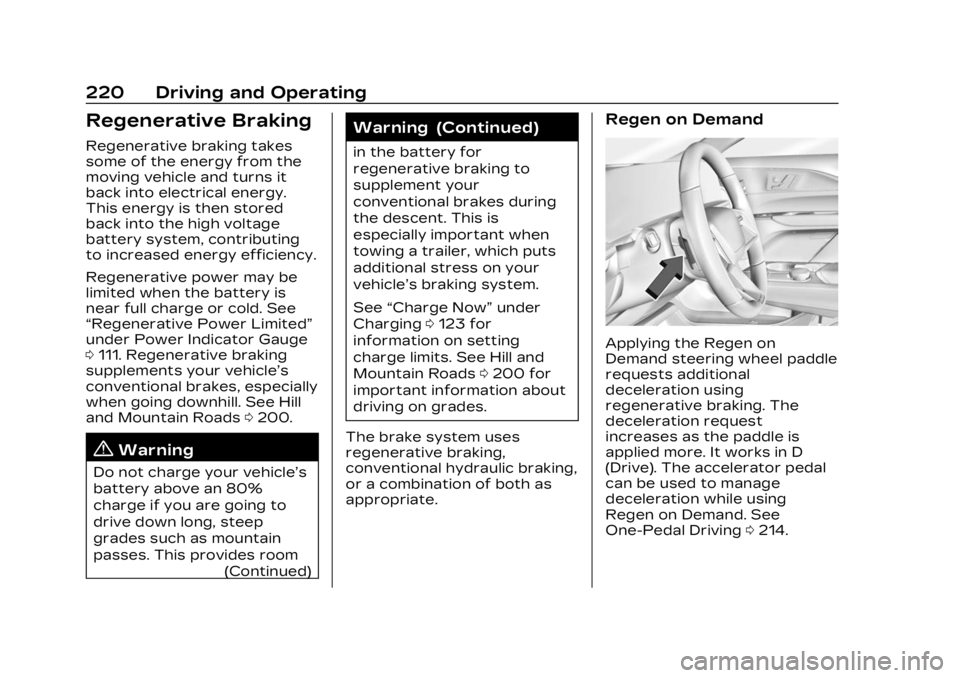
Applying the Regen on
Demand steering wheel paddle
requests additional
deceleration using
regenerative braking. The
deceleration request
increases as the paddle is
applied more. It works in D
(Drive). The accelerator pedal
can be used to manage
deceleration while using
Regen on Demand. See
One-Pedal Driving 0214.
Page 285 of 424

Cadillac Lyriq Owner Manual (GMNA-Localizing-U.S./Canada-15644413) -
2023 - CRC - 2/23/22
284 Driving and Operating
Video List :Touch to display a
list of the most recent and
saved videos. Touch the
delete button next to the
name to delete a saved video.
Rewind : Touch to rewind the
video. Touch again up to three
times to increase speed.
Touch a fourth time to stop
rewinding.
Play/Pause : Touch to play or
pause a recorded video.
Fast Forward : Touch to fast
forward the video. Touch
again up to three times to
increase speed. Touch a
fourth time to stop fast
forward.
Save : Touch to save a video.
This protects the video from
being erased. Once the SD
card is full, the oldest files will
be overwritten unless they
have been saved.
Camera Views : When
opening the Video Recorder,
the previous file will show all
camera views and can be played. Icons in the upper right
corner of each view indicate
which camera. Touch one of
the views to zoom to only that
camera view. Touch again to
return to all camera views.
Press X at any time to exit the
video recorder app.
The latest recorded video file
can be played. In addition:
.The recorded video is stored
in five-minute-long files.
.All files can be viewed on the
playback app or when the
SD card is read by a
personal computer (PC).
.Once the SD card is full, the
oldest files will be
overwritten.
To Delete Data : Remove the
SD card from the vehicle and
insert into a PC to manually
delete the file.
Error messages can occur if:
.No SD card is present.
.An empty SD card is present.
.The video files are the
wrong format.
.The video files are corrupt.
.The SD card is full.
.There is a system error.
Other files should not be
stored on the same SD card as
the surround vision recorder
files. Storing other files on the
same card may increase
recording start up and
playback time or result in a
loss of data. An error message
may be displayed if no
surround vision recorded
video file is available for
playback.
Charging
When to Charge
When the high voltage battery
is low, the following charging
messages may display on the
Driver Information
Center (DIC):
CHARGE VEHICLE SOON :
The battery needs to be
charged soon.
Page 286 of 424
Cadillac Lyriq Owner Manual (GMNA-Localizing-U.S./Canada-15644413) -
2023 - CRC - 2/23/22
Driving and Operating 285
REDUCED ACCELERATION
DRIVE WITH CARE :The
accelerator pedal response is
reduced and the remaining
range value changes to LOW,
charge the vehicle
immediately. See Propulsion
Power Messages 0135.
OUT OF ENERGY, CHARGE
VEHICLE NOW : The battery
charge is fully depleted. The
vehicle will slow to a stop.
Brake and steering assist will
continue operating. Once
stopped, turn the vehicle off.
Plug-In Charging
Plug-in charge times vary
based on the battery
condition, charge level, and the
outside temperature. See
Charging 0123 for charge
mode selection.
Do not allow the vehicle to
remain in temperature
extremes for long periods
without being driven or
plugged in. When
temperatures are below 0 °C (32 °F) and above 32 °C (90 °F),
plug in the vehicle to maximize
high voltage battery life.
In extreme temperature
conditions, a full charge will
take additional time.
It is normal to hear fans,
pumps, and electrical devices
clicking while the vehicle is
turned off and charging.
The vehicle does not require
indoor charging area
ventilation before, during,
or after charging.
The vehicle cannot be driven
while the charge cord is
plugged into the vehicle.
Caution
To avoid damage to the
vehicle, make sure the
charging cord plug is in good
condition, is not worn or
damaged, and is connected
securely to the vehicle's
charging port. If vehicle
charging is intermittent,
(Continued)
Caution (Continued)
disconnect the cord and
inspect for damage. An
excessively worn or
damaged AC or DC charging
cord plug may result in an
intermittent connection and
potential damage to the
vehicle's charging port.
There are several infotainment
screens that will display
depending on the current
charging status. See Charging
0 123.
Charging Override
A CHARGING OVERRIDE/
INTERRUPTION OCCURRED
message may display to
indicate that a charging
override or interruption has
occurred due to one or more
of the following events:
.Override of the charge
settings by the owner.
.Unintended interruption of
AC power at the vehicle's
charge port.
Page 287 of 424
Cadillac Lyriq Owner Manual (GMNA-Localizing-U.S./Canada-15644413) -
2023 - CRC - 2/23/22
286 Driving and Operating
.Interruption of charging by
the utility company.
AC Charging (If Equipped)
A loss of AC power alert may
sound for a short time if AC
power is lost for over
one minute. This sound alert
can be turned off. See
Charging0123.
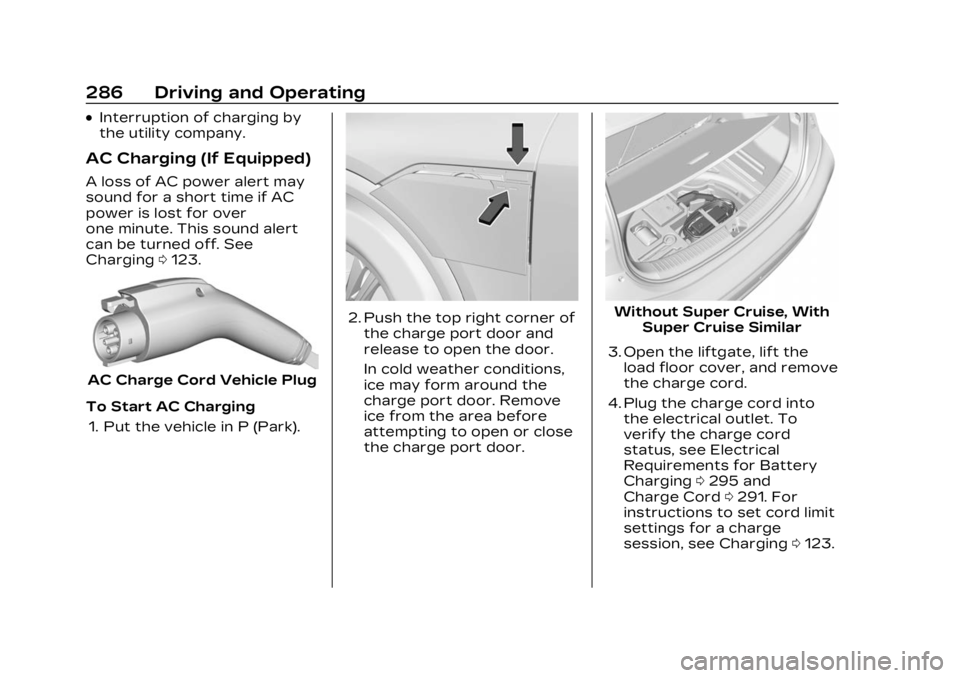
AC Charge Cord Vehicle Plug
To Start AC Charging 1. Put the vehicle in P (Park).
2. Push the top right corner of the charge port door and
release to open the door.
In cold weather conditions,
ice may form around the
charge port door. Remove
ice from the area before
attempting to open or close
the charge port door.Without Super Cruise, With Super Cruise Similar
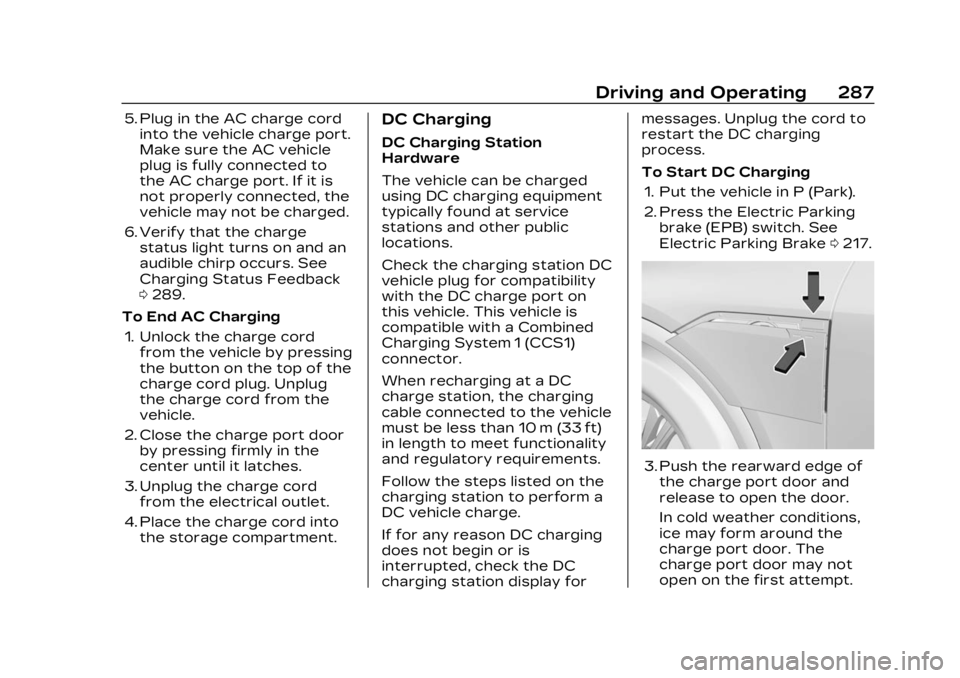
3. Open the liftgate, lift the load floor cover, and remove
the charge cord.
4. Plug the charge cord into the electrical outlet. To
verify the charge cord
status, see Electrical
Requirements for Battery
Charging 0295 and
Charge Cord 0291. For
instructions to set cord limit
settings for a charge
session, see Charging 0123.
Page 288 of 424
Cadillac Lyriq Owner Manual (GMNA-Localizing-U.S./Canada-15644413) -
2023 - CRC - 2/23/22
Driving and Operating 287
5. Plug in the AC charge cordinto the vehicle charge port.
Make sure the AC vehicle
plug is fully connected to
the AC charge port. If it is
not properly connected, the
vehicle may not be charged.
6. Verify that the charge status light turns on and an
audible chirp occurs. See
Charging Status Feedback
0289.
To End AC Charging 1. Unlock the charge cord from the vehicle by pressing
the button on the top of the
charge cord plug. Unplug
the charge cord from the
vehicle.
2. Close the charge port door by pressing firmly in the
center until it latches.
3. Unplug the charge cord from the electrical outlet.
4. Place the charge cord into the storage compartment.DC Charging
DC Charging Station
Hardware
The vehicle can be charged
using DC charging equipment
typically found at service
stations and other public
locations.
Check the charging station DC
vehicle plug for compatibility
with the DC charge port on
this vehicle. This vehicle is
compatible with a Combined
Charging System 1 (CCS1)
connector.
When recharging at a DC
charge station, the charging
cable connected to the vehicle
must be less than 10 m (33 ft)
in length to meet functionality
and regulatory requirements.
Follow the steps listed on the
charging station to perform a
DC vehicle charge.
If for any reason DC charging
does not begin or is
interrupted, check the DC
charging station display for messages. Unplug the cord to
restart the DC charging
process.
To Start DC Charging
1. Put the vehicle in P (Park).
2. Press the Electric Parking brake (EPB) switch. See
Electric Parking Brake 0217.
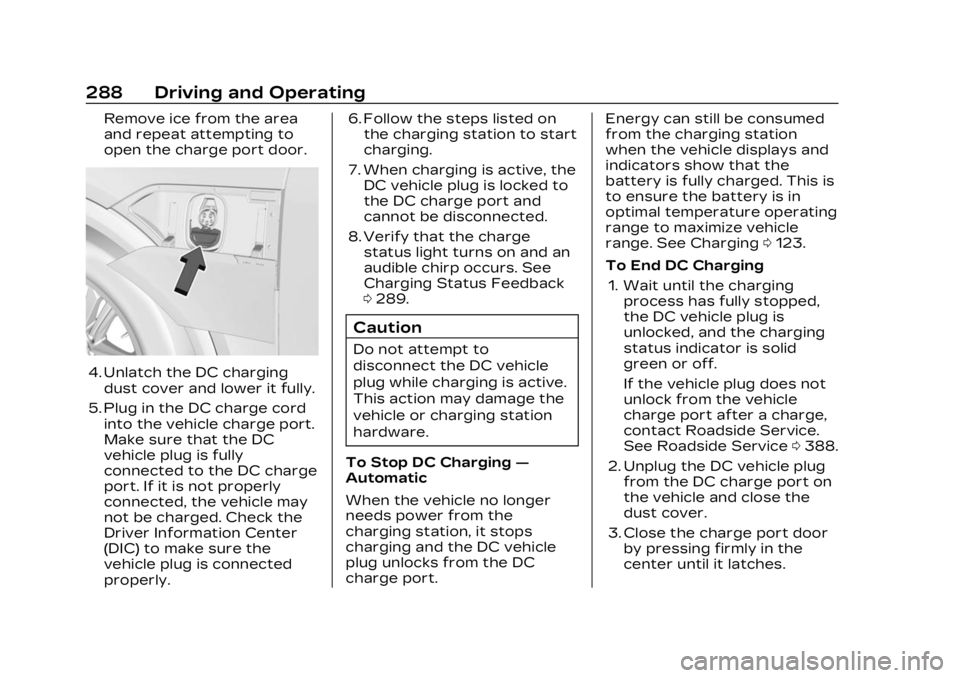
3. Push the rearward edge of
the charge port door and
release to open the door.
In cold weather conditions,
ice may form around the
charge port door. The
charge port door may not
open on the first attempt.
Page 289 of 424
Cadillac Lyriq Owner Manual (GMNA-Localizing-U.S./Canada-15644413) -
2023 - CRC - 2/23/22
288 Driving and Operating
Remove ice from the area
and repeat attempting to
open the charge port door.
4. Unlatch the DC chargingdust cover and lower it fully.
5. Plug in the DC charge cord into the vehicle charge port.
Make sure that the DC
vehicle plug is fully
connected to the DC charge
port. If it is not properly
connected, the vehicle may
not be charged. Check the
Driver Information Center
(DIC) to make sure the
vehicle plug is connected
properly. 6. Follow the steps listed on
the charging station to start
charging.
7. When charging is active, the DC vehicle plug is locked to
the DC charge port and
cannot be disconnected.
8. Verify that the charge status light turns on and an
audible chirp occurs. See
Charging Status Feedback
0289.
Caution
Do not attempt to
disconnect the DC vehicle
plug while charging is active.
This action may damage the
vehicle or charging station
hardware.
To Stop DC Charging —
Automatic
When the vehicle no longer
needs power from the
charging station, it stops
charging and the DC vehicle
plug unlocks from the DC
charge port. Energy can still be consumed
from the charging station
when the vehicle displays and
indicators show that the
battery is fully charged. This is
to ensure the battery is in
optimal temperature operating
range to maximize vehicle
range. See Charging
0123.
To End DC Charging 1. Wait until the charging process has fully stopped,
the DC vehicle plug is
unlocked, and the charging
status indicator is solid
green or off.
If the vehicle plug does not
unlock from the vehicle
charge port after a charge,
contact Roadside Service.
See Roadside Service 0388.
2. Unplug the DC vehicle plug from the DC charge port on
the vehicle and close the
dust cover.
3. Close the charge port door by pressing firmly in the
center until it latches.
Page 290 of 424
Cadillac Lyriq Owner Manual (GMNA-Localizing-U.S./Canada-15644413) -
2023 - CRC - 2/23/22
Driving and Operating 289
4. Manually disengage theElectric Parking Brake (EPB)
before driving the vehicle.
To Stop AC or DC
Charging
Controls on the charging
station can be used to stop
the charge process at
any time.
To stop charging when inside
the vehicle, use the Stop
Charge button on the
Charging screen. See “Active
Charging” under Charging
0 123.
Delayed Charging
Override
To temporarily override a
delayed charge event, unplug
the charge cord from the
charge port and then plug it
back in within five seconds.
A single audible chirp will
sound and charging will begin
immediately.
To cancel a temporary
override, unplug the charge
cord, wait for 10 seconds, and
then plug the charge cord
back in. A double audible chirp
will sound and charging will be
delayed.
See Charging 0123 for
advanced charge scheduling
options.
Charging Status
Feedback
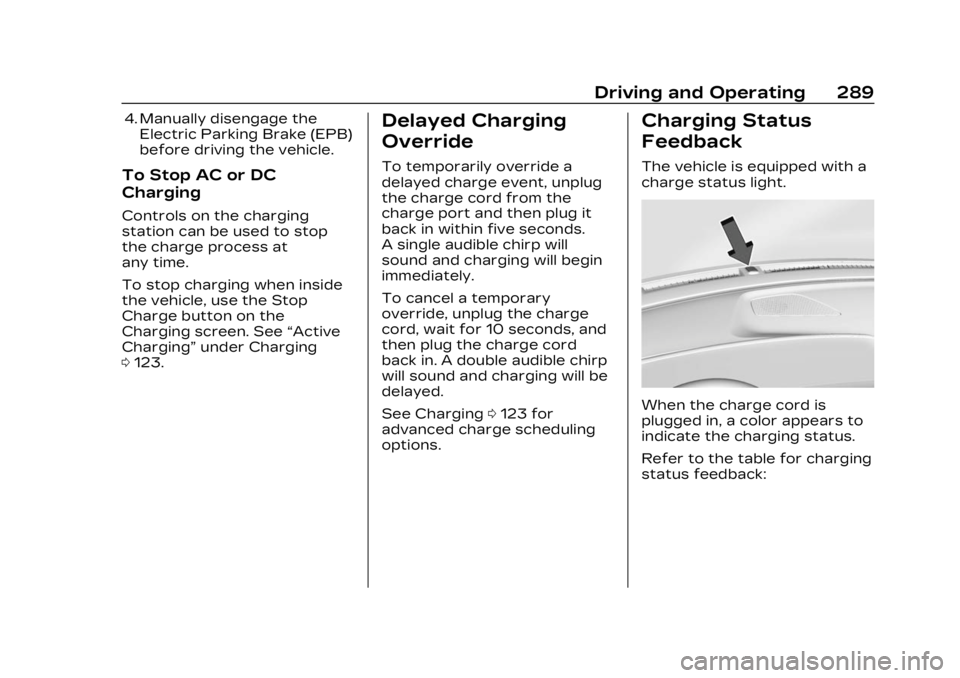
The vehicle is equipped with a
charge status light.
When the charge cord is
plugged in, a color appears to
indicate the charging status.
Refer to the table for charging
status feedback: