charging CADILLAC LYRIC 2023 User Guide
[x] Cancel search | Manufacturer: CADILLAC, Model Year: 2023, Model line: LYRIC, Model: CADILLAC LYRIC 2023Pages: 424, PDF Size: 4.76 MB
Page 128 of 424
Cadillac Lyriq Owner Manual (GMNA-Localizing-U.S./Canada-15644413) -
2023 - CRC - 2/23/22
Instruments and Controls 127
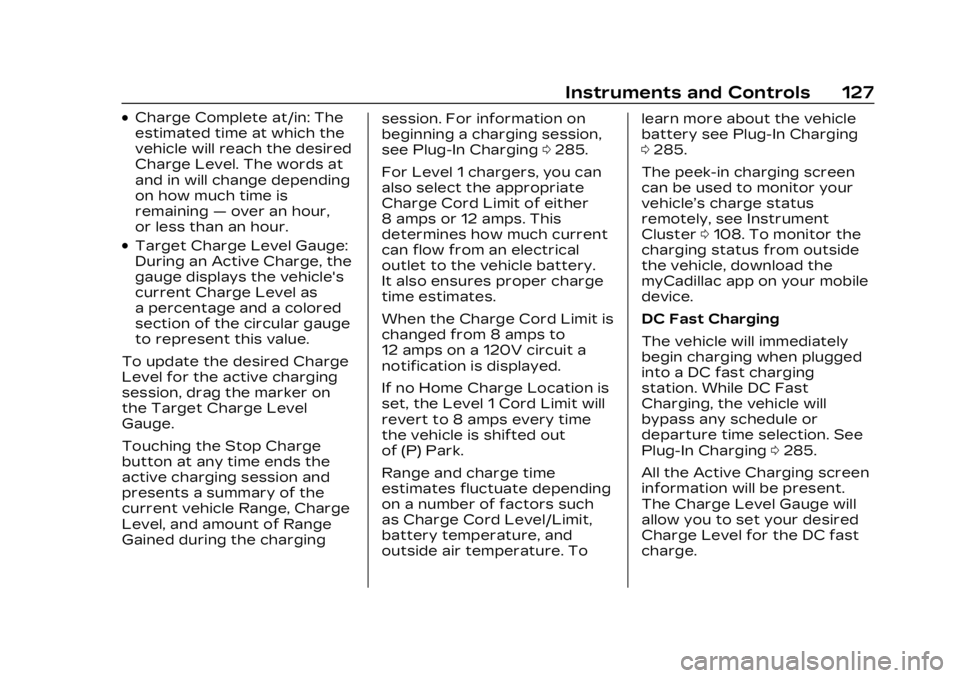
.Charge Complete at/in: The
estimated time at which the
vehicle will reach the desired
Charge Level. The words at
and in will change depending
on how much time is
remaining—over an hour,
or less than an hour.
.Target Charge Level Gauge:
During an Active Charge, the
gauge displays the vehicle's
current Charge Level as
a percentage and a colored
section of the circular gauge
to represent this value.
To update the desired Charge
Level for the active charging
session, drag the marker on
the Target Charge Level
Gauge.
Touching the Stop Charge
button at any time ends the
active charging session and
presents a summary of the
current vehicle Range, Charge
Level, and amount of Range
Gained during the charging session. For information on
beginning a charging session,
see Plug-In Charging
0285.
For Level 1 chargers, you can
also select the appropriate
Charge Cord Limit of either
8 amps or 12 amps. This
determines how much current
can flow from an electrical
outlet to the vehicle battery.
It also ensures proper charge
time estimates.
When the Charge Cord Limit is
changed from 8 amps to
12 amps on a 120V circuit a
notification is displayed.
If no Home Charge Location is
set, the Level 1 Cord Limit will
revert to 8 amps every time
the vehicle is shifted out
of (P) Park.
Range and charge time
estimates fluctuate depending
on a number of factors such
as Charge Cord Level/Limit,
battery temperature, and
outside air temperature. To learn more about the vehicle
battery see Plug-In Charging
0
285.
The peek-in charging screen
can be used to monitor your
vehicle’s charge status
remotely, see Instrument
Cluster 0108. To monitor the
charging status from outside
the vehicle, download the
myCadillac app on your mobile
device.
DC Fast Charging
The vehicle will immediately
begin charging when plugged
into a DC fast charging
station. While DC Fast
Charging, the vehicle will
bypass any schedule or
departure time selection. See
Plug-In Charging 0285.
All the Active Charging screen
information will be present.
The Charge Level Gauge will
allow you to set your desired
Charge Level for the DC fast
charge.
Page 129 of 424
Cadillac Lyriq Owner Manual (GMNA-Localizing-U.S./Canada-15644413) -
2023 - CRC - 2/23/22
128 Instruments and Controls
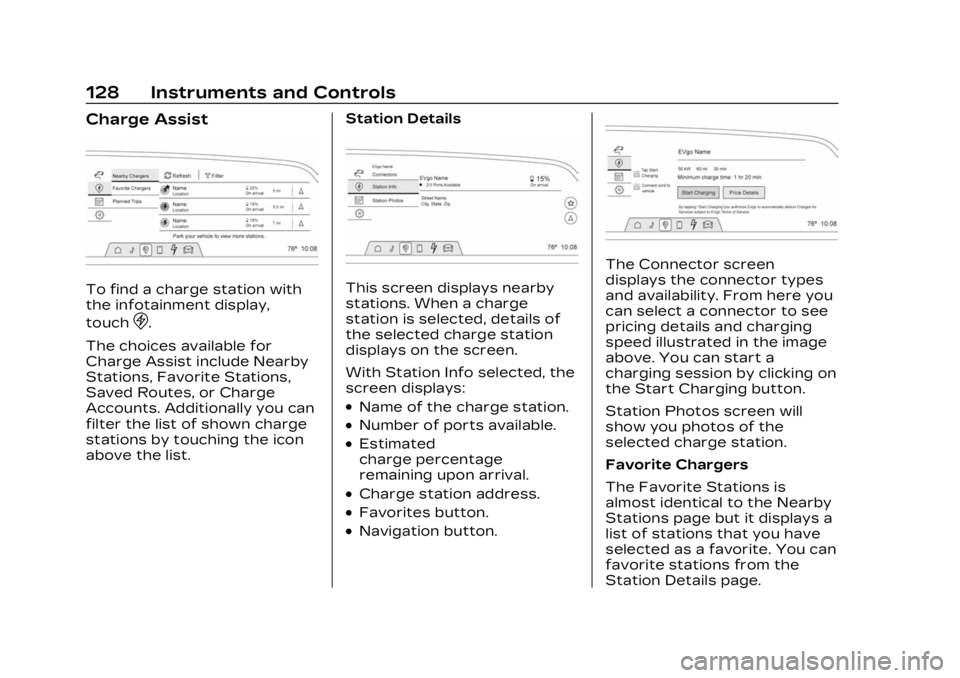
Charge Assist
To find a charge station with
the infotainment display,
touch
D.
The choices available for
Charge Assist include Nearby
Stations, Favorite Stations,
Saved Routes, or Charge
Accounts. Additionally you can
filter the list of shown charge
stations by touching the icon
above the list. Station Details
This screen displays nearby
stations. When a charge
station is selected, details of
the selected charge station
displays on the screen.
With Station Info selected, the
screen displays:
.Name of the charge station.
.Number of ports available.
.Estimated
charge percentage
remaining upon arrival.
.Charge station address.
.Favorites button.
.Navigation button.
The Connector screen
displays the connector types
and availability. From here you
can select a connector to see
pricing details and charging
speed illustrated in the image
above. You can start a
charging session by clicking on
the Start Charging button.
Station Photos screen will
show you photos of the
selected charge station.
Favorite Chargers
The Favorite Stations is
almost identical to the Nearby
Stations page but it displays a
list of stations that you have
selected as a favorite. You can
favorite stations from the
Station Details page.
Page 130 of 424
Cadillac Lyriq Owner Manual (GMNA-Localizing-U.S./Canada-15644413) -
2023 - CRC - 2/23/22
Instruments and Controls 129
Saved Routes
This screen allows you to
access routes planned and
saved on the myCadillac app.
To select a route, touch the
navigation icon to start route
guidance.
Charge Accounts
This screen allows you to
manage your charge provider
accounts in the myCadillac
app. This allows you to easily
start charging without having
to manage payment on-site.
You can also choose to be
notified when you are
approaching supported
stations.
Schedule
TouchEto view the Schedule
feature that allows a custom
charging plan to be set for
each day of the week. When
the vehicle is plugged in at the
Home Charge Location, the
Schedule feature will
automatically charge to the
desired Charge Level and pre-condition the cabin by the
time set in the Schedule. This
feature acts as a more
customizable Charge Later
setting than the one on the
Next Charge screen.
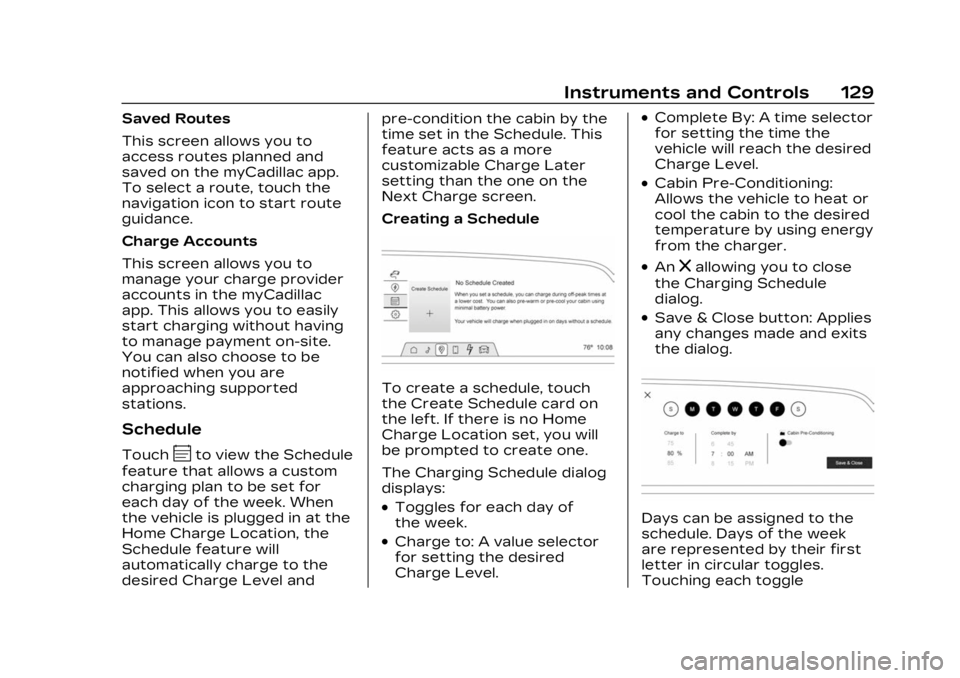
Creating a Schedule
To create a schedule, touch
the Create Schedule card on
the left. If there is no Home
Charge Location set, you will
be prompted to create one.
The Charging Schedule dialog
displays:
.Toggles for each day of
the week.
.Charge to: A value selector
for setting the desired
Charge Level.
.Complete By: A time selector
for setting the time the
vehicle will reach the desired
Charge Level.
.Cabin Pre-Conditioning:
Allows the vehicle to heat or
cool the cabin to the desired
temperature by using energy
from the charger.
.Anzallowing you to close
the Charging Schedule
dialog.
.Save & Close button: Applies
any changes made and exits
the dialog.
Days can be assigned to the
schedule. Days of the week
are represented by their first
letter in circular toggles.
Touching each toggle
Page 131 of 424
Cadillac Lyriq Owner Manual (GMNA-Localizing-U.S./Canada-15644413) -
2023 - CRC - 2/23/22
130 Instruments and Controls
illuminates the graphic,
confirming that day is
assigned that to the schedule.
Touching a second time
unassigns days from this
schedule, dimming the toggle
once again. Select all days you
wish to adhere to the settings
in this schedule. If there are
multiple charge schedules,
days must be unassigned from
their current schedule before
they can be assigned to a
new one.
Once completed with the
charging schedule, touch the
Save & Close button to finish
creating the schedule.
On days that are not assigned
a schedule, the vehicle will
begin charging to 100% as
soon as it is plugged in, unless
otherwise specified on the
Charging screen.
Home Charge Schedule can be
turned ON or OFF. To enable
or disable all charging
schedules, touch the toggleswitch next to Home Charge
Schedule on the Schedule
screen.
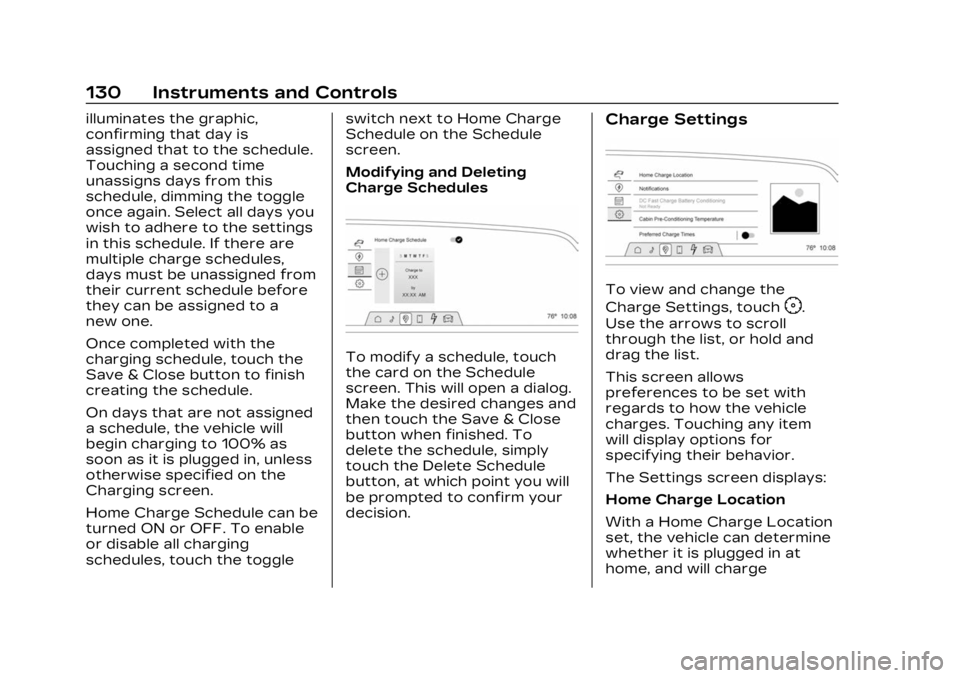
Modifying and Deleting
Charge Schedules
To modify a schedule, touch
the card on the Schedule
screen. This will open a dialog.
Make the desired changes and
then touch the Save & Close
button when finished. To
delete the schedule, simply
touch the Delete Schedule
button, at which point you will
be prompted to confirm your
decision.
Charge Settings
To view and change the
Charge Settings, touch
F.
Use the arrows to scroll
through the list, or hold and
drag the list.
This screen allows
preferences to be set with
regards to how the vehicle
charges. Touching any item
will display options for
specifying their behavior.
The Settings screen displays:
Home Charge Location
With a Home Charge Location
set, the vehicle can determine
whether it is plugged in at
home, and will charge
Page 132 of 424
Cadillac Lyriq Owner Manual (GMNA-Localizing-U.S./Canada-15644413) -
2023 - CRC - 2/23/22
Instruments and Controls 131
according to any existing
schedules. The Home Charge
Location can be changed or
deleted at this screen.
The wireless service and GPS
satellite technologies must be
available and operating for
features to function properly.
These systems may not
operate if the battery is
disconnected, or if the vehicle
has been off for an extended
period of time. If GPS is
unavailable, a message
displays on the infotainment
screen. GPS functionality may
resume after the next time
you drive the vehicle.
Notifications
This section contains on/off
preferences for multiple
notifications triggered during
the Charging session.
Charge Status Feedback :
Provides an audible
notification through horn
chirps that accompany
changes in the charging
status.Charge Cord Unplugged
Alert :
When on and your
vehicle is locked, your vehicle
will honk the horn and flash
the lights if charge cord
becomes unplugged.
Charge Power Loss Alert :
When on, your vehicle will
honk the horn and flash the
lights if Charging power is
cut off.
DC Fast Charge Battery
Conditioning
If equipped, adjusts the
battery to the optimal
temperature for quicker DC
Fast Charging. This should be
done before charging at a DC
Fast Charger.
Depending on the outside and
battery temperature, battery
conditioning could take longer
to reach the optimal
temperature. While en route to a DC fast
charge station using Google
Maps, DC Fast Charge
Conditioning happens
automatically.
Cabin Pre-Conditioning
Temperature
Allows for the preferred cabin
temperature to be set. During
a planned charging session at
the vehicle's Home Charge
Location, the vehicle cabin is
warmed or cooled to this
temperature if set to ON in
either the Charge Later
screen, or in an active
Schedule.
Preferred Charge Times
Allows preferred charge time
windows to be enabled for the
Home Charge Location during
both weekday and weekend
planned charging sessions.
It does so whether the vehicle
is set to Charge Later,
or observing a scheduled
charge. This allows for
charging at a lower cost by
prioritizing charging during the
Page 135 of 424
Cadillac Lyriq Owner Manual (GMNA-Localizing-U.S./Canada-15644413) -
2023 - CRC - 2/23/22
134 Instruments and Controls
Tires :Tire Pressure card
displays the approximate
pressures of all four tires. Tire
pressure is displayed in either
kilopascal (kPa) or in pounds
per square inch (psi). If the
pressure is low, the value for
that tire is shown in amber.
See Tire Pressure Monitor
System 0343 and
Tire Pressure Monitor
Operation 0344.
When selected, the following
options may be chosen in the
dialog: Relearn Tire Pressure,
Reset Leak Detection, Turn
Off/On Leak Detection, and
Show in Cluster. When
enabled, you will receive alerts
when a fast and/or slow tire
leak is detected. The Leak
Detection speeds shown are
either Tire Leak or Fast Leak.
When disabled, you will still
receive low tire pressure
alerts. However, you will stop
receiving additional alerts
when a tire is leaking air. Energy Info :
Energy Usage
card displays how energy is
being used for the current
drive since the last time the
vehicle was started.
Percentages of the Driving,
Remote Start, Climate and
Conditioning vehicle systems
as overall vehicle energy use
are shown. When selected,
distance driven, total energy,
energy usage bar diagram, and
selectable categories are
displayed. Select a category to
learn more about how your
vehicle uses energy from the
battery.
Energy Efficiency card
displays a graph showing the
energy efficiency that has
been used by the vehicle over
the last 48 km (30 mi). When
selected, regenerated range,
and instant efficiency is shown
along with average efficiency
in the dialog.Vehicle Messages
Messages displayed on the
Driver Information Center
(DIC) indicate the status of the
vehicle or some action that
may be needed to correct a
condition. Multiple messages
may appear one after another.
Vehicle status notifications
are also sent to the
infotainment display. Touching
Uon the bottom right corner
of the infotainment display
opens the notification drawer
where all the active vehicle
messages can be viewed.
Depending on the message,
you can schedule a service,
find the nearest dealer, or find
the nearest charging station.
When there are active
messages that can be viewed,
a red dot appears on top of
the notification icon on the
infotainment display.
The messages that do not
require immediate action can
be acknowledged and cleared
Page 149 of 424
Cadillac Lyriq Owner Manual (GMNA-Localizing-U.S./Canada-15644413) -
2023 - CRC - 2/23/22
148 Lighting
doors, and the dome lamp
control is in the DOOR
position.
Some exterior lamps also turn
on when pressing
Kon the
remote key or opening any
doors. Low-beam lamps will
only turn on briefly at night,
or in areas with limited lighting.
All lamps will gradually fade
out after about 30 seconds.
Entry lighting can be disabled
manually by closing all doors,
pressing
Qon the remote key,
or starting the vehicle.
This feature can be changed.
On the infotainment home
screen, select the Settings
icon
TVehicleTVehicle
Locator Lights.
Exit Lighting
Some exterior lamps and
interior lamps turn on when
the driver door is opened after
the vehicle is turned off The exterior and interior lamps
remain on for a set amount of
time, then automatically
turn off.
The interior lights turn on
when the vehicle is turned off.
The exterior lamps turn off
immediately by turning the
exterior lamp control off.
This feature can be changed.
On the infotainment home
screen, select the Settings
icon
TVehicleTExit Lighting.
Battery Load
Management
The vehicle has Electric Power
Management (EPM) that
estimates the battery
temperature and state of
charge. It then adjusts the
voltage for best performance
and extended life of the 12–
volt battery
When the battery state of
charge is low, the voltage is
raised slightly to quickly
increase the charge. When thestate of charge is high, the
voltage is lowered slightly to
prevent over charging. As this
adjustment occurs, you may
see the voltage move up or
down on the voltmeter gauge
or voltage display on the
Driver Information (DIC),
if equipped. This is normal. If a
problem occurs, an alert will be
displayed.
If the electrical loads are very
high, the battery can be
discharged when the vehicle is
stationary. A high electrical
load occurs when several
features are on, such as:
headlamps, high beams, rear
window defogger, climate
control fan at high speed,
heated seats, motor cooling
fans, trailer loads, and loads
plugged into accessory power
outlets.
EPM works to prevent
excessive discharge of the
battery by balancing the
electrical system output and
the vehicle's electrical needs.
Page 150 of 424
Cadillac Lyriq Owner Manual (GMNA-Localizing-U.S./Canada-15644413) -
2023 - CRC - 2/23/22
Lighting 149
In some cases, it can
temporarily reduce the power
demands of some accessories.
These actions occur in steps
or levels without being
noticeable. In rare cases at the
highest levels of corrective
action, this action may be
noticeable to the driver. If so, a
DIC battery voltage and
charging message displays.
It is recommended that the
driver reduce the electrical
loads as much as possible. See
Driver Information Center
(DIC)0132.
Battery Power
Protection
This feature helps prevent the
battery from being drained if
the interior courtesy lamps or
reading lamps are accidentally
left on. If any of these lamps
are left on, they automatically
turn off after 10 minutes when
the vehicle is turned off. The lamps will not come back on
again until one of the following
occurs:
.The vehicle is started.
.The doors are closed and
then re-opened.
Exterior Lighting
Battery Saver
The exterior lamps turn off
about 10 minutes after the
vehicle is turned off, if the
parking lamps or headlamps
have been manually left on.
This protects against draining
the battery. To restart the
10-minute timer, turn the
exterior lamp control to the
O
position and then back to the
;or2position.
To keep the lamps on for more
than 10 minutes, the vehicle
must be on.
Page 160 of 424
Cadillac Lyriq Owner Manual (GMNA-Localizing-U.S./Canada-15644413) -
2023 - CRC - 2/23/22
Infotainment System 159
Favorites
Audio favorites are displayed
on the left side of the active
audio source page.
Favorites are stored by
touching Hold to Set at the
left side of the active audio
source page.
User Settings
From the SiriusXM source
main page, touch
zto display
the following:
.Tune Start
.Location Services
.Help and Support
Tune Start
Select on or of to have songs
play from the start when
tuning.
Location Services
Select on or of to allow
SiriusXM to see your location.
Help and Support
Select to show the SiriusXM
help website.
Radio Reception
Unplug electronic devices
from the accessory power
outlets if there is interference
or static in the radio.
FM
FM signals only reach about 16
to 65 km (10 to 40 mi).
Although the radio has a
built-in electronic circuit that
automatically works to reduce
interference, some static can
occur, especially around tall
buildings or hills, causing the
sound to fade in and out.
AM
The range for most AM
stations is greater than for
FM, especially at night. The
longer range can cause station
frequencies to interfere with
each other. Static can also
occur when things like storms
and power lines interfere with
radio reception. When this
happens, try reducing the
treble on the radio.
SiriusXM Satellite Radio
Service
If equipped, SiriusXM Satellite
Radio Service provides digital
radio reception. Tall buildings
or hills can interfere with
satellite radio signals, causing
the sound to fade in and out.
In addition, traveling or
standing under heavy foliage,
bridges, garages, or tunnels
may cause loss of the
SiriusXM signal for a period of
time. Some cellular services
may interfere with SXM
reception causing loss of
signal.
Mobile Device Usage
Mobile device usage, such as
making or receiving calls,
charging, or just having the
mobile device on may cause
static interference in the radio.
Unplug the mobile device or
turn it off if this happens.
Page 164 of 424
Cadillac Lyriq Owner Manual (GMNA-Localizing-U.S./Canada-15644413) -
2023 - CRC - 2/23/22
Infotainment System 163
To change the units, see
Instrument Cluster0108.
Mute Settings
During active route guidance,
Google Maps can give audible
voice directions, traffic alerts,
or can be muted. In the Google
Maps app, touch Settings,
then Mute settings to access
the options.
Compass
The Google Maps orientation
can be changed between the
direction currently traveling
and pointing north. Touch the
compass to switch between
these options.
To recenter the map to the
current location, touch the
location icon.
Super Cruise
If equipped, Super Cruise
highlights routes in a specific
outline. See Super Cruise
0 236.Electric Vehicle (EV)
Features with
Google Maps
When vehicle data is shared
with Google, some of the
Maps features for EVs are as
follows:
.Battery charge level at
arrival
.Estimated minimum
charging time
If the vehicle needs to be
charged to reach a
destination, charging stations
may automatically be added to
a route.
Maps
Auto-downloaded Maps
Google Maps downloads
offline maps automatically for
use when not connected to
the Internet and for making
map data available to vehicle
features regardless of
connectivity. These offline maps are only available when
the vehicle has a subscription
data plan.
To turn on auto-download:
1. Open Google Maps.
2. Touch Settings.
3. Touch Privacy Center, then select Offline maps.
4. Select Auto-download offline maps.
5. Check the Internet connection and wait for the
download to finish.
Downloading Offline Maps 1. Open Google Maps.
2. Touch Settings, then Offline maps.
3. Touch the square with the Select your own map icon.
4. Adjust the map to cover the desired area to download.
5. Touch Download.