radio CADILLAC LYRIC 2023 Owner's Manual
[x] Cancel search | Manufacturer: CADILLAC, Model Year: 2023, Model line: LYRIC, Model: CADILLAC LYRIC 2023Pages: 424, PDF Size: 4.76 MB
Page 183 of 424
Cadillac Lyriq Owner Manual (GMNA-Localizing-U.S./Canada-15644413) -
2023 - CRC - 2/23/22
182 Infotainment System
.Touch Clear PIN and All
Teen Driver Keys from the
Teen Driver menu. This will
also unregister any Teen
Driver keys and delete
the PIN.
Forgotten PIN
See your dealer to reset
the PIN.
Trademarks and
License
Agreements
FCC Information
See Radio Frequency
Statement 0395.
If you decide to continue
service after your trial, your
selected subscription plan will
automatically renew thereafter. You will be
charged at then-current rates.
Fees and taxes apply. Please
see the SiriusXM Customer
Agreement at siriusxm.com for
complete terms and how to
cancel, which includes calling
SiriusXM at 1-866-635-2349.
All fees and programming are
subject to change.
Fees and Taxes: Subscription
fee, taxes, one time activation
fee, and other fees may apply.
Subscription fee is consumer
only. All fees and programming
subject to change.
Subscriptions subject to
Customer Agreement available
at www.siriusxm.com. SiriusXM
service is only available in the
48 contiguous United States
and Canada.
In Canada: Some deterioration
of service may occur in
extreme northern latitudes.
This is beyond the control of
SiriusXM Satellite Radio.
Explicit Language Notice:
Channels with frequent
explicit language are indicated
with an
“XL”preceding the
channel name. Channel
blocking is available for
SiriusXM Satellite Radio
receivers by notifying
SiriusXM:
.USA Customers —See
www.siriusxm.com or call
1-888-601–6296.
.Canada Customers —See
www.siriusxm.ca or call
1-877-438-9677.
It is prohibited to copy,
decompile, disassemble,
reverse engineer, hack,
manipulate, or otherwise make
available any technology or
software incorporated in
receivers compatible with the
SiriusXM Satellite Radio
System or that support the
SiriusXM website, the Online
Service or any of its content.
Furthermore, the AMBER
voice compression software
included in this product is
Page 184 of 424
Cadillac Lyriq Owner Manual (GMNA-Localizing-U.S./Canada-15644413) -
2023 - CRC - 2/23/22
Infotainment System 183
protected by intellectual
property rights including
patent rights, copyrights, and
trade secrets of Digital Voice
Systems, Inc.
General Requirements:1. A License Agreement from SiriusXM is required for any
product that incorporates
SiriusXM Technology and/or
for use of any of the
SiriusXM marks to be
manufactured, distributed,
or marketed in the SiriusXM
Service Area.
2. For products to be distributed, marketed, and/
or sold in Canada, a
separate agreement is
required with Canadian
Satellite Radio Inc.
(operating as SiriusXM
Canada).
TouchSense Technology and
TouchSense System 1000
Series Licensed from
Immersion Corporation.
TouchSense System 1000
protected under one or more
of the U.S. Patents at the
following address
www.immersion.com/
patent-marking.html and other
patents pending.
Bluetooth
The Bluetooth word mark and
logos are owned by the
Bluetooth SIG, Inc. and any use
of such marks by General
Motors is under license. Other
trademarks and trade names
are those of their respective
owners. Java
Java is a registered trademark
of Oracle and/or its affiliates.
MPEG4–AVC (H.264)
THIS PRODUCT IS LICENSED
UNDER THE AVC PATENT
PORTFOLIO LICENSE FOR
THE PERSONAL AND
NON-COMMERCIAL USE OF
A CONSUMER TO (i) ENCODE
VIDEO IN COMPLIANCE WITH
THE AVC STANDARD (“AVC
VIDEO”) AND/OR (ii) DECODE
AVC VIDEO THAT WAS
ENCODED BY A CONSUMER
ENGAGED IN A PERSONAL
AND NON-COMMERCIAL
ACTIVITY AND/OR WAS
OBTAINED FROM A VIDEO
PROVIDER LICENSED TO
PROVIDE AVC VIDEO. NO
LICENSE IS GRANTED OR
SHALL BE IMPLIED FOR ANY
OTHER USE. ADDITIONAL
INFORMATION MAY BE
OBTAINED FROM MPEG LA,
LLC. SEE HTTPS://
WWW.MPEGLA.COM.
Page 190 of 424
Cadillac Lyriq Owner Manual (GMNA-Localizing-U.S./Canada-15644413) -
2023 - CRC - 2/23/22
Climate Controls 189
Caution (Continued)
with a razor blade or
anything else that is sharp.
This may damage the rear
window defogger grid and
affect the radio's ability to
pick up stations clearly. The
repairs would not be
covered by the vehicle
warranty.
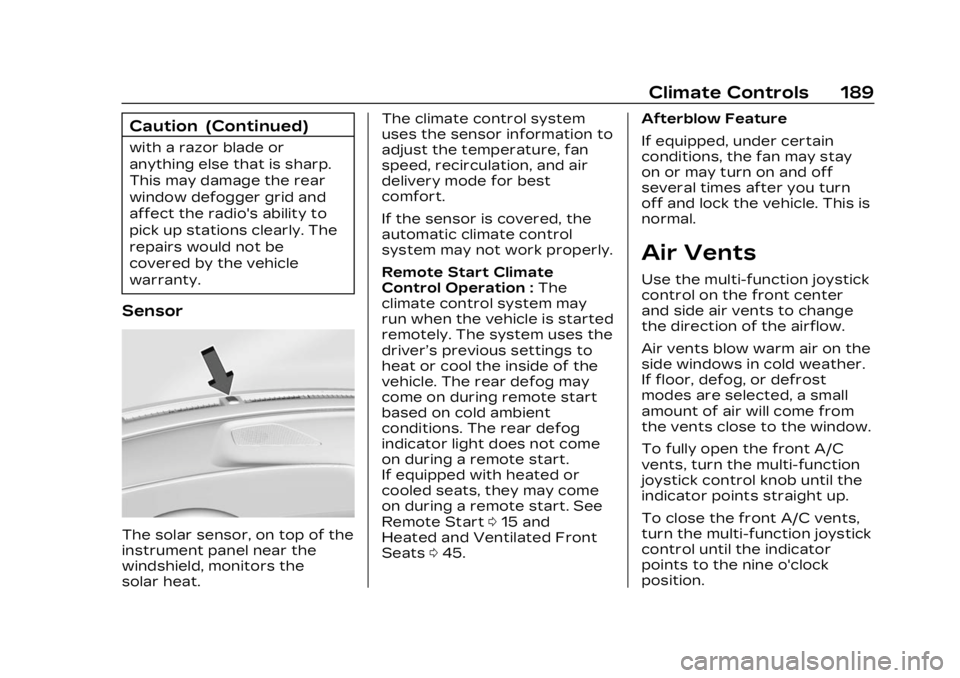
Sensor
The solar sensor, on top of the
instrument panel near the
windshield, monitors the
solar heat.The climate control system
uses the sensor information to
adjust the temperature, fan
speed, recirculation, and air
delivery mode for best
comfort.
If the sensor is covered, the
automatic climate control
system may not work properly.
Remote Start Climate
Control Operation :
The
climate control system may
run when the vehicle is started
remotely. The system uses the
driver’s previous settings to
heat or cool the inside of the
vehicle. The rear defog may
come on during remote start
based on cold ambient
conditions. The rear defog
indicator light does not come
on during a remote start.
If equipped with heated or
cooled seats, they may come
on during a remote start. See
Remote Start 015 and
Heated and Ventilated Front
Seats 045. Afterblow Feature
If equipped, under certain
conditions, the fan may stay
on or may turn on and off
several times after you turn
off and lock the vehicle. This is
normal.
Air Vents
Use the multi-function joystick
control on the front center
and side air vents to change
the direction of the airflow.
Air vents blow warm air on the
side windows in cold weather.
If floor, defog, or defrost
modes are selected, a small
amount of air will come from
the vents close to the window.
To fully open the front A/C
vents, turn the multi-function
joystick control knob until the
indicator points straight up.
To close the front A/C vents,
turn the multi-function joystick
control until the indicator
points to the nine o'clock
position.
Page 196 of 424
Cadillac Lyriq Owner Manual (GMNA-Localizing-U.S./Canada-15644413) -
2023 - CRC - 2/23/22
Driving and Operating 195
Allow the vehicle to warm up
for 20 minutes before driving.
Vehicle Charging/
Maintenance
Charging
Keep the vehicle plugged in,
even when fully charged, to
keep the battery temperature
ready for the next drive. This
is important when outside
temperatures are extremely
hot or cold.
If possible, use a level 2
(240 volt) high power charge
station for best results. This
allows the interior of the
vehicle and high voltage
battery to warm to optimal
temperature.
Maintenance
Always keep the tires properly
inflated and the vehicle
properly aligned.
The weight of excess cargo in
the vehicle affects efficiency
and range. Avoid carrying
more than is needed.Avoid unnecessary use of
electrical accessories. Power
used for functions other than
propelling the vehicle will
reduce the available range.
Using a rooftop carrier will
reduce efficiency due to
additional weight and drag.
Distracted Driving
Distraction comes in many
forms and can take your focus
from the task of driving.
Exercise good judgment and
do not let other activities
divert your attention away
from the road. Many local
governments have enacted
laws regarding driver
distraction. Become familiar
with the local laws in
your area.
To avoid distracted driving,
keep your eyes on the road,
keep your hands on the
steering wheel, and focus your
attention on driving.
.Do not use a mobile phone in
demanding driving situations.
Use a hands-free method to
place or receive necessary
phone calls.
.Watch the road. Do not read,
take notes, or look up
information on mobile
phones or other electronic
devices.
.Designate a front seat
passenger to handle
potential distractions.
.Become familiar with vehicle
features before driving, such
as programming favorite
radio stations and adjusting
climate control and seat
settings. Program all trip
information into any
navigation device prior to
driving.
.Wait until the vehicle is
parked to retrieve items that
have fallen to the floor.
.Stop or park the vehicle to
tend to children.
.Keep pets in an appropriate
carrier or restraint.
Page 226 of 424
Cadillac Lyriq Owner Manual (GMNA-Localizing-U.S./Canada-15644413) -
2023 - CRC - 2/23/22
Driving and Operating 225
Cruise Control
Adaptive Cruise
Control (Advanced)
Adaptive Cruise Control (ACC)
allows the cruise control set
speed and following gap to be
selected. Read this entire
section before using this
system. The following gap is
the following time (or distance)
between your vehicle and a
vehicle detected directly
ahead in your path, moving in
the same direction. If no
vehicle is detected in your
path, ACC works like regular
cruise control. ACC uses a
camera and radar sensor(s) to
detect other vehicles. See
Radio Frequency Statement
0395.
If a vehicle is detected in your
path, ACC can apply
acceleration or limited,
moderate braking to maintain
the selected following gap. To
disengage ACC, apply the
brake. If ACC is controlling the vehicle speed when the
Traction Control System (TCS)
or StabiliTrak/Electronic
Stability Control (ESC) system
activates, ACC may
automatically disengage. See
Traction Control/Electronic
Stability Control
0221. When
road conditions allow ACC to
be safely used, ACC can be
turned back on.
Disabling the TCS or
StabiliTrak/ESC system will
disengage and prevent
engagement of ACC.
ACC can reduce the need for
you to frequently brake and
accelerate, especially when
used on expressways,
freeways, and interstate
highways. When used on other
roads, you may need to take
over the control of braking or
acceleration more often.
{Warning
ACC has limited braking
ability and may not have
time to slow the vehicle
down enough to avoid a
collision with another vehicle
you are following. This can
occur when vehicles
suddenly slow or stop
ahead, or enter your lane.
Also see “Alerting the
Driver” later in this section.
Complete attention is
always required while driving
and you should be ready to
take action and apply the
brakes. See Defensive
Driving 0196.
{Warning
ACC will not detect or brake
for children, pedestrians,
animals, or other objects.
(Continued)
Page 258 of 424
Cadillac Lyriq Owner Manual (GMNA-Localizing-U.S./Canada-15644413) -
2023 - CRC - 2/23/22
Driving and Operating 257
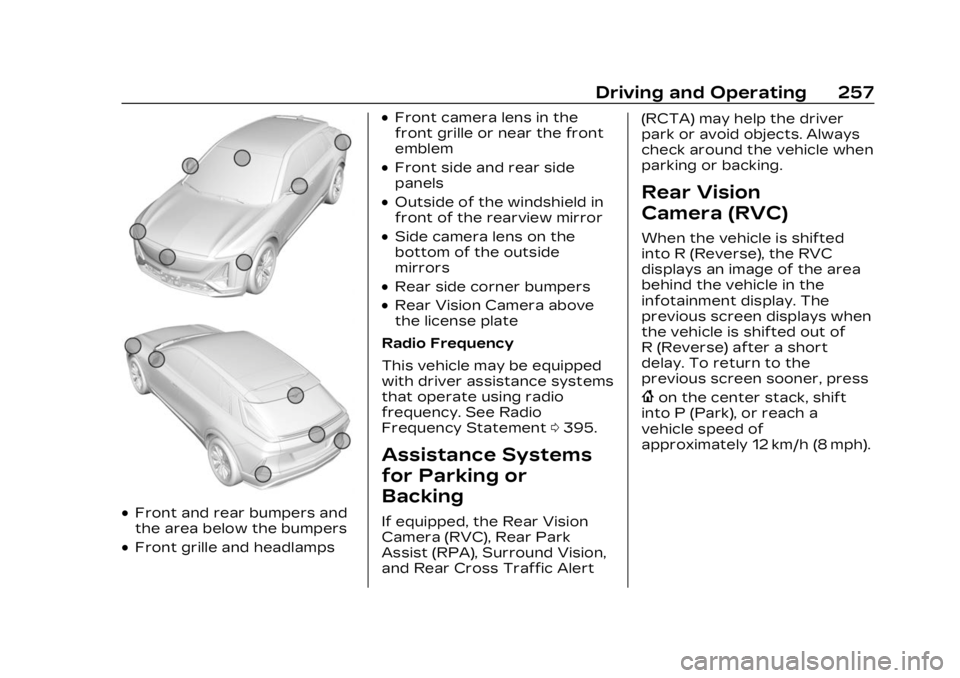
.Front and rear bumpers and
the area below the bumpers
.Front grille and headlamps
.Front camera lens in the
front grille or near the front
emblem
.Front side and rear side
panels
.Outside of the windshield in
front of the rearview mirror
.Side camera lens on the
bottom of the outside
mirrors
.Rear side corner bumpers
.Rear Vision Camera above
the license plate
Radio Frequency
This vehicle may be equipped
with driver assistance systems
that operate using radio
frequency. See Radio
Frequency Statement 0395.
Assistance Systems
for Parking or
Backing
If equipped, the Rear Vision
Camera (RVC), Rear Park
Assist (RPA), Surround Vision,
and Rear Cross Traffic Alert (RCTA) may help the driver
park or avoid objects. Always
check around the vehicle when
parking or backing.
Rear Vision
Camera (RVC)
When the vehicle is shifted
into R (Reverse), the RVC
displays an image of the area
behind the vehicle in the
infotainment display. The
previous screen displays when
the vehicle is shifted out of
R (Reverse) after a short
delay. To return to the
previous screen sooner, press
{on the center stack, shift
into P (Park), or reach a
vehicle speed of
approximately 12 km/h (8 mph).
Page 292 of 424
Cadillac Lyriq Owner Manual (GMNA-Localizing-U.S./Canada-15644413) -
2023 - CRC - 2/23/22
Driving and Operating 291
Charge StatusLight Color Sound Action/Reason
None Three audible chirps when the
driver is opened The charge port door is open.
Flashing Green (the
longer the blink, the
higher the state of
charge) Four audible chirps The currently set departure time cannot be met. May
be due to charging power level or charge schedule
setting factors. Refer to the charging screen for actual
charge completion time. See Charging 0123.
Charge Cord
IMPORTANT SAFETY
INSTRUCTIONS
This symbol indicates risk of
electrical shock.
See Radio Frequency
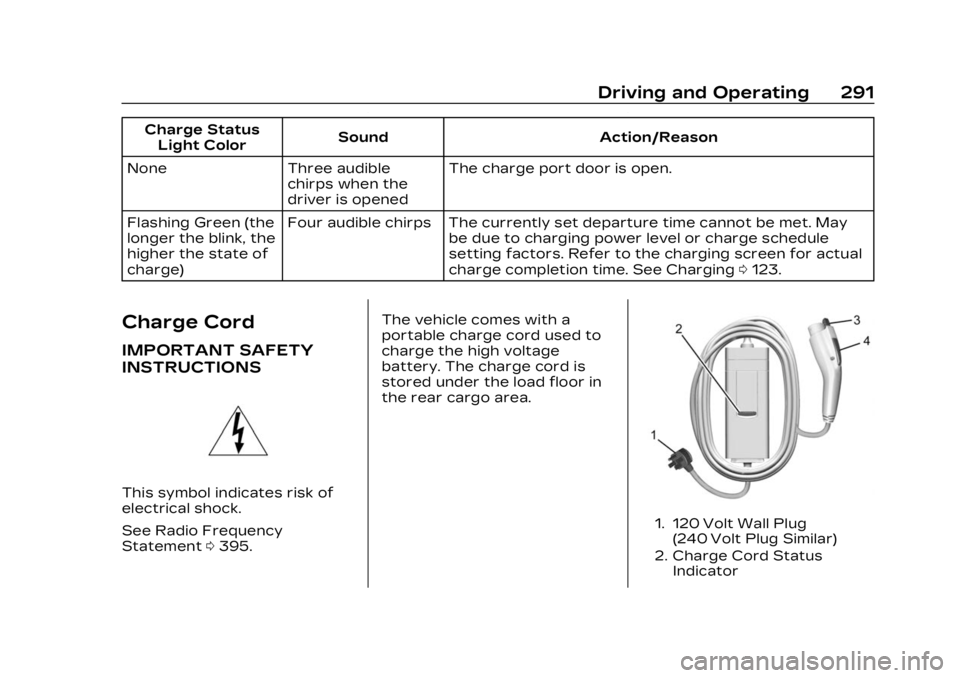
Statement 0395. The vehicle comes with a
portable charge cord used to
charge the high voltage
battery. The charge cord is
stored under the load floor in
the rear cargo area.
1. 120 Volt Wall Plug
(240 Volt Plug Similar)
2. Charge Cord Status Indicator
Page 295 of 424
Cadillac Lyriq Owner Manual (GMNA-Localizing-U.S./Canada-15644413) -
2023 - CRC - 2/23/22
294 Driving and Operating
Verify the charge cord status.
The charge cord uses a
combination of red, blue, and
yellow indicators to display the
status of the charge cord.
If the status indicator is not lit,
ensure the electrical outlet
has power.
Charge Level Selection
Charge level selection can be
made using the Charging tab
in the Energy Application on
the infotainment display. For
instructions to set cord limit
settings for a charge session,
see Charging0123.
{Warning
Using a charge level that
exceeds the electrical circuit
or electrical outlet capacity
may start a fire or damage
the electrical circuit. Use the
lowest charge level until a
qualified electrician inspects
the electrical circuit
capacity. Use the lowest
(Continued)
Warning (Continued)
charge level if the electrical
circuit or electrical outlet
capacity is not known.
Grounding Instructions
The charge circuit must be
grounded. If the charge circuit
should malfunction or break
down, grounding provides a
path of least resistance for
the electric current to reduce
the risk of electric shock. This
product is equipped with a
cord that has an equipment
grounding conductor and a
grounding plug. The plug must
be plugged into an appropriate
outlet that is properly installed
and grounded in accordance
with all local codes and
ordinances.
{Warning
Improper connection of the
charge cord ground may
cause electrical shock.(Continued)
Warning (Continued)
Check with a qualified
electrician if there is doubt
as to whether the charge
circuit is properly grounded.
Do not modify the plug
provided with the product.
If it will not fit the electrical
outlet, have a proper
electrical outlet installed by
a qualified electrician.
FCC Information
See Radio Frequency
Statement0395.
Utility Interruption of
Charging
This vehicle responds to
requests through the utility
company to limit or completely
block electrical power grid use.
This feature is inactive during
DC charging. A utility
interruption will lengthen the
vehicle charge time.
Page 319 of 424
Cadillac Lyriq Owner Manual (GMNA-Localizing-U.S./Canada-15644413) -
2023 - CRC - 2/23/22
318 Vehicle Care
Warning (Continued)
whether an inspection is
needed. See Customer
Assistance Offices0386.
If the vehicle is in a crash, the
sensing system may shut
down the high voltage system.
When this occurs, the high
voltage battery is
disconnected and the vehicle
will not start. The SERVICE
VEHICLE SOON message in
the Driver Information Center
(DIC) will display. Before the
vehicle can operate again, it
must be serviced at your
dealer. If a crash occurs or an
airbag(s) inflates, see “If a
Crash Occurs” under Collision
Damage Repair 0392 and
What Will You See after an
Airbag Inflates? 065 for
additional information.
Keep the vehicle plugged in,
even when fully charged, to
keep the high voltage battery
temperature ready for the next drive. This is important
when outside temperatures
are extremely hot or cold.
Propulsion power may be
reduced in extremely cold
temperatures, or if the high
voltage battery is too cold.
The message BATTERY TOO
COLD, PLUG IN TO WARM will
display. If the message
displays, a level 2 charger is
required to heat the battery to
a minimum temperature to
enable propulsion or charging.
A vehicle cover, which can
reduce sun loading on the
vehicle and improve high
voltage battery life, is available
from your dealer.
See Radio Frequency
Statement
0395.
Federal Communications
Commission (FCC) Radiation
Exposure Statement
This equipment has been
evaluated to be installed and
operated at a minimum
distance of 5.7 cm (2.2 in) between the device and your
body. The vehicle design
ensures this distance is
maintained during normal use.
Changes or modifications to
any of these systems by other
than an authorized service
facility could void
authorization to use this
equipment.
Innovation, Science, and
Economic Development
(ISED) Radiation Exposure
Statement
This equipment complies with
RSS-102 radiation exposure
limits set forth for an
uncontrolled environment. This
equipment should be installed
and operated with a minimum
distance of 5.7 cm (2.2 in)
between the radiator and any
part of your body. The vehicle
design ensures this distance is
maintained during normal use.
Changes or modifications to
any of these systems by other
than an authorized service
Page 344 of 424
Cadillac Lyriq Owner Manual (GMNA-Localizing-U.S./Canada-15644413) -
2023 - CRC - 2/23/22
Vehicle Care 343
Remove the valve cap from
the tire valve stem. Press
the tire gauge firmly onto
the valve to get a pressure
measurement. If the cold
tire inflation pressure
matches the recommended
pressure on the Tire and
Loading Information label,
no further adjustment is
necessary. If the inflation
pressure is low, add air
until the recommended
pressure is reached. If the
inflation pressure is high,
press on the metal stem in
the center of the tire valve
to release air.
Recheck the tire pressure
with the tire gauge.
Put the valve caps back on
the valve stems to keep out
dirt and moisture. Use only
valve caps designed for the
vehicle by GM. TPMSsensors could be damaged
and would not be covered
by the vehicle warranty.
Tire Pressure Monitor
System
The Tire Pressure Monitor
System (TPMS) uses radio and
sensor technology to check
tire pressure levels. The TPMS
sensors monitor the air
pressure in your tires and
transmit tire pressure
readings to a receiver located
in the vehicle.
Each tire, including the spare
(if provided), should be
checked monthly when cold
and inflated to the inflation
pressure recommended by the
vehicle manufacturer on the
vehicle placard or tire inflation
pressure label. (If your vehicle
has tires of a different size
than the size indicated on the
vehicle placard or tire inflation
pressure label, you should determine the proper tire
inflation pressure for those
tires.)
As an added safety feature,
your vehicle has been
equipped with a tire pressure
monitoring system (TPMS)
that illuminates a low tire
pressure telltale when one or
more of your tires is
significantly under-inflated.
Accordingly, when the low tire
pressure telltale illuminates,
you should stop and check
your tires as soon as possible,
and inflate them to the proper
pressure. Driving on a
significantly under-inflated tire
causes the tire to overheat
and can lead to tire failure.
Under-inflation also reduces
energy efficiency and tire
tread life, and may affect the
vehicle's handling and
stopping ability.
Please note that the TPMS is
not a substitute for proper tire
maintenance, and it is the
driver's responsibility to