radio CADILLAC LYRIC 2023 Owner's Guide
[x] Cancel search | Manufacturer: CADILLAC, Model Year: 2023, Model line: LYRIC, Model: CADILLAC LYRIC 2023Pages: 424, PDF Size: 4.76 MB
Page 345 of 424
Cadillac Lyriq Owner Manual (GMNA-Localizing-U.S./Canada-15644413) -
2023 - CRC - 2/23/22
344 Vehicle Care
maintain correct tire pressure,
even if under-inflation has not
reached the level to trigger
illumination of the TPMS low
tire pressure telltale.
Your vehicle has also been
equipped with a TPMS
malfunction indicator to
indicate when the system is
not operating properly. The
TPMS malfunction indicator is
combined with the low tire
pressure telltale. When the
system detects a malfunction,
the telltale will flash for
approximately one minute and
then remain continuously
illuminated. This sequence will
continue upon subsequent
vehicle start-ups as long as
the malfunction exists.
When the malfunction
indicator is illuminated, the
system may not be able to
detect or signal low tire
pressure as intended. TPMS
malfunctions may occur for a
variety of reasons, including
the installation of replacementor alternate tires or wheels on
the vehicle that prevent the
TPMS from functioning
properly. Always check the
TPMS malfunction telltale
after replacing one or more
tires or wheels on your vehicle
to ensure that the
replacement or alternate tires
and wheels allow the TPMS to
continue to function properly.
See Tire Pressure Monitor
Operation
0344.
See Radio Frequency
Statement 0395.
Tire Pressure Monitor
Operation
This vehicle may have a Tire
Pressure Monitor System
(TPMS). The TPMS is designed
to warn the driver when a low
tire pressure condition exists.
TPMS sensors are mounted
onto each tire and wheel
assembly, excluding the spare
tire and wheel assembly. The
TPMS sensors monitor the air
pressure in the tires and transmit the tire pressure
readings to a receiver located
in the vehicle.
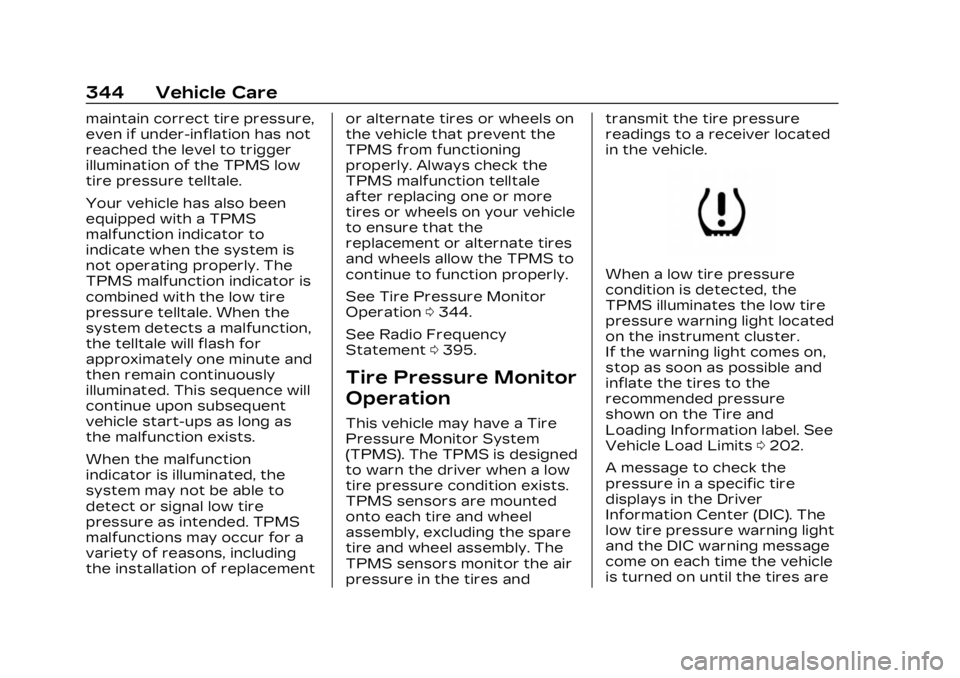
When a low tire pressure
condition is detected, the
TPMS illuminates the low tire
pressure warning light located
on the instrument cluster.
If the warning light comes on,
stop as soon as possible and
inflate the tires to the
recommended pressure
shown on the Tire and
Loading Information label. See
Vehicle Load Limits
0202.
A message to check the
pressure in a specific tire
displays in the Driver
Information Center (DIC). The
low tire pressure warning light
and the DIC warning message
come on each time the vehicle
is turned on until the tires are
Page 347 of 424
Cadillac Lyriq Owner Manual (GMNA-Localizing-U.S./Canada-15644413) -
2023 - CRC - 2/23/22
346 Vehicle Care
message should go off after
successfully completing the
sensor matching process.
See "TPMS Sensor Matching
Process" later in this section.
.One or more TPMS sensors
are missing or damaged. The
malfunction light and the DIC
message should go off when
the TPMS sensors are
installed and the sensor
matching process is
performed successfully. See
your dealer for service.
.Replacement tires or wheels
do not match the original
equipment tires or wheels.
Tires and wheels other than
those recommended could
prevent the TPMS from
functioning properly. See
Buying New Tires0350.
.Operating electronic devices
or being near facilities using
radio wave frequencies
similar to the TPMS could
cause the TPMS sensors to
malfunction. If the TPMS is not functioning
properly, it cannot detect or
signal a low tire pressure
condition. See your dealer for
service if the TPMS
malfunction light and DIC
message come on and stay on.
Tire Fill Alert (If Equipped)
This feature provides visual
and audible alerts outside the
vehicle to help when inflating
an underinflated tire to the
recommended cold tire
pressure.
When the low tire pressure
warning light comes on:
1. Park the vehicle in a safe, level place.
2. Set the parking brake firmly.
3. Place the vehicle in P (Park).
4. Add air to the tire that is underinflated. The turn
signal lamp will flash.
When the recommended
pressure is reached, the
horn sounds once and the turn signal lamp will stop
flashing and briefly turn
solid.
Repeat these steps for all
underinflated tires that have
illuminated the low tire
pressure warning light.{Warning
Overinflating a tire could
cause the tire to rupture
and you or others could be
injured. Do not exceed the
maximum pressure listed on
the tire sidewall. See Tire
Sidewall Labeling 0337 and
Vehicle Load Limits 0202.
If the tire is overinflated by
more than 35 kPa (5 psi), the
horn will sound multiple times
and the turn signal lamp will
continue to flash for several
seconds after filling stops. To
release and correct the
pressure, while the turn signal
lamp is still flashing, briefly
press the center of the valve
Page 359 of 424
Cadillac Lyriq Owner Manual (GMNA-Localizing-U.S./Canada-15644413) -
2023 - CRC - 2/23/22
358 Vehicle Care
2. Get the vehicles closeenough so the jumper
cables can reach, but make
sure the vehicles are not
touching each other.
Caution
If the vehicles touch each
other while jump starting, a
ground connection may
occur that disables your
vehicle and/or damages the
electrical systems of one or
both vehicles.
To avoid the possibility of
the vehicles rolling, set the
parking brake firmly on both
vehicles involved in the jump
start procedure. Put the
vehicles into P (Park). If the
other vehicle has a manual
transmission, put the vehicle
in N (Neutral) before setting
the parking brakes.
3. Turn off both vehicles. Unplug unnecessary
accessories plugged into
the cigarette lighter or the accessory power outlet.
Turn off the radio and all
lamps that are not needed.
Caution
If any accessories are left on
or plugged in during the
jump starting procedure,
they could be damaged. The
repairs would not be
covered by the vehicle
warranty. Whenever
possible, turn off or unplug
all accessories on either
vehicle when jump starting.
4. Open the hood. See Hood 0310.
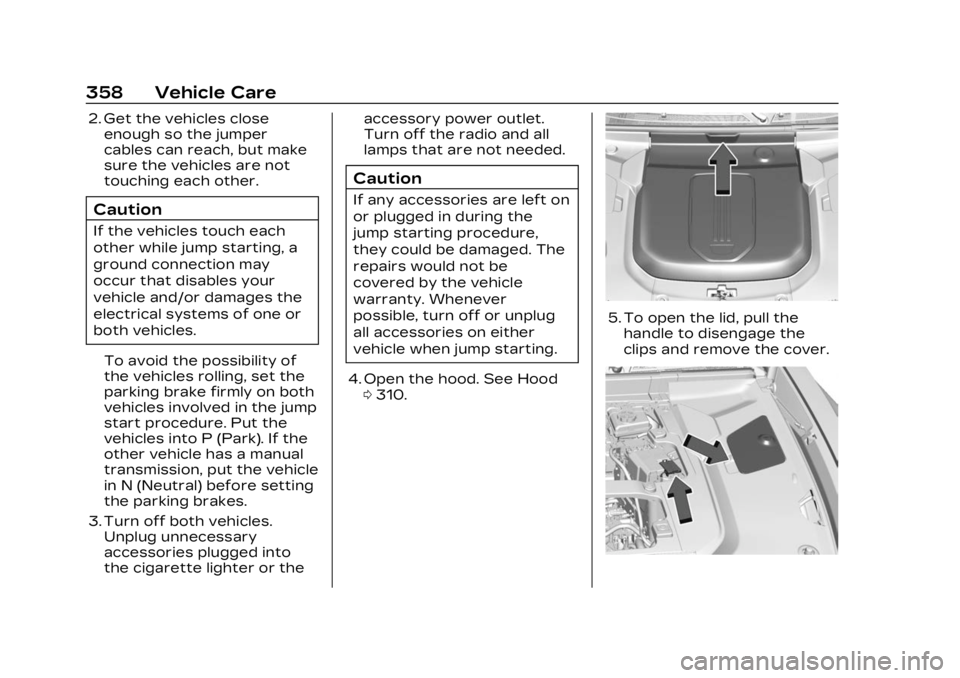
5. To open the lid, pull the
handle to disengage the
clips and remove the cover.
Page 372 of 424
Cadillac Lyriq Owner Manual (GMNA-Localizing-U.S./Canada-15644413) -
2023 - CRC - 2/23/22
Vehicle Care 371
Warning (Continued)
appearance and feel of the
vinyl/rubber and can make
the floor slippery. Your foot
could slip while operating
the vehicle, and you could
lose control, resulting in a
crash. You or others could
be injured.
Fabric/Carpet/Suede
Start by vacuuming the
surface using a soft brush
attachment. If a rotating
vacuum brush attachment is
being used, only use it on the
floor carpet. Before cleaning,
gently remove as much of the
soil as possible:
.Gently blot liquids with a
paper towel. Continue
blotting until no more soil
can be removed.
.For solid soils, remove as
much as possible prior to
vacuuming.To clean:
1. Saturate a clean, lint-free colorfast cloth with water.
Microfiber cloth is
recommended to prevent
lint transfer to the fabric or
carpet.
2. Remove excess moisture by gently wringing until water
does not drip from the
cleaning cloth.
3. Start on the outside edge of the soil and gently rub
toward the center. Fold the
cleaning cloth to a clean
area frequently to prevent
forcing the soil into the
fabric.
4. Continue gently rubbing the soiled area until there is no
longer any color transfer
from the soil to the cleaning
cloth.
5. If the soil is not completely removed, use a mild soap
solution followed only by
plain water. If the soil is not completely
removed, it may be necessary
to use a commercial
upholstery cleaner or spot
lifter. Test a small hidden area
for colorfastness before using
a commercial upholstery
cleaner or spot lifter. If ring
formation occurs, clean the
entire fabric or carpet.
After cleaning, use a paper
towel to blot excess moisture.
Cleaning High Gloss
Surfaces and Vehicle
Information and Radio
Displays
Use a microfiber cloth on high
gloss surfaces or vehicle
displays. First, use a soft
bristle brush to remove dirt
that can scratch the surface.
Then gently clean by rubbing
with a microfiber cloth. Never
use window cleaners or
solvents. Periodically hand
wash the microfiber cloth
separately, using mild soap. Do
Page 385 of 424
Cadillac Lyriq Owner Manual (GMNA-Localizing-U.S./Canada-15644413) -
2023 - CRC - 3/2/22
384 Customer Information
Customer
Information
Customer Information
Customer SatisfactionProcedure . . . . . . . . . . . . . . . . . 384
Customer Assistance Offices . . . . . . . . . . . . . . . . . . . . . . 386
Customer Assistance for Text Telephone (TTY)
Users . . . . . . . . . . . . . . . . . . . . . . . . 387
Online Account . . . . . . . . . . . . . 387
GM Mobility Reimbursement
Program . . . . . . . . . . . . . . . . . . . . 388
Roadside Service . . . . . . . . . . 388
Scheduling Service Appointments . . . . . . . . . . . . 390
Courtesy Transportation Program . . . . . . . . . . . . . . . . . . . . . 391
Collision Damage Repair . . . . . . . . . . . . . . . . . . . . . . . 392
Publication Ordering Information . . . . . . . . . . . . . . . . 394
Radio Frequency Statement . . . . . . . . . . . . . . . . . 395
Reporting Safety Defects
Reporting Safety Defectsto the United States
Government . . . . . . . . . . . . . . . 395
Reporting Safety Defects to the Canadian
Government . . . . . . . . . . . . . . . 396
Reporting Safety Defects to General Motors . . . . . . . 396
Vehicle Data Recording
and Privacy
Vehicle Data Recordingand Privacy . . . . . . . . . . . . . . . . 397
Cybersecurity . . . . . . . . . . . . . . 397
Event Data Recorders . . . 398
OnStar . . . . . . . . . . . . . . . . . . . . . . . . 399
Infotainment System . . . . . 399
Customer
Information
Customer
Satisfaction
Procedure
Your satisfaction and goodwill
are important to your dealer
and to Cadillac. Normally, any
concerns with the sales
transaction or the operation
of the vehicle will be resolved
by your dealer's sales or
service departments.
Sometimes, however, despite
the best intentions of all
concerned, misunderstandings
can occur. If your concern has
not been resolved to your
satisfaction, the following
steps should be taken:
STEP ONE : Discuss your
concern with a member of
dealership management.
Normally, concerns can be
quickly resolved at that level.
If the matter has already been
reviewed with the sales,
Page 396 of 424
Cadillac Lyriq Owner Manual (GMNA-Localizing-U.S./Canada-15644413) -
2023 - CRC - 3/2/22
Customer Information 395
Customer Literature
Owner’s manuals are written
specifically for owners and are
intended to provide basic
operational information about
the vehicle. The owner’s
manual includes the
Maintenance Schedule for all
models.
Customer literature
publications available for
purchase include owner’s
manuals, warranty manuals,
and portfolios. Portfolios
include an owner’s manual,
warranty manual, if applicable,
and zip lock bag or pouch.
Current and Past Models
Service manuals and customer
literature are available for
many current and past model
year GM vehicles.
To order, call 1-800-551-4123
Monday–Friday, 8:00 a.m.–
6:00 p.m. Eastern TimeFor credit card orders only
(VISA, MasterCard,
or Discover), see Helm, Inc. at:
www.helminc.com.
To order by mail, write to:
Helm, Incorporated
Attention: Customer Service
47911 Halyard Drive
Plymouth, MI 48170
Make checks payable in U.S.
funds.
Radio Frequency
Statement
This vehicle uses
license-exempt transmitters /
receivers / systems that
operate on a radio frequency
that complies with Part 15/
Part 18 of the Federal
Communications Commission
(FCC) rules and with
Innovation, Science and
Economic Development (ISED)
Canada's license-exempt
RSS(s) / RSP-100 / ICES-GEN.
Operation is subject to the
following two conditions: 1. The device may not cause
harmful interference.
2. The device must accept any interference received,
including interference that
may cause undesired
operation of the device.
Changes or modifications to
any of these systems by other
than an authorized service
facility could void
authorization to use this
equipment.Reporting Safety
Defects
Reporting Safety
Defects to the United
States Government
If you believe that your
vehicle has a defect which
could cause a crash or
could cause injury or death,
you should immediately
inform the National
Highway Traffic Safety
Page 398 of 424
Cadillac Lyriq Owner Manual (GMNA-Localizing-U.S./Canada-15644413) -
2023 - CRC - 3/2/22
Customer Information 397
Canadian Cadillac Customer
Care Centre
General Motors of Canada
Company
500 Wentworth Street W
Oshawa, ON L1J 0C5
In Mexico, call 800-466-0805
or 800-212-234-5522.
In other Central America and
Caribbean Countries, call
52-555-901-2369.
Vehicle Data
Recording and
Privacy
The vehicle has a number of
computers that record
information about the vehicle’s
performance and how it is
driven or used. For example,
the vehicle uses computer
modules to monitor and
control electric drive unit
performance, to monitor the
conditions for airbag
deployment and to deploy
them in a crash, and,if equipped, to provide antilock
braking to help the driver
control the vehicle. These
modules may store data to
help the dealer technician
service the vehicle or to help
GM improve safety or
features. Some modules may
also store data about how the
vehicle is operated, such as
rate of energy consumption or
average speed. These
modules may retain personal
preferences, such as radio
presets, seat positions, and
temperature settings.
Cybersecurity
GM collects information about
the use of your vehicle
including operational and
safety related information. We
collect this information to
provide, evaluate, improve, and
troubleshoot our products and
services and to develop new
products and services. The
protection of vehicle
electronics systems and
customer data fromunauthorized outside
electronic access or control is
important to GM. GM
maintains appropriate security
standards, practices,
guidelines and controls aimed
at defending the vehicle and
the vehicle service ecosystem
against unauthorized
electronic access, detecting
possible malicious activity in
related networks, and
responding to suspected
cybersecurity incidents in a
timely, coordinated and
effective manner. Security
incidents could impact your
safety or compromise your
private data. To minimize
security risks, please do not
connect your vehicle
electronic systems to
unauthorized devices or
connect your vehicle to any
unknown or untrusted
networks (such as Bluetooth,
WIFI or similar technology). In
the event you suspect any
security incident impacting
your data or the safe
Page 404 of 424
Cadillac Lyriq Owner Manual (GMNA-Localizing-U.S./Canada-15644413) -
2023 - CRC - 2/23/22
OnStar 403
hardware. OnStar or
connected services may not
work if the OnStar equipment
is not properly installed or it
has not been properly
maintained. If equipment or
software is added, connected,
or modified, OnStar or
connected services may not
work. Other problems beyond
the control of OnStar—such
as hills, tall buildings, tunnels,
weather, electrical system
design and architecture of the
vehicle, damage to the vehicle
in a crash, or wireless phone
network congestion or
jamming —may prevent
service.
See Radio Frequency
Statement 0395.
Services for People with
Disabilities
Advisors provide services to
help with physical disabilities
and medical conditions. Press
Qto help:
.Find a hotel, restaurant, etc.,
that meets accessibility
needs.
.Provide directions to the
closest hospital or pharmacy
in urgent situations.
TTY Users
OnStar has the ability to
communicate to deaf,
hard-of-hearing,
or speech-impaired customers
while in the vehicle. The
available TTY system provides
in-vehicle access to all OnStar
services, except Virtual
Advisor and OnStar
Turn-by-Turn Navigation.
If equipped, access TTY by
touching Settings > System>
TTY from the infotainment
home screen. When TTY mode
is active, you can make and
receive phone calls using the
infotainment display.
OnStar Personal
Identification
Number (PIN)
A PIN is needed to access
some OnStar services. The
PIN will need to be changed
the first time when speaking
with an Advisor. To change the
OnStar PIN, contact an
OnStar Advisor by pressing
Q
or calling 1-888-4ONSTAR.
Warranty
OnStar equipment may be
warranted as part of the
vehicle warranty.
Languages
The vehicle can be
programmed to respond in
multiple languages. Press
Q
and ask for an Advisor.
Advisors are available in
English, Spanish, and French.
Available languages may vary
by country.
Page 406 of 424
Cadillac Lyriq Owner Manual (GMNA-Localizing-U.S./Canada-15644413) -
2023 - CRC - 2/23/22
OnStar 405
Add-on Electrical
Equipment
The OnStar system is
integrated into the electrical
architecture of the vehicle. Do
not add any electrical
equipment. See Add-On
Electrical Equipment0306.
Added electrical equipment
may interfere with the
operation of the OnStar
system and cause it to not
operate.
Vehicle Software Updates
OnStar or GM may remotely
deliver software updates or
changes to the vehicle without
further notice or consent.
These updates or changes
may enhance or maintain
safety, security, or the
operation of the vehicle or the
vehicle systems. Software
updates or changes may
affect or erase data or
settings that are stored in the vehicle, such as saved
navigation destinations or
pre-set radio stations. Neither
OnStar nor GM is responsible
for any affected or erased
data or settings. These
updates or changes may also
collect personal information.
Such collection is described in
the OnStar privacy statement
or separately disclosed at the
time of installation. These
updates or changes may also
cause a system to
automatically communicate
with GM servers to collect
information about vehicle
system status, identify
whether updates or changes
are available, or deliver
updates or changes. An active
OnStar agreement constitutes
consent to these software
updates or changes and
agreement that either OnStar
or GM may remotely deliver
them to the vehicle.
Privacy
The complete OnStar Privacy
Statement may be found at
www.onstar.com (U.S.),
or www.onstar.ca (Canada).
We recommend that you
review it. If you have any
questions, call
1-888-4ONSTAR
(1-888-466-7827) or press
Q
to speak with an Advisor.
Users of wireless
communications are cautioned
that the privacy of any
information sent via wireless
cellular communications
cannot be assured. Third
parties may unlawfully
intercept or access
transmissions and private
communications without
consent.
Page 412 of 424

Cadillac Lyriq Owner Manual (GMNA-Localizing-U.S./Canada-15644413) -
2023 - CRC - 2/23/22
INDEX 411
Alert (cont'd)Side Blind
Zone (SBZA) . . . . . . . . . . . . . . . . 277
All-Season Tires . . . . . . . . . . . . . 335
All-Wheel Drive . . . . . . . . . . . . . . . . 215
AM-FM Radio . . . . . . . . . . . . . . . . . . 156
Antenna Multi-band . . . . . . . . . . . . . . . . . . . . 160
Antilock Brake System (ABS) . . . . . . . . . . . . . . . . 216
Warning Light . . . . . . . . . . . . . . . . 117
Appearance Care
Exterior . . . . . . . . . . . . . . . . . . . . . . . 364
Interior . . . . . . . . . . . . . . . . . . . . . . . . 369
Apple CarPlay and Android Auto . . . . . . . . . . . . . . . . . 174
Assistance Systems Driving . . . . . . . . . . . . . . . . . . . . . . . . 270
Parking and Backing . . . . . . . 257
Audio Bluetooth . . . . . . . . . . . . . . . . . . . . . 161
Automatic Door Locks . . . . . . . . . . . . . . . . . . . . . 19
EmergencyBraking (AEB) . . . . . . . . . . . . . . 273
Emergency Braking
(AEB) Disabled Light . . . . . 118
Headlamp System . . . . . . . . . . 143 Automatic (cont'd)
Parking Assist (APA) . . . . . 262
Vehicle Hold Light . . . . . . . . . . . 117
Automatic Vehicle Hold (AVH) . . . . . . . . . . . . . . . . . . . . 219
Avoiding Untrusted Media Devices . . . . . . . . . . . . . . . 160
B
Battery
Charging ElectricalRequirements . . . . . . . . . . . . . 295
Exterior Lighting Battery Saver . . . . . . . . . . . . . . 149
Fault Light . . . . . . . . . . . . . . . . . . . . 115
Gauge . . . . . . . . . . . . . . . . . . . . . . . . . . 110
Load Management . . . . . . . . . 148
Power Protection . . . . . . . . . . 149
Battery - North America . . . . . . . . . . . . . . . . . 317, 356
Blade Replacement, Wiper . . . . . . . . . . . . . . . . . . . . . . . . . . 320
Blind Zone SteeringAssist (BZSA) . . . . . . . . . . . . . . 279
Bluetooth
Audio . . . . . . . . . . . . . . . . . . . . . . . . . . . 161
Overview . . . . . . . . . . . . . . . . 168, 170 Brake
Fluid . . . . . . . . . . . . . . . . . . . . . . . . . . . . 316
System Warning Light . . . . 115
Brakes . . . . . . . . . . . . . . . . . . . . . . . . . . . 315 Antilock . . . . . . . . . . . . . . . . . . . . . . . . 216
Brake Assist . . . . . . . . . . . . . . . . . 218
Electric Brake Boost . . . . . . 216
Electric Parking Brake . . . . 217
Regenerative Braking . . . . 220
Braking . . . . . . . . . . . . . . . . . . . . . . . . . . 196 Automatic
Emergency (AEB) . . . . . . . . . 273
Reverse Automatic . . . . . . . . 267
Braking System FrontPedestrian (FPB) . . . . . . . . . . 274
Break-In, New Vehicle . . . . . . 206
Buckle To Drive . . . . . . . . . . . . . . . . . 51
Bulb Replacement . . . . . . . . . . . 323 Headlamp Aiming . . . . . . . . . . 322
Buying New Tires . . . . . . . . . . . . 350
C
Calibration
Compass . . . . . . . . . . . . . . . . . . . . . . 102