ECU CADILLAC LYRIC 2023 Owner's Guide
[x] Cancel search | Manufacturer: CADILLAC, Model Year: 2023, Model line: LYRIC, Model: CADILLAC LYRIC 2023Pages: 424, PDF Size: 4.76 MB
Page 99 of 424
Cadillac Lyriq Owner Manual (GMNA-Localizing-U.S./Canada-15644413) -
2023 - CRC - 2/23/22
98 Instruments and Controls
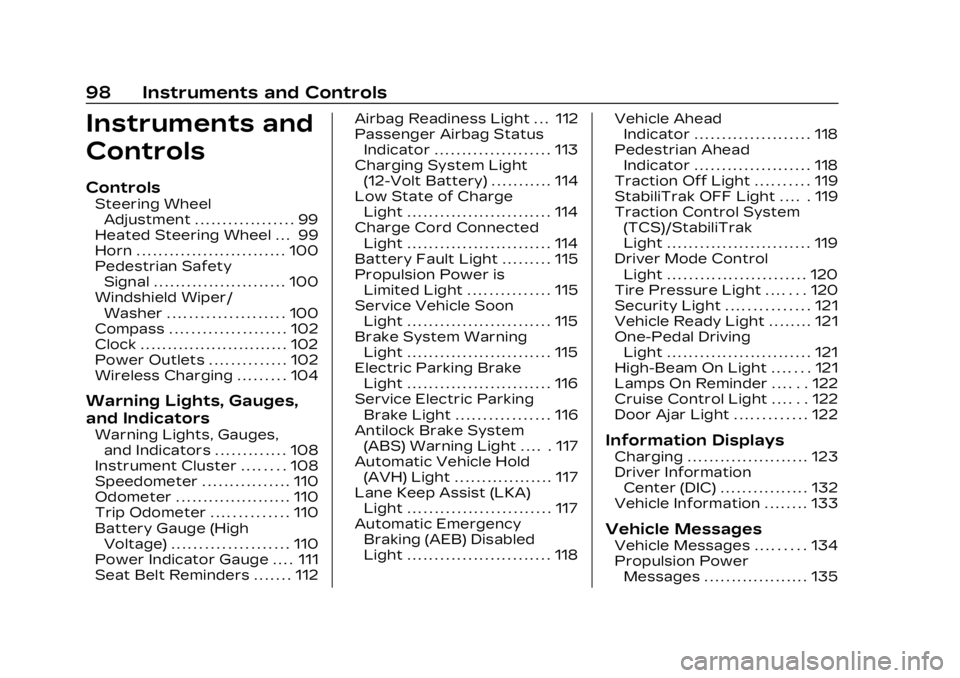
Instruments and
Controls
Controls
Steering WheelAdjustment . . . . . . . . . . . . . . . . . . 99
Heated Steering Wheel . . . 99
Horn . . . . . . . . . . . . . . . . . . . . . . . . . . . 100
Pedestrian Safety Signal . . . . . . . . . . . . . . . . . . . . . . . . 100
Windshield Wiper/ Washer . . . . . . . . . . . . . . . . . . . . . 100
Compass . . . . . . . . . . . . . . . . . . . . . 102
Clock . . . . . . . . . . . . . . . . . . . . . . . . . . . 102
Power Outlets . . . . . . . . . . . . . . 102
Wireless Charging . . . . . . . . . 104
Warning Lights, Gauges,
and Indicators
Warning Lights, Gauges, and Indicators . . . . . . . . . . . . . 108
Instrument Cluster . . . . . . . . 108
Speedometer . . . . . . . . . . . . . . . . 110
Odometer . . . . . . . . . . . . . . . . . . . . . 110
Trip Odometer . . . . . . . . . . . . . . 110
Battery Gauge (High Voltage) . . . . . . . . . . . . . . . . . . . . . 110
Power Indicator Gauge . . . . 111
Seat Belt Reminders . . . . . . . 112 Airbag Readiness Light . . . 112
Passenger Airbag Status
Indicator . . . . . . . . . . . . . . . . . . . . . 113
Charging System Light (12-Volt Battery) . . . . . . . . . . . 114
Low State of Charge Light . . . . . . . . . . . . . . . . . . . . . . . . . . 114
Charge Cord Connected Light . . . . . . . . . . . . . . . . . . . . . . . . . . 114
Battery Fault Light . . . . . . . . . 115
Propulsion Power is Limited Light . . . . . . . . . . . . . . . 115
Service Vehicle Soon Light . . . . . . . . . . . . . . . . . . . . . . . . . . 115
Brake System Warning Light . . . . . . . . . . . . . . . . . . . . . . . . . . 115
Electric Parking Brake Light . . . . . . . . . . . . . . . . . . . . . . . . . . 116
Service Electric Parking Brake Light . . . . . . . . . . . . . . . . . 116
Antilock Brake System (ABS) Warning Light . . . . . 117
Automatic Vehicle Hold (AVH) Light . . . . . . . . . . . . . . . . . . 117
Lane Keep Assist (LKA) Light . . . . . . . . . . . . . . . . . . . . . . . . . . 117
Automatic Emergency Braking (AEB) Disabled
Light . . . . . . . . . . . . . . . . . . . . . . . . . . 118 Vehicle Ahead
Indicator . . . . . . . . . . . . . . . . . . . . . 118
Pedestrian Ahead Indicator . . . . . . . . . . . . . . . . . . . . . 118
Traction Off Light . . . . . . . . . . 119
StabiliTrak OFF Light . . . . . 119
Traction Control System
(TCS)/StabiliTrak
Light . . . . . . . . . . . . . . . . . . . . . . . . . . 119
Driver Mode Control Light . . . . . . . . . . . . . . . . . . . . . . . . . 120
Tire Pressure Light . . . . . . . 120
Security Light . . . . . . . . . . . . . . . 121
Vehicle Ready Light . . . . . . . . 121
One-Pedal Driving Light . . . . . . . . . . . . . . . . . . . . . . . . . . 121
High-Beam On Light . . . . . . . 121
Lamps On Reminder . . . . . . 122
Cruise Control Light . . . . . . 122
Door Ajar Light . . . . . . . . . . . . . 122Information Displays
Charging . . . . . . . . . . . . . . . . . . . . . . 123
Driver Information Center (DIC) . . . . . . . . . . . . . . . . 132
Vehicle Information . . . . . . . . 133
Vehicle Messages
Vehicle Messages . . . . . . . . . 134
Propulsion Power Messages . . . . . . . . . . . . . . . . . . . 135
Page 122 of 424
Cadillac Lyriq Owner Manual (GMNA-Localizing-U.S./Canada-15644413) -
2023 - CRC - 2/23/22
Instruments and Controls 121
When the Light Flashes First
and Then Is On Steady
If the light flashes for about a
minute and then stays on,
there may be a problem with
the TPMS. If the problem is
not corrected, the light will
come on every time the
vehicle is started. See Tire
Pressure Monitor Operation
0344.
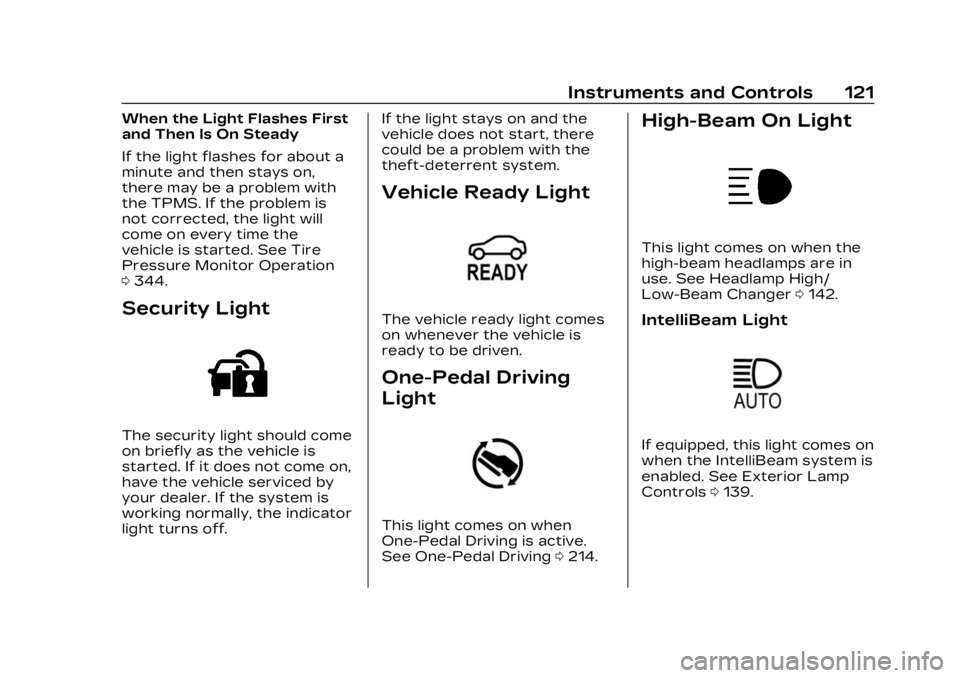
Security Light
The security light should come
on briefly as the vehicle is
started. If it does not come on,
have the vehicle serviced by
your dealer. If the system is
working normally, the indicator
light turns off. If the light stays on and the
vehicle does not start, there
could be a problem with the
theft-deterrent system.
Vehicle Ready Light
The vehicle ready light comes
on whenever the vehicle is
ready to be driven.
One-Pedal Driving
Light
This light comes on when
One-Pedal Driving is active.
See One-Pedal Driving
0214.
High-Beam On Light
This light comes on when the
high-beam headlamps are in
use. See Headlamp High/
Low-Beam Changer 0142.
IntelliBeam Light
If equipped, this light comes on
when the IntelliBeam system is
enabled. See Exterior Lamp
Controls 0139.
Page 124 of 424
Cadillac Lyriq Owner Manual (GMNA-Localizing-U.S./Canada-15644413) -
2023 - CRC - 2/23/22
Instruments and Controls 123
This light comes on when a
door is open or not securely
latched. Before driving, check
that all doors are properly
closed.
Information
Displays
Charging
Important Information about
Electric Vehicle Charging
.Charging an electric vehicle
can stress a building’s
electrical system more than
a typical household
appliance.
.Charge cord limits can vary
from vehicle to vehicle, and
increased charging rates can
stress a building’s electrical
system.
.Before plugging into any
electrical outlet, have a
qualified electrician inspect
and verify the electrical
system (electrical outlet,
wiring, junctions, andprotection devices) for
heavy-duty service at a
12 amp continuous load.
.Electrical outlets may wear
out with normal usage or
may be damaged over time,
making them unsuitable for
electric vehicle charging.
.Check the electrical outlet/
plug while charging and
discontinue use if the
electrical outlet/plug is hot,
then have the electrical
outlet serviced by a qualified
electrician.
.When outdoors, plug into an
electrical outlet that is
weatherproof while in use.
.Mount the charging cord to
reduce strain on the
electrical outlet/plug.
.Do not place the charge cord
in a position where it is
expected to be submerged
in water.
{Danger
Improper use of portable
electric vehicle charge cords
may cause a fire, electrical
shock, or burns, and may
result in damage to
property, serious injury,
or death.
.Do not use extension
cords, multi-outlet power
strips, splitters, grounding
adaptors, surge
protectors, or similar
devices.
.Do not use an electrical
outlet that is worn or
damaged, or will not hold
the plug firmly in place.
.Do not use an electrical
outlet that is not properly
grounded.
.Do not use an electrical
outlet that is on a circuit
with other electrical loads.
Page 136 of 424
Cadillac Lyriq Owner Manual (GMNA-Localizing-U.S./Canada-15644413) -
2023 - CRC - 2/23/22
Instruments and Controls 135
by pressing the thumbwheel.
The messages that require
immediate action cannot be
cleared until that action is
performed.
All messages should be taken
seriously; clearing the
message does not correct the
problem.
If a SERVICE message
appears, see your dealer.
Follow the instructions given
in the messages. The system
displays messages regarding
the following topics:
.Service Messages
.Fluid Levels
.Vehicle Security
.Brakes
.Ride Control Systems
.Driver Assistance Systems
.Cruise Control
.Lighting and Bulb
Replacement
.Wiper/Washer Systems
.Doors and Windows
.Seat Belts
.Airbag Systems
.Propulsion
.Tire Pressure
.Battery
.Steering
Propulsion Power
Messages
REDUCED
ACCELERATION DRIVE
WITH CARE
This message displays when
the vehicle's propulsion power
is reduced. A reduction in
propulsion power can affect
the vehicle's ability to
accelerate. If this message is
on, but there is no observed
reduction in performance,
proceed to your destination.
Under certain conditions, the
performance may be reduced
the next time the vehicle is
driven. The vehicle may be
driven while this message is
on, but maximum acceleration
and speed may be reduced.
Anytime this message stayson, or displays repeatedly, the
vehicle should be taken to
your dealer for service as
soon as possible.
This message can be displayed
when the high voltage battery
charge level is low. The vehicle
is limiting power to maximize
range.
Under certain operating
conditions propulsion will be
disabled. Try restarting after
the vehicle has been off for
two minutes.
PROPULSION POWER
REDUCED DUE TO
TEMPERATURE
This message displays when
the vehicle is on, the battery
temperature is low, and when
the vehicle’s performance is
limited. The duration of the
limited vehicle performance
depends, in part, on the high
voltage battery charge level.
If the high voltage battery
charge level is relatively high,
as the vehicle is driven, the
Page 137 of 424
Cadillac Lyriq Owner Manual (GMNA-Localizing-U.S./Canada-15644413) -
2023 - CRC - 2/23/22
136 Instruments and Controls
battery temperature will
increase, and the vehicle will
return to normal operation.
If the high voltage battery
charge level is relatively low
the vehicle will not return to
normal operation until
charged.
Keep the vehicle plugged in,
even when fully charged, to
keep the high voltage battery
temperature ready for the
next drive. This is important
when outside temperatures
are extremely hot or cold.
Vehicle Speed
Messages
SPEED LIMITED TO XXX
KM/H (MPH)
This message shows that the
vehicle speed has been limited
to the speed displayed. The
limited speed is a protection
for various propulsion and
vehicle systems, such aslubrication, thermal, brakes,
suspension, Teen Driver if
equipped, or tires.
Universal Remote
System
See Radio Frequency
Statement
0395.
Universal Remote
System Programming
If equipped, the Universal
Garage Door (Universal
Remote) controls are located
on the infotainment screen.
This system can replace up to
eight remote control
transmitters used to activate
devices such as garage door
openers, security systems,
and home automation devices.
These instructions refer to a
garage door opener, but can
be used for other devices.
Do not use the Universal
Remote system with any
garage door opener that does not have the stop and reverse
feature. This includes any
garage door opener model
manufactured before April
1, 1982.
Keep the original hand-held
transmitter for use in other
vehicles as well as for future
programming. Erase the
programming when vehicle
ownership is terminated. See
“Erasing Universal Remotes.”
To program a garage door
opener, park outside directly in
line with and facing the garage
door opener receiver. Clear all
people and objects away from
the garage door.
Make sure the hand-held
transmitter has a new battery
for quick and accurate
transmission of the
radio-frequency signal.
Programming the
Universal Remote System
Programming involves
time-sensitive actions and may
time out, requiring the
Page 178 of 424
Cadillac Lyriq Owner Manual (GMNA-Localizing-U.S./Canada-15644413) -
2023 - CRC - 2/23/22
Infotainment System 177
Buckle to Drive
This feature can prevent
shifting out of Park when the
driver, and if applicable the
front passenger, seat belt is
not buckled. See Buckle To
Drive051.
Climate and Air Quality
Adjusts different climate
settings.
Collision/Detection Systems
Adjusts different driver
assistance system settings.
Comfort and Convenience
Adjusts different comfort and
convenience settings.
Lighting
Adjusts different lighting
settings.
Power Door Locks
Adjusts different door lock
settings. Remote Lock, Unlock, and
Start
Adjusts different remote lock
settings.
Seating Position
Adjusts different seating
position settings.
Apps and Permissions
Shows a list of installed apps
and the permissions used.
Date / Time
Allows setting of the clock.
Display
Allows adjustment of the
infotainment display.
Sounds
Allows adjustment of the
infotainment system sounds.
Users
Modifies the infotainment
system’s users.
Accounts
Allows adding or adjusting of
the user accounts.
Privacy
This menu allows adjustment
of the infotainment privacy
settings.
Storage
This menu shows the storage
info on the infotainment
system.
Security
This menu allows adjustment
of the infotainment security
settings.
System
The menu may contain the
following:
Language
This will set the display
language used on the
infotainment display.
Page 181 of 424
Cadillac Lyriq Owner Manual (GMNA-Localizing-U.S./Canada-15644413) -
2023 - CRC - 2/23/22
180 Infotainment System
On certain vehicles, when the
Speed Limiter is turned ON,
the vehicle’s maximum
acceleration will be limited.
The DIC will display a message
that the acceleration is limited.
Teen Driver Speed Warning :
Displays a warning in the DIC
when exceeding a selectable
speed. Turn the speed
warning on or off and choose
the desired speed warning
level. The speed warning does
not limit the speed of the
vehicle. On some infotainment
systems, touch Set Teen
Driver Speed Warning to set
the warning speed.
Set Teen Driver Speed
Warning :Choose the desired
speed warning level. The
speed warning does not limit
the speed of the vehicle.
SiriusXM Explicit Content
Filter : Allows the SiriusXM
Explicit Content Filter to be
turned ON or OFF. When ON,
the teen driver will not be able
to listen to SiriusXM stations that contain explicit content,
and the Explicit Content Filter
selection in the Audio Settings
will be unavailable for change.
When Teen Driver is Active:
.If equipped, the radio will
mute when the driver seat
belt, and in some vehicles
the front passenger seat
belt, is not buckled. The
audio from any device paired
to the vehicle will also be
muted.
.An object placed on the
front passenger seat, such
as a briefcase, handbag,
grocery bag, laptop, or other
electronic device, could
cause the passenger
sensing system to falsely
sense an unbuckled front
passenger and mute the
radio. If this happens,
remove the object from the
seat. See Passenger
Sensing System
066.
.Some safety systems, such
as Automatic Emergency
Braking, if equipped, cannot
be turned off.
.The gap setting for Adaptive
Cruise Control and alert
timing for Forward Collision
Alert, if equipped, cannot be
changed.
.When trying to change a
safety feature that is not
configurable in Teen Driver,
the feature may be grayed
out or removed from the
infotainment menu, or the
DIC will display a message
indicating that Teen Driver is
active and the action is not
available.
.Super Cruise, if equipped, is
not available.
.Do not tow a trailer if
equipped with Automatic
Emergency Braking.
Report Card
The vehicle owner must
secure the driver’s consent to
record certain vehicle data
when the vehicle is driven with
Page 207 of 424

Cadillac Lyriq Owner Manual (GMNA-Localizing-U.S./Canada-15644413) -
2023 - CRC - 2/23/22
206 Driving and Operating
Caution
Overloading the vehicle may
cause damage. Repairs
would not be covered by the
vehicle warranty. Do not
overload the vehicle.
{Warning
Things inside the vehicle
can strike and injure
people in a sudden stop
or turn, or in a crash.
.Put things in the cargo
area of the vehicle. In
the cargo area, put
them as far forward as
possible. Try to spread
the weight evenly.
.Never stack heavier
things, like suitcases,
inside the vehicle so
that some of them are
above the tops of the
seats.
(Continued)
Warning (Continued)
.Do not leave an
unsecured child
restraint in the vehicle.
.Secure loose items in
the vehicle.
.Do not leave a seat
folded down unless
needed.
Starting and
Operating
New Vehicle Break-In
Caution
Avoid making hard stops for
the first 322 km (200 mi).
During this time the new
brake linings are not yet
broken in. Hard stops with
new linings can mean
premature wear and earlier
replacement. Follow this
breaking-in guideline every (Continued)
Caution (Continued)
time you get new brake
linings. Following break-in,
vehicle speed and load can
be gradually increased.
Power Button
The vehicle has an electronic
pushbutton start.
The Remote Key must be in
the vehicle for the system to
operate. If the vehicle will not
start, place the Remote Key in
the transmitter pocket, inside
the center console.
Page 286 of 424
Cadillac Lyriq Owner Manual (GMNA-Localizing-U.S./Canada-15644413) -
2023 - CRC - 2/23/22
Driving and Operating 285
REDUCED ACCELERATION
DRIVE WITH CARE :The
accelerator pedal response is
reduced and the remaining
range value changes to LOW,
charge the vehicle
immediately. See Propulsion
Power Messages 0135.
OUT OF ENERGY, CHARGE
VEHICLE NOW : The battery
charge is fully depleted. The
vehicle will slow to a stop.
Brake and steering assist will
continue operating. Once
stopped, turn the vehicle off.
Plug-In Charging
Plug-in charge times vary
based on the battery
condition, charge level, and the
outside temperature. See
Charging 0123 for charge
mode selection.
Do not allow the vehicle to
remain in temperature
extremes for long periods
without being driven or
plugged in. When
temperatures are below 0 °C (32 °F) and above 32 °C (90 °F),
plug in the vehicle to maximize
high voltage battery life.
In extreme temperature
conditions, a full charge will
take additional time.
It is normal to hear fans,
pumps, and electrical devices
clicking while the vehicle is
turned off and charging.
The vehicle does not require
indoor charging area
ventilation before, during,
or after charging.
The vehicle cannot be driven
while the charge cord is
plugged into the vehicle.
Caution
To avoid damage to the
vehicle, make sure the
charging cord plug is in good
condition, is not worn or
damaged, and is connected
securely to the vehicle's
charging port. If vehicle
charging is intermittent,
(Continued)
Caution (Continued)
disconnect the cord and
inspect for damage. An
excessively worn or
damaged AC or DC charging
cord plug may result in an
intermittent connection and
potential damage to the
vehicle's charging port.
There are several infotainment
screens that will display
depending on the current
charging status. See Charging
0 123.
Charging Override
A CHARGING OVERRIDE/
INTERRUPTION OCCURRED
message may display to
indicate that a charging
override or interruption has
occurred due to one or more
of the following events:
.Override of the charge
settings by the owner.
.Unintended interruption of
AC power at the vehicle's
charge port.
Page 298 of 424
Cadillac Lyriq Owner Manual (GMNA-Localizing-U.S./Canada-15644413) -
2023 - CRC - 2/23/22
Driving and Operating 297
.Automatic Emergency
Braking (AEB)
.Front Pedestrian
Braking (FPB)
If equipped with Lane Change
Alert (LCA), the LCA detection
zones that extend back from
the side of the vehicle do not
move further back when a
trailer is towed. Use caution
while changing lanes when
towing a trailer.
If equipped with Rear Cross
Traffic Alert (RCTA), use
caution while backing up when
towing a trailer, as the RCTA
detection zones that extend
out from the back of the
vehicle do not move further
back when a trailer is towed.
Towing a trailer requires
experience. The combination
of the vehicle and trailer is
longer and not as responsive
as the vehicle itself. Become
familiar with handling and
braking of the combination by
driving on a level road surface
before driving on public roads. The trailer structure, the tires,
and the brakes must be all be
rated to carry the intended
cargo. Inadequate trailer
equipment can cause the
combination to operate in an
unexpected or unsafe manner.
Before driving, inspect all
trailer hitch parts and
attachments, safety chains,
electrical connectors, lamps,
tires, and mirrors. See Towing
Equipment
0303. If the trailer
has electric brakes, start the
combination moving and then
manually apply the trailer
brake controller to check the
trailer brakes work. During the
trip, occasionally check that
the cargo and trailer are
secure and that the lamps and
any trailer brakes are working.
Towing with a Stability
Control System
When towing, the stability
control system might be
heard. The system reacts to
vehicle movement caused by
the trailer, which mainly occurs during cornering. This is
normal when towing heavier
trailers.
Following Distance
Stay at least twice as far
behind the vehicle ahead as
you would when driving
without a trailer to help to
avoid heavy braking and
sudden turns.
Passing
More passing distance is
needed when towing a trailer.
The combination of the vehicle
and trailer will not accelerate
as quickly and is much longer
than the vehicle alone. It is
necessary to go much farther
beyond the passed vehicle
before returning to the lane.
Pass on level roadways. Avoid
passing on hills if possible.
Backing Up
Hold the bottom of the
steering wheel with one hand.
To move the trailer to the left,
move that hand to the left. To