Light CADILLAC LYRIC 2023 Workshop Manual
[x] Cancel search | Manufacturer: CADILLAC, Model Year: 2023, Model line: LYRIC, Model: CADILLAC LYRIC 2023Pages: 424, PDF Size: 4.76 MB
Page 146 of 424
Cadillac Lyriq Owner Manual (GMNA-Localizing-U.S./Canada-15644413) -
2023 - CRC - 2/23/22
Lighting 145
If equipped, when driving
faster than 90 km/h (55 mph)
on freeways, the low-beam
illumination is smaller and
extended.
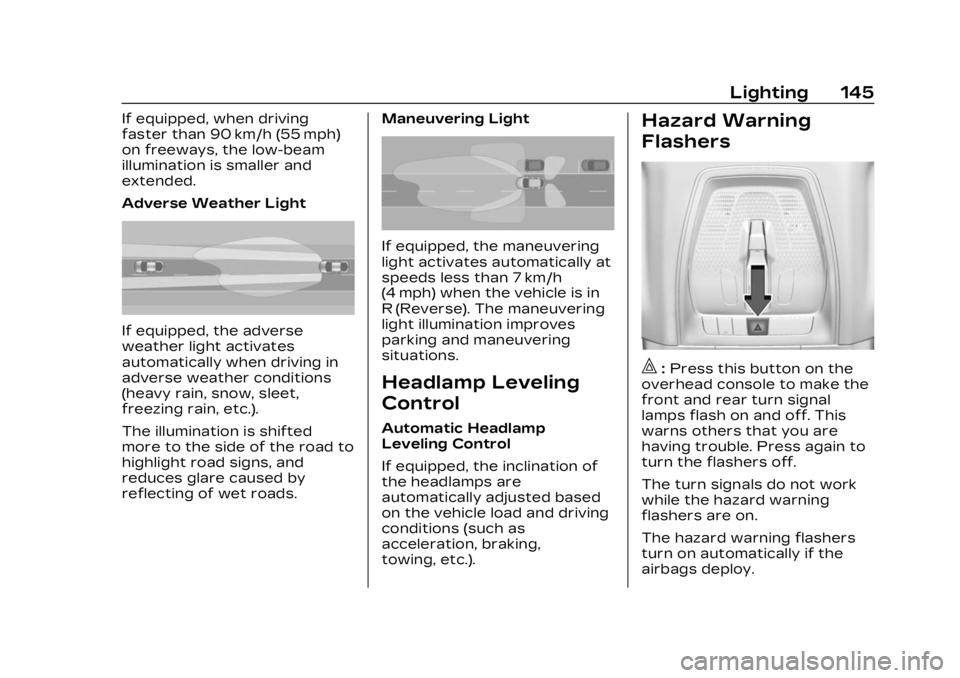
Adverse Weather Light
If equipped, the adverse
weather light activates
automatically when driving in
adverse weather conditions
(heavy rain, snow, sleet,
freezing rain, etc.).
The illumination is shifted
more to the side of the road to
highlight road signs, and
reduces glare caused by
reflecting of wet roads.Maneuvering Light
If equipped, the maneuvering
light activates automatically at
speeds less than 7 km/h
(4 mph) when the vehicle is in
R (Reverse). The maneuvering
light illumination improves
parking and maneuvering
situations.
Headlamp Leveling
Control
Automatic Headlamp
Leveling Control
If equipped, the inclination of
the headlamps are
automatically adjusted based
on the vehicle load and driving
conditions (such as
acceleration, braking,
towing, etc.).
Hazard Warning
Flashers
|:
Press this button on the
overhead console to make the
front and rear turn signal
lamps flash on and off. This
warns others that you are
having trouble. Press again to
turn the flashers off.
The turn signals do not work
while the hazard warning
flashers are on.
The hazard warning flashers
turn on automatically if the
airbags deploy.
Page 147 of 424
Cadillac Lyriq Owner Manual (GMNA-Localizing-U.S./Canada-15644413) -
2023 - CRC - 2/23/22
146 Lighting
Turn and
Lane-Change Signals
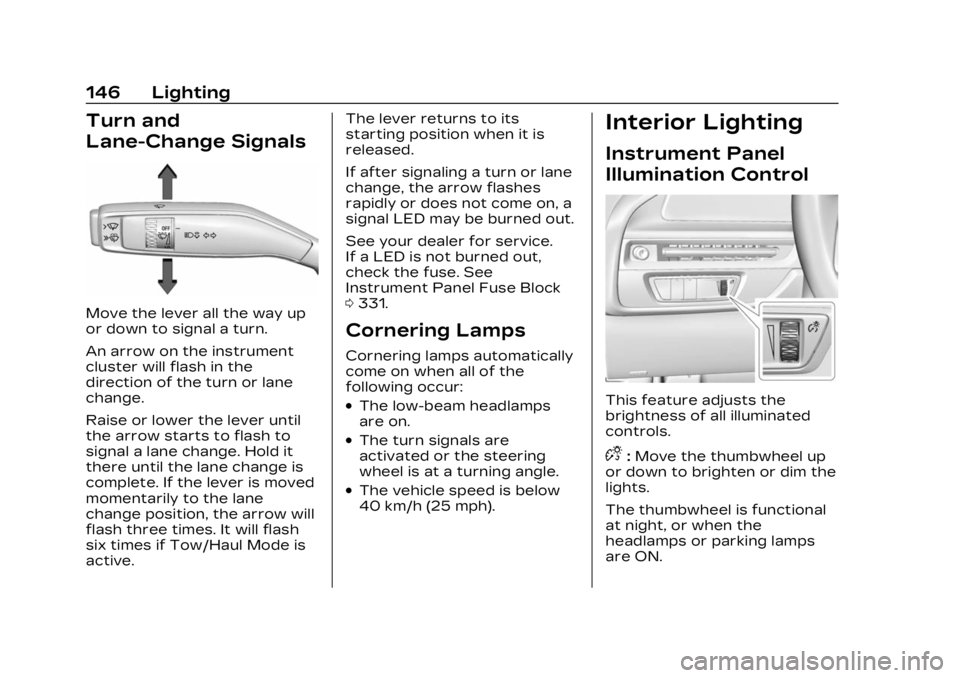
Move the lever all the way up
or down to signal a turn.
An arrow on the instrument
cluster will flash in the
direction of the turn or lane
change.
Raise or lower the lever until
the arrow starts to flash to
signal a lane change. Hold it
there until the lane change is
complete. If the lever is moved
momentarily to the lane
change position, the arrow will
flash three times. It will flash
six times if Tow/Haul Mode is
active.The lever returns to its
starting position when it is
released.
If after signaling a turn or lane
change, the arrow flashes
rapidly or does not come on, a
signal LED may be burned out.
See your dealer for service.
If a LED is not burned out,
check the fuse. See
Instrument Panel Fuse Block
0
331.
Cornering Lamps
Cornering lamps automatically
come on when all of the
following occur:
.The low-beam headlamps
are on.
.The turn signals are
activated or the steering
wheel is at a turning angle.
.The vehicle speed is below
40 km/h (25 mph).
Interior Lighting
Instrument Panel
Illumination Control
This feature adjusts the
brightness of all illuminated
controls.
D:Move the thumbwheel up
or down to brighten or dim the
lights.
The thumbwheel is functional
at night, or when the
headlamps or parking lamps
are ON.
Page 148 of 424
Cadillac Lyriq Owner Manual (GMNA-Localizing-U.S./Canada-15644413) -
2023 - CRC - 2/23/22
Lighting 147
The display brightness
automatically adjusts based on
outdoor lighting.
Night Mode: At night, when
the knob is turned all the way
to the OFF position, the
instrument cluster will show
minimum feature content
(digital speed, gear indication,
and coolant temp) with muted
colors to reduce light
emissions for better visibility.
Dome Lamps
The dome lamps controls are
in the Virtual Controls App on
the infotainment home screen.
Select Virtual Controls >
Lights > Dome Lights.
To operate, select the
following options:
+ON/OFF :Select to turn on
or off the dome lamps when
the door is open. Select OFF
again to deactivate this
feature. The dome lamps will
come when any door is open,
Kon the remote key is
pressed, or when the vehicle is
turned off.
Reading Lamps
There are reading lamps on
the overhead console and
over the rear seats. These
lamps come on when any door
is opened,
Kon the remote
key is pressed, or when the
vehicle is turned off.
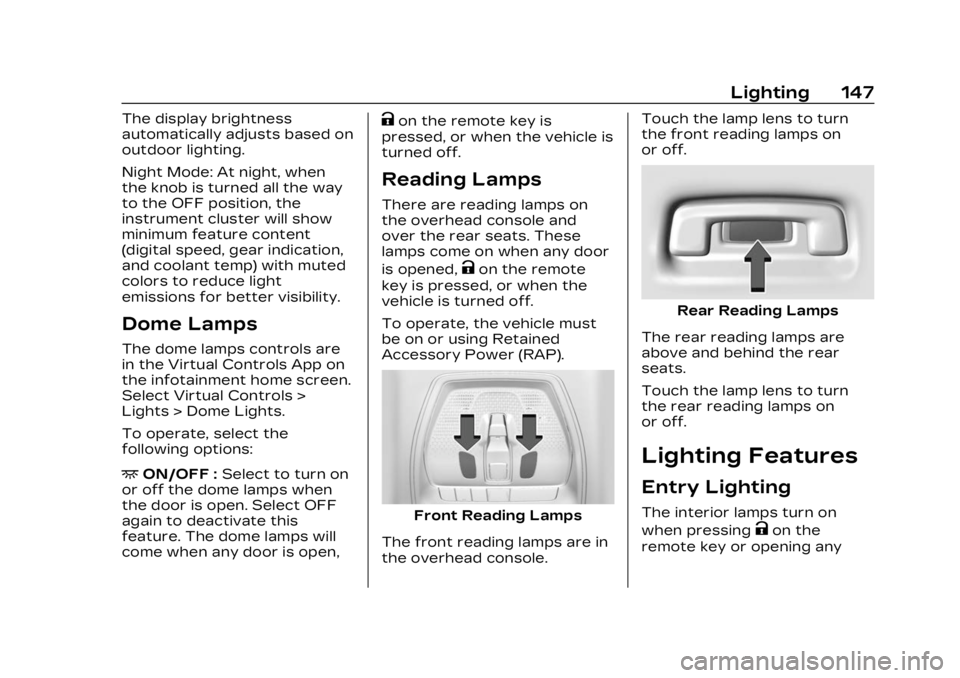
To operate, the vehicle must
be on or using Retained
Accessory Power (RAP).
Front Reading Lamps
The front reading lamps are in
the overhead console. Touch the lamp lens to turn
the front reading lamps on
or off.
Rear Reading Lamps
The rear reading lamps are
above and behind the rear
seats.
Touch the lamp lens to turn
the rear reading lamps on
or off.
Lighting Features
Entry Lighting
The interior lamps turn on
when pressing
Kon the
remote key or opening any
Page 149 of 424
Cadillac Lyriq Owner Manual (GMNA-Localizing-U.S./Canada-15644413) -
2023 - CRC - 2/23/22
148 Lighting
doors, and the dome lamp
control is in the DOOR
position.
Some exterior lamps also turn
on when pressing
Kon the
remote key or opening any
doors. Low-beam lamps will
only turn on briefly at night,
or in areas with limited lighting.
All lamps will gradually fade
out after about 30 seconds.
Entry lighting can be disabled
manually by closing all doors,
pressing
Qon the remote key,
or starting the vehicle.
This feature can be changed.
On the infotainment home
screen, select the Settings
icon
TVehicleTVehicle
Locator Lights.
Exit Lighting
Some exterior lamps and
interior lamps turn on when
the driver door is opened after
the vehicle is turned off The exterior and interior lamps
remain on for a set amount of
time, then automatically
turn off.
The interior lights turn on
when the vehicle is turned off.
The exterior lamps turn off
immediately by turning the
exterior lamp control off.
This feature can be changed.
On the infotainment home
screen, select the Settings
icon
TVehicleTExit Lighting.
Battery Load
Management
The vehicle has Electric Power
Management (EPM) that
estimates the battery
temperature and state of
charge. It then adjusts the
voltage for best performance
and extended life of the 12–
volt battery
When the battery state of
charge is low, the voltage is
raised slightly to quickly
increase the charge. When thestate of charge is high, the
voltage is lowered slightly to
prevent over charging. As this
adjustment occurs, you may
see the voltage move up or
down on the voltmeter gauge
or voltage display on the
Driver Information (DIC),
if equipped. This is normal. If a
problem occurs, an alert will be
displayed.
If the electrical loads are very
high, the battery can be
discharged when the vehicle is
stationary. A high electrical
load occurs when several
features are on, such as:
headlamps, high beams, rear
window defogger, climate
control fan at high speed,
heated seats, motor cooling
fans, trailer loads, and loads
plugged into accessory power
outlets.
EPM works to prevent
excessive discharge of the
battery by balancing the
electrical system output and
the vehicle's electrical needs.
Page 150 of 424
Cadillac Lyriq Owner Manual (GMNA-Localizing-U.S./Canada-15644413) -
2023 - CRC - 2/23/22
Lighting 149
In some cases, it can
temporarily reduce the power
demands of some accessories.
These actions occur in steps
or levels without being
noticeable. In rare cases at the
highest levels of corrective
action, this action may be
noticeable to the driver. If so, a
DIC battery voltage and
charging message displays.
It is recommended that the
driver reduce the electrical
loads as much as possible. See
Driver Information Center
(DIC)0132.
Battery Power
Protection
This feature helps prevent the
battery from being drained if
the interior courtesy lamps or
reading lamps are accidentally
left on. If any of these lamps
are left on, they automatically
turn off after 10 minutes when
the vehicle is turned off. The lamps will not come back on
again until one of the following
occurs:
.The vehicle is started.
.The doors are closed and
then re-opened.
Exterior Lighting
Battery Saver
The exterior lamps turn off
about 10 minutes after the
vehicle is turned off, if the
parking lamps or headlamps
have been manually left on.
This protects against draining
the battery. To restart the
10-minute timer, turn the
exterior lamp control to the
O
position and then back to the
;or2position.
To keep the lamps on for more
than 10 minutes, the vehicle
must be on.
Page 152 of 424
Cadillac Lyriq Owner Manual (GMNA-Localizing-U.S./Canada-15644413) -
2023 - CRC - 2/23/22
Infotainment System 151
features are also available
through the instrument cluster
and steering wheel controls.
Before driving:
.Become familiar with the
operation, center stack
controls, steering wheel
controls, and infotainment
display.
.Set up the audio by
presetting favorite stations,
setting the tone, and
adjusting the speakers.
.Set up phone numbers in
advance so they can be
called easily by pressing a
single control or by using a
single voice command.
See Distracted Driving 0195.
Overview
Infotainment System
The infotainment system is
controlled by using the
infotainment display,
multifunction controller (MCF) on the center console,
steering wheel controls, and
voice recognition, if available.
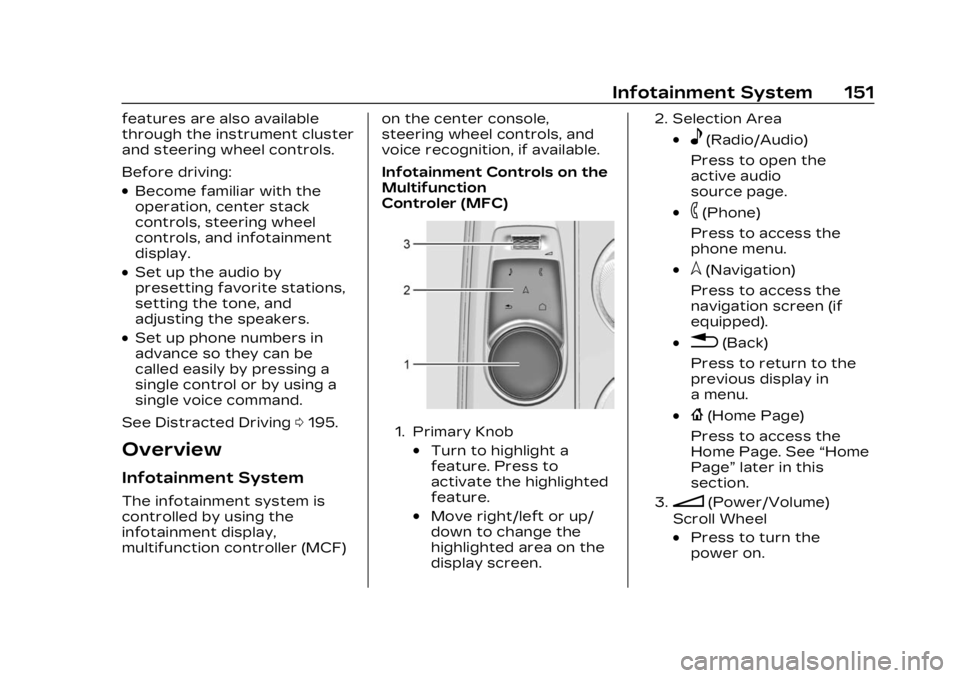
Infotainment Controls on the
Multifunction
Controler (MFC)
1. Primary Knob
.Turn to highlight a
feature. Press to
activate the highlighted
feature.
.Move right/left or up/
down to change the
highlighted area on the
display screen.
2. Selection Area
.e(Radio/Audio)
Press to open the
active audio
source page.
.6(Phone)
Press to access the
phone menu.
.l(Navigation)
Press to access the
navigation screen (if
equipped).
.0(Back)
Press to return to the
previous display in
a menu.
.{(Home Page)
Press to access the
Home Page. See “Home
Page” later in this
section.
3.n(Power/Volume)
Scroll Wheel
.Press to turn the
power on.
Page 164 of 424
Cadillac Lyriq Owner Manual (GMNA-Localizing-U.S./Canada-15644413) -
2023 - CRC - 2/23/22
Infotainment System 163
To change the units, see
Instrument Cluster0108.
Mute Settings
During active route guidance,
Google Maps can give audible
voice directions, traffic alerts,
or can be muted. In the Google
Maps app, touch Settings,
then Mute settings to access
the options.
Compass
The Google Maps orientation
can be changed between the
direction currently traveling
and pointing north. Touch the
compass to switch between
these options.
To recenter the map to the
current location, touch the
location icon.
Super Cruise
If equipped, Super Cruise
highlights routes in a specific
outline. See Super Cruise
0 236.Electric Vehicle (EV)
Features with
Google Maps
When vehicle data is shared
with Google, some of the
Maps features for EVs are as
follows:
.Battery charge level at
arrival
.Estimated minimum
charging time
If the vehicle needs to be
charged to reach a
destination, charging stations
may automatically be added to
a route.
Maps
Auto-downloaded Maps
Google Maps downloads
offline maps automatically for
use when not connected to
the Internet and for making
map data available to vehicle
features regardless of
connectivity. These offline maps are only available when
the vehicle has a subscription
data plan.
To turn on auto-download:
1. Open Google Maps.
2. Touch Settings.
3. Touch Privacy Center, then select Offline maps.
4. Select Auto-download offline maps.
5. Check the Internet connection and wait for the
download to finish.
Downloading Offline Maps 1. Open Google Maps.
2. Touch Settings, then Offline maps.
3. Touch the square with the Select your own map icon.
4. Adjust the map to cover the desired area to download.
5. Touch Download.
Page 178 of 424
Cadillac Lyriq Owner Manual (GMNA-Localizing-U.S./Canada-15644413) -
2023 - CRC - 2/23/22
Infotainment System 177
Buckle to Drive
This feature can prevent
shifting out of Park when the
driver, and if applicable the
front passenger, seat belt is
not buckled. See Buckle To
Drive051.
Climate and Air Quality
Adjusts different climate
settings.
Collision/Detection Systems
Adjusts different driver
assistance system settings.
Comfort and Convenience
Adjusts different comfort and
convenience settings.
Lighting
Adjusts different lighting
settings.
Power Door Locks
Adjusts different door lock
settings. Remote Lock, Unlock, and
Start
Adjusts different remote lock
settings.
Seating Position
Adjusts different seating
position settings.
Apps and Permissions
Shows a list of installed apps
and the permissions used.
Date / Time
Allows setting of the clock.
Display
Allows adjustment of the
infotainment display.
Sounds
Allows adjustment of the
infotainment system sounds.
Users
Modifies the infotainment
system’s users.
Accounts
Allows adding or adjusting of
the user accounts.
Privacy
This menu allows adjustment
of the infotainment privacy
settings.
Storage
This menu shows the storage
info on the infotainment
system.
Security
This menu allows adjustment
of the infotainment security
settings.
System
The menu may contain the
following:
Language
This will set the display
language used on the
infotainment display.
Page 187 of 424
Cadillac Lyriq Owner Manual (GMNA-Localizing-U.S./Canada-15644413) -
2023 - CRC - 2/23/22
186 Climate Controls
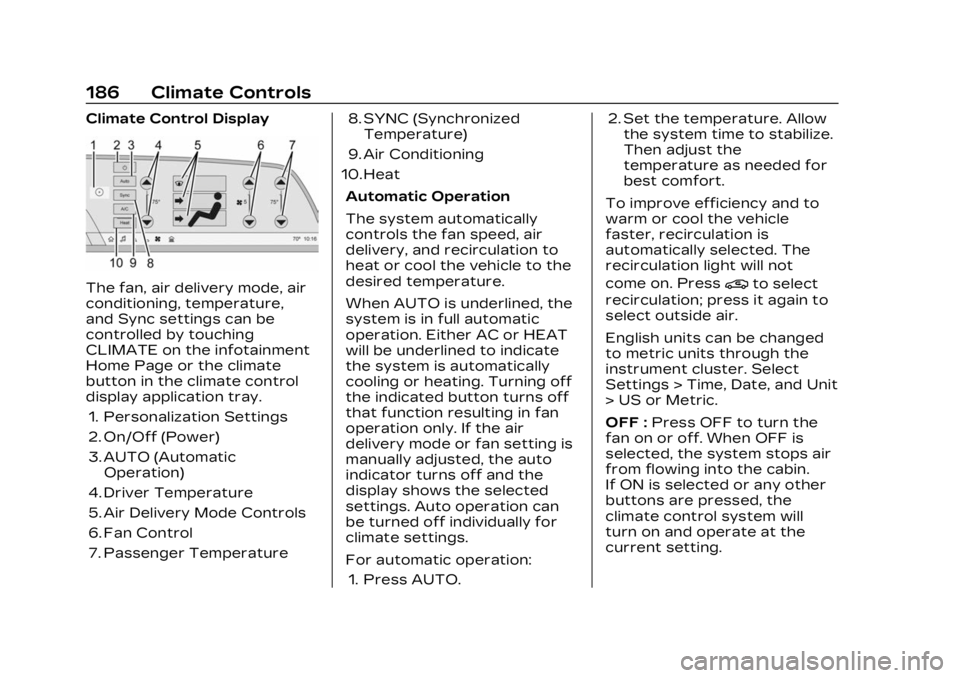
Climate Control Display
The fan, air delivery mode, air
conditioning, temperature,
and Sync settings can be
controlled by touching
CLIMATE on the infotainment
Home Page or the climate
button in the climate control
display application tray.1. Personalization Settings
2. On/Off (Power)
3. AUTO (Automatic Operation)
4. Driver Temperature
5. Air Delivery Mode Controls
6. Fan Control
7. Passenger Temperature 8. SYNC (Synchronized
Temperature)
9. Air Conditioning
10. Heat
Automatic Operation
The system automatically
controls the fan speed, air
delivery, and recirculation to
heat or cool the vehicle to the
desired temperature.
When AUTO is underlined, the
system is in full automatic
operation. Either AC or HEAT
will be underlined to indicate
the system is automatically
cooling or heating. Turning off
the indicated button turns off
that function resulting in fan
operation only. If the air
delivery mode or fan setting is
manually adjusted, the auto
indicator turns off and the
display shows the selected
settings. Auto operation can
be turned off individually for
climate settings.
For automatic operation:1. Press AUTO. 2. Set the temperature. Allow
the system time to stabilize.
Then adjust the
temperature as needed for
best comfort.
To improve efficiency and to
warm or cool the vehicle
faster, recirculation is
automatically selected. The
recirculation light will not
come on. Press@to select
recirculation; press it again to
select outside air.
English units can be changed
to metric units through the
instrument cluster. Select
Settings > Time, Date, and Unit
> US or Metric.
OFF : Press OFF to turn the
fan on or off. When OFF is
selected, the system stops air
from flowing into the cabin.
If ON is selected or any other
buttons are pressed, the
climate control system will
turn on and operate at the
current setting.
Page 188 of 424
Cadillac Lyriq Owner Manual (GMNA-Localizing-U.S./Canada-15644413) -
2023 - CRC - 2/23/22
Climate Controls 187
y/z:The temperature can
be adjusted separately for the
driver and the passenger.
Press to decrease or lift to
increase the temperature.
Press or lift and hold to rapidly
increase or decrease the
temperature. Press SYNC on
the Climate Display to reset
the Passenger Temperature
to the Driver Temperature.
Manual Operation
z 9 y: Press to decrease or
lift to increase the fan speed.
Press or lift and hold the fan
controls to adjust speed more
quickly. The fan speed setting
displays. Any adjustment of
the fan speed cancels
automatic fan control and the
fan can be controlled manually.
Press AUTO to return to
automatic operation.
To turn off the fan and climate
control system, press OFF on
the center stack climate
controls. The airflow will be blocked from entering in all air
delivery modes, except
defrost.
The maximum automatic fan
speed can be set to low,
medium, or high. To adjust
Auto Fan Speed, select
Settings > Climate and Air
Quality > Auto Fan Speed.
Air Delivery Mode Control :
When the climate information
is displayed, press the desired
air delivery mode on the
climate control display to
change the direction of the
airflow. The selected air
delivery mode button is lit.
Pressing any of the air
delivery buttons cancels
automatic air delivery control
and the direction of the airflow
can be controlled manually.
Press AUTO to return to
automatic operation.
To change the current mode,
select one or more of the
following:
z:
Air is directed to the
windshield, outboard a/c
outlets, and side window
outlets.
Y: Air is directed to the
instrument panel outlets.
[: Air is directed to the floor
outlets.
vHEAT : Touch to turn the
automatic heater on or off. An
indicator light comes on to
show that the heater is
enabled. If the fan is turned
off, the heater will not run.
Press AUTO to return to
automatic operation.
d: Clears the windshield of
fog or frost more quickly. Air is
directed to the windshield.
Press
dto turn on or off.
Changing the air delivery
mode also turns the
defrost off.
A/C : Touch AC to turn the
automatic air conditioning on
or off. If the fan is turned off,
the air conditioner will not run.