infotainment CADILLAC LYRIC 2023 Repair Manual
[x] Cancel search | Manufacturer: CADILLAC, Model Year: 2023, Model line: LYRIC, Model: CADILLAC LYRIC 2023Pages: 424, PDF Size: 4.76 MB
Page 178 of 424
Cadillac Lyriq Owner Manual (GMNA-Localizing-U.S./Canada-15644413) -
2023 - CRC - 2/23/22
Infotainment System 177
Buckle to Drive
This feature can prevent
shifting out of Park when the
driver, and if applicable the
front passenger, seat belt is
not buckled. See Buckle To
Drive051.
Climate and Air Quality
Adjusts different climate
settings.
Collision/Detection Systems
Adjusts different driver
assistance system settings.
Comfort and Convenience
Adjusts different comfort and
convenience settings.
Lighting
Adjusts different lighting
settings.
Power Door Locks
Adjusts different door lock
settings. Remote Lock, Unlock, and
Start
Adjusts different remote lock
settings.
Seating Position
Adjusts different seating
position settings.
Apps and Permissions
Shows a list of installed apps
and the permissions used.
Date / Time
Allows setting of the clock.
Display
Allows adjustment of the
infotainment display.
Sounds
Allows adjustment of the
infotainment system sounds.
Users
Modifies the infotainment
system’s users.
Accounts
Allows adding or adjusting of
the user accounts.
Privacy
This menu allows adjustment
of the infotainment privacy
settings.
Storage
This menu shows the storage
info on the infotainment
system.
Security
This menu allows adjustment
of the infotainment security
settings.
System
The menu may contain the
following:
Language
This will set the display
language used on the
infotainment display.
Page 179 of 424
Cadillac Lyriq Owner Manual (GMNA-Localizing-U.S./Canada-15644413) -
2023 - CRC - 2/23/22
178 Infotainment System
Keyboard & speech
Touch to change keyboard
and speech settings.
Units
Touch to change units
settings.
Reset Options
Touch to change reset
settings.
About
Touch to view the
infotainment system software
information.
Legal Information
Touch to view legal and
license information.
Updates
This menu allows adjustment
of the vehicle update settings.
Google
This menu allows adjustment
of the Google settings.
Teen Driver
If equipped, this allows
multiple keys to be registered
for beginner drivers to
encourage safe driving habits.
When the vehicle is started
with a Teen Driver key, it will
automatically activate certain
safety systems, allow setting
of some features, and limit the
use of others. The Report
Card will record vehicle data
about driving behavior that
can be viewed later. When the
vehicle is started with a Teen
Driver key, the Driver
Information Center (DIC)
displays a message that Teen
Driver is active.
To access:1. Touch Settings on the Home Page, then touch
Vehicle, and then Teen
Driver.
2. Create a Personal Identification Number (PIN)
by choosing a four-digit PIN. Re-enter the PIN to confirm.
To change the PIN, touch
Change PIN.
The PIN is required to:
.Set up/Add or remove keys.
.Change Teen Driver
settings.
.Change or clear the Teen
Driver PIN.
.Access or delete Report
Card data.
Set up/Add keys to activate
Teen Driver and assign
restrictions to the key:
Any vehicle key can be
registered, up to a maximum
of eight keys. Label the Teen
Driver key to tell it apart from
the other keys.
For a pushbutton start
system: 1. Start the vehicle.
2. The vehicle must be in P (Park).
3. From the Settings menu, touch Vehicle and then
Teen Driver.
Page 180 of 424
Cadillac Lyriq Owner Manual (GMNA-Localizing-U.S./Canada-15644413) -
2023 - CRC - 2/23/22
Infotainment System 179
4. Enter the PIN.
5. Place the remote key youwish to register in the
transmitter pocket. The key
does not need to be the one
that started the vehicle. See
Remote Key Operation 08
for transmitter pocket
location.
6. From the Teen Driver menu, touch Setup Keys or Add/
Remove Teen Driver Keys.
.If the remote key has not
previously been
registered, the option to
add the key displays.
Touch Add and a
confirmation message
displays. Teen Driver
restrictions will be applied
whenever this remote key
is used to operate the
vehicle.
.If the remote key has
already been registered,
the option to remove the
key displays. If Remove is
touched, the remote key
is no longer registered. A confirmation message
displays, and Teen Driver
restrictions will not be
applied if this remote key
is used to operate the
vehicle.
In vehicles with a pushbutton
start system, if a Teen Driver
and a non-Teen Driver key are
both present at start up, the
vehicle will recognize the
non-Teen Driver key to start
the vehicle. The Teen Driver
settings will not be active.
Manage Settings or Teen
Driver Settings
Depending on the options of
your vehicle, the following
menu items may be displayed:
Buckle to Drive : When turned
ON, Buckle to Drive prevents
the driver from shifting out of
P (Park) for a period of time
after the brake pedal is
pressed if the driver, or on
some vehicles the detected
passenger, has not buckled
their seat belt. On some
vehicles, Buckle to Drive is always ON when Teen Driver
is active and is not
configurable. See Buckle To
Drive
051.
Audio Volume Limit : Allows a
maximum audio volume to be
set. Turn the audio volume
limit on or off. Use the arrows
to choose the maximum
allowable level for the audio
volume. On some infotainment
systems, touch Set Audio
Volume Limit to choose the
maximum allowable audio
volume level.
Set Audio Volume Limit : Use
the arrows to choose the
maximum allowable level for
the audio volume.
Teen Driver Speed Limiter :
Limits the maximum speed of
the vehicle. When the speed
limiter is turned on and the
vehicle is started with a Teen
Driver key, the DIC displays a
message that the top speed is
limited.
Page 181 of 424
Cadillac Lyriq Owner Manual (GMNA-Localizing-U.S./Canada-15644413) -
2023 - CRC - 2/23/22
180 Infotainment System
On certain vehicles, when the
Speed Limiter is turned ON,
the vehicle’s maximum
acceleration will be limited.
The DIC will display a message
that the acceleration is limited.
Teen Driver Speed Warning :
Displays a warning in the DIC
when exceeding a selectable
speed. Turn the speed
warning on or off and choose
the desired speed warning
level. The speed warning does
not limit the speed of the
vehicle. On some infotainment
systems, touch Set Teen
Driver Speed Warning to set
the warning speed.
Set Teen Driver Speed
Warning :Choose the desired
speed warning level. The
speed warning does not limit
the speed of the vehicle.
SiriusXM Explicit Content
Filter : Allows the SiriusXM
Explicit Content Filter to be
turned ON or OFF. When ON,
the teen driver will not be able
to listen to SiriusXM stations that contain explicit content,
and the Explicit Content Filter
selection in the Audio Settings
will be unavailable for change.
When Teen Driver is Active:
.If equipped, the radio will
mute when the driver seat
belt, and in some vehicles
the front passenger seat
belt, is not buckled. The
audio from any device paired
to the vehicle will also be
muted.
.An object placed on the
front passenger seat, such
as a briefcase, handbag,
grocery bag, laptop, or other
electronic device, could
cause the passenger
sensing system to falsely
sense an unbuckled front
passenger and mute the
radio. If this happens,
remove the object from the
seat. See Passenger
Sensing System
066.
.Some safety systems, such
as Automatic Emergency
Braking, if equipped, cannot
be turned off.
.The gap setting for Adaptive
Cruise Control and alert
timing for Forward Collision
Alert, if equipped, cannot be
changed.
.When trying to change a
safety feature that is not
configurable in Teen Driver,
the feature may be grayed
out or removed from the
infotainment menu, or the
DIC will display a message
indicating that Teen Driver is
active and the action is not
available.
.Super Cruise, if equipped, is
not available.
.Do not tow a trailer if
equipped with Automatic
Emergency Braking.
Report Card
The vehicle owner must
secure the driver’s consent to
record certain vehicle data
when the vehicle is driven with
Page 182 of 424
Cadillac Lyriq Owner Manual (GMNA-Localizing-U.S./Canada-15644413) -
2023 - CRC - 2/23/22
Infotainment System 181
a registered Teen Driver key.
There is one Report Card per
vehicle. Data is only recorded
when a registered Teen Driver
key is used to operate the
vehicle.
The Report Card data is
collected from the time Teen
Driver is activated or the last
time the Report Card was
reset. The following items may
be recorded:
.Distance Driven–the total
distance driven.
.Maximum Speed –the
maximum vehicle speed
detected.
.Overspeed Warnings –the
number of times the speed
warning setting was
exceeded.
.Wide Open Throttle –the
number of times the
accelerator pedal was
pressed nearly all the
way down.
.Forward Collision Alerts (if
equipped) –the number of
times the driver was notified when approaching a vehicle
ahead too quickly and at
potential risk for a crash.
.Forward Automatic Braking,
also called Automatic
Emergency Braking (if
equipped)
–the number of
times the vehicle detected
that a forward collision was
imminent and applied the
brakes.
.Reverse Automatic Braking
(if equipped) –the number of
times the vehicle detected
that a rearward collision was
imminent and applied the
brakes.
.Traction Control –the
number of times the
Traction Control System
activated to reduce wheel
spin or loss of traction.
.Stability Control –the
number of events which
required the use of
electronic stability control.
.Antilock Braking System
Active –The number of
Antilock Brake System
activations.
.Tailgating Alerts (if
equipped) –the number of
times the driver was alerted
for following a vehicle ahead
too closely.
Report Card Data
Cumulative Data is saved for
all trips until the Report Card
is reset or until the maximum
count is exceeded. If the
maximum count is exceeded
for a Report Card line item,
that item will no longer be
updated in the Report Card
until it is reset. Each item will
report a maximum of
1,000 counts. The distance
driven will report a maximum
of 64,374 km (40,000 mi).
To delete Report Card data,
do one of the following:
.From the Report Card
display, touch Reset.
Page 183 of 424
Cadillac Lyriq Owner Manual (GMNA-Localizing-U.S./Canada-15644413) -
2023 - CRC - 2/23/22
182 Infotainment System
.Touch Clear PIN and All
Teen Driver Keys from the
Teen Driver menu. This will
also unregister any Teen
Driver keys and delete
the PIN.
Forgotten PIN
See your dealer to reset
the PIN.
Trademarks and
License
Agreements
FCC Information
See Radio Frequency
Statement 0395.
If you decide to continue
service after your trial, your
selected subscription plan will
automatically renew thereafter. You will be
charged at then-current rates.
Fees and taxes apply. Please
see the SiriusXM Customer
Agreement at siriusxm.com for
complete terms and how to
cancel, which includes calling
SiriusXM at 1-866-635-2349.
All fees and programming are
subject to change.
Fees and Taxes: Subscription
fee, taxes, one time activation
fee, and other fees may apply.
Subscription fee is consumer
only. All fees and programming
subject to change.
Subscriptions subject to
Customer Agreement available
at www.siriusxm.com. SiriusXM
service is only available in the
48 contiguous United States
and Canada.
In Canada: Some deterioration
of service may occur in
extreme northern latitudes.
This is beyond the control of
SiriusXM Satellite Radio.
Explicit Language Notice:
Channels with frequent
explicit language are indicated
with an
“XL”preceding the
channel name. Channel
blocking is available for
SiriusXM Satellite Radio
receivers by notifying
SiriusXM:
.USA Customers —See
www.siriusxm.com or call
1-888-601–6296.
.Canada Customers —See
www.siriusxm.ca or call
1-877-438-9677.
It is prohibited to copy,
decompile, disassemble,
reverse engineer, hack,
manipulate, or otherwise make
available any technology or
software incorporated in
receivers compatible with the
SiriusXM Satellite Radio
System or that support the
SiriusXM website, the Online
Service or any of its content.
Furthermore, the AMBER
voice compression software
included in this product is
Page 184 of 424
Cadillac Lyriq Owner Manual (GMNA-Localizing-U.S./Canada-15644413) -
2023 - CRC - 2/23/22
Infotainment System 183
protected by intellectual
property rights including
patent rights, copyrights, and
trade secrets of Digital Voice
Systems, Inc.
General Requirements:1. A License Agreement from SiriusXM is required for any
product that incorporates
SiriusXM Technology and/or
for use of any of the
SiriusXM marks to be
manufactured, distributed,
or marketed in the SiriusXM
Service Area.
2. For products to be distributed, marketed, and/
or sold in Canada, a
separate agreement is
required with Canadian
Satellite Radio Inc.
(operating as SiriusXM
Canada).
TouchSense Technology and
TouchSense System 1000
Series Licensed from
Immersion Corporation.
TouchSense System 1000
protected under one or more
of the U.S. Patents at the
following address
www.immersion.com/
patent-marking.html and other
patents pending.
Bluetooth
The Bluetooth word mark and
logos are owned by the
Bluetooth SIG, Inc. and any use
of such marks by General
Motors is under license. Other
trademarks and trade names
are those of their respective
owners. Java
Java is a registered trademark
of Oracle and/or its affiliates.
MPEG4–AVC (H.264)
THIS PRODUCT IS LICENSED
UNDER THE AVC PATENT
PORTFOLIO LICENSE FOR
THE PERSONAL AND
NON-COMMERCIAL USE OF
A CONSUMER TO (i) ENCODE
VIDEO IN COMPLIANCE WITH
THE AVC STANDARD (“AVC
VIDEO”) AND/OR (ii) DECODE
AVC VIDEO THAT WAS
ENCODED BY A CONSUMER
ENGAGED IN A PERSONAL
AND NON-COMMERCIAL
ACTIVITY AND/OR WAS
OBTAINED FROM A VIDEO
PROVIDER LICENSED TO
PROVIDE AVC VIDEO. NO
LICENSE IS GRANTED OR
SHALL BE IMPLIED FOR ANY
OTHER USE. ADDITIONAL
INFORMATION MAY BE
OBTAINED FROM MPEG LA,
LLC. SEE HTTPS://
WWW.MPEGLA.COM.
Page 185 of 424

Cadillac Lyriq Owner Manual (GMNA-Localizing-U.S./Canada-15644413) -
2023 - CRC - 2/23/22
184 Infotainment System
MPEG4–Visual
USE OF THIS PRODUCT IN
ANY MANNER THAT
COMPLIES WITH THE
MPEG-4 VISUAL STANDARD
IS PROHIBITED, EXCEPT FOR
USE BY A CONSUMER
ENGAGING IN PERSONAL
AND NON-COMMERCIAL
ACTIVITIES.
MP3
MPEG Layer-3 audio coding
technology licensed from
Fraunhofer IIS and Thomson.
WMV/WMA
This product includes
technology owned by
Microsoft Corporation and
under a license from Microsoft
Licensing, GP. Use or
distribution of such
technology outside of this
product is prohibited without a
license from Microsoft
Corporation and/or Microsoft
Licensing, GP as applicable.
Page 187 of 424
Cadillac Lyriq Owner Manual (GMNA-Localizing-U.S./Canada-15644413) -
2023 - CRC - 2/23/22
186 Climate Controls
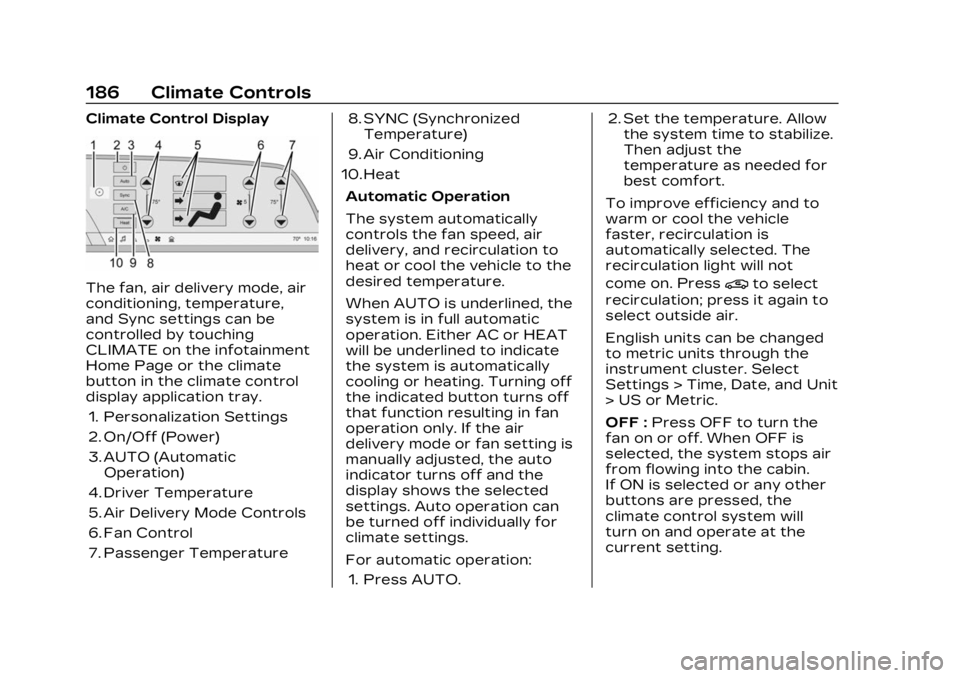
Climate Control Display
The fan, air delivery mode, air
conditioning, temperature,
and Sync settings can be
controlled by touching
CLIMATE on the infotainment
Home Page or the climate
button in the climate control
display application tray.1. Personalization Settings
2. On/Off (Power)
3. AUTO (Automatic Operation)
4. Driver Temperature
5. Air Delivery Mode Controls
6. Fan Control
7. Passenger Temperature 8. SYNC (Synchronized
Temperature)
9. Air Conditioning
10. Heat
Automatic Operation
The system automatically
controls the fan speed, air
delivery, and recirculation to
heat or cool the vehicle to the
desired temperature.
When AUTO is underlined, the
system is in full automatic
operation. Either AC or HEAT
will be underlined to indicate
the system is automatically
cooling or heating. Turning off
the indicated button turns off
that function resulting in fan
operation only. If the air
delivery mode or fan setting is
manually adjusted, the auto
indicator turns off and the
display shows the selected
settings. Auto operation can
be turned off individually for
climate settings.
For automatic operation:1. Press AUTO. 2. Set the temperature. Allow
the system time to stabilize.
Then adjust the
temperature as needed for
best comfort.
To improve efficiency and to
warm or cool the vehicle
faster, recirculation is
automatically selected. The
recirculation light will not
come on. Press@to select
recirculation; press it again to
select outside air.
English units can be changed
to metric units through the
instrument cluster. Select
Settings > Time, Date, and Unit
> US or Metric.
OFF : Press OFF to turn the
fan on or off. When OFF is
selected, the system stops air
from flowing into the cabin.
If ON is selected or any other
buttons are pressed, the
climate control system will
turn on and operate at the
current setting.
Page 197 of 424
Cadillac Lyriq Owner Manual (GMNA-Localizing-U.S./Canada-15644413) -
2023 - CRC - 2/23/22
196 Driving and Operating
.Avoid stressful
conversations while driving,
whether with a passenger or
on a mobile phone.
{Warning
Taking your eyes off the
road too long or too often
could cause a crash
resulting in injury or death.
Focus your attention on
driving.
Refer to the Infotainment
section for more information
on using that system, including
pairing and using a mobile
phone.
Defensive Driving
Defensive driving means
“always expect the
unexpected.” The first step in
driving defensively is to wear
the seat belt. See Seat Belts
0 50.
.Assume that other road
users (pedestrians,
bicyclists, and other drivers) are going to be careless and
make mistakes. Anticipate
what they may do and be
ready.
.Allow enough following
distance between you and
the driver in front of you.
.Focus on the task of driving.
Impaired Driving
Death and injury associated
with impaired driving is a
global tragedy.
{Warning
Drinking alcohol or taking
drugs and then driving is
very dangerous. Your
reflexes, perceptions,
attentiveness, and judgment
can be affected by even a
small amount of alcohol or
drugs. You can have a
serious
—or even fatal —
collision if you drive after
drinking or taking drugs. (Continued)
Warning (Continued)
Do not drive while under the
influence of alcohol or drugs,
or ride with a driver who has
been drinking or is impaired
by drugs. Find alternate
transportation home; or if
you are with a group,
designate a driver who will
remain sober.
Control of a Vehicle
Braking, steering, and
accelerating are important
factors in helping to control a
vehicle while driving.
Braking
Braking action involves
perception time and reaction
time. Deciding to push the
brake pedal is perception time.
Actually doing it is
reaction time.
Average driver reaction time is
about three-quarters of a
second. In that time, a vehicle