infotainment CADILLAC LYRIC 2023 Owner's Manual
[x] Cancel search | Manufacturer: CADILLAC, Model Year: 2023, Model line: LYRIC, Model: CADILLAC LYRIC 2023Pages: 424, PDF Size: 4.76 MB
Page 132 of 424
Cadillac Lyriq Owner Manual (GMNA-Localizing-U.S./Canada-15644413) -
2023 - CRC - 2/23/22
Instruments and Controls 131
according to any existing
schedules. The Home Charge
Location can be changed or
deleted at this screen.
The wireless service and GPS
satellite technologies must be
available and operating for
features to function properly.
These systems may not
operate if the battery is
disconnected, or if the vehicle
has been off for an extended
period of time. If GPS is
unavailable, a message
displays on the infotainment
screen. GPS functionality may
resume after the next time
you drive the vehicle.
Notifications
This section contains on/off
preferences for multiple
notifications triggered during
the Charging session.
Charge Status Feedback :
Provides an audible
notification through horn
chirps that accompany
changes in the charging
status.Charge Cord Unplugged
Alert :
When on and your
vehicle is locked, your vehicle
will honk the horn and flash
the lights if charge cord
becomes unplugged.
Charge Power Loss Alert :
When on, your vehicle will
honk the horn and flash the
lights if Charging power is
cut off.
DC Fast Charge Battery
Conditioning
If equipped, adjusts the
battery to the optimal
temperature for quicker DC
Fast Charging. This should be
done before charging at a DC
Fast Charger.
Depending on the outside and
battery temperature, battery
conditioning could take longer
to reach the optimal
temperature. While en route to a DC fast
charge station using Google
Maps, DC Fast Charge
Conditioning happens
automatically.
Cabin Pre-Conditioning
Temperature
Allows for the preferred cabin
temperature to be set. During
a planned charging session at
the vehicle's Home Charge
Location, the vehicle cabin is
warmed or cooled to this
temperature if set to ON in
either the Charge Later
screen, or in an active
Schedule.
Preferred Charge Times
Allows preferred charge time
windows to be enabled for the
Home Charge Location during
both weekday and weekend
planned charging sessions.
It does so whether the vehicle
is set to Charge Later,
or observing a scheduled
charge. This allows for
charging at a lower cost by
prioritizing charging during the
Page 133 of 424
Cadillac Lyriq Owner Manual (GMNA-Localizing-U.S./Canada-15644413) -
2023 - CRC - 2/23/22
132 Instruments and Controls
electrical provider’s off-peak
period. The vehicle will use this
schedule to reach the desired
Charge Level by the
scheduled time. If the vehicle
cannot reach the desired
charge level within these
times, it will charge as needed
outside of this time window.
Driver Information
Center (DIC)
The DIC is displayed in the
instrument cluster. It shows
the status of many vehicle
systems.
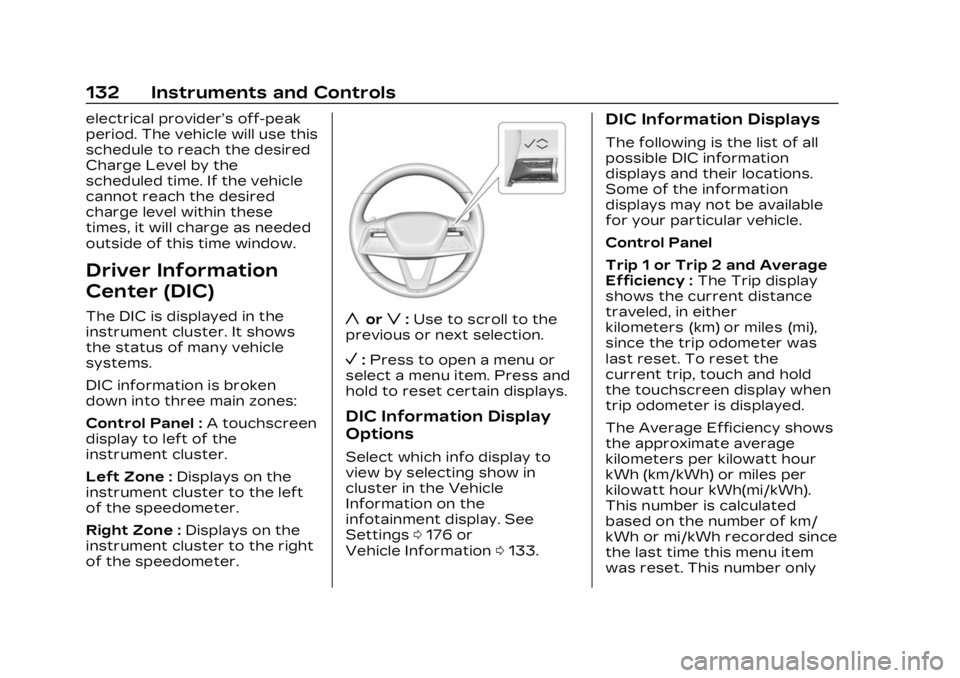
DIC information is broken
down into three main zones:
Control Panel :A touchscreen
display to left of the
instrument cluster.
Left Zone : Displays on the
instrument cluster to the left
of the speedometer.
Right Zone : Displays on the
instrument cluster to the right
of the speedometer.yorz: Use to scroll to the
previous or next selection.
V: Press to open a menu or
select a menu item. Press and
hold to reset certain displays.
DIC Information Display
Options
Select which info display to
view by selecting show in
cluster in the Vehicle
Information on the
infotainment display. See
Settings 0176 or
Vehicle Information 0133.
DIC Information Displays
The following is the list of all
possible DIC information
displays and their locations.
Some of the information
displays may not be available
for your particular vehicle.
Control Panel
Trip 1 or Trip 2 and Average
Efficiency : The Trip display
shows the current distance
traveled, in either
kilometers (km) or miles (mi),
since the trip odometer was
last reset. To reset the
current trip, touch and hold
the touchscreen display when
trip odometer is displayed.
The Average Efficiency shows
the approximate average
kilometers per kilowatt hour
kWh (km/kWh) or miles per
kilowatt hour kWh(mi/kWh).
This number is calculated
based on the number of km/
kWh or mi/kWh recorded since
the last time this menu item
was reset. This number only
Page 134 of 424
Cadillac Lyriq Owner Manual (GMNA-Localizing-U.S./Canada-15644413) -
2023 - CRC - 2/23/22
Instruments and Controls 133
reflects the approximate
average electrical energy
economy that the vehicle has
at that moment, and changes
as driving conditions change.
Left Zone
Time/Date :Displays current
date and time information.
Auto Lane Change : Displays
the status of a
driver-requested lane change
when Super Cruise is active.
See Super Cruise 0236.
Tire Pressure : Displays the
approximate pressures of all
four tires. Tire pressure is
displayed in either
kilopascal (kPa) or in pounds
per square inch (psi). If the
pressure is low, the value for
that tire is shown in amber.
See Tire Pressure Monitor
System 0343 and
Tire Pressure Monitor
Operation 0344.
Energy Usage : Displays
energy usage of the Driving,
Remote Start, Climate and Conditioning vehicle systems
as percentages of overall
vehicle energy use.
Energy Efficiency :
Displays a
graph showing the energy
efficiency that has been used
by the vehicle over the last
48 km (30 mi).
Right Zone
Audio Now Playing : Displays
the actively playing audio.
Navigation : Displays a variety
of navigation information.
Vehicle Information
The following are all possible
vehicle information features.
To access the vehicle
information menu touch
A
from the list of home page
icons displayed on the left side
of the infotainment display.
Vehicle information content is
shown on cards that are
grouped together in option
tabs that are displayed on the
infotainment display. Touching a card on the
infotainment display opens up
a dialog box for that card. To
select a desired option within
a dialog box, touch the option
and follow any message or
alerts that may display. Some
options may be unavailable
while driving.
Touch Show in Cluster to send
the desired card to the left
zone of the instrument cluster.
Touch Remove from Cluster to
remove the selected card from
the instrument cluster. See
Driver Information Center
(DIC)
0132.
Options
The following is the list of all
possible cards and their
locations. Some of the cards
may not be available for your
particular vehicle.
Summary : Displays an
interactive 3–D rendered
image of your vehicle that
shows performance and
health information.
Page 135 of 424
Cadillac Lyriq Owner Manual (GMNA-Localizing-U.S./Canada-15644413) -
2023 - CRC - 2/23/22
134 Instruments and Controls
Tires :Tire Pressure card
displays the approximate
pressures of all four tires. Tire
pressure is displayed in either
kilopascal (kPa) or in pounds
per square inch (psi). If the
pressure is low, the value for
that tire is shown in amber.
See Tire Pressure Monitor
System 0343 and
Tire Pressure Monitor
Operation 0344.
When selected, the following
options may be chosen in the
dialog: Relearn Tire Pressure,
Reset Leak Detection, Turn
Off/On Leak Detection, and
Show in Cluster. When
enabled, you will receive alerts
when a fast and/or slow tire
leak is detected. The Leak
Detection speeds shown are
either Tire Leak or Fast Leak.
When disabled, you will still
receive low tire pressure
alerts. However, you will stop
receiving additional alerts
when a tire is leaking air. Energy Info :
Energy Usage
card displays how energy is
being used for the current
drive since the last time the
vehicle was started.
Percentages of the Driving,
Remote Start, Climate and
Conditioning vehicle systems
as overall vehicle energy use
are shown. When selected,
distance driven, total energy,
energy usage bar diagram, and
selectable categories are
displayed. Select a category to
learn more about how your
vehicle uses energy from the
battery.
Energy Efficiency card
displays a graph showing the
energy efficiency that has
been used by the vehicle over
the last 48 km (30 mi). When
selected, regenerated range,
and instant efficiency is shown
along with average efficiency
in the dialog.Vehicle Messages
Messages displayed on the
Driver Information Center
(DIC) indicate the status of the
vehicle or some action that
may be needed to correct a
condition. Multiple messages
may appear one after another.
Vehicle status notifications
are also sent to the
infotainment display. Touching
Uon the bottom right corner
of the infotainment display
opens the notification drawer
where all the active vehicle
messages can be viewed.
Depending on the message,
you can schedule a service,
find the nearest dealer, or find
the nearest charging station.
When there are active
messages that can be viewed,
a red dot appears on top of
the notification icon on the
infotainment display.
The messages that do not
require immediate action can
be acknowledged and cleared
Page 137 of 424
Cadillac Lyriq Owner Manual (GMNA-Localizing-U.S./Canada-15644413) -
2023 - CRC - 2/23/22
136 Instruments and Controls
battery temperature will
increase, and the vehicle will
return to normal operation.
If the high voltage battery
charge level is relatively low
the vehicle will not return to
normal operation until
charged.
Keep the vehicle plugged in,
even when fully charged, to
keep the high voltage battery
temperature ready for the
next drive. This is important
when outside temperatures
are extremely hot or cold.
Vehicle Speed
Messages
SPEED LIMITED TO XXX
KM/H (MPH)
This message shows that the
vehicle speed has been limited
to the speed displayed. The
limited speed is a protection
for various propulsion and
vehicle systems, such aslubrication, thermal, brakes,
suspension, Teen Driver if
equipped, or tires.
Universal Remote
System
See Radio Frequency
Statement
0395.
Universal Remote
System Programming
If equipped, the Universal
Garage Door (Universal
Remote) controls are located
on the infotainment screen.
This system can replace up to
eight remote control
transmitters used to activate
devices such as garage door
openers, security systems,
and home automation devices.
These instructions refer to a
garage door opener, but can
be used for other devices.
Do not use the Universal
Remote system with any
garage door opener that does not have the stop and reverse
feature. This includes any
garage door opener model
manufactured before April
1, 1982.
Keep the original hand-held
transmitter for use in other
vehicles as well as for future
programming. Erase the
programming when vehicle
ownership is terminated. See
“Erasing Universal Remotes.”
To program a garage door
opener, park outside directly in
line with and facing the garage
door opener receiver. Clear all
people and objects away from
the garage door.
Make sure the hand-held
transmitter has a new battery
for quick and accurate
transmission of the
radio-frequency signal.
Programming the
Universal Remote System
Programming involves
time-sensitive actions and may
time out, requiring the
Page 138 of 424

Cadillac Lyriq Owner Manual (GMNA-Localizing-U.S./Canada-15644413) -
2023 - CRC - 2/23/22
Instruments and Controls 137
procedure to be repeated.
Read these instructions
completely before
programming the Universal
Remote system. It may help to
have another person assist
with the programming
process.1. On the infotainment home screen, navigate to the
Universal Remote controls.
2. Hold the end of the hand-held transmitter about
3 to 8 cm (1 to 3 in) away
from the rear-view mirror.
The hand-held transmitter
was supplied by the
manufacturer of the garage
door opener.
3. Select the “Add Remotes”
option on the infotainment
screen.
4. Press and hold the hand-held transmitter
button. Do not release the
hand-held transmitter
button until “Signal Found”
appears on the infotainment
screen. 5. Once the signal is found,
test the Universal Remote
System by pressing the
Test button. If your garage
door moves, then
programming was
successful. You may need to
press the Test button
several times. Indicate the
successful programming of
a remote by pressing the It
Worked button. After
successfully programming a
remote, there is no need to
complete Steps 6–10.
6. If your garage door does not react during testing,
press the It Didn’t Work
button and proceed to
Step 7.
The following steps require
the location and pressing of
the Learn or Smart button
on the garage door opener
receiver inside the garage.
These steps may require a
ladder and are time
sensitive. 7. Locate the Learn or Smart
button on the garage door
opener receiver in the
garage. The name and color
may vary by manufacturer
but is usually located near
the antenna wire.
8. Press and release the Learn or Smart button on the
garage door opener
receiver. Step 9 must be
completed within
30 seconds of pressing this
button.
9. Press the Test button on the infotainment screen.
If your garage door moves,
then programming was
successful. You may need to
press the Test button
several times. Indicate
successful programming by
pressing the It Worked
button.
10. If programming is not successful, press It Didn’t
Work button and repeat
Page 139 of 424
Cadillac Lyriq Owner Manual (GMNA-Localizing-U.S./Canada-15644413) -
2023 - CRC - 2/23/22
138 Instruments and Controls
Steps 8–9, or consult
HomeLink by website or
phone.
After your Universal Remote
has been successfully
programmed, you can change
the name of the remote on the
screen as desired.
Some garage door openers
require a modification of
Step 4. See “Radio Signals for
Some Gate Operators.”
For questions or programming
help, visit www.homelink.com/
gm for self-help videos or call
1–800–355–3515. For calls
placed outside the U.S.,
Canada, or Puerto Rico,
international rates will apply
and may differ based on
landline or mobile phone.
Erasing Universal
Remotes
To erase a programmed
Universal Remote, select the
remote on the infotainment
screen. Then select “Delete.”To erase ALL programmed
Universal Remotes, select any
remote on the infotainment
screen. Then select
“Delete All.”
Radio Signals for Some
Gate Operators
Some gate operators and
radio-frequency laws require
transmitter signals to time out
or quit after several seconds
of transmission. This may not
be long enough for the
Universal Remote system to
pick up the signal during
programming.
If programming did not work,
replace Step 4 under
“Programming the Universal
Remote System,”
with the
following:
Press and release the
hand-held transmitter button
every two seconds until the
signal has been found by the
Universal Remote System.
Proceed to Step 5 under “Programming the Universal
Remote System”
to complete
programming.
Universal Remote
System Operation
Using the Universal
Remote System
Press the desired Universal
Remote button on the
infotainment screen.
Reprogramming a Single
Universal Remote System
Button
To reprogram any of the
system buttons:
1. Select the universal remote to be reprogrammed.
2. Select “Delete”.
3. Select “Add Remote”. Follow
the instructions in Universal
Remote System
Programming 0136.
Page 140 of 424
Cadillac Lyriq Owner Manual (GMNA-Localizing-U.S./Canada-15644413) -
2023 - CRC - 2/23/22
Lighting 139
Lighting
Exterior Lighting
Exterior LampControls . . . . . . . . . . . . . . . . . . . . . 139
Exterior Lamps Off Reminder . . . . . . . . . . . . . . . . . . . . 142
Headlamp High/ Low-Beam Changer . . . . . 142
Flash-to-Pass . . . . . . . . . . . . . . . 142
Daytime Running Lamps (DRL) . . . . . . . . . . . . . . . 142
Automatic Headlamp System . . . . . . . . . . . . . . . . . . . . . . 143
Adaptive Forward Lighting (AFL) . . . . . . . . . . . . . 143
Headlamp Leveling Control . . . . . . . . . . . . . . . . . . . . . . 145
Hazard Warning Flashers . . . . . . . . . . . . . . . . . . . . . 145
Turn and Lane-Change Signals . . . . . . . . . . . . . . . . . . . . . . . 146
Cornering Lamps . . . . . . . . . . 146
Interior Lighting
Instrument Panel Illumination Control . . . . . . 146
Dome Lamps . . . . . . . . . . . . . . . . 147
Reading Lamps . . . . . . . . . . . . . 147
Lighting Features
Entry Lighting . . . . . . . . . . . . . . . 147
Exit Lighting . . . . . . . . . . . . . . . . . 148
Battery Load Management . . . . . . . . . . . . . . . 148
Battery Power
Protection . . . . . . . . . . . . . . . . . . 149
Exterior Lighting Battery Saver . . . . . . . . . . . . . . . . . . . . . . . . . 149Exterior Lighting
Exterior Lamp
Controls
The exterior lamp controls,
also known as headlights, are
in the Virtual Controls App on
the infotainment home screen.
Select Virtual Controls >
Lights > Headlights.
To operate, select the
following options:
Off : Turns off the exterior
lamps.
For vehicles first sold in
Canada, the headlamps will
automatically reactivate when
the vehicle is shifted out of
P (Park).
Auto : Automatically turns the
exterior lamps on and off,
depending on outside lighting.
Parking : Turns on the parking
lamps.
On : Turns on the exterior
lamps.
Page 141 of 424
Cadillac Lyriq Owner Manual (GMNA-Localizing-U.S./Canada-15644413) -
2023 - CRC - 2/23/22
140 Lighting
IntelliBeam System
If equipped, this system turns
the high-beam headlamps on
and off according to
surrounding traffic conditions.
The system turns the
high-beam headlamps on when
it is dark enough and there is
no other traffic present.
This light
bappears on the
instrument cluster when the
IntelliBeam system is enabled.
Turning the IntelliBeam On
and Off
To enable and disable the
IntelliBeam system on the
infotainment home screen,
select Virtual Control App >
Lights >
bAuto High Beams
when the headlights are set in
the Auto position.
Driving with IntelliBeam
The system only activates the
high beams when driving over
40 km/h (25 mph). The blue high-beam on light
appears on the instrument
cluster when the high beams
are on.
There is a sensor near the top
center of the windshield that
automatically controls the
system. Keep this area of the
windshield clear of debris to
allow for best system
performance.
The high-beam headlamps
remain on, under the
automatic control, until one of
the following situations
occurs:
.The system detects an
approaching vehicle's
headlamps.
.The system detects a
preceding vehicle's taillamps.
.The outside light is bright
enough that high-beam
headlamps are not required.
.The vehicle speed drops
below 20 km/h (12 mph).
The high beams may not turn
off automatically if the system
cannot detect another
vehicle's lamps because of any
of the following:
.The other vehicle's lamps
are missing, damaged,
obstructed from view,
or otherwise undetected.
.The other vehicle's lamps
are covered with dirt, snow,
and/or road spray.
.The other vehicle's lamps
cannot be detected due to
dense exhaust, smoke, fog,
snow, road spray, mist,
or other airborne
obstructions.
.The vehicle windshield is
dirty, cracked, or obstructed
by something that blocks the
view of the light sensor.
.The vehicle is loaded such
that the front end points
upward, causing the light
sensor to aim high and not
detect headlamps and
taillamps.
Page 142 of 424
Cadillac Lyriq Owner Manual (GMNA-Localizing-U.S./Canada-15644413) -
2023 - CRC - 2/23/22
Lighting 141
.The vehicle is being driven
on winding or hilly roads.
The automatic high-beam
headlamps may need to be
disabled if any of the above
conditions exist.
Adaptive Headlight
System
If equipped, the Adaptive
Headlight system allows the
high-beam headlamps to
function as the main driving
light at night.
The system turns on all the
high-beam headlamp LED
segments when it is dark
enough and there is no other
traffic present.
This light
bdisplays on the
instrument cluster when the
Adaptive Headlight system is
enabled.
Turning the Adaptive
Headlight System On and Off
To enable and disable the
Adaptive Headlight system on
the infotainment home screen, select Virtual Control App >
Lights >
bAuto High Beams
when the headlights are set in
the Auto position.
Driving with Adaptive
Headlight System
The system only activates the
high beams when driving over
40 km/h (25 mph).
There is a sensor near the top
center of the windshield that
automatically detects the
lights of oncoming and
preceding vehicles. Keep this
area of the windshield clear of
debris to allow for best
system performance.
The headlamp high-beam
alters according to the traffic
situation, preventing high
beam light from glaring
towards oncoming or
preceding traffic. This gives
the best light distribution
without glaring other road
users. The Adaptive Headlight
system remains on until one of
the following situations
occurs:
.The fog lamps are turned on.
.The system detects a
preceding vehicle’s taillamps.
.The vehicle speed drops
below approximately
20 km/h (12 mph).
The high beams may not turn
off automatically if the system
cannot detect another vehicle
lamps because of any of the
following:
.The other vehicle’s lamps
are missing, damaged,
obstructed from view,
or otherwise undetected.
.The other vehicle’s lamps
are covered with dirt, snow,
and/or road spray.
.The other vehicle’s lamps
cannot be detected due to
dense exhaust, smoke, fog,
snow, road spray, mist,
or other airborne
obstructions.