seats CADILLAC LYRIC 2023 Repair Manual
[x] Cancel search | Manufacturer: CADILLAC, Model Year: 2023, Model line: LYRIC, Model: CADILLAC LYRIC 2023Pages: 424, PDF Size: 4.76 MB
Page 148 of 424
Cadillac Lyriq Owner Manual (GMNA-Localizing-U.S./Canada-15644413) -
2023 - CRC - 2/23/22
Lighting 147
The display brightness
automatically adjusts based on
outdoor lighting.
Night Mode: At night, when
the knob is turned all the way
to the OFF position, the
instrument cluster will show
minimum feature content
(digital speed, gear indication,
and coolant temp) with muted
colors to reduce light
emissions for better visibility.
Dome Lamps
The dome lamps controls are
in the Virtual Controls App on
the infotainment home screen.
Select Virtual Controls >
Lights > Dome Lights.
To operate, select the
following options:
+ON/OFF :Select to turn on
or off the dome lamps when
the door is open. Select OFF
again to deactivate this
feature. The dome lamps will
come when any door is open,
Kon the remote key is
pressed, or when the vehicle is
turned off.
Reading Lamps
There are reading lamps on
the overhead console and
over the rear seats. These
lamps come on when any door
is opened,
Kon the remote
key is pressed, or when the
vehicle is turned off.
To operate, the vehicle must
be on or using Retained
Accessory Power (RAP).
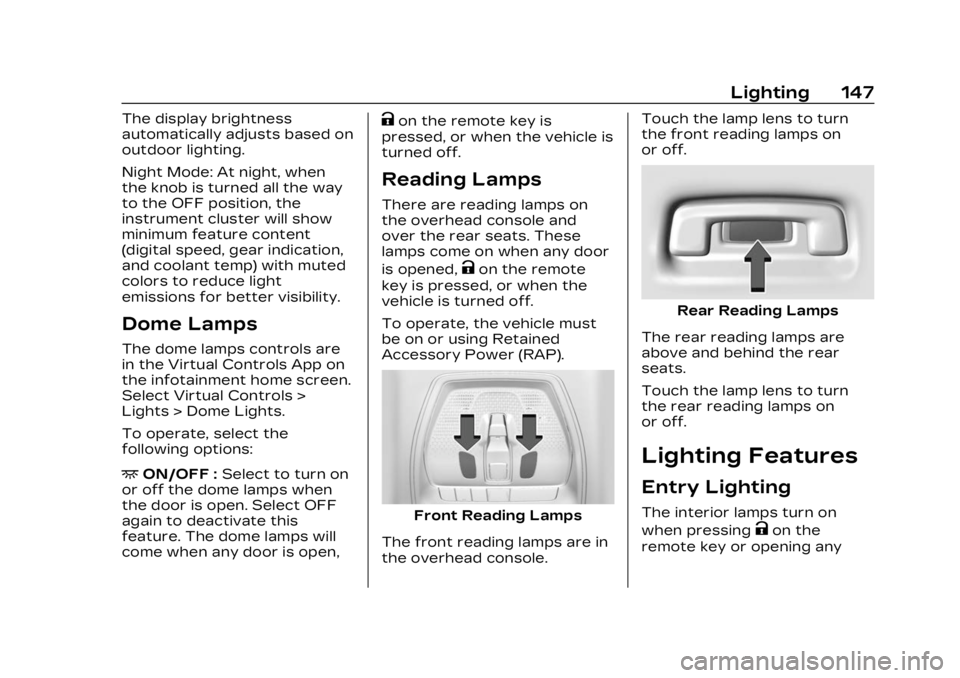
Front Reading Lamps
The front reading lamps are in
the overhead console. Touch the lamp lens to turn
the front reading lamps on
or off.
Rear Reading Lamps
The rear reading lamps are
above and behind the rear
seats.
Touch the lamp lens to turn
the rear reading lamps on
or off.
Lighting Features
Entry Lighting
The interior lamps turn on
when pressing
Kon the
remote key or opening any
Page 149 of 424
Cadillac Lyriq Owner Manual (GMNA-Localizing-U.S./Canada-15644413) -
2023 - CRC - 2/23/22
148 Lighting
doors, and the dome lamp
control is in the DOOR
position.
Some exterior lamps also turn
on when pressing
Kon the
remote key or opening any
doors. Low-beam lamps will
only turn on briefly at night,
or in areas with limited lighting.
All lamps will gradually fade
out after about 30 seconds.
Entry lighting can be disabled
manually by closing all doors,
pressing
Qon the remote key,
or starting the vehicle.
This feature can be changed.
On the infotainment home
screen, select the Settings
icon
TVehicleTVehicle
Locator Lights.
Exit Lighting
Some exterior lamps and
interior lamps turn on when
the driver door is opened after
the vehicle is turned off The exterior and interior lamps
remain on for a set amount of
time, then automatically
turn off.
The interior lights turn on
when the vehicle is turned off.
The exterior lamps turn off
immediately by turning the
exterior lamp control off.
This feature can be changed.
On the infotainment home
screen, select the Settings
icon
TVehicleTExit Lighting.
Battery Load
Management
The vehicle has Electric Power
Management (EPM) that
estimates the battery
temperature and state of
charge. It then adjusts the
voltage for best performance
and extended life of the 12–
volt battery
When the battery state of
charge is low, the voltage is
raised slightly to quickly
increase the charge. When thestate of charge is high, the
voltage is lowered slightly to
prevent over charging. As this
adjustment occurs, you may
see the voltage move up or
down on the voltmeter gauge
or voltage display on the
Driver Information (DIC),
if equipped. This is normal. If a
problem occurs, an alert will be
displayed.
If the electrical loads are very
high, the battery can be
discharged when the vehicle is
stationary. A high electrical
load occurs when several
features are on, such as:
headlamps, high beams, rear
window defogger, climate
control fan at high speed,
heated seats, motor cooling
fans, trailer loads, and loads
plugged into accessory power
outlets.
EPM works to prevent
excessive discharge of the
battery by balancing the
electrical system output and
the vehicle's electrical needs.
Page 190 of 424
Cadillac Lyriq Owner Manual (GMNA-Localizing-U.S./Canada-15644413) -
2023 - CRC - 2/23/22
Climate Controls 189
Caution (Continued)
with a razor blade or
anything else that is sharp.
This may damage the rear
window defogger grid and
affect the radio's ability to
pick up stations clearly. The
repairs would not be
covered by the vehicle
warranty.
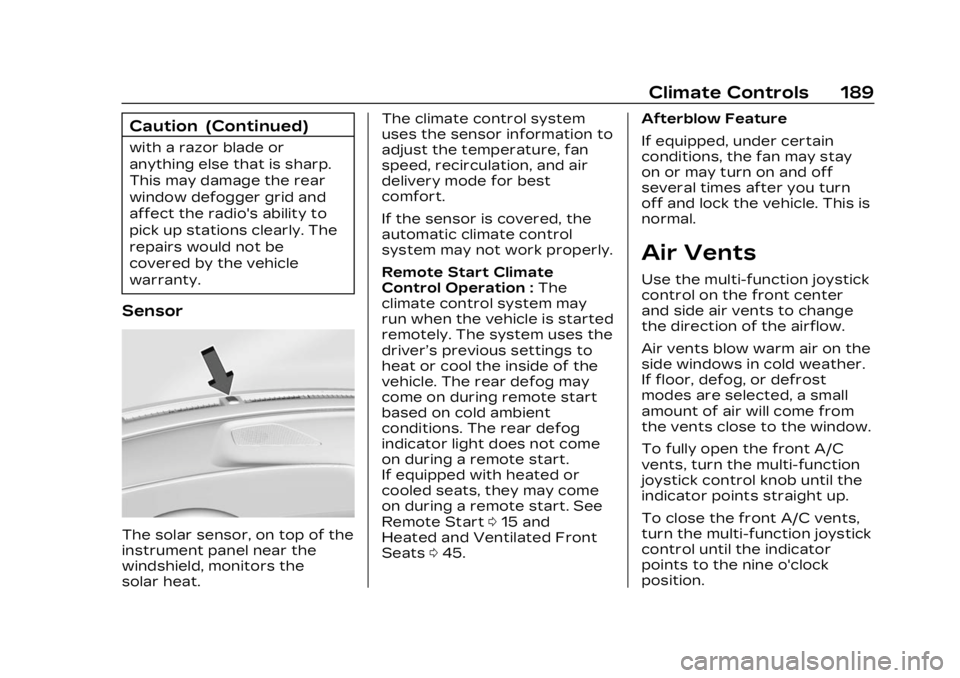
Sensor
The solar sensor, on top of the
instrument panel near the
windshield, monitors the
solar heat.The climate control system
uses the sensor information to
adjust the temperature, fan
speed, recirculation, and air
delivery mode for best
comfort.
If the sensor is covered, the
automatic climate control
system may not work properly.
Remote Start Climate
Control Operation :
The
climate control system may
run when the vehicle is started
remotely. The system uses the
driver’s previous settings to
heat or cool the inside of the
vehicle. The rear defog may
come on during remote start
based on cold ambient
conditions. The rear defog
indicator light does not come
on during a remote start.
If equipped with heated or
cooled seats, they may come
on during a remote start. See
Remote Start 015 and
Heated and Ventilated Front
Seats 045. Afterblow Feature
If equipped, under certain
conditions, the fan may stay
on or may turn on and off
several times after you turn
off and lock the vehicle. This is
normal.
Air Vents
Use the multi-function joystick
control on the front center
and side air vents to change
the direction of the airflow.
Air vents blow warm air on the
side windows in cold weather.
If floor, defog, or defrost
modes are selected, a small
amount of air will come from
the vents close to the window.
To fully open the front A/C
vents, turn the multi-function
joystick control knob until the
indicator points straight up.
To close the front A/C vents,
turn the multi-function joystick
control until the indicator
points to the nine o'clock
position.
Page 191 of 424
Cadillac Lyriq Owner Manual (GMNA-Localizing-U.S./Canada-15644413) -
2023 - CRC - 2/23/22
190 Climate Controls
To close the rear A/C vents,
move the sliding knobs to the
full inboard position.
Operation Tips
.Clear away any ice, snow,
or leaves from air inlets at
the base of the windshield
that could block the flow of
air into the vehicle.
.Clear snow off the hood to
improve visibility and help
decrease moisture drawn
into the vehicle.
.Keep the path under the
front seats clear of objects
to help circulate the air
inside of the vehicle more
effectively.
.Use of non-GM approved
hood deflectors can
adversely affect the
performance of the system.
Check with your dealer
before adding equipment to
the outside of the vehicle.
.Do not attach any devices to
the air vent slats. This will
restrict airflow and may
cause damage to the air
vents.
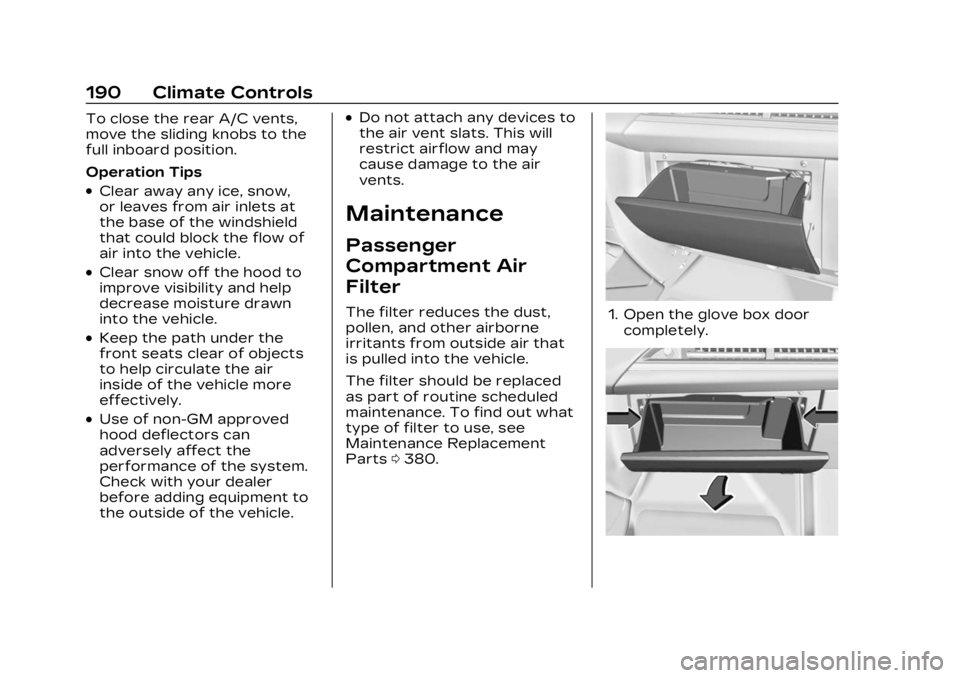
Maintenance
Passenger
Compartment Air
Filter
The filter reduces the dust,
pollen, and other airborne
irritants from outside air that
is pulled into the vehicle.
The filter should be replaced
as part of routine scheduled
maintenance. To find out what
type of filter to use, see
Maintenance Replacement
Parts0380.1. Open the glove box door
completely.
Page 195 of 424
Cadillac Lyriq Owner Manual (GMNA-Localizing-U.S./Canada-15644413) -
2023 - CRC - 2/23/22
194 Driving and Operating
Acceleration/Braking/
Coasting
Avoid rapid accelerations and
decelerations.
Use cruise control when
appropriate.
Plan ahead for decelerations,
and coast whenever possible.
Do not rush to traffic signals,
and do not shift to N (Neutral)
to coast.
Use the One-Pedal Driving
feature when appropriate to
help recover energy during
coasting and braking.
One-Pedal mode recovers
more energy while coasting
and braking than D (Drive)
mode. See One-Pedal Driving
0214.
Use the steering wheel Regen
on Demand paddle during
deceleration to help recover
energy. See Regenerative
Braking 0220. Terrain and Vehicle Speed
Higher speeds and grade
changes use more energy and
can significantly reduce
electric range.
Climate Setting
Using the heat and air
conditioning systems
decreases the energy
available for electric driving.
Optimal energy efficiency is
achieved when the heat, air
conditioning, and fan are
turned off.
Use the heated and ventilated
seat features (if equipped)
instead of the climate control
system. Heating and
ventilating the seat uses less
energy than heating and
cooling the interior. See
Heated and Ventilated Front
Seats
045 and
Heated Rear Seats 049.
Use the Remote Start Climate
Control feature to heat or cool
the interior while the vehicle is
plugged in to use electricity from the electrical outlet
instead of using energy from
the battery. See Remote Start
0
15.
In hot weather, avoid parking
in direct sunlight. Use
sunshades inside the vehicle.
Keep the inside of the
windows clean to reduce
fogging. Turn off the front
defroster and rear defogger
when they are not needed.
Avoid driving with the
windows open at highway
speeds.
Use the Battery Gauge on the
Instrument Cluster to view the
effect of climate control
settings on your estimated
range. See Battery Gauge
(High Voltage) 0110.
Outside Temperature
On colder days, it is best to
plug in the vehicle overnight,
and then remote start the
vehicle.
Page 207 of 424

Cadillac Lyriq Owner Manual (GMNA-Localizing-U.S./Canada-15644413) -
2023 - CRC - 2/23/22
206 Driving and Operating
Caution
Overloading the vehicle may
cause damage. Repairs
would not be covered by the
vehicle warranty. Do not
overload the vehicle.
{Warning
Things inside the vehicle
can strike and injure
people in a sudden stop
or turn, or in a crash.
.Put things in the cargo
area of the vehicle. In
the cargo area, put
them as far forward as
possible. Try to spread
the weight evenly.
.Never stack heavier
things, like suitcases,
inside the vehicle so
that some of them are
above the tops of the
seats.
(Continued)
Warning (Continued)
.Do not leave an
unsecured child
restraint in the vehicle.
.Secure loose items in
the vehicle.
.Do not leave a seat
folded down unless
needed.
Starting and
Operating
New Vehicle Break-In
Caution
Avoid making hard stops for
the first 322 km (200 mi).
During this time the new
brake linings are not yet
broken in. Hard stops with
new linings can mean
premature wear and earlier
replacement. Follow this
breaking-in guideline every (Continued)
Caution (Continued)
time you get new brake
linings. Following break-in,
vehicle speed and load can
be gradually increased.
Power Button
The vehicle has an electronic
pushbutton start.
The Remote Key must be in
the vehicle for the system to
operate. If the vehicle will not
start, place the Remote Key in
the transmitter pocket, inside
the center console.
Page 350 of 424
Cadillac Lyriq Owner Manual (GMNA-Localizing-U.S./Canada-15644413) -
2023 - CRC - 2/23/22
Vehicle Care 349
Warning (Continued)
wheel could come off and
cause a crash. When
changing a wheel, remove
any rust or dirt from
places where the wheel
attaches to the vehicle. In
an emergency, a cloth or
paper towel can be used;
however, use a scraper
or wire brush later to
remove all rust or dirt.
Lightly coat the inner
diameter of the wheel hub
opening with wheel bearing
grease after a wheel
change or tire rotation to
prevent corrosion or rust
build-up.{Warning
Do not apply grease to
the wheel mounting
surface, wheel conical
seats, or the wheel nuts
or bolts. Grease applied
to these areas could
cause a wheel to become
loose or come off,
resulting in a crash.
When It Is Time for
New Tires
Factors, such as maintenance,
temperatures, driving speeds,
vehicle loading, and road
conditions affect the wear
rate of the tires.
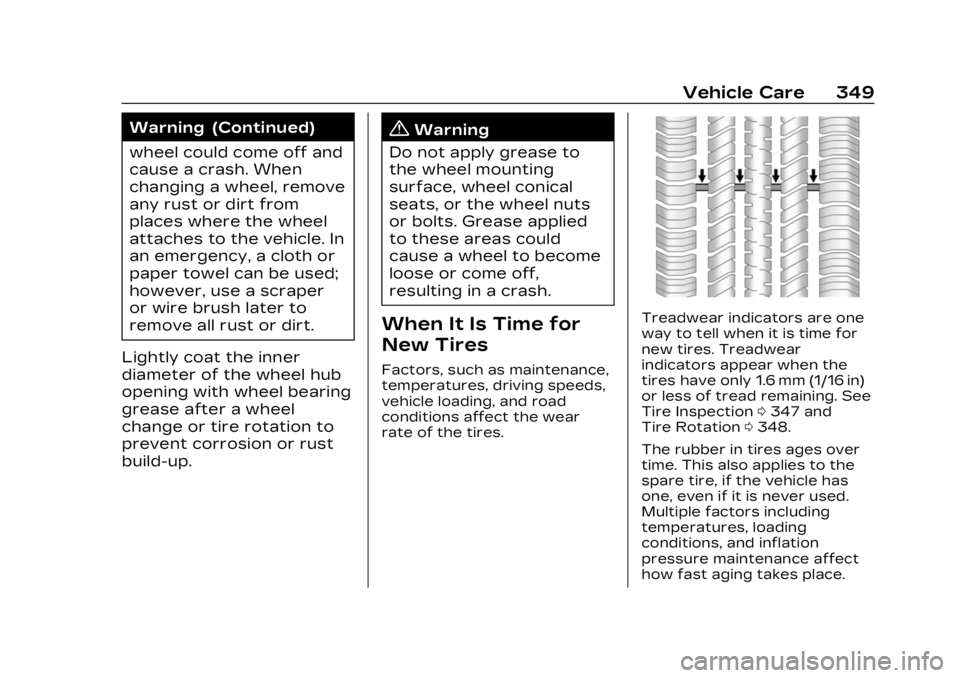
Treadwear indicators are one
way to tell when it is time for
new tires. Treadwear
indicators appear when the
tires have only 1.6 mm (1/16 in)
or less of tread remaining. See
Tire Inspection 0347 and
Tire Rotation 0348.
The rubber in tires ages over
time. This also applies to the
spare tire, if the vehicle has
one, even if it is never used.
Multiple factors including
temperatures, loading
conditions, and inflation
pressure maintenance affect
how fast aging takes place.
Page 373 of 424
Cadillac Lyriq Owner Manual (GMNA-Localizing-U.S./Canada-15644413) -
2023 - CRC - 2/23/22
372 Vehicle Care
not use bleach or fabric
softener. Rinse thoroughly and
air dry before next use.
Caution
Do not attach a device with
a suction cup to the display.
This may cause damage and
would not be covered by the
vehicle warranty.
Instrument Panel, Leather,
Vinyl, Other Plastic
Surfaces, Low Gloss Paint
Surfaces, and Natural
Open Pore Wood
Surfaces
Use a soft bristle brush to
remove dust from knobs and
crevices on the instrument
cluster. Use a soft microfiber
cloth dampened with water to
remove dust and loose dirt.
For a more thorough cleaning,
use a soft microfiber cloth
dampened with a mild soap
and water solution.
Caution
Soaking or saturating
leather, especially
perforated leather, as well
as other interior surfaces,
may cause permanent
damage. Wipe excess
moisture from these
surfaces after cleaning and
allow them to dry naturally.
Never use heat, steam,
or spot removers. Do not
use liquids that contain
alcohol or solvents on
leather seats. Do not use
cleaners that contain
silicone or wax-based
products. Cleaners
containing these solvents
can permanently change the
appearance and feel of
leather or soft trim, and are
not recommended.
Do not use cleaners that
increase gloss, especially on
the instrument panel.
Reflected glare can decrease visibility through the
windshield under certain
conditions.
Caution
Use of air fresheners may
cause permanent damage to
plastics and painted
surfaces. If an air freshener
comes in contact with any
plastic or painted surface in
the vehicle, blot immediately
and clean with a soft cloth
dampened with a mild soap
solution. Damage caused by
air fresheners would not be
covered by the vehicle
warranty.
Cargo Cover and
Convenience Net
If equipped, wash with warm
water and mild detergent. Do
not use chlorine bleach. Rinse
with cold water, and then dry
completely.
Care of Seat Belts
Keep belts clean and dry.
Page 411 of 424

Cadillac Lyriq Owner Manual (GMNA-Localizing-U.S./Canada-15644413) -
2023 - CRC - 2/23/22
410 INDEX
IndexA
Accessories andModifications . . . . . . . . . . . . . . . . 308
Accessory Power . . . . . . . . . . . 209
Adaptive Cruise Control . . . . . . . . . . . . . . 225
ForwardLighting (AFL) . . . . . . . . . . . . . . 143
Add-On Electrical Equipment . . . . . . . . . . . . . . . . . . . 306
Additional OnStar Information . . . . . . . 402
Adjustments Lumbar, Front Seats . . . . . . . . 41
Agreements Trademarks andLicense . . . . . . . . . . . . . . . . . . . . . . 182
Air Conditioning . . . . . . . . . . . . . . . . . 185
Filter, Passenger
Compartment . . . . . . . . . . . . . . 190
Vents . . . . . . . . . . . . . . . . . . . . . . . . . . . 189
Airbag System . . . . . . . . . . . . . . . . . 59 Check . . . . . . . . . . . . . . . . . . . . . . . . . . . 72
How Does an Airbag
Restrain? . . . . . . . . . . . . . . . . . . . . . 64
Passenger Sensing System . . . . . . . . . . . . . . . . . . . . . . . . 66 Airbag System (cont'd)
What Makes an Airbag
Inflate? . . . . . . . . . . . . . . . . . . . . . . . . 64
What Will You See after an Airbag
Inflates? . . . . . . . . . . . . . . . . . . . . . . 65
When Should an Airbag
Inflate? . . . . . . . . . . . . . . . . . . . . . . . . 63
Where Are the Airbags? . . . . . . . . . . . . . . . . . . . . . . . 61
Airbags Adding Equipment to
the Vehicle . . . . . . . . . . . . . . . . . . . . 71
Passenger Status Indicator . . . . . . . . . . . . . . . . . . . . . 113
Readiness Light . . . . . . . . . . . . . . 112
Replacing System
Parts after a Crash . . . . . . . 72
Servicing Airbag-Equipped
Vehicles . . . . . . . . . . . . . . . . . . . . . . . 71
Alarm Vehicle Security . . . . . . . . . . . . . 26
Alert Lane Change . . . . . . . . . . . . . . . . 277
Rear Cross Traffic . . . . . . . . 269
Rear Pedestrian . . . . . . . . . . . 268
Page 415 of 424

Cadillac Lyriq Owner Manual (GMNA-Localizing-U.S./Canada-15644413) -
2023 - CRC - 2/23/22
414 INDEX
Electrical (cont'd)System Overload . . . . . . . . . . 323
Electrical System Fuses and CircuitBreakers . . . . . . . . . . . . . . . . . . . . 325
Instrument Panel Fuse Block . . . . . . . . . . . . . . . . . . . . . . . . . . 331
Emergency OnStar . . . . . . . . . . . . . . . . . . . . . . . . . 401
Energy Efficiency Driving . . . . . . . . . . . . . . . . . . . . . . . . . 193
Engine
Cooling System . . . . . . . . . . . . . 313
Entry Lighting . . . . . . . . . . . . . . . . . 147
Equipment, Towing . . . . . . . . . 303
Event Data Recorders . . . . . 398
Exit Lighting . . . . . . . . . . . . . . . . . . . 148
Extended Parking . . . . . . . . . . . . 210
Extender, Seat Belt . . . . . . . . . . . 58
Exterior Lamp Controls . . . . . . . . . . . . . . 139
Lamps Off Reminder . . . . . . 142
Lighting Battery Saver . . . 149F
Flash-to-Pass . . . . . . . . . . . . . . . . . . 142
Flashers, Hazard
Warning . . . . . . . . . . . . . . . . . . . . . . . 145
Flat Tire . . . . . . . . . . . . . . . . . . . . . . . . 355
Floor Mats . . . . . . . . . . . . . . . . . . . . . 373
Fluid
Brakes . . . . . . . . . . . . . . . . . . . . . . . . . 316
Washer . . . . . . . . . . . . . . . . . . . . . . . . 314
Folding Mirrors . . . . . . . . . . . . . . . . . 28
Forward
Collision Alert (FCA)System . . . . . . . . . . . . . . . . . . . . . . 270
Frequency Statement
Radio . . . . . . . . . . . . . . . . . . . . . . . . . . 395
Front Heated and VentilatedSeats . . . . . . . . . . . . . . . . . . . . . . . . . . 45
Pedestrian Braking
(FPB) System . . . . . . . . . . . . . . 274
Fuses Fuses and CircuitBreakers . . . . . . . . . . . . . . . . . . . . 325
Instrument Panel Fuse
Block . . . . . . . . . . . . . . . . . . . . . . . . . . 331
Underhood Compartment . . . . . . . . . . . . . 326
G
Garage Door Opener . . . . . . . . 136Programming . . . . . . . . . . . . . . . . 136
Gas Strut(s) . . . . . . . . . . . . . . . . . . . . 321
Gauges Battery . . . . . . . . . . . . . . . . . . . . . . . . 110
Odometer . . . . . . . . . . . . . . . . . . . . . 110
Power Indicator . . . . . . . . . . . . . . 111
Speedometer . . . . . . . . . . . . . . . . 110
Trip Odometer . . . . . . . . . . . . . . 110
Warning Lights andIndicators . . . . . . . . . . . . . . . . . . . 108
General Information Service and
Maintenance . . . . . . . . . . . . . . 375
Towing . . . . . . . . . . . . . . . . . . . . . . . . 295
Vehicle Care . . . . . . . . . . . . . . . . 308
Global Positioning System (GPS) . . . . . . . . . . . . . . . . 165
Glove Box . . . . . . . . . . . . . . . . . . . . . . . . 94
GM Mobility Reimbursement
Program . . . . . . . . . . . . . . . . . . . . . . 388
Guidance
Problems with theRoute . . . . . . . . . . . . . . . . . . . . . . . . . 166