horn CADILLAC LYRIC 2023 Owners Manual
[x] Cancel search | Manufacturer: CADILLAC, Model Year: 2023, Model line: LYRIC, Model: CADILLAC LYRIC 2023Pages: 424, PDF Size: 4.76 MB
Page 7 of 424

Cadillac Lyriq Owner Manual (GMNA-Localizing-U.S./Canada-15644413) -
2023 - CRC - 3/2/22
6 Introduction
1. Air Vents0189.
2. Turn Signal Lever. See Turn and Lane-Change Signals
0146.
Windshield Wiper/Washer
0 100.
3. Shift Lever. See Electric Drive Unit 0211.
4. Light Sensor. See Automatic Headlamp
System 0143.
5. Infotainment Display. See Introduction 0150.
Instrument Cluster 0108.
6. Instrument Panel Fuse Block 0331.
7. Glove Box 094.
8. Dual Automatic Climate Control System 0185.
9. Sliding Storage Tray. See Instrument Panel Storage
094 (If Equipped).
10. Lower Storage. See Instrument Panel Storage
094 (If Equipped).
11. Wireless Charging 0104.
12. Infotainment Controls. 13. Power Button
0206 (Out
of View).
14. Radio Controls. See Steering Wheel Controls
0152.
15. Horn 0100.
16. Steering Wheel Adjustment 099 (Out of View).
17. Adaptive Cruise Control (Advanced) 0225.
Super Cruise 0236.
Forward Collision Alert
(FCA) System 0270 (If
Equipped).
Heated Steering Wheel
0 99.
18. Hood Release. See Hood 0310.
19. Electric Parking Brake 0217.
Lane Keep Assist (LKA)
0 280 (If Equipped).
Automatic Vehicle Hold
(AVH) 0219.
Instrument Panel
Illumination Control 0146.
Page 10 of 424
Cadillac Lyriq Owner Manual (GMNA-Localizing-U.S./Canada-15644413) -
2023 - CRC - 2/23/22
Keys, Doors, and Windows 9
Other conditions can impact
the performance of the
remote key. See Remote Key
08.
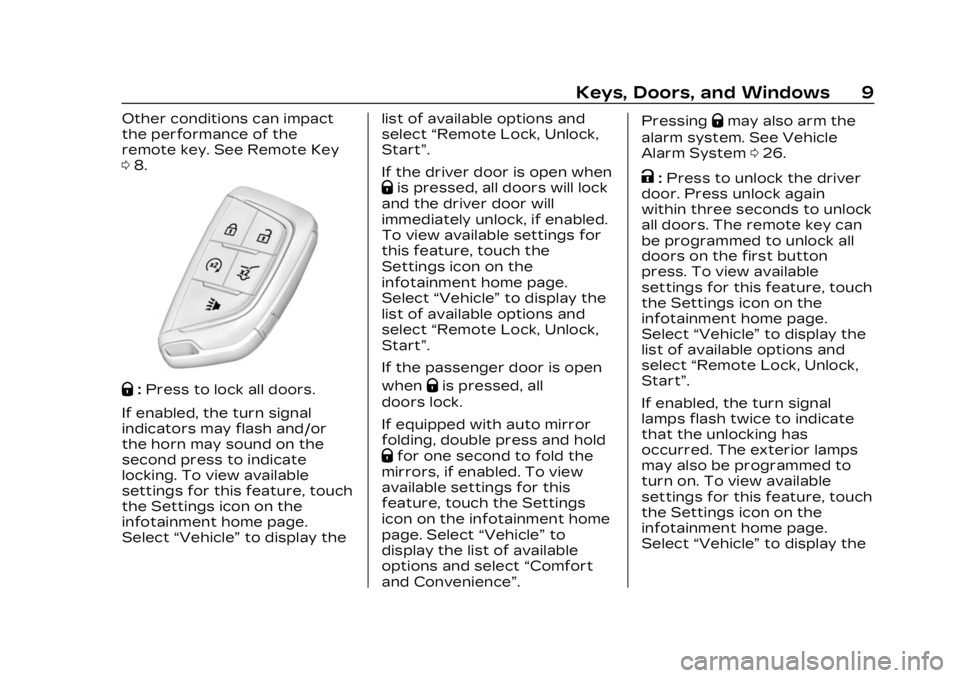
Q:Press to lock all doors.
If enabled, the turn signal
indicators may flash and/or
the horn may sound on the
second press to indicate
locking. To view available
settings for this feature, touch
the Settings icon on the
infotainment home page.
Select “Vehicle” to display the list of available options and
select
“Remote Lock, Unlock,
Start”.
If the driver door is open when
Qis pressed, all doors will lock
and the driver door will
immediately unlock, if enabled.
To view available settings for
this feature, touch the
Settings icon on the
infotainment home page.
Select “Vehicle” to display the
list of available options and
select “Remote Lock, Unlock,
Start”.
If the passenger door is open
when
Qis pressed, all
doors lock.
If equipped with auto mirror
folding, double press and hold
Qfor one second to fold the
mirrors, if enabled. To view
available settings for this
feature, touch the Settings
icon on the infotainment home
page. Select “Vehicle”to
display the list of available
options and select “Comfort
and Convenience”. Pressing
Qmay also arm the
alarm system. See Vehicle
Alarm System 026.
K:Press to unlock the driver
door. Press unlock again
within three seconds to unlock
all doors. The remote key can
be programmed to unlock all
doors on the first button
press. To view available
settings for this feature, touch
the Settings icon on the
infotainment home page.
Select “Vehicle” to display the
list of available options and
select “Remote Lock, Unlock,
Start”.
If enabled, the turn signal
lamps flash twice to indicate
that the unlocking has
occurred. The exterior lamps
may also be programmed to
turn on. To view available
settings for this feature, touch
the Settings icon on the
infotainment home page.
Select “Vehicle” to display the
Page 11 of 424

Cadillac Lyriq Owner Manual (GMNA-Localizing-U.S./Canada-15644413) -
2023 - CRC - 2/23/22
10 Keys, Doors, and Windows
list of available options and
select“Remote Lock, Unlock,
Start”.
If equipped with auto mirror
unfolding, double press and
hold
Kuntil the mirrors fully
open. To view available
settings for this feature, touch
the Settings icon on the
infotainment home page.
Select “Vehicle” to display the
list of available options and
select “Comfort and
Convenience”.
Pressing
Kwill disarm the
alarm system. See Vehicle
Alarm System 026.
b:Press twice to open or
close the liftgate. Press once
to stop the liftgate from
moving. The vehicle must be in
P (Park).
7: Press and release one time
to initiate vehicle locator. The
exterior lamps flash and the
horn chirps three times. Press and hold
7for at least
three seconds to sound the
panic alarm. The horn sounds
and the turn signals flash for
about 30 seconds or until
7is
pressed again or the vehicle is
started.
/: Press and releaseQand
then immediately press and
hold
/for at least
four seconds to start the
vehicle's heating or air
conditioning systems and rear
window defogger from outside
the vehicle using the remote
key. See Remote Start 015.
Keyless Access Operation
The Keyless Access system
allows the doors and liftgate
to be unlocked without
pressing the remote key
button. The remote key must
be within 1 m (3 ft) of the
liftgate or door being opened.
Doors can be programmed to
the lock after exiting the
vehicle through Passive locking or delayed locking. The
remote key can also be used
to lock the doors
Keyless Access can be
programmed to unlock all
doors on the first unlock
button press from the driver
door. To view available
settings for this feature, touch
the Settings icon on the
infotainment home page.
Select
“Vehicle” to display the
list of available options and
select “Remote Lock, Unlock,
Start”.
Keyless Unlocking from
the Driver Door
When the doors are locked
and the remote key is within
1 m (3 ft) of the driver door
handle, pressing the large end
of the unlock button on the
driver door handle will unlock
and unlatch the driver door.
Page 13 of 424

Cadillac Lyriq Owner Manual (GMNA-Localizing-U.S./Canada-15644413) -
2023 - CRC - 2/23/22
12 Keys, Doors, and Windows
Select“Vehicle” to display the
list of available options and
select “Power Door Locks”.
Temporary Disable of
Passive Locking
Temporarily disable passive
locking by pressing and
holding
Kon the interior door
switch with a door open for at
least four seconds, or until
three chimes are heard.
Passive locking will then
remain disabled until
Qon the
interior door is pressed,
or until the vehicle is started.
Remote Left In Vehicle Alert
When the vehicle is turned off
and a remote key is left in the
vehicle, the horn will chirp
three times after all doors are
closed.
To view available settings for
this feature, touch the
Settings icon on the
infotainment home page.
Select “Vehicle” to display the list of available options and
select
“Remote Lock, Unlock,
Start”.
Remote Removed From
Vehicle Alert
If the vehicle is on with a door
open, and then all doors are
closed, the vehicle will check
for remote keys inside. If a
remote key is not detected,
the Driver Information Center
(DIC) will display NO KEY
FOUND and the horn will chirp
three times.
This occurs only once each
time the vehicle is driven.
To view available settings for
this feature, touch the
Settings icon on the
infotainment home page.
Select “Vehicle” to display the
list of available options and
select “Remote Lock, Unlock,
Start”.
Keyless Liftgate Opening
Press the touch pad on the
underside of the liftgate glass
and lift up to open if the remote key is within 1 m (3 ft)
and the doors are locked.
If the doors are unlocked, the
remote key is not required to
open the liftgate. See Liftgate
0
21.
Key Access
To access a vehicle with a
weak remote key battery, see
Door Locks 017.
Programming Remote
Keys to the Vehicle
Only remote keys programmed
to the vehicle will work. If a
remote key is lost or stolen, a
replacement can be purchased
and programmed through your
dealer. The vehicle can be
reprogrammed so that lost or
stolen remote keys no longer
work. Any remaining remote
keys will need to be
reprogrammed. Each vehicle
can have up to eight remote
keys matched to it.
Page 20 of 424

Cadillac Lyriq Owner Manual (GMNA-Localizing-U.S./Canada-15644413) -
2023 - CRC - 2/23/22
Keys, Doors, and Windows 19
WhenQis pressed on the
power door lock switch while
the door is open, a chime will
sound three times indicating
delayed locking is active.
The doors will lock
automatically five seconds
after all doors are closed. If a
door is reopened before that
time, the five-second timer will
reset when all doors are
closed again.
Press
Qon the door lock
switch again or press
Qon the
remote key to lock the doors
immediately.
To view available settings for
this feature, touch the
Settings icon on the
infotainment home page.
Select “Vehicle” to display the
list of available options and
select “Power Door Locks”.
Automatic Door
Locks
The doors will lock
automatically when all doors
are closed, the vehicle is on,
and the shift switch is out of
P (Park).
If a vehicle door is unlocked
and then opened and closed,
the doors will lock either when
your foot is removed from the
brake or the vehicle speed
becomes faster than
13 km/h (8 mph).
To unlock the doors:
.PressKon a door.
.Shift the vehicle into
P (Park).
Automatic door unlocking can
be programmed. To view
available settings for this
feature, touch the Settings
icon on the infotainment home
page. Select “Vehicle”to
display the list of available
options and select “Power
Door Locks”.
Lockout Protection
This feature protects you from
locking remote keys in the
vehicle.
When the lock button is
pressed and the vehicle is on,
with the driver door open, all
of the doors will lock and then
the driver door will unlock.
If the vehicle is off and locking
is requested while a door is
open, when all doors are
closed the vehicle will check
for remote keys inside. If a
remote key is detected and
the number of remote keys
inside has not reduced, the
driver door will unlock and the
horn will sound three times.
This can be manually
overridden by pressing and
holding
Qon the power door
lock switch.
Page 27 of 424
Cadillac Lyriq Owner Manual (GMNA-Localizing-U.S./Canada-15644413) -
2023 - CRC - 2/23/22
26 Keys, Doors, and Windows
Vehicle Security
This vehicle has
theft-deterrent features;
however, they do not make
the vehicle impossible to steal.
Vehicle Alarm System
Arming the Alarm System
1. Turn off the vehicle.
2. Lock the vehicle in one ofthree ways:
.Use the remote key.
.Use the Keyless Access
system.
.With a door open, pressQ
on the interior of
the door.
3. After 30 seconds the alarm system will arm, and the
indicator light will begin to
slowly flash. Pressing
Qon
the remote key a second
time will bypass the
30-second delay and
immediately arm the alarm
system. The vehicle alarm system will
not arm if the doors are locked
with the mechanical key.
If the driver door is opened
without first unlocking with
the remote key, the horn will
chirp and the lights will flash
to indicate pre-alarm. If the
vehicle is not started, or the
door is not unlocked by
pressing
Kon the remote key
during the 10-second
pre-alarm, the alarm will be
activated.
The alarm will also be
activated if a passenger door,
the tailgate, or the hood is
opened without first disarming
the system. When the alarm is
activated, the turn signals
flash and the horn sounds for
about 30 seconds. The alarm
system will then re-arm to
monitor for the next
unauthorized event.
Disarming the Alarm
System
To disarm the alarm system or
turn off the alarm if it has
been activated:
.PressKon the remote key.
.Unlock the vehicle using the
Keyless Access system.
.Start the vehicle.
To avoid setting off the alarm
by accident:
.Lock the vehicle after all
occupants have exited.
.Always unlock a door with
the remote key, or use the
Keyless Access system.
Unlocking the driver door
with the mechanical key will
not disarm the system or
turn off the alarm.
Page 28 of 424
Cadillac Lyriq Owner Manual (GMNA-Localizing-U.S./Canada-15644413) -
2023 - CRC - 2/23/22
Keys, Doors, and Windows 27
How to Detect a Tamper
Condition
IfKis pressed on the remote
key and the horn chirps three
times, an alarm occurred
previously while the alarm
system was armed.
If the alarm has been
activated, a message will
appear on the Driver
Information Center (DIC).
Immobilizer
See Radio Frequency
Statement 0395.
Immobilizer Operation
This vehicle has a passive
theft-deterrent system.
The system does not have to
be manually armed or
disarmed.
The vehicle is automatically
immobilized when the vehicle
is turned off. The immobilization system is
disarmed when the vehicle is
turned and a valid remote key
is present in the vehicle.
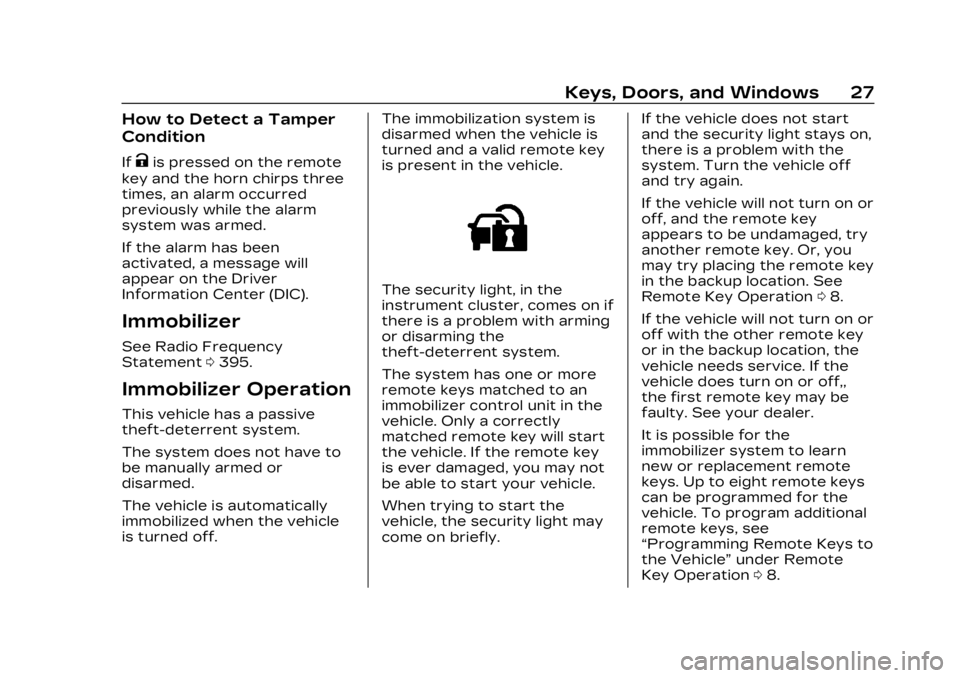
The security light, in the
instrument cluster, comes on if
there is a problem with arming
or disarming the
theft-deterrent system.
The system has one or more
remote keys matched to an
immobilizer control unit in the
vehicle. Only a correctly
matched remote key will start
the vehicle. If the remote key
is ever damaged, you may not
be able to start your vehicle.
When trying to start the
vehicle, the security light may
come on briefly.If the vehicle does not start
and the security light stays on,
there is a problem with the
system. Turn the vehicle off
and try again.
If the vehicle will not turn on or
off, and the remote key
appears to be undamaged, try
another remote key. Or, you
may try placing the remote key
in the backup location. See
Remote Key Operation
08.
If the vehicle will not turn on or
off with the other remote key
or in the backup location, the
vehicle needs service. If the
vehicle does turn on or off,,
the first remote key may be
faulty. See your dealer.
It is possible for the
immobilizer system to learn
new or replacement remote
keys. Up to eight remote keys
can be programmed for the
vehicle. To program additional
remote keys, see
“Programming Remote Keys to
the Vehicle” under Remote
Key Operation 08.
Page 99 of 424
Cadillac Lyriq Owner Manual (GMNA-Localizing-U.S./Canada-15644413) -
2023 - CRC - 2/23/22
98 Instruments and Controls
Instruments and
Controls
Controls
Steering WheelAdjustment . . . . . . . . . . . . . . . . . . 99
Heated Steering Wheel . . . 99
Horn . . . . . . . . . . . . . . . . . . . . . . . . . . . 100
Pedestrian Safety Signal . . . . . . . . . . . . . . . . . . . . . . . . 100
Windshield Wiper/ Washer . . . . . . . . . . . . . . . . . . . . . 100
Compass . . . . . . . . . . . . . . . . . . . . . 102
Clock . . . . . . . . . . . . . . . . . . . . . . . . . . . 102
Power Outlets . . . . . . . . . . . . . . 102
Wireless Charging . . . . . . . . . 104
Warning Lights, Gauges,
and Indicators
Warning Lights, Gauges, and Indicators . . . . . . . . . . . . . 108
Instrument Cluster . . . . . . . . 108
Speedometer . . . . . . . . . . . . . . . . 110
Odometer . . . . . . . . . . . . . . . . . . . . . 110
Trip Odometer . . . . . . . . . . . . . . 110
Battery Gauge (High Voltage) . . . . . . . . . . . . . . . . . . . . . 110
Power Indicator Gauge . . . . 111
Seat Belt Reminders . . . . . . . 112 Airbag Readiness Light . . . 112
Passenger Airbag Status
Indicator . . . . . . . . . . . . . . . . . . . . . 113
Charging System Light (12-Volt Battery) . . . . . . . . . . . 114
Low State of Charge Light . . . . . . . . . . . . . . . . . . . . . . . . . . 114
Charge Cord Connected Light . . . . . . . . . . . . . . . . . . . . . . . . . . 114
Battery Fault Light . . . . . . . . . 115
Propulsion Power is Limited Light . . . . . . . . . . . . . . . 115
Service Vehicle Soon Light . . . . . . . . . . . . . . . . . . . . . . . . . . 115
Brake System Warning Light . . . . . . . . . . . . . . . . . . . . . . . . . . 115
Electric Parking Brake Light . . . . . . . . . . . . . . . . . . . . . . . . . . 116
Service Electric Parking Brake Light . . . . . . . . . . . . . . . . . 116
Antilock Brake System (ABS) Warning Light . . . . . 117
Automatic Vehicle Hold (AVH) Light . . . . . . . . . . . . . . . . . . 117
Lane Keep Assist (LKA) Light . . . . . . . . . . . . . . . . . . . . . . . . . . 117
Automatic Emergency Braking (AEB) Disabled
Light . . . . . . . . . . . . . . . . . . . . . . . . . . 118 Vehicle Ahead
Indicator . . . . . . . . . . . . . . . . . . . . . 118
Pedestrian Ahead Indicator . . . . . . . . . . . . . . . . . . . . . 118
Traction Off Light . . . . . . . . . . 119
StabiliTrak OFF Light . . . . . 119
Traction Control System
(TCS)/StabiliTrak
Light . . . . . . . . . . . . . . . . . . . . . . . . . . 119
Driver Mode Control Light . . . . . . . . . . . . . . . . . . . . . . . . . 120
Tire Pressure Light . . . . . . . 120
Security Light . . . . . . . . . . . . . . . 121
Vehicle Ready Light . . . . . . . . 121
One-Pedal Driving Light . . . . . . . . . . . . . . . . . . . . . . . . . . 121
High-Beam On Light . . . . . . . 121
Lamps On Reminder . . . . . . 122
Cruise Control Light . . . . . . 122
Door Ajar Light . . . . . . . . . . . . . 122Information Displays
Charging . . . . . . . . . . . . . . . . . . . . . . 123
Driver Information Center (DIC) . . . . . . . . . . . . . . . . 132
Vehicle Information . . . . . . . . 133
Vehicle Messages
Vehicle Messages . . . . . . . . . 134
Propulsion Power Messages . . . . . . . . . . . . . . . . . . . 135
Page 101 of 424
Cadillac Lyriq Owner Manual (GMNA-Localizing-U.S./Canada-15644413) -
2023 - CRC - 2/23/22
100 Instruments and Controls
Automatic Heated Steering
Wheel
The heated steering wheel
may turn on during a remote
start along with the heated
seats when it is cold outside.
The heated steering wheel
indicator may come on in
remote start.
The heated steering wheel will
turn on when the auto heated
seat is activated. The heated
steering wheel indicator will
display the state of the
steering wheel heat.
See Heated and Ventilated
Front Seats045.
To turn this feature on or off,
select Settings > Vehicle >
Comfort and Convenience >
Heated Steering Wheel >
Select ON or OFF.
Horn
To sound the horn, pressa
on the steering wheel.
Pedestrian Safety
Signal
The vehicle is equipped with
automatic sound generation.
The automatic sound is
generated to indicate the
vehicle presence to
pedestrians. The sound
changes if the vehicle is
speeding up or slowing down.
It is activated when the vehicle
is shifted into a forward gear,
N (Neutral), or R (Reverse), up
to 34 km/h (21 mph).
Windshield Wiper/
Washer
This vehicle is equipped with
Rainsense and a sensor near
the top center of the
windshield detects the amount
of water on the windshield and
controls the frequency of the
windshield wiper based on the
current sensitivity setting. Keep this area of the
windshield clear of debris to
allow for best system
performance.
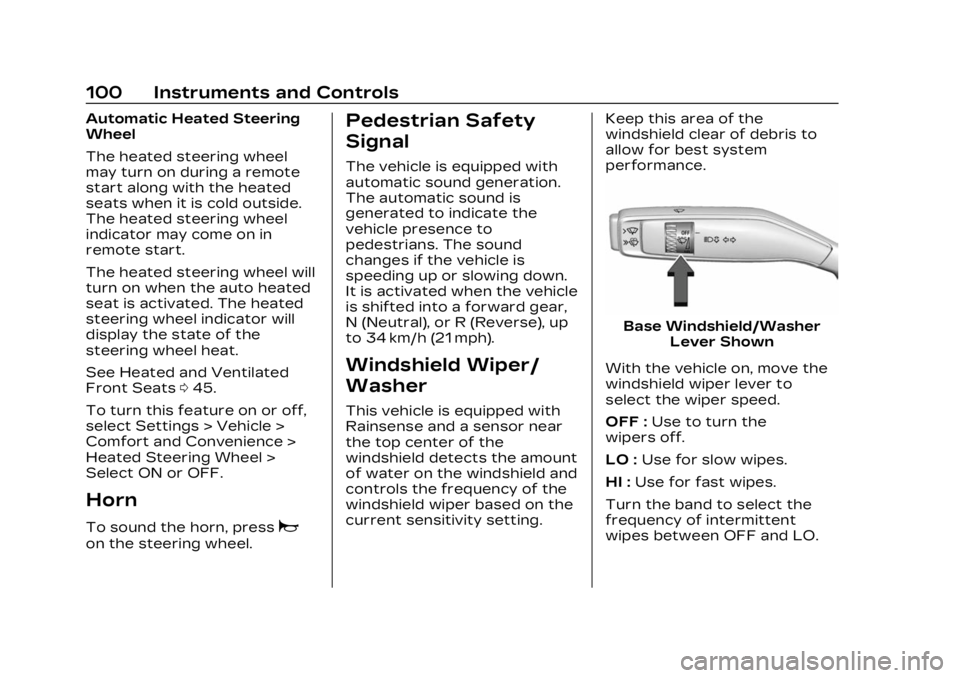
Base Windshield/Washer
Lever Shown
With the vehicle on, move the
windshield wiper lever to
select the wiper speed.
OFF : Use to turn the
wipers off.
LO : Use for slow wipes.
HI : Use for fast wipes.
Turn the band to select the
frequency of intermittent
wipes between OFF and LO.
Page 132 of 424
Cadillac Lyriq Owner Manual (GMNA-Localizing-U.S./Canada-15644413) -
2023 - CRC - 2/23/22
Instruments and Controls 131
according to any existing
schedules. The Home Charge
Location can be changed or
deleted at this screen.
The wireless service and GPS
satellite technologies must be
available and operating for
features to function properly.
These systems may not
operate if the battery is
disconnected, or if the vehicle
has been off for an extended
period of time. If GPS is
unavailable, a message
displays on the infotainment
screen. GPS functionality may
resume after the next time
you drive the vehicle.
Notifications
This section contains on/off
preferences for multiple
notifications triggered during
the Charging session.
Charge Status Feedback :
Provides an audible
notification through horn
chirps that accompany
changes in the charging
status.Charge Cord Unplugged
Alert :
When on and your
vehicle is locked, your vehicle
will honk the horn and flash
the lights if charge cord
becomes unplugged.
Charge Power Loss Alert :
When on, your vehicle will
honk the horn and flash the
lights if Charging power is
cut off.
DC Fast Charge Battery
Conditioning
If equipped, adjusts the
battery to the optimal
temperature for quicker DC
Fast Charging. This should be
done before charging at a DC
Fast Charger.
Depending on the outside and
battery temperature, battery
conditioning could take longer
to reach the optimal
temperature. While en route to a DC fast
charge station using Google
Maps, DC Fast Charge
Conditioning happens
automatically.
Cabin Pre-Conditioning
Temperature
Allows for the preferred cabin
temperature to be set. During
a planned charging session at
the vehicle's Home Charge
Location, the vehicle cabin is
warmed or cooled to this
temperature if set to ON in
either the Charge Later
screen, or in an active
Schedule.
Preferred Charge Times
Allows preferred charge time
windows to be enabled for the
Home Charge Location during
both weekday and weekend
planned charging sessions.
It does so whether the vehicle
is set to Charge Later,
or observing a scheduled
charge. This allows for
charging at a lower cost by
prioritizing charging during the