power steering CADILLAC LYRIC 2023 Owners Manual
[x] Cancel search | Manufacturer: CADILLAC, Model Year: 2023, Model line: LYRIC, Model: CADILLAC LYRIC 2023Pages: 424, PDF Size: 4.76 MB
Page 7 of 424

Cadillac Lyriq Owner Manual (GMNA-Localizing-U.S./Canada-15644413) -
2023 - CRC - 3/2/22
6 Introduction
1. Air Vents0189.
2. Turn Signal Lever. See Turn and Lane-Change Signals
0146.
Windshield Wiper/Washer
0 100.
3. Shift Lever. See Electric Drive Unit 0211.
4. Light Sensor. See Automatic Headlamp
System 0143.
5. Infotainment Display. See Introduction 0150.
Instrument Cluster 0108.
6. Instrument Panel Fuse Block 0331.
7. Glove Box 094.
8. Dual Automatic Climate Control System 0185.
9. Sliding Storage Tray. See Instrument Panel Storage
094 (If Equipped).
10. Lower Storage. See Instrument Panel Storage
094 (If Equipped).
11. Wireless Charging 0104.
12. Infotainment Controls. 13. Power Button
0206 (Out
of View).
14. Radio Controls. See Steering Wheel Controls
0152.
15. Horn 0100.
16. Steering Wheel Adjustment 099 (Out of View).
17. Adaptive Cruise Control (Advanced) 0225.
Super Cruise 0236.
Forward Collision Alert
(FCA) System 0270 (If
Equipped).
Heated Steering Wheel
0 99.
18. Hood Release. See Hood 0310.
19. Electric Parking Brake 0217.
Lane Keep Assist (LKA)
0 280 (If Equipped).
Automatic Vehicle Hold
(AVH) 0219.
Instrument Panel
Illumination Control 0146.
Page 99 of 424
Cadillac Lyriq Owner Manual (GMNA-Localizing-U.S./Canada-15644413) -
2023 - CRC - 2/23/22
98 Instruments and Controls
Instruments and
Controls
Controls
Steering WheelAdjustment . . . . . . . . . . . . . . . . . . 99
Heated Steering Wheel . . . 99
Horn . . . . . . . . . . . . . . . . . . . . . . . . . . . 100
Pedestrian Safety Signal . . . . . . . . . . . . . . . . . . . . . . . . 100
Windshield Wiper/ Washer . . . . . . . . . . . . . . . . . . . . . 100
Compass . . . . . . . . . . . . . . . . . . . . . 102
Clock . . . . . . . . . . . . . . . . . . . . . . . . . . . 102
Power Outlets . . . . . . . . . . . . . . 102
Wireless Charging . . . . . . . . . 104
Warning Lights, Gauges,
and Indicators
Warning Lights, Gauges, and Indicators . . . . . . . . . . . . . 108
Instrument Cluster . . . . . . . . 108
Speedometer . . . . . . . . . . . . . . . . 110
Odometer . . . . . . . . . . . . . . . . . . . . . 110
Trip Odometer . . . . . . . . . . . . . . 110
Battery Gauge (High Voltage) . . . . . . . . . . . . . . . . . . . . . 110
Power Indicator Gauge . . . . 111
Seat Belt Reminders . . . . . . . 112 Airbag Readiness Light . . . 112
Passenger Airbag Status
Indicator . . . . . . . . . . . . . . . . . . . . . 113
Charging System Light (12-Volt Battery) . . . . . . . . . . . 114
Low State of Charge Light . . . . . . . . . . . . . . . . . . . . . . . . . . 114
Charge Cord Connected Light . . . . . . . . . . . . . . . . . . . . . . . . . . 114
Battery Fault Light . . . . . . . . . 115
Propulsion Power is Limited Light . . . . . . . . . . . . . . . 115
Service Vehicle Soon Light . . . . . . . . . . . . . . . . . . . . . . . . . . 115
Brake System Warning Light . . . . . . . . . . . . . . . . . . . . . . . . . . 115
Electric Parking Brake Light . . . . . . . . . . . . . . . . . . . . . . . . . . 116
Service Electric Parking Brake Light . . . . . . . . . . . . . . . . . 116
Antilock Brake System (ABS) Warning Light . . . . . 117
Automatic Vehicle Hold (AVH) Light . . . . . . . . . . . . . . . . . . 117
Lane Keep Assist (LKA) Light . . . . . . . . . . . . . . . . . . . . . . . . . . 117
Automatic Emergency Braking (AEB) Disabled
Light . . . . . . . . . . . . . . . . . . . . . . . . . . 118 Vehicle Ahead
Indicator . . . . . . . . . . . . . . . . . . . . . 118
Pedestrian Ahead Indicator . . . . . . . . . . . . . . . . . . . . . 118
Traction Off Light . . . . . . . . . . 119
StabiliTrak OFF Light . . . . . 119
Traction Control System
(TCS)/StabiliTrak
Light . . . . . . . . . . . . . . . . . . . . . . . . . . 119
Driver Mode Control Light . . . . . . . . . . . . . . . . . . . . . . . . . 120
Tire Pressure Light . . . . . . . 120
Security Light . . . . . . . . . . . . . . . 121
Vehicle Ready Light . . . . . . . . 121
One-Pedal Driving Light . . . . . . . . . . . . . . . . . . . . . . . . . . 121
High-Beam On Light . . . . . . . 121
Lamps On Reminder . . . . . . 122
Cruise Control Light . . . . . . 122
Door Ajar Light . . . . . . . . . . . . . 122Information Displays
Charging . . . . . . . . . . . . . . . . . . . . . . 123
Driver Information Center (DIC) . . . . . . . . . . . . . . . . 132
Vehicle Information . . . . . . . . 133
Vehicle Messages
Vehicle Messages . . . . . . . . . 134
Propulsion Power Messages . . . . . . . . . . . . . . . . . . . 135
Page 100 of 424
Cadillac Lyriq Owner Manual (GMNA-Localizing-U.S./Canada-15644413) -
2023 - CRC - 2/23/22
Instruments and Controls 99
Vehicle SpeedMessages . . . . . . . . . . . . . . . . . . . 136
Universal Remote System
Universal RemoteSystem . . . . . . . . . . . . . . . . . . . . . . 136
Universal Remote System Programming . . . . . . . . . . . . . . 136
Universal Remote System Operation . . . . . . . . . . . . . . . . . . . 138
Controls
Steering Wheel
Adjustment
Power Tilt and Telescoping
Steering Wheel
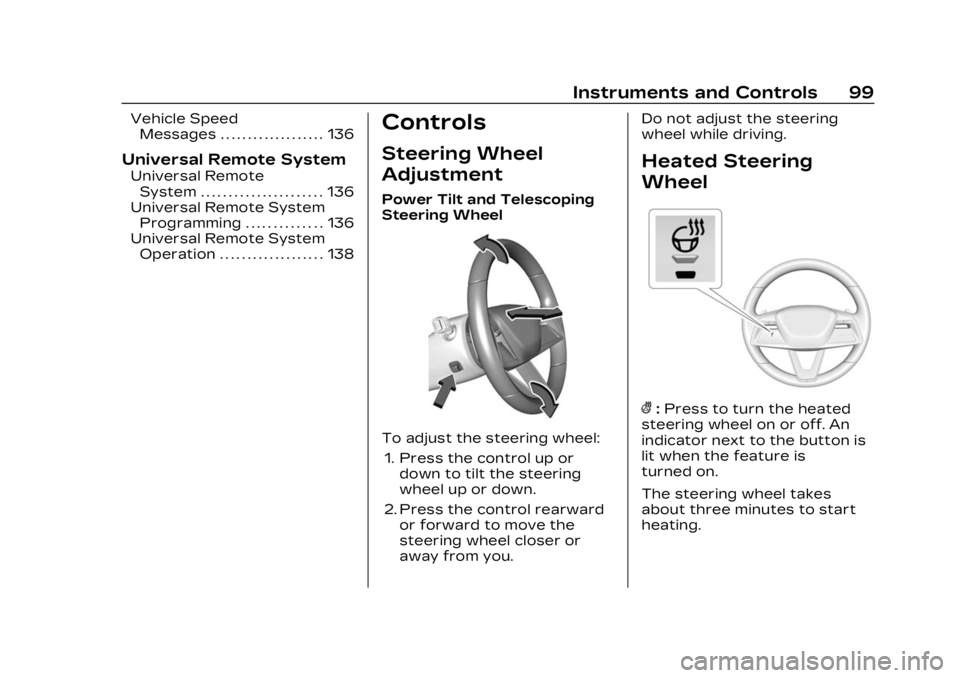
To adjust the steering wheel:
1. Press the control up or down to tilt the steering
wheel up or down.
2. Press the control rearward or forward to move the
steering wheel closer or
away from you. Do not adjust the steering
wheel while driving.
Heated Steering
Wheel
(:
Press to turn the heated
steering wheel on or off. An
indicator next to the button is
lit when the feature is
turned on.
The steering wheel takes
about three minutes to start
heating.
Page 136 of 424
Cadillac Lyriq Owner Manual (GMNA-Localizing-U.S./Canada-15644413) -
2023 - CRC - 2/23/22
Instruments and Controls 135
by pressing the thumbwheel.
The messages that require
immediate action cannot be
cleared until that action is
performed.
All messages should be taken
seriously; clearing the
message does not correct the
problem.
If a SERVICE message
appears, see your dealer.
Follow the instructions given
in the messages. The system
displays messages regarding
the following topics:
.Service Messages
.Fluid Levels
.Vehicle Security
.Brakes
.Ride Control Systems
.Driver Assistance Systems
.Cruise Control
.Lighting and Bulb
Replacement
.Wiper/Washer Systems
.Doors and Windows
.Seat Belts
.Airbag Systems
.Propulsion
.Tire Pressure
.Battery
.Steering
Propulsion Power
Messages
REDUCED
ACCELERATION DRIVE
WITH CARE
This message displays when
the vehicle's propulsion power
is reduced. A reduction in
propulsion power can affect
the vehicle's ability to
accelerate. If this message is
on, but there is no observed
reduction in performance,
proceed to your destination.
Under certain conditions, the
performance may be reduced
the next time the vehicle is
driven. The vehicle may be
driven while this message is
on, but maximum acceleration
and speed may be reduced.
Anytime this message stayson, or displays repeatedly, the
vehicle should be taken to
your dealer for service as
soon as possible.
This message can be displayed
when the high voltage battery
charge level is low. The vehicle
is limiting power to maximize
range.
Under certain operating
conditions propulsion will be
disabled. Try restarting after
the vehicle has been off for
two minutes.
PROPULSION POWER
REDUCED DUE TO
TEMPERATURE
This message displays when
the vehicle is on, the battery
temperature is low, and when
the vehicle’s performance is
limited. The duration of the
limited vehicle performance
depends, in part, on the high
voltage battery charge level.
If the high voltage battery
charge level is relatively high,
as the vehicle is driven, the
Page 152 of 424
Cadillac Lyriq Owner Manual (GMNA-Localizing-U.S./Canada-15644413) -
2023 - CRC - 2/23/22
Infotainment System 151
features are also available
through the instrument cluster
and steering wheel controls.
Before driving:
.Become familiar with the
operation, center stack
controls, steering wheel
controls, and infotainment
display.
.Set up the audio by
presetting favorite stations,
setting the tone, and
adjusting the speakers.
.Set up phone numbers in
advance so they can be
called easily by pressing a
single control or by using a
single voice command.
See Distracted Driving 0195.
Overview
Infotainment System
The infotainment system is
controlled by using the
infotainment display,
multifunction controller (MCF) on the center console,
steering wheel controls, and
voice recognition, if available.
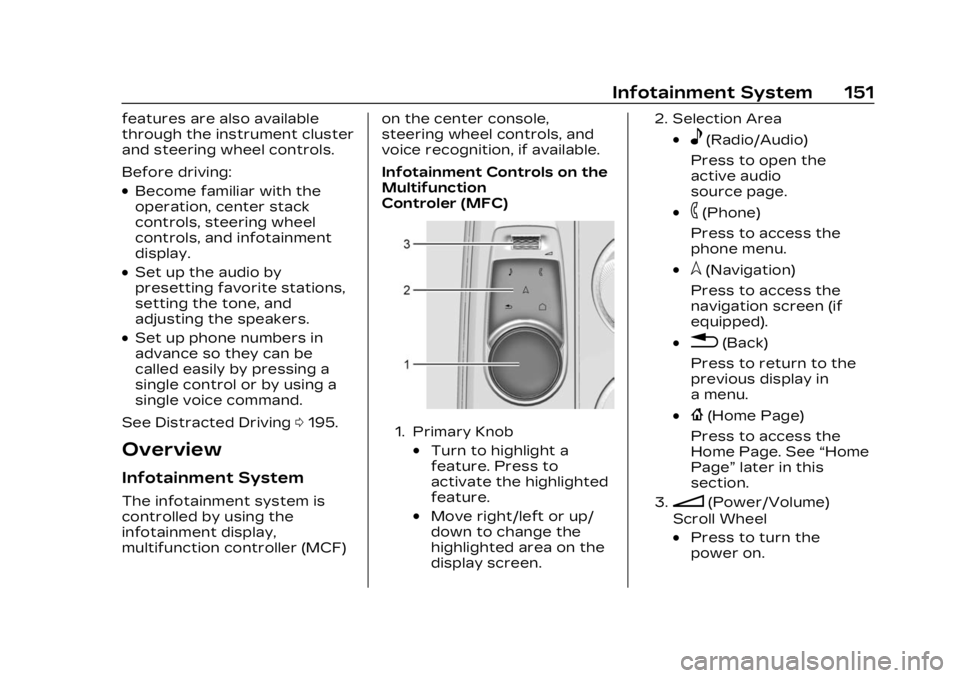
Infotainment Controls on the
Multifunction
Controler (MFC)
1. Primary Knob
.Turn to highlight a
feature. Press to
activate the highlighted
feature.
.Move right/left or up/
down to change the
highlighted area on the
display screen.
2. Selection Area
.e(Radio/Audio)
Press to open the
active audio
source page.
.6(Phone)
Press to access the
phone menu.
.l(Navigation)
Press to access the
navigation screen (if
equipped).
.0(Back)
Press to return to the
previous display in
a menu.
.{(Home Page)
Press to access the
Home Page. See “Home
Page” later in this
section.
3.n(Power/Volume)
Scroll Wheel
.Press to turn the
power on.
Page 153 of 424
Cadillac Lyriq Owner Manual (GMNA-Localizing-U.S./Canada-15644413) -
2023 - CRC - 2/23/22
152 Infotainment System
.Press and hold when
the system is on to turn
the power off.
.Press to mute/unmute
the system when on.
.Scroll up or down to
increase or decrease
the volume.
Home Page
The Home Page is where
vehicle application icons are
accessed. Some applications
are disabled when the vehicle
is moving.
Swipe left or right across the
display or use the MFC to
move the home page. Move
the knob right/left to change
the page or touch on one of
the page count indicators at
the bottom of the screen to
jump to a specific page.
Managing Home Page Icons1. Touch and hold any of the Home Page icons to enter
edit mode. Edit mode is not
available when the vehicle is
moving. 2. Continue holding the icon
and drag it to the desired
position.
3. Release your finger to drop the icon in the desired
position.
4. To move an application to another page, drag the icon
to the edge of the display
toward the desired page
5. Continue dragging and dropping application icons
as desired.
6. Touch Done to save changes or Cancel to not
save and exit edit mode.
There will always be 10 icons
per page except on the last
page. If an icon is moved from
the first page to the second,
then that icon from the
second page will replace the
one removed from the first.
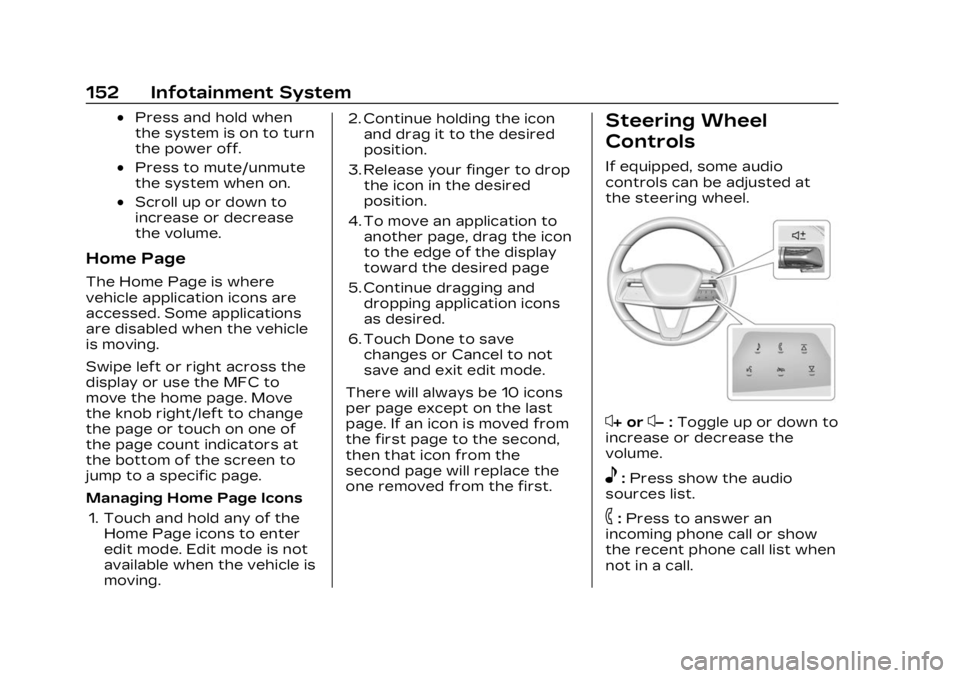
Steering Wheel
Controls
If equipped, some audio
controls can be adjusted at
the steering wheel.
x+ orx− :Toggle up or down to
increase or decrease the
volume.
e: Press show the audio
sources list.
6: Press to answer an
incoming phone call or show
the recent phone call list when
not in a call.
Page 162 of 424
Cadillac Lyriq Owner Manual (GMNA-Localizing-U.S./Canada-15644413) -
2023 - CRC - 2/23/22
Infotainment System 161
3. Touch Source and selectthe USB icon or source
option.
Use the following when
playing an active USB source:
p: Touch to play the current
media source.
j: Touch to pause playback of
the current media source.
7:
.Touch to seek the beginning
of the current or previous
track.
6:
.Touch to seek the next
track.
Shuffle : Touch the shuffle
icon to play music in random
order.
USB Sound Menu
See “Infotainment System
Sound Menu” under AM-FM
Radio 0156. File System and Naming
File systems supported by the
USB may include:
.FAT32
.NTFS
The songs, artists, albums, and
genres are taken from the
file’s song information and are
only displayed if present. The
radio displays the file name as
the track name if the song
information is not available.
Media Playback and Mute
USB playback will be paused if
the system is muted. If the
steering wheel mute control is
pressed again, playback will
resume.
If the source is changed while
in mute, playback resumes and
audio will unmute.
Bluetooth Audio
Music may be played from a
paired Bluetooth device. See
Bluetooth (Overview) 0168 or Bluetooth (Pairing and Using a
Phone)
0170 for help pairing a
device.
Volume and song selection
may be controlled by using the
infotainment controls or the
mobile device. If Bluetooth is
selected and no volume is
present, check the volume
setting on both your mobile
device and the infotainment
system.
Music can be launched by
touching Bluetooth from the
recent sources list on the left
of the display or by touching
the More option and then
touching the Bluetooth device.
To play music via Bluetooth:
1. Power on the device, and pair to connect the device.
2. Once paired, touch Audio from the Home Page, then
touch Source and touch the
Bluetooth device.
Page 193 of 424

Cadillac Lyriq Owner Manual (GMNA-Localizing-U.S./Canada-15644413) -
2023 - CRC - 2/23/22
192 Driving and Operating
Driving and
Operating
Driving Information
Driving for Better EnergyEfficiency . . . . . . . . . . . . . . . . . . . 193
Distracted Driving . . . . . . . . . 195
Defensive Driving . . . . . . . . . . 196
Impaired Driving . . . . . . . . . . . . 196
Control of a Vehicle . . . . . . . 196
Braking . . . . . . . . . . . . . . . . . . . . . . . . 196
Steering . . . . . . . . . . . . . . . . . . . . . . . 197
Off-Road Recovery . . . . . . . . 198
Loss of Control . . . . . . . . . . . . . 198
Driving on Wet Roads . . . . 199
Hill and Mountain Roads . . . . . . . . . . . . . . . . . . . . . . . 200
Winter Driving . . . . . . . . . . . . . . 201
If the Vehicle Is Stuck . . . . 202
Vehicle Load Limits . . . . . . . 202
Starting and Operating
New Vehicle Break-In . . . . 206
Power Button . . . . . . . . . . . . . . 206
Starting and Stopping the Vehicle . . . . . . . . . . . . . . . . 208
Retained Accessory Power (RAP) . . . . . . . . . . . . . . 209
Shifting Into Park . . . . . . . . . . 209 Shifting out of Park . . . . . . . 210
Extended Parking . . . . . . . . . . 210
Electric Drive Unit
Electric Drive Unit . . . . . . . . . . 211
One-Pedal Driving . . . . . . . . . 214
Drive Systems
All-Wheel Drive . . . . . . . . . . . . . 215
Brakes
Electric Brake Boost . . . . . . 216
Antilock Brake
System (ABS) . . . . . . . . . . . . . . 216
Electric Parking Brake . . . . 217
Brake Assist . . . . . . . . . . . . . . . . . 218
Hill Start Assist (HSA) . . . . 218
Automatic Vehicle Hold (AVH) . . . . . . . . . . . . . . . . . . 219
Regenerative Braking . . . . 220
Ride Control Systems
Traction Control/ Electronic Stability
Control . . . . . . . . . . . . . . . . . . . . . . 221
Driver Mode Control . . . . . . 223
Cruise Control
Adaptive Cruise Control (Advanced) . . . . . . . . . . . . . . . . . 225
Super Cruise . . . . . . . . . . . . . . . . 236
Driver Assistance
Systems
Driver Assistance Systems . . . . . . . . . . . . . . . . . . . . 255
Assistance Systems for Parking or Backing . . . . . . 257
Rear Vision Camera (RVC) . . . . . . . . . . . . . 257
Surround Vision System . . . . . . . . . . . . . . . . . . . . . . 258
Park Assist . . . . . . . . . . . . . . . . . . 260
Automatic Parking Assist (APA) . . . . . . . . . . . . . . . 262
Reverse Automatic Braking (RAB) . . . . . . . . . . . . . 267
Rear Pedestrian Alert . . . . 268
Rear Cross Traffic Alert (RCTA) System . . . . . . . . . . . 269
Assistance Systems for Driving . . . . . . . . . . . . . . . . . . . . . . 270
Forward Collision Alert (FCA) System . . . . . . . . . . . . . 270
Automatic Emergency Braking (AEB) . . . . . . . . . . . . . 273
Front Pedestrian Braking (FPB) System . . . . . . . . . . . . . . 274
Side Blind Zone Alert (SBZA) . . . . . . . . . . . . . . . 277
Lane Change Alert (LCA) . . . . . . . . . . . . . . . . . 277
Page 196 of 424
Cadillac Lyriq Owner Manual (GMNA-Localizing-U.S./Canada-15644413) -
2023 - CRC - 2/23/22
Driving and Operating 195
Allow the vehicle to warm up
for 20 minutes before driving.
Vehicle Charging/
Maintenance
Charging
Keep the vehicle plugged in,
even when fully charged, to
keep the battery temperature
ready for the next drive. This
is important when outside
temperatures are extremely
hot or cold.
If possible, use a level 2
(240 volt) high power charge
station for best results. This
allows the interior of the
vehicle and high voltage
battery to warm to optimal
temperature.
Maintenance
Always keep the tires properly
inflated and the vehicle
properly aligned.
The weight of excess cargo in
the vehicle affects efficiency
and range. Avoid carrying
more than is needed.Avoid unnecessary use of
electrical accessories. Power
used for functions other than
propelling the vehicle will
reduce the available range.
Using a rooftop carrier will
reduce efficiency due to
additional weight and drag.
Distracted Driving
Distraction comes in many
forms and can take your focus
from the task of driving.
Exercise good judgment and
do not let other activities
divert your attention away
from the road. Many local
governments have enacted
laws regarding driver
distraction. Become familiar
with the local laws in
your area.
To avoid distracted driving,
keep your eyes on the road,
keep your hands on the
steering wheel, and focus your
attention on driving.
.Do not use a mobile phone in
demanding driving situations.
Use a hands-free method to
place or receive necessary
phone calls.
.Watch the road. Do not read,
take notes, or look up
information on mobile
phones or other electronic
devices.
.Designate a front seat
passenger to handle
potential distractions.
.Become familiar with vehicle
features before driving, such
as programming favorite
radio stations and adjusting
climate control and seat
settings. Program all trip
information into any
navigation device prior to
driving.
.Wait until the vehicle is
parked to retrieve items that
have fallen to the floor.
.Stop or park the vehicle to
tend to children.
.Keep pets in an appropriate
carrier or restraint.
Page 198 of 424
Cadillac Lyriq Owner Manual (GMNA-Localizing-U.S./Canada-15644413) -
2023 - CRC - 2/23/22
Driving and Operating 197
moving at 100 km/h (60 mph)
travels 20 m (66 ft), which
could be a lot of distance in an
emergency.
Helpful braking tips to keep in
mind include:
.Keep enough distance
between you and the vehicle
in front of you.
.Avoid needless heavy
braking.
.Keep pace with traffic.
Steering
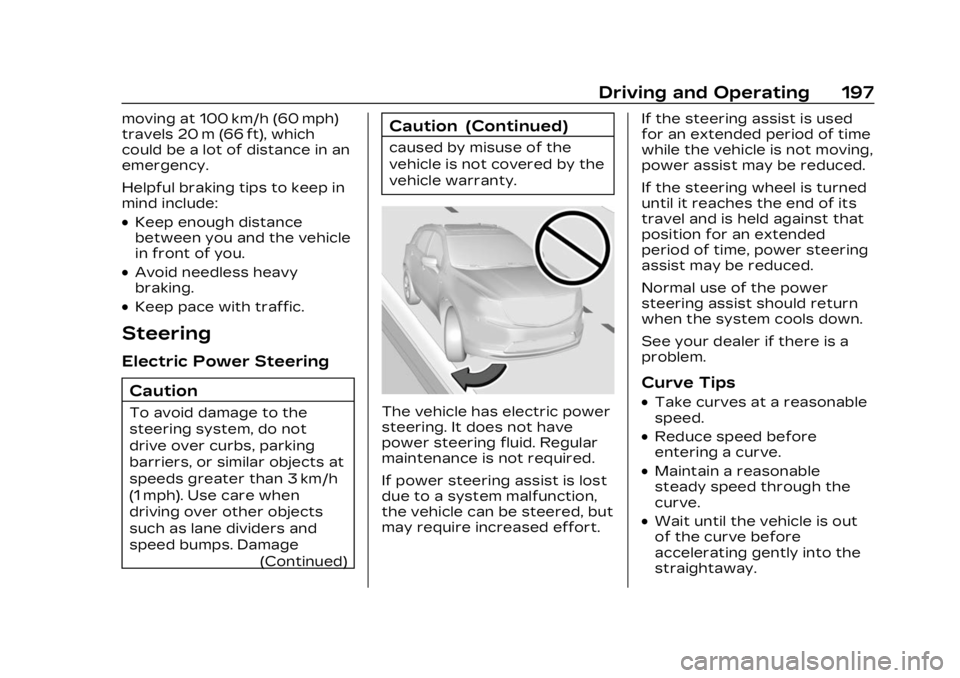
Electric Power SteeringCaution
To avoid damage to the
steering system, do not
drive over curbs, parking
barriers, or similar objects at
speeds greater than 3 km/h
(1 mph). Use care when
driving over other objects
such as lane dividers and
speed bumps. Damage (Continued)
Caution (Continued)
caused by misuse of the
vehicle is not covered by the
vehicle warranty.
The vehicle has electric power
steering. It does not have
power steering fluid. Regular
maintenance is not required.
If power steering assist is lost
due to a system malfunction,
the vehicle can be steered, but
may require increased effort. If the steering assist is used
for an extended period of time
while the vehicle is not moving,
power assist may be reduced.
If the steering wheel is turned
until it reaches the end of its
travel and is held against that
position for an extended
period of time, power steering
assist may be reduced.
Normal use of the power
steering assist should return
when the system cools down.
See your dealer if there is a
problem.
Curve Tips
.Take curves at a reasonable
speed.
.Reduce speed before
entering a curve.
.Maintain a reasonable
steady speed through the
curve.
.Wait until the vehicle is out
of the curve before
accelerating gently into the
straightaway.