warning lights CADILLAC LYRIC 2023 Owners Manual
[x] Cancel search | Manufacturer: CADILLAC, Model Year: 2023, Model line: LYRIC, Model: CADILLAC LYRIC 2023Pages: 424, PDF Size: 4.76 MB
Page 51 of 424
Cadillac Lyriq Owner Manual (GMNA-Localizing-U.S./Canada-15644413) -
2023 - CRC - 2/23/22
50 Seats and Restraints
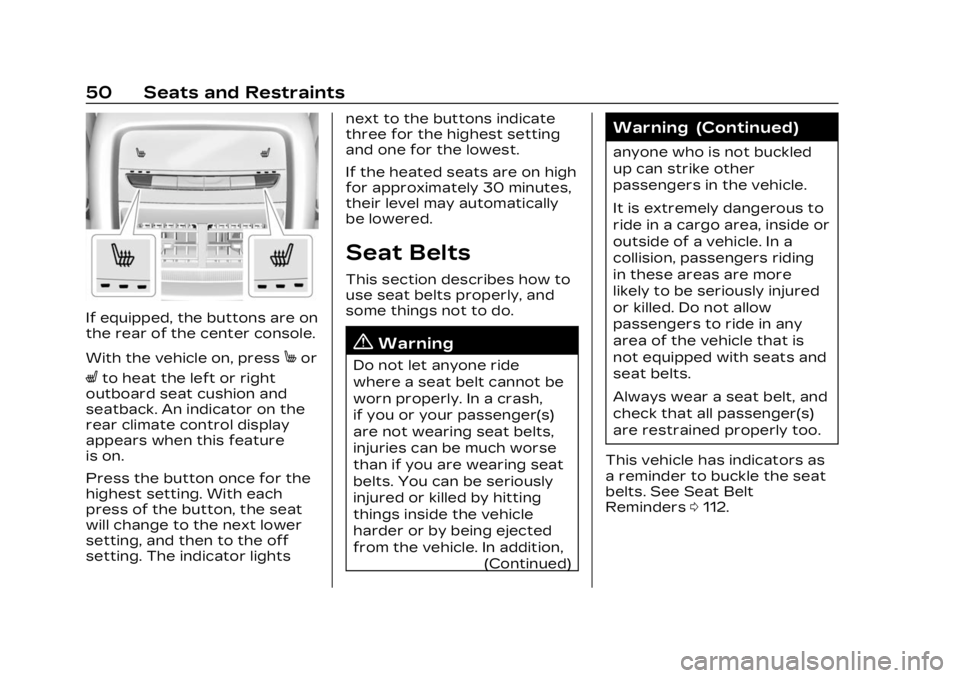
If equipped, the buttons are on
the rear of the center console.
With the vehicle on, press
Mor
Lto heat the left or right
outboard seat cushion and
seatback. An indicator on the
rear climate control display
appears when this feature
is on.
Press the button once for the
highest setting. With each
press of the button, the seat
will change to the next lower
setting, and then to the off
setting. The indicator lights next to the buttons indicate
three for the highest setting
and one for the lowest.
If the heated seats are on high
for approximately 30 minutes,
their level may automatically
be lowered.
Seat Belts
This section describes how to
use seat belts properly, and
some things not to do.
{Warning
Do not let anyone ride
where a seat belt cannot be
worn properly. In a crash,
if you or your passenger(s)
are not wearing seat belts,
injuries can be much worse
than if you are wearing seat
belts. You can be seriously
injured or killed by hitting
things inside the vehicle
harder or by being ejected
from the vehicle. In addition,
(Continued)
Warning (Continued)
anyone who is not buckled
up can strike other
passengers in the vehicle.
It is extremely dangerous to
ride in a cargo area, inside or
outside of a vehicle. In a
collision, passengers riding
in these areas are more
likely to be seriously injured
or killed. Do not allow
passengers to ride in any
area of the vehicle that is
not equipped with seats and
seat belts.
Always wear a seat belt, and
check that all passenger(s)
are restrained properly too.
This vehicle has indicators as
a reminder to buckle the seat
belts. See Seat Belt
Reminders 0112.
Page 99 of 424
Cadillac Lyriq Owner Manual (GMNA-Localizing-U.S./Canada-15644413) -
2023 - CRC - 2/23/22
98 Instruments and Controls
Instruments and
Controls
Controls
Steering WheelAdjustment . . . . . . . . . . . . . . . . . . 99
Heated Steering Wheel . . . 99
Horn . . . . . . . . . . . . . . . . . . . . . . . . . . . 100
Pedestrian Safety Signal . . . . . . . . . . . . . . . . . . . . . . . . 100
Windshield Wiper/ Washer . . . . . . . . . . . . . . . . . . . . . 100
Compass . . . . . . . . . . . . . . . . . . . . . 102
Clock . . . . . . . . . . . . . . . . . . . . . . . . . . . 102
Power Outlets . . . . . . . . . . . . . . 102
Wireless Charging . . . . . . . . . 104
Warning Lights, Gauges,
and Indicators
Warning Lights, Gauges, and Indicators . . . . . . . . . . . . . 108
Instrument Cluster . . . . . . . . 108
Speedometer . . . . . . . . . . . . . . . . 110
Odometer . . . . . . . . . . . . . . . . . . . . . 110
Trip Odometer . . . . . . . . . . . . . . 110
Battery Gauge (High Voltage) . . . . . . . . . . . . . . . . . . . . . 110
Power Indicator Gauge . . . . 111
Seat Belt Reminders . . . . . . . 112 Airbag Readiness Light . . . 112
Passenger Airbag Status
Indicator . . . . . . . . . . . . . . . . . . . . . 113
Charging System Light (12-Volt Battery) . . . . . . . . . . . 114
Low State of Charge Light . . . . . . . . . . . . . . . . . . . . . . . . . . 114
Charge Cord Connected Light . . . . . . . . . . . . . . . . . . . . . . . . . . 114
Battery Fault Light . . . . . . . . . 115
Propulsion Power is Limited Light . . . . . . . . . . . . . . . 115
Service Vehicle Soon Light . . . . . . . . . . . . . . . . . . . . . . . . . . 115
Brake System Warning Light . . . . . . . . . . . . . . . . . . . . . . . . . . 115
Electric Parking Brake Light . . . . . . . . . . . . . . . . . . . . . . . . . . 116
Service Electric Parking Brake Light . . . . . . . . . . . . . . . . . 116
Antilock Brake System (ABS) Warning Light . . . . . 117
Automatic Vehicle Hold (AVH) Light . . . . . . . . . . . . . . . . . . 117
Lane Keep Assist (LKA) Light . . . . . . . . . . . . . . . . . . . . . . . . . . 117
Automatic Emergency Braking (AEB) Disabled
Light . . . . . . . . . . . . . . . . . . . . . . . . . . 118 Vehicle Ahead
Indicator . . . . . . . . . . . . . . . . . . . . . 118
Pedestrian Ahead Indicator . . . . . . . . . . . . . . . . . . . . . 118
Traction Off Light . . . . . . . . . . 119
StabiliTrak OFF Light . . . . . 119
Traction Control System
(TCS)/StabiliTrak
Light . . . . . . . . . . . . . . . . . . . . . . . . . . 119
Driver Mode Control Light . . . . . . . . . . . . . . . . . . . . . . . . . 120
Tire Pressure Light . . . . . . . 120
Security Light . . . . . . . . . . . . . . . 121
Vehicle Ready Light . . . . . . . . 121
One-Pedal Driving Light . . . . . . . . . . . . . . . . . . . . . . . . . . 121
High-Beam On Light . . . . . . . 121
Lamps On Reminder . . . . . . 122
Cruise Control Light . . . . . . 122
Door Ajar Light . . . . . . . . . . . . . 122Information Displays
Charging . . . . . . . . . . . . . . . . . . . . . . 123
Driver Information Center (DIC) . . . . . . . . . . . . . . . . 132
Vehicle Information . . . . . . . . 133
Vehicle Messages
Vehicle Messages . . . . . . . . . 134
Propulsion Power Messages . . . . . . . . . . . . . . . . . . . 135
Page 109 of 424
Cadillac Lyriq Owner Manual (GMNA-Localizing-U.S./Canada-15644413) -
2023 - CRC - 2/23/22
108 Instruments and Controls
Warning Lights,
Gauges, and
Indicators
Warning lights and gauges can
signal that something is wrong
before it becomes serious
enough to cause an expensive
repair or replacement. Paying
attention to the warning lights
and gauges could prevent
injury.
Some warning lights come on
briefly when the propulsion
system is started to indicate
they are working. When one of
the warning lights comes on
and stays on while driving,
or when one of the gauges
shows there may be a
problem, check the section
that explains what to do.
Waiting to do repairs can be
costly and even dangerous.
Instrument Cluster
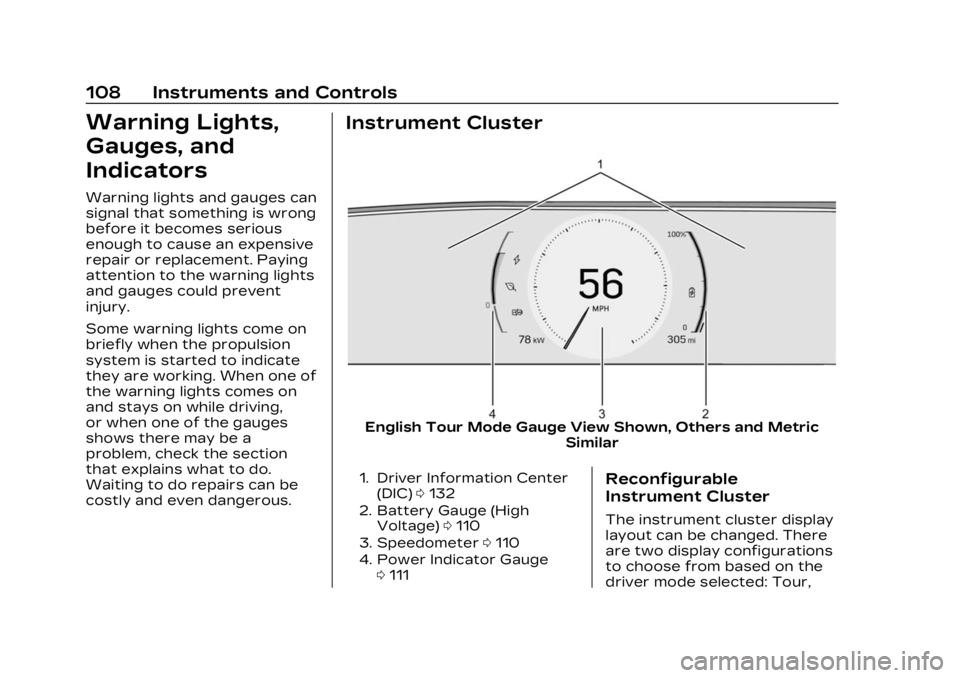
English Tour Mode Gauge View Shown, Others and MetricSimilar
1. Driver Information Center
(DIC) 0132
2. Battery Gauge (High Voltage) 0110
3. Speedometer 0110
4. Power Indicator Gauge 0111Reconfigurable
Instrument Cluster
The instrument cluster display
layout can be changed. There
are two display configurations
to choose from based on the
driver mode selected: Tour,
Page 115 of 424
Cadillac Lyriq Owner Manual (GMNA-Localizing-U.S./Canada-15644413) -
2023 - CRC - 2/23/22
114 Instruments and Controls
If, after several seconds, both
status indicator lights remain
on, or if there are no lights at
all, or if the airbag readiness
light is on, there may be a
problem with the lights or the
passenger sensing system.
See your dealer for service
right away.
{Warning
If the airbag readiness light
ever comes on and stays on,
it means that something may
be wrong with the airbag
system. To help avoid injury
to yourself or others, have
the vehicle serviced right
away. See Airbag Readiness
Light0112 for more
information, including
important safety
information.
Charging System
Light (12-Volt Battery)
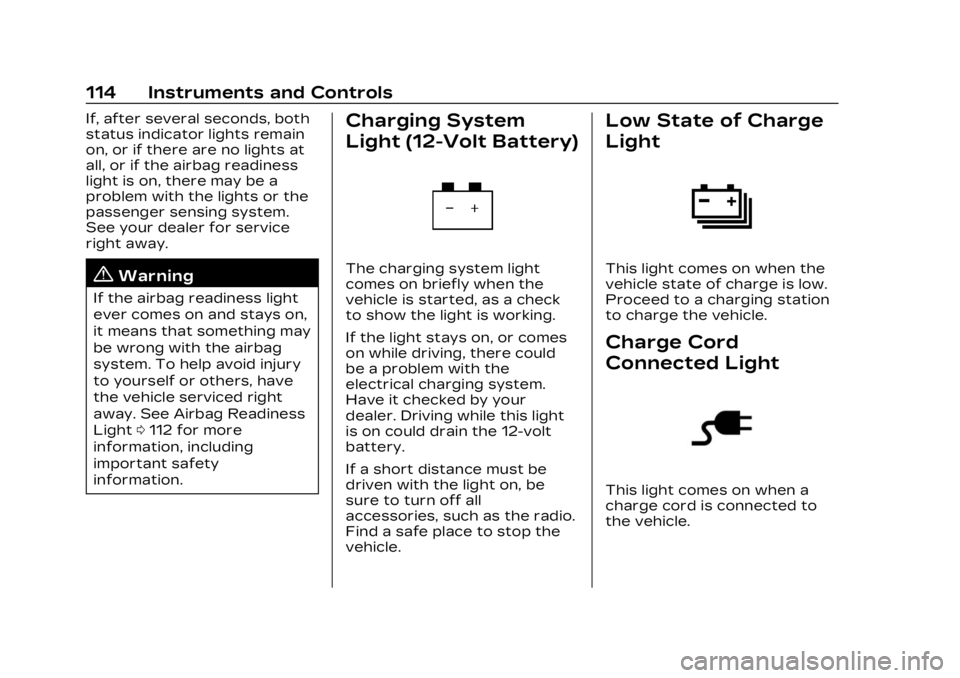
The charging system light
comes on briefly when the
vehicle is started, as a check
to show the light is working.
If the light stays on, or comes
on while driving, there could
be a problem with the
electrical charging system.
Have it checked by your
dealer. Driving while this light
is on could drain the 12-volt
battery.
If a short distance must be
driven with the light on, be
sure to turn off all
accessories, such as the radio.
Find a safe place to stop the
vehicle.
Low State of Charge
Light
This light comes on when the
vehicle state of charge is low.
Proceed to a charging station
to charge the vehicle.
Charge Cord
Connected Light
This light comes on when a
charge cord is connected to
the vehicle.
Page 116 of 424
Cadillac Lyriq Owner Manual (GMNA-Localizing-U.S./Canada-15644413) -
2023 - CRC - 2/23/22
Instruments and Controls 115
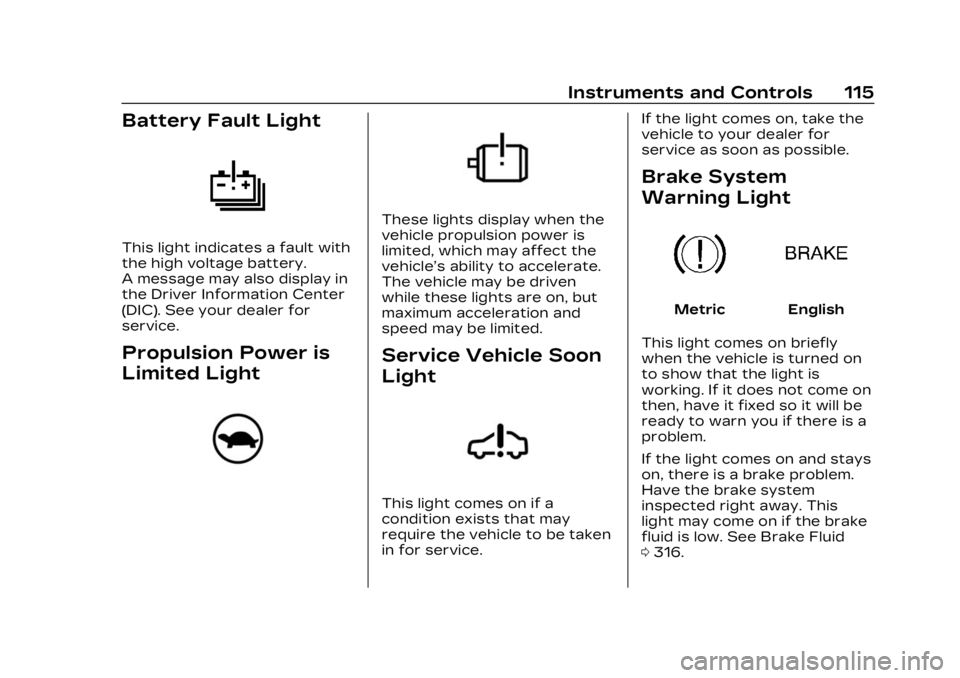
Battery Fault Light
This light indicates a fault with
the high voltage battery.
A message may also display in
the Driver Information Center
(DIC). See your dealer for
service.
Propulsion Power is
Limited Light
These lights display when the
vehicle propulsion power is
limited, which may affect the
vehicle’s ability to accelerate.
The vehicle may be driven
while these lights are on, but
maximum acceleration and
speed may be limited.
Service Vehicle Soon
Light
This light comes on if a
condition exists that may
require the vehicle to be taken
in for service.If the light comes on, take the
vehicle to your dealer for
service as soon as possible.
Brake System
Warning Light
MetricEnglish
This light comes on briefly
when the vehicle is turned on
to show that the light is
working. If it does not come on
then, have it fixed so it will be
ready to warn you if there is a
problem.
If the light comes on and stays
on, there is a brake problem.
Have the brake system
inspected right away. This
light may come on if the brake
fluid is low. See Brake Fluid
0 316.
Page 140 of 424
Cadillac Lyriq Owner Manual (GMNA-Localizing-U.S./Canada-15644413) -
2023 - CRC - 2/23/22
Lighting 139
Lighting
Exterior Lighting
Exterior LampControls . . . . . . . . . . . . . . . . . . . . . 139
Exterior Lamps Off Reminder . . . . . . . . . . . . . . . . . . . . 142
Headlamp High/ Low-Beam Changer . . . . . 142
Flash-to-Pass . . . . . . . . . . . . . . . 142
Daytime Running Lamps (DRL) . . . . . . . . . . . . . . . 142
Automatic Headlamp System . . . . . . . . . . . . . . . . . . . . . . 143
Adaptive Forward Lighting (AFL) . . . . . . . . . . . . . 143
Headlamp Leveling Control . . . . . . . . . . . . . . . . . . . . . . 145
Hazard Warning Flashers . . . . . . . . . . . . . . . . . . . . . 145
Turn and Lane-Change Signals . . . . . . . . . . . . . . . . . . . . . . . 146
Cornering Lamps . . . . . . . . . . 146
Interior Lighting
Instrument Panel Illumination Control . . . . . . 146
Dome Lamps . . . . . . . . . . . . . . . . 147
Reading Lamps . . . . . . . . . . . . . 147
Lighting Features
Entry Lighting . . . . . . . . . . . . . . . 147
Exit Lighting . . . . . . . . . . . . . . . . . 148
Battery Load Management . . . . . . . . . . . . . . . 148
Battery Power
Protection . . . . . . . . . . . . . . . . . . 149
Exterior Lighting Battery Saver . . . . . . . . . . . . . . . . . . . . . . . . . 149Exterior Lighting
Exterior Lamp
Controls
The exterior lamp controls,
also known as headlights, are
in the Virtual Controls App on
the infotainment home screen.
Select Virtual Controls >
Lights > Headlights.
To operate, select the
following options:
Off : Turns off the exterior
lamps.
For vehicles first sold in
Canada, the headlamps will
automatically reactivate when
the vehicle is shifted out of
P (Park).
Auto : Automatically turns the
exterior lamps on and off,
depending on outside lighting.
Parking : Turns on the parking
lamps.
On : Turns on the exterior
lamps.
Page 143 of 424
Cadillac Lyriq Owner Manual (GMNA-Localizing-U.S./Canada-15644413) -
2023 - CRC - 2/23/22
142 Lighting
.The vehicle windshield is
dirty, cracked, or obstructed
by something that blocks the
view of the light sensor.
.The vehicle is loaded in a
way that the front end
points upward, causing the
light sensor to aim high and
not detect headlamps and
taillamps.
.The vehicle is being driven
on winding or hilly roads.
The Adaptive Headlight
system may need to be
disabled if any of the above
conditions exist.
Exterior Lamps Off
Reminder
A warning chime sounds if the
driver door is opened while
the vehicle is off and the
exterior lamps are on.
Headlamp High/
Low-Beam Changer
Push the turn signal lever
away from you and release, to
turn the high beams on. To
return to low beams, push the
lever again or pull it toward
you and release.
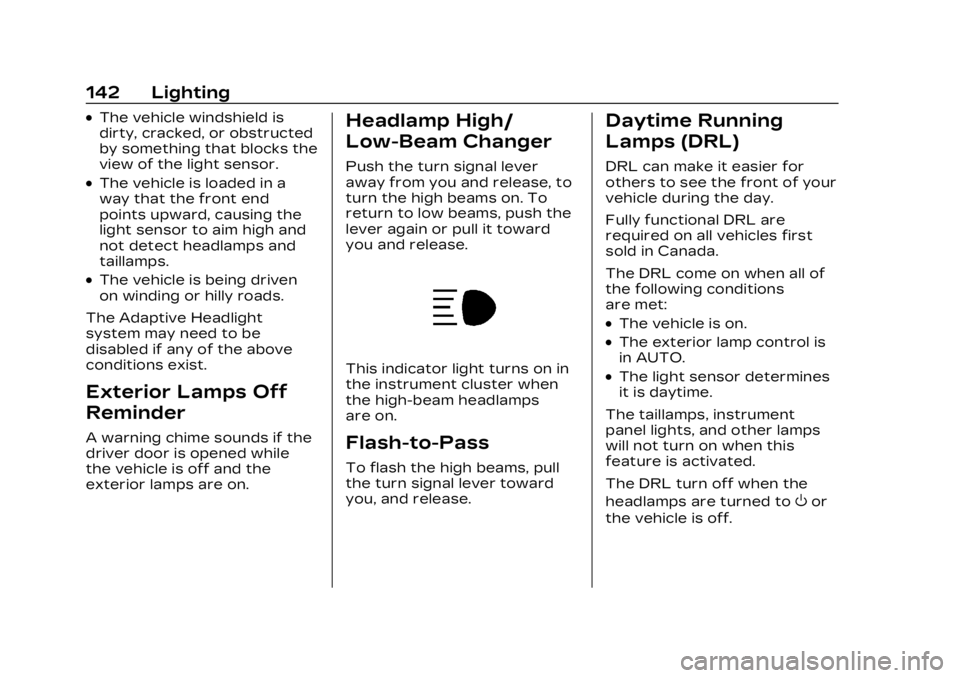
This indicator light turns on in
the instrument cluster when
the high-beam headlamps
are on.
Flash-to-Pass
To flash the high beams, pull
the turn signal lever toward
you, and release.
Daytime Running
Lamps (DRL)
DRL can make it easier for
others to see the front of your
vehicle during the day.
Fully functional DRL are
required on all vehicles first
sold in Canada.
The DRL come on when all of
the following conditions
are met:
.The vehicle is on.
.The exterior lamp control is
in AUTO.
.The light sensor determines
it is daytime.
The taillamps, instrument
panel lights, and other lamps
will not turn on when this
feature is activated.
The DRL turn off when the
headlamps are turned to
Oor
the vehicle is off.
Page 239 of 424

Cadillac Lyriq Owner Manual (GMNA-Localizing-U.S./Canada-15644413) -
2023 - CRC - 2/23/22
238 Driving and Operating
Warning (Continued)
Super Cruise does:
.Not prevent crashes or
warn of possible crashes.
.Not steer to avoid
stopped or slow-moving
vehicles, cross-traffic,
construction barriers or
cones, motorcycles,
children, pedestrians,
animals, or other objects
on the road.
.Not steer in response to
vehicles or objects next to
your vehicle, including
vehicles attempting to
enter your lane.
.Not respond to traffic
lights, stop signs, or other
traffic control devices.
.Not respond to crossing
traffic.
.Not make turns.
.Not steer to merge onto
or to exit highways.(Continued)
Warning (Continued)
.Not detect, steer to avoid,
or steer through
construction zones.
.Not function on surface
streets.
.Not respond to crossing
or oncoming traffic.
.Not function in city driving
conditions.
{Warning
Some state and local laws
may require hands to be
kept on the steering wheel
at all times. Only remove
your hands from the
steering wheel if Super
Cruise is engaged, it is safe
to do so, and it is permitted
by state and local laws.
{Warning
Failure to supervise the
driving task and to respond
appropriately, even while
Super Cruise is operating,
can cause a crash. Super
Cruise may not respond as
you would to all driving
situations and may not
maintain lane position under
all conditions.
It is extremely important to
pay attention to the
operation of the vehicle,
even while using Super
Cruise. Do not use a
hand-held device while
driving, even with Super
Cruise engaged. To prevent
serious injury or death:
.Always remain properly
seated in the driver seat
with your seat belt
fastened.(Continued)
Page 271 of 424
Cadillac Lyriq Owner Manual (GMNA-Localizing-U.S./Canada-15644413) -
2023 - CRC - 2/23/22
270 Driving and Operating
the vehicle do not move
farther back when a trailer is
attached to the vehicle.
Driving With a Trailer
Use caution while backing up
when towing a trailer. The
RCTA feature is automatically
disabled when a trailer is
attached to the vehicle.
Turning the Features On
or Off
The
Xbutton on the center
stack is used to turn on or off
the Front and Rear Park
Assist, and Backing Warning
and Reverse Automatic
Braking (RAB) systems at the
same time. The indicator light
next to the button comes on
when the features are on and
turns off when the features
have been disabled.
RCTA can be turned on or off
using the infotainment system.
To view available settings for
this feature, touch the
Settings icon on the
infotainment home page. Select
“Vehicle” to display the
list of available options and
select “Collision/Detection
Systems”.
Assistance Systems
for Driving
If equipped, when driving the
vehicle in a forward gear,
Forward Collision Alert (FCA),
Lane Departure Warning
(LDW), Lane Keep Assist
(LKA), Side Blind Zone Alert
(SBZA), Lane Change Alert
(LCA), Automatic Emergency
Braking (AEB), and/or the
Front Pedestrian Braking
(FPB) System can help to
avoid a crash or reduce crash
damage.
Forward Collision
Alert (FCA) System
The FCA system may help to
avoid or reduce the harm
caused by front-end crashes.
When approaching a vehicle
ahead too quickly, FCA
provides a red flashing alert on the windshield and rapidly
beeps or pulses the driver
seat. FCA also lights an amber
visual alert if following another
vehicle much too closely.
FCA detects vehicles within a
distance of approximately
110 m (360 ft) and operates at
all speeds.
{Warning
FCA is a warning system and
does not apply the brakes.
When approaching a
slower-moving or stopped
vehicle ahead too rapidly,
or when following a vehicle
too closely, FCA may not
provide a warning with
enough time to help avoid a
crash. It also may not
provide any warning at all.
FCA does not warn of
pedestrians, animals, signs,
guardrails, bridges,
construction barrels,
or other objects. Be ready to
(Continued)
Page 279 of 424
Cadillac Lyriq Owner Manual (GMNA-Localizing-U.S./Canada-15644413) -
2023 - CRC - 2/23/22
278 Driving and Operating
the vehicle and goes back 5 m
(16 ft). Drivers are also warned
of vehicles rapidly
approaching from up to 70 m
(230 ft) behind the vehicle.
How the System Works
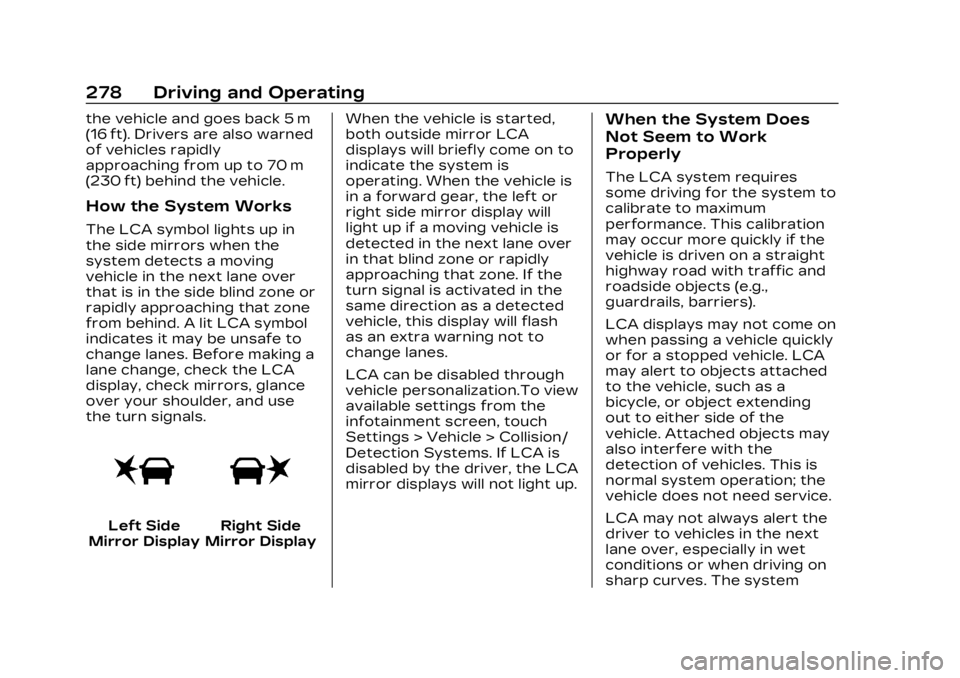
The LCA symbol lights up in
the side mirrors when the
system detects a moving
vehicle in the next lane over
that is in the side blind zone or
rapidly approaching that zone
from behind. A lit LCA symbol
indicates it may be unsafe to
change lanes. Before making a
lane change, check the LCA
display, check mirrors, glance
over your shoulder, and use
the turn signals.
Left Side
Mirror DisplayRight Side
Mirror Display When the vehicle is started,
both outside mirror LCA
displays will briefly come on to
indicate the system is
operating. When the vehicle is
in a forward gear, the left or
right side mirror display will
light up if a moving vehicle is
detected in the next lane over
in that blind zone or rapidly
approaching that zone. If the
turn signal is activated in the
same direction as a detected
vehicle, this display will flash
as an extra warning not to
change lanes.
LCA can be disabled through
vehicle personalization.To view
available settings from the
infotainment screen, touch
Settings > Vehicle > Collision/
Detection Systems. If LCA is
disabled by the driver, the LCA
mirror displays will not light up.
When the System Does
Not Seem to Work
Properly
The LCA system requires
some driving for the system to
calibrate to maximum
performance. This calibration
may occur more quickly if the
vehicle is driven on a straight
highway road with traffic and
roadside objects (e.g.,
guardrails, barriers).
LCA displays may not come on
when passing a vehicle quickly
or for a stopped vehicle. LCA
may alert to objects attached
to the vehicle, such as a
bicycle, or object extending
out to either side of the
vehicle. Attached objects may
also interfere with the
detection of vehicles. This is
normal system operation; the
vehicle does not need service.
LCA may not always alert the
driver to vehicles in the next
lane over, especially in wet
conditions or when driving on
sharp curves. The system