ECO mode CADILLAC SRX 2004 1.G User Guide
[x] Cancel search | Manufacturer: CADILLAC, Model Year: 2004, Model line: SRX, Model: CADILLAC SRX 2004 1.GPages: 468, PDF Size: 2.92 MB
Page 218 of 468
Finding a Station
BAND:Press this button to select FM1, FM2, or AM, or
XM1 or XM2 (48 contiguous US states, if equipped).
QSEEKR:Press the up or the down arrow to seek
to the next or to the previous station and stay there.
SEEK will appear on the display. The sound will mute
while seeking.
The radio will seek only to stations that are in the
selected band and only to those with a strong signal.
QSCANR:Press the SCAN button to enter
scan mode. SCAN will appear on the display. Press the
up arrow to scan to the next station. The radio will go
to a station, play for 5 seconds, then go on to the
next station. Press this button again to stop scanning.
To scan preset stations, press and hold SCAN for more
than two seconds until you hear a beep and PSCAN
appears on the display. The radio will go to the
rst preset station stored on your pushbuttons, play for
5 seconds, then go on to the next preset station.
Press SCAN again to stop scanning presets.
The radio will scan only to stations that are in the
selected band and only to those with a strong signal.LOCAL/DISTANT Selection:With this feature you can
set the radio to search for local stations or stations that
are further away for a larger selection. To set this feature
to LOCAL or DISTANT, perform the following steps:
1. Press the TUNE/SEL knob to enter the main menu.
2. Turn the TUNE/SEL knob until SEEK LOCAL or
SEEK DISTANT appears on the display.
3. Press the TUNE/SEL knob to select either LOCAL
or DISTANT.
4. Press the CLR button to exit the display. To return
to the original display, repeatedly press the CLR
button or wait for the display to time out.
To search for stations, press the SEEK up or down
arrows. If the system is set to LOCAL, SEEK will appear
in the display and seek to stations with strong signals
only. If the system is set to DISTANT, D-SEEK will
appear in the display and seek to stations with weak and
strong signals.
3-96
Page 223 of 468
MSG (Message):If the current RDS station has a
message, MSG will appear on the display. If the whole
message does not appear on the display, parts of
the message will appear every three seconds until the
message is completed. Once the completed message
has been displayed, MSG will disappear from the display
until another new message is received.
For XM™ (48 contiguous US states, if equipped), press
this button while in XM mode to retrieve four different
categories of information related to the current song or
channel: Artist, Song Title, PTY or Category, or Channel
Number/Channel Name.
If you would like to display the message, perform the
following steps:
1. Press the TUNE/SEL knob to enter the main menu.
2. Turn the TUNE/SEL knob until RECALL RDS
MESSAGE appears on the display.
3. Press the TUNE/SEL knob. The message will
appear on the display.
Once the message has been displayed, MSG will
disappear from the display until another new message
is received.
TP (Traffic Program):TP will appear on the display
when the radio detects a signal from an RDS station that
has traffic announcement broadcast capability.TA (Traffic Announcement):If TA appears on the
display, the tuned radio station broadcasts traffic
announcements and when a traffic announcement
comes on the tuned station you will hear it.
If the current tuned station does not broadcast traffic
announcements, when TA is turned on it will seek to a
station that does. When the radio nds a station
that broadcasts traffic announcements, it will stop and
TA will be displayed. When a traffic announcement
comes on the tuned radio station you will hear it. If no
station is found, No Traffic will appear on the display.
Your radio will play traffic announcements if the volume
is low. Your radio will interrupt the play of a CD if the
last tuned station broadcasts traffic announcements.
To turn TA on or off, perform the following steps:
1. Press the TUNE/SEL knob to enter the main menu.
2. Turn the TUNE/SEL knob until TRAFFIC
ANNOUNCE appears on the display.
3. Press the TUNE/SEL knob to select ON or OFF.
An X will appear in the box when TA is selected on.
4. Press the CLR button to exit the display. To return
to the original display keep pressing the CLR button
or wait for the display to time out.
3-101
Page 230 of 468
F5 MODE:Press this pushbutton to select from
NORMAL, RPT TRCK (Repeat Track), RPT CD
(Repeat CD), RDM TRK (Random Track), and
RDM ALL (Random All CDs).
NORMAL:Sets the system for normal play of the
CD(s). NORMAL will not be displayed when in
this mode.
RPT TRCK (Repeat Track):Repeats the track over
again. RPT TRCK will appear on the display. Press
the MODE pushbutton again to turn off repeat play.
RPT TRCK will disappear from the display.
RPT CD (Repeat CD):Repeats the CD over again.
RPT DISC will appear on the display. Press the
MODE pushbutton again to turn off repeat
play. RPT DISC will disappear from the display.
RDM TRK (Random Track):Plays the tracks on the
current CD in random, rather than sequential, order.
RDM TRK will appear on the display. Press the
MODE pushbutton again to turn off random play.
RDM TRK will disappear from the display.
RDM ALL (Random All CDs):Plays all of the CDs
loaded and tracks in random, rather than sequential,
order. RDM ALL will appear on the display. Press the
MODE pushbutton again to turn off random play.
RDM ALL will disappear from the display.F6 DISP (Display):Press this pushbutton to display the
time of the track. Press this pushbutton again to
display CD PLAY and press this pushbutton once more
to clear the display.
QSEEKR:Press the up or the down arrow to seek
to the next or to the previous track on the CD.
QSCAN:Press this button to listen to each track for
10 seconds. The CD will go to a track, play for
10 seconds, then go on to the next track. Press this
button again to stop scanning.
X(Eject):Press this button to eject the CD that is
currently playing, or press and hold this button to
eject all of the CDs loaded. you will hear a beep.
Eject may be activated with the ignition or radio off.
3-108
Page 236 of 468
DVD Player
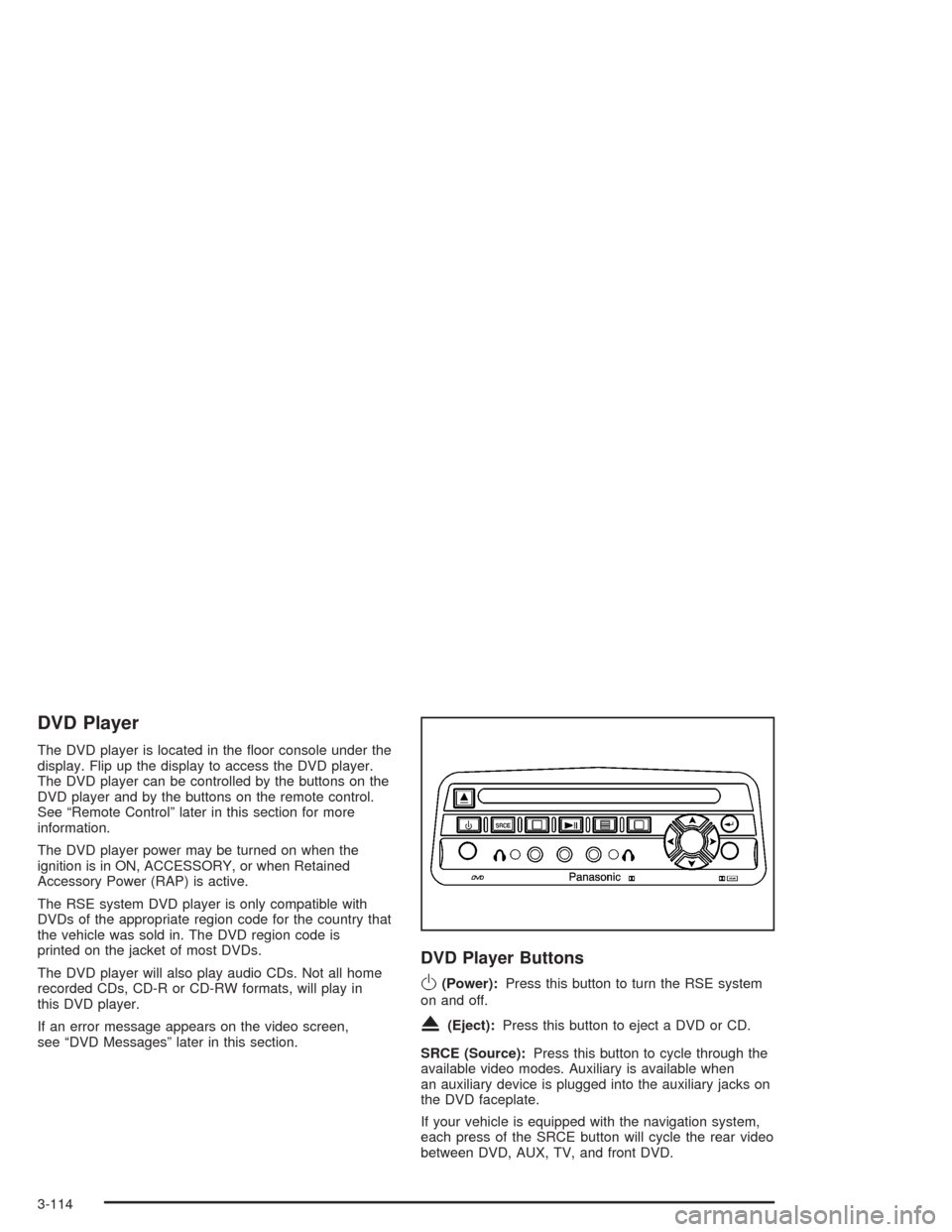
The DVD player is located in the oor console under the
display. Flip up the display to access the DVD player.
The DVD player can be controlled by the buttons on the
DVD player and by the buttons on the remote control.
See “Remote Control” later in this section for more
information.
The DVD player power may be turned on when the
ignition is in ON, ACCESSORY, or when Retained
Accessory Power (RAP) is active.
The RSE system DVD player is only compatible with
DVDs of the appropriate region code for the country that
the vehicle was sold in. The DVD region code is
printed on the jacket of most DVDs.
The DVD player will also play audio CDs. Not all home
recorded CDs, CD-R or CD-RW formats, will play in
this DVD player.
If an error message appears on the video screen,
see “DVD Messages” later in this section.
DVD Player Buttons
O(Power):Press this button to turn the RSE system
on and off.
X(Eject):Press this button to eject a DVD or CD.
SRCE (Source):Press this button to cycle through the
available video modes. Auxiliary is available when
an auxiliary device is plugged into the auxiliary jacks on
the DVD faceplate.
If your vehicle is equipped with the navigation system,
each press of the SRCE button will cycle the rear video
between DVD, AUX, TV, and front DVD.
3-114
Page 240 of 468
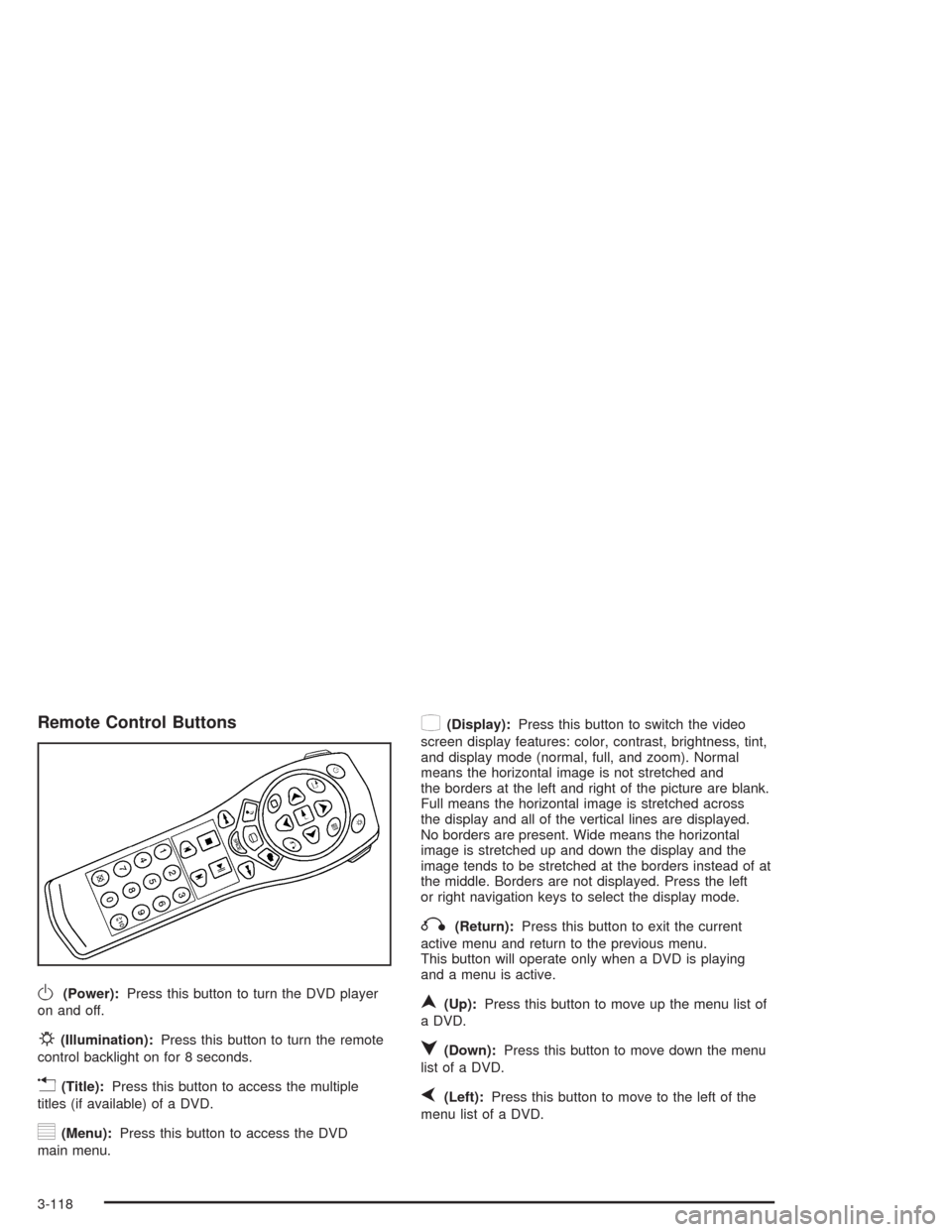
Remote Control Buttons
O(Power):Press this button to turn the DVD player
on and off.
P(Illumination):Press this button to turn the remote
control backlight on for 8 seconds.
v(Title):Press this button to access the multiple
titles (if available) of a DVD.
y(Menu):Press this button to access the DVD
main menu.
z(Display):Press this button to switch the video
screen display features: color, contrast, brightness, tint,
and display mode (normal, full, and zoom). Normal
means the horizontal image is not stretched and
the borders at the left and right of the picture are blank.
Full means the horizontal image is stretched across
the display and all of the vertical lines are displayed.
No borders are present. Wide means the horizontal
image is stretched up and down the display and the
image tends to be stretched at the borders instead of at
the middle. Borders are not displayed. Press the left
or right navigation keys to select the display mode.
q(Return):Press this button to exit the current
active menu and return to the previous menu.
This button will operate only when a DVD is playing
and a menu is active.
n(Up):Press this button to move up the menu list of
a DVD.
q(Down):Press this button to move down the menu
list of a DVD.
p(Left):Press this button to move to the left of the
menu list of a DVD.
3-118
Page 242 of 468
Battery Replacement
To change the batteries, do the following:
1. Remove the battery compartment door located on
the bottom of the remote control.
2. Replace the two AA batteries in the compartment.
Make sure that they are installed correctly, using the
diagram on the inside of the battery compartment.
3. Close the battery door securely.
If the remote control is to be stored for a long period of
time, remove the batteries and keep them in a cool,
dry place.
Problem Recommended Action
No power. The ignition might not be
in on or accessory.
The parental control
button might have been
turned on. The power
indicator light will ash.
Disc will not play. The system might be off.
The parental control
button might have been
turned on. The power
indicator light will ash.
The system might be in
auxiliary source mode.
Press the MODE button
to switch between the
DVD player and the
auxiliary source.
The disc is upside down
or is not compatible.
3-120
Page 243 of 468

Problem Recommended Action
The picture does not ll
the screen. There are
black borders on the
top and bottom or on
both sides or it looks
stretched out.Press the DISP button on
the DVD player or on the
remote control. Change
the display mode.
The disc was ejected,
but it was pulled back
into the DVD player.The disc is being stored
in the DVD player.
Press the eject button
again to eject the disc.
In auxiliary mode, the
picture moves or scrolls.Check the signal coming
from the auxiliary device
and make sure that the
connection and the signal
is good.
Change the Video Format
to PAL or NTSC. See
“Stereo RCA Jacks”
previously for how to
change the video format.Problem Recommended Action
The language in the audio
or on the screen is wrong.Press the MENU button
on the DVD player or on
the remote control and
change the audio or
language selection on
the DVD menu.
The remote control does
not work.Point the remote control
directly at the infrared
window below the video
screen while using.
Check that the batteries
are not dead or put in
wrong.
The parental control
button might have been
turned on. The power
indicator light will ash.
3-121
Page 244 of 468
Problem Recommended Action
After stopping the player,
I push Play but
sometimes the DVD starts
where I left off and
sometimes at the
beginning.If the stop button was
pressed one time, the
DVD player will resume
playing where the DVD
was stopped. If the stop
button was pressed two
times the DVD player will
begin to play from the
beginning of the DVD.
The auxiliary source is
running but there is no
picture or sound.Press the MODE button
to change from the DVD
player mode to the
auxiliary source mode.
Check to make sure that
the auxiliary source is
connected to the inputs
properly.Problem Recommended Action
My disc is stuck in the
player. The Load/Eject
button does not work.Press the eject/load
button on the DVD player.
Turn the power off, then
on again, then press the
eject/load button on the
DVD player.
Do not attempt to forcibly
remove the disc from the
DVD player. This could
permanently damage the
disc and the DVD player.
Sometimes the wireless
headphone audio cuts out
or buzzes.This could be caused by
interference from cellular
telephone towers or by
using your cellular
telephone in the vehicle.
I lost the remote and/or
the headphones.See your dealer for
assistance.
3-122
Page 375 of 468
Occupant Distribution:Designated seating positions.
Outward Facing Sidewall:The side of a asymmetrical
tire that has a particular side that faces outward
when mounted on a vehicle. The side of the tire that
contains a whitewall, bears white lettering or bears
manufacturer, brand and or model name molding that is
higher or deeper than the same moldings on the
other sidewall of the tire.
Passenger (P-Metric) Tire:A tire used on passenger
cars and some light duty trucks and multipurpose
vehicles.
Recommended Ination Pressure:Vehicle
manufacturer’s recommended tire ination pressure and
shown on the tire placard. SeeInation - Tire Pressure
on page 5-68andLoading Your Vehicle on page 4-47.
Radial Ply tire:A pneumatic tire in which the ply cords
that extend to the beads are laid at 90 degrees to the
centerline of the tread.
Rim:A metal support for a tire and upon which the tire
beads are seated.
Sidewall:The portion of a tire between the tread and
the bead.
Speed Rating:An alphanumeric code assigned to a
tire indicating the maximum speed at which a tire
can operate.Traction:The friction between the tire and the road
surface. The amount of grip provided.
Tread:The portion of a tire that comes into contact
with the road.
Treadwear Indicators:Narrow bands, sometimes
called “wear bars,” that show across the tread of a tire
when only 2/32 inch of tread remains. SeeWhen It
Is Time for New Tires on page 5-72.
UTQGS:Uniform Tire Quality Grading Standards, a tire
information system that provides consumers with
ratings for a tire’s traction, temperature and treadwear.
Ratings are determined by tire manufacturers using
government testing procedures. The ratings are molded
into the sidewall of the tire. SeeUniform Tire Quality
Grading on page 5-74.
Vehicle Capacity Weight:The number of designated
seating positions multiplied by 150 lbs. (68 kg) plus
the rated cargo load. SeeLoading Your Vehicle
on page 4-47.
Vehicle Maximum Load on the Tire:Load on an
individual tire due to curb weight, accessory weight,
occupant weight and cargo weight.
Vehicle Placard:A label permanently attached to a
vehicle showing the original equipment tire size
and recommended ination pressure. SeeLoading Your
Vehicle on page 4-47.
5-67
Page 444 of 468
Cadillac Owner Privileges™
Roadside Service provides several Cadillac Owner
Privileges™ at “no charge,” throughout yourCadillac
Warranty Period – 48 months/50,000 miles (80 000 km).
Emergency Road Service is performed on site for the
following situations:
Towing Service
Battery Jump Starting
Lock Out Assistance
Fuel Delivery
Flat Tire Change (Covers change only)
Trip Interruption – If your trip is interrupted due to a
warranty failure, incidental expenses may be
reimbursed during the 48 months/50,000 miles
(80 000 km) warranty period. Items covered
are hotel, meals and rental car.
Roadside Service Availability
Wherever you drive in the United States or Canada, an
advisor is available to assist you over the phone. A
dealer technician, if available, can travel to your location
within a 30 mile (50 km) radius of a participating
Cadillac dealership. If beyond this radius, we will
arrange to have your car towed to the nearest Cadillac
dealership.
Reaching Roadside Service
Dial the toll-free Roadside Service number:
1-800-882-1112. An experienced Roadside Service
Advisor will assist you and request the following
information:
A description of the problem
Name, home address, home telephone number
Location of your Cadillac and number you are
calling from
The model year, Vehicle Identication
Number (VIN), mileage and date of delivery
Roadside Service for the Hearing or
Speech Impaired
Roadside Service is prepared to assist owners who
have hearing difficulties or are speech impaired. Cadillac
has installed special telecommunication devices
called Text Telephone (TTY) in the Roadside Service
Center.
Any customer who has access to a (TTY) or a
conventional teletypewriter can communicate with
Cadillac by dialing from the United States or Canada
1-888-889-2438 – daily, 24 hours.
7-6