key CADILLAC SRX 2004 1.G Workshop Manual
[x] Cancel search | Manufacturer: CADILLAC, Model Year: 2004, Model line: SRX, Model: CADILLAC SRX 2004 1.GPages: 468, PDF Size: 2.92 MB
Page 207 of 468
Driver Unlock in Park
The feature allows the driver’s door to automatically
unlock when the transmission is shifted into PARK (P).
Programmable Modes
Mode 1:ON
Mode 2:OFF
Before your vehicle was shipped from the factory, it was
programmed to Mode 2. The mode to which the
vehicle was programmed may have been changed since
it left the factory. To program the vehicle to a different
mode, use one of the following procedures:
To change the mode using the Base audio system,
do the following:
1. Enter the personalization portion of the SETUP
menu following the instructions listed previously.
2. Scroll to DRIVER UNLOCK IN PARK to highlight it.
3. Press the TUNE/SEL knob to switch back and
forth between on and off.
When the mode is turned on, a check mark will
appear next to the feature name.To change the mode using the Navigation system,
do the following:
1. Enter the Personalization menu by following the
instructions listed previously.
2. Scroll to DRIVER UNLOCK IN PARK and press the
ON or OFF button next to it as desired. If the item
is turned on the color of the ON button will be
light blue. If the item is turned off the color of the
OFF button will be light blue.
If DRIVER UNLOCK IN PARK is turned on, this will
also turn off DRIVER UNLOCK KEY OUT,
DOORS UNLOCK IN PARK and DOORS UNLOCK
KEY OUT if they are not already turned off.
The mode you selected is now set. You can either exit
the programming mode by following the instructions
later in this section or program the next feature available
on your vehicle.
3-85
Page 208 of 468
Driver Unlock Key Out
This feature allows the driver’s door to automatically
unlock when the key is removed from the ignition.
Programmable Modes
Mode 1:ON
Mode 2:OFF
Before your vehicle was shipped from the factory, it was
programmed to Mode 2. The mode to which the
vehicle was programmed may have been changed since
it left the factory. To program the vehicle to a different
mode, use one of the following procedures:
To change the mode using the Base audio system,
do the following:
1. Enter the personalization portion of the SETUP
menu following the instructions listed previously.
2. Scroll to DRIVER UNLOCK KEY OUT.
3. Press the TUNE/SEL knob to switch between on
and off.
When the mode is turned on, a check mark will
appear next to the feature name.To change the mode using the Navigation system,
do the following:
1. Enter the Personalization menu by following the
instructions listed previously.
2. Scroll to DRIVER UNLOCK KEY OUT and press
the ON or OFF button next to it as desired. If the
item is turned on the color of the ON button will be
light blue. If the item is turned off the color of the
OFF button will be light blue.
If DRIVER UNLOCK KEY OUT is turned on, this
will also turn off DRIVER UNLOCK IN PARK,
DOORS UNLOCK IN PARK and DOORS UNLOCK
KEY OUT if they are not already turned off.
The mode you selected is now set. You can either exit
the programming mode by following the instructions
later in this section or program the next feature available
on your vehicle.
3-86
Page 209 of 468
Doors Unlock in Park
The feature allows the doors to automatically unlock
when the transmission is shifted into PARK (P).
Programmable Modes
Mode 1:ON
Mode 2:OFF
Before your vehicle was shipped from the factory, it was
programmed to Mode 2. The mode to which the
vehicle was programmed may have been changed since
it left the factory. To program the vehicle to a different
mode, use one of the following procedures:
To change the mode using the Base audio system,
do the following:
1. Enter the personalization portion of the SETUP
menu following the instructions listed previously.
2. Scroll to DOORS UNLOCK IN PARK to highlight it.
3. Press the TUNE/SEL knob to switch back and
forth between on and off.
When the mode is turned on, a check mark will
appear next to the feature name.To change the mode using the Navigation system,
do the following:
1. Enter the Personalization menu by following the
instructions listed previously.
2. Scroll to DOORS UNLOCK IN PARK and press the
ON or OFF button next to it as desired. If the item
is turned on the color of the ON button will be
light blue. If the item is turned off the color of the
OFF button will be light blue.
If DOORS UNLOCK IN PARK is turned on, this will
also turn off DRIVER UNLOCK IN PARK, DRIVER
UNLOCK KEY OUT and DOORS UNLOCK
KEY OUT if they are not already turned off.
The mode you selected is now set. You can either exit
the programming mode by following the instructions
later in this section or program the next feature available
on your vehicle.
3-87
Page 210 of 468
Doors Unlock Key Out
This feature allows the doors to automatically unlock
when the key is removed from the ignition.
Programmable Modes
Mode 1:ON
Mode 2:OFF
Before your vehicle was shipped from the factory, it was
programmed to Mode 2. The mode to which the
vehicle was programmed may have been changed since
it left the factory. To program the vehicle to a different
mode, use one of the following procedures:
To change the mode using the Base audio system,
do the following:
1. Enter the personalization portion of the SETUP
menu following the instructions listed previously.
2. Scroll to DOORS UNLOCK KEY OUT.
3. Press the TUNE/SEL knob to switch between on
and off.
When the mode is turned on, a check mark will
appear next to the feature name.To change the mode using the Navigation system,
do the following:
1. Enter the Personalization menu by following the
instructions listed previously.
2. Scroll to DOORS UNLOCK KEY OUT and press
the ON or OFF button next to it as desired. If the
item is turned on the color of the ON button will be
light blue. If the item is turned off the color of the
OFF button will be light blue.
If DOORS UNLOCK KEY OUT is turned on, this will
also turn off DRIVER UNLOCK IN PARK, DRIVER
UNLOCK KEY OUT and DOORS UNLOCK IN
PARK if they are not already turned off.
The mode you selected is now set. You can either exit
the programming mode by following the instructions
later in this section or program the next feature available
on your vehicle.
3-88
Page 211 of 468

Delayed Locking
This feature delays the locking of the vehicle’s doors for
up to ve seconds after a power door lock switch or
the lock button on the remote keyless entry transmitter
is pressed. The ve second delay occurs after the
last door is closed.
Programmable Modes
Mode 1:ON
Mode 2:OFF
Before your vehicle was shipped from the factory, it was
programmed to Mode 1. The mode to which the
vehicle was programmed may have been changed since
it left the factory. To program the vehicle to a different
mode, use one of the following procedures:
To change the mode using the Base audio system,
do the following:
1. Enter the personalization portion of the SETUP
menu following the instructions listed previously.
2. Scroll to DELAYED LOCKING using the TUNE/SEL
knob to highlight it.3. Press the TUNE/SEL knob to switch back and forth
between on and off.
When the mode is turned on, a check mark will
appear next to the feature name.
To change the mode using the Navigation system,
do the following:
1. Enter the Personalization menu by following the
instructions listed previously.
2. Scroll to DELAYED LOCKING and press the ON or
OFF button next to it as desired. If the item is
turned on the color of the ON button will be light
blue. If the item is turned off the color of the
OFF button will be light blue.
The mode you selected is now set. You can either exit
the programming mode by following the instructions
later in this section or program the next feature available
on your vehicle.
3-89
Page 215 of 468

Audio System(s)
Notice:Before adding any sound equipment to
your vehicle, like a tape player, CB radio, mobile
telephone, or two-way radio, make sure that it can
be added by checking with your dealer. Also,
check federal rules covering mobile radio and
telephone units. If sound equipment can be added,
it is very important to do it properly. Added
sound equipment may interfere with the operation
of your vehicle’s engine, radio, or other systems,
and even damage them. Your vehicle’s systems may
interfere with the operation of sound equipment
that has been added improperly.
Figure out which audio system is in your vehicle, nd
out what your audio system can do, and how to operate
all of its controls.
Your vehicle has a feature called Retained Accessory
Power (RAP). With RAP, the audio system can be
played even after the ignition is turned off. See
“Retained Accessory Power (RAP)” underIgnition
Positions on page 2-21.
Setting the Time
1. Press the TUNE/SEL knob to enter the main menu.
2. Turn the TUNE/SEL knob until SET CLOCK
appears on the display.
3. Press the TUNE/SEL knob to select SET CLOCK.
4. Turn the TUNE/SEL knob to adjust the time.
5. Press the TUNE/SEL knob to update the time.
VEHICLE TIME UPDATED will appear on the
display.
If the CLOCK/RADIO DISP is congured into one of the
congurable keys, pressing the key will switch the
display between the radio station frequency and the
time. See “Congurable Radio Display Keys” under
Radio with CD on page 3-94for more information on
conguring the keys.
3-93
Page 231 of 468

CD Messages
If the CD comes out, it could be for one of the following
reasons:
If it is very hot. When the temperature returns to
normal, the CD should play.
If you are driving on a very rough road. When the
road becomes smooth the CD should play.
The CD is dirty, scratched, wet, or upside down.
The air is very humid. If so, wait about an hour and
try again.
There may have been a problem while burning
the CD.
The label may be caught in the CD player.
If the CD is not playing correctly, for any other reason,
try a known good CD.
If any error occurs repeatedly or if an error cannot be
corrected, contact your dealer. If your radio displays an
error message, write it down and provide it to your
dealer when reporting the problem.
Congurable Radio Display Keys
This feature allows you to customize the four keys that
are located on each side of the radio display to
make it easier to adjust the radio features and other
non-radio related features are also available for
customization.
To program the congurable radio display keys, perform
the following steps:
1. Press the TUNE/SEL knob to enter the main menu.
2. Turn the TUNE/SEL knob until SETUP appears
on the display.
3. Press the TUNE/SEL knob to enter into SETUP.
4. Turn the TUNE/SEL knob until CONFIGURE
DISPLAY KEYS appears on the display.
5. Press the TUNE/SEL knob to enter into
CONFIGURE DISPLAY KEYS.
6. Turn the TUNE/SEL knob to select which of the
four congurable keys you would like to change.
The currently assigned feature will be shown.
7. Press the TUNE/SEL knob to select the congurable
key to change.
8. Turn the TUNE/SEL knob to nd the feature that
you would like to store to the key.
3-109
Page 232 of 468
9. Press the TUNE/SEL knob when you have found
the feature to be stored. The display will update,
by showing the symbol of the feature that you
selected next to the congurable key.
10. Repeat the previous steps for each congurable key.
Once a feature is programmed to a key, the feature will
not appear on the display when programming the
remaining congurable keys. The congurable keys can
be changed at any time.
Navigation/Radio System
Your vehicle may have an AM-FM navigation radio
system that includes Digital Signal Processing (DSP),
a Radio Data System (RDS) with Program Type
(PTY) selections that will seek out the kind of music
you want to listen to. The radio can also communicate
with the navigation system to broadcast announcements
on traffic, weather, and emergency alert
communications. For information on how to use this
system, see the “Navigation System” manual.
Rear Seat Entertainment System
Your vehicle may have the DVD Rear Seat
Entertainment (RSE) system. The RSE system includes
a DVD player, a video display screen, two sets of
wireless headphones, and a remote control.
RSE is available in a base and an uplevel version.
The uplevel version is provided with the navigation radio
(if equipped). The uplevel RSE system offers the rear
seat passengers to have shared control of FM1,
FM2, AM, weather, CDC, and XM™ Satellite Radio
Service (if equipped).
Before You Drive
The RSE system is for rear seat passengers only.
The driver cannot safely view the video screen while
driving and should not try to do so.
3-110
Page 237 of 468
Pressing the enter button when this menu appears on
the display will switch the RSE setting between all
speaker and rear video. All speaker will not be available
if the front passenger has turned on the parental
control.
All Speaker:The radio and the RSE unit will share
control of what is heard through the vehicle
speakers. All audio and video sources are available
for selection with the SRCE button when in all
speaker.
Rear Video:The RSE unit will only control what is
seen on the rear display and what is heard through
the headphones.
o(Stop):Press this button to stop playing a DVD.
Press this button twice to return to the beginning of
the DVD.
s(Play/Pause):Press this button to turn the
DVD player on, to start play of a DVD or CD, and to
switch between play and pause of a DVD or CD.
y(Menu):Press this button to access the DVD menu.
This button only operates with a DVD.
If your vehicle is equipped with the TV option, the menu
button will display a TV specic menu.
z(Display Menu):Press this button to modify the
video screen display characteristics.
n,q,p,o(Menu Navigation):Use the arrow
keys to navigate through a menu.
r(Enter):Press this button to select items within
a menu.
If your vehicle is equipped with the navigation system,
after pressing the SRCE button, the enter button
can select all speaker or rear video. See the SRCE
button previously for more information.
Audio/Video Jack:See “Stereo RCA Jacks” earlier in
this section for more information.
X(Headphone Jack):These jacks allow you to listen
to the RSE through wired headphones (not included).
O(Headphone Volume):Turn the left knob to
increase the volume of the headphone connected to the
left headphone jack. Turn the right knob to increase
the volume of the headphone connected to the
right headphone jack.
3-115
Page 240 of 468
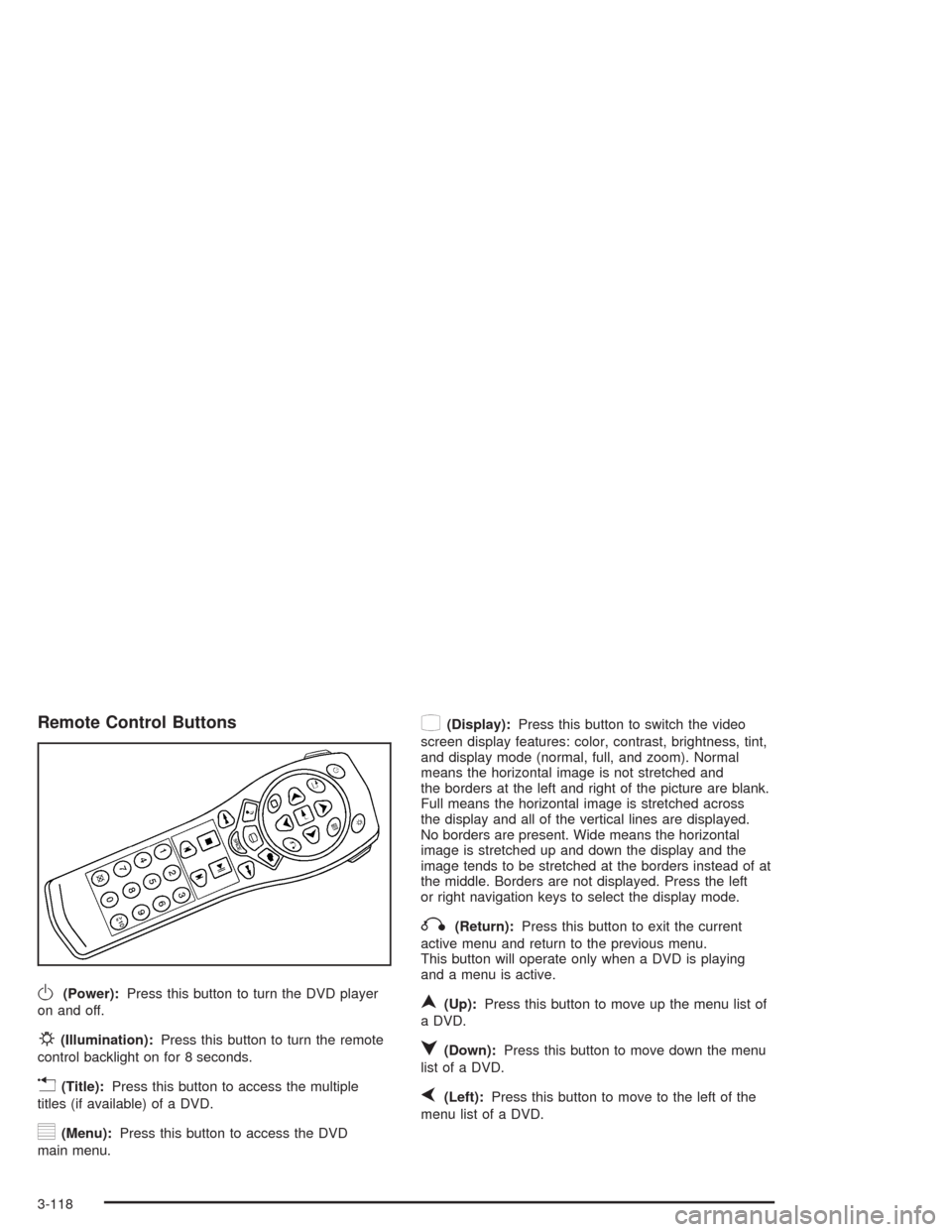
Remote Control Buttons
O(Power):Press this button to turn the DVD player
on and off.
P(Illumination):Press this button to turn the remote
control backlight on for 8 seconds.
v(Title):Press this button to access the multiple
titles (if available) of a DVD.
y(Menu):Press this button to access the DVD
main menu.
z(Display):Press this button to switch the video
screen display features: color, contrast, brightness, tint,
and display mode (normal, full, and zoom). Normal
means the horizontal image is not stretched and
the borders at the left and right of the picture are blank.
Full means the horizontal image is stretched across
the display and all of the vertical lines are displayed.
No borders are present. Wide means the horizontal
image is stretched up and down the display and the
image tends to be stretched at the borders instead of at
the middle. Borders are not displayed. Press the left
or right navigation keys to select the display mode.
q(Return):Press this button to exit the current
active menu and return to the previous menu.
This button will operate only when a DVD is playing
and a menu is active.
n(Up):Press this button to move up the menu list of
a DVD.
q(Down):Press this button to move down the menu
list of a DVD.
p(Left):Press this button to move to the left of the
menu list of a DVD.
3-118