key CADILLAC SRX 2004 1.G Repair Manual
[x] Cancel search | Manufacturer: CADILLAC, Model Year: 2004, Model line: SRX, Model: CADILLAC SRX 2004 1.GPages: 468, PDF Size: 2.92 MB
Page 241 of 468
o(Right):Press this button to move to the right of the
menu list of a DVD.
r(Enter):Press this button to select items within
a menu.
e(Audio):Press this button to open a menu that will
operate only when a DVD is playing. The format and
content of this function will vary for each disc.
{(Subtitle):Press this button to open a menu that
will operate only when a DVD is playing. The format and
content of this function will vary for each disc.
|(Angle):Press this button to open a menu that will
operate only when a DVD is playing. The format and
content of this function will vary for each disc.
l(Next):Press this button to go to the next chapter
or track of a DVD or CD.
g(Previous):Press this button to go to the previous
chapter or track of a DVD or CD.
[(Fast Forward):Press this button to fast forward
through the chapter or track of a DVD or CD. This button
may not work when the DVD is playing the copyright
information or the previews.
r(Rewind):Press this button to rewind through the
chapter or track of a DVD or CD. This button may
not work when the DVD is playing the copyright
information or the previews.
c(Stop):Press this button to stop the play of a DVD
or CD. Press this button twice to return to the beginning
of the DVD.
s(Play/Pause):Press this button to turn the DVD
player on, to start play of a DVD or CD, and to
switch between play and pause of a DVD or CD.
1 through 0 (Numeric Keypad):The numeric keypad
provides the capability of direct chapter, title, and
track number selection.
}10 (Double Digit Entries):Press this button to
select chapter, title, and track numbers greater than 9.
Press this button before inputting the number.
\(Clear):Press this button within three seconds after
inputting a numeric selection, to clear all numeric
inputs.
3-119
Page 254 of 468
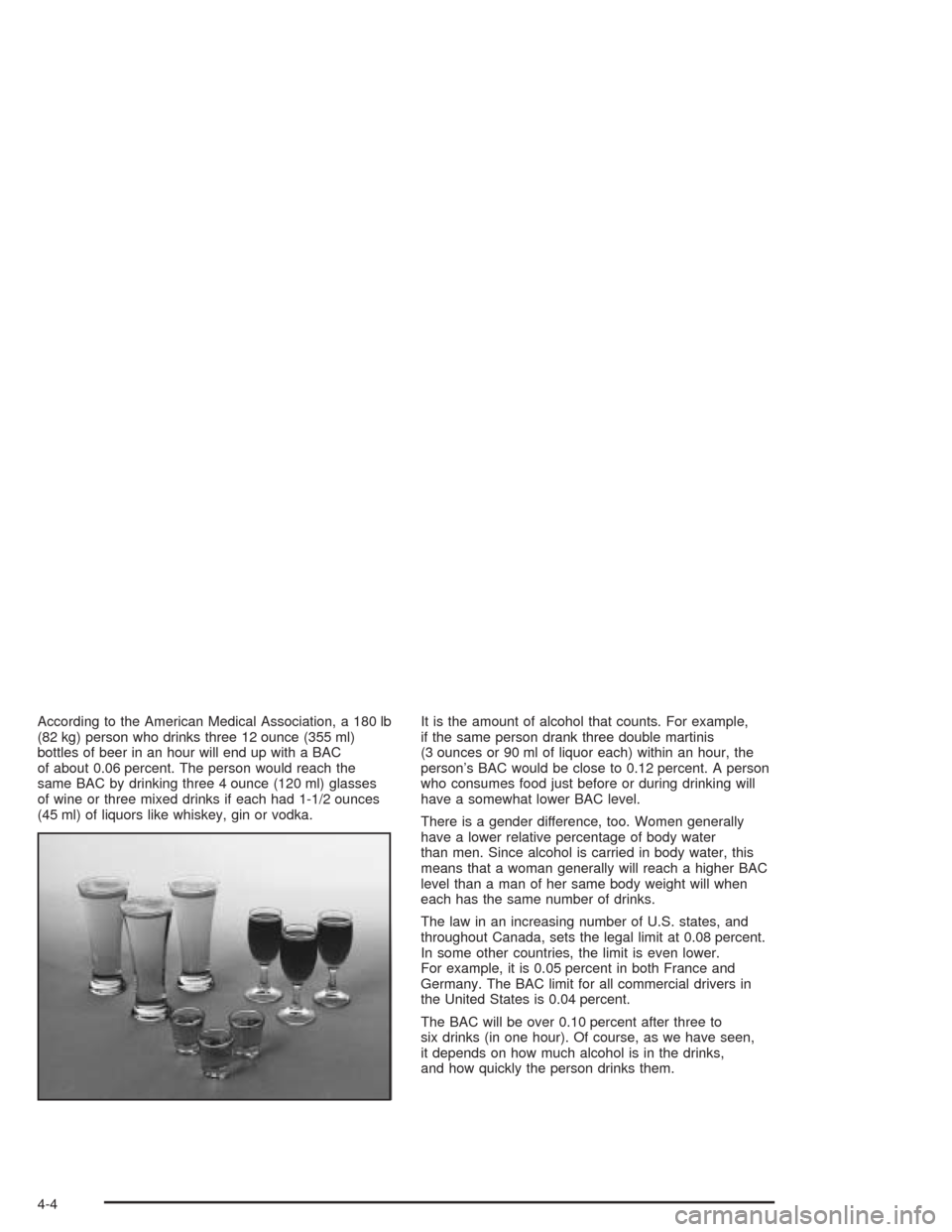
According to the American Medical Association, a 180 lb
(82 kg) person who drinks three 12 ounce (355 ml)
bottles of beer in an hour will end up with a BAC
of about 0.06 percent. The person would reach the
same BAC by drinking three 4 ounce (120 ml) glasses
of wine or three mixed drinks if each had 1-1/2 ounces
(45 ml) of liquors like whiskey, gin or vodka.It is the amount of alcohol that counts. For example,
if the same person drank three double martinis
(3 ounces or 90 ml of liquor each) within an hour, the
person’s BAC would be close to 0.12 percent. A person
who consumes food just before or during drinking will
have a somewhat lower BAC level.
There is a gender difference, too. Women generally
have a lower relative percentage of body water
than men. Since alcohol is carried in body water, this
means that a woman generally will reach a higher BAC
level than a man of her same body weight will when
each has the same number of drinks.
The law in an increasing number of U.S. states, and
throughout Canada, sets the legal limit at 0.08 percent.
In some other countries, the limit is even lower.
For example, it is 0.05 percent in both France and
Germany. The BAC limit for all commercial drivers in
the United States is 0.04 percent.
The BAC will be over 0.10 percent after three to
six drinks (in one hour). Of course, as we have seen,
it depends on how much alcohol is in the drinks,
and how quickly the person drinks them.
4-4
Page 270 of 468

Controlling your vehicle is the key to successful off-road
driving. One of the best ways to control your vehicle
is to control your speed. Here are some things to keep
in mind. At higher speeds:
you approach things faster and you have less time
to scan the terrain for obstacles.
you have less time to react.
you have more vehicle bounce when you drive over
obstacles.
you will need more distance for braking, especially
since you are on an unpaved surface.
{CAUTION:
When you are driving off-road, bouncing and
quick changes in direction can easily throw
you out of position. This could cause you to
lose control and crash. So, whether you’re
driving on or off the road, you and your
passengers should wear safety belts.
Scanning the Terrain
Off-road driving can take you over many different kinds
of terrain. You need to be familiar with the terrain
and its many different features. Here are some things to
consider.
Surface Conditions:Off-roading can take you over
hard-packed dirt, gravel, rocks, grass, sand, mud, snow
or ice. Each of these surfaces affects the steering,
acceleration and braking of your vehicle in different
ways. Depending upon the kind of surface you are on,
you may experience slipping, sliding, wheel spinning,
delayed acceleration, poor traction and longer braking
distances.
Surface Obstacles:Unseen or hidden obstacles can
be hazardous. A rock, log, hole, rut or bump can startle
you if you are not prepared for them. Often these
obstacles are hidden by grass, bushes, snow or even
the rise and fall of the terrain itself. Here are some
things to consider:
Is the path ahead clear?
Will the surface texture change abruptly up ahead?
Does the travel take you uphill or downhill?
(There is more discussion of these subjects later.)
Will you have to stop suddenly or change direction
quickly?
4-20
Page 296 of 468
Here are some important things to consider before you
do recreational vehicle towing:
What’s the towing capacity of the towing vehicle?
Be sure you read the tow vehicle manufacturer’s
recommendations.
How far will you tow? Some vehicles have
restrictions on how far and how long they can tow.
Do you have the proper towing equipment?
See your dealer or trailering professional for
additional advice and equipment recommendations.
Is your vehicle ready to be towed? Just as you
would prepare your vehicle for a long trip, you’ll
want to make sure your vehicle is prepared to be
towed. SeeBefore Leaving on a Long Trip on
page 4-37.
Dinghy Towing
Notice:If you tow your vehicle with all four wheels
on the ground, the drivetrain components could
be damaged. The repairs would not be covered by
your warranty. Do not tow your vehicle with all
four wheels on the ground.
Your vehicle was not designed to be towed with all four
wheels on the ground. If your vehicle must be towed,
see “Dolly Towing” following for more information.
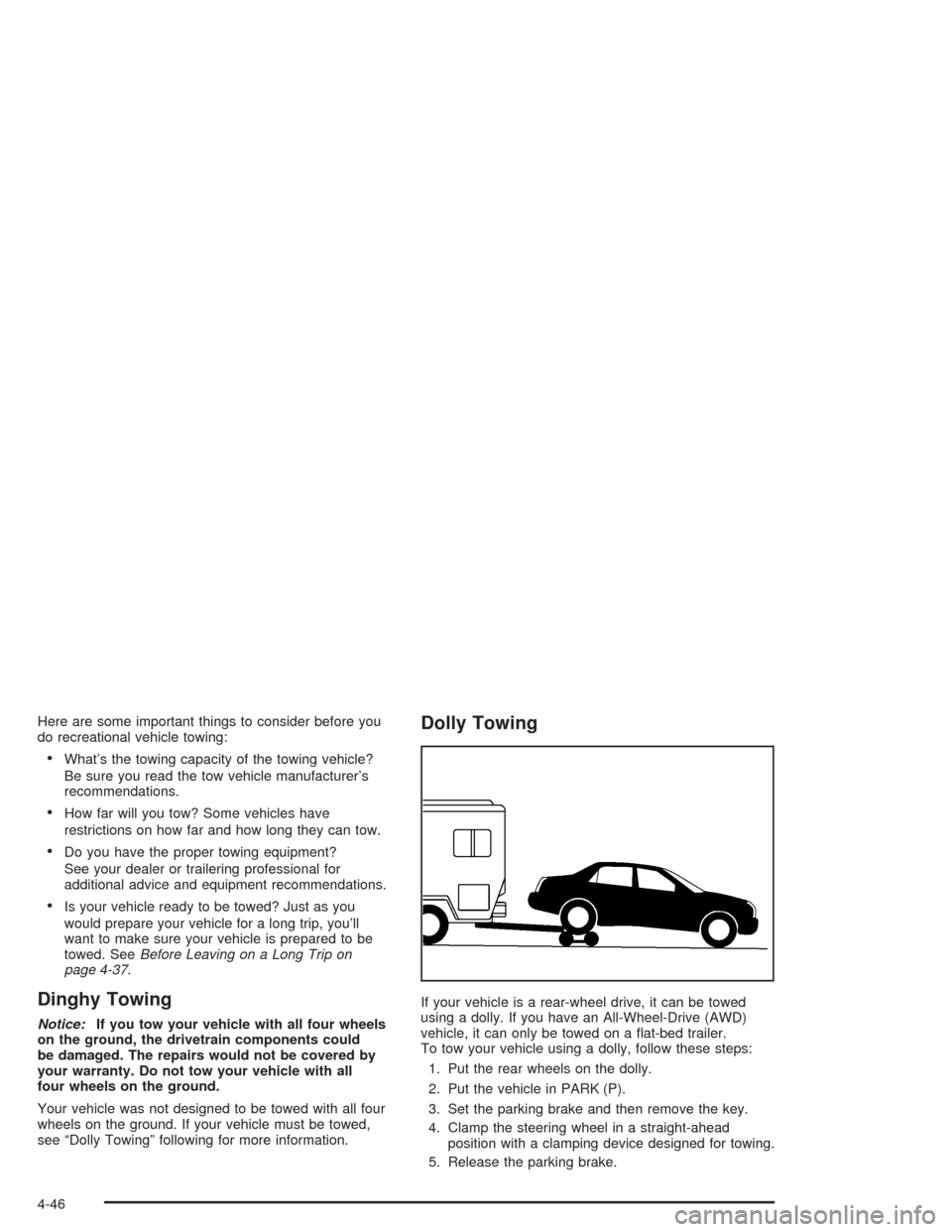
Dolly Towing
If your vehicle is a rear-wheel drive, it can be towed
using a dolly. If you have an All-Wheel-Drive (AWD)
vehicle, it can only be towed on a at-bed trailer.
To tow your vehicle using a dolly, follow these steps:
1. Put the rear wheels on the dolly.
2. Put the vehicle in PARK (P).
3. Set the parking brake and then remove the key.
4. Clamp the steering wheel in a straight-ahead
position with a clamping device designed for towing.
5. Release the parking brake.
4-46
Page 329 of 468

Base Audio System
Press the CLR button located to the right of the DIC
display to acknowledge the Change Engine Oil
message. This will clear the message from the display
and reset it.
To reset the oil life indicator, use the following steps:
1. Press the up or down arrow on the INFO button
located to the right of the DIC display to access
the DIC menu.
2. Once XXX% ENGINE OIL LIFE menu item is
highlighted, press and hold the CLR button.
The percentage will return to 100, and the oil life
indicator will be reset.
3. Turn the key to OFF.
If the Change Engine Oil message comes back on
when you start your vehicle or the percentage does not
return to 100, the engine oil life system has not reset.
Repeat the procedure.
Navigation System
Press the display button to acknowledge the Change
Engine Oil message. This will clear the message
from the display and reset it.
To reset the oil life indicator using the Navigation
system, use the following steps:
1. Turn the ignition to ON with the engine running.
2. Turn the system on by pressing the PWR/VOL knob
located to the lower left of the DIC display screen.
3. Press and hold the vehicle information display
button located in the upper right of the screen
for 3 seconds to enter the vehicle information menu.
4. Use the scroll up or down display keys to select
Engine Oil Life.
5. Press and hold the RESET button on the display.
The percentage will return to 100, and the oil life
indicator will be reset. Repeat the steps if the
percentage does not return to 100.
6. Press the RETURN button on the display to return
to the main page.
7. Turn the key to OFF.
If the Change Engine Oil message comes back on
when you start your vehicle, the engine oil life system
has not reset. Repeat the procedure.
5-21
Page 346 of 468

When to Check Power Steering Fluid
It is not necessary to regularly check power steering uid
unless you suspect there is a leak in the system or
you hear an unusual noise. A uid loss in this system
could indicate a problem. Have the system inspected
and repaired.
How to Check Power Steering Fluid
Turn the key off, while the engine compartment is still
warm, wipe the cap and the top of the reservoir
clean, then unscrew the cap and wipe the dipstick with
a clean rag. Replace the cap and completely tighten
it. Then remove the cap again and look at the uid level
on the dipstick.
The level should be within the HOT mark. If necessary,
add only enough uid to bring the level within
the mark.
What to Use
To determine what kind of uid to use, see
Recommended Fluids and Lubricants on page 6-13.
Always use the proper uid. Failure to use the proper
uid can cause leaks and damage hoses and seals.
Windshield Washer Fluid
What to Use
When you need windshield washer uid, be sure to read
the manufacturer’s instructions before use. If you will
be operating your vehicle in an area where the
temperature may fall below freezing, use a uid that has
sufficient protection against freezing.
5-38
Page 378 of 468

TPM Sensor Identication Codes
Each TPM sensor has a unique identication code. Any
time you replace one or more of the TPM sensors,
the identication codes will need to be matched to the
new tire/wheel position. Each tire/wheel position is
matched, to a sensor, by increasing or decreasing the
tire’s air pressure. The sensors are matched, to the
tire/wheel positions, in the following order: left front (LF),
right front (RF), right rear (RR), and left rear (LR).
You will have one minute to match the rst tire/wheel
position, and ve minutes overall, to match all four
tire/wheel positions. If it takes longer than one minute,
to match the rst tire and wheel, or more than
ve minutes to match all four tire/wheel positions the
matching process stops and you will need to start over.
The TPM matching process is outlined below:
1. Set the Parking brake.
2. Turn the ignition switch to ON with the engine off.
3. Using the Remote Keyless Entry (RKE) transmitter,
lock and unlock the vehicle’s doors.
4. Press the lock and unlock buttons, at the same
time, on the RKE transmitter. A single horn chirp
will sound, indicating that the TPM system is ready,
and the sensor matching process can begin.5. Start with the left (driver’s side) front tire.
6. Remove the valve cap from the valve stem.
Activate the TPM sensor by increasing or
decreasing the tire’s air pressure for ve seconds,
or until a horn chirp sounds. The horn chirp,
which may take up to 30 seconds, conrms that the
sensor identication code has been matched to
this tire position. To decrease the tire’s air-pressure
use the pointy end of the valve cap, a pencil-style
air pressure gage or a key.
7. Proceed to the right (passenger’s side) front tire,
and repeat the procedure in Step 6.
8. Proceed to the right (passenger’s side) rear tire,
and repeat the procedure in Step 6.
9. Proceed to the left (driver’s side) rear tire, and
repeat the procedure in Step 6.
10. After hearing the conrming double horn chirp, for
the left rear tire, exit the matching process by
turning the ignition switch to OFF.
11. Set all four tires to the recommended air pressure
level as indicated on the tire and loading information
label.
12. Put the valve caps back on the valve stems.
5-70
Page 413 of 468
Wiring
HarnessesUsage
BODY W/H Wiring Harness Connection
I/P W/H Wiring Harness Connection
ENG W/H Engine Wiring Harness Connection
FORWARD
LAMPForward Lamp Wiring Harness
Connection
J Cases Usage
R REARRRPDB (Passenger’s Side Rear
Power Distribution Box)
R REARRRPDB (Passenger’s Side Rear
Power Distribution Box)
L REARLRPDB (Driver’s Side Rear Power
Distribution Box)
L REARLRPDB (Driver’s Side Rear Power
Distribution Box)
HI FAN High Cooling Fan Motor
LOW FAN Low Cooling Fan Motor
BLOWER PWM Fan Motor Assembly
STARTER Starter Solenoid
EBCM Electronic Brake Control Module
Fuses Usage
RT PARKPassenger’s Side Taillamp
Assembly, Front Sidemarker and
Front Parking Lamp Assembly
HORN Dual Horn Assembly
LT HI BEAM Driver’s Side High-Beam Headlamp
LT LOW BEAM Driver’s Side Low-Beam Headlamp
RT LOW BEAMPassenger’s Side Low-Beam
Headlamp
RT HI BEAMPassenger’s Side High-Beam
Headlamp
HFV6 ECMHigh Feature V6 ECM
(Electronic Control Module)
REAR WPR Rear Wiper Motor
THEFTECM, TCM (Transmission Control
Module), PASS-Key
®III+ Module
LT PARKDriver’s Side Taillamp Assembly,
Front Sidemarker and Front Parking
Lamp Assembly
LIC/DIMMINGRear License Plate Assembly, DIM
(Dash Integration Module)
DIM/ALDLDIM, ALDL (Assembly Line
Data Link)
5-105
Page 414 of 468
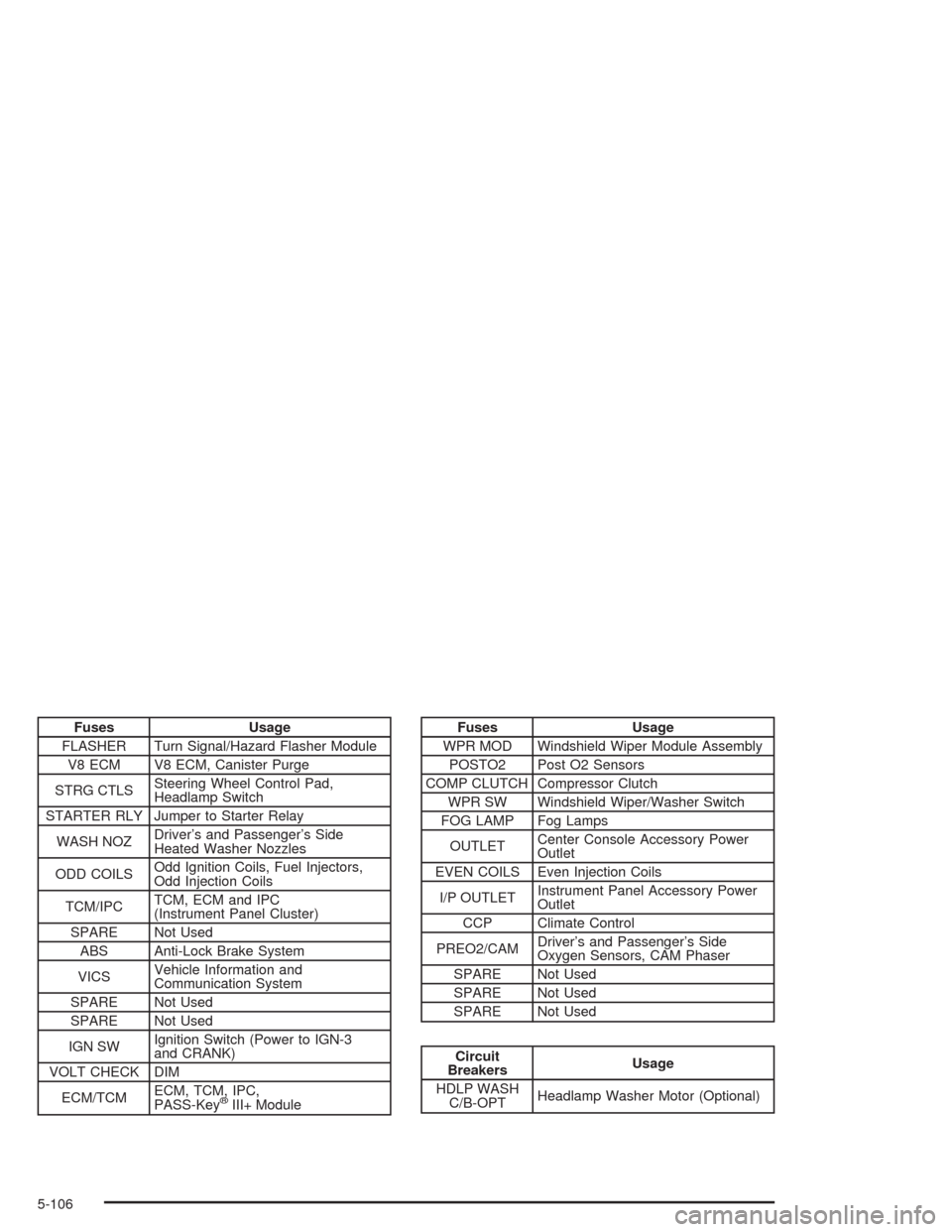
Fuses Usage
FLASHER Turn Signal/Hazard Flasher Module
V8 ECM V8 ECM, Canister Purge
STRG CTLSSteering Wheel Control Pad,
Headlamp Switch
STARTER RLY Jumper to Starter Relay
WASH NOZDriver’s and Passenger’s Side
Heated Washer Nozzles
ODD COILSOdd Ignition Coils, Fuel Injectors,
Odd Injection Coils
TCM/IPCTCM, ECM and IPC
(Instrument Panel Cluster)
SPARE Not Used
ABS Anti-Lock Brake System
VICSVehicle Information and
Communication System
SPARE Not Used
SPARE Not Used
IGN SWIgnition Switch (Power to IGN-3
and CRANK)
VOLT CHECK DIM
ECM/TCMECM, TCM, IPC,
PASS-Key
®III+ Module
Fuses Usage
WPR MOD Windshield Wiper Module Assembly
POSTO2 Post O2 Sensors
COMP CLUTCH Compressor Clutch
WPR SW Windshield Wiper/Washer Switch
FOG LAMP Fog Lamps
OUTLETCenter Console Accessory Power
Outlet
EVEN COILS Even Injection Coils
I/P OUTLETInstrument Panel Accessory Power
Outlet
CCP Climate Control
PREO2/CAMDriver’s and Passenger’s Side
Oxygen Sensors, CAM Phaser
SPARE Not Used
SPARE Not Used
SPARE Not Used
Circuit
BreakersUsage
HDLP WASH
C/B-OPTHeadlamp Washer Motor (Optional)
5-106
Page 418 of 468
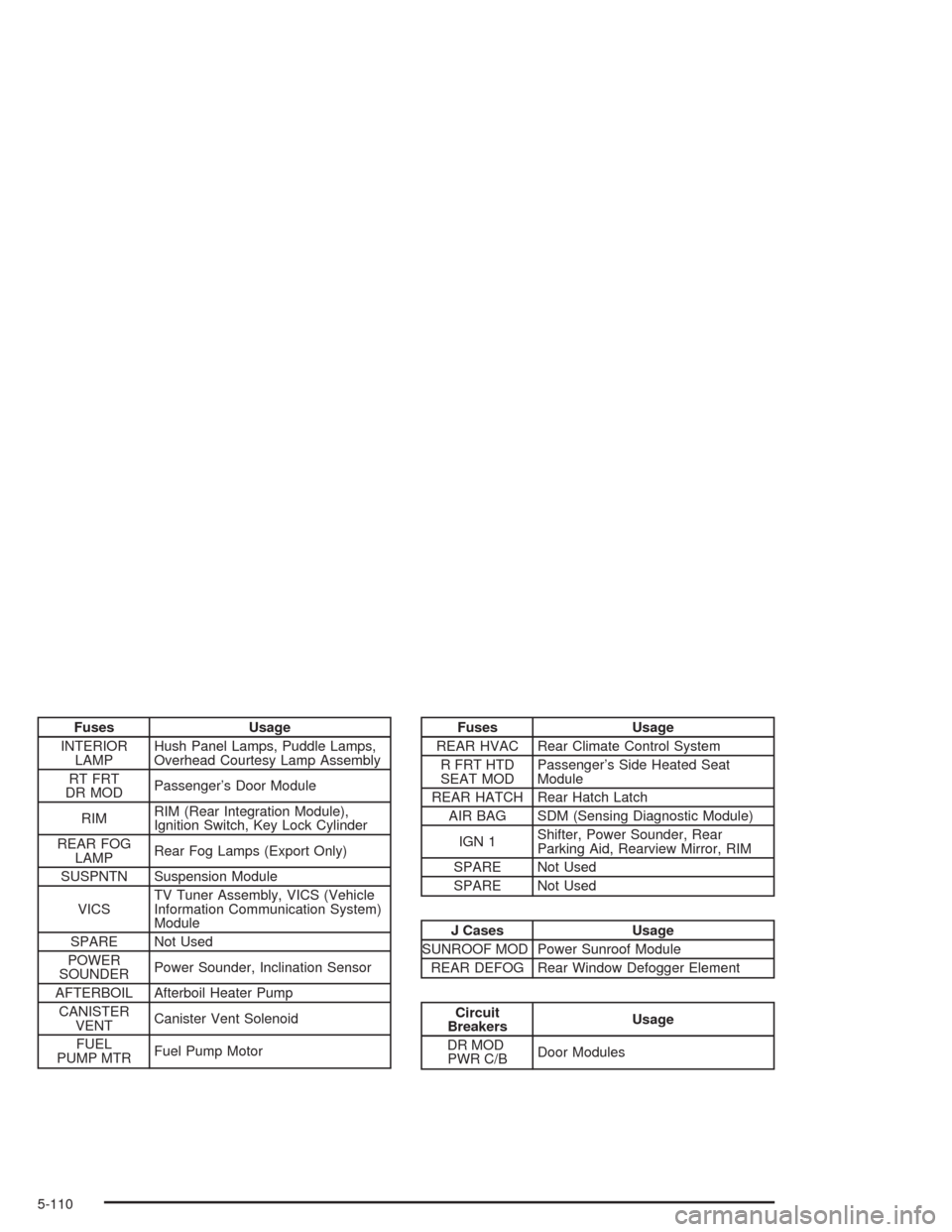
Fuses Usage
INTERIOR
LAMPHush Panel Lamps, Puddle Lamps,
Overhead Courtesy Lamp Assembly
RT FRT
DR MODPassenger’s Door Module
RIMRIM (Rear Integration Module),
Ignition Switch, Key Lock Cylinder
REAR FOG
LAMPRear Fog Lamps (Export Only)
SUSPNTN Suspension Module
VICSTV Tuner Assembly, VICS (Vehicle
Information Communication System)
Module
SPARE Not Used
POWER
SOUNDERPower Sounder, Inclination Sensor
AFTERBOIL Afterboil Heater Pump
CANISTER
VENTCanister Vent Solenoid
FUEL
PUMP MTRFuel Pump MotorFuses Usage
REAR HVAC Rear Climate Control System
R FRT HTD
SEAT MODPassenger’s Side Heated Seat
Module
REAR HATCH Rear Hatch Latch
AIR BAG SDM (Sensing Diagnostic Module)
IGN 1Shifter, Power Sounder, Rear
Parking Aid, Rearview Mirror, RIM
SPARE Not Used
SPARE Not Used
J Cases Usage
SUNROOF MOD Power Sunroof Module
REAR DEFOG Rear Window Defogger Element
Circuit
BreakersUsage
DR MOD
PWR C/BDoor Modules
5-110